

CVE-2026-6308 is another stark reminder that Chrome’s most dangerous bugs are often not flashy logic failures but low-level memory-safety issues hiding in the browser’s media stack. Google says an out-of-bounds read in Media affected Chrome versions before 147.0.7727.101, and that a remote attacker could potentially turn a user into the last missing piece of the exploit chain by convincing them to perform specific UI gestures on a crafted HTML page. Microsoft’s Security Update Guide is tracking the same upstream Chromium issue, which matters because Edge and other Chromium-based browsers inherit the exposure and the fix path from Google’s release cadence mium’s security model is built on layers: the browser process, sandboxed renderer processes, and a sprawling collection of subsystems that handle everything from JavaScript to video decoding. The Media subsystem sits in one of the most sensitive parts of that stack because it handles content that arrives over the network and is processed continuously as pages load, play, or update. When a flaw in that area crosses from “crash” into “memory disclosure” or “code execution,” defenders tend to treat it as a high-priority patch, even when the exploit requires a little user help.
That is the context for CVE-2026-6308. Google’s public description is short, but it is enough to show the shape of the problem: a crafted HTML page could trigger an out-of-bounds read, and exploitation required the victim to perform specific UI gestures. That combination usually implies an attacker is trying to steer the browser into a precise state rather than simply sending one malicious packet and winning immediately. The vulnerability is tagged CWE-125, the standard out-of-bounds read weakness, and Chromium rates it High rather than Critical, which is a clue that the bug is dangerous but not necessarily a one-click compromise by itself
Google fixed the is2026 Stable Channel update, shipping 147.0.7727.101/102 for Windows and Mac and 147.0.7727.101 for Linux. The same release notes show that Chrome 147 was a broad security cleanup, with 31 security fixes in one build, which is increasingly typical for modern browser maintenance cycles. The company also reiterates that bug details may stay restricted until most users have updated, a familiar practice designed to reduce the window in which exploit writers can use the public notes as a roadmap
What makes this CVE notable is not just the weakness class but the ecosystem it touches. Microsoft publishes Chromium-origin CVEs in its Security Update Guide so enterprises can see upstream browser risk even when the product they deploy is Microsoft Edge rather than Chrome. Microsoft has spent years expanding the transparency of its CVE process, including machine-readable CSAF files and continued use of the Security Update Guide as a central consumption point for vulnerability data. In other words, the Chrome fix is not only a Google story; it is also a downstream patching and asset-inventory problem for Microsoft customers
The timing also matters. Chromium’s April 2026 patch train arrived after an already busy March, when Google pushed out multiple security updates and at least one bug was publicly acknowledged as exploited in the wild. That broader backdrop makes each new high-severity issue feel less isolated and more like part of a sustained campaign against browser attack surface. Even when CVE-2026-6308 is not described as actively exploited, administrators tend to read these disclosures with heightened caution because the pattern of the year has been patch fast, ask questions later
At the core, CVE-2026-6308 is an out-of-bounds read in Chromium’s Media code. In practical terms, that means the browser could be persuaded to read memory past the edge of a legitimate buffer, potentially exposing data that should never have been accessible to the page. Out-of-bounds reads are often underestimated because they do not immediately sound as destructive as a write primitive, but they can still leak pointers, heap structure, or other state that helps an attacker build a reliable exploit chain.
The UI-gesture requirement is also significant. It implies the attacker likely needs the victim to scroll, click, drag, or otherwise interact with content in a particular way. That constraint raises the bar a bit, but it does not reduce the urgency to patch. In consumer security, any bug that can be triggered from a remote web page deserves attention if the browser’s memory model can be manipulated in a way that exposes sensitive state.
Google’s longstanding security notes show that many Chrome vulnerabilities are found by instrumentation like AddressSanitizer, MemorySanitizer, and fuzzing systems such as libFuzzer and AFL. That matters because it hints at the engineering reality behind these CVEs: the browser is constantly being beaten on by automated test systems, yet memory-safety issues still emerge. In other words, Chrome’s security posture is good, but the attack surface is still enormous (chromereleases.googleblog.com)
This also means the attack is probably more viable in targeted campaigns than in mass drive-by exploitation. That does not make it harmless. Targeted attacks are often exactly where browser bugs prove most valuable, because they can be tailored to a high-value person or organization and combined with social engineering.
That matters even more in environments with staged deployment rings. Some users receive browser updates quickly, while others wait for IT validation, software packaging, or policy enforcement. A precise version target lets administrators prove whether a device is in or out of compliance.
This is especially useful when the advisory is still “undergoing enrichment,” as CVE-2026-6308 is. The NVD record notes that the CVE is being enriched, while Microsoft’s page already surfaces the upstream description, severity context, and references. That split is common early in the disclosure lifecycle, when one source has more mature data than another.
That is why a “Media” CVE deserves close scrutiny even when it is labeled High rather than Critical. Attackers do not need every bug to be spectacular. They need one reliable foothold and one useful primitive, and media bugs often provide exactly that.
Organizations should also remember that “specific UI gestures” does not equal “safe if users are trained.” Attackers routinely design lures that coax those interactions out of targeted employees. Security awareness helps, but it is not a substitute for remediation.
Home users should also remember that Chromium-derived browsers outside of Chrome itself may lag on updates. Some update quickly, others require separate packaging, and some depend on the operating system vendor. That means “I use Edge” or “I don’t use Chrome” is not a substitute for checking the actual version.
At the same time, the repeated appearance of memory-safety bugs in browser code reinforces an uncomfortable truth: modern browser platforms are still under heavy pressure from legacy C++ complexity. That reality strengthens the case for safer language adoption, tighter isolation, and continued fuzzing investment.
The next thing to watch is whether downstream vendors like Microsoft publish their own corresponding update timing for Edge, and whether any further technical detail emerges from the Chromium issue tracker. It will also be worth watching whether this CVE is later tied to exploit attempts, because memory-read bugs in media pipelines often become more interesting when paired with a second vulnerability or a targeted delivery campaign.
Source: NVD / Chromium Security Update Guide - Microsoft Security Response Center
That is the context for CVE-2026-6308. Google’s public description is short, but it is enough to show the shape of the problem: a crafted HTML page could trigger an out-of-bounds read, and exploitation required the victim to perform specific UI gestures. That combination usually implies an attacker is trying to steer the browser into a precise state rather than simply sending one malicious packet and winning immediately. The vulnerability is tagged CWE-125, the standard out-of-bounds read weakness, and Chromium rates it High rather than Critical, which is a clue that the bug is dangerous but not necessarily a one-click compromise by itself
Google fixed the is2026 Stable Channel update, shipping 147.0.7727.101/102 for Windows and Mac and 147.0.7727.101 for Linux. The same release notes show that Chrome 147 was a broad security cleanup, with 31 security fixes in one build, which is increasingly typical for modern browser maintenance cycles. The company also reiterates that bug details may stay restricted until most users have updated, a familiar practice designed to reduce the window in which exploit writers can use the public notes as a roadmap
What makes this CVE notable is not just the weakness class but the ecosystem it touches. Microsoft publishes Chromium-origin CVEs in its Security Update Guide so enterprises can see upstream browser risk even when the product they deploy is Microsoft Edge rather than Chrome. Microsoft has spent years expanding the transparency of its CVE process, including machine-readable CSAF files and continued use of the Security Update Guide as a central consumption point for vulnerability data. In other words, the Chrome fix is not only a Google story; it is also a downstream patching and asset-inventory problem for Microsoft customers
The timing also matters. Chromium’s April 2026 patch train arrived after an already busy March, when Google pushed out multiple security updates and at least one bug was publicly acknowledged as exploited in the wild. That broader backdrop makes each new high-severity issue feel less isolated and more like part of a sustained campaign against browser attack surface. Even when CVE-2026-6308 is not described as actively exploited, administrators tend to read these disclosures with heightened caution because the pattern of the year has been patch fast, ask questions later
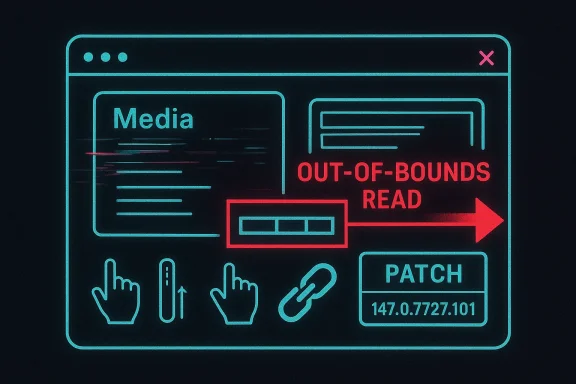 What the Vulnerability Is
At the core, CVE-2026-6308 is an out-of-bounds read in Chromium’s Media code. In practical terms, that means the browser could be persuaded to read memory past the edge of a legitimate buffer, potentially exposing data that should never have been accessible to the page. Out-of-bounds reads are often underestimated because they do not immediately sound as destructive as a write primitive, but they can still leak pointers, heap structure, or other state that helps an attacker build a reliable exploit chain.Why an Out-of-Bounds Read Matters
Memory disclosure bugs are valuable because they can defeat modern exploit mitigations. If an attacker can learn addresses or object layouts, a later-stage bug becomes easier to weaponize. That is why a vulnerability labeled “read” rather than “write” can still be a serious precursor to arbitrary code execution when paired with another weakness or a carefully shaped interaction flow.The UI-gesture requirement is also significant. It implies the attacker likely needs the victim to scroll, click, drag, or otherwise interact with content in a particular way. That constraint raises the bar a bit, but it does not reduce the urgency to patch. In consumer security, any bug that can be triggered from a remote web page deserves attention if the browser’s memory model can be manipulated in a way that exposes sensitive state.
- The issue is in Media, not a peripheral feature.
out-of-bounds read, not just a crash. - Exploitation depends on specific UI gestures.
- The target is a crafted HTML page, which means the attack surface is the open web.
- The affected Chrome builds are prior to 147.0.7727.101
Why Media Bugs Are Hard to Dismiss
Media pipelines are among the most complicated parts of a browser. They must decode malformed, evolving, and often adversarial content at speed, while coexisting with hardware acceleration, platform codecs, and rendering subsystems. That complexity creates a steady stream of edge cases, especially when parsers, state machines, and UI elements all collide in the same feature path.Google’s longstanding security notes show that many Chrome vulnerabilities are found by instrumentation like AddressSanitizer, MemorySanitizer, and fuzzing systems such as libFuzzer and AFL. That matters because it hints at the engineering reality behind these CVEs: the browser is constantly being beaten on by automated test systems, yet memory-safety issues still emerge. In other words, Chrome’s security posture is good, but the attack surface is still enormous (chromereleases.googleblog.com)
How the Attack Works
The public description does not spell out the full exploit chain, and it probably should not. But the wording gives enough to infer the likely attacker workflow: serve a malicious HTML page, manipulate the victim into a particular gesture sequence, and use the Media component’s memory error to read beyond bounds. That is a classic browser-exploitation pattern where the initial web content sets up state, and the user interaction completes the trigger.The Role of UI Gestures
The need for specific gestures is not a trivial footnote. In practice, gesture-dependent bugs often appear in areas where the browser transitions between UI states, media playback states, or gesture-sensitive controls. A page may need the user to open a media element, engage with a control, or follow a particular sequence that exposes a vulnerable code path.This also means the attack is probably more viable in targeted campaigns than in mass drive-by exploitation. That does not make it harmless. Targeted attacks are often exactly where browser bugs prove most valuable, because they can be tailored to a high-value person or organization and combined with social engineering.
Likely Exploit Value
Even when the final symptom is “read out of bounds,” the attacker’s real prize is often something quieter: information disclosure. Leaked memory can reveal security-sensitive details about the browser process, and that can enable a second-stage exploit or sandbox escape. That is one reason defenders treat memory-read bugs as more than mere reliability problems.- The page is likely a delivery mechanism for the exploit.
- The user gesture is the triggering condition.
- The out-of-bounds read is the information leak primitive.
- The practical goal may be follow-on code execution.
- The attack profile is consistent with targeted phishing or baited browsing.
Chrome 147 and the Patch Timeline
Google fixed CVE-2026-6308 in Chrome 147.0.7727.101 as part of the April 15, 2026 stable update. That release was not a single-bug patch; it was a sweeping security refresh with 31 fixes, which is exactly why browser release notes are worth reading as security bulletins, not just product changelogs. The stable update applied across Windows, Mac, and Linux, although version formatting differs slightly by platformWhy Version Numbers Matter
The exact version string is not a cosmetic detail. In enterprise fleets, patch verification often depends on querying the installed build number and comparing it to the published fixed release. For Chrome, the distinction between 147.0.7727.100 and 147.0.7727.101 is the difference between vulnerable and remediated.That matters even more in environments with staged deployment rings. Some users receive browser updates quickly, while others wait for IT validation, software packaging, or policy enforcement. A precise version target lets administrators prove whether a device is in or out of compliance.
Google’s Release Strategy
Chrome’s release notes also show that Google keeps some vulnerability details restricted until the fix reaches the majority of users. That is a sensible anti-exploit practice, but it also means defenders must rely on the version number and severity label rather than a full public exploit narrative. It is a reminder that patch management is often a race between disclosure and deployment, not between disclosure and perfect understanding.- Fixed in 147.0.7727.101.
- Distributed through the April 15, 2026 stable update.
- Covered Windows, Mac, and Linux.
- Part of a 31-fix security release.
- Public bug details may remain partially restricted for a time
Why Microsoft Is Tracking It
Microsoft’s Security Update Guide mirrors Chromium vulnerabilities because Edge uses the same upstream engine. That means a Chrome CVE is effectively an Edge security signal, even if the downstream browser’s own patch packaging happens later. Microsoft has also pushed hard on vulnerability transparency in recent years, adding CSAF support and expanding the information available in the Security Update Guide ecosystemDownstream Visibility for Edge
For enterprises, this is more than bookkeeping. Security teams that standardize on Edge need to know when an upstream Chromium issue lands, because their browser inventory may expose them to the bug even if their endpoint management tool only tracks Microsoft patches. MSRC’s approach helps bridge that gap by putting upstream Chromium CVEs into a Microsoft-managed visibility channelThis is especially useful when the advisory is still “undergoing enrichment,” as CVE-2026-6308 is. The NVD record notes that the CVE is being enriched, while Microsoft’s page already surfaces the upstream description, severity context, and references. That split is common early in the disclosure lifecycle, when one source has more mature data than another.
Why Enterprises Should Care
For large organizations, a Chromium CVE is a fleet issue, not a browser-brand issue. If Chrome is permitted on desktops, if Edge is the default browser, or if remote workers use both, the same vulnerable code path may exist in multiple product channels. Microsoft’s downstream tracking lets security teams triage browser risk using the vendor console they already monitor rather than hunting for Google release notes separately.- Edge inherits Chromium security fixes.
- Microsoft uses the Security Update Guide to surface upstream browser risk.
- CSAF and related transparency work improve machine-readable consumption.
- Early CVE records may remain enriched over time rather than fully populated at first.
- Unified visibility helps with enterprise patch governance.
The Media Stack as an Attack Surface
Media-related code is a perennial favorite for exploit developers because it combines complex parsing with real-time performance demands. The browser must ingest images, audio, and video content that may be malformed, fragmented, or intentionally malicious, and it must do so without freezing the UI or tanking the user experience. That creates fertile ground for memory-safety slips.Why This Layer Keeps Producing CVEs
The browser media stack sits at the intersection of web content, platform libraries, GPU acceleration, and user interaction. Every extra layer introduces opportunities for state confusion or buffer mismanagement. Even if each individual module is defensively coded, the handoffs between modules are where subtle bugs accumulate.That is why a “Media” CVE deserves close scrutiny even when it is labeled High rather than Critical. Attackers do not need every bug to be spectacular. They need one reliable foothold and one useful primitive, and media bugs often provide exactly that.
Interaction with the Sandbox
The browser sandbox remains a strong barrier, but it is not a magic shield. Many modern browser exploits are designed to get code running inside the sandbox first, then chain to another weakness for escape or privilege escalation. A memory leak in media parsing can help expose the information needed to make that chain viable.- Media code handles adversarial input at scale.
- Real-time processing increases state complexity.
- Parser edges often expose memory-safety bugs.
- A leak can help defeat exploit mitigations.
- The sandbox is protective, but not invulnerable.
Enterprise Impact
For enterprises, CVE-2026-6308 is best understood as a patch coordination problem with security consequences. The exposure is not just on internet-facing kiosks or consumer PCs; it extends to managed fleets where browser updates are delayed for change-control reasons. Those delays can turn a fixable bug into an avoidable risk window.Operational Reality
Browser patches are often one of the easiest controls to deploy, but they still depend on packaging, policy approval, and reboot behavior. If a managed environment pins Chrome or Edge to a prior build, the vulnerability remains live until the new version lands everywhere. That is why version enforcement and browser update telemetry should be part of the same control plane as endpoint protection.Organizations should also remember that “specific UI gestures” does not equal “safe if users are trained.” Attackers routinely design lures that coax those interactions out of targeted employees. Security awareness helps, but it is not a substitute for remediation.
What Administrators Should Check
Administrators should verify both direct Chrome deployments and any Chromium-based browsers under policy control. They should also make sure reporting tools distinguish between installed version, update channel, and update deferral settings, because those three numbers rarely tell the same story.- Inventory Chromium-based browsers across all endpoints.
- Compare installed versions against 147.0.7727.101 or later.
- Confirm update channels are not pinned to an older stable build.
- Review group policy or MDM settings that delay browser updates.
- Validate that remediation reached remote and hybrid workers.
- Fleet-wide version audit is essential.
- Delay policies can extend exposure.
- Remote workers may update on a different schedule.
- Edge and Chrome both need attention.
- Security teams should not rely on user awareness alone.
Consumer Impact
For consumers, the practical message is simpler: update the browser. Most users will never interact with the bug intentionally, but they do not need to. The threat model here is a malicious page, not an installed application, so a normal browsing session could be enough if the victim is drawn into the right sequence of actions.What Makes This Risky for Home Users
The combination of a web-delivered payload and UI-gated exploit path makes this the kind of issue that social engineering can amplify. A phishing email, a malicious forum post, or a compromised webpage can all be used to direct the victim to the attack content. Once the browser is on an old build, the last line of defense is mostly luck.Home users should also remember that Chromium-derived browsers outside of Chrome itself may lag on updates. Some update quickly, others require separate packaging, and some depend on the operating system vendor. That means “I use Edge” or “I don’t use Chrome” is not a substitute for checking the actual version.
Consumer Best Practices
- Update to 147.0.7727.101 or later.
- Restart the browser after updating.
- Avoid interacting with suspicious pages that push unusual gestures.
- Keep the browser’s auto-update mechanism enabled.
- Treat unknown media pages with extra caution.
Competitive and Ecosystem Implications
Every Chrome security update has a competitive ripple effect because Chromium is the shared foundation for a large portion of the browser market. When Google patches a flaw, downstream vendors must ingest the fix, repackage it, and distribute it on their own schedules. That means a single CVE can expose differences in operational discipline between vendors more than differences in engineering quality.Why This Matters Beyond Chrome
Browsers compete on features, privacy, AI integration, and performance, but security cadence remains one of the most visible measures of platform maturity. A vendor that can turn around upstream fixes quickly earns trust, especially in enterprise environments where browser risk is policy-managed rather than user-managed. Microsoft’s public tracking of Chromium CVEs is part of that trust equation, because it signals that downstream customers will not be left guessing.At the same time, the repeated appearance of memory-safety bugs in browser code reinforces an uncomfortable truth: modern browser platforms are still under heavy pressure from legacy C++ complexity. That reality strengthens the case for safer language adoption, tighter isolation, and continued fuzzing investment.
Broader Market Pressure
- Faster patch cycles become a competitive advantage.
- Downstream browsers must prove responsiveness, not just feature parity.
- Security transparency influences enterprise purchasing decisions.
- Memory safety remains a strategic engineering challenge.
- Chromium’s shared codebase amplifies both risk and remediation.
Strengths and Opportunities
The good news is that this disclosure also shows the security machinery is working. Google found and fixed the issue, Microsoft surfaced it for downstream customers, and the vulnerability data is being enriched rather than hidden. That is not a small thing in a browser ecosystem that depends on rapid coordination.- Fast upstream remediation keeps the vulnerable window narrower.
- Version-specific fixes make compliance measurable.
- Microsoft visibility helps Edge administrators act quickly.
- CWE mapping improves threat classification.
- Browser update automation can eliminate most user burden.
- Security research tooling continues to catch memory-safety flaws earlier.
- More transparency improves enterprise response time.
Risks and Concerns
The concern, of course, is that patch availability does not equal patch adoption. Browser updates can still be delayed by policy, offline endpoints, or simple user inattention, and that gives attackers time to exploit the gap. The fact that exploitation requires UI gestures may also lull some users into a false sense of safety.- Delayed rollout keeps the vulnerability alive.
- User interaction requirements can be socially engineered.
- Out-of-bounds reads can support follow-on exploitation.
- Chromium’s wide reach magnifies downstream impact.
- Mixed-browser environments complicate inventory and response.
- Consumers may not know which browser channel they use.
- Patch fatigue can lead to dangerous complacency.
Looking Ahead
CVE-2026-6308 will probably not be the last media-related Chromium bug this year, and it will not even be the last one in this patch cycle. What matters now is whether organizations treat the disclosure as a one-off browser update or as part of a broader policy: keep Chromium-based browsers current, verify versions continuously, and assume that UI-gated bugs can still be weaponized against targeted users. Browser security in 2026 is still a game of narrowing the gap between the moment a bug is known and the moment every endpoint is actually fixed.The next thing to watch is whether downstream vendors like Microsoft publish their own corresponding update timing for Edge, and whether any further technical detail emerges from the Chromium issue tracker. It will also be worth watching whether this CVE is later tied to exploit attempts, because memory-read bugs in media pipelines often become more interesting when paired with a second vulnerability or a targeted delivery campaign.
- Confirm whether Edge has ingested the upstream fix.
- Monitor for any exploit-in-the-wild indicators.
- Check whether Google adds more technical detail later.
- Re-audit fleet browser versions after rollout.
- Keep an eye on adjacent media and rendering CVEs.
Source: NVD / Chromium Security Update Guide - Microsoft Security Response Center
Last edited:
