

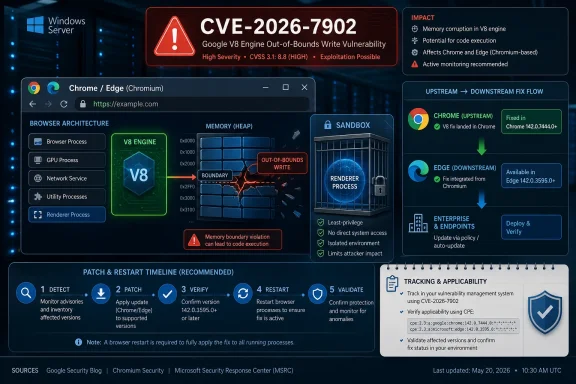
Google disclosed CVE-2026-7902 on May 6, 2026, as a high-severity V8 out-of-bounds memory access flaw fixed in Chrome 148.0.7778.96 for Linux and 148.0.7778.96/97 for Windows and macOS, where a crafted HTML page could enable remote code execution inside Chrome’s sandbox. The immediate lesson is simple: this is not “just another browser bug,” because V8 is the execution engine that turns ordinary web pages into a large, highly optimized attack surface. The deeper lesson is less comfortable for Windows admins: Chromium security is now part of the Windows patch story, even when the vulnerability did not originate in Microsoft code. If Edge is still waiting on its corresponding security release, the operational gap between Google’s disclosure and Microsoft’s downstream update becomes the risk window that matters.
The phrase “inside a sandbox” can lull people into underreacting. It should not. Chrome’s sandbox is a critical containment boundary, but modern browser exploitation often works as a chain: first gain code execution in the renderer, then pair it with a sandbox escape, broker weakness, kernel bug, driver flaw, or misconfiguration to move further.
CVE-2026-7902 is described as out-of-bounds memory access in V8, Chrome’s JavaScript and WebAssembly engine. That placement matters because V8 is where attacker-controlled content becomes machine-level behavior at enormous speed. The same performance tricks that make modern web apps feel native — just-in-time compilation, speculative optimization, object shape assumptions, memory layout gymnastics — also make the engine a rich target.
The reported attack condition is familiar: a remote attacker persuades a user to open or land on a crafted HTML page. That requirement gives defenders some comfort, but not much. “User interaction required” in a browser CVE does not mean a victim must approve a scary prompt; it often means browsing the web, clicking a link, opening a malicious ad, or visiting a compromised site.
The CISA ADP CVSS 3.1 score of 8.8 reflects that reality. Network attack vector, low complexity, no privileges required, user interaction required, and high impact to confidentiality, integrity, and availability is the shape of a bug that belongs in fast-track patching, not in a monthly housekeeping pile.
But a sandbox is not a magic word. It is a wall, and attackers have spent years learning how to climb walls in sequence. A renderer compromise may expose tokens, session data, same-origin content, browser memory, extension surfaces, or IPC paths before it ever becomes full host compromise. In enterprise environments, even a contained browser exploit can be enough to steal access to cloud services where the real business data lives.
That is why the CVE’s “execute arbitrary code inside a sandbox” wording should be read as a minimum capability, not a maximum ambition. The browser is no longer a viewer for documents. It is the office suite, the identity provider front end, the admin console, the CRM client, the remote-desktop portal, the password manager host, and the SaaS operating system.
For Windows shops, the practical distinction is not whether CVE-2026-7902 instantly gives SYSTEM. It is whether untrusted web content can break the assumptions that IT teams rely on when users spend their workday inside a browser. On that measure, a high-severity V8 flaw is already serious enough.
Microsoft’s Security Update Guide entry exists because Edge is Chromium-based and inherits many of these upstream vulnerabilities. That does not always mean Microsoft ships at the exact same moment as Google. Microsoft’s own Edge security release notes for May 6, 2026, said the company was aware of recent Chromium security fixes and was actively working on a security fix, while the most recent Edge Stable release listed immediately before that was Version 147.0.3912.98 on April 30.
That gap is not scandalous by itself. Chromium-based browsers are not identical binaries with different logos, and vendors must integrate, test, and release their own builds. But it is operationally important. In a world where exploit development can move faster than enterprise change windows, “patched upstream” and “patched in the browser your users actually run” are different states.
This is where WindowsForum readers should be especially careful. A CVE page that references Chrome may still matter to Edge. An NVD configuration that lists Google Chrome may not fully express every downstream Chromium consumer at the moment an admin first reads it. A browser inventory that simply says “Chromium-based” is not a patch status.
For Microsoft Edge, the relevant source of truth is Microsoft’s own servicing status, not merely Chrome’s version line. Edge has its own versioning scheme, its own Stable and Extended Stable channels, and its own release cadence. A Chromium CVE can be applicable in principle while still needing a Microsoft-specific advisory or release note to establish exact affected builds and fixed builds.
This is where many vulnerability-management programs stumble. They treat CPE matching as the answer rather than the beginning of the investigation. If the scanner does not map CVE-2026-7902 cleanly to Edge yet, that may reflect enrichment lag rather than absence of risk. If it maps the CVE too broadly, that may create noise before Microsoft confirms the affected Edge build range.
The right operational stance is to separate three questions. Is the vulnerable upstream component present? Has the downstream vendor confirmed applicability? Has the fixed downstream build reached the device? The first question is architectural, the second is advisory-driven, and the third is inventory-driven. Collapsing them into one scanner flag is convenient, but it is also how browser risk gets misunderstood.
Out-of-bounds memory access, use-after-free, type confusion, and integer overflow bugs keep recurring because browser engines are constantly balancing speed against safety. V8 in particular must make rapid assumptions about code it has only just seen, optimize those assumptions, and deoptimize safely when reality changes. A small mistake in that dance can become a primitive an attacker uses to read or write memory outside intended boundaries.
The industry has responded with sandboxes, site isolation, pointer compression, exploit mitigations, fuzzing, memory tagging experiments, and more disciplined disclosure pipelines. Those defenses have raised the bar dramatically. They have not changed the basic economics: a reliable browser exploit is valuable because it starts at the point where users and enterprises touch the internet.
The more Windows workloads move into web apps, the more browser bugs become endpoint bugs. It does not matter that the vulnerable code lives in V8 rather than win32k or SMB. If exploitation begins in the process users keep open all day, then the browser is part of the endpoint security perimeter.
That does not mean every organization should blindly force-update browsers the second an advisory appears. Browser updates can break line-of-business apps, kiosk flows, extension-dependent workflows, automated testing rigs, and old intranet assumptions. But the old rhythm — test for weeks, deploy when convenient, accept browser drift as background noise — is no longer defensible for high-severity engine bugs.
The better model is telemetry-first patching. Admins should know, within hours, which browser versions are actually installed, which channels are in use, whether auto-update is functioning, which devices have restart debt, and which managed policies are delaying updates. Browser patching is no longer simply a software deployment task; it is an exposure measurement task.
CVE-2026-7902 also highlights the weakness of relying on user-visible update prompts. Chrome and Edge can download updates quietly, but the fixed browser often does not fully replace the running vulnerable process until restart. In practical terms, a user who has not relaunched the browser may remain exposed even after the update package is staged.
Attack surface reduction helps at the margins. Disabling unnecessary extensions, tightening extension installation policy, limiting JavaScript in highly sensitive browsing contexts, and isolating risky browsing in remote browser isolation or virtualized environments can all make exploitation less useful. So can removing local admin rights, hardening identity flows, enforcing phishing-resistant MFA, and segmenting privileged admin workstations away from ordinary web browsing.
But those are layers. The fix is still the browser update. The most common failure mode in enterprises is not that no one knew a browser CVE existed; it is that update state was assumed rather than verified. “Managed by your organization” can mean a carefully governed browser fleet, or it can mean a policy relic that accidentally pins users to stale builds.
Windows environments also need to account for Edge’s role beyond the desktop icon. Edge WebView2 powers parts of the modern Windows application ecosystem. A user may think they are not “using Edge” while an enterprise app is rendering web content through Microsoft’s runtime. That does not automatically mean every Chrome CVE maps cleanly to every WebView2 deployment, but it does mean browser-component inventory has to include more than shortcuts on the taskbar.
But absence of public exploitation is not the same as absence of exploitation. Browser vendors often restrict bug details until most users have updated, precisely because exploit developers can learn from patches. The Chromium issue tracker entry for this CVE is permission-restricted, which is normal for security bugs but also limits independent assessment during the most important patch window.
The uncomfortable reality is that attackers can diff patched and unpatched builds. They can study commits, crash behavior, and surrounding code paths. Even if the original finder responsibly reported the bug, the fix itself can become a roadmap for others. That is why “not known exploited” should influence prioritization, not justify delay.
For most organizations, the correct response is neither emergency-room drama nor sleepy routine. It is expedited browser patching, active verification, and a temporary increase in monitoring for suspicious browser child processes, unusual renderer crashes, exploit-kit traffic, and credential theft patterns. Treat the bug as serious because the class and component are serious, not because a headline has used the word “zero-day.”
The simplification is obvious: websites that target Chrome tend to work in Edge, and enterprise browser policy became more familiar to organizations already managing Chromium. The complication is that Microsoft’s browser security story is now inseparable from Google’s upstream project. A Chrome advisory can become an Edge concern before Microsoft has finished publishing all of the downstream details that Windows admins want.
That dependency is not inherently bad. Chromium’s security engineering is formidable, and the project benefits from intense scrutiny. But it changes the communication burden. Microsoft must translate upstream fixes into Edge releases quickly, clearly, and with enough specificity that enterprise teams can act without guessing.
The May 6 Edge release-note language — awareness of recent Chromium fixes and active work on a security fix — is candid, but it also leaves a practical gap. Admins want to know fixed build numbers, affected channels, Extended Stable status, WebView2 implications, and whether any exploit-in-the-wild signal exists. Until those details land, the safest assumption is that Chromium exposure needs active tracking, not passive waiting.
This is mundane advice, but it is the part that prevents real harm. Browser updates often arrive silently, and many users assume that means the job is finished. It is not finished until the running browser process is replaced. On Windows, that often means closing every browser window and relaunching, or rebooting if the browser has background processes that refuse to die.
Users who juggle multiple browsers should patch all of them. Chrome being fixed does not help if Edge, Brave, Opera, or another Chromium-based browser remains behind. Likewise, a fully patched Edge does not update a separate Chrome installation.
The most sensible personal security habit is to treat browser restarts as routine hygiene, not an interruption. A browser that has been open for weeks is not a badge of stability. It is a stack of old code still handling hostile input.
If those questions require a week of spreadsheet archaeology, the vulnerability is exposing more than a V8 memory bug. It is exposing a weak browser governance model. The browser has become too important to be managed as a side effect of endpoint imaging or user preference.
Security teams should also make sure vulnerability scanners and endpoint tools are not fighting each other. A scanner may flag a CVE based on installed version, while the browser’s own updater may have staged a newer build awaiting restart. Conversely, an admin console may report a target version while stale processes continue running. The distinction matters when the attack surface is the live process accepting web content.
The best organizations will use this kind of disclosure to tighten feedback loops. They will shorten the time between upstream advisory, downstream vendor release, deployment, restart, and verification. That is less glamorous than exploit reverse engineering, but it is where most preventable browser compromises are won or lost.
Source: NVD / Chromium Security Update Guide - Microsoft Security Response Center
 A High-Severity V8 Bug Is Still a Browser Emergency
The phrase “inside a sandbox” can lull people into underreacting. It should not. Chrome’s sandbox is a critical containment boundary, but modern browser exploitation often works as a chain: first gain code execution in the renderer, then pair it with a sandbox escape, broker weakness, kernel bug, driver flaw, or misconfiguration to move further.CVE-2026-7902 is described as out-of-bounds memory access in V8, Chrome’s JavaScript and WebAssembly engine. That placement matters because V8 is where attacker-controlled content becomes machine-level behavior at enormous speed. The same performance tricks that make modern web apps feel native — just-in-time compilation, speculative optimization, object shape assumptions, memory layout gymnastics — also make the engine a rich target.
The reported attack condition is familiar: a remote attacker persuades a user to open or land on a crafted HTML page. That requirement gives defenders some comfort, but not much. “User interaction required” in a browser CVE does not mean a victim must approve a scary prompt; it often means browsing the web, clicking a link, opening a malicious ad, or visiting a compromised site.
The CISA ADP CVSS 3.1 score of 8.8 reflects that reality. Network attack vector, low complexity, no privileges required, user interaction required, and high impact to confidentiality, integrity, and availability is the shape of a bug that belongs in fast-track patching, not in a monthly housekeeping pile.
The Sandbox Limits the Blast, Not the Urgency
Chrome’s sandbox is one of the great defensive engineering stories of the last two decades. It moved browser security away from the old model, where a rendering bug could immediately own the user’s machine, and toward a layered design in which compromised content processes are deliberately constrained. That architecture has saved users countless times.But a sandbox is not a magic word. It is a wall, and attackers have spent years learning how to climb walls in sequence. A renderer compromise may expose tokens, session data, same-origin content, browser memory, extension surfaces, or IPC paths before it ever becomes full host compromise. In enterprise environments, even a contained browser exploit can be enough to steal access to cloud services where the real business data lives.
That is why the CVE’s “execute arbitrary code inside a sandbox” wording should be read as a minimum capability, not a maximum ambition. The browser is no longer a viewer for documents. It is the office suite, the identity provider front end, the admin console, the CRM client, the remote-desktop portal, the password manager host, and the SaaS operating system.
For Windows shops, the practical distinction is not whether CVE-2026-7902 instantly gives SYSTEM. It is whether untrusted web content can break the assumptions that IT teams rely on when users spend their workday inside a browser. On that measure, a high-severity V8 flaw is already serious enough.
Chrome’s Fix Landed; Edge’s Timing Becomes the Windows Story
Google’s stable-channel update fixed CVE-2026-7902 in Chrome 148.0.7778.96 and related desktop builds. The same release family also carried a much larger set of security fixes, with reporting around Chrome 148 pointing to more than 100 patched vulnerabilities and several critical flaws elsewhere in the browser stack. CVE-2026-7902 was not the only problem in the release, but it is a useful lens for understanding the modern Chromium supply chain.Microsoft’s Security Update Guide entry exists because Edge is Chromium-based and inherits many of these upstream vulnerabilities. That does not always mean Microsoft ships at the exact same moment as Google. Microsoft’s own Edge security release notes for May 6, 2026, said the company was aware of recent Chromium security fixes and was actively working on a security fix, while the most recent Edge Stable release listed immediately before that was Version 147.0.3912.98 on April 30.
That gap is not scandalous by itself. Chromium-based browsers are not identical binaries with different logos, and vendors must integrate, test, and release their own builds. But it is operationally important. In a world where exploit development can move faster than enterprise change windows, “patched upstream” and “patched in the browser your users actually run” are different states.
This is where WindowsForum readers should be especially careful. A CVE page that references Chrome may still matter to Edge. An NVD configuration that lists Google Chrome may not fully express every downstream Chromium consumer at the moment an admin first reads it. A browser inventory that simply says “Chromium-based” is not a patch status.
The CPE Confusion Is a Symptom of a Bigger Asset Problem
The user-facing question — are we missing a CPE here? — gets at an annoying but important truth. CPEs are useful for vulnerability databases and scanners, but they are a blunt instrument for the reality of Chromium distribution. NVD’s entry shows Google Chrome versions prior to 148.0.7778.96, plus operating-system context for Windows, Linux, and macOS. That is a reasonable start for the canonical Chrome vulnerability, but it does not settle the downstream exposure question for Edge, Brave, Opera, Vivaldi, Electron apps, embedded WebViews, or managed Chromium forks.For Microsoft Edge, the relevant source of truth is Microsoft’s own servicing status, not merely Chrome’s version line. Edge has its own versioning scheme, its own Stable and Extended Stable channels, and its own release cadence. A Chromium CVE can be applicable in principle while still needing a Microsoft-specific advisory or release note to establish exact affected builds and fixed builds.
This is where many vulnerability-management programs stumble. They treat CPE matching as the answer rather than the beginning of the investigation. If the scanner does not map CVE-2026-7902 cleanly to Edge yet, that may reflect enrichment lag rather than absence of risk. If it maps the CVE too broadly, that may create noise before Microsoft confirms the affected Edge build range.
The right operational stance is to separate three questions. Is the vulnerable upstream component present? Has the downstream vendor confirmed applicability? Has the fixed downstream build reached the device? The first question is architectural, the second is advisory-driven, and the third is inventory-driven. Collapsing them into one scanner flag is convenient, but it is also how browser risk gets misunderstood.
V8 Keeps Appearing Because the Web Keeps Winning
V8 vulnerabilities are not a sign that Google forgot how to write secure code. They are a sign that browsers have become among the most complex and most heavily attacked software platforms on Earth. JavaScript engines sit at the intersection of hostile input, extreme performance pressure, type inference, garbage collection, WebAssembly, and cross-platform compatibility. That is a brutal place to maintain memory safety.Out-of-bounds memory access, use-after-free, type confusion, and integer overflow bugs keep recurring because browser engines are constantly balancing speed against safety. V8 in particular must make rapid assumptions about code it has only just seen, optimize those assumptions, and deoptimize safely when reality changes. A small mistake in that dance can become a primitive an attacker uses to read or write memory outside intended boundaries.
The industry has responded with sandboxes, site isolation, pointer compression, exploit mitigations, fuzzing, memory tagging experiments, and more disciplined disclosure pipelines. Those defenses have raised the bar dramatically. They have not changed the basic economics: a reliable browser exploit is valuable because it starts at the point where users and enterprises touch the internet.
The more Windows workloads move into web apps, the more browser bugs become endpoint bugs. It does not matter that the vulnerable code lives in V8 rather than win32k or SMB. If exploitation begins in the process users keep open all day, then the browser is part of the endpoint security perimeter.
Patch Management Has Moved From Monthly Ritual to Browser Telemetry
Windows administrators were trained for Patch Tuesday. Browsers broke that model years ago. Chrome, Edge, Firefox, and their cousins update continuously because the web threat model does not wait for the second Tuesday of the month.That does not mean every organization should blindly force-update browsers the second an advisory appears. Browser updates can break line-of-business apps, kiosk flows, extension-dependent workflows, automated testing rigs, and old intranet assumptions. But the old rhythm — test for weeks, deploy when convenient, accept browser drift as background noise — is no longer defensible for high-severity engine bugs.
The better model is telemetry-first patching. Admins should know, within hours, which browser versions are actually installed, which channels are in use, whether auto-update is functioning, which devices have restart debt, and which managed policies are delaying updates. Browser patching is no longer simply a software deployment task; it is an exposure measurement task.
CVE-2026-7902 also highlights the weakness of relying on user-visible update prompts. Chrome and Edge can download updates quietly, but the fixed browser often does not fully replace the running vulnerable process until restart. In practical terms, a user who has not relaunched the browser may remain exposed even after the update package is staged.
Enterprise Controls Can Reduce the Risk, but They Cannot Replace the Fix
There are compensating controls worth discussing, but none of them should be mistaken for a patch. Web filtering can reduce exposure to known malicious domains, but crafted HTML can be delivered through compromised legitimate sites, ad networks, SaaS comments, email links, and collaboration tools. Endpoint detection can catch post-exploitation behavior, but a browser exploit that stays within expected web activity may not light up obvious alarms early.Attack surface reduction helps at the margins. Disabling unnecessary extensions, tightening extension installation policy, limiting JavaScript in highly sensitive browsing contexts, and isolating risky browsing in remote browser isolation or virtualized environments can all make exploitation less useful. So can removing local admin rights, hardening identity flows, enforcing phishing-resistant MFA, and segmenting privileged admin workstations away from ordinary web browsing.
But those are layers. The fix is still the browser update. The most common failure mode in enterprises is not that no one knew a browser CVE existed; it is that update state was assumed rather than verified. “Managed by your organization” can mean a carefully governed browser fleet, or it can mean a policy relic that accidentally pins users to stale builds.
Windows environments also need to account for Edge’s role beyond the desktop icon. Edge WebView2 powers parts of the modern Windows application ecosystem. A user may think they are not “using Edge” while an enterprise app is rendering web content through Microsoft’s runtime. That does not automatically mean every Chrome CVE maps cleanly to every WebView2 deployment, but it does mean browser-component inventory has to include more than shortcuts on the taskbar.
The Absence of Known Exploitation Is Not a Clean Bill of Health
As of the public details available with the disclosure, CVE-2026-7902 was not described by Google or Microsoft as actively exploited in the wild. That matters, and it should prevent panic. There is a difference between a severe bug patched through the normal stable channel and a confirmed zero-day already being used by threat actors.But absence of public exploitation is not the same as absence of exploitation. Browser vendors often restrict bug details until most users have updated, precisely because exploit developers can learn from patches. The Chromium issue tracker entry for this CVE is permission-restricted, which is normal for security bugs but also limits independent assessment during the most important patch window.
The uncomfortable reality is that attackers can diff patched and unpatched builds. They can study commits, crash behavior, and surrounding code paths. Even if the original finder responsibly reported the bug, the fix itself can become a roadmap for others. That is why “not known exploited” should influence prioritization, not justify delay.
For most organizations, the correct response is neither emergency-room drama nor sleepy routine. It is expedited browser patching, active verification, and a temporary increase in monitoring for suspicious browser child processes, unusual renderer crashes, exploit-kit traffic, and credential theft patterns. Treat the bug as serious because the class and component are serious, not because a headline has used the word “zero-day.”
Microsoft’s Chromium Bet Comes With Chromium’s Alarm Bells
Microsoft’s move to Chromium gave Edge compatibility, performance, and a developer ecosystem that the old EdgeHTML engine struggled to match. For users, it mostly worked. For admins, it simplified some things and complicated others.The simplification is obvious: websites that target Chrome tend to work in Edge, and enterprise browser policy became more familiar to organizations already managing Chromium. The complication is that Microsoft’s browser security story is now inseparable from Google’s upstream project. A Chrome advisory can become an Edge concern before Microsoft has finished publishing all of the downstream details that Windows admins want.
That dependency is not inherently bad. Chromium’s security engineering is formidable, and the project benefits from intense scrutiny. But it changes the communication burden. Microsoft must translate upstream fixes into Edge releases quickly, clearly, and with enough specificity that enterprise teams can act without guessing.
The May 6 Edge release-note language — awareness of recent Chromium fixes and active work on a security fix — is candid, but it also leaves a practical gap. Admins want to know fixed build numbers, affected channels, Extended Stable status, WebView2 implications, and whether any exploit-in-the-wild signal exists. Until those details land, the safest assumption is that Chromium exposure needs active tracking, not passive waiting.
Home Users Need the Boring Advice, Fast
For consumers and enthusiasts, the answer is less nuanced. Open Chrome’s About page and let it update. If you use Edge, open Edge’s About page and check whether Microsoft has shipped the corresponding security update for your channel. Then restart the browser, not just the tab.This is mundane advice, but it is the part that prevents real harm. Browser updates often arrive silently, and many users assume that means the job is finished. It is not finished until the running browser process is replaced. On Windows, that often means closing every browser window and relaunching, or rebooting if the browser has background processes that refuse to die.
Users who juggle multiple browsers should patch all of them. Chrome being fixed does not help if Edge, Brave, Opera, or another Chromium-based browser remains behind. Likewise, a fully patched Edge does not update a separate Chrome installation.
The most sensible personal security habit is to treat browser restarts as routine hygiene, not an interruption. A browser that has been open for weeks is not a badge of stability. It is a stack of old code still handling hostile input.
Security Teams Should Read This as a Process Test
CVE-2026-7902 is a useful audit event because it asks whether your organization can answer basic questions quickly. Which endpoints are running Chrome? Which are running Edge? Which are on Stable, Extended Stable, Beta, or unmanaged channels? Which machines have downloaded the patch but not restarted? Which business units have policy exceptions that defer browser updates?If those questions require a week of spreadsheet archaeology, the vulnerability is exposing more than a V8 memory bug. It is exposing a weak browser governance model. The browser has become too important to be managed as a side effect of endpoint imaging or user preference.
Security teams should also make sure vulnerability scanners and endpoint tools are not fighting each other. A scanner may flag a CVE based on installed version, while the browser’s own updater may have staged a newer build awaiting restart. Conversely, an admin console may report a target version while stale processes continue running. The distinction matters when the attack surface is the live process accepting web content.
The best organizations will use this kind of disclosure to tighten feedback loops. They will shorten the time between upstream advisory, downstream vendor release, deployment, restart, and verification. That is less glamorous than exploit reverse engineering, but it is where most preventable browser compromises are won or lost.
The Practical Read on CVE-2026-7902
The important thing about this CVE is not that it is uniquely catastrophic. It is that it sits in exactly the part of the stack where modern security programs cannot afford ambiguity: the JavaScript engine of the default daily work tool. That makes the response concrete.- Chrome desktop installations should be updated to 148.0.7778.96 or later on Linux and to the corresponding 148.0.7778.96/97 or later builds on Windows and macOS.
- Edge administrators should track Microsoft’s security release notes and Security Update Guide for the fixed Edge build, rather than assuming Google’s Chrome build number maps directly to Microsoft’s versioning.
- Browser restarts should be verified, because downloading an update is not the same as replacing vulnerable running processes.
- Vulnerability teams should treat missing or incomplete CPE mappings as enrichment lag until vendor applicability and fixed-build information are confirmed.
- Organizations with high-risk users should prioritize browser isolation, least privilege, extension control, and suspicious renderer-crash monitoring while updates roll through the fleet.
- The absence of a public exploit-in-the-wild statement should lower panic, not lower urgency.
Source: NVD / Chromium Security Update Guide - Microsoft Security Response Center
