

A Medium Bug Lands in a High-Value Neighborhood
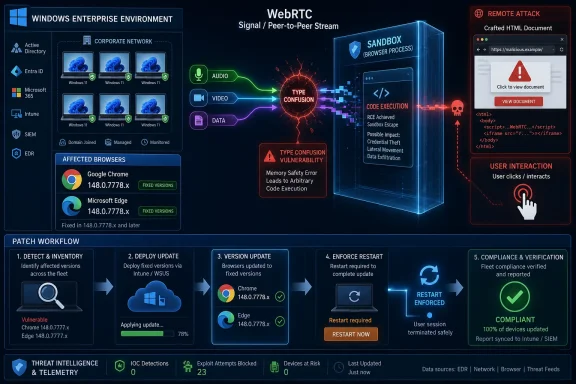
CVE-2026-7988 is described plainly enough: a type confusion vulnerability in WebRTC allowed a remote attacker to execute arbitrary code inside a sandbox through a crafted HTML page. That wording matters because it strips away the false comfort that this is “just” a browser crash or “just” a malformed webpage problem. The bug sits at the boundary between untrusted web content and one of the browser’s most complex real-time communications stacks.
WebRTC is not a niche corner of Chromium anymore. It is the plumbing behind browser-based conferencing, screen sharing, voice calling, peer-to-peer media, and a long tail of collaboration tools that became ordinary enterprise infrastructure after the remote-work surge. A vulnerability there is not automatically catastrophic, but it lives in code paths that many organizations expose all day, every day, without thinking of them as exposed.
The phrase inside a sandbox is also doing a lot of work. It means the initial execution is constrained by Chromium’s process isolation and security architecture. It does not mean the vulnerability is harmless, nor does it mean an attacker cannot pair it with another bug to escape the sandbox or steal data reachable from the compromised renderer context.
That is the uncomfortable middle ground of modern browser security. A single bug may not equal device takeover, but a single bug can still become one link in an exploit chain, and exploit chains are how serious browser compromises usually happen.
Chrome 148 Was a Security Release Wearing a Version Bump
The fix for CVE-2026-7988 arrived in the Chrome 148 stable update for desktop, with Google moving Linux to 148.0.7778.96 and Windows and macOS to 148.0.7778.96 or 148.0.7778.97. The same vulnerability was then reflected in Microsoft’s Security Update Guide because Edge consumes Chromium and ships the relevant security fixes through its own release process. That dual appearance is routine now, but routine should not be confused with trivial.
Chrome 148 was not a one-CVE emergency patch. It was a large security update containing more than 100 fixes, including several vulnerabilities rated more severely than CVE-2026-7988. In that crowd, a medium-severity WebRTC type confusion flaw can look like background noise. The danger is that asset owners learn to triage by headline severity rather than by exposure, exploitability, and fleet reality.
A browser update that fixes 127 vulnerabilities is not a neat monthly chore. It is a reminder that browsers have become full application platforms with media engines, graphics stacks, JavaScript runtimes, GPU processes, PDF readers, sync systems, password managers, enterprise policy hooks, and update channels. Every one of those subsystems is an attack surface. Every browser tab is a negotiation between convenience and code execution.
The lesson for Windows shops is not that Chrome is uniquely fragile. Edge, Chrome, Brave, Vivaldi, and other Chromium-based browsers benefit from Chromium’s engineering scale, but they also inherit much of its risk profile. When a Chromium bug lands, the practical question is not “Do we use Chrome?” It is “Where in the estate does Chromium exist, and how quickly can we prove it moved?”
Type Confusion Is an Old Bug Class That Still Works
Type confusion is one of those vulnerability categories that sounds academic until it is used in an exploit. In simple terms, software expects one kind of object in memory but treats it as another. If an attacker can influence that mismatch, they may be able to corrupt memory, redirect execution, or make the program operate on data in a way the programmer never intended.
The browser world has spent years trying to make this harder. Chromium has process isolation, site isolation, memory safety mitigations, compiler hardening, control-flow protections, sandbox boundaries, and a steady flow of fuzzing and code review. Yet the bug class persists because browsers are massive, performance-sensitive C++ applications where speed, legacy compatibility, and complex state machines collide.
WebRTC is a particularly rich environment for these mistakes. It handles codecs, packet timing, device capabilities, peer negotiation, network traversal, permissions, streams, and browser APIs. The attacker’s “crafted HTML page” is not just a static document; it can be a programmatic environment that manipulates APIs, state transitions, timing, and inputs in ways no ordinary user would.
That is why vulnerability descriptions that fit into one sentence can be misleading. “Crafted HTML page” sounds simple because it describes the delivery mechanism. The exploit path behind it may involve a highly specific sequence of API calls, object lifetimes, and memory layout manipulations. The victim’s experience, however, can still be as boring as clicking a link.
The Sandbox Changes the Blast Radius, Not the Duty to Patch
Chromium’s sandbox is one of the main reasons browser bugs do not automatically become full operating-system compromises. It restricts what a compromised renderer or related process can do, reducing access to files, devices, and sensitive system resources. That is exactly what mature defensive architecture should do: assume code will fail and limit the damage when it does.
But defenders should resist the rhetorical trap that “sandboxed code execution” is somehow acceptable. Inside-the-sandbox execution can still read and manipulate content available to that browser context. It can potentially access session data, interact with pages, pivot through browser-exposed APIs, or wait for a second vulnerability. It can also serve as proof that an attacker has crossed from passive web content into active execution.
For enterprise IT, this is where severity labels become blunt instruments. Chromium rated the issue Medium, while CISA-ADP assigned a CVSS 3.1 score of 8.8, reflecting network attack vector, low complexity, no privileges required, user interaction required, and high confidentiality, integrity, and availability impacts. Those two signals are not necessarily contradictory; they are measuring risk through different lenses.
The vendor severity often reflects exploit primitives, mitigations, component context, and internal policy. CVSS attempts to normalize technical impact across products. Neither can tell you whether your help desk is still imaging laptops with an outdated browser, whether your VDI gold image is stuck on an old build, or whether a line-of-business kiosk has blocked auto-update for “stability.”
Edge Makes This a Microsoft Story Even When Chrome Assigned the CVE
Microsoft’s advisory for CVE-2026-7988 is short because the vulnerability belongs upstream. Chrome assigned the CVE; Chromium fixed it; Edge ingests Chromium. Microsoft’s role is to tell customers that Edge has taken the fix and that the latest Chromium-based Edge build is no longer vulnerable.
That model is efficient, but it changes how Windows administrators must think about Patch Tuesday-style discipline. Browser security no longer maps neatly onto the old monthly rhythm. Chromium updates land when Chromium updates land, and Edge follows through its own stable, extended stable, and enterprise update mechanisms. The result is a security stream adjacent to Windows Update, not identical to it.
Many organizations still behave as if the browser is an application installed on top of Windows. In practice, the browser is part of the operating environment. It is the front door for identity providers, SaaS consoles, admin portals, webmail, documentation, ticketing systems, remote support tools, and security dashboards. If Edge or Chrome is stale, the workstation is stale, even if the Windows cumulative update installed cleanly.
This is especially important for environments that standardize on Edge but allow Chrome for compatibility, developer tooling, or user preference. A Chromium CVE can require coordinated action across both browsers. The fact that Microsoft and Google publish separate advisories does not mean defenders can treat them as separate risks.
The CPE Trail Tells Asset Managers What the Headline Does Not
The NVD change record for CVE-2026-7988 added a Chrome CPE configuration covering versions before 148.0.7778.96, with operating-system contexts including Windows, Linux, and macOS. That is dry metadata, but it matters to the machines that run vulnerability management. Scanners, dashboards, SBOM tools, and compliance systems often depend on CPE mapping to decide what is vulnerable.
The user-facing question — “Are we missing a CPE here?” — is exactly the right one for a security team, because missing or delayed product mappings can produce blind spots. If Chrome has a CPE and Edge is represented primarily through Microsoft’s advisory ecosystem, a dashboard may show different levels of confidence for products that share the same underlying Chromium flaw. That can lead to inconsistent remediation even when the technical exposure is similar.
CPE data is also imperfect when products update quickly. Chrome and Edge may roll fixes through channels, staged rollouts, enterprise policies, and platform-specific version numbers. A scanner that sees “148.0.7778.xxx” might need additional logic to distinguish fixed from vulnerable builds. A human can read the advisory context; an automated control may need exact version normalization.
This is why mature organizations should not use vulnerability enrichment as a substitute for inventory. The CPE tells you what the vulnerability database thinks is affected. Your endpoint telemetry tells you what is actually installed. The second should win when the two disagree.
WebRTC Exposure Is Wider Than the Meeting App
It is tempting to think of WebRTC vulnerabilities as “video call bugs.” That is too narrow. WebRTC APIs can be touched by web applications, embedded browser components, internal collaboration portals, customer-service platforms, telehealth tools, online education systems, and browser-based remote support products. The feature set has become part of the web’s default capability layer.
That ubiquity matters because user interaction is still enough. CVE-2026-7988 requires a crafted HTML page and user interaction, but the modern phishing economy is built around getting users to visit crafted pages. A malicious link in a chat, a poisoned search result, a compromised site, a fake meeting invite, or a lure themed around collaboration can all provide the delivery path.
Even organizations that block camera and microphone access by policy should not assume they are unaffected. A memory corruption bug in a component may be reachable before a user grants media permissions, depending on the vulnerable code path. The public description does not provide exploit details, and Chromium issue access is restricted, so defenders should avoid both panic and overconfidence.
The practical answer is simple: patch the browser, verify the browser, and treat browser exposure as continuous. The hard part is doing that across every device that can render untrusted web content.
Enterprise Controls Are Only as Good as Their Exceptions
Most managed Windows environments have some browser update story. Edge has enterprise update policies, Chrome has enterprise policy controls, and endpoint management platforms can report installed versions. Yet browser drift is still common because exceptions accumulate faster than administrators admit.
A lab machine is pinned for compatibility. A kiosk is isolated from the normal update ring. A VDI image gets refreshed quarterly because the app owner fears regression. A developer machine has multiple channels installed. A server used for admin consoles has a browser nobody owns. None of these exceptions are scandalous by themselves, but collectively they form the long tail where browser CVEs linger.
CVE-2026-7988 is a good test of whether the organization’s browser patching process is real or performative. If security can ask, “Which Windows endpoints still have Chrome below 148.0.7778.96 or Edge below the fixed 148.0.7778.xxx line?” and get a reliable answer within hours, the process is healthy. If the answer requires a week of spreadsheet archaeology, the risk is not this CVE alone. The risk is the update system.
There is also a communications problem. Users know Windows Update as an event. Browser updates are quiet, rolling, and often invisible until restart. If a user keeps a browser open for weeks, the update may be downloaded but not fully applied. The enterprise control plane can set policy, but the human behavior still matters.
The Browser Restart Is the New Reboot Fight
For years, IT fought users over operating-system reboots. Now the browser restart deserves similar attention. Chrome and Edge can update automatically, but the running browser session must usually restart before the new code is active. In practical terms, a patched installer sitting behind a week-old browser process is not the same as a patched browser.
This creates a familiar tension. Users live in their browsers. They have unsent forms, pinned tabs, half-finished admin tasks, dashboards, chats, documentation, and authentication flows. Asking them to restart the browser can feel more disruptive than asking them to reboot Windows, because the browser is where the workday actually happens.
Security teams should stop treating restart prompts as an afterthought. If a browser CVE allows code execution from web content, the remediation is not complete until vulnerable processes are gone. That may mean setting deadlines for relaunch, using enterprise policies that notify and enforce restarts, and giving users plain-language explanations that this is not cosmetic maintenance.
The better message is not “Update Chrome.” It is “Restart Chrome or Edge today so the security fix actually takes effect.” That phrasing respects the operational truth.
Severity Inflation Is Real, but So Is Severity Complacency
Security professionals complain, correctly, that CVSS scores often inflate urgency. A score can make a bug look catastrophic even when exploitation is constrained by deployment details or mitigations. CVE-2026-7988 shows the other side of the problem: a vendor Medium can make a bug look ordinary even when it is remotely reachable in the world’s most exposed application class.
The right response is not to pick one label and ignore the other. Chromium’s Medium severity tells us something about the bug in Chromium’s internal taxonomy. CISA-ADP’s 8.8 score tells us something about theoretical impact under CVSS 3.1. The operational question sits between them: how much exposed browser surface do we have, how quickly can we update, and what would exploitation mean in our environment?
For home users, the answer is straightforward. Update the browser, restart it, and move on. For businesses, the answer is still straightforward but less easy: measure exposure, enforce update policy, validate the fixed version, and watch for lagging devices. The problem is not intellectual complexity. It is operational follow-through.
This is why browser CVEs are so revealing. They cut through architectural debates and ask whether the organization can perform a basic security motion quickly across a messy estate.
Microsoft’s Chromium Bet Keeps Paying Off, but It Carries Chromium’s Bill
Microsoft’s move to Chromium-based Edge solved a major compatibility problem and gave Windows users a browser aligned with the dominant web engine. It also made Microsoft a downstream participant in Chromium’s security tempo. When Chromium ships a fix, Edge customers reasonably expect Microsoft to absorb, package, document, and distribute it promptly.
That dependency has mostly benefited users. Edge gets the advantage of Chromium’s massive testing, bug bounty attention, and security engineering. Web developers face fewer engine-specific surprises. Enterprises get a browser that behaves predictably across the modern web while still integrating with Microsoft management and identity tooling.
But the trade-off is concentration. A Chromium memory-safety bug can ripple across multiple browsers and platforms. Attackers can study one engine and affect a large share of desktops. Defenders, in turn, must treat Chromium advisories as ecosystem events rather than product-specific notices.
CVE-2026-7988 is not a reason to regret Chromium Edge. It is a reason to understand what standardization really means. You get fewer compatibility islands, but you also get shared blast radius when the common foundation cracks.
The Quietest CVEs Are Often the Ones That Test Discipline
There is no public evidence in the advisory text that CVE-2026-7988 is being exploited in the wild. It is not presented as a zero-day fire drill. Its Chromium severity is Medium. Its bug details are restricted. In the attention economy of security news, that combination usually means the story disappears quickly.
That would be a mistake. Quiet CVEs are where patching discipline is built. If an organization only moves quickly when a vulnerability is branded as exploited, critical, or wormable, it is training itself to react late. Browser bugs reachable from malicious web content deserve a shorter fuse than many server-side vulnerabilities with more impressive-looking labels but narrower exposure.
This does not mean every browser CVE should trigger panic. Panic is not a patching strategy. It means the default browser update process should be fast enough that a CVE like this does not require a war room at all. The system should absorb it, prove compliance, and leave only the exceptions for human attention.
That is the mature posture: not breathless urgency, but boring speed.
The Patch Window Is Where the Real Risk Lives
For attackers, vulnerability disclosure creates a race. Once a patch ships, motivated researchers and adversaries can compare versions, inspect commits where available, and infer the shape of the fixed bug. Details may remain restricted until a majority of users update, but the existence of the fix is itself a signal.
The highest-risk period is often not before disclosure, but after disclosure and before patch saturation. During that window, defenders are aware enough to be accountable, attackers are aware enough to investigate, and users are still running vulnerable builds. For browser vulnerabilities, that window can be shortened dramatically if auto-update and restart enforcement work.
WindowsForum readers know this pattern from years of cumulative updates, Exchange emergencies, print spooler drama, and driver rollbacks. The browser version number is just the latest battlefield. An estate that can converge quickly on fixed browser builds is less attractive because the exploit shelf life is shorter.
That is why the exact fixed versions matter. Chrome before 148.0.7778.96 is the line for this CVE. Edge is documented by Microsoft as fixed in the relevant 148.0.7778.xxx security update line. Anything below those thresholds should be treated as unfinished business.
The Version Number Is the Evidence
The most useful security advice here is also the least glamorous: check the version. In Chrome, users and admins can verify through the About Google Chrome page or enterprise inventory. In Edge, the About Microsoft Edge page and management telemetry provide the same answer. On managed fleets, the better answer is centralized reporting rather than asking users to self-report screenshots.
For Windows administrators, the inventory query should be specific. Find Chrome installations below 148.0.7778.96. Find Edge installations that have not reached the fixed 148.0.7778.xxx security update. Separate Windows, macOS, and Linux devices if your management stack covers more than Windows. Pay attention to extended stable channels and machines that do not check in regularly.
The follow-up is equally important. If a device claims to be updated but has not restarted the browser, confirm whether the running process is still old. If a device is offline, decide when it becomes noncompliant. If a line-of-business application blocks the update, escalate that as a security exception with an owner and an expiration date.
The version number is not trivia. It is the audit trail between a published vulnerability and a reduced risk.
The Practical Read for Windows Shops Running Chromium at Scale
This CVE does not demand drama, but it does demand proof. The organizations that handle it well will not be the ones with the loudest alerting channel; they will be the ones that can verify browser versions, force relaunches where necessary, and clean up unmanaged leftovers without turning every Chromium advisory into a crisis.
- Chrome desktop installations should be updated to 148.0.7778.96 or later, with Windows and macOS also seeing the 148.0.7778.97 build in the stable channel.
- Microsoft Edge should be updated to the corresponding Chromium-based 148.0.7778.xxx security release documented by Microsoft as no longer vulnerable.
- The vulnerability requires user interaction through crafted HTML, but that still fits ordinary phishing, compromised-site, and malicious-link scenarios.
- The “inside a sandbox” limitation reduces immediate system impact but does not make browser code execution safe or ignorable.
- CPE and vulnerability-scanner data should be checked against real endpoint inventory, because browser channel differences and metadata lag can create reporting gaps.
- Restart enforcement matters because downloaded browser updates do not fully protect users while vulnerable browser processes continue running.
CVE-2026-7988 will probably not be remembered as the defining browser vulnerability of 2026, and that is precisely why it is useful. It is a normal flaw in a normal component, fixed in a normal update, affecting normal users who spend their working lives inside Chromium-based browsers. The future of browser security will be decided less by whether vendors can eliminate every memory bug than by whether enterprises can make this kind of patch boring, fast, and verifiable before the next crafted page gets its chance.
References
- Security Update Guide - Microsoft Security Response Center NVD / Chromium