

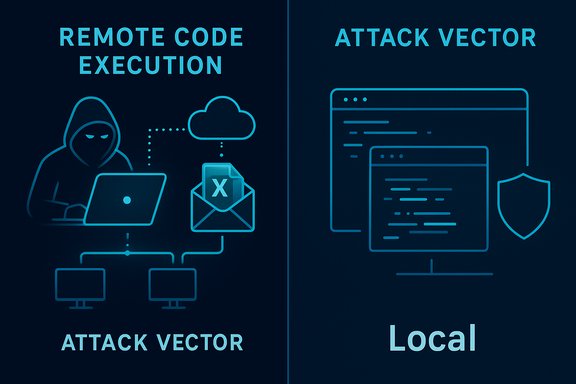
Microsoft’s CVE label and the CVSS Attack Vector are answering two different but complementary questions: the CVE title “Remote Code Execution” signals the attacker’s origin and impact (an external actor can cause arbitrary code to run on a target), while the CVSS AV:L (Local) metric documents the execution context — the vulnerable code must be invoked by a local process (for example, Excel parsing a workbook) for exploitation to occur.
Microsoft’s advisory language for Excel vulnerabilities often uses the concise phrase Remote Code Execution (RCE) because it conveys operational urgency: a remote adversary can ultimately cause code to run on a victim machine if the exploitation chain completes. At the same time, the Common Vulnerability Scoring System (CVSS) separates impact from exploitation mechanics. The CVSS Attack Vector (AV) describes where the vulnerable code is executed at the moment the exploit triggers; if that execution happens inside a local application process — such as Excel parsing a file — the correct score is AV:L (Local) even when the malicious input was delivered over the network (email, cloud share, or download).
This distinction is not a contradiction — it is deliberate. Security advisories emphasize impact and attacker origin; CVSS provides consistent, mechanistic scoring so that automated risk systems and triage pipelines can compare vulnerabilities on the same terms. Reading both together gives defenders a precise picture: high operational risk (RCE) and the technical requirement for exploitation (local parsing / user interaction).
 ). The metric is explicitly designed to represent how remote an attacker can be at the moment the vulnerable code executes. For document-parsing bugs where the vulnerable code executes inside the local Office process, the correct classification is AV:L even if the malicious bytes arrived over the network earlier. This preserves comparability and prevents network delivery from inflating exploitability ratings.
The User Interaction (UI) metric further clarifies exploit mechanics for the defender: if a user must open or preview a file, CVSS marks UI:R (User Interaction required). Combined with AV:L, CVSS provides a mechanistic description: local trigger plus required user action — critical detail for operational triage.
Source: MSRC Security Update Guide - Microsoft Security Response Center
 Background / Overview
Microsoft’s advisory language for Excel vulnerabilities often uses the concise phrase Remote Code Execution (RCE) because it conveys operational urgency: a remote adversary can ultimately cause code to run on a victim machine if the exploitation chain completes. At the same time, the Common Vulnerability Scoring System (CVSS) separates impact from exploitation mechanics. The CVSS Attack Vector (AV) describes where the vulnerable code is executed at the moment the exploit triggers; if that execution happens inside a local application process — such as Excel parsing a file — the correct score is AV:L (Local) even when the malicious input was delivered over the network (email, cloud share, or download).This distinction is not a contradiction — it is deliberate. Security advisories emphasize impact and attacker origin; CVSS provides consistent, mechanistic scoring so that automated risk systems and triage pipelines can compare vulnerabilities on the same terms. Reading both together gives defenders a precise picture: high operational risk (RCE) and the technical requirement for exploitation (local parsing / user interaction).
What “Remote” in the CVE title really means
Remote = attacker origin and delivery capability
When Microsoft says “Remote Code Execution,” the word Remote typically refers to the attacker’s ability to deliver a crafted input from off-host — for example via a phishing email, a cloud-shared link, or a malicious download — that ultimately results in code execution on the target. The advisory headline intentionally signals: a remote actor can cause the endpoint to execute attacker-controlled code if the victim performs the required local action (usually opening or previewing a file).Local in CVSS = moment of the trigger
CVSS’s Attack Vector (AV) answers a different question: Where must the exploit run at the moment it triggers? If the vulnerable component is only invoked when a local process parses a file stored on disk or passed into the application (for example, Excel’s parsing stack), CVSS considers that moment local and assigns AV:L. CVSS intentionally avoids “double-counting” a network delivery step and focuses on the locality of the triggering operation. This is why many document-parsing RCE advisories end up with AV:L.The typical Excel attack chain: remote delivery, local execution
Understanding the exploit chain clarifies why both labels are used together. A canonical document-based RCE attack looks like:- Attacker crafts a malicious Excel workbook that targets a parsing bug (use-after-free, heap overflow, out-of-bounds write/read, or pointer dereference).
- Attacker remotely delivers the crafted file (spear-phishing email, shared cloud link, file upload, or malicious download).
- Victim opens (or a preview handler renders) the workbook in the local Excel client.
- Excel’s parser triggers the memory-safety defect and attacker-controlled code runs in the context of the local Excel process under the logged-on user’s privileges.
Why CVSS uses AV:L for document parsing vulnerabilities
CVSS defines four Attack Vector categories: Network (AV:N), Adjacent (AV:A), Local (AV:L), and Physical (AV). The metric is explicitly designed to represent how remote an attacker can be at the moment the vulnerable code executes. For document-parsing bugs where the vulnerable code executes inside the local Office process, the correct classification is AV:L even if the malicious bytes arrived over the network earlier. This preserves comparability and prevents network delivery from inflating exploitability ratings.The User Interaction (UI) metric further clarifies exploit mechanics for the defender: if a user must open or preview a file, CVSS marks UI:R (User Interaction required). Combined with AV:L, CVSS provides a mechanistic description: local trigger plus required user action — critical detail for operational triage.
The important exception: server-side parsing and preview handlers
There is a crucial operational exception that can turn an AV:L scenario into AV:N (Network): any server-side service or gateway that invokes the same vulnerable parser on behalf of remote clients. Examples include:- Email gateways that generate attachment previews or thumbnails.
- Document-conversion services and collaboration platforms that render uploaded files.
- Office Online Server or cloud-hosted preview engines.
Practical implications for defenders: why AV:L does not mean “low risk”
A Local Attack Vector is not synonymous with low exploitability. Several practical factors keep Excel/Office document RCEs high-risk:- Ubiquity of Excel: Excel is widely deployed, increasing the probability that a crafted file reaches a user.
- Low-friction delivery channels: Email, cloud collaboration, and shared drives make distribution easy and scalable.
- Social engineering effectiveness: Phishing and business-context lures reliably trick users into opening attachments.
- Preview panes and server-rendering: In some environments, files can be rendered automatically, reducing user awareness and click barriers.
Recommended mitigation and hardening checklist
Immediate and medium-term actions to reduce risk from CVE-class Excel RCEs:- Patch promptly:
- Deploy Microsoft’s security updates for the affected Excel/Office builds via Microsoft Update, WSUS, Intune, or MECM. This is the primary remediation.
- Harden email and file ingestion:
- Quarantine or block suspicious attachments; enforce attachment type policies for external mail.
- Use sandboxing and content-disarm/preview features that isolate untrusted files.
- Enforce Office sandbox features:
- Require Protected View for files from the internet and untrusted sources.
- Enable Office Application Guard where available to further isolate document parsing.
- Restrict macros and scripting:
- Disable automatic macro execution; allow only signed macros from trusted publishers.
- Reduce privilege and apply application control:
- Ensure users run with least privilege (non-administrative accounts).
- Apply AppLocker, WDAC, or ASR rules to restrict Office from launching child processes.
- Monitor and detect:
- Tune EDR to alert on suspicious Office process behavior, anomalous child processes, and post-exploitation indicators.
- Audit server-side renderers:
- Identify mail gateways, collaboration platforms, and document-conversion services that parse Office files and prioritize patching or isolating those systems first.
Communication and triage guidance for IT teams
- Translate the headline: explain to non-technical stakeholders that an attacker can operate from anywhere but the exploit triggers when a user opens or a service parses a crafted Excel file. Emphasize the practical actions: patching, gateway hardening, and Protected View enforcement.
- Prioritize by exposure:
- Servers and gateways that parse or preview Office files (treat these as AV:N candidates).
- Endpoint clients with high-value data or elevated privileges.
- Mobile and BYOD devices where patching may lag.
- Avoid automated misclassification: ensure triage tooling ingests CVSS vectors, User Interaction, and the advisory narrative — not just the CVE title — so prioritization maps to real risk.
Technical anatomy: why Excel parsing bugs are powerful
Excel and other Office formats are complex. Native parsers include legacy binary formats, Open XML subdocuments, formula engines, OLE/ActiveX handling, and rendering subsystems — all written in native code and historically prone to memory-safety defects. Common exploitation primitives include:- Use‑after‑free: referencing freed memory to hijack control flow.
- Heap overflow / out‑of‑bounds writes: corrupting control structures.
- Untrusted pointer dereference (CWE-822): converting attacker-controlled values into pointers without proper validation.
Critical analysis: vendor messaging — strengths and risks
Strengths
- Immediate operational clarity: Labeling high-impact issues as “Remote Code Execution” provides an urgent, unmistakable triage signal for security operations to prioritize patching. This reduces the chance high‑impact items are deprioritized.
- Consistent mechanistic scoring: CVSS’s separation of impact vs. exploit mechanics supports automated risk comparison and prevents inconsistent scoring across heterogeneous vulnerabilities.
- Explicit exceptions for server-side parsing: Vendors typically call out when server-side components change the attack vector to network, which materially affects prioritization.
Risks and potential for misinterpretation
- Headline vs. mechanics mismatch: Teams or automated tools that rely only on CVE titles may misunderstand exposure (e.g., assuming a network service is vulnerable when exploit requires local opening). This can lead to misallocated resources or delayed patching of the real attack surface.
- Overreliance on AV:L = “low risk”: Misreading AV:L as benign is dangerous; document-based RCEs are easily delivered and socially engineered.
- Blind spots in server-side parsing: Organizations that overlook mail gateways, preview services, or collaboration platforms that parse documents could be exposed to AV:N exploitation even if client endpoints are AV:L.
How to triage CVE-2025-62564 specifically (operational playbook)
- Identify affected builds:
- Match installed Excel/Office build numbers in your estate to Microsoft’s update mapping and KB IDs.
- Patch critical hosts:
- If any server or gateway performs document rendering, prioritize its patching before or alongside endpoint rollouts.
- Tighten email/file ingestion:
- Block or quarantine untrusted attachments; enforce file type blocking for external mail.
- Enforce client hardening:
- Protected View for Internet-sourced files; disable untrusted macros; apply ASR rules.
- Monitor for exploitation indicators:
- Search EDR logs for Office processes spawning child processes, unexpected network connections following document opens, or suspicious file writes.
- Communicate and document:
- Provide clear timelines and remediation status to stakeholders; include the server-side audit results in the risk assessment.
- Reassess after patch:
- Validate mitigations and update detection rules to capture potential exploitation attempts.
Flagging unverifiable or changeable claims
Public reporting about active exploitation or proof-of-concept code can change quickly after disclosure. If Microsoft’s advisory or public trackers do not explicitly confirm in-the-wild exploitation for CVE-2025-62564, that absence should be treated with caution — it is not proof of safety. Assume conservative, high-priority action (patch, gateway isolation) until reliable public evidence indicates otherwise. Check the vendor advisory for any updates on exploit status and server-side impact.Conclusion
The apparent mismatch between a CVE titled “Remote Code Execution” and a CVSS Attack Vector of AV:L (Local) is a matter of messaging intent and technical precision. The CVE title conveys the operational reality — a remote attacker can cause code to run on a victim — while CVSS AV:L explains the mechanics — the exploit completes when a local process (Excel) parses a crafted file. Both are accurate and complementary; defenders must read them together and treat RCE-class advisories as urgent, map where parsing occurs in their environment (client and server), and apply layered mitigations: prompt patching, email/file gateway hardening, Protected View and Application Guard, macro restrictions, least privilege, application control, and EDR monitoring. Failing to interpret either the headline or the CVSS vector correctly risks misprioritization; understanding both enables a precise, high-impact response to CVE-2025-62564 and similar Office document vulnerabilities.Source: MSRC Security Update Guide - Microsoft Security Response Center
