

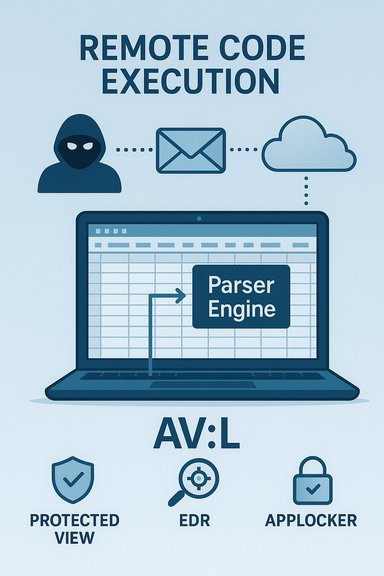
Microsoft’s decision to label CVE-2025-62561 as a “Microsoft Excel Remote Code Execution Vulnerability” while its published CVSS vector lists Attack Vector as Local (AV:L) is not a contradiction but a reflection of two different communication goals: the CVE title describes what an attacker can achieve and from where they can act, while CVSS AV describes where the vulnerable code must run when the exploit actually triggers. This distinction — remote delivery, local execution — is the standard explanation for document-parsing vulnerabilities in Office products, and understanding it is essential for correct triage and mitigation.
Microsoft’s advisory headlines and CVE titles use compact, operational language to tell administrators and defenders why an item deserves urgent attention — “Remote Code Execution” is an immediate red flag because it signals that an external actor can cause arbitrary code to run on a target system if the exploitation chain completes. CVSS, by contrast, is a standardized scoring framework that separates the impact of a successful exploit from the technical mechanics required to trigger it. One of CVSS’s core metrics, Attack Vector (AV), is explicitly about the locality of the vulnerable code at the moment of exploitation: Network (AV:N), Adjacent (AV:A), Local (AV:L), or Physical (AV ). When the vulnerable logic executes inside a local application that parses a file (for example, when Excel parses a workbook the user opens), CVSS correctly assigns AV:L even if the malicious file was delivered over email, a cloud share, or a public download link. This split — advisory headline vs. CVSS mechanics — is intentional and common for Office document-parsing bugs: the headline communicates operational reach and impact; CVSS documents exploitation mechanics so automated triage systems remain consistent across many vulnerability types. Treating these two signals as complementary, not contradictory, gives security teams a complete picture for prioritization.
Source: MSRC Security Update Guide - Microsoft Security Response Center
 Background / Overview
Microsoft’s advisory headlines and CVE titles use compact, operational language to tell administrators and defenders why an item deserves urgent attention — “Remote Code Execution” is an immediate red flag because it signals that an external actor can cause arbitrary code to run on a target system if the exploitation chain completes. CVSS, by contrast, is a standardized scoring framework that separates the impact of a successful exploit from the technical mechanics required to trigger it. One of CVSS’s core metrics, Attack Vector (AV), is explicitly about the locality of the vulnerable code at the moment of exploitation: Network (AV:N), Adjacent (AV:A), Local (AV:L), or Physical (AV). When the vulnerable logic executes inside a local application that parses a file (for example, when Excel parses a workbook the user opens), CVSS correctly assigns AV:L even if the malicious file was delivered over email, a cloud share, or a public download link. This split — advisory headline vs. CVSS mechanics — is intentional and common for Office document-parsing bugs: the headline communicates operational reach and impact; CVSS documents exploitation mechanics so automated triage systems remain consistent across many vulnerability types. Treating these two signals as complementary, not contradictory, gives security teams a complete picture for prioritization.Why “Remote” appears in the CVE title while CVSS shows AV:L
Two different questions
- The CVE/advisory title answers: What can an attacker achieve and from where can they try? If an external adversary can deliver a weaponized file and cause code to run on a victim machine, the advisory will often use Remote Code Execution (RCE) to convey that worst‑case impact and attacker origin.
- The CVSS Attack Vector answers: Where must the exploit execute when the vulnerable code is invoked? If the exploit triggers when a local application parses a file on the victim host, CVSS assigns AV:L because the vulnerable code runs locally at the moment of exploitation. This avoids “double‑counting” the network delivery step and keeps scoring consistent.
Practical example — typical Excel attack chain
- Attacker crafts a malicious Excel workbook that exploits a memory-safety defect in Excel’s native parsers.
- The attacker delivers the file remotely — via a spear-phishing email, cloud share link, or public download.
- A victim opens (or an automated preview component renders) the workbook in the local Excel process.
- Excel’s parser hits the crafted input, triggers memory corruption, and the attacker’s payload executes inside the Excel process under the user’s context.
Technical anatomy: why document parsing bugs allow “data-only” RCEs
Complex native parsers and memory-safety defects
Excel supports a wide range of file formats, legacy binary records, embedded OLE objects, ActiveX, formula engines, and rendering subsystems. Many of these components run as native code inside Excel’s process space, which historically has been fertile ground for memory‑safety bugs such as use‑after‑free, heap overflow, and out‑of‑bounds reads/writes. When attackers control file data, they can sometimes manipulate internal memory structures to hijack control flow — resulting in arbitrary code execution without macros or scripts. These are data-only exploits.Why macros are not required
Because the exploit targets the native parser itself, macro-blocking controls (which focus on script execution) are insufficient to stop such attacks. Detection that only inspects macro signatures will miss data-driven parsing exploits that corrupt native code paths. That’s why prompt patching and layered mitigations (Protected View, mail gateway sandboxing, EDR controls) are crucial.CVSS: what AV:L actually means and why it’s used here
CVSS’s Attack Vector metric is meant to describe how remote an attacker can be at the moment the vulnerable code is invoked. The four values map as follows:- AV:N — Network: the vulnerable component is accessible across network boundaries and exploitable without local user interaction.
- AV:A — Adjacent: the attacker must be on the same network segment or adjacent.
- AV:L — Local: the vulnerable code is invoked by a local action (opening a file, running a program).
- AV — Physical: physical access is required.
The server-side exception: when AV becomes Network (AV:N)
There is one operationally critical exception: if a network-accessible server or service — for example, an email gateway that generates attachment previews, Office Online Server, or a cloud collaboration platform — invokes the same vulnerable parser on behalf of remote clients, the vulnerable code executes in a network-bound process. In that scenario, the attack vector legitimately becomes Network (AV:N) because an attacker can trigger the vulnerable code remotely without a specific user opening the document on an endpoint. Vendors call this out explicitly when applicable because it materially increases exposure and changes remediation priorities. Administrators must inventory where parsing happens in their environment — not just which desktops run Excel, but which servers or services process or preview Office files.Operational implications: why “Local” does not mean “low risk”
Labeling the Attack Vector as Local may be misread as implying low urgency; that’s a dangerous misunderstanding. Several contextual factors keep document-based RCEs attractive and practical for attackers:- Excel is ubiquitous across enterprise and consumer devices, increasing the reachable attack surface.
- Delivery channels (email, cloud shares, file transfer services) make distribution trivial and scalable.
- Social engineering (spear-phishing, invoice scams, shared document pretexts) reliably induces users to open attachments.
- Preview panes or server-side previews may reduce or eliminate explicit user action, increasing risk.
Prioritized mitigation checklist for administrators
Immediate actions (in order):- Patch first: map Excel/Office build numbers across your estate and deploy Microsoft’s security updates for CVE‑2025‑62561 through your established patch management tools. Patching is the definitive remediation.
- Harden document handling: enforce Protected View for files originating from the Internet, disable automatic preview panes for high‑risk user groups, and route attachments through mail gateway sandboxing/detonation.
- Apply endpoint controls: use Attack Surface Reduction (ASR) rules in Microsoft Defender for Endpoint or equivalent EDR controls to block Office applications from spawning child processes; implement application allowlisting (AppLocker or WDAC).
- Least privilege: ensure users run as standard (non‑admin) accounts to limit post‑exploit impact; remove unnecessary local admin rights.
- Mail and gateway defenses: quarantine suspicious Excel attachments from external senders and enable deep-content inspection or sandbox detonation for attachments.
- Deploy and tune EDR to detect suspicious child processes, abnormal process behavior originating from excel.exe, and lateral‑movement indicators.
- Maintain robust logging and preservation of suspected malicious files for forensic analysis.
- Train users in phishing recognition and ensure phishing-resistant multi-factor authentication is enforced for high‑risk accounts.
Detection and incident response cues
Key telemetry and hunting signals to monitor:- excel.exe spawning cmd.exe, PowerShell, wscript.exe, or other command interpreters immediately after a file open.
- Unexpected new scheduled tasks, services, or persistence artifacts created by Office processes.
- Correlation between mail delivery logs showing a delivered spreadsheet and EDR traces of that host opening a document around the same time.
- Sandbox detonations in gateway logs that indicate malicious behavior originating from a spreadsheet.
Communication and triage: how to explain this to non‑technical stakeholders
Use plain language: explain that an attacker located offsite can deliver a malicious spreadsheet and if a user opens it (or a preview service renders it), the attacker’s code can run on that machine. Emphasize two distinct facts: the attacker’s reach — remote delivery — and the exploit trigger — local parsing — and explain that both are important for deciding mitigation steps. Provide concrete, prioritized actions (patching, disabling previews, Protected View enforcement) and timelines for deployment.Critical analysis — strengths and potential risks of the messaging approach
Strengths- Operational clarity: labeling a bug “Remote Code Execution” is an efficient triage signal; defenders immediately understand the potential severity and attacker reach.
- Scalability of triage: many security teams use impact class (RCE vs information disclosure) as a primary prioritization axis; the headline communicates that quickly.
- Oversimplification: headline phrasing can be misread as implying the vulnerable component is network‑facing; teams that do not read the advisory body and CVSS metadata may misprioritize resources.
- Automation blind spots: security automation that relies solely on CVE titles may misclassify exposures unless CVSS AV and other metadata are considered.
- Server-side blind spot: environments that perform server-side previewing or conversion can convert an AV:L client risk into an AV:N server risk; failure to inventory such services may leave large trust boundaries unpatched.
Verification and reproducibility: which claims are provable and which are time‑sensitive
Verifiable claims- CVSS Attack Vector semantics and the AV:L definition are codified in the CVSS specification and examples, which explicitly treat document‑parsing exploits as Local when the vulnerable code executes inside a local process. This is authoritative CVSS guidance.
- Vendor advisories, including Microsoft’s Security Update Guide, frequently use “Remote Code Execution” in CVE titles for document-parsing bugs to convey impact; the MSRC advisory for CVE‑2025‑62561 follows this established pattern. The advisory body and CVSS metadata provide the technical context for AV:L.
- Whether CVE‑2025‑62561 has been observed in the wild or whether public proof‑of‑concept exploits exist can change rapidly; at initial disclosure such claims may be absent or unconfirmed. Any statement about active exploitation is therefore time‑sensitive and should be verified against real‑time telemetry and vendor advisories at the moment of triage. Flag this as provisional and check vendor/telemetry updates continuously.
Final operational takeaway
- The CVE title’s use of “Remote Code Execution” signals attacker reach and impact; CVSS AV:L documents the exploit trigger’s execution locality. Both are correct and complementary.
- Treat RCE-class Office advisories as high priority even when CVSS lists AV:L — patch promptly, harden preview and mail pipelines, enforce Protected View, apply least‑privilege policies, and deploy EDR detection rules to watch for suspicious behavior originating from Excel.
- Inventory server‑side services that parse Office content (mail gateways, Office Online Server, cloud collaboration platforms). If those services use the vulnerable parser, they can convert a local‑trigger vulnerability into a network‑accessible one (AV:N) and must be prioritized for immediate patching.
Source: MSRC Security Update Guide - Microsoft Security Response Center
