

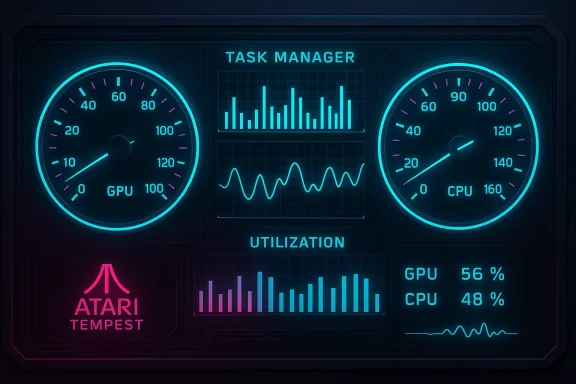
Dave Plummer’s take on a modern Task Manager is equal parts personal nostalgia, power‑user provocation, and a design experiment that forces the Windows community to ask a simple question: what should a system utility actually be in an era of AI, flashy visuals, and increasingly opaque operating‑system behavior? Plummer—best known inside Microsoft and across the Windows community as the engineer who authored the original Windows Task Manager—shared a synthwave‑tinged dashboard for his Tempest AI and described it as “probably what Task Manager would look like (and sound like) if I were still around,” a tweet that immediately reignited debates about utility design, telemetry, and the role of audio/visual feedback in core system tools.
Dave Plummer’s footprint on Windows is concrete and historic: he wrote the Task Manager, shipped ZIP support and the Space Cadet Pinball port to Windows NT, and left Microsoft in the early 2000s after a career that touched some of the OS’s most visible utilities. Plummer’s experience gives weight to his public stances on Windows design and on proposals like a “Professional Mode” for advanced users; he’s also remained active publicly through videos and projects that show both affection for retro games and an engineer’s appetite for experimentation.
What Plummer posted this month was not an official Microsoft proposal or a polished Microsoft design brief — it was his Tempest AI dashboard, built to train an AI against the notoriously difficult Atari arcade game Tempest, and wrapped in a cyberpunk aesthetic with kinetic gauges, dense graphs, and a pounding synth soundtrack. He framed it as a playful thought experiment: imagine Task Manager if its original author were still free to redesign it without corporate constraints. The post and its live demo landed on social channels on February 16–17, 2026 and were picked up by outlets covering gaming and systems design.
Most provocative to casual observers was the inclusion of music: Plummer’s demo pairs the visual dashboard with an energetic, synthwave/glitch soundtrack. Reaction split along predictable lines—some viewers found the audio invigorating and evocative of classic arcade energy; others found it distracting or incompatible with what many consider a strictly utilitarian tool. Reporters covering the demo highlighted that paradox: the music is conceivably the project’s most talked‑about choice.
Beyond the aesthetics, Plummer included performance instrumentation: GPU and CPU load graphs, frame‑rate counters, and real‑time indicators that showed Tempest’s AI training workload in tangible terms. In a candid note he said the project “burns about 75% of the GPU at 30fps on my M2 Mac Pro,” a data point that gives specific technical grounding to what would otherwise read as eye candy. That admission also frames the experiment as computationally non‑trivial, not a mere mockup.
Practical implications:
At the same time, Microsoft’s more recent work on a redesigned Task Manager shows the company is moving toward a modernized, consistent UI that aligns with Windows 11 aesthetics. Plummer’s demo is a counterpoint: instead of a minimalist, platform‑consistent redesign, he proposes a maximalist, instrumented control surface. The tension between those approaches maps onto a broader product choice: simplify and harmonize, or extend and empower? Both are valid, but they serve different audiences.
The compromise most likely to hold water is pluralism: keep the tried‑and‑true Task Manager for utility and reliability, and offer a separate, opt‑in instrumentation layer for those who want the kind of immersive, synthwave‑accompanied telemetry Plummer demonstrated. That preserves the core utility for the many while enabling experimentation for the few—and it respects the user’s right to choose how much spectacle they want from the software that sits at the heart of system control.
In the end, Plummer’s dashboard succeeds most as a conversation starter. It challenges product teams to be explicit about defaults, to justify every sensory affordance they add to system utilities, and to remember that power and elegance can coexist—but only if the design path is deliberate, transparent, and respectful of diverse user needs.
Source: Windows Central Ex-Microsoft engineer: This is what Task Manager would "probably" look like
 Background
Dave Plummer’s footprint on Windows is concrete and historic: he wrote the Task Manager, shipped ZIP support and the Space Cadet Pinball port to Windows NT, and left Microsoft in the early 2000s after a career that touched some of the OS’s most visible utilities. Plummer’s experience gives weight to his public stances on Windows design and on proposals like a “Professional Mode” for advanced users; he’s also remained active publicly through videos and projects that show both affection for retro games and an engineer’s appetite for experimentation.What Plummer posted this month was not an official Microsoft proposal or a polished Microsoft design brief — it was his Tempest AI dashboard, built to train an AI against the notoriously difficult Atari arcade game Tempest, and wrapped in a cyberpunk aesthetic with kinetic gauges, dense graphs, and a pounding synth soundtrack. He framed it as a playful thought experiment: imagine Task Manager if its original author were still free to redesign it without corporate constraints. The post and its live demo landed on social channels on February 16–17, 2026 and were picked up by outlets covering gaming and systems design.
Overview: What Plummer showed — the dashboard, the sound, the stunt
Plummer’s dashboard is unapologetically theatrical. The visual language borrows heavily from retro‑futuristic interfaces: neon colors, circuit‑like grids, and two large speedometer‑style gauges flanking a panel of line and bar graphs. The layout favors at‑a‑glance, high‑contrast telemetry rather than the sparse, textual lists that modern Task Manager variants often use. In his tweet he linked to a live display and to the GitHub repository for the project, signaling the work is both demonstrative and open for inspection.Most provocative to casual observers was the inclusion of music: Plummer’s demo pairs the visual dashboard with an energetic, synthwave/glitch soundtrack. Reaction split along predictable lines—some viewers found the audio invigorating and evocative of classic arcade energy; others found it distracting or incompatible with what many consider a strictly utilitarian tool. Reporters covering the demo highlighted that paradox: the music is conceivably the project’s most talked‑about choice.
Beyond the aesthetics, Plummer included performance instrumentation: GPU and CPU load graphs, frame‑rate counters, and real‑time indicators that showed Tempest’s AI training workload in tangible terms. In a candid note he said the project “burns about 75% of the GPU at 30fps on my M2 Mac Pro,” a data point that gives specific technical grounding to what would otherwise read as eye candy. That admission also frames the experiment as computationally non‑trivial, not a mere mockup.
Why Tempest? An odd but defensible choice
Tempest’s technical fit for an AI project
Tempest is a 1981 Atari arcade game that uses vector graphics and generates a fast, pattern‑dense environment. Plummer explained his rationale plainly: Tempest’s playfield and enemies generate complex, high‑velocity patterns that reward reflexes and pattern recognition—precisely the kind of challenge that makes it interesting for an AI to master. Because Tempest is difficult even for skilled players, automating high‑quality play requires a model to handle rapid inputs and tight timing, a useful benchmark for agentic behaviors.The cultural angle: retro credibility
There’s a cultural parallel at work: by choosing a retro arcade game, Plummer ties the modern AI experiment to a period of computing where directness and observability were prized. That history resonates with power users who remember tools that exited the “user‑comfort” era and instead privileged control and visibility—precisely the values that guided Plummer’s original Task Manager design. The choice is as much rhetorical as it is technical: Tempest lets Plummer demonstrate how an agent performs, while evoking the era that birthed the original utility.Design analysis: dashboards, gauges, and synths
What the redesign gets right
- Immediate situational awareness: The speedometer gauges and dense graphics are optimized for instant comprehension. For troubleshooting scenarios where time is the limiting resource, glyphs that encode trends and thresholds visually can be faster than parsing lists.
- Aesthetic clarity for a certain audience: For developers, gamers, and data‑literate users, the cyberpunk aesthetic communicates activity and urgency. It says: “This is a tool for people who love real‑time instrumentation.”
- Extensibility model: Since the demo is tied to Plummer’s GitHub and live code, it models a transparent engineering approach: telemetry that’s instrumented, documented, and inspectable. That’s a design value many power users demand.
Where the concept strains usability
- Audio as a system indicator is fraught. Background music in an always‑on system utility risks being intrusive, inaccessible for users who rely on screen readers, and hostile to quiet workplace norms. Sound can enhance attention but must be optional and contextual; making music a default is a poor fit for a utility shipped to diverse user bases.
- Visual density reduces accessibility. High-contrast neon palettes and motion‑heavy charts can hinder users with visual sensitivities or those on color‑constrained displays. Task Manager historically works in low‑resource environments (including Server Core); any redesign needs to keep a minimal, high‑contrast, low‑motion fallback.
- Feature bloat vs. core function. Task Manager’s original mandate was simple: show processes and let you act on them. Adding elaborate visuals and AI recommendations risks mission creep unless those features demonstrably improve task completion times for core use cases.
Technical reality: AI dashboards and resource economics
Plummer’s confession that Tempest AI used roughly 75% of his M2 Mac Pro GPU at 30fps is more than a curiosity; it signals the resource profile of a locally running training or inference workload. Modern consumer devices and business laptops vary wildly in GPU capability; a visually rich, GPU‑accelerated Task Manager that also runs on the system it monitors must be engineered to avoid self‑inflicted congestion. Put bluntly: you don’t want the task monitor to become the reason for the system slowdown it’s diagnosing.Practical implications:
- Any AI‑powered Task Manager features—live model inference, visual overlays, audio alerts—should be throttled, offloadable, or optional.
- GPU usage should be capped relative to total system capacity; fallback to CPU or low‑power visual modes is essential on constrained devices.
- For enterprise environments, policy controls should allow admins to disable non‑essential instrumentation, preserving predictable performance for critical workloads.
Security, privacy, and governance concerns
- Telemetry scope and consent. If Task Manager integrates AI that suggests process terminations or quarantines, the system must be explicit about what data the AI consumes—call stacks, heuristics, or cloud‑backed behavioral signals—and whether any of that leaves the device. Users and admins require quick, clear controls to opt out.
- Attack surface expansion. Richer visuals and audio subsystems increase code complexity and the potential for exploitable bugs. Every new subsystem (audio engine, GPU shaders, AI runtime) is another module needing security review and hardened update paths.
- Trust model for AI decisions. If an AI proposes an action—e.g., “kill service X”—the UI must present provenance: why this recommendation, how confident is it, and what the consequences might be. Acting on black‑box suggestions without transparency invites operational risk.
Accessibility audit: who gets left behind?
An essential utility must respect assistive technologies. Plummer’s design, powerful and expressive for some, can be exclusionary if:- Visual motion isn’t optional for users with vestibular disorders.
- Color‑coded alerts lack text alternatives for color‑blind users.
- Music is enabled by default without keyboard or speech‑friendly toggles.
What Plummer’s experiment says about Task Manager’s evolution
Task Manager’s history is a tale of utility evolving under competing pressures: simple, reliable tooling for power users vs. the broader consumer demand for approachable, less intimidating interfaces. Plummer’s 1990s design priorities leaned heavily toward determinism and visibility — “there should be nothing that TaskMgr can't kill,” he once wrote, emphasizing maximal control for the user. That philosophy still resonates among experienced users who see observability as empowerment.At the same time, Microsoft’s more recent work on a redesigned Task Manager shows the company is moving toward a modernized, consistent UI that aligns with Windows 11 aesthetics. Plummer’s demo is a counterpoint: instead of a minimalist, platform‑consistent redesign, he proposes a maximalist, instrumented control surface. The tension between those approaches maps onto a broader product choice: simplify and harmonize, or extend and empower? Both are valid, but they serve different audiences.
Strengths and benefits of an AI‑centric Task Manager
- Faster triage: AI can surface anomalies and prioritize processes that need attention, reducing the cognitive load on users who otherwise must interpret raw metrics.
- Contextual recommendations: For non‑experts, a system that suggests safe actions with clear explanations could democratize troubleshooting.
- Advanced telemetry for devs and SOCs: Rich dashboards aid debugging and can be tailored into a “Pro” tier for administrators and developers who want deeper insight.
Risks and possible mitigations
- Performance overhead: Avoid heavy local model execution by default. Offer a tiered model: minimal local inference, optional local GPU acceleration, and optional cloud offload with explicit user consent.
- Feature creep: Maintain a “core” mode that preserves Task Manager’s minimalistic, scriptable functions. Add an opt‑in “insights” or “dashboard” modality for richer features.
- Security and privacy: Ship with transparent telemetry toggles, downloadable model manifests, and enterprise policy endpoints. Allow administrators to enforce safe defaults via group policy or MDM.
- Accessibility gaps: Build with accessibility first—keyboard controls, text equivalents, adjustable contrast, and off switches for motion or audio.
A suggested roadmap for Microsoft (or any vendor)
- Define a clear product boundary: what is the Task Manager’s primary mission? (Visibility + control.)
- Introduce advanced visualization as an opt‑in mode, not the default.
- Separate the UI from the inference pipeline: let telemetry flow into optional processors that can be enabled per device or per user.
- Publish an accessibility and performance budget for each feature. If a feature can’t be implemented without violating that budget, it should be deferred.
- Provide enterprise controls for disabling AI features, audio, and non‑essential telemetry.
What this means for power users and admins today
For power users, Plummer’s demo is a reminder: observability matters, and nothing prevents any user from experimenting with third‑party replacements or open‑source dashboards that fit their workflow today. Many alternatives already provide advanced instrumentation and custom dashboards, and users who want an immersive telemetry experience have choices outside the built‑in Task Manager. For admins, the practical takeaway is a reaffirmation to control change: set policies that limit non‑essential agents and keep update paths predictable.Final verdict and cultural take
Dave Plummer’s Tempest AI dashboard is an effective provocation. It doesn’t present a production‑ready solution for all Windows users, nor does it pretend to be a one‑size‑fits‑all answer. What it does achieve is twofold: it reminds us of the radical clarity of early system tools and it forces a public conversation about trade‑offs. Should Task Manager evolve to be more visual, more AI‑assisted, or more theatrical? The answer depends on whom Microsoft wants to serve.The compromise most likely to hold water is pluralism: keep the tried‑and‑true Task Manager for utility and reliability, and offer a separate, opt‑in instrumentation layer for those who want the kind of immersive, synthwave‑accompanied telemetry Plummer demonstrated. That preserves the core utility for the many while enabling experimentation for the few—and it respects the user’s right to choose how much spectacle they want from the software that sits at the heart of system control.
In the end, Plummer’s dashboard succeeds most as a conversation starter. It challenges product teams to be explicit about defaults, to justify every sensory affordance they add to system utilities, and to remember that power and elegance can coexist—but only if the design path is deliberate, transparent, and respectful of diverse user needs.
Source: Windows Central Ex-Microsoft engineer: This is what Task Manager would "probably" look like
