

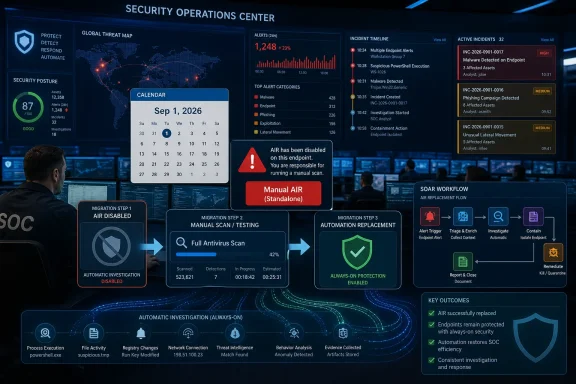
Microsoft is removing manual triggering and the standalone Automated Investigation and Response experience from Microsoft Defender XDR starting September 1, 2026, after announcing the change in Message Center post MC1411577 on July 1, 2026. Admins should treat this as an operational migration deadline. If your playbooks, scripts, runbooks, or integrations initiate AIR directly, the replacement path is to move on-demand checks to full antivirus scans and let Defender’s always-on protection trigger AIR automatically.
Manual AIR stops on September 1, 2026. Inventory every dependency now, replace it before the cutoff, and test the new workflow while there is still time to fix broken procedures calmly.
The practical answer is blunt: replace any manually triggered AIR workflow before September 1, 2026. Microsoft says AIR is already integrated into always-on antivirus protection, where it runs automatically, and that full antivirus scans should be used for on-demand analysis once manual AIR triggering goes away.
The change was signaled through Microsoft’s Message Center, not as a broad consumer-facing Windows announcement. That matters because the affected audience is not the average PC owner wondering why a scan button moved. It is the administrator, SOC lead, MSP, or security engineer who has embedded “start an AIR investigation” into a response pattern that now has an expiration date.
The core issue is not whether Defender XDR still has automated investigation capability. Microsoft’s stated replacement path keeps the article focused in a narrower place: full antivirus scans for on-demand analysis, and automatic AIR through always-on protection. Anything beyond that should be treated as existing Defender behavior only where your tenant, licensing, configuration, and Microsoft documentation support it.
WindowsForum readers have already been tracking Microsoft’s larger security direction. In forum coverage of Microsoft Defender XDR’s AI-powered updates, members described Microsoft’s push to sharpen cyber defenses and streamline security operations through AI-assisted features. Other WindowsForum reports covered the Defender Experts Suite, AI-driven security operations, and incident prioritization in Defender XDR. Those reports give useful context, but the job in front of admins is narrower: find every place where manual AIR is used and replace it before September 1, 2026.
If an analyst previously launched AIR manually because a device, file, or user context looked suspicious, the future motion is not “find the new AIR trigger.” It is to initiate a full antivirus scan for on-demand analysis and rely on Defender’s always-on protection to invoke AIR automatically when Defender’s detection logic warrants it.
That changes the shape of a response. Manual AIR gave many teams a clear “investigate this now” action. Full scans are a more conventional endpoint security operation, and automatic AIR is platform-driven rather than analyst-triggered.
For teams that have already moved toward Microsoft’s broader XDR model, this may feel like part of the same direction WindowsForum has been following in its related Defender coverage. Forum reports on AI-powered Defender XDR updates, the Defender Experts Suite, AI-driven cyber defense, and AI-powered incident prioritization all point toward Microsoft putting more emphasis on automation, prioritization, managed expertise, and integrated security operations.
But that product direction does not eliminate the migration work. Every place where “manual AIR” appears in a procedure, ticket template, SOC checklist, automation workflow, or analyst habit needs to be found and replaced.
The practical problem is that things that used to work will stop working. Microsoft’s stated consequence is that playbooks, scripts, or integrations that initiate AIR will stop working after September 1, 2026.
That kind of failure often lands badly because it hides in operational assumptions. A junior analyst follows an incident guide and discovers a step no longer exists. A SOAR workflow calls an action that no longer produces the expected result. A managed service provider’s customer-facing runbook promises an investigation trigger that the platform no longer supports.
These failures may surface during incidents, not during planning meetings. The first time a manual AIR dependency breaks should not be the day an endpoint is suspected of compromise. The responsible move is to run a dependency hunt now, while the deadline is still far enough away to change procedures and retrain analysts.
The September 2026 change does not erase automated investigation. It narrows how humans kick it off. Instead of treating AIR as something analysts manually summon, Microsoft is treating it as something the protection stack activates automatically.
That may be defensible from a product design standpoint. Manual triggers can create inconsistent usage, duplicate work, and analyst uncertainty about when to use them. But it also removes a control point that some teams used to bridge uncertainty: when an alert was ambiguous, when a ticket was escalated from help desk to security, or when a business unit demanded a visible response action.
The new bargain is straightforward. Microsoft gives administrators fewer manual levers and expects more trust in always-on protection. Administrators get a simpler official path for on-demand analysis — full antivirus scans — but lose a familiar way to force an AIR investigation.
In Microsoft Defender XDR, admins should review the operational places where analysts currently begin, track, or close response work: incidents, alerts, device pages, investigation records, pending or completed remediation actions, and any analyst procedures that reference the standalone AIR experience. The goal is not to discover a replacement manual AIR button. The goal is to identify where your team expects manual AIR to exist, and to rewrite the process around the supported replacement path.
Use this checklist as the minimum migration plan:
Search your scripts. Search your SOAR playbooks. Search your ticketing templates, internal wiki pages, customer support macros, escalation procedures, and managed detection response handoffs. If any of them say to initiate AIR, trigger an AIR investigation, launch an automated investigation manually, or depend on the standalone AIR experience, they need revision.
Many organizations have accumulated Defender workflows incrementally. One team added a script. Another documented a workaround. A third integrated a response step into a case management process. Nobody thinks of that collection as an “AIR dependency map,” but that is what it becomes when Microsoft assigns a cutoff date.
The safest assumption is that if your security program has used Defender XDR long enough to have mature procedures, you probably have at least one manual AIR reference somewhere. The question is whether you find it during the migration window or during an incident after September 1.
Technical dependencies deserve special attention. If a script or integration initiates AIR today, Microsoft says it will stop working after the cutoff. That is the clearest red flag in the announcement.
That means scan procedures need to be precise enough for operations. Analysts should know when a full antivirus scan is appropriate, who is authorized to initiate it, how the result is recorded, and how the scan outcome affects escalation. If the old procedure said “trigger AIR and review results,” the new procedure cannot merely say “run a scan” and stop there.
The scan also needs to fit into evidence handling. A full antivirus scan may produce findings, no findings, or additional Defender signals. The runbook should tell analysts what to do in each case without pretending that a scan is the same thing as a complete incident investigation.
This distinction matters. AIR is an automated investigation and response capability in Defender XDR. A full antivirus scan is the replacement for on-demand analysis when manual AIR triggering is removed. They are related operationally, but they are not the same thing.
Administrators should therefore rewrite language carefully. Do not tell stakeholders that “manual AIR is being replaced by another manual AIR.” Tell them that on-demand analysis moves to full antivirus scans, while automated AIR runs through always-on protection.
A standalone experience gives analysts a place to orient themselves. It becomes a landmark in screenshots, training decks, tabletop exercises, and internal documentation. When that landmark disappears, even if automated investigation continues through always-on protection, the mental model changes.
Teams that trained analysts around a dedicated AIR workflow need to retrain them around the remaining Defender XDR flow. That means updating screenshots, revising procedures, and removing references to manual AIR from onboarding material.
This is especially important for organizations with rotating on-call staff, outsourced SOC coverage, or tiered analyst models. Senior engineers may understand the distinction instantly. Tier 1 analysts following procedures at 2 a.m. need the new path written down plainly.
The documentation update should happen before the cutoff. Waiting until the feature is gone turns a manageable training edit into a production support problem.
That is not merely a Defender configuration question. It affects incident response policy.
If a business unit reports suspicious activity but Defender has not generated a signal that starts AIR automatically, what happens next? If a full antivirus scan finds nothing, does the incident close, remain under observation, or escalate to manual hunting? If a script used to trigger AIR after a certain ticket status change, what replaces that decision logic?
These questions expose how many security workflows rely on product affordances instead of explicit policy. The button existed, so the procedure used the button. Once the button is gone, the organization has to decide what the button actually meant in its response model.
For many IT shops, that may be the useful part of this change. It is a forced cleanup of undocumented assumptions. But forced cleanup is still forced, and September 1, 2026, is close enough that postponement has a cost.
Do that across source repositories, automation platforms, ticketing systems, wiki pages, analyst guides, customer-facing service descriptions, and training material. The goal is to identify every place where someone or something expects manual AIR initiation to exist after September 1, 2026.
Then classify each dependency. Some references are merely descriptive and can be updated. Some are procedural and need a replacement step. Some are technical dependencies that may fail outright and need engineering work.
Once dependencies are found, replace them with an explicit pattern: full antivirus scan for on-demand analysis, always-on protection for automatic AIR, and documented escalation if the result does not resolve the concern.
That explicit pattern should appear in runbooks, not just in project notes. If an analyst sees “manual AIR” anywhere after the migration, the document is not done.
There are change windows to schedule, SOC training materials to revise, automation owners to identify, customer commitments to adjust, and testing cycles to run. If Defender workflows sit inside a regulated environment or a managed service contract, the documentation burden alone can consume weeks.
For smaller IT teams, the work may be modest. For larger environments, the challenge is coordination. Defender administration, SOC operations, endpoint engineering, automation, compliance, and service desk teams may each own a piece of the old workflow.
That is why the Message Center notice should be treated as a change-management trigger. Create a ticket. Assign an owner. Put the cutoff date in the risk register. If nothing breaks, excellent. But do not rely on luck to discover whether anything depends on manual AIR.
Microsoft can argue that automatic AIR inside always-on protection is the more reliable model. It does not depend on an analyst remembering a specific manual trigger, and it aligns with Defender XDR’s broader incident-centric posture. In that framing, manual AIR is a redundant artifact.
Admins can respond that redundancy sometimes has value. A manual trigger is not just a duplicate mechanism; it is a way to express human suspicion, business context, or escalation urgency inside the tool. Removing it may reduce clutter, but it also narrows how operators interact with the platform.
Neither side has to be wrong. The product can be better integrated and still disrupt workflows. The security model can be more automatic and still require careful migration.
WindowsForum’s own coverage of Microsoft’s XDR direction has repeatedly shown this tension. Reports on Defender XDR’s AI-powered updates described a platform evolving toward more automated, AI-assisted security operations. Coverage of AI-driven incident prioritization focused on reducing SOC overload by turning noisy incident queues into ranked worklists. Reporting on Microsoft being named an XDR Leader by Forrester in 2026 framed AI disruption as a possible SOC control-plane shift. Those developments may be useful, but they also make disciplined change management more important, not less.
This is not a reason to abandon Defender XDR. It is a reason to stop treating Microsoft’s automation story as something that can be passively consumed. If your organization builds processes around cloud security features, you inherit the vendor’s roadmap as an operational dependency.
Customer communication also matters. If service descriptions mention manual AIR investigations, those words should be reviewed. If customer reports say an analyst “initiated AIR” as a standard response action, the language may need to change before the product does.
This is not just legal housekeeping. Customers interpret security response language literally, especially after an incident. A provider that promises one action and performs another invites avoidable confusion.
For providers, the deadline should drive a portfolio-wide audit. The work is less about one Defender tenant and more about repeatability. Replace the dependency once, validate it, and push the revised procedure everywhere it applies.
Internal IT teams can learn from that discipline. Even if there is only one tenant, act as though the runbook will be read under stress by someone who did not attend the planning meeting.
That aligns with Microsoft’s messaging around AI-powered security operations and incident prioritization, themes WindowsForum has covered in its Defender XDR reporting. The direction is toward triage assistance, automatic correlation, and fewer isolated manual actions.
For overwhelmed SOCs, that direction has appeal. Alert volume has made purely manual investigation models hard to sustain. If automation is configured and governed well, it can reduce repetitive work and help analysts focus on higher-value decisions.
But control planes need transparency. If AIR runs automatically, administrators need confidence that analysts can see what happened, what action was taken or recommended, and where follow-up is required. The September 2026 removal should therefore prompt a visibility review as well as a workflow review.
If analysts previously used manual AIR as the starting point for understanding a suspicious event, make sure they know where to review the incident, scan result, investigation status, and any response actions in the Defender experience that remains.
Manual AIR may have been useful, but its removal exposes whether an organization has defined its response logic independently of one portal action. A mature runbook should be able to survive a UI removal because it explains intent, decision points, and fallback paths. An immature one breaks because a button disappears.
That does not make Microsoft blameless for disruption. Vendors routinely underestimate how deeply customers embed features into operational muscle memory. A feature that looks secondary from Redmond can be load-bearing inside a SOC.
Still, the path forward is not ambiguous. Keep the automatic protection model, move on-demand checks to full antivirus scans, rewrite automation that initiates AIR, and validate the replacement before September 1, 2026.
No. The reported change is the removal of manual triggering and the standalone AIR experience. Microsoft says AIR remains integrated into always-on antivirus protection and runs automatically.
What replaces manually triggered AIR?
For on-demand analysis, use a full antivirus scan. Do not describe this as a new manual AIR button. The supported replacement path is full antivirus scans for on-demand analysis, with AIR running automatically through always-on protection.
When does manual AIR stop?
Manual triggering and the standalone AIR experience are scheduled to be removed starting September 1, 2026.
What should admins do first?
Search for every reference to AIR in runbooks, scripts, SOAR playbooks, ticket templates, training material, and customer-facing documentation. Then classify each dependency and replace it with the correct fallback path.
What happens to scripts or integrations that initiate AIR?
Microsoft says playbooks, scripts, or integrations that initiate AIR will stop working after September 1, 2026. Remove those actions and replace them with full antivirus scan workflows where supported, or route the work to a manual analyst task.
Does this require a new Defender capability?
No. Do not build the migration plan around an assumed new capability. The verified replacement path is full antivirus scans for on-demand analysis and automatic AIR through always-on protection.
Should MSPs and MDR providers treat this differently?
Yes. Providers should audit shared runbooks, customer reports, service descriptions, and automation packages across tenants. A single manual AIR dependency can become a repeated customer-impacting failure if it is baked into a common workflow.
The broader lesson is that Defender XDR is not standing still, and Microsoft’s automation-first security model will keep sanding down manual edges that once felt permanent. For Windows administrators and security teams, the smart response is neither panic nor complacency: treat the AIR cutoff as a live operational migration, prove your replacement workflows now, and make sure every analyst knows the new path before September 1, 2026.
Manual AIR stops on September 1, 2026. Inventory every dependency now, replace it before the cutoff, and test the new workflow while there is still time to fix broken procedures calmly.
 Microsoft Turns a Button Into a Deadline
The practical answer is blunt: replace any manually triggered AIR workflow before September 1, 2026. Microsoft says AIR is already integrated into always-on antivirus protection, where it runs automatically, and that full antivirus scans should be used for on-demand analysis once manual AIR triggering goes away.The change was signaled through Microsoft’s Message Center, not as a broad consumer-facing Windows announcement. That matters because the affected audience is not the average PC owner wondering why a scan button moved. It is the administrator, SOC lead, MSP, or security engineer who has embedded “start an AIR investigation” into a response pattern that now has an expiration date.
The core issue is not whether Defender XDR still has automated investigation capability. Microsoft’s stated replacement path keeps the article focused in a narrower place: full antivirus scans for on-demand analysis, and automatic AIR through always-on protection. Anything beyond that should be treated as existing Defender behavior only where your tenant, licensing, configuration, and Microsoft documentation support it.
WindowsForum readers have already been tracking Microsoft’s larger security direction. In forum coverage of Microsoft Defender XDR’s AI-powered updates, members described Microsoft’s push to sharpen cyber defenses and streamline security operations through AI-assisted features. Other WindowsForum reports covered the Defender Experts Suite, AI-driven security operations, and incident prioritization in Defender XDR. Those reports give useful context, but the job in front of admins is narrower: find every place where manual AIR is used and replace it before September 1, 2026.
The Replacement Is a Scan, Not a New AIR Button
The approved replacement for manual AIR investigations is a full antivirus scan. That is the operational fact administrators need to put at the top of their change plan.If an analyst previously launched AIR manually because a device, file, or user context looked suspicious, the future motion is not “find the new AIR trigger.” It is to initiate a full antivirus scan for on-demand analysis and rely on Defender’s always-on protection to invoke AIR automatically when Defender’s detection logic warrants it.
That changes the shape of a response. Manual AIR gave many teams a clear “investigate this now” action. Full scans are a more conventional endpoint security operation, and automatic AIR is platform-driven rather than analyst-triggered.
For teams that have already moved toward Microsoft’s broader XDR model, this may feel like part of the same direction WindowsForum has been following in its related Defender coverage. Forum reports on AI-powered Defender XDR updates, the Defender Experts Suite, AI-driven cyber defense, and AI-powered incident prioritization all point toward Microsoft putting more emphasis on automation, prioritization, managed expertise, and integrated security operations.
But that product direction does not eliminate the migration work. Every place where “manual AIR” appears in a procedure, ticket template, SOC checklist, automation workflow, or analyst habit needs to be found and replaced.
What Will Actually Break
The risk here is not dramatic. There is no need to invent a vulnerability, panic about a missing protection layer, or claim that Defender is becoming less capable. Microsoft is saying AIR remains integrated into always-on antivirus protection and will run automatically.The practical problem is that things that used to work will stop working. Microsoft’s stated consequence is that playbooks, scripts, or integrations that initiate AIR will stop working after September 1, 2026.
That kind of failure often lands badly because it hides in operational assumptions. A junior analyst follows an incident guide and discovers a step no longer exists. A SOAR workflow calls an action that no longer produces the expected result. A managed service provider’s customer-facing runbook promises an investigation trigger that the platform no longer supports.
These failures may surface during incidents, not during planning meetings. The first time a manual AIR dependency breaks should not be the day an endpoint is suspected of compromise. The responsible move is to run a dependency hunt now, while the deadline is still far enough away to change procedures and retrain analysts.
Microsoft Is Collapsing Manual Triage Into Always-On Protection
The strategic direction is clear enough: Microsoft is steering Defender XDR away from administrator-initiated AIR and toward automatic investigation as part of baseline protection. That fits the company’s long-running positioning of Defender as an integrated security platform rather than a collection of separate tools.The September 2026 change does not erase automated investigation. It narrows how humans kick it off. Instead of treating AIR as something analysts manually summon, Microsoft is treating it as something the protection stack activates automatically.
That may be defensible from a product design standpoint. Manual triggers can create inconsistent usage, duplicate work, and analyst uncertainty about when to use them. But it also removes a control point that some teams used to bridge uncertainty: when an alert was ambiguous, when a ticket was escalated from help desk to security, or when a business unit demanded a visible response action.
The new bargain is straightforward. Microsoft gives administrators fewer manual levers and expects more trust in always-on protection. Administrators get a simpler official path for on-demand analysis — full antivirus scans — but lose a familiar way to force an AIR investigation.
Migration Checklist: Where to Look and What to Replace
Start with the Defender portal and then move outward into the systems that surround it.In Microsoft Defender XDR, admins should review the operational places where analysts currently begin, track, or close response work: incidents, alerts, device pages, investigation records, pending or completed remediation actions, and any analyst procedures that reference the standalone AIR experience. The goal is not to discover a replacement manual AIR button. The goal is to identify where your team expects manual AIR to exist, and to rewrite the process around the supported replacement path.
Use this checklist as the minimum migration plan:
- Inventory manual AIR references
- Search for “AIR,” “Automated Investigation,” “Automated Investigation and Response,” “manual AIR,” “start investigation,” “trigger investigation,” and any internal shorthand your SOC uses.
- Search across analyst runbooks, incident response playbooks, ticket templates, SOAR workflows, scripts, source repositories, service desk macros, customer-facing service descriptions, training decks, and compliance evidence templates.
- Include MSP and MDR documentation if Defender XDR is part of a managed service.
- Classify each dependency
- Manual portal dependency: A human analyst is instructed to click or use the standalone AIR experience.
- Script dependency: A script, scheduled task, command, or custom tool initiates AIR.
- SOAR or integration dependency: A workflow in a SOAR platform, case-management system, ticketing platform, or managed-service automation initiates AIR.
- Documentation-only dependency: A document describes manual AIR but does not drive an actual response step.
- Replace each dependency with the correct fallback
- Manual portal dependency: Replace “manually trigger AIR” with “initiate a full antivirus scan for on-demand analysis.” Add the follow-up step: review the scan result and continue normal incident triage based on the evidence available in Defender XDR.
- Script dependency: Remove the AIR initiation call. Replace the workflow with a supported full antivirus scan action where your tooling supports it, or route the case to an analyst for a manual full scan if automation is not available.
- SOAR or integration dependency: Remove the AIR action from the playbook. Replace it with a full antivirus scan step if your integration supports that action. If it does not, create a manual analyst task in the ticket or case that instructs the responder to initiate the scan in Defender.
- Documentation-only dependency: Rewrite the language so it no longer promises that an analyst can manually start AIR. Use precise wording: “Run a full antivirus scan for on-demand analysis; AIR runs automatically through always-on protection.”
- Update runbooks
- Replace “trigger AIR and review investigation” with “run full antivirus scan and review results.”
- Replace “use standalone AIR experience” with the current Defender XDR locations your team uses to review incidents, alerts, investigation status, actions, and outcomes.
- Add decision points for scan results: what to do if the scan finds malware, what to do if it finds nothing, and when to escalate to manual hunting or deeper investigation.
- Test before September 1, 2026
- Run tabletop exercises using the revised process.
- Test scripts and SOAR playbooks after removing AIR initiation.
- Confirm that analysts know the difference between on-demand full scans and automatic AIR.
- Validate that ticket notes, customer reports, and audit evidence no longer claim that manual AIR was initiated.
Scripts Are the Canary in the Defender Mine
The most urgent work may not be in the portal. It may be in the places where human analysts are not looking every day.Search your scripts. Search your SOAR playbooks. Search your ticketing templates, internal wiki pages, customer support macros, escalation procedures, and managed detection response handoffs. If any of them say to initiate AIR, trigger an AIR investigation, launch an automated investigation manually, or depend on the standalone AIR experience, they need revision.
Many organizations have accumulated Defender workflows incrementally. One team added a script. Another documented a workaround. A third integrated a response step into a case management process. Nobody thinks of that collection as an “AIR dependency map,” but that is what it becomes when Microsoft assigns a cutoff date.
The safest assumption is that if your security program has used Defender XDR long enough to have mature procedures, you probably have at least one manual AIR reference somewhere. The question is whether you find it during the migration window or during an incident after September 1.
Technical dependencies deserve special attention. If a script or integration initiates AIR today, Microsoft says it will stop working after the cutoff. That is the clearest red flag in the announcement.
Full Antivirus Scans Need to Become a First-Class Response Action
Replacing manual AIR with full antivirus scans only works if the organization treats scans as a real response action rather than a vague instruction.That means scan procedures need to be precise enough for operations. Analysts should know when a full antivirus scan is appropriate, who is authorized to initiate it, how the result is recorded, and how the scan outcome affects escalation. If the old procedure said “trigger AIR and review results,” the new procedure cannot merely say “run a scan” and stop there.
The scan also needs to fit into evidence handling. A full antivirus scan may produce findings, no findings, or additional Defender signals. The runbook should tell analysts what to do in each case without pretending that a scan is the same thing as a complete incident investigation.
This distinction matters. AIR is an automated investigation and response capability in Defender XDR. A full antivirus scan is the replacement for on-demand analysis when manual AIR triggering is removed. They are related operationally, but they are not the same thing.
Administrators should therefore rewrite language carefully. Do not tell stakeholders that “manual AIR is being replaced by another manual AIR.” Tell them that on-demand analysis moves to full antivirus scans, while automated AIR runs through always-on protection.
The Standalone AIR Experience Was Also a Training Surface
The removal of the standalone AIR experience has a softer but real consequence: it changes how teams teach Defender XDR.A standalone experience gives analysts a place to orient themselves. It becomes a landmark in screenshots, training decks, tabletop exercises, and internal documentation. When that landmark disappears, even if automated investigation continues through always-on protection, the mental model changes.
Teams that trained analysts around a dedicated AIR workflow need to retrain them around the remaining Defender XDR flow. That means updating screenshots, revising procedures, and removing references to manual AIR from onboarding material.
This is especially important for organizations with rotating on-call staff, outsourced SOC coverage, or tiered analyst models. Senior engineers may understand the distinction instantly. Tier 1 analysts following procedures at 2 a.m. need the new path written down plainly.
The documentation update should happen before the cutoff. Waiting until the feature is gone turns a manageable training edit into a production support problem.
This Is a Governance Change Disguised as a Product Change
The deeper issue is governance. Manual AIR gave security teams a discretionary action. Removing it pushes organizations to define when they trust automatic protection, when they run full scans, and when they escalate to deeper investigation.That is not merely a Defender configuration question. It affects incident response policy.
If a business unit reports suspicious activity but Defender has not generated a signal that starts AIR automatically, what happens next? If a full antivirus scan finds nothing, does the incident close, remain under observation, or escalate to manual hunting? If a script used to trigger AIR after a certain ticket status change, what replaces that decision logic?
These questions expose how many security workflows rely on product affordances instead of explicit policy. The button existed, so the procedure used the button. Once the button is gone, the organization has to decide what the button actually meant in its response model.
For many IT shops, that may be the useful part of this change. It is a forced cleanup of undocumented assumptions. But forced cleanup is still forced, and September 1, 2026, is close enough that postponement has a cost.
The Migration Plan Starts With Finding the Word “AIR”
The first practical step is simple: search for AIR. Search for “Automated Investigation,” “automated investigation and response,” “manual investigation,” and any internal shorthand your team uses.Do that across source repositories, automation platforms, ticketing systems, wiki pages, analyst guides, customer-facing service descriptions, and training material. The goal is to identify every place where someone or something expects manual AIR initiation to exist after September 1, 2026.
Then classify each dependency. Some references are merely descriptive and can be updated. Some are procedural and need a replacement step. Some are technical dependencies that may fail outright and need engineering work.
Once dependencies are found, replace them with an explicit pattern: full antivirus scan for on-demand analysis, always-on protection for automatic AIR, and documented escalation if the result does not resolve the concern.
That explicit pattern should appear in runbooks, not just in project notes. If an analyst sees “manual AIR” anywhere after the migration, the document is not done.
The Deadline Is Late Enough to Ignore and Close Enough to Hurt
September 1, 2026, may look comfortably distant from July 1, 2026. In enterprise security terms, it is not.There are change windows to schedule, SOC training materials to revise, automation owners to identify, customer commitments to adjust, and testing cycles to run. If Defender workflows sit inside a regulated environment or a managed service contract, the documentation burden alone can consume weeks.
For smaller IT teams, the work may be modest. For larger environments, the challenge is coordination. Defender administration, SOC operations, endpoint engineering, automation, compliance, and service desk teams may each own a piece of the old workflow.
That is why the Message Center notice should be treated as a change-management trigger. Create a ticket. Assign an owner. Put the cutoff date in the risk register. If nothing breaks, excellent. But do not rely on luck to discover whether anything depends on manual AIR.
Microsoft’s Security Story Gets Cleaner, While Admin Control Gets Thinner
There is a familiar tradeoff in modern cloud security platforms: vendors consolidate controls to improve consistency, while administrators lose some manual specificity. Defender AIR is now part of that pattern.Microsoft can argue that automatic AIR inside always-on protection is the more reliable model. It does not depend on an analyst remembering a specific manual trigger, and it aligns with Defender XDR’s broader incident-centric posture. In that framing, manual AIR is a redundant artifact.
Admins can respond that redundancy sometimes has value. A manual trigger is not just a duplicate mechanism; it is a way to express human suspicion, business context, or escalation urgency inside the tool. Removing it may reduce clutter, but it also narrows how operators interact with the platform.
Neither side has to be wrong. The product can be better integrated and still disrupt workflows. The security model can be more automatic and still require careful migration.
WindowsForum’s own coverage of Microsoft’s XDR direction has repeatedly shown this tension. Reports on Defender XDR’s AI-powered updates described a platform evolving toward more automated, AI-assisted security operations. Coverage of AI-driven incident prioritization focused on reducing SOC overload by turning noisy incident queues into ranked worklists. Reporting on Microsoft being named an XDR Leader by Forrester in 2026 framed AI disruption as a possible SOC control-plane shift. Those developments may be useful, but they also make disciplined change management more important, not less.
This is not a reason to abandon Defender XDR. It is a reason to stop treating Microsoft’s automation story as something that can be passively consumed. If your organization builds processes around cloud security features, you inherit the vendor’s roadmap as an operational dependency.
Managed Service Providers Should Move First
MSPs and MDR providers have the sharpest exposure because they often standardize procedures across many tenants. A single manual AIR dependency can become a repeated failure pattern if it is embedded in a shared runbook or automation package.Customer communication also matters. If service descriptions mention manual AIR investigations, those words should be reviewed. If customer reports say an analyst “initiated AIR” as a standard response action, the language may need to change before the product does.
This is not just legal housekeeping. Customers interpret security response language literally, especially after an incident. A provider that promises one action and performs another invites avoidable confusion.
For providers, the deadline should drive a portfolio-wide audit. The work is less about one Defender tenant and more about repeatability. Replace the dependency once, validate it, and push the revised procedure everywhere it applies.
Internal IT teams can learn from that discipline. Even if there is only one tenant, act as though the runbook will be read under stress by someone who did not attend the planning meeting.
The Defender Portal Is Becoming More of a Control Plane
This change also says something about Microsoft’s long-term view of Defender XDR. The portal is becoming less a collection of manually operated tools and more a place to review, approve, and govern automated security activity.That aligns with Microsoft’s messaging around AI-powered security operations and incident prioritization, themes WindowsForum has covered in its Defender XDR reporting. The direction is toward triage assistance, automatic correlation, and fewer isolated manual actions.
For overwhelmed SOCs, that direction has appeal. Alert volume has made purely manual investigation models hard to sustain. If automation is configured and governed well, it can reduce repetitive work and help analysts focus on higher-value decisions.
But control planes need transparency. If AIR runs automatically, administrators need confidence that analysts can see what happened, what action was taken or recommended, and where follow-up is required. The September 2026 removal should therefore prompt a visibility review as well as a workflow review.
If analysts previously used manual AIR as the starting point for understanding a suspicious event, make sure they know where to review the incident, scan result, investigation status, and any response actions in the Defender experience that remains.
The Cutoff Turns “Best Practice” Into Operational Debt
The easy advice is to keep Defender’s always-on protection enabled and use full antivirus scans when on-demand analysis is needed. The harder advice is to stop using product-era habits as policy.Manual AIR may have been useful, but its removal exposes whether an organization has defined its response logic independently of one portal action. A mature runbook should be able to survive a UI removal because it explains intent, decision points, and fallback paths. An immature one breaks because a button disappears.
That does not make Microsoft blameless for disruption. Vendors routinely underestimate how deeply customers embed features into operational muscle memory. A feature that looks secondary from Redmond can be load-bearing inside a SOC.
Still, the path forward is not ambiguous. Keep the automatic protection model, move on-demand checks to full antivirus scans, rewrite automation that initiates AIR, and validate the replacement before September 1, 2026.
The Admin’s Calendar Before AIR Goes Dark
The immediate job is not to debate whether Microsoft should have kept the manual trigger. The immediate job is to make sure nothing in your environment still depends on it when the deadline arrives.- Inventory every playbook, script, integration, ticket template, and analyst guide that refers to manually triggering AIR or using the standalone AIR experience.
- In Microsoft Defender XDR, review the response surfaces your analysts actually use today: incidents, alerts, device pages, investigation views, remediation/action queues, and any internal instructions tied to the standalone AIR experience.
- Replace manual AIR initiation steps with full antivirus scans for on-demand analysis, while documenting that AIR runs automatically through always-on protection.
- For manual portal procedures, replace the old instruction with a clear analyst task: run a full antivirus scan, review the result, document the outcome, and escalate if the concern remains unresolved.
- For scripts, remove AIR initiation calls and replace them with supported scan automation where available; if there is no supported automation path in your environment, create a manual analyst task instead.
- For SOAR and ticketing integrations, replace AIR actions with full-scan actions where the connector supports them; otherwise, generate a case task that tells the responder exactly what to do in Defender.
- Test any automation that previously initiated AIR and remove or redesign calls that will stop working after September 1, 2026.
- Retrain analysts on the difference between full antivirus scans for on-demand analysis and automatic AIR through always-on protection.
- Communicate the change to stakeholders, especially if reports, contracts, or service descriptions currently describe manual AIR as part of the response process.
- Schedule validation before the cutoff rather than waiting for the first incident after September 1, 2026, to reveal a broken dependency.
Frequently Asked Questions
Is Microsoft removing AIR completely?No. The reported change is the removal of manual triggering and the standalone AIR experience. Microsoft says AIR remains integrated into always-on antivirus protection and runs automatically.
What replaces manually triggered AIR?
For on-demand analysis, use a full antivirus scan. Do not describe this as a new manual AIR button. The supported replacement path is full antivirus scans for on-demand analysis, with AIR running automatically through always-on protection.
When does manual AIR stop?
Manual triggering and the standalone AIR experience are scheduled to be removed starting September 1, 2026.
What should admins do first?
Search for every reference to AIR in runbooks, scripts, SOAR playbooks, ticket templates, training material, and customer-facing documentation. Then classify each dependency and replace it with the correct fallback path.
What happens to scripts or integrations that initiate AIR?
Microsoft says playbooks, scripts, or integrations that initiate AIR will stop working after September 1, 2026. Remove those actions and replace them with full antivirus scan workflows where supported, or route the work to a manual analyst task.
Does this require a new Defender capability?
No. Do not build the migration plan around an assumed new capability. The verified replacement path is full antivirus scans for on-demand analysis and automatic AIR through always-on protection.
Should MSPs and MDR providers treat this differently?
Yes. Providers should audit shared runbooks, customer reports, service descriptions, and automation packages across tenants. A single manual AIR dependency can become a repeated customer-impacting failure if it is baked into a common workflow.
The broader lesson is that Defender XDR is not standing still, and Microsoft’s automation-first security model will keep sanding down manual edges that once felt permanent. For Windows administrators and security teams, the smart response is neither panic nor complacency: treat the AIR cutoff as a live operational migration, prove your replacement workflows now, and make sure every analyst knows the new path before September 1, 2026.
References
- Primary source: learn.microsoft.com
Automated investigation and response in Microsoft Defender XDR - Microsoft Defender XDR | Microsoft Learn
Get an overview of automated investigation and response capabilities, also called self-healing, in Microsoft Defender XDRlearn.microsoft.com - Primary source: WindowsForum
Microsoft Defender XDR: AI-Powered Updates for Enhanced Cybersecurity | Windows Forum
Microsoft Defender XDR is evolving with a fresh wave of AI-powered features designed to sharpen cyber defenses and streamline security operations. In a...windowsforum.com
