

A refurbished Dell OptiPlex 7010 Small Form Factor (SFF) advertised with an Intel Core i7‑3770, 8 GB RAM and a 128 GB SSD on a scraped storefront raises more questions than answers — the hardware on offer is serviceable for basic office work, but the listing contains mismatched copy and typical refurb‑market pitfalls that make verification and a strict pre‑purchase checklist essential for anyone considering the buy. OptiPlex 7010 is a business‑class Dell platform whose Small Form Factor variant is designed for office deployments where compact size and manageability matter. Dell’s official documentation details the SFF chassis’ power options, thermal envelope and expansion constraints — the SFF 7010 supports two internal PSU options and was engineered for enterprise serviceability rather than gaming‑grade expansion.
The Intel Core i7‑3770 that appears in the listing is an Ivy Bridge desktop CPU introduced in 2012: 4 cores, 8 threads, 3.4 GHz base and up to 3.9 GHz Turbo, with a Thermal Design Power (TDP) of 77 W. It is a capable chip for multi‑tab office work, web apps, basic photo editing and general productivity, but it is a decade‑old architecture with DDR3 memory support and limited upgrade headroom relative to modern platforms.
What we have here is a classic refurb marketplace proposition: attractive storage and memory + possibly seller‑refurbished OS claim. Those three elements together are where buyers need to focus their verification before handing over money.
Mitigation: demand the Service Tag and a photo of the BIOS/serial label before paying.
Mitigation: test temps after arrival; if overheating appears, attempt a BIOS update and a thermal paste service as a first step. If the refurbisher refuses returns for thermal problems, escalate or return.
Mitigation: if ongoing Windows 11 support is crucial, buy hardware that Microsoft lists as supported. Otherwise plan to use Windows 10 (with awareness of its lifecycle) or accept Windows 11 on an unsupported platform with the attendant update and support caveats.
Mitigation: prioritize sellers with clearly documented warranty terms and positive reputations; capture order screenshots and seller replies that confirm warranty length.
Key takeaways:
Source: ilrappuso.com Il Rappuso, magazine dedicato agli amanti del Rap
The Intel Core i7‑3770 that appears in the listing is an Ivy Bridge desktop CPU introduced in 2012: 4 cores, 8 threads, 3.4 GHz base and up to 3.9 GHz Turbo, with a Thermal Design Power (TDP) of 77 W. It is a capable chip for multi‑tab office work, web apps, basic photo editing and general productivity, but it is a decade‑old architecture with DDR3 memory support and limited upgrade headroom relative to modern platforms.
What we have here is a classic refurb marketplace proposition: attractive storage and memory + possibly seller‑refurbished OS claim. Those three elements together are where buyers need to focus their verification before handing over money.
 What the listing claims — and why the copy matters
Headline specs in context
The listing you pasted (a Dell OptiPlex 7010 SFF advertised as “Intel Core i7‑3770 8GB RAM 128GB SSD Windows 10 Professional 64 Bit Desktop PC Renewed”) checks the obvious boxes for a buyer who wants a small, workmanlike PC with an i7 badge. The hardware combination — i7‑3770 + 8 GB DDR3 + 128 GB SSD — is coherent on paper for light office tasks and is a common reused configuration among refurbished enterprise desktops. However, headline plausibility is not the same as verification.Signs of scraping and template errors
An immediate red flag in the supplied product text is unrelated or scrambled copy (for example, an inserted paragraph describing bare copper wire or other non‑PC items). That kind of inconsistent copy commonly appears when sellers or aggregators scrape multiple sources into a single listing without careful editorial checks. Listings that contain mismatched paragraphs or product-related strongly with poor listing hygiene and unpredictable fulfillment quality. Treat sloppy copy as a reliability signal: it increases the chance that the delivered hardware will not match the advertised SKU.Technical reality check: OptiPlex SFF constraints vs. i7‑3770 characteristics
CPU and thermal realities
- Intel Core i7‑3770: 4 cores / 8 threads, 3.4 GHz base, 3.9 GHz Turbo, 77 W TDP. This is a desktop LGA1155 part with DDR3 memory support.
- Dell OptiPlex 7010 SFF chassis: compact footprint, constrained airflow compared with towers, available internal PSU choices and a small‑form cooling path tuned for Dell‑specified CPUs at point of manufacture. Dell’s service documents list the thermal and PSU options for the SFF variant.
Power and expansion limits
Dell’s SFF 7010 runs with modest internal PSUs (Dell lists 180 W and 300 W options for various 7010 SFF configurations). Half‑height PCIe cards and limited drive bays are typical; the SFF permits one half‑height expansion card and usually two SATA devices plus an optical drive in some builds. Those constraints mean upgrades like adding a big discrete GPU or a high‑power cooler are often impractical. Check the unit’s actual PSU rating and the service tag listing before assuming you can add parts.The verification checklist — what to ask, demand and test
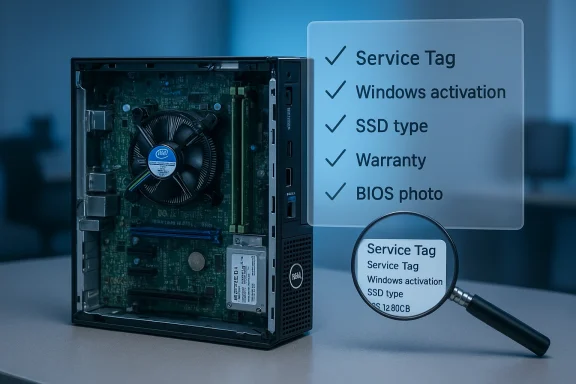
Before buying a refurbished OptiPlex 7010 SFF from a third‑party listing, do the following — this is a practical checklist drawn from community guides and refurb buyer best practices.- Ask for the exact SKU or Dell Service Tag and photograph of the rear label (serial + service tag).
- Request a screenshot of Settings → System → About showing Windows edition and activation status (if the listing claims Windows 10 Pro). Do not accept a generic “Windows installed” claim without proof.
- Ask for a photo of the BIOS splash or POST screen that clearly shows detected CPU and memory.
- Confirm the SSD type (SATA vs NVMe / M.2) and whether it is an OEM drive or a supplier‑installed aftermarket unit.
- Confirm the number and population of RAM slots (single 8 GB vs 2 × 4 GB) and whether memory is in dual‑channel mode.
- Verify the PSU rating and whether the system shipped originally with a desktop‑class CPU (if it didn’t, verify the cooler and fan used).
- Verify the refurbisher’s warranty period and return policy — longer warranty usually reduces risk.
- If possible, request a short video of unit booting into Windows and Device Manager showing installed devices.
On‑arrival tests (first 48 hours)
When the machine arrives, run these quick checks to validate the listing and reveal early defects. These steps are recommended in refurb buyer guides and community posts.- Validate Windows activation: Settings → System → About and Activation state.
- Cheboard details via Device Manager, CPU‑Z or the BIOS.
- Run a short SSD benchmark (CrystalDiskMark or the vendor’s quick test) to confirm the drive performs roughly as expected for its advertised type.
- Observe idle and light‑load CPU temperatures (HWMonitor, HWiNFO) and listen for unusual fan noise. If idle temps are high or the fan is loud immediately, treat as a red flag.
- Update Windows and install vendor drivers tag/Model from Dell support — BIOS updates sometimes resolve fan and thermal anomalies.
- If the listing promised internal Wi‑Fi but you received a USB dongle, that’s a returnable mismatch unless disclosed in the ad.
Known risks and mitigations
1) Scraped or template listings hide SKU inconsistencies
Automated aggregation and sloppy copy are common in mass marketplace listings. If the product text contains unrelated items or oddly formatted paragraphs (e.g., craft wire, unrelated accessories), insist on proof of the unit’s system details and photos. Sloppy listings have higher odds of shipping inconsistent hardware.Mitigation: demand the Service Tag and a photo of the BIOS/serial label before paying.
2) Thermal and fan behaviour in compact chassis
Compact SFF and micro PCs can show elevated temperatures under load or even at idle if the cooling path or firmware fan curves are not optimal. While many units run fine, community reports show isolated problems that required re‑application of thermal paste, updated BIOS firmware or quieter fan profile adjustments.Mitigation: test temps after arrival; if overheating appears, attempt a BIOS update and a thermal paste service as a first step. If the refurbisher refuses returns for thermal problems, escalate or return.
3) Windows 10/11 compatibility and support caveats
An i7‑3770 is a 3rd‑generation Intel CPU and is not on Microsoft’s official list of processors supported for Windows 11 (Microsoft’s baseline starts with many 8th‑generation Intel chips and later). Listings that claim Windows 11 compatibuaranteed long‑term feature updates may be misleading. If the seller claims a preinstalled Windows 11 or full Windows 11 lifecycle support, ask for proof (activation + Microsoft PC Health Check output).Mitigation: if ongoing Windows 11 support is crucial, buy hardware that Microsoft lists as supported. Otherwise plan to use Windows 10 (with awareness of its lifecycle) or accept Windows 11 on an unsupported platform with the attendant update and support caveats.
4) Warranty and refurbisher credibility
Marketplace sellers vary widely: Dell Outlet stock often retains some warranty coverage, but third‑party “renewed” sellers may only include short warranties. Short or absent warranties increase the total cost of ownership risk.Mitigation: prioritize sellers with clearly documented warranty terms and positive reputations; capture order screenshots and seller replies that confirm warranty length.
Why someone might still buy a renewed OptiPlex 7010 SFF with an i7‑3770
- Value for money: a properly refurbished enterprise desktop can offer serviceable CPU performance, durable chassis and manageable reliability for basic business tasks.
- Repairability and parts availability: OptiPlex systems have widely available spare parts and straightforward service manuals, easing future maintenance.
- Sufficient for many workloads: for office suites, web apps, remote sessions, video calls and basic content tasks the i7‑3770 remains adequate when paired with a suitably fast SSD and adequate RAM.
Practical step‑by‑step if you already bought the unit and it shows problems
- Validate the Service Tag and open Dell’s support page to confirm original configuration and warranty entries.
- Update BIOS and chipset drivers for the OptiPlex 7010 model from Dell’s support portal (use the Service Tag if possible).
- Monitor temps with HWiNFO or similar; if idle temps are unusually high, schedule a thermal repaste and clean the dust filters.
- If the SSD is slow or small, prioritize replacing it with a modern NVMe SATA alternative (or a higher capacity SATA SSD) — SSD upgrades deliver the most immediate responsiveness improvement.
- If Windows activation is missing or incorrect, requesation proof from the seller; do not accept a machine without a valid OS license if that was part of the sale.
- If thermal behavior remains poor aftce, escalate under the refurbisher’s warranty or return policy.
Final verdict and buyer guidance
A Dell OptiPlex 7010 SFF equippe7‑3770, 8 GB of RAM and a 128 GB SSD will run typical office workloads and is a legitimate value play — provided the listing is accurate, the refurbisher is reputable and the unit passes the arrival validation steps. The combination of an older Ivy Bridge CPU and a compact SFF chassis increases the importance of verifying thermal readiness, PSU rating, and the claimed Windows activation.Key takeaways:
- Verify the Service Tag and system screenshots before purchase. Listings with scrambled copy or unrelated product text are red flags.
- Insist on clear warranty and return terms. Short warranties raise the risk tll be a hassle and cost you time and money.
- Tes performance immediately on arrival; upgrade for the biggest real‑world improvements.
- If ity matters, this hardware is not on Microsoft’s supported list for recent Windows 11 releases — plan accordingly.
Quick purchase checklist (one‑page summary)
- Request Service Tag + BIOS photo.
- Request screenshot proving Windows activation.
- Confirm SSD type and RAM slot population.
- Confirm warranty length and return process.
- On arrival: verify activation, run SSD benchmark, check idle/load temps, update BIOS/drivers.
Source: ilrappuso.com Il Rappuso, magazine dedicato agli amanti del Rap
