

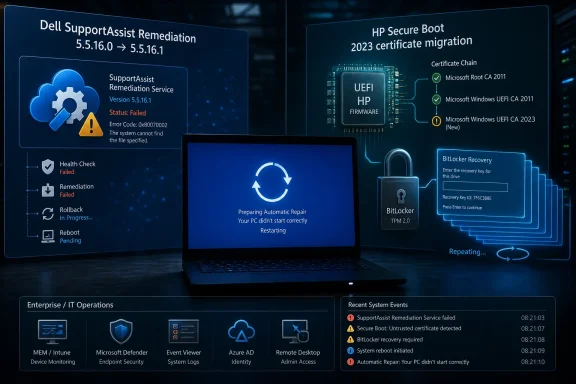
Dell and HP PCs have recently hit separate reboot and BitLocker recovery failures, but the common thread is not a broken Windows 11 update so much as OEM maintenance software and firmware colliding with Microsoft’s evolving Secure Boot chain. That distinction matters because it changes both the blame and the fix. The easy headline is that “Windows broke again”; the more useful lesson is that the Windows PC ecosystem now depends on a fragile choreography among Microsoft, device makers, firmware vendors, encryption policy, and recovery tools. When any one partner misses a step, users still see the same thing: a machine that will not boot cleanly.
Windows 11 has earned its reputation for update anxiety the hard way. Monthly cumulative updates are large, reboot-heavy, and sometimes opaque even to administrators who live inside Intune, WSUS, and event logs. So when a PC starts blue-screening after a recent update, or a fleet of laptops suddenly demands BitLocker recovery keys, the first suspect is almost always Microsoft.
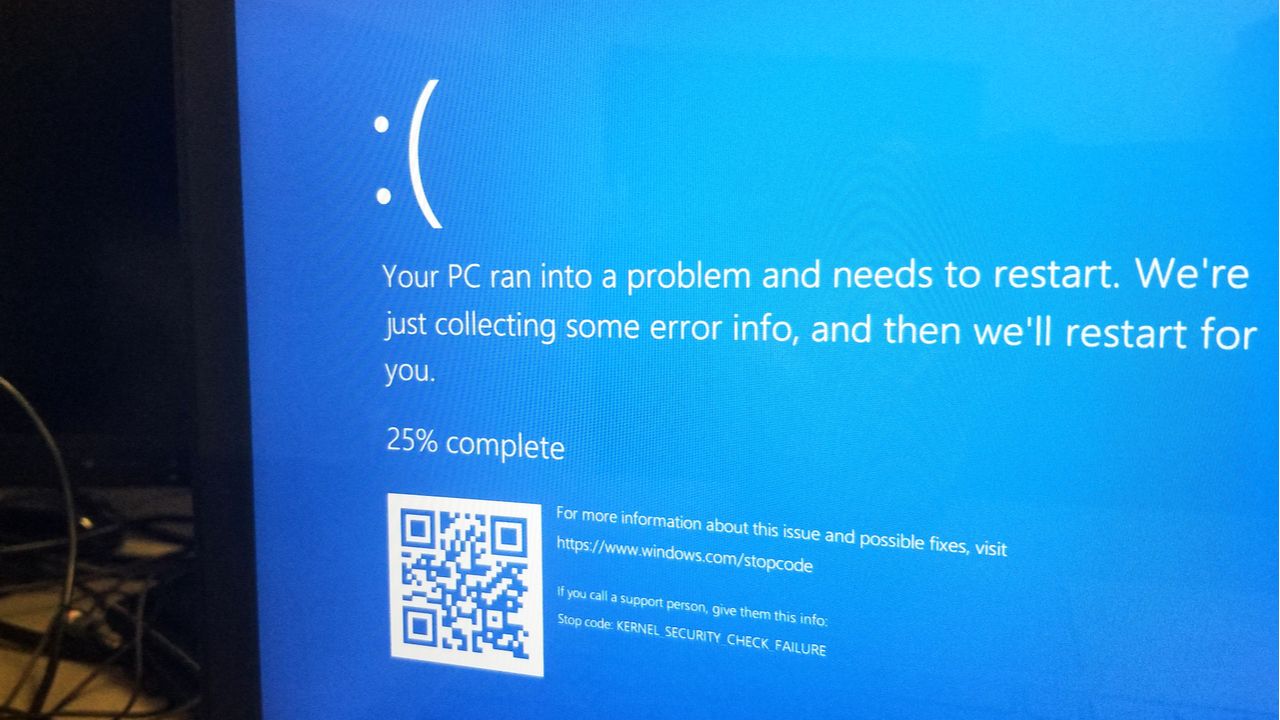
In the Dell case, however, the culprit was Dell’s own SupportAssist Remediation component. Dell has acknowledged that version 5.5.16.0 of Dell SupportAssist Remediation and Alienware SupportAssist Remediation can cause blue screen errors and unexpected restarts. The company’s fix is not to roll back Windows 11, but to update the remediation component to version 5.5.16.1.
That is not a minor distinction. SupportAssist Remediation is adjacent to the main SupportAssist application, but Dell says the problematic service is a separate piece bundled with SupportAssist OS Recovery Tools. In plain English, the software meant to help recover a Dell PC became the thing destabilizing it.
HP’s problem sits closer to the firmware boundary. Its affected commercial and workstation systems can become trapped in a BitLocker recovery loop after BIOS updates and Secure Boot certificate changes connected to Microsoft’s 2023 UEFI certificate migration. The operating system is involved, but it is not acting alone; the firmware must accept and preserve the right trust anchors for the boot path to remain stable.
SupportAssist Remediation is the kind of component many users do not know they have until something goes wrong. It is not the main Dell SupportAssist interface most people recognize. It operates as part of the recovery and remediation stack, which means it is privileged, persistent, and close enough to system health functions that a faulty version can have outsized consequences.
That is what appears to have happened with version 5.5.16.0. Users reported recurring crashes, reboot loops, and blue screen failures before Dell published its advisory identifying the bad component. The prescribed path is straightforward: check Installed Apps in Windows Settings, determine whether the affected remediation version is present, and update SupportAssist OS Recovery Tools through SupportAssist or Dell Command Update.
The more interesting point is not the fix. It is the exposure. A Windows PC can be fully patched, running a supported Windows 11 build, and still be undermined by an OEM utility that updates on a different cadence, carries a different quality bar, and is rarely part of the user’s mental model when troubleshooting crashes.
That creates a support problem as much as a software problem. Users see a Windows blue screen, not a “Dell remediation service failure” screen. Help desks receive reports of “Windows keeps rebooting,” not “SupportAssist OS Recovery Tools version 5.5.16.0 appears to be defective.” The visual language of failure still belongs to Windows, even when the failing code does not.
That design is correct in principle. If the boot chain changes, a disk encryption system should be suspicious. The trouble comes when legitimate updates to firmware, certificates, boot managers, or platform configuration look too much like an attack from BitLocker’s point of view.
HP’s support guidance indicates that affected systems can hit a BitLocker recovery loop when the required Secure Boot certificates are not applied correctly. Users may enter the correct recovery key, get back into Windows, reboot, and then face the same recovery demand again. For a single enthusiast machine, that is aggravating. For a managed fleet, it is a ticket storm.
This is where the phrase “Windows 11 isn’t to blame” needs careful handling. Windows is part of the chain, and Microsoft’s Secure Boot certificate migration is part of the trigger environment. But the failure described by HP depends on platform firmware configuration and BIOS behavior. If the system cannot retain or properly expose the required certificates, the OS cannot magically pretend the boot trust chain is unchanged.
The practical fix, according to HP’s guidance, is to update affected systems to the latest BIOS and configure the necessary Secure Boot certificates before applying the relevant Windows updates. Systems already stuck in the loop may require manual BIOS configuration changes to restore normal boot behavior. That is not the kind of repair most consumers are prepared to make, and it is exactly the kind of repair enterprises would prefer to automate, test, and stage.
The result is a shared responsibility model in which the user experiences a single failure but the accountability is spread across multiple vendors. Microsoft signs the boot components and pushes OS policy. OEMs ship the firmware, platform defaults, and update channels. Security tools measure the result. IT departments inherit the blast radius.
This is not unique to Dell or HP. It is the architecture of the Windows ecosystem in 2026. The platform has become more secure partly by moving trust decisions earlier in the boot process and deeper into firmware. That makes compromise harder, but it also makes recovery more specialized when routine maintenance disturbs the chain.
The uncomfortable lesson is that some of the most consequential Windows changes no longer look like Windows changes. A certificate toggle in firmware, a BIOS update classified as critical, or an OEM recovery service update can be just as disruptive as a cumulative update. Users still schedule their anxiety around Patch Tuesday, but the fault line now runs through the whole supply chain.
The platform configuration registers used in measured boot are meant to detect whether key parts of the boot path have changed. Secure Boot certificate updates, boot manager changes, BIOS setting flips, and firmware revisions can alter those measurements. If policy says those measurements must match, BitLocker asks for proof that the person at the keyboard is authorized.
The HP loop becomes pathological because the system does not settle into a new trusted state. The user supplies the recovery key, but the next boot still looks wrong. That is the difference between a one-time recovery event and an administrative sinkhole.
Microsoft and OEMs have tried to make this transition more graceful, but the path is inherently messy. Secure Boot’s older certificates are aging out, and the industry has to move. Yet many PCs in the field were not designed, imaged, or managed with a smooth certificate rollover in mind. Some have stale firmware. Some have odd BIOS defaults. Some have tiny or cluttered EFI system partitions. Some are governed by BitLocker policies written years before this migration became urgent.
That is why the HP case matters beyond HP. It is an early warning about how brittle “secure by default” can become when the defaults change underneath deployed machines.
Dell Command Update, HP Image Assistant, Lenovo Commercial Vantage, firmware delivery agents, telemetry services, remediation tools, and recovery plug-ins all sit close to the operating system’s reliability boundary. Some are invaluable for keeping BIOS and drivers current. Others duplicate functions already handled by enterprise management. The important point is that they are not neutral.
Consumer users have fewer levers. They are often told to keep OEM tools installed because those tools deliver firmware and driver updates Microsoft may not provide directly. That advice is not wrong, but it is incomplete. A tool that can update firmware or recovery components can also ship a bad update. Trusting the OEM channel does not eliminate update risk; it moves some of that risk outside Windows Update’s familiar frame.
Enterprises should already be testing OEM update catalogs before broad deployment. The events at Dell and HP reinforce why that discipline matters. Firmware and support-stack updates should be piloted on representative hardware, staged by model, and correlated with BitLocker recovery key escrow health before rollout.
For Dell users, the symptom was instability: blue screens, sudden restarts, and reboot cycles. For HP users, it was access friction: BitLocker recovery screens repeating even after the correct key was entered. Different symptoms, same trust problem.
The Windows PC has always been an ecosystem product, but users rarely experience it that way until failure. When things work, the Dell or HP logo disappears behind the Windows desktop. When things fail, the boundary between Microsoft and the manufacturer suddenly matters — and the user is expected to understand it under pressure.
That is poor product design, even when the technical architecture is defensible. A recovery service should not be able to create an opaque crash loop without clear attribution. A firmware certificate migration should not leave ordinary users guessing which BIOS boxes to check. If platform security now requires more moving parts, the industry owes users better failure modes.
The wrong approach is to let every endpoint discover its own fate during a normal update window. That may work for most systems, but the exceptions will be painful. Machines that enter recovery loops can consume disproportionate help desk time, especially if recovery keys are missing, users are remote, or BIOS settings require hands-on intervention.
The better approach is dull but effective: inventory, pilot, verify, then expand. Identify which models need BIOS updates. Confirm that recovery keys are escrowed in Entra ID, Active Directory, MBAM, or whatever key management system the organization actually uses. Test the certificate migration on a small group of each hardware model before pushing broadly.
Administrators should also document BIOS settings in operational language, not just vendor language. If a fleet requires Microsoft UEFI CA 2023 or Microsoft Option ROM UEFI CA 2023 to be enabled, that setting should be visible in deployment runbooks. The firmware setup screen is no place to discover policy for the first time.
But incidents like these show the limits of simplicity. “Update everything” is safe only when the update pipeline is reliable, the dependencies are understood, and the recovery path is available. When firmware, certificates, encryption policy, and OEM remediation software all change in overlapping windows, blind updating can become operational roulette.
That does not mean users should freeze their systems. The risks addressed by firmware updates and Secure Boot modernization are real. Expired or obsolete trust chains are not academic concerns, and leaving machines on stale firmware can be worse than enduring a difficult transition.
The more mature advice is to update deliberately. Consumers should make sure BitLocker recovery keys are saved before firmware or major security updates. Businesses should test OEM tools with the same suspicion they apply to third-party security agents. Everyone should stop assuming that a blue screen or recovery loop after Patch Tuesday automatically means the monthly Windows update is the root cause.
There is also a wider reading, and it is more important. The Windows endpoint is becoming less like a standalone OS install and more like a continuously serviced trust appliance. Its health depends on the operating system, firmware, OEM utilities, cloud policy, encryption escrow, and boot certificates all agreeing about what “normal” looks like.
That agreement can break without malware, without user error, and without Microsoft shipping a fundamentally bad Windows build. It can break because a remediation service update crashes. It can break because a BIOS update mishandles certificate state. It can break because BitLocker correctly refuses to ignore a boot path that changed.
This is why blaming Windows 11 alone is too crude. Windows remains the stage on which the failure appears, but the actors increasingly come from elsewhere.
 The Windows Update Scapegoat Is Too Convenient This Time
Windows 11 has earned its reputation for update anxiety the hard way. Monthly cumulative updates are large, reboot-heavy, and sometimes opaque even to administrators who live inside Intune, WSUS, and event logs. So when a PC starts blue-screening after a recent update, or a fleet of laptops suddenly demands BitLocker recovery keys, the first suspect is almost always Microsoft.In the Dell case, however, the culprit was Dell’s own SupportAssist Remediation component. Dell has acknowledged that version 5.5.16.0 of Dell SupportAssist Remediation and Alienware SupportAssist Remediation can cause blue screen errors and unexpected restarts. The company’s fix is not to roll back Windows 11, but to update the remediation component to version 5.5.16.1.
That is not a minor distinction. SupportAssist Remediation is adjacent to the main SupportAssist application, but Dell says the problematic service is a separate piece bundled with SupportAssist OS Recovery Tools. In plain English, the software meant to help recover a Dell PC became the thing destabilizing it.
HP’s problem sits closer to the firmware boundary. Its affected commercial and workstation systems can become trapped in a BitLocker recovery loop after BIOS updates and Secure Boot certificate changes connected to Microsoft’s 2023 UEFI certificate migration. The operating system is involved, but it is not acting alone; the firmware must accept and preserve the right trust anchors for the boot path to remain stable.
Dell’s Recovery Tool Became the Failure Domain
The Dell incident is almost too neat as a parable. Modern OEM support suites are sold as convenience layers: driver checks, diagnostics, recovery tools, update automation, and one-click serviceability for users who would rather not visit a support site. In enterprise environments, those same tools can be either useful plumbing or unwanted noise, depending on how tightly IT controls the image.SupportAssist Remediation is the kind of component many users do not know they have until something goes wrong. It is not the main Dell SupportAssist interface most people recognize. It operates as part of the recovery and remediation stack, which means it is privileged, persistent, and close enough to system health functions that a faulty version can have outsized consequences.
That is what appears to have happened with version 5.5.16.0. Users reported recurring crashes, reboot loops, and blue screen failures before Dell published its advisory identifying the bad component. The prescribed path is straightforward: check Installed Apps in Windows Settings, determine whether the affected remediation version is present, and update SupportAssist OS Recovery Tools through SupportAssist or Dell Command Update.
The more interesting point is not the fix. It is the exposure. A Windows PC can be fully patched, running a supported Windows 11 build, and still be undermined by an OEM utility that updates on a different cadence, carries a different quality bar, and is rarely part of the user’s mental model when troubleshooting crashes.
That creates a support problem as much as a software problem. Users see a Windows blue screen, not a “Dell remediation service failure” screen. Help desks receive reports of “Windows keeps rebooting,” not “SupportAssist OS Recovery Tools version 5.5.16.0 appears to be defective.” The visual language of failure still belongs to Windows, even when the failing code does not.
HP’s BitLocker Loop Shows the Cost of Secure Boot Modernization
HP’s issue is more complicated because it touches one of the most important platform transitions happening quietly beneath Windows: the migration from older Secure Boot certificates to newer 2023-era certificate authorities. Secure Boot depends on firmware-stored trust lists that determine which pre-boot software is allowed to run. BitLocker, in turn, watches parts of that boot environment closely because changes to the trusted boot path can indicate tampering.That design is correct in principle. If the boot chain changes, a disk encryption system should be suspicious. The trouble comes when legitimate updates to firmware, certificates, boot managers, or platform configuration look too much like an attack from BitLocker’s point of view.
HP’s support guidance indicates that affected systems can hit a BitLocker recovery loop when the required Secure Boot certificates are not applied correctly. Users may enter the correct recovery key, get back into Windows, reboot, and then face the same recovery demand again. For a single enthusiast machine, that is aggravating. For a managed fleet, it is a ticket storm.
This is where the phrase “Windows 11 isn’t to blame” needs careful handling. Windows is part of the chain, and Microsoft’s Secure Boot certificate migration is part of the trigger environment. But the failure described by HP depends on platform firmware configuration and BIOS behavior. If the system cannot retain or properly expose the required certificates, the OS cannot magically pretend the boot trust chain is unchanged.
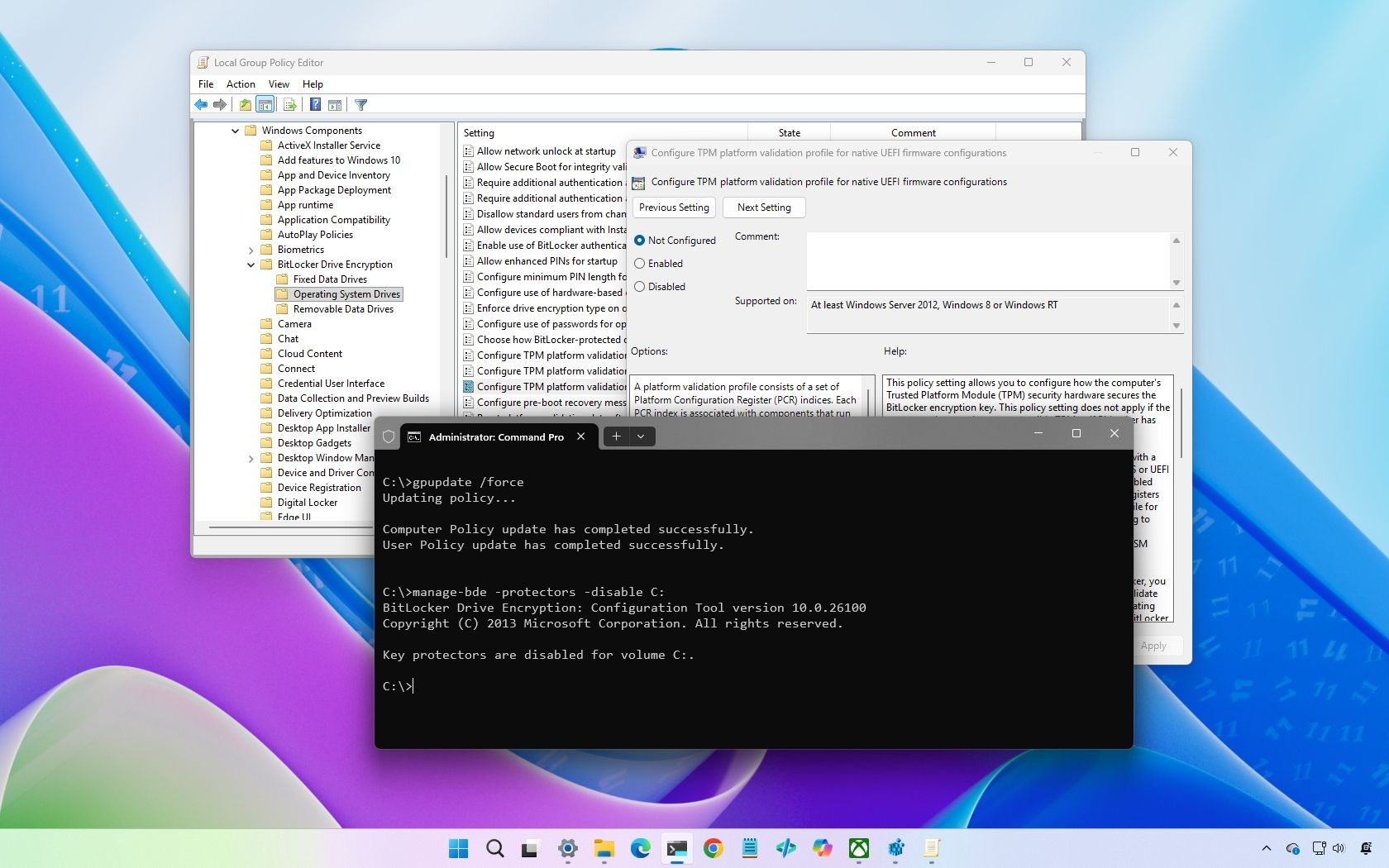
The practical fix, according to HP’s guidance, is to update affected systems to the latest BIOS and configure the necessary Secure Boot certificates before applying the relevant Windows updates. Systems already stuck in the loop may require manual BIOS configuration changes to restore normal boot behavior. That is not the kind of repair most consumers are prepared to make, and it is exactly the kind of repair enterprises would prefer to automate, test, and stage.
The PC Ecosystem Is Now a Shared Responsibility Trap
For years, Windows servicing was treated as a Microsoft problem with a hardware footnote. That model no longer describes the modern PC. Firmware updates arrive through Windows Update. OEM utilities update themselves or ride along through vendor management tools. Security features such as BitLocker, Secure Boot, virtualization-based security, TPM attestation, and measured boot depend on hardware and firmware behaving predictably.The result is a shared responsibility model in which the user experiences a single failure but the accountability is spread across multiple vendors. Microsoft signs the boot components and pushes OS policy. OEMs ship the firmware, platform defaults, and update channels. Security tools measure the result. IT departments inherit the blast radius.
This is not unique to Dell or HP. It is the architecture of the Windows ecosystem in 2026. The platform has become more secure partly by moving trust decisions earlier in the boot process and deeper into firmware. That makes compromise harder, but it also makes recovery more specialized when routine maintenance disturbs the chain.
The uncomfortable lesson is that some of the most consequential Windows changes no longer look like Windows changes. A certificate toggle in firmware, a BIOS update classified as critical, or an OEM recovery service update can be just as disruptive as a cumulative update. Users still schedule their anxiety around Patch Tuesday, but the fault line now runs through the whole supply chain.
BitLocker Is Doing Its Job, Which Is Why It Feels Broken
BitLocker recovery prompts are often described as lockouts, and from the user’s chair that is fair. A machine that demands a 48-digit recovery key before work can begin is functionally unavailable. But BitLocker is not merely malfunctioning when it reacts to boot-chain changes; it is enforcing the premise on which disk encryption depends.The platform configuration registers used in measured boot are meant to detect whether key parts of the boot path have changed. Secure Boot certificate updates, boot manager changes, BIOS setting flips, and firmware revisions can alter those measurements. If policy says those measurements must match, BitLocker asks for proof that the person at the keyboard is authorized.
The HP loop becomes pathological because the system does not settle into a new trusted state. The user supplies the recovery key, but the next boot still looks wrong. That is the difference between a one-time recovery event and an administrative sinkhole.
Microsoft and OEMs have tried to make this transition more graceful, but the path is inherently messy. Secure Boot’s older certificates are aging out, and the industry has to move. Yet many PCs in the field were not designed, imaged, or managed with a smooth certificate rollover in mind. Some have stale firmware. Some have odd BIOS defaults. Some have tiny or cluttered EFI system partitions. Some are governed by BitLocker policies written years before this migration became urgent.
That is why the HP case matters beyond HP. It is an early warning about how brittle “secure by default” can become when the defaults change underneath deployed machines.
OEM Utilities Deserve the Same Scrutiny as Drivers
The Dell episode should push administrators to reclassify OEM support tools as production software, not harmless bloatware. That does not mean every support utility should be ripped out. It means these tools need version tracking, change control, and rollback plans like any other privileged endpoint component.Dell Command Update, HP Image Assistant, Lenovo Commercial Vantage, firmware delivery agents, telemetry services, remediation tools, and recovery plug-ins all sit close to the operating system’s reliability boundary. Some are invaluable for keeping BIOS and drivers current. Others duplicate functions already handled by enterprise management. The important point is that they are not neutral.
Consumer users have fewer levers. They are often told to keep OEM tools installed because those tools deliver firmware and driver updates Microsoft may not provide directly. That advice is not wrong, but it is incomplete. A tool that can update firmware or recovery components can also ship a bad update. Trusting the OEM channel does not eliminate update risk; it moves some of that risk outside Windows Update’s familiar frame.
Enterprises should already be testing OEM update catalogs before broad deployment. The events at Dell and HP reinforce why that discipline matters. Firmware and support-stack updates should be piloted on representative hardware, staged by model, and correlated with BitLocker recovery key escrow health before rollout.
The Real Outage Is the Loss of Predictability
The most damaging part of these failures is not a single blue screen or recovery prompt. It is the loss of predictability in routine maintenance. Users can tolerate scheduled disruption when the cause and remedy are obvious. They lose trust when a normal update path turns into an endless loop with unclear ownership.For Dell users, the symptom was instability: blue screens, sudden restarts, and reboot cycles. For HP users, it was access friction: BitLocker recovery screens repeating even after the correct key was entered. Different symptoms, same trust problem.
The Windows PC has always been an ecosystem product, but users rarely experience it that way until failure. When things work, the Dell or HP logo disappears behind the Windows desktop. When things fail, the boundary between Microsoft and the manufacturer suddenly matters — and the user is expected to understand it under pressure.
That is poor product design, even when the technical architecture is defensible. A recovery service should not be able to create an opaque crash loop without clear attribution. A firmware certificate migration should not leave ordinary users guessing which BIOS boxes to check. If platform security now requires more moving parts, the industry owes users better failure modes.
Admins Should Treat Secure Boot Migration as a Project, Not a Patch
The Secure Boot 2023 certificate transition is not just another monthly update detail. It is a platform migration that deserves planning, especially for organizations with BitLocker enforced, PCR profile customizations, legacy boot assumptions, or mixed hardware generations.The wrong approach is to let every endpoint discover its own fate during a normal update window. That may work for most systems, but the exceptions will be painful. Machines that enter recovery loops can consume disproportionate help desk time, especially if recovery keys are missing, users are remote, or BIOS settings require hands-on intervention.
The better approach is dull but effective: inventory, pilot, verify, then expand. Identify which models need BIOS updates. Confirm that recovery keys are escrowed in Entra ID, Active Directory, MBAM, or whatever key management system the organization actually uses. Test the certificate migration on a small group of each hardware model before pushing broadly.
Administrators should also document BIOS settings in operational language, not just vendor language. If a fleet requires Microsoft UEFI CA 2023 or Microsoft Option ROM UEFI CA 2023 to be enabled, that setting should be visible in deployment runbooks. The firmware setup screen is no place to discover policy for the first time.
The Old Advice to “Just Update Everything” Has Expired
Security professionals often give simple advice because simple advice is more likely to be followed. Keep Windows updated. Install firmware updates. Do not disable BitLocker. Leave Secure Boot on. For the broad population, those recommendations remain correct.But incidents like these show the limits of simplicity. “Update everything” is safe only when the update pipeline is reliable, the dependencies are understood, and the recovery path is available. When firmware, certificates, encryption policy, and OEM remediation software all change in overlapping windows, blind updating can become operational roulette.
That does not mean users should freeze their systems. The risks addressed by firmware updates and Secure Boot modernization are real. Expired or obsolete trust chains are not academic concerns, and leaving machines on stale firmware can be worse than enduring a difficult transition.
The more mature advice is to update deliberately. Consumers should make sure BitLocker recovery keys are saved before firmware or major security updates. Businesses should test OEM tools with the same suspicion they apply to third-party security agents. Everyone should stop assuming that a blue screen or recovery loop after Patch Tuesday automatically means the monthly Windows update is the root cause.
The Fix Is Smaller Than the Lesson
There is a narrow reading of the Dell and HP news, and it is useful. Dell users with SupportAssist Remediation 5.5.16.0 should update to 5.5.16.1 rather than uninstalling the main SupportAssist application reflexively. HP commercial and workstation users caught in BitLocker loops should follow HP’s BIOS and Secure Boot certificate guidance, with particular attention to the required Microsoft 2023 UEFI certificate settings.There is also a wider reading, and it is more important. The Windows endpoint is becoming less like a standalone OS install and more like a continuously serviced trust appliance. Its health depends on the operating system, firmware, OEM utilities, cloud policy, encryption escrow, and boot certificates all agreeing about what “normal” looks like.
That agreement can break without malware, without user error, and without Microsoft shipping a fundamentally bad Windows build. It can break because a remediation service update crashes. It can break because a BIOS update mishandles certificate state. It can break because BitLocker correctly refuses to ignore a boot path that changed.
This is why blaming Windows 11 alone is too crude. Windows remains the stage on which the failure appears, but the actors increasingly come from elsewhere.
The Clues IT Should Pull From These Two Messes
The immediate fixes are vendor-specific, but the operational lessons generalize across mixed Windows fleets. If these failures have a silver lining, it is that they expose weak assumptions before a larger platform migration forces the issue at scale.- Organizations should inventory OEM remediation, recovery, driver, and firmware utilities as managed software rather than treating them as background vendor extras.
- BitLocker recovery keys should be verified before firmware, Secure Boot, or boot manager changes reach users, because the correct key is the difference between an interruption and a dead stop.
- Secure Boot certificate migration should be tested by hardware model and BIOS version, not merely by Windows build number.
- Consumer users should avoid uninstalling primary OEM support tools in panic unless the vendor guidance specifically says to do so.
- Help desks should update triage scripts so repeated BitLocker prompts and reboot loops are investigated as firmware or OEM-tool failures, not automatically logged as generic Windows update defects.
References
- Primary source: Neowin
Published: 2026-06-08T10:10:17.888129
Loading…
www.neowin.net - Related coverage: dell.com
- Related coverage: windowslatest.com

HP admits its latest BIOS update is bricking Windows 11 with BitLocker loop, blocking Secure Boot 2023 fix
HP business laptops are stuck in BitLocker recovery loops after a faulty BIOS update that also disrupted Microsoft's Secure Boot 2023 rollout www.windowslatest.com
- Related coverage: tomshardware.com
Dell SupportAssist update is crashing PCs with constant blue screens and reboot loops — the boot service built for system recovery is the culprit of unending instability
Version 5.5.16.0 of Dell's SupportAssist Remediation software is the culprit.www.tomshardware.com
- Related coverage: windowscentral.com
“I thought my drive was corrupted” — Windows 11’s April update is tripping BitLocker recovery for some users
A faulty BitLocker configuration is forcing some PCs into BitLocker recovery mode after the April 2026 update, but there's a workaround to resolve this issue. www.windowscentral.com
- Related coverage: fdaytalk.com

Fix HP BIOS Update BitLocker Recovery Loop on Windows 11
HP's April 2026 BIOS update is causing an HP BIOS update BitLocker recovery loop on EliteBook, ProBook, and ZBook laptops. Use F10 BIOS workaround to fix it. www.fdaytalk.com
- Related coverage: windowsnews.ai
HP April 2026 BIOS Updates Trigger BitLocker Recovery Loops & Secure Boot 2023 Issues
HP's April 2026 BIOS updates trigger BitLocker recovery loops and Secure Boot errors on Windows 11 PCs. Learn about the root causes, affected models,...windowsnews.ai
- Related coverage: windowsforum.com

HP April 2026 BIOS Updates Trigger BitLocker Recovery Loops & Secure Boot 2023 Issues
HP’s April 2026 BIOS updates for commercial Windows 11 PCs have triggered BitLocker recovery loops and boot failures across HP notebooks, desktops, and workstations, while also interfering with Microsoft’s Secure Boot 2023 certificate migration ahead of the June 2026 certificate-expiration... windowsforum.com
- Related coverage: notebookcheck.net

Windows 11 KB5083769 April 2026 update triggers death loops and BSODs
Microsoft’s Windows 11 KB5083769 April 2026 update causes critical boot failures, pixelated BSODs, and BitLocker recovery loops on Windows 11 24H2 and 25H2 PCs. www.notebookcheck.net
- Related coverage: tomsguide.com
Loading…
www.tomsguide.com