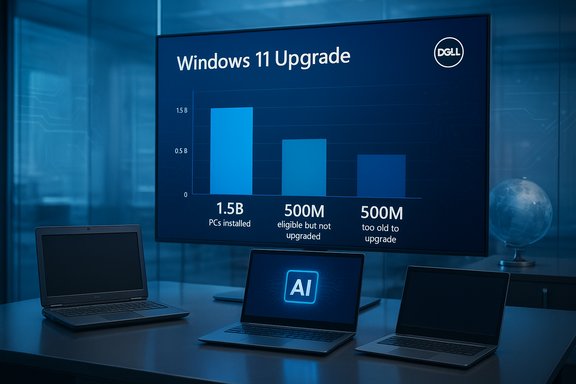
Dell’s blunt investor math — an installed base of roughly 1.5 billion Windows PCs, with “about 500 million” that can run Windows 11 but haven’t upgraded and another “about 500 million” that are effectively too old to run it — is reshaping how OEMs, enterprise IT teams and consumers think about the PC refresh cycle. The upshot: despite Microsoft’s end-of-support push for Windows 10 and a market saturated with AI‑branded hardware, Dell told investors it expects the PC market to be roughly flat for the coming year, and that the Windows 11 transition is trailing previous OS migrations by roughly 10–12 percentage points.
Background
Microsoft formally ended mainstream support for consumer Windows 10 with a hard deadline that pushed marketing, OEM activity and corporate procurement into motion. Microsoft also offered a time-limited Extended Security Updates (ESU) program to give some consumers and organizations breathing room while they decide whether to migrate or replace hardware. At the same time, Windows 11 shipments and Microsoft’s AI-driven messaging (Copilot, Copilot+ PCs, on-device NPUs) created a narrative that the OS transition would rapidly accelerate. The reality captured by Dell’s Q3 investor commentary is more complicated: adoption momentum exists, but so does inertia — and the result is a slower, more staggered migration than many in the industry expected.Independent telemetry from market trackers in 2025 recorded volatile month‑to‑month movement — Windows 11 grew but not uniformly across regions and device classes. Some trackers reported Windows 11 passing Windows 10 in desktop share mid‑2025; others showed a persistent Windows 10 base. That mixed picture helps explain why Dell’s field-level estimate and Microsoft’s marketing language can look like different stories rather than outright contradictions.
What Dell actually said — and why it matters
The core claims from the earnings call
- Dell put the installed base at ~1.5 billion Windows PCs in the field.
- Of those, Dell said ~500 million devices could run Windows 11 but remained on Windows 10.
- Dell also said ~500 million devices are about four or more years old and cannot run Windows 11 without hardware changes.
- Dell’s COO, Jeffrey Clarke, characterized the migration as 10–12 percentage points behind the comparable migration during the previous OS transition.
- Dell forecast the PC market as flat for the next year while noting strength in AI server demand and pressure from rising component costs (DRAM, NAND).
Why the remarks carry weight
Dell is a leading OEM with deep channel visibility; its earnings‑call commentary reflects sales telemetry, channel feedback and enterprise procurement signals. An OEM view that sees a lower‑than‑expected OS‑driven refresh implies different inventory, pricing and promotional tactics across the PC supply chain — and it signals to investors that the near‑term replacement tailwind Microsoft hoped for may be weaker than planned. That matters for OEMs, enterprise procurement schedules, and channel financing.Verifying the numbers: what’s solid, what’s estimated
The installed‑base and the “500M/500M” split
Dell’s numerical framing appeared repeatedly in the call transcript and in contemporaneous reporting; the company presented these figures as an internal estimate used to explain its guidance. Those numbers are directional and meaningful in scale — they convert abstract percentages into a tangible hardware market — but they are company estimates, not an audited global census. Treat the 1.5B / 500M / 500M breakdown as OEM telemetry and planning math rather than a precise, device‑by‑device public audit.Windows 10 end-of-support and ESU details
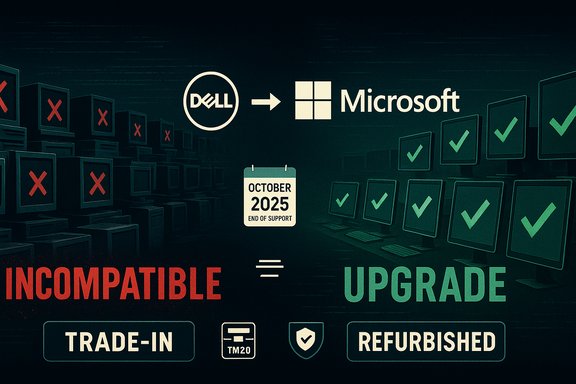
Microsoft’s formal end-of-support for mainstream consumer Windows 10 created the calendar driver for migration. Microsoft also released a consumer ESU path (with free enrollment options in some scenarios and a paid option in others) that extends critical and important security updates for a limited window — a factor that materially softens urgency for some users. The ESU program and the October 2025/October 2026 milestone framing were widely reported in the industry and cited during Dell’s remarks. These lifecycle facts are verifiable in Microsoft’s documentation and were reflected in press coverage and OEM commentary.Independent tracker context
Multiple independent trackers recorded Windows 11’s share of desktop Windows growing through 2024–2025, and some reported Windows 11 crossing Windows 10 in share in mid‑2025. Those tracker numbers are sampled telemetry (web panels, OEM data, Steam, etc. and differ by methodology. They confirm the broad trend — Windows 11 grew substantially — but they don’t invalidate Dell’s claim that a very large installed base remained on Windows 10 at the time of Dell’s commentary. In short: the trackers and OEM telemetry point to the same underlying truth — migration progressed but was incomplete and uneven.Caveat on Microsoft’s marketing phrasing
Microsoft’s messaging around Windows 11 sometimes used high‑level language like “nearly a billion people rely on Windows 11,” which is powerful marketing shorthand but inherently ambiguous about the underlying metric (monthly active users, unique signed-in devices, OEM preloads, etc.. That phrasing is not wrong as a promotional statement, but it lacks the device-level precision analysts need for inventory planning; treat such claims as broad platform metrics rather than audited installed‑device counts. This is an example of marketing language versus operational telemetry.Why adoption is slower than expected — the multidimensional friction
Windows 11’s migration is not delayed for a single reason. Instead, several technical, economic and behavioral forces converge to slow the upgrade cycle.1) Hardware gating and compatibility rules
Windows 11’s minimum baseline — TPM 2.0, UEFI Secure Boot, and a list of supported CPU generations — created a compatibility cliff that left many otherwise functional Windows 10 PCs ineligible for an official upgrade. For many laptops and small-form-factor systems, there is no practical path to meet those requirements except a full system replacement. That technical friction alone accounts for a large portion of the “can’t” cohort Dell described.2) Enterprise conservatism and application complexity
Enterprises migrate conservatively. Legacy applications, regulatory testing, and the sheer operational overhead of a mass OS migration lead IT teams to stagger pilots, validate drivers, and coordinate fleet rollouts — often over multiple fiscal cycles. This natural conservatism flattens enterprise-driven adoption curves and explains why even upgrade‑eligible devices can remain on Windows 10 for months or years.3) Cost pressures, component inflation and profitability
Memory and storage prices (DRAM, NAND) rose in the 2024–2025 timeframe, increasing the cost basis for new systems. That component inflation compresses price points and narrows OEM margin flexibility, making it harder to create compelling price-first refresh offers for mainstream consumers. Dell explicitly cited rising DRAM and NAND costs in its market commentary and used that as context for its flat PC market forecast. Higher component costs dampen replacement economics for both OEMs and buyers.4) Perceived value and user choice
Many consumers and businesses ask a simple question: does the upgrade justify the cost and disruption? For users whose workflows are unchanged, Windows 11’s early perceived benefits (visual refresh, some security features, and AI cues) did not always outweigh the friction of a new OS. Microsoft’s ESU program also gave many households and small businesses a practical way to delay expensive hardware purchases.5) Sustainability and e‑waste concerns
Replacing large numbers of otherwise‑serviceable PCs raises environmental concerns. Advocacy groups and sustainability-minded IT organizations raised early flags about the potential e‑waste impact of a forced hardware refresh, and that ethical calculus influenced some procurement decisions toward repair, refurbishment and longer device lifecycles. Dell’s remarks acknowledged longer-term replacement opportunity but the industry must weigh these sustainability constraints.Market and strategic implications
For Microsoft
- Messaging friction: Heavy-handed nudges can accelerate awareness but may not convert holdouts without clearer, measurable feature advantages. Microsoft’s marketing that highlights Windows 11 scale helps the platform narrative, but it does not replace fleet-level telemetry used by IT buyers.
- Product strategy: With a stretched migration tail, Microsoft may pivot to hybrid strategies — cloud-offload for AI workloads, backward-compatible enhancements, or incremental features that work on older hardware where feasible.
For OEMs (Dell, HP, Lenovo, others)
- Inventory and pricing: Expect tighter SKU rationalization, targeted promotions and trade‑in programs that incentivize replacement of the oldest devices. Dell’s direct model and enterprise relationships let it reprice and prioritize supply where demand is strongest, particularly around AI servers and high‑end Copilot+ systems.
- Upsell opportunity: OEMs are positioning NPUs and on‑device inference as the tangible reasons to buy new hardware — a value proposition beyond an OS bump. That sells higher-margin units even if unit growth is flat.
For enterprises and IT managers
- Migration planning: The migration is a multi‑year program. IT teams should prioritize risk‑exposed endpoints, embrace phased pilots, and use ESU selectively as a bridge rather than a permanent solution. Vendor engagement (drivers, firmware updates) is essential.
Practical steps: how to manage the migration and minimize risk
For enterprises (recommended sequence)
- Inventory and classify: Audit your fleet by hardware capability, application criticality, and compliance risk.
- Prioritize by risk: Move high‑risk or regulated endpoints first; low‑risk users can be staged later.
- Pilot and validate: Use representative hardware to validate drivers and critical apps — a single failed app can stall rollouts.
- Consider alternatives: For ineligible devices, evaluate VDI/Windows 365, ChromeOS Flex, or controlled ESU enrollment.
- Finance and refurb: Use trade-in programs, leasing and certified refurbishers to lower incremental costs and reduce e‑waste.
For consumers (practical checklist)
- Check upgrade eligibility using Microsoft’s system check tools and your OEM’s support pages.
- Back up critical data and ensure you have recovery media before attempting an upgrade.
- If hardware is incompatible, evaluate trade-in discounts, refurbished certified systems or the limited ESU option while planning a replacement.
- For privacy and AI concerns, read the device and OS privacy settings; AI features often require cloud or account sign‑in to unlock full functionality.
Risks to watch
- Security exposure: The longer large populations remain on an unsupported OS (or on ESU with limited coverage), the bigger the potential attack surface for targeted threats. ESU is a stopgap, not a long-term substitute for platform currency.
- Supply and price shocks: Memory and storage inflation can make replacement more expensive and squeeze entry-level offers, slowing sales. OEMs will respond with configuration changes and availability tactics, but higher cost bases are a headwind.
- E‑waste and regulatory scrutiny: Policymakers and ESG officers are increasingly focused on device lifecycles and repairability. A mass hardware churn without robust refurbishment and take‑back programs risks reputational and regulatory backlash.
- Messaging mismatch: When platform owners use ambiguous scale language while OEMs report field-level delay, customers and investors can become confused — increasing pressure on firms to publish more auditable telemetry.
What the slower refresh cycle means for the near-term PC market
Dell’s forecast of a flat PC market in the coming year reflects a tradeoff: unit growth may be muted, but the replacement cycle can still generate higher-margin opportunities where AI-capable hardware and commercial refresh programs are prioritized. In practice, that creates a bifurcated market:- Stable to flat unit volumes in the consumer mainstream, which is price-sensitive and will delay upgrades;
- Concentrated demand in commercial fleets and high-value AI‑enabled segments, where enterprises and early adopters buy premium devices or servers.
Long‑term scenarios and what to watch for
- Accelerated uplift scenario (12–24 months): Strong demand for local AI experiences and vendor-led trade‑in programs convert a significant share of the “can run but won’t” cohort into buyers. OEM shipments pick up, and Windows 11 reaches broader parity across active device classes. Indicators: rising sell‑through, shrinking Windows 10 share in independent trackers, and stronger consumer promotions.
- Stretched migration scenario (2–5 years): Enterprise timing, cost sensitivity and sustainability concerns keep many Windows 10 devices in the field longer. OEMs maintain flat shipments but extract revenue through services, financing and mid‑tier product refreshes. Indicators: persistent Windows 10 traffic share, continued use of ESU, and slow reduction in the “too old” population.
- Hybrid‑replacement outcome: Geographic and segmental disparity persists — some markets and verticals upgrade quickly, while others delay. The PC market overall remains flat but becomes more profitable due to higher ASPs (average selling prices) in the AI-capable tier and server growth for AI workloads. Indicators: regional shipment divergence, premium SKU growth, and continuing server order strength.
Final analysis and key takeaways
- Dell’s investor statements convert a broad migration narrative into a tangible, three‑number heuristic: 1.5 billion PCs installed, ~500 million eligible but un-upgraded, and ~500 million too-old to upgrade. Those figures are useful directional telemetry for planning but should be treated as OEM estimates rather than a precise global device census.
- The Windows 11 transition is real and meaningful, but it is neither instantaneous nor uniform. Hardware eligibility rules, enterprise risk management, component pricing and buyer perception all combine to slow the refresh cycle. Independent trackers show Windows 11 growing, but a large Windows 10 base persisted through the critical mid‑2025 window.
- Microsoft’s ESU program and ambiguous platform metrics complicate public interpretation: ESU reduces near‑term urgency for some users, and marketing language like “nearly a billion” is useful but not a substitute for audited device counts. Exercise caution when translating marketing statements into procurement plans.
- For OEMs and channel partners, the path forward is pragmatic: optimize SKU mixes, offer trade‑in and financing, and pitch local AI/NPU value where it’s persuasive. For enterprises, staged, risk‑based migrations and an explicit refurbishment/ESU strategy are the defensible route.
- Important caution: several high-profile numbers reported in public discussions (including Dell’s) are estimates and rounding — not audited device censuses. For procurement, compliance or budgeting, organizations should rely on fleet-level inventory reports and primary telemetry rather than headline OEM or marketing figures.
The PC refresh story that began as an OS‑centric countdown has evolved into a broader, multi-year negotiation between hardware capability, economic reality and buyer choice. The immediate headline — half a billion users remaining on Windows 10 by Dell’s estimate — is a stark reminder that technology transitions are rarely linear, and that the AI‑driven future Microsoft and OEMs sell will arrive unevenly across devices, industries and regions.
Source: TweakTown PC refresh cycle flat as half a billion PC users stick with Windows 10