

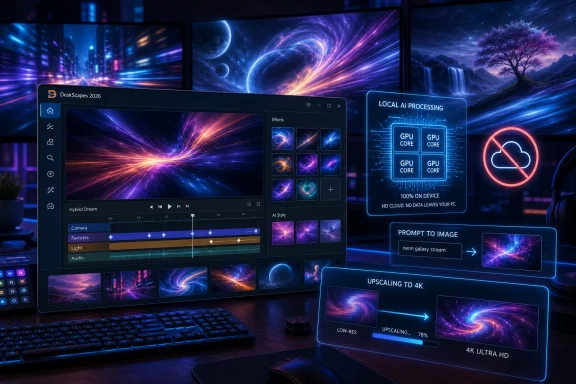
Stardock released DeskScapes 2026 for Windows 11 on May 20, 2026, adding local AI wallpaper generation, AI restyling, image upscaling, and a new Hybrid Dream editor to its long-running desktop wallpaper customization app. The headline feature is not simply that Windows users can make prettier backgrounds. It is that a customization utility built around animated wallpapers is now pitching itself as a local creative workstation, with no cloud tokens and no subscription meter between the user and the GPU. In a Windows ecosystem increasingly shaped by cloud-connected AI services, DeskScapes 2026 is a small but telling counterargument: personalization still has a market when it happens on the PC itself.
DeskScapes has always lived in a peculiar corner of the Windows software world: not quite a productivity tool, not quite a toy, and not quite a system utility. Its job is to make the desktop feel less like a default install and more like a user-owned surface. With DeskScapes 2026, Stardock is trying to move that promise from curation to creation.
The new release lets users generate wallpapers directly on their own Windows 11 hardware. Stardock’s pitch is straightforward: there are no cloud credits, no token accounting, and no hidden usage fees once the software is installed. That matters because consumer AI image tools have trained users to expect a meter somewhere, whether it is a monthly allowance, a priority queue, or a paid tier that unlocks higher resolution output.
Local generation changes the psychology of the feature. A wallpaper app is not asking users to think about prompt economics or whether an experiment is worth burning a credit. It is inviting them to iterate casually, which is exactly how desktop customization tends to work: try something, hate it, tweak it, forget about it for a week, then come back and rebuild the whole setup around a new mood.
That does not make DeskScapes 2026 a replacement for professional image-generation platforms. It does, however, make it part of a broader shift in which AI features are no longer isolated destinations. They are being folded into the utilities people already use, often in narrower, more practical forms than the grander “AI PC” marketing tends to suggest.
Stardock has built a business around that feeling. Start11 restores and reshapes the Start menu. Fences organizes the desktop. Groupy adds tabbed window management. DeskScapes handles the background layer that most users see before they launch anything else. These are not random utilities; they are pressure valves for Windows design decisions that Microsoft either will not reverse or cannot afford to fragment.
Wallpaper may sound trivial until you remember how much of Windows culture has been built around the desktop as a personal canvas. From Windows XP’s Bliss to the glassy excess of Vista and the dark, abstract folds of Windows 11, Microsoft’s default backgrounds have always carried an identity. The difference is that defaults are shared; customization is claimed.
DeskScapes 2026 leans into that distinction. It is not simply offering a library of animated backgrounds. It is saying the user can generate, restyle, upscale, animate, and manage a wallpaper collection without leaving the desktop customization loop. That is a more complete proposition than “download a nice image and set it as background.”
By emphasizing on-device generation, Stardock is aligning DeskScapes with a privacy and ownership argument that has become more prominent as cloud AI has spread into consumer software. Local processing means prompts and source images do not need to be uploaded to a remote service for the core workflow. It also means performance and output quality depend on the user’s own machine, which is both a limitation and a selling point.
For desktop enthusiasts, that tradeoff may be acceptable. Many of the users most likely to care about animated wallpapers and multi-monitor setups are also the users most likely to own capable GPUs. They are accustomed to tinkering, tuning, and waiting for local workloads to finish. In that audience, “uses your hardware” can sound less like a burden than a badge.
There is also a cost argument. Cloud image generation often hides infrastructure expense behind tokens, credits, or subscription entitlements. Stardock’s launch messaging makes the opposite bet: pay for the software, then generate without a per-image tax. For an app priced at $6.99 during launch, with a stated MSRP of $9.99 and support for up to five devices, that is a deliberately approachable way to package AI creation.
The caveat is that “local” does not mean “free” in a technical sense. Users pay in compute time, heat, fan noise, battery life, and GPU availability. On a desktop gaming rig, that may be a minor concern. On a thin laptop, local image generation and animated wallpaper playback may feel less invisible.
DeskScapes 2026’s restyling feature is designed for exactly that middle ground. It takes an existing image and reimagines it in a new artistic style. In practical terms, that could mean turning a photo into something painterly, making a bright image fit a darker desktop, or giving a familiar wallpaper a different visual identity without hunting through another download site.
This is where AI makes sense as a utility rather than a spectacle. The feature is not asking the user to become a prompt engineer. It is giving them a shortcut for a task that previously required a separate image editor, a filter library, or a lot of manual adjustment. That is the kind of AI integration that tends to stick: not a chatbot bolted onto a sidebar, but a function that collapses several annoying steps into one.
The same is true of upscaling. Wallpaper collections age badly as display resolutions improve. A favorite 1080p image that looked sharp on an old monitor may look soft or stretched on a modern 1440p, ultrawide, or 4K panel. Built-in upscaling gives DeskScapes a practical role as a repair shop for old favorites, not just a showroom for new ones.
But animated wallpapers have always had a cost. They consume resources, they interact with Explorer and window compositing, and they can expose edge cases across drivers, multi-monitor setups, refresh rates, and Windows feature updates. That does not mean they are unsafe or impractical; it means they are closer to shell enhancement than a static JPEG.
This distinction matters for IT pros and power users. A wallpaper manager that plays videos, animates images, schedules backgrounds, and hooks into desktop rendering is not the same category of risk as a folder of PNG files. It sits closer to the experience layer of Windows, where cumulative updates, GPU drivers, and third-party shell utilities can occasionally collide.
For home enthusiasts, that risk may be worth it. For managed environments, the calculation is different. Animated wallpapers are rarely business-critical, and local AI generation may be difficult to justify on corporate endpoints unless there is a specific creative or branding use case. Stardock’s Object Desktop suite has long appealed to businesses that want more control over the Windows interface, but DeskScapes 2026’s most exciting features are still likely to land first with individual users.
That choice is understandable. Every built-in Windows feature carries support, accessibility, performance, battery, security, and enterprise management obligations. Animated wallpapers may delight enthusiasts, but they also complicate the default experience. Microsoft tends to reserve its visual energy for system-wide design language rather than deep end-user theming.
Stardock does not have the same constraints. Its customers self-select. They install DeskScapes because they want the extra behavior, not because it came preloaded on a corporate image. That makes the software freer to push into areas Microsoft would likely treat as optional, distracting, or too expensive to support at Windows scale.
The result is a familiar pattern in the Windows ecosystem. Microsoft standardizes the platform, and third-party utilities reintroduce the messiness enthusiasts miss. Sometimes that messiness is frivolous. Sometimes it is where the most interesting ideas happen first.
That is important because DeskScapes is not competing only with other wallpaper apps. It is competing with inertia. Most users accept the default wallpaper, pick a personal photo, or download an image once every few months. To change that behavior, Stardock needs the software to feel inexpensive, obvious, and rewarding quickly.
The five-device support also fits modern Windows ownership patterns. Enthusiasts often have a desktop, a laptop, maybe a handheld gaming PC, and a test machine. A license that follows that reality is easier to justify than one that treats every device as a separate purchase.
Object Desktop changes the equation for Stardock’s existing audience. If a user already subscribes to or owns the suite for Start11, Fences, Groupy, SoundPackager, or Multiplicity, DeskScapes 2026 becomes another reason to stay inside the Stardock ecosystem. The company’s strength is not that every utility is essential; it is that together they form a parallel control panel for Windows power users.
The harder questions come later. How fast is generation on typical hardware? What models or pipelines are being used locally? How much VRAM is realistic for high-resolution output? How gracefully does the app pause during gaming, video calls, or battery use? How well does the Hybrid Dream editor balance power and usability?
Those answers will determine whether DeskScapes 2026 is merely a clever update or a genuinely sticky tool. Local AI features can be impressive in demos but uneven across real hardware. A fast GPU can make the experience feel magical; an older integrated GPU can make the same feature feel like a chore.
Still, the direction is notable. Stardock is not positioning AI as a corporate assistant, a search replacement, or an operating system co-pilot. It is using AI for something deeply personal and low-stakes: making the screen you stare at all day look more like yours.
 Stardock Turns the Wallpaper App Into a Local AI Workshop
DeskScapes has always lived in a peculiar corner of the Windows software world: not quite a productivity tool, not quite a toy, and not quite a system utility. Its job is to make the desktop feel less like a default install and more like a user-owned surface. With DeskScapes 2026, Stardock is trying to move that promise from curation to creation.The new release lets users generate wallpapers directly on their own Windows 11 hardware. Stardock’s pitch is straightforward: there are no cloud credits, no token accounting, and no hidden usage fees once the software is installed. That matters because consumer AI image tools have trained users to expect a meter somewhere, whether it is a monthly allowance, a priority queue, or a paid tier that unlocks higher resolution output.
Local generation changes the psychology of the feature. A wallpaper app is not asking users to think about prompt economics or whether an experiment is worth burning a credit. It is inviting them to iterate casually, which is exactly how desktop customization tends to work: try something, hate it, tweak it, forget about it for a week, then come back and rebuild the whole setup around a new mood.
That does not make DeskScapes 2026 a replacement for professional image-generation platforms. It does, however, make it part of a broader shift in which AI features are no longer isolated destinations. They are being folded into the utilities people already use, often in narrower, more practical forms than the grander “AI PC” marketing tends to suggest.
The Desktop Remains Windows’ Most Personal Interface
Microsoft has spent much of the Windows 11 era refining the operating system’s look while narrowing the range of obvious user customization. The centered taskbar, the simplified Start menu, the redesigned Settings app, and the gradual retirement of old Control Panel surfaces all point toward a cleaner, more managed Windows. That approach has benefits, especially for consistency and supportability, but it leaves a long-running class of Windows users feeling fenced in.Stardock has built a business around that feeling. Start11 restores and reshapes the Start menu. Fences organizes the desktop. Groupy adds tabbed window management. DeskScapes handles the background layer that most users see before they launch anything else. These are not random utilities; they are pressure valves for Windows design decisions that Microsoft either will not reverse or cannot afford to fragment.
Wallpaper may sound trivial until you remember how much of Windows culture has been built around the desktop as a personal canvas. From Windows XP’s Bliss to the glassy excess of Vista and the dark, abstract folds of Windows 11, Microsoft’s default backgrounds have always carried an identity. The difference is that defaults are shared; customization is claimed.
DeskScapes 2026 leans into that distinction. It is not simply offering a library of animated backgrounds. It is saying the user can generate, restyle, upscale, animate, and manage a wallpaper collection without leaving the desktop customization loop. That is a more complete proposition than “download a nice image and set it as background.”
Local AI Is the Feature and the Message
The most interesting part of DeskScapes 2026 is not that it uses AI. In 2026, that alone barely qualifies as news. The more meaningful point is where the AI runs.By emphasizing on-device generation, Stardock is aligning DeskScapes with a privacy and ownership argument that has become more prominent as cloud AI has spread into consumer software. Local processing means prompts and source images do not need to be uploaded to a remote service for the core workflow. It also means performance and output quality depend on the user’s own machine, which is both a limitation and a selling point.
For desktop enthusiasts, that tradeoff may be acceptable. Many of the users most likely to care about animated wallpapers and multi-monitor setups are also the users most likely to own capable GPUs. They are accustomed to tinkering, tuning, and waiting for local workloads to finish. In that audience, “uses your hardware” can sound less like a burden than a badge.
There is also a cost argument. Cloud image generation often hides infrastructure expense behind tokens, credits, or subscription entitlements. Stardock’s launch messaging makes the opposite bet: pay for the software, then generate without a per-image tax. For an app priced at $6.99 during launch, with a stated MSRP of $9.99 and support for up to five devices, that is a deliberately approachable way to package AI creation.
The caveat is that “local” does not mean “free” in a technical sense. Users pay in compute time, heat, fan noise, battery life, and GPU availability. On a desktop gaming rig, that may be a minor concern. On a thin laptop, local image generation and animated wallpaper playback may feel less invisible.
Restyling Existing Wallpapers Is the Smarter Everyday Feature
Generating new wallpapers will get the attention, but AI Restyle may be the feature that sees more daily use. Most users do not begin with a blank creative brief. They begin with an image they already like, then wish it matched a different theme, color palette, season, or monitor layout.DeskScapes 2026’s restyling feature is designed for exactly that middle ground. It takes an existing image and reimagines it in a new artistic style. In practical terms, that could mean turning a photo into something painterly, making a bright image fit a darker desktop, or giving a familiar wallpaper a different visual identity without hunting through another download site.
This is where AI makes sense as a utility rather than a spectacle. The feature is not asking the user to become a prompt engineer. It is giving them a shortcut for a task that previously required a separate image editor, a filter library, or a lot of manual adjustment. That is the kind of AI integration that tends to stick: not a chatbot bolted onto a sidebar, but a function that collapses several annoying steps into one.
The same is true of upscaling. Wallpaper collections age badly as display resolutions improve. A favorite 1080p image that looked sharp on an old monitor may look soft or stretched on a modern 1440p, ultrawide, or 4K panel. Built-in upscaling gives DeskScapes a practical role as a repair shop for old favorites, not just a showroom for new ones.
Animated Wallpapers Still Carry a Performance Tax
DeskScapes’ historical promise is animated wallpaper, and DeskScapes 2026 does not abandon that identity. The new Hybrid Dream editor is meant to help users build animated backgrounds, while the effects library has grown as well. For Windows users who remember Microsoft’s old DreamScene experiment, Stardock’s continued investment in this category feels like a long-running alternate timeline for the Windows desktop.But animated wallpapers have always had a cost. They consume resources, they interact with Explorer and window compositing, and they can expose edge cases across drivers, multi-monitor setups, refresh rates, and Windows feature updates. That does not mean they are unsafe or impractical; it means they are closer to shell enhancement than a static JPEG.
This distinction matters for IT pros and power users. A wallpaper manager that plays videos, animates images, schedules backgrounds, and hooks into desktop rendering is not the same category of risk as a folder of PNG files. It sits closer to the experience layer of Windows, where cumulative updates, GPU drivers, and third-party shell utilities can occasionally collide.
For home enthusiasts, that risk may be worth it. For managed environments, the calculation is different. Animated wallpapers are rarely business-critical, and local AI generation may be difficult to justify on corporate endpoints unless there is a specific creative or branding use case. Stardock’s Object Desktop suite has long appealed to businesses that want more control over the Windows interface, but DeskScapes 2026’s most exciting features are still likely to land first with individual users.
Microsoft Left a Customization Gap Wide Enough for a Business
Windows 11 can set static wallpapers, rotate backgrounds, use themes, and sync some personalization across devices. What it does not natively provide is a full animated wallpaper platform with editing, effects, wallpaper collection management, AI generation, restyling, and upscaling. Stardock’s opportunity exists because Microsoft has chosen not to make that part of the core operating system.That choice is understandable. Every built-in Windows feature carries support, accessibility, performance, battery, security, and enterprise management obligations. Animated wallpapers may delight enthusiasts, but they also complicate the default experience. Microsoft tends to reserve its visual energy for system-wide design language rather than deep end-user theming.
Stardock does not have the same constraints. Its customers self-select. They install DeskScapes because they want the extra behavior, not because it came preloaded on a corporate image. That makes the software freer to push into areas Microsoft would likely treat as optional, distracting, or too expensive to support at Windows scale.
The result is a familiar pattern in the Windows ecosystem. Microsoft standardizes the platform, and third-party utilities reintroduce the messiness enthusiasts miss. Sometimes that messiness is frivolous. Sometimes it is where the most interesting ideas happen first.
The Price Is Aggressive Because the Real Competition Is Habit
At $6.99 during the launch period, DeskScapes 2026 is priced less like a professional creative app and more like an impulse buy for someone already inclined to customize Windows. Even the $9.99 MSRP keeps it in the range where the decision is less about budget approval and more about whether the user cares enough to install another background process.That is important because DeskScapes is not competing only with other wallpaper apps. It is competing with inertia. Most users accept the default wallpaper, pick a personal photo, or download an image once every few months. To change that behavior, Stardock needs the software to feel inexpensive, obvious, and rewarding quickly.
The five-device support also fits modern Windows ownership patterns. Enthusiasts often have a desktop, a laptop, maybe a handheld gaming PC, and a test machine. A license that follows that reality is easier to justify than one that treats every device as a separate purchase.
Object Desktop changes the equation for Stardock’s existing audience. If a user already subscribes to or owns the suite for Start11, Fences, Groupy, SoundPackager, or Multiplicity, DeskScapes 2026 becomes another reason to stay inside the Stardock ecosystem. The company’s strength is not that every utility is essential; it is that together they form a parallel control panel for Windows power users.
The Neowin Disclosure Is a Reminder to Read the Pitch Carefully
The announcement surfaced through Neowin with a disclosure about its relationship to Stardock. That does not invalidate the news, but it does remind readers to separate the vendor’s claims from the user impact. A product launch article will naturally emphasize the cleanest version of the story: local AI, no tokens, easy restyling, expanded effects, and simple wallpaper management.The harder questions come later. How fast is generation on typical hardware? What models or pipelines are being used locally? How much VRAM is realistic for high-resolution output? How gracefully does the app pause during gaming, video calls, or battery use? How well does the Hybrid Dream editor balance power and usability?
Those answers will determine whether DeskScapes 2026 is merely a clever update or a genuinely sticky tool. Local AI features can be impressive in demos but uneven across real hardware. A fast GPU can make the experience feel magical; an older integrated GPU can make the same feature feel like a chore.
Still, the direction is notable. Stardock is not positioning AI as a corporate assistant, a search replacement, or an operating system co-pilot. It is using AI for something deeply personal and low-stakes: making the screen you stare at all day look more like yours.
The Windows Customization Crowd Gets Its AI Moment
The concrete story here is simple, but its implications are broader than another wallpaper app update. DeskScapes 2026 shows how AI features may spread through Windows not only from Microsoft downward, but from specialist utilities upward.- DeskScapes 2026 adds local wallpaper generation on Windows 11, avoiding the token and cloud-credit model common to many AI image services.
- AI Restyle may prove more useful than blank-slate generation because it lets users transform wallpapers they already like.
- Built-in upscaling gives the app a practical role for users maintaining older wallpaper collections across newer high-resolution displays.
- The new Hybrid Dream editor keeps DeskScapes anchored in animated backgrounds rather than turning it into a generic AI image tool.
- The launch price of $6.99, support for up to five devices, and Object Desktop inclusion make the update easy for Stardock’s existing audience to try.
- The real-world value will depend heavily on local hardware performance, Windows 11 compatibility, and how well the app manages resource use during everyday work.
References
- Primary source: Neowin
Published: Wed, 20 May 2026 15:01:04 GMT
Stardock releases DeskScapes 2026 adding live wallpaper support in Windows 11 - Neowin
DeskScapes focuses on the user friendliness of the app above all, with popular Dream authors easily searchable from within the main menu, and you can get it right now. www.neowin.net
- Related coverage: stardock.com
Stardock Releases DeskScapes 11
All of the latest news, announcements, and product releases from Stardock.www.stardock.com - Related coverage: techspot.com
Stardock DeskScapes Download - 11.0.2 | TechSpot
Download Stardock DeskScapes - Stardock DeskScapes allows users of Windows Vista Ultimate to have dynamic, animated wallpaper.www.techspot.com - Related coverage: forums.stardock.com
- Related coverage: facebook.com
Stardock has just released DeskScapes 11, a desktop background customization tool for Windows! Key Features: - Animated wallpapers and advanced background customization - Powerful design tool, DreamMaker Pro, for creating animated wallpapers - Inte
Stardock has just released DeskScapes 11, a desktop background customization tool for Windows! Key Features: - Animated wallpapers and advanced...www.facebook.com
- Related coverage: techyorker.com
How to put live wallpaper on pc Windows 11 - TechYorker
×AIDiscover the way to a Faster PC - Chipps AI AssistantNew Update: Boost Your Device Performance Today with Chipps.Fix My... techyorker.com
- Related coverage: support.stardock.com
DeskScapes Clean Boot
 support.stardock.com
- Related coverage: archive.stardock.com
DeskScapes Guide - 10. About DeskScapes
archive.stardock.com
