

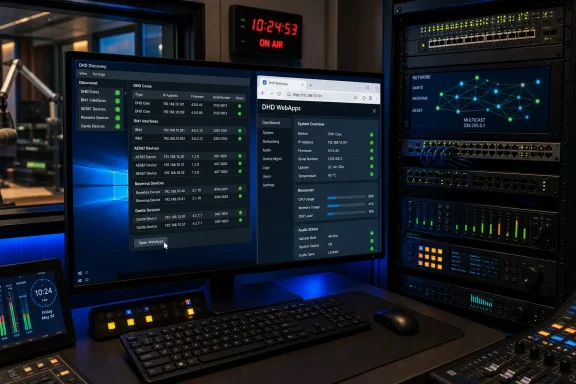
DHD has introduced DHD Discovery, a compact cross-platform utility intended to remove one of the most mundane but persistent obstacles in broadcast audio deployment: identifying a newly connected device on a busy IP network. The free application sits in the system tray, watches for compatible DHD hardware as it comes online, and provides a direct route into each device’s browser-based management tools without requiring engineers to first locate or type an IP address.
For Windows-based radio studios, outside broadcast vehicles, production control rooms, and technical facilities that rely on DHD mixing and routing equipment, the announcement represents more than a convenience feature. It reflects how audio infrastructure has shifted from isolated consoles and fixed point-to-point wiring toward distributed, network-connected systems where the operational challenge increasingly lies in visibility, access, and control.
DHD Discovery is available for Windows 10 or later, alongside macOS 12 or later and modern Linux distributions with FUSE support. That wider operating-system support is one of the utility’s defining characteristics, particularly for facilities where engineers, systems integrators, and freelance technical staff work across mixed Windows, macOS, and Linux environments.
In a traditional studio installation, finding a hardware unit often meant walking to a rack, reading a label, tracing a cable, or consulting an installation plan. In IP-based audio systems, a device can be physically present, correctly powered, and actively connected to Ethernet while still remaining difficult to identify from a workstation.
The first question after connecting a new device is often simple: what IP address did it receive? Yet the answer can be less straightforward in a real-world network. A device may use DHCP, retain a previous static address, sit on a dedicated audio VLAN, appear on an unexpected network interface, or be installed by a colleague who is no longer on site.
DHD’s existing Toolbox application already provides device discovery capabilities, but DHD Discovery approaches the task differently. Rather than being part of a broader configuration and management application, it is designed as a lightweight, always-available utility focused on rapid identification and direct access.
That distinction matters. Full configuration tools are indispensable when creating console logic, adjusting device settings, deploying projects, managing firmware, or maintaining a larger system. But an engineer does not always need to launch a substantial application simply to check whether a core, interface, or remote unit is online.
DHD Discovery instead aims to make that initial visibility a background function. When a device appears on the network, the app can display it. When an engineer needs to inspect it, a click can open the relevant WebApps interface.
For a DHD deployment, the utility is designed to identify a range of products and endpoints, including:
Each discovered device can display core operational details, including:
A visible serial number reduces the risk of configuring the wrong device. This is especially valuable when an organization maintains more than one identical AES67 or Dante interface, or when a device has been replaced during a service visit and inherited an existing network configuration.
Firmware visibility is equally important. A new device may be running an older shipping version, while the rest of the installation has moved to a later release. Discovery does not replace a formal compatibility review, but it can make such discrepancies obvious before they develop into configuration or operational problems.
The ability to verify status at a glance also helps during commissioning. Rather than repeatedly switching between browser tabs, documentation, command-line utilities, and DHCP lease tables, the engineer can begin with a concise inventory of what the local system can currently see.
Without a discovery utility, a technician may need to identify the address through a DHCP server, router table, switch management interface, legacy broadcast tool, or device display. The address then has to be copied or manually entered into a browser, with the added possibility of a typing error or accidental selection of the wrong address.
DHD Discovery condenses that routine into a single click. Once the right device appears in the dashboard, its web-based control and configuration environment can be opened immediately.
For Windows users, this fits naturally into a modern support workflow. A system tray utility is accessible without dominating the desktop, and it remains available while engineers work in DHD Toolbox, a browser, monitoring software, playout applications, documentation, or remote support tools.
A tray-based discovery app cannot solve every commissioning task, but it can shorten the journey from “the device is plugged in” to “the device is reachable.” That can save time in situations where multiple teams are working against a limited engineering window.
The utility should also prove useful during troubleshooting. When a device is reported as unavailable, the dashboard can help separate several different issues:
The protocol is well suited to the initial deployment scenario. A device can announce itself on the local network, and a compatible discovery application can recognize it quickly. In a studio or mobile production environment, that reduces reliance on handwritten setup notes, default address assumptions, or network scanning tools that may not be appropriate on a production network.
DHD has already incorporated mDNS-based discovery into newer system generations and current software workflows. DHD Discovery takes that capability and packages it into a purpose-built interface that is more approachable for fast access.
DHD Discovery addresses part of that limitation with manual entries for other subnets. This is a welcome feature because many broadcast organizations separate studio infrastructure, office systems, control surfaces, audio networks, management networks, and remote operations across distinct VLANs or IP ranges.
However, manual entries should not be mistaken for automatic cross-subnet discovery. In an enterprise-style network, discovery behavior depends on switch configuration, multicast handling, routing policy, firewall rules, interface selection, and whether an mDNS gateway or reflector has been deliberately deployed.
This means the utility will likely be at its strongest in clearly designed local broadcast segments where DHD devices and the engineer’s workstation share the relevant Layer 2 environment. Facilities with complicated multi-VLAN designs should validate the tool against their own topology before treating it as a universal device inventory platform.
The utility’s lightweight form factor is an advantage in that environment. Broadcast technical PCs often need to run a specialized collection of applications, sometimes in locked-down or carefully controlled configurations. A small tray utility that does one job clearly can be easier to deploy and support than a larger platform that tries to serve every management need.
Optional automatic startup reinforces this positioning. An engineer can choose to have DHD Discovery available whenever a designated technical workstation signs in, turning the device list into a persistent awareness layer rather than a tool opened only after a problem has already emerged.
Automatic updates also offer clear benefits, particularly where hardware support and operating-system compatibility evolve. But update behavior should remain subject to an organization’s change-management policy. In a mission-critical broadcast environment, automatic software updates are not automatically synonymous with operational readiness.
Technical teams should determine whether updates are installed automatically on:
DHD Toolbox remains the more substantial environment for configuration-centric workflows. It is built for tasks that demand a deeper understanding of the system, including project-oriented engineering work and broader device management.
Likewise, discovery is not equivalent to monitoring. A device appearing online does not prove that audio is flowing correctly, that clocking is stable, that multicast streams are correctly subscribed, or that network performance meets the requirements of a live production system.
A comprehensive broadcast network strategy should still include:
This is not inherently a problem; it is simply a reason to maintain good network separation and access control. If a workstation can discover and open a device’s WebApps interface, that workstation should be appropriately authorized to exist on the management or audio network in the first place.
Organizations should review whether:
The utility is therefore best used as a quick diagnostic signal rather than a final verdict. If a critical unit fails to appear, the next step should be structured troubleshooting, not an assumption that the hardware has failed.
That simplicity is a strength. Broadcast technology often accumulates powerful but complex software layers, and those layers are necessary when systems grow. Yet the daily work of commissioning and maintenance also benefits from tools that eliminate repetitive, low-value steps.
The app’s status indicators, searchable local dashboard, favourites, filters, automatic launch option, and direct WebApps shortcuts all support that objective. None of these features is revolutionary in isolation, but together they create a more efficient path through routine discovery work.
Its success will ultimately depend on reliability across different hardware generations, operating systems, and real-world network designs. DHD’s public description is clear about the supported categories and operating-system requirements, but individual facilities should still test discovery behavior with their own VLAN architecture, multicast policies, firmware levels, security controls, and DHD product mix.
For Windows 10 and later users, the system tray model should feel familiar and practical. It reduces dependence on manually recorded addresses, browser typing, and larger configuration software when the immediate need is simply to confirm that a device is present and reach its WebApps interface.
The wider macOS and Linux support strengthens the offering, while mDNS provides a standards-based foundation for local-network discovery. At the same time, the local nature of multicast discovery means that complex multi-subnet facilities must treat the tool as a complement to disciplined network design rather than a replacement for it.
In the increasingly networked world of professional radio, television, remote production, and audio-over-IP infrastructure, visibility is operationally valuable. DHD Discovery turns that visibility into a lightweight everyday utility, and that may make it one of the more useful additions to a DHD engineering toolkit.
For Windows-based radio studios, outside broadcast vehicles, production control rooms, and technical facilities that rely on DHD mixing and routing equipment, the announcement represents more than a convenience feature. It reflects how audio infrastructure has shifted from isolated consoles and fixed point-to-point wiring toward distributed, network-connected systems where the operational challenge increasingly lies in visibility, access, and control.
DHD Discovery is available for Windows 10 or later, alongside macOS 12 or later and modern Linux distributions with FUSE support. That wider operating-system support is one of the utility’s defining characteristics, particularly for facilities where engineers, systems integrators, and freelance technical staff work across mixed Windows, macOS, and Linux environments.
 A Small Tool Addressing a Real Broadcast Workflow Problem
In a traditional studio installation, finding a hardware unit often meant walking to a rack, reading a label, tracing a cable, or consulting an installation plan. In IP-based audio systems, a device can be physically present, correctly powered, and actively connected to Ethernet while still remaining difficult to identify from a workstation.The first question after connecting a new device is often simple: what IP address did it receive? Yet the answer can be less straightforward in a real-world network. A device may use DHCP, retain a previous static address, sit on a dedicated audio VLAN, appear on an unexpected network interface, or be installed by a colleague who is no longer on site.
DHD’s existing Toolbox application already provides device discovery capabilities, but DHD Discovery approaches the task differently. Rather than being part of a broader configuration and management application, it is designed as a lightweight, always-available utility focused on rapid identification and direct access.
That distinction matters. Full configuration tools are indispensable when creating console logic, adjusting device settings, deploying projects, managing firmware, or maintaining a larger system. But an engineer does not always need to launch a substantial application simply to check whether a core, interface, or remote unit is online.
DHD Discovery instead aims to make that initial visibility a background function. When a device appears on the network, the app can display it. When an engineer needs to inspect it, a click can open the relevant WebApps interface.
What DHD Discovery Finds on the Network
The application uses Multicast DNS, commonly abbreviated as mDNS, to detect DHD devices on the local network. This decentralized discovery method allows compatible equipment to announce itself and be found without depending on a conventional central DNS server for the initial lookup process.For a DHD deployment, the utility is designed to identify a range of products and endpoints, including:
- DHD cores
- RM1 broadcast-from-anywhere interfaces
- AES67 and Ravenna-connected audio-over-IP devices
- Dante-connected DHD interfaces
- Other compatible DHD network devices that advertise through the supported discovery mechanism
Each discovered device can display core operational details, including:
- IP address
- Firmware version
- Serial number
- Connection status
- Colour-coded health or availability indicators
- Device shortcuts leading directly to browser-based management pages
Why Serial Numbers and Firmware Versions Matter
In smaller systems, a technician may recognize every device by name and physical position. In larger broadcast facilities, that assumption quickly breaks down. Multiple DHD units can be deployed across studios, machine rooms, racks, production galleries, and remote sites, often with the same hardware model repeated several times.A visible serial number reduces the risk of configuring the wrong device. This is especially valuable when an organization maintains more than one identical AES67 or Dante interface, or when a device has been replaced during a service visit and inherited an existing network configuration.
Firmware visibility is equally important. A new device may be running an older shipping version, while the rest of the installation has moved to a later release. Discovery does not replace a formal compatibility review, but it can make such discrepancies obvious before they develop into configuration or operational problems.
The ability to verify status at a glance also helps during commissioning. Rather than repeatedly switching between browser tabs, documentation, command-line utilities, and DHCP lease tables, the engineer can begin with a concise inventory of what the local system can currently see.
Direct WebApps Access Is the Core Convenience Feature
The standout function of DHD Discovery is not merely that it lists devices; it is that it can open a device’s WebApps interface directly. This removes a series of small but surprisingly error-prone steps from the normal workflow.Without a discovery utility, a technician may need to identify the address through a DHCP server, router table, switch management interface, legacy broadcast tool, or device display. The address then has to be copied or manually entered into a browser, with the added possibility of a typing error or accidental selection of the wrong address.
DHD Discovery condenses that routine into a single click. Once the right device appears in the dashboard, its web-based control and configuration environment can be opened immediately.
For Windows users, this fits naturally into a modern support workflow. A system tray utility is accessible without dominating the desktop, and it remains available while engineers work in DHD Toolbox, a browser, monitoring software, playout applications, documentation, or remote support tools.
Reduced Friction During Installation
The value of this approach becomes clearest during installation and replacement work. Consider a new DHD interface connected to a studio switch after a hardware swap. The installer needs to determine whether the unit has powered up, joined the intended network, obtained the expected address, and exposed the right management service.A tray-based discovery app cannot solve every commissioning task, but it can shorten the journey from “the device is plugged in” to “the device is reachable.” That can save time in situations where multiple teams are working against a limited engineering window.
The utility should also prove useful during troubleshooting. When a device is reported as unavailable, the dashboard can help separate several different issues:
- The device is absent from the local network altogether.
- The device is present but has an unexpected IP address.
- The device is visible but running an unexpected firmware version.
- The device is reachable, making a deeper review through WebApps possible.
- The device is outside the current local discovery scope and must be added or investigated through another route.
Why mDNS Fits Modern DHD Systems
DHD’s use of mDNS is a logical extension of the networking direction already visible across current broadcast audio platforms. Multicast DNS is designed for local-link discovery, making it particularly useful where devices need to find one another without requiring an engineer to configure conventional DNS records before the first connection.The protocol is well suited to the initial deployment scenario. A device can announce itself on the local network, and a compatible discovery application can recognize it quickly. In a studio or mobile production environment, that reduces reliance on handwritten setup notes, default address assumptions, or network scanning tools that may not be appropriate on a production network.
DHD has already incorporated mDNS-based discovery into newer system generations and current software workflows. DHD Discovery takes that capability and packages it into a purpose-built interface that is more approachable for fast access.
The Local-Link Limitation Must Be Understood
mDNS is powerful precisely because it is local and decentralized, but that design introduces boundaries. Standard mDNS traffic is generally limited to the local network segment and does not automatically pass through routers to other subnets.DHD Discovery addresses part of that limitation with manual entries for other subnets. This is a welcome feature because many broadcast organizations separate studio infrastructure, office systems, control surfaces, audio networks, management networks, and remote operations across distinct VLANs or IP ranges.
However, manual entries should not be mistaken for automatic cross-subnet discovery. In an enterprise-style network, discovery behavior depends on switch configuration, multicast handling, routing policy, firewall rules, interface selection, and whether an mDNS gateway or reflector has been deliberately deployed.
This means the utility will likely be at its strongest in clearly designed local broadcast segments where DHD devices and the engineer’s workstation share the relevant Layer 2 environment. Facilities with complicated multi-VLAN designs should validate the tool against their own topology before treating it as a universal device inventory platform.
Windows 10 Support Keeps the Tool Relevant for Broadcast Workstations
Although DHD Discovery is not Windows-exclusive, its availability for Windows 10 and later is particularly relevant to the professional broadcast market. Windows remains deeply embedded in studio technical operations, whether for workstation-based configuration, automation, monitoring, scheduling, production applications, device maintenance, or vendor-specific engineering tools.The utility’s lightweight form factor is an advantage in that environment. Broadcast technical PCs often need to run a specialized collection of applications, sometimes in locked-down or carefully controlled configurations. A small tray utility that does one job clearly can be easier to deploy and support than a larger platform that tries to serve every management need.
Optional automatic startup reinforces this positioning. An engineer can choose to have DHD Discovery available whenever a designated technical workstation signs in, turning the device list into a persistent awareness layer rather than a tool opened only after a problem has already emerged.
Automatic updates also offer clear benefits, particularly where hardware support and operating-system compatibility evolve. But update behavior should remain subject to an organization’s change-management policy. In a mission-critical broadcast environment, automatic software updates are not automatically synonymous with operational readiness.
Update Policy Requires a Sensible Balance
For individual users, automatic updates reduce maintenance effort and help ensure the utility receives fixes and refinements promptly. For a major broadcast facility, however, every software change carries some level of operational consideration.Technical teams should determine whether updates are installed automatically on:
- Engineering laptops used for field service
- Production control-room workstations
- Shared studio administration PCs
- Systems connected to protected broadcast networks
- Devices maintained under formal change-control procedures
DHD Discovery Does Not Replace Toolbox or Network Monitoring
It would be a mistake to frame DHD Discovery as a replacement for DHD Toolbox, central monitoring, switch telemetry, or formal network-management systems. Its strength lies in its focused purpose: fast local awareness and fast browser access.DHD Toolbox remains the more substantial environment for configuration-centric workflows. It is built for tasks that demand a deeper understanding of the system, including project-oriented engineering work and broader device management.
Likewise, discovery is not equivalent to monitoring. A device appearing online does not prove that audio is flowing correctly, that clocking is stable, that multicast streams are correctly subscribed, or that network performance meets the requirements of a live production system.
A comprehensive broadcast network strategy should still include:
- Clear IP addressing and VLAN documentation
- Managed switches configured for the audio environment
- Appropriate multicast controls and monitoring
- Firmware lifecycle management
- Secure administrator credentials
- Backups of device and console configurations
- Logging and alerting for faults that affect service
- Defined support procedures for remote and on-site intervention
Security and Network Design Considerations
The convenience of immediate device visibility must be balanced with basic operational security. Any discovery utility that reveals device addresses, identities, firmware versions, and management entry points becomes part of the organization’s administrative surface.This is not inherently a problem; it is simply a reason to maintain good network separation and access control. If a workstation can discover and open a device’s WebApps interface, that workstation should be appropriately authorized to exist on the management or audio network in the first place.
Discovery Should Not Equal Unrestricted Administration
An engineer should be able to discover a DHD device without the system confusing visibility with authorization. Properly configured device authentication and role-based access remain important, especially when a browser interface may expose settings capable of affecting production paths, signal processing, routing logic, or network configuration.Organizations should review whether:
- Device management pages require strong passwords
- Default credentials have been eliminated
- HTTPS or TLS is enabled where supported and appropriate
- Management interfaces are limited to approved networks
- Remote access is routed through approved secure methods
- Windows workstations running discovery tools are maintained and protected
- Network documentation reflects the actual deployed device inventory
The Risk of Overreliance
There is also a human risk: engineers may become accustomed to instantaneous discovery and assume that an absent device is necessarily offline or faulty. In reality, absence from a discovery list can result from a subnet boundary, firewall rule, unsupported firmware generation, disabled service, incorrect interface selection, or multicast filtering.The utility is therefore best used as a quick diagnostic signal rather than a final verdict. If a critical unit fails to appear, the next step should be structured troubleshooting, not an assumption that the hardware has failed.
Practical Use Cases for DHD Discovery
The utility’s value will vary by facility, but several use cases stand out.New Studio Commissioning
During a new control room or radio-studio installation, engineering teams can use DHD Discovery to verify that cores, interfaces, and remote units are visible as each endpoint is powered and patched. The dashboard can become a quick confirmation layer before deeper configuration begins.Hardware Replacement
When a failed interface is replaced, the app can help verify that the new unit is present and identify its assigned address immediately. That reduces the chance of connecting to the wrong unit when several identical devices are installed.Remote Production and OB Workflows
Outside broadcast and remote-production environments often involve temporary infrastructure, unfamiliar switches, rapidly assembled racks, and time pressure. Fast discovery can be especially useful where system documentation is incomplete or the network must be brought online in stages.Routine Technical Support
For broadcast engineers supporting several DHD installations, the application can provide a quick way to check which compatible endpoints are visible from the current workstation. This may shorten the initial phase of support calls and make it easier to move directly into browser-based diagnostics.Mixed-Platform Engineering Teams
The macOS and Linux versions are strategically significant even for organizations centered on Windows. Systems integrators and specialist audio engineers frequently bring their own laptops, and cross-platform availability avoids forcing discovery workflows into one operating-system ecosystem.A Sensible Evolution of Broadcast Audio Device Management
DHD Discovery does not attempt to reinvent broadcast system administration. Its value comes from narrowing the focus to a common friction point and handling it with an interface that is easy to understand: show the device, show the essentials, and open the management page.That simplicity is a strength. Broadcast technology often accumulates powerful but complex software layers, and those layers are necessary when systems grow. Yet the daily work of commissioning and maintenance also benefits from tools that eliminate repetitive, low-value steps.
The app’s status indicators, searchable local dashboard, favourites, filters, automatic launch option, and direct WebApps shortcuts all support that objective. None of these features is revolutionary in isolation, but together they create a more efficient path through routine discovery work.
Its success will ultimately depend on reliability across different hardware generations, operating systems, and real-world network designs. DHD’s public description is clear about the supported categories and operating-system requirements, but individual facilities should still test discovery behavior with their own VLAN architecture, multicast policies, firmware levels, security controls, and DHD product mix.
The Bottom Line
DHD Discovery is a modest release with potentially meaningful operational benefits for broadcast audio teams. By making DHD cores, RM1 interfaces, and compatible AES67, Ravenna, and Dante devices easier to locate and open, the utility addresses a problem that engineers encounter constantly but rarely celebrate: finding the right network endpoint quickly.For Windows 10 and later users, the system tray model should feel familiar and practical. It reduces dependence on manually recorded addresses, browser typing, and larger configuration software when the immediate need is simply to confirm that a device is present and reach its WebApps interface.
The wider macOS and Linux support strengthens the offering, while mDNS provides a standards-based foundation for local-network discovery. At the same time, the local nature of multicast discovery means that complex multi-subnet facilities must treat the tool as a complement to disciplined network design rather than a replacement for it.
In the increasingly networked world of professional radio, television, remote production, and audio-over-IP infrastructure, visibility is operationally valuable. DHD Discovery turns that visibility into a lightweight everyday utility, and that may make it one of the more useful additions to a DHD engineering toolkit.