
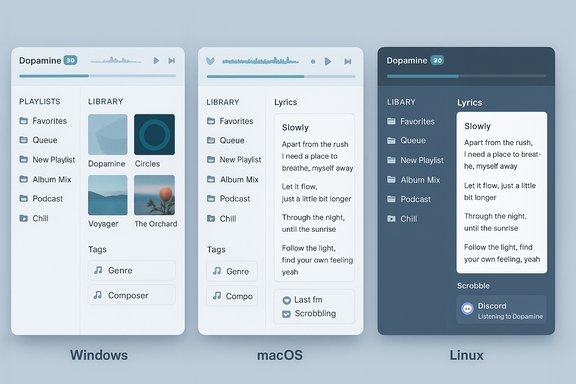
Dopamine 3.0 lands as a major milestone for the once-Windows-only audio player: the app graduates from a polished, minimalist Windows music client into a fully cross‑platform music manager with gapless playback, playlist folders, Last.fm scrobbling, lyrics and Discord presence — changes that reposition Dopamine as a serious contender for users who want a lightweight, modern alternative to more entrenched library managers.
Dopamine began life as a clean, opinionated music player focused on usability: simple library browsing by artists, albums, genres and playlists, and support for common file formats (MP3, FLAC, OGG, WMA, M4A/AAC). Over its v2.x lifecycle it earned praise for its attractive UI, sensible defaults and battery-friendly footprint on Windows systems. The jump to Dopamine 3.0 is not merely iterative polish — it converts that design philosophy into a cross‑platform product strategy and stitches in several advanced playback, metadata and social features that many listeners expect today. This article verifies the main claims in the official v3.0 release notes and independent coverage, explains what the changes mean in practical terms, warns about migration and privacy considerations, compares Dopamine to peers, and gives a practical checklist for power users and IT pros who want to evaluate the update.
Installation hint: locate the official v3.0 release artifact on the project’s releases page and verify checksums before installing; third‑party mirrors list preview installers in the 90–100 MB range for some platforms, but exact packaging and sizes differ by OS and build channel, so prefer the official assets for deployments.
Source: Neowin Dopamine 3.0
 Background
Dopamine began life as a clean, opinionated music player focused on usability: simple library browsing by artists, albums, genres and playlists, and support for common file formats (MP3, FLAC, OGG, WMA, M4A/AAC). Over its v2.x lifecycle it earned praise for its attractive UI, sensible defaults and battery-friendly footprint on Windows systems. The jump to Dopamine 3.0 is not merely iterative polish — it converts that design philosophy into a cross‑platform product strategy and stitches in several advanced playback, metadata and social features that many listeners expect today. This article verifies the main claims in the official v3.0 release notes and independent coverage, explains what the changes mean in practical terms, warns about migration and privacy considerations, compares Dopamine to peers, and gives a practical checklist for power users and IT pros who want to evaluate the update.What’s new in Dopamine 3.0 — the headline features
The official v3.0 release highlights (published with the release artifact) summarize the biggest additions:- Multi‑platform support — native builds for Windows, Linux and macOS.
- Playlist folders — hierarchical playlist organization for large collections.
- Gapless playback — seamless transitions between tracks without small interstitial gaps, critical for many live, classical and DJ‑style albums.
- Logarithmic volume control — volume adjustments that better match human perception for smoother fine‑tuning.
- Artist splitting — configurable splitting of multi‑artist tags (e.g., “ft.”, “feat.”) so compilation and featured‑artist metadata display correctly.
- Album grouping options — more control over how albums are defined and presented in the library UI.
- Last.fm integration — scrobbling and artist metadata download.
- Lyrics support — offline and online lyric display.
- Discord integration — Rich Presence to show current track on Discord in real time.
Deep dive: Library management and metadata handling
Playlist folders and album grouping
For users with hundreds or thousands of playlists, playlist folders are a real productivity gain. Instead of a flat playlist list, Dopamine 3.0 lets you create folders and nest playlists for theme‑based organization or project workflows (for example: “Workouts > Running”, “Studio > Edits”, “DJ Sets > 2025”). This matters in real world use: when a player’s playlist view becomes an unwieldy flat list, discoverability and quick selection suffer. Album grouping options address an enduring problem: how to treat multi‑disc or reissue albums, or albums that were released with different artist attributions. The new settings let users select how Dopamine groups tracks into albums (by tag fields, disc number, release date rules or custom heuristics), reducing misgrouped releases and making the library feel coherent for large collections. This is especially helpful for classical and progressive rock collections where track‑to‑movement relationships matter.Artist splitting and metadata fidelity
Automatic splitting of artists using configurable separators (like “ft.”, “feat.”) fixes a long‑standing annoyance: when featured artists are baked into a single artist string, the artist index fragments and search results become noisy. With explicit splitting, Dopamine builds cleaner artist pages and avoids duplicates caused by tag inconsistencies. That said, splitting rules must be tuned: overly aggressive separators can split legitimate artist names that contain tokens similar to separators, so the UI exposes customizable separators for safe handling.Playback engine: gapless playback, volume, and audio fidelity
Gapless playback — why it matters
Gapless playback is essential for albums where tracks crossfade by design (e.g., live concert recordings, Pink Floyd, classical movements). A true gapless engine preloads and aligns decoders to deliver continuous audio output without sample gaps or audible pops. Dopamine 3.0 advertises gapless playback as a headline feature, and preview changelogs explicitly note the addition and iterative fixes around transition logic. Users who stream entire albums or curate DJ‑style sequences will immediately notice the difference.Logarithmic volume control — more natural adjustments
The move to logarithmic volume control addresses a UX nuance: human hearing perceives loudness logarithmically, not linearly. A logarithmic slider gives better low‑level control (fine adjustments near quieter volumes) and avoids sudden jumps at mid‑slider positions. For desktop listening and critical listening environments, this makes daily volume adjustments feel more intuitive. Preview notes confirm the change and user reports in the preview chain highlight the perceptual improvement.Format and playback compatibility
Dopamine continues to support common lossless and lossy codecs (FLAC, MP3, OGG, WMA, M4A/AAC). Cross‑platform builds mean developers had to reconcile decoding backends across OSes; the practical effect is that you should test any niche formats or specialized tags (e.g., uncommon FLAC tags or large embedded images) before migrating a production library. Preview changelogs document fixes for cover image handling and edge cases in metadata parsing.Integrations: Last.fm, Lyrics, Discord — convenience vs privacy
Dopamine 3.0 ships with several third‑party integrations that expand the listening experience but also introduce network and privacy considerations.- Last.fm scrobbling: Automatic scrobbling helps track listening history across devices, power user analytics and discovery, but it requires sharing track metadata with Last.fm servers. The integration is standard, but users who care about exposure should confirm OAuth scopes and account privacy settings.
- Lyrics support: Offline and online lyric options permit synchronized display during playback. Online lyrics typically require third‑party lookup, which can involve automatic queries to lyric providers and possible scraping of services whose terms vary. Dopamine’s previews added toggles to control lyric downloads; users should prefer offline lyrics or confirm the provider’s terms where necessary.
- Discord Rich Presence: Displaying the current track in Discord is a popular social feature for streamers and small groups. Previews show Dopamine iteratively fixing Discord presence bugs, and the feature is present in v3.0. Bear in mind it exposes playback status to the Discord account and, depending on your settings, to servers and friends. Confirm whether presence updates include full metadata (artist, album) or only song titles, and whether you want that shared.
Cross‑platform build: opportunities and caveats
Dopamine 3.0’s most strategic change is multi‑platform support. The project’s GitHub release explicitly lists Windows, Linux and macOS support in the v3.0 notes. That broadens Dopamine’s potential user base and enables a consistent listening experience across desktop environments. Opportunities:- Unified UX on different desktops avoids retraining users switching machines.
- macOS and Linux users gain access to Dopamine’s curated UI and lightweight library manager.
- Easier support for portable repositories (use the same library across OSes if file paths are portable or if library export/import functions are used).
- Cross‑platform parity may lag: preview changelogs show macOS‑specific fixes (e.g., player transitions), meaning some UI flows needed platform‑specific adjustments. Test the platform builds you need before committing.
- Packaging differences (installer vs portable zipped app vs macOS DMG) may affect where configuration and libraries are stored; plan for consistent backups before migrating.
Stability, release strategy and community testing
The 3.0 rollout followed an extended preview cycle (multiple preview builds numbered into the 30s and 40s), with preview changelogs showing iterative fixes for Discord presence, lyrics bugs, cover art handling and performance adjustments. Independent mirrors list both preview and final 3.0 artifacts, and community feedback during preview builds helped harden the release. That said, major platform and architectural moves often surface regressions post‑release; prudent users will either:- Keep a stable v2.x installation as a fallback during the transition, or
- Install v3.0 in a separate test environment (VM or secondary profile) and validate core workflows (library scanning, gapless playback on representative albums, tag edits, and device output).
Security and privacy considerations
Several aspects deserve attention:- Networked integrations (Last.fm, online lyrics) involve outbound queries. Confirm whether Dopamine caches tokens locally and how long it stores metadata. Prefer explicit opt‑in for scrobbling and lyric downloads.
- Discord Rich Presence transmits playback state to a third‑party service; verify what metadata is exposed.
- Third‑party libraries: cross‑platform decoders and metadata parsers are commonly targeted areas for security bugs in media players. The preview chain shows ongoing fixes to cover handling and decoding edge cases; users should keep Dopamine updated to receive security patches.
Migration: preparing your library for v3.0
Users migrating from Dopamine v2.x or another player should follow a short checklist to avoid surprises:- Back up your existing Dopamine library database and configuration files.
- Export playlists (M3U or the player’s export feature) if you rely on external playlist consumption.
- Test gapless playback on representative albums (classical, live, DJ mixes) to validate the new engine on your hardware.
- Test third‑party integrations in a non‑production account (e.g., a throwaway Last.fm account) to validate scrobbling behavior before linking a primary account.
- Confirm cover art and embedded artwork handling for large libraries; preview notes show iterative fixes to album art behavior, so verify your most important albums.
How Dopamine 3.0 compares to alternatives
- MusicBee: Feature rich with advanced tagging and DSP; historically Windows‑only. Dopamine 3.0 narrows the gap on usability and modern features but still positions itself as a lighter, less configuration‑heavy alternative.
- foobar2000: Extremely customizable and lightweight; for users who love deep configuration and component ecosystems, foobar2000 still wins on tweakability. Dopamine’s advantage is a polished UI out of the box and easier cross‑platform availability in v3.0.
- MediaMonkey: Powerful library management and tagging with commercial options; better for users who require large‑scale library management and automation. Dopamine aims for simplicity with modern UX rather than massive automation.
- Swinsian (mac): A strong, Mac‑native player with excellent library tools. Dopamine 3.0’s macOS build targets users who favor Dopamine’s UI language; power users should compare feature parity and macOS native integrations.
Practical recommendations and test plan
For enthusiasts and IT pros who want to evaluate Dopamine 3.0, follow this practical test plan:- Install v3.0 in a test VM or secondary account (do not overwrite a production install).
- Scan a representative subset of your library (1–5 GB) that includes: multi‑disc albums, live albums, compilations and files with uncommon tags.
- Test gapless playback on an entire album and listen for silent gaps or samples; try both local files and network shares if you use NAS storage.
- Validate artist splitting on tracks with “feat.” and “ft.” tokens and tweak separators to avoid false splits.
- Enable Last.fm scrobbling in test mode and confirm the metadata sent matches expectations (title, artist, album, timestamps).
- Try lyrics fetching with both offline files and online lookup and confirm where lyrics are cached and how you can disable automated downloads.
- Test Discord Rich Presence and confirm what metadata appears to other accounts.
- If you use external audio devices, test exclusive mode (if supported), sample rate switching and per‑track volume behavior.
Final appraisal
Dopamine 3.0 is a bold and well‑executed evolution of a beloved music player: the transition to multi‑platform support and the addition of gapless playback, playlist folders, logarithmic volume and social integrations make it far more than a simple UI refresh. For listeners who prize a clean interface and straightforward library navigation, Dopamine 3.0 offers a compelling, modern alternative — and its open‑source distribution makes it attractive to privacy‑conscious users who want transparent update mechanics. However, the move to cross‑platform and networked integrations increases the importance of testing and informed configuration. Users should validate the release on representative libraries, verify how integrations handle metadata and tokens, and confirm that any platform‑specific quirks (packaging, file paths, permission models) fit their workflows. Keep a tested rollback plan and prefer conservative, opt‑in settings for scrobbling and online lyric downloads until you’re comfortable with the defaults. Dopamine 3.0 marks a new chapter for the project: it turns a delightful Windows app into a cross‑platform listening workspace while carefully preserving the core simplicity that made it popular in the first place. For many users, that balance of approachability and modern features will be a winning combination.Installation hint: locate the official v3.0 release artifact on the project’s releases page and verify checksums before installing; third‑party mirrors list preview installers in the 90–100 MB range for some platforms, but exact packaging and sizes differ by OS and build channel, so prefer the official assets for deployments.
Source: Neowin Dopamine 3.0
