

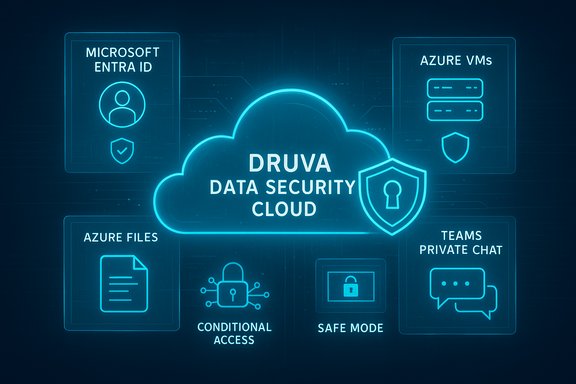
Druva’s latest expansion of Microsoft-focused capabilities aims to fold identity protection, cloud-native backup, and advanced cyber recovery into a single, fully managed platform—an aggressive push to make Microsoft 365, Entra ID, and Azure workload protection simpler, faster, and more ransomware resilient for enterprises of all sizes. The vendor’s new feature set—centered on Entra ID Conditional Access and Administrative Unit coverage, advanced cyber recovery for Azure Virtual Machines, agentless Azure Files protection, and Microsoft Teams Private Chat backup—is positioned inside the Druva Data Security Cloud to remove infrastructure overhead and deliver unified recovery and governance. This move tightens Druva’s integration with Microsoft technologies and signals how backup vendors are reorienting around identity-first, cloud-native cyber resilience.
Source: Channel Insider Druva Expands Resilience for Microsoft Azure, Entra ID, More
 Background
Why Microsoft environments are a target
Microsoft 365, Azure, and Entra ID are the backbone of most enterprise IT estates. That ubiquity makes them high-value targets: attackers know that compromising identity or collaboration stores yields broad access or sensitive data exfiltration. Modern ransomware and human-operated intrusions increasingly exploit identity and collaboration layers—malicious persistence through compromised accounts, mass deletion of Teams chats, or tampering with Azure VMs used for critical workloads. Protecting these surface areas requires more than periodic backups; it needs identity-aware controls, clean-restore assurance, and automated detection tied directly to recovery operations.Druva’s positioning
Druva markets the Druva Data Security Cloud as a fully managed, cloud-native alternative to legacy backup appliances and agent-heavy architectures. The core promise is to eliminate customer-managed infrastructure, centralize protection across Microsoft endpoints and workloads, and integrate threat detection with recoverability so teams can restore clean data quickly after incidents. The recent announcements extend that promise deeper into Microsoft identity and Azure workload domains.What Druva announced: the essentials
- Expanded Microsoft Entra ID Protection — Support for Entra ID Conditional Access Policies and Administrative Units, enabling organizations to apply the same identity controls used for sign-in protections to backup and recovery operations. This helps reduce exposure to identity-driven attacks and supports multi-tenant governance.
- Advanced Cyber Recovery for Azure Virtual Machines — New restore-time capabilities for Azure VMs that include malware and IOC scanning, AI-driven anomaly detection during restores, and a Safe Mode lockdown to prevent compromised assets from rejoining production networks until verified clean. These features are aimed at detecting threats earlier and ensuring restored VMs are not reinfected.
- Agentless, Cloud-Native Azure Files Backup — An agentless backup method for Azure Files that removes the operational risks and dependencies created by agent-based backups. The goal is to simplify operations while maintaining ransomware-resilient storage and recovery for file shares.
- Microsoft Teams Private Chat Protection — Coverage extended to include Teams private chat (both one-to-one and group private chats), adding to existing Exchange, SharePoint, and OneDrive protection so compliance and eDiscovery needs won’t be blindsided by missing chat records.
- DruAI / agentic AI expansion — A recent enhancement to the DruAI suite introduced agentic AI capabilities intended to automate security tasks and accelerate detection and response workflows, which Druva says augments the new recovery features with proactive threat management. This is part of an ongoing shift to embed AI into backup and recovery operations.
Deep dive: feature analysis and technical implications
Entra ID Conditional Access + Administrative Units: what changes
Conditional Access policies are the primary enforcement vector in Entra ID for controlling when and how users sign in. By extending support for those policies and Administrative Units into backup workflows, Druva lets organizations apply identity posture policies to backup and recovery operations themselves. Practically, that means:- Backup and recovery requests can be constrained by the same contextual signals (device compliance, location, risk level, authentication strength) used for application access.
- Administrative Units enable scoped policy and visibility across multi-tenant or segmented environments, reducing blast radius during compromise.
Azure VM Advanced Cyber Recovery: restoring with confidence
Restoring a VM after a ransomware or intrusion incident has long been a fraught operation: restore too quickly and you may reintroduce the threat; restore too slowly and business continuity suffers. Druva’s approach layers:- Malware and IOC scanning at restore time — An automated scan of restored disk images against known indicators, aiming to flag reinfection before the VM is brought online.
- AI-driven anomaly detection — Behavioral or metadata anomalies identified during the restore validate whether the snapshot being restored reflects pre-compromise baselines.
- Safe Mode lockdown — A quarantined operational mode preventing restored VMs from connecting to production networks until validated.
Agentless Azure Files backup: why it matters
Agent-based backups were standard in on-prem environments but introduce complexity and additional attack surface in cloud-native contexts. An agentless, cloud-native approach for Azure Files promises:- Reduced operational overhead (no agent deployment or lifecycle management).
- Lower risk of agent compromise or configuration drift.
- Tighter integration with Azure IAM and platform APIs for consistent snapshots and retention.
Teams Private Chat protection: closing compliance gaps
Microsoft Teams is now a major corporate communication channel. Historically, backups covered Exchange, SharePoint, and OneDrive, but private Teams chats were a weaker point for recovery and eDiscovery. Adding Private Chat ensures:- One-to-one and private group messages are captured and recoverable, improving legal hold and audits.
- Continuity of conversational context after accidental deletion or targeted erasure.
- A more complete archive for compliance and governance across Microsoft 365.
Strengths: where Druva’s strategy shines
- Cloud-native simplicity — Removing customer-managed backup infrastructure reduces operational overhead and helps organizations adopt a true SaaS model for data protection. This lowers the skills and capital barrier to scale.
- Identity-aware recovery — Integrating Entra ID Conditional Access into restore flows brings security and governance to a stage historically treated as “all-privileged.” This is a pragmatic shift toward least privilege for recovery activities and helps close identity-driven attack paths.
- Integrated detection + recovery — Combining AI-driven detection at restore time with IOC scanning and quarantine features means organizations can automate more of the verify-then-restore process, which materially reduces the risk of restoring infected data.
- Comprehensive Microsoft 365 coverage — Adding Teams Private Chat and broadening Azure workload support makes Druva more of a one-stop solution for Microsoft-centric environments, reducing tool fragmentation for SOC, backup, and compliance teams.
- Agentless options — Agentless Azure Files backup removes maintenance chores and potential agent-related vulnerabilities, making protection more consistent and easier to manage across diverse cloud workloads.
Risks, limitations, and implementation caveats
- Vendor claims vs. independent verification — Assertions such as “nearly 100 PB protected for millions of Microsoft 365 users” are useful adoption signals but are vendor-stated figures. These should be treated as company-reported metrics unless independently audited. Where exact numbers matter for procurement or vendor selection, insist on contractual SLAs and third-party validation.
- Restore latency vs. security trade-offs — Introducing malware scans, anomaly detection, and Safe Mode lockdowns during restores increases assurance but can lengthen recovery time. Organizations must document Recovery Time Objectives (RTOs) that incorporate these verification steps and run restore drills to validate SLAs under realistic conditions.
- Conditional Access complexity — Applying Conditional Access to backup operations helps secure recovery but increases operational complexity. Misconfigured policies could block legitimate restores during incidents. Implement a staged rollout with exception paths, emergency break-glass procedures, and rigorous testing in non-production tenants.
- Data residency and compliance — Centralizing backups in a SaaS service requires careful review of where backup copies are stored, who has access, and how regulatory holds or cross-border transfer obligations are honored. Contracts should specify region controls, data residency options, and audit paths.
- AI detection governance — AI-driven anomaly detection and agentic AI workflows can reduce analyst toil but introduce model governance issues: explainability, drift, false positives, and potential for automation errors. Establish monitoring, regular model reviews, and human-in-the-loop approvals for critical actions.
How organizations should evaluate and adopt these capabilities
- Map recovery requirements to business risk. Plot critical Microsoft 365 apps, Azure VMs, and file shares against business impact and compliance needs. Decide which workloads need fast RTOs, which need immutable copies, and which require deep forensic scans at restore time.
- Pilot Conditional Access for recovery flows. Test how Entra ID policies affect restore automation and manually exercise break-glass procedures. Validate service principal and managed identity paths to prevent accidental lockouts.
- Run restore drills that include verification. Include malware scans, AI anomaly checks, and Safe Mode transitions in tabletop and live restore tests so SOC, backup, and application owners can tune policies and SLAs.
- Reassess retention and classification policies. With Teams chats, Exchange, SharePoint, OneDrive, and Azure File shares in scope, update retention, eDiscovery, and data minimization rules to stay compliant and reduce unnecessary storage costs.
- Define model governance for DruAI features. Assign owners for detection thresholds, review model outputs for false positives, and require human sign-off for high-impact automated recovery actions.
- Negotiate SLAs and region controls. Ensure contractual coverage for availability, restore speeds (including quarantine/scan time allowances), and data residency requirements. Confirm auditability and access controls for stored backups.
Operational playbook: a practical checklist
- Inventory all Microsoft identities and service principals tied to backup and restore.
- Define Emergency Break-Glass accounts and test their efficacy under Conditional Access.
- Catalog mission-critical Azure VMs and choose between standard restore vs. advanced cyber recovery based on risk appetite.
- Enable Teams Private Chat capture and align retention to eDiscovery needs.
- Schedule recurring restore drills that simulate simultaneous incidents across M365 and Azure workloads.
- Monitor DruAI outputs for false positives and maintain a human-in-the-loop escalation path.
- Establish a post-incident forensic workflow to trace how a compromise occurred and which restore copies are safest.
Commercial and market context
Druva’s move follows a broader industry trend: backup and data protection vendors are converging with security tooling to deliver cyber resilience rather than mere archival. Customers expect three things now: reliable, fast recovery; verification that restored data is clean; and integration of identity and telemetry so restoration can be a guarded, auditable process—not a risky, last-minute throwback. Vendors that provide cloud-native backup, identity-aware recovery, and integrated detection are better positioned to win enterprise deals where Microsoft workloads dominate. Druva’s expanded Microsoft ecosystem support is consistent with that market direction.Final assessment: who benefits most, and when to proceed
- Organizations with heavy Microsoft 365 adoption, lots of Teams usage, and Azure-hosted applications gain the most immediate value from Druva’s expanded coverage.
- Regulated industries that must preserve private chats for compliance and eDiscovery will find the Teams Private Chat support particularly valuable.
- Enterprises with limited backup staff or those seeking to consolidate backup vendors will appreciate the fully managed, agentless options and integrated AI-assisted detection.
- However, if your environment requires complex application-consistent backups beyond what agentless APIs can guarantee—or you operate under strict on-prem data residency constraints—you should validate those needs before full adoption.
Conclusion
The expansion of Druva’s Microsoft-focused capabilities reflects a pragmatic shift in enterprise cyber resilience: identity controls and verification steps are no longer optional extras for backup—they’re integral to safe recoveries. By weaving Entra ID controls into recovery operations, adding deeper restore-time scanning and quarantine for Azure VMs, delivering agentless Azure Files backup, and closing Microsoft Teams Private Chat gaps, Druva is packaging what many security and IT teams have been asking for—clean, auditable, cloud-native recovery built for Microsoft-first environments. The benefits are clear: reduced operational complexity, better governance, and higher confidence that restores won’t reintroduce compromise. The caveat is equally clear: these gains depend on disciplined rollout, realistic RTO planning, robust Conditional Access testing, and model governance for AI-driven automation. For organizations that treat recovery as a security-sensitive operation, these features are a welcome advance—provided they are validated and governed in production-like conditions before being relied on in crisis.Source: Channel Insider Druva Expands Resilience for Microsoft Azure, Entra ID, More
