

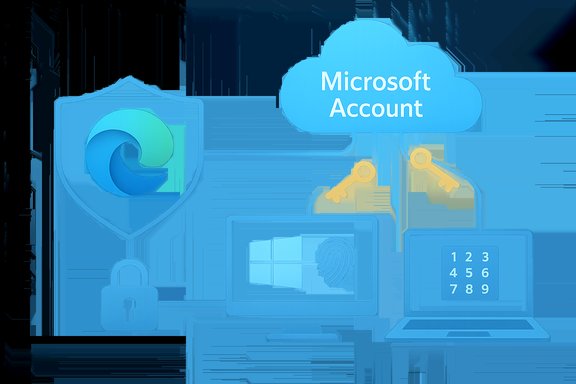
Microsoft Edge 142 can now save and sync passkeys to your Microsoft Account, letting Windows users create, store, and use passwordless credentials across devices protected by a Microsoft Password Manager PIN and Windows Hello authentication.
Background
Passkeys are a modern, phishing-resistant alternative to traditional passwords that use public-key cryptography (the FIDO2/WebAuthn standard) to authenticate users with a device-bound secret. Instead of typing a password, users prove possession of a private key by unlocking a local authenticator — typically via biometrics or a device PIN. Major platform vendors and browsers have been rolling out passkey support over the past several years, and Microsoft’s latest move embeds cloud-sync for these credentials directly into Edge on Windows.Microsoft’s official rollout arrives with Microsoft Edge 142 and uses Microsoft Password Manager to store passkeys in the cloud tied to a user’s Microsoft Account. On Windows devices, passkey creation and use rely on Windows Hello (fingerprint, facial recognition, or PIN) for local authentication, while the cloud-synced copy is protected by a separate Microsoft Password Manager PIN. The feature is currently scoped to Windows desktop devices running Windows 10 or later and Edge 142 or newer; Microsoft has stated plans to expand platform coverage and provide a plugin so passkeys stored in Edge can be invoked by third-party apps and browsers on Windows.
What changed in Edge 142: feature overview
Microsoft Edge 142 introduces several concrete user-facing capabilities:- Save passkeys to your Microsoft Account: When you create a passkey on a supported website, Edge can now offer to save that passkey to Microsoft Password Manager. The passkey is associated with your Microsoft Account and can be synced to other Windows devices where you sign in with the same account.
- Cloud sync with local unlock: Synced passkeys are protected in the cloud but require a local unlock to use — typically Windows Hello on the device. Edge additionally requires a Microsoft Password Manager PIN to unlock the cloud copy when enrolling or moving to a new device.
- Passkey generation and use in the browser: Edge will propose passkey creation on supporting websites and prompt for Windows Hello when authenticating with an existing passkey.
- Password manager continuity: Edge’s password manager still supports traditional passwords (saved, autofilled, and synced) alongside passkeys; neither capability replaces the other immediately.
- Planned plugin for third-party use: Microsoft says a dedicated plugin for Windows will enable apps and other browsers to use passkeys stored in Edge outside the browser.
How it works: technical mechanics explained
Passkey fundamentals
Passkeys implement FIDO2/WebAuthn principles: the relying party (a website or app) receives a public key, while the private key remains on the user’s authenticator. Authentication is accomplished by a proof signed with the private key, validated by the server with the stored public key. Because private keys never leave authenticators, passkeys are inherently phishing-resistant—a stolen password can be replayed or phished, but a private key cannot be coerced by a malicious site to authenticate elsewhere.Microsoft’s implementation specifics
- Storage: Passkeys created in Edge and saved to the cloud are encrypted and associated with the user’s Microsoft Account. Microsoft adds a Microsoft Password Manager PIN as an access control guard for using the cloud-stored passkeys on new devices.
- Local unlock: To use a passkey on a Windows device, Edge calls Windows Hello (biometric or PIN) to unlock the local credential or to authorize use of the cloud-synced credential.
- Recovery and PIN reset: Microsoft provides a PIN reset mechanism that relies on devices where the passkeys are already present. Microsoft also enforces a limited number of incorrect PIN attempts before protective measures kick in.
- Platform scope: Initial availability is Windows desktop only (Windows 10 and newer) with Edge 142+. Microsoft indicates broader platform support and a Windows plugin to extend usage to third-party apps and browsers are coming later.
Why this matters: benefits for users and admins
Stronger security, fewer phishable secrets
Passkeys remove the fundamental vector that underlies most account takeovers—reused or stolen passwords. Because passkeys use asymmetric cryptography and device-bound authentication, they’re resistant to credential stuffing, phishing, and many server-side password breaches.- Phishing resistance: A passkey can’t be presented to a malicious site and re-used elsewhere.
- No password reuse: Users no longer need to rely on unique passwords or password managers to avoid reuse.
- Local biometric protection: Windows Hello keeps biometric templates on-device rather than on a cloud server.
Better cross-device convenience
Cloud-sync solves the classic passkey friction: what happens when you create a passkey on one device but must sign in on another. By storing a secure, encrypted copy tied to a Microsoft Account and protecting it with a PIN, Microsoft lets users have both the seamless experience of synchronized credentials and the security of local biometric or PIN unlock.Enterprise readiness and integration
For organizations invested in Microsoft’s ecosystem, this development simplifies rollouts of passwordless authentication and complements Microsoft Entra and Windows management features. Administrators can test adopting passkeys with existing Microsoft account and device management controls.Strengths and notable advantages
- Vendor-integrated approach: Storing passkeys in a user’s Microsoft Account and tying sync into Edge leverages Microsoft’s existing account infrastructure and device management tooling.
- User-friendly recovery flows: Microsoft’s PIN-based protection, combined with device-attested PIN reset, reduces the risk of permanent lockout compared with fully local-only passkeys if a device is lost.
- Compatibility with established standards: Because passkeys in Edge use FIDO2/WebAuthn primitives, they remain compatible with services that support modern passwordless authentication.
- Preserves traditional password workflows: Edge’s password manager still supports conventional passwords, allowing a gradual migration to passkeys without breaking older sites or user habits.
- Clear device-based protection: Reliance on Windows Hello ensures biometric data never leaves the device; the cloud layer stores encrypted keys rather than raw biometric data.
Risks, limitations, and unanswered questions
Cloud storage introduces a new centralization tradeoff
Holding encrypted passkeys in the cloud under a Microsoft Account delivers convenience but increases dependence on the account’s security and Microsoft’s cloud systems. Attack vectors to consider:- Account compromise: If an attacker fully controls the Microsoft Account (including recovery controls), cloud-stored passkeys may become accessible. The Microsoft Password Manager PIN and device-anchored protections mitigate but do not eliminate risk.
- Account recovery flows: Many account takeovers exploit social engineering or recovery channels. Centralized passkeys shift the security boundary from device-only to account+device, making recovery controls and secondary protections crucial.
Platform and ecosystem limits
- Windows-only at launch: The feature is initially available only on Windows desktop. Users on macOS, iOS, Android, or Linux cannot yet benefit from Edge’s cloud passkey sync between platforms.
- Browser and app interoperability: Until Microsoft’s promised plugin is released, passkeys saved in Edge are usable only inside Edge. Cross-browser/password-manager interoperability is essential for a true cross-platform passwordless future.
- Entra and enterprise behavior: Details about how Edge passkey sync integrates with Microsoft Entra ID (Azure AD) in enterprise-managed accounts may vary, and administrators must validate compliance and audit capabilities for their environments.
Recovery and brute-force protections — operational consequences
- PIN attempt limits: Microsoft’s implementation includes a finite number of PIN attempts to unlock the cloud copy. While this helps prevent brute force attacks, it also risks legitimate users being temporarily blocked after accidental failures. The precise lockout behavior and recovery timelines should be examined by administrators planning rollouts.
- Device loss scenarios: If a user loses all devices with passkeys and cannot access recovery options, account access could be disrupted. The hybrid cloud model helps here compared to local-only passkeys, but recovery depends on secure and robust account recovery practices.
Transparency and auditing questions
Microsoft’s blog and docs describe auditing and integrity protections (for example, logging in an immutable ledger), but independent auditability and the precise technical details of server-side key handling, encryption schema, and threat models require scrutiny by security researchers. Until such independent audits and technical disclosures are widely available, organizations should treat cloud-stored passkeys as a well-designed tradeoff but not an unquestionable replacement for multi-layered security.Practical guidance for users
If Edge 142 and the new passkey sync are available in your environment, follow these practical steps:- Ensure Windows Hello is set up on your device (fingerprint, face, or PIN). This is required for local passkey use.
- Update Edge to version 142 or newer and sign in with your Microsoft Account.
- When prompted to create a passkey on a supported website, allow Edge to generate and save it if you want sync across Windows devices.
- Choose a secure Microsoft Password Manager PIN and treat it like a secondary credential — don’t reuse it across services.
- Configure Microsoft Account recovery options (secondary email, phone, authenticator) and enable multi-factor protection for the account itself.
- For sensitive or high-value accounts, consider keeping an additional recovery method (hardware security key) registered with the service where available.
- If you use non-Windows devices frequently, wait for cross-platform support or evaluate third-party passkey managers that already support multiple OSes.
Guidance for IT admins and security teams
- Pilot before wide rollout: Deploy Edge passkey sync in controlled pilots to assess recovery, helpdesk impact, and compatibility with existing identity solutions.
- Audit account-recovery paths: Strengthen and monitor recovery channels for Microsoft Accounts to reduce risk from social engineering attacks.
- Map Entra/Azure AD behavior: Test interactions between Edge passkey sync and Entra policies. Confirm whether passkeys appear as credentials under managed identity controls and how conditional access policies apply.
- Update helpdesk procedures: Prepare support flows for PIN resets, device replacement, and orphaned credentials, and communicate clearly to end users about lockout behaviors.
- Consider hardware security keys: For high-assurance requirements, hardware FIDO2 security keys still offer the strongest physical possession guarantee.
Interoperability: will passkeys stored in Edge play well with other browsers and services?
Technically, passkeys created per WebAuthn/FIDO2 are interoperable at the service level: any relying party that implements passkey sign-in can accept the public key generated for that account. The practical issue is using the stored private key across browsers and apps.Microsoft’s immediate strategy is Edge-centric: passkeys stored in Edge’s Microsoft Password Manager are available to Edge on Windows. Microsoft says it will deliver a Windows plugin to allow passkeys stored in Edge to be used by other applications and browsers on Windows. Until that plugin ships, interoperability remains limited, and users who routinely switch browsers may find passkey handling fragmented.
Third-party password managers (e.g., dedicated passkey managers) and cross-platform solutions are evolving to bridge this gap. Organizations should watch for vendor plugins and standards-based cross-browser integrations to reach a truly seamless passwordless experience.
Future outlook and what to expect next
- Cross-platform expansion: Microsoft has committed to bringing passkey sync to more platforms. Expect staged rollouts for macOS, iOS, Android, and possibly Linux in future Edge releases or via companion apps.
- Windows plugin for app/browser support: The promised plugin for Windows will be an important milestone for broader app and browser interoperability.
- Enterprise feature maturation: Deeper integration with Microsoft Entra ID, administrative controls, and auditing will be prioritized for enterprise customers.
- Ecosystem growth: As more vendors and browsers adopt passkeys, the overall friction of passwordless sign-in will decline, and more services will default to passkeys for new accounts.
- Security research and audits: Independent audits, threat-modeling papers, and community scrutiny will clarify residual risks and harden the architecture.
Critical analysis: balancing convenience and trust
Microsoft’s Edge 142 passkey sync is a significant step toward mainstreaming passwordless authentication for Windows users. It addresses a core usability friction — the difficulty of making passkeys usable across multiple devices — by leveraging cloud sync tied to Microsoft Accounts and reinforcing it with device-based authentication and a PIN. This hybrid model aligns with the industry move toward “cloud-backed passkeys,” which promise both convenience and resistance to phishing.However, the tradeoff is increased reliance on cloud account security and recovery flows. Centralizing passkeys under a Microsoft Account simplifies access but also increases the attack surface to account recovery and social engineering. The protective measures Microsoft describes (PIN protection, attempt limits, device-bound Windows Hello unlock, and logging) are sensible mitigations, but they do not eliminate the need for robust account hygiene and administrative oversight.
For privacy-conscious users or organizations with high-assurance requirements, cloud sync may not be appropriate without additional safeguards (like mandatory hardware key registration or strict recovery policies). Enterprises will need to evaluate the approach against compliance regimes, auditability requirements, and acceptable risk profiles.
Recommendations and final verdict
- For consumer users who primarily operate inside the Windows and Microsoft ecosystem, Edge 142’s passkey sync is a practical, secure upgrade over password-based workflows. Enable Windows Hello, keep your Microsoft Account protected, and adopt passkeys for sites that support them.
- For organizations, run a measured pilot to understand helpdesk load and recovery scenarios. Strengthen account recovery channels and assess how the feature aligns with Entra policies and compliance needs.
- Remain cautious about cross-platform limitations: users with mixed device fleets should not expect full parity until Microsoft ships broader platform support and the promised Windows plugin.
- Security teams should insist on independent audits and clarify the cryptographic key handling and server-side protections if they plan to centralize high-value credentials in Microsoft’s cloud.
This marks a pivotal phase in the migration away from passwords: the technical foundations are solid and user convenience is improving, but the operational and trust questions around cloud storage, account recovery, and cross-platform interoperability will define how quickly and safely organizations and users embrace passkeys at scale.
Source: Neowin Microsoft Edge can now store and sync passkeys across devices
