

Microsoft’s browser is quietly becoming something more like an assistant than a window — a shift that blends Copilot’s conversational AI with Edge’s browsing surface and promises to change how users research, shop, and automate tasks online.
Microsoft has been rolling Copilot across Windows and its app portfolio for more than a year, but the latest phase puts the assistant inside Edge as a purpose-built browsing surface called Copilot Mode. The early launch of Copilot Mode (announced in mid‑2025 and widely covered during the summer rollout) introduced a unified chat/search input, voice controls, cross‑tab reasoning, and experimental automation capabilities now being expanded in preview channels. Microsoft framed these additions as permissioned and opt‑in, intended to preserve user control while enabling agentic workflows. Concurrently, Microsoft has updated Copilot’s backend and tooling — most notably Copilot Studio — to give enterprise and developer teams access to the latest model family, including GPT‑5 variants, and to manage agent behavior at scale. These platform updates underpin Edge’s move from passive display to active assistant.
For Windows enthusiasts and IT decision‑makers, the correct posture is measured curiosity: experiment with Copilot Mode in constrained contexts, insist on visible consent and auditable outcomes, and treat agentic automation as a tool that requires continuous oversight. If Microsoft balances convenience with clear controls and robust enterprise features, Edge could become a compelling, productivity‑focused browser for users anchored in the Microsoft ecosystem. If not, the move risks alienating users who prize transparency and control over aggressive default nudges.
Either way, we are witnessing a consequential redesign of the browser — from passive viewport to active collaborator — and the choices Microsoft makes next will shape how millions interact with the web for years to come.
Source: WebProNews Microsoft Transforms Edge into AI Command Center with Copilot
 Background
Microsoft has been rolling Copilot across Windows and its app portfolio for more than a year, but the latest phase puts the assistant inside Edge as a purpose-built browsing surface called Copilot Mode. The early launch of Copilot Mode (announced in mid‑2025 and widely covered during the summer rollout) introduced a unified chat/search input, voice controls, cross‑tab reasoning, and experimental automation capabilities now being expanded in preview channels. Microsoft framed these additions as permissioned and opt‑in, intended to preserve user control while enabling agentic workflows. Concurrently, Microsoft has updated Copilot’s backend and tooling — most notably Copilot Studio — to give enterprise and developer teams access to the latest model family, including GPT‑5 variants, and to manage agent behavior at scale. These platform updates underpin Edge’s move from passive display to active assistant. What’s changed in Edge: From browser to AI command center
Copilot Mode: the new interaction surface
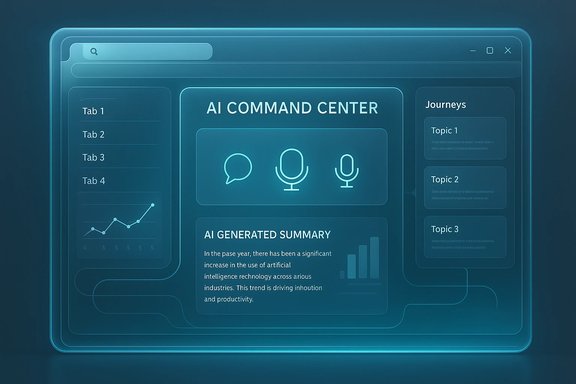
Copilot Mode replaces the traditional new‑tab experience in Edge with a unified command field that acts as search box, chat input, and command console. Users can type or speak natural‑language commands and ask the assistant to:- Summarize the content of one or multiple open tabs.
- Compare prices, extract structured data, or create a quick comparison chart.
- Resume a prior research session organized into Journeys (topic‑based session memory).
- Run Actions — agentic automations that, with permission, can interact with page elements, fill forms, and move through multi‑step flows.
Journeys: session memory that resumes work
Journeys groups past browsing activity into resumable cards (e.g., “vacation research” or “laptop shopping”), storing short summaries and metadata so users can pick up where they left off. This aims to replace tab hoarding and manual bookmarking with an AI‑curated timeline. Microsoft says Journeys is opt‑in and gated by explicit Page Context permissions. Early previews show practical gains for long‑running research tasks, although the feature raises immediate governance questions for enterprise deployments.Copilot Actions: agentic automations
Copilot Actions are the capability that turns Edge from an assistant that tells you what to do into one that tries to do it. Actions can:- Fill shopping carts or forms using session state (cookies).
- Execute unsubscribe flows or basic reservation sequences.
- Chain commands across tabs (e.g., collect prices from several stores and build a comparison table).
UI redesign: Edge adopts Copilot’s look
Separately from functional changes, Edge is receiving a visual refresh that borrows Copilot’s design language — rounded corners, new fonts and colors, and Copilot‑style context menus and settings. That UI shift is being tested in Edge’s Canary and Dev channels and appears to be applied broadly, sometimes even when Copilot Mode is disabled. The new aesthetics are part of Microsoft’s attempt to create a unified Copilot experience across products.Timeline and verification of major claims
- Copilot Mode public rollout (experimental/preview): Microsoft began shipping Copilot Mode in Edge in July 2025 and documented it in release notes and blog posts as an opt‑in experience. Coverage at launch detailed the unified command field, voice features, and early session memory concepts.
- Summer → Fall expansion: The feature set expanded through previews in the fall of 2025 with additional agentic capabilities and Journeys shown in demos and press coverage. Independent reviews and in‑depth reports surfaced in October 2025 as Copilot Mode matured in preview builds.
- Model updates: Microsoft has integrated GPT‑5 family models into Copilot Studio and the broader Copilot ecosystem, with GPT‑5 Chat available for production in select markets and newer GPT‑5.2 experimental models rolled out to early test environments in late 2025. These changes are reflected in Microsoft’s Copilot Studio documentation and release notes.
Strengths and clear benefits
- Productivity gains for research and shopping: Multi‑tab synthesis and Journeys collapse hours of manual work (collect links, copy/paste, compare specs) into instant summaries and charts. Early tests show real time savings for product research and itinerary planning.
- Accessibility and voice-first interactions: Voice commands, Copilot Vision (where available), and the ability to have the assistant navigate pages improve accessibility for users with motor or vision impairments. These multimodal inputs align with current best practices for inclusive product design.
- Tighter Microsoft ecosystem integration: Edge can leverage Microsoft accounts, Microsoft 365 connectors, and Copilot Studio agents to route complex workflows into enterprise systems (Outlook, Teams, Graph APIs), enabling unified agent-assisted processes in corporate environments. For organizations already invested in Microsoft 365, these integrations can reduce friction and centralize governance.
- Improved on-device protections: Microsoft has added locally running defenses (for example, a Scareware blocker) to help detect full‑screen scams and other malicious UX attacks — these protections can run without sending page content to remote servers, reducing telemetry concerns for the specific cases they address.
Risks, trade‑offs, and unanswered questions
Privacy and data flows
Copilot’s power depends on access to context: open tabs, session cookies, browsing history, and (in some preview scenarios) connected accounts. Even with opt‑in toggles, exposing that level of context to a persistent assistant increases the attack surface and complexity of governance. Privacy advocates are right to press for clarity on retention windows, telemetry, and whether screenshots or page captures are stored or used for model training. Microsoft’s permission model mitigates some risk, but enterprises must still treat Copilot features as new data flows requiring policy updates.Reliability and hallucination risk
Agentic actions that navigate the open web are inherently brittle. Early reviews show useful automation for stable, structured pages (retailer product pages, booking forms) but failures or misreports on dynamic or bespoke sites. The consequence is clear: Actions should never be treated as infallible. Organizations should maintain human‑in‑the‑loop checks for financial, legal, or compliance‑sensitive workflows. Microsoft’s Copilot Studio human‑in‑the‑loop preview is a promising direction, but it remains a developing discipline.User agency and forced UI changes
A major flashpoint is the visual redesign: several reports indicate Edge’s Copilot‑inspired UI elements are appearing in preview builds even when Copilot Mode itself is not enabled. That has provoked user backlash and talk of “forced AI” design — with vocal critics arguing Microsoft is nudging users toward Copilot through default visual placements. Some community reporting suggests limited or no ability to revert the UI in Canary/Dev builds, though this is a preview‑channel behavior and not yet definitively a permanent policy. For clarity: the extent to which the Copilot visual overhaul will be optional in stable releases remains unresolved. Users and IT admins should watch settings controls closely as the redesign rolls out.Market and competitive pressure
Edge’s AI makeover is a strategic counter to rival moves — Google’s Gemini integration for Chrome, OpenAI’s ChatGPT Atlas experiment, and new entrants like Arc/Dia and Perplexity’s Comet. Yet market share trends show that Chrome remains dominant on desktop, while Edge’s share has fluctuated and declined in many markets. Upgrading Edge’s capabilities may improve stickiness among Microsoft‑centric users but winning broad consumer preference will require balancing innovation with trust. StatCounter snapshots from 2025 show Chrome with a commanding desktop share and Edge operating in the low double digits or single digits depending on region and metric — a reminder that UI and feature changes must be executed carefully to avoid alienating users.Enterprise perspective: Opportunity and caution
For IT leaders, Copilot Mode and the Edge changes are a mixed prospect.- Opportunities:
- Edge for Business with Copilot Mode can centralize AI‑driven summarization, triage, and workflow automation inside a managed browser, potentially improving knowledge work for teams that already use Microsoft 365 and Azure.
- Copilot Studio and Agent Builder allow enterprises to create governed agents that integrate with internal systems, giving structured access to GPT‑5 models and express workflow execution.
- Required controls:
- Update data classification and consent policies to cover Copilot Journeys, Action logs, and connectors.
- Pilot in constrained environments and instrument usage telemetry to watch for hallucinations and misautomation incidents.
- Establish clear human‑in‑the‑loop approval thresholds for financial, legal, and HR actions. Microsoft’s HITL preview for Copilot Studio is a step in this direction, but organizational discipline is essential.
Community reaction and the “Microslop” debate
The tech community’s response is split. Enthusiasts praise the convenience of multi‑tab reasoning and agentic workflows; critics worry about creeping AI integration and reduced control. The term “Microslop” has emerged in social media as shorthand for unwanted AI features added across the Windows ecosystem, and developers and power users have raised alarms about forced UI changes or heavy default nudges toward Microsoft’s assistant. That discourse matters: product trust can erode quickly if users feel defaults override choice. At the same time, forums and hands‑on reviews highlight real productivity wins for specialized tasks. The balanced takeaway is pragmatic: the feature set is powerful and useful for many jobs — but the rollout must be handled with transparent opt‑ins, clear undo/override controls, and robust enterprise governance to avoid backlash.Technical notes and verifiable specifics
- Copilot Mode launch and availability: experimental/preview releases began in mid‑2025 with staged rollouts in Copilot‑enabled markets; some advanced features are limited to U.S. previews or require Microsoft 365 Copilot licenses.
- Model stack: Microsoft’s Copilot Studio supports GPT‑5 Chat for production scenarios in the EU and U.S., and has started rolling experimental GPT‑5.2 models to early release environments; GPT‑4.1 was set as a new default for Copilot Studio agents in late October 2025. These product pages and release notes are Microsoft’s official documentation of the model availability.
- Market context: Chrome’s desktop market share remains dominant in 2025 (StatCounter snapshots), while Edge’s share has declined in several markets — a market reality that frames Microsoft’s urgency to reposition Edge as an AI‑centric product. Exact percentages vary by region and date; use current StatCounter pages for the latest numbers.
Practical guidance for Windows users and admins
- Evaluate in a controlled pilot: start with a small business unit or a volunteer power‑user group to test Journeys and Actions with noncritical workflows.
- Review and tighten privacy settings: verify Page Context, Journey retention, and connector permissions before broad rollout.
- Require confirmation for transactions: enforce human approvals for any automation that can alter financial or contractual states.
- Monitor and log: configure telemetry to capture automation outcomes and any mismatches between reported and actual results.
- Train users: teach people that Copilot outputs are assistive and require verification, especially in regulated contexts.
What to watch next
- Microsoft’s settings and admin controls for Copilot artifacts (retention, export, deletion) — will they be granular and enterprise‑grade?
- The stability and accuracy of Copilot Actions on complex commercial sites and the expansion of partner integrations for secure payments and bookings.
- How Microsoft responds to UI backlash: will the Copilot visual language be optional in stable channels, or will it become the default?
- Ongoing model governance: whether GPT‑5 variants are accompanied by stronger hallucination mitigation, evaluation tooling, and explainability features inside Copilot Studio.
Conclusion
Microsoft’s strategy to convert Edge into an AI command center is a deliberate, ecosystem‑level bet: embed Copilot as both a functional assistant and a visual touchpoint across Windows and Microsoft 365. The result can be powerful — faster research, hands‑free navigation, and agentic automations that remove busywork. At the same time, this pivot raises substantive questions about privacy, reliability, user choice, and enterprise governance.For Windows enthusiasts and IT decision‑makers, the correct posture is measured curiosity: experiment with Copilot Mode in constrained contexts, insist on visible consent and auditable outcomes, and treat agentic automation as a tool that requires continuous oversight. If Microsoft balances convenience with clear controls and robust enterprise features, Edge could become a compelling, productivity‑focused browser for users anchored in the Microsoft ecosystem. If not, the move risks alienating users who prize transparency and control over aggressive default nudges.
Either way, we are witnessing a consequential redesign of the browser — from passive viewport to active collaborator — and the choices Microsoft makes next will shape how millions interact with the web for years to come.
Source: WebProNews Microsoft Transforms Edge into AI Command Center with Copilot
