

Microsoft’s latest Beta release for Edge — build 142.0.3595.33 — delivers a pragmatic but meaningful tweak to the browser’s Autofill behavior while continuing a longer-term push toward faster WebUI code and deeper Copilot integration, all shipped as part of a staged rollout that prioritizes controlled exposure and compatibility.
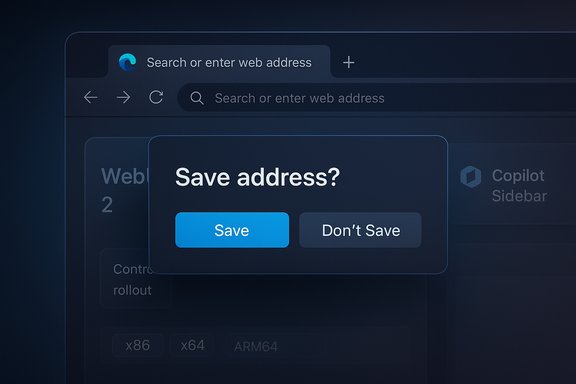
Microsoft published official Beta-channel release notes for Microsoft Edge showing version 142.0.3595.33 as the October 21, 2025 Beta release. The notes call out an improved Autofill experience that prompts users to confirm whether an entered address should be saved, and they explicitly note the update is being delivered via a controlled feature rollout. The same release package and catalog entries also list the build and platform packages for the October 21 release, confirming the versioning and distribution across x86, x64 and ARM64 packages.
Under the surface, Microsoft is continuing a multi-year effort to modernize the Edge UI stack — a program sometimes referred to internally and in industry reporting as a migration to WebUI 2 — and to fold its Copilot features more deeply into the browsing experience. The Beta release is a small, user-facing step (Autofill confirmation) that sits alongside those larger engineering initiatives (WebUI modernization and Copilot expansion).
This confirmation step is a low-friction, intent-based guardrail:
Because the new prompt is being introduced as a controlled rollout, IT admins should:
For users, that means:
For users, it reduces accidental savings and makes Autofill behave more intentionally. For IT pros, it emphasizes the need to test, document, and communicate staged rollouts. For security and privacy teams, it offers a slight improvement in control without changing the overall capability set.
The promised WebUI modernization and Copilot enhancements point toward a faster, more AI-centric future for Edge, but some performance claims still need fuller public documentation. Organizations and power users should validate the behavior in their own environments, verify policy interactions, and treat the WebUI performance numbers as an encouraging indicator rather than an absolute until more detailed engineering data is made public.
Ultimately, this is the kind of incremental improvement that signals Microsoft is not only focused on big AI features but also on the small, pragmatic changes that keep a browser usable and respectful of user intent.
Source: Windows Report Microsoft Rolls Out Improved Autofill Experience in Edge
 Background
Microsoft published official Beta-channel release notes for Microsoft Edge showing version 142.0.3595.33 as the October 21, 2025 Beta release. The notes call out an improved Autofill experience that prompts users to confirm whether an entered address should be saved, and they explicitly note the update is being delivered via a controlled feature rollout. The same release package and catalog entries also list the build and platform packages for the October 21 release, confirming the versioning and distribution across x86, x64 and ARM64 packages.Under the surface, Microsoft is continuing a multi-year effort to modernize the Edge UI stack — a program sometimes referred to internally and in industry reporting as a migration to WebUI 2 — and to fold its Copilot features more deeply into the browsing experience. The Beta release is a small, user-facing step (Autofill confirmation) that sits alongside those larger engineering initiatives (WebUI modernization and Copilot expansion).
What changed in Autofill — the details that matter
What users will see
- When a user fills an address on a web form in Edge Beta 142, the browser now prompts whether the address should be saved for future Autofill suggestions.
- The prompt appears at the moment of data entry or form submission (depending on the form), asking the user to choose to save or decline the address.
- This is a default behavior for eligible profiles in the Beta channel, but only for users who receive the staged rollout.
Why this is a meaningful UX change
Autofill systems are simple in concept but messy in the real world. Browsers historically save addresses when a user completes a form and either leaves the page or submits it; many users end up with duplicated or erroneous entries because websites auto-populate fields, internal test data slips into a production entry, or web forms are used for transient workflows that shouldn’t be saved.This confirmation step is a low-friction, intent-based guardrail:
- It reduces accidental saves and the ensuing clutter in saved addresses.
- It helps privacy-conscious users avoid accidentally storing sensitive or ephemeral addresses.
- It mitigates administrative headache for IT teams who manage shared or kiosk-style devices where accidental saves can lead to cross-user leakage of personal data.
Administrative and policy considerations
Edge’s management policies already expose comprehensive controls around Autofill behavior for enterprise and education customers. Administrators can disable address Autofill entirely via policy (for example, Group Policy or corresponding registry/ADMX settings), and the browser’s behavior can differ per-profile or by organizational configuration.Because the new prompt is being introduced as a controlled rollout, IT admins should:
- Confirm the organization’s current AutofillAddress policy settings and consider whether the consent prompt aligns with internal data-handling policies.
- Test the Beta build and user experience in a lab or pilot pool before rolling to large deployments.
- Communicate the change to helpdesk teams so that end-user queries are handled efficiently if profiles begin seeing the new prompt.
WebUI 2: modernization, performance claims, and uncertainty
What “WebUI 2” is claimed to do
Industry reports and product commentary have tied recent Edge updates to a broader migration of the browser’s internal UI layers — often referred to as “WebUI 2.” The promise of this modernization is straightforward:- Rebuild or refactor UI components using a newer, optimized WebUI framework.
- Reduce load times and increase UI responsiveness across built-in features, including the PDF viewer and other internal pages.
- Deliver smoother animations and more consistent rendering behavior.
What’s verified and what remains reported
- Verified: Microsoft’s official Beta release metadata and catalog entries confirm the Edge Beta version and the staged deployment; industry coverage makes a reasonable case that Microsoft is modernizing internal UIs as part of longer-term engineering improvements.
- Reported / less well-documented: The specific “40%” performance figure and the exhaustive list of features improved by WebUI 2 appear in third-party write-ups and product roadmaps referenced by reporters. Those performance figures are plausible for targeted UI refactors but are not called out with the same granularity in the formal release notes for the Beta build.
Practical effect for users
Even without a precise percent figure, the architectural goals are clear: moving UI surfaces to a lighter, more modern WebUI engine will reduce CPU and I/O pressure in common UI flows and should produce measurable snappier behavior, especially on lower-end devices where resource constraints accentuate UI lag.For users, that means:
- Faster opening of built-in pages (New Tab, Settings, PDF Viewer).
- Potentially smoother animations and fewer janky transitions.
- Incremental improvements as features are migrated — performance wins will likely be phased in, not delivered all at once.
Copilot in Edge: expansion and the current shape
Copilot Mode versus Copilot sidebar
Microsoft now exposes AI assistance in multiple ways inside Edge. Two major patterns are worth distinguishing:- Copilot Mode — a fuller, “mode”-level experience that changes the new tab and integrates contextual AI across tabs and workflows. Copilot Mode is more experimental and has historically been rolled out selectively, with some features tied to personal accounts and staged experiments.
- Copilot in the Sidebar — the more widely deployed, enterprise-aware integration that provides summarization, on-page Q&A, content rewriting, and other assistance without changing the browser’s main UI.
How Copilot features intersect with Autofill and privacy
Copilot’s capabilities (summarize, rewrite, compose, recommend) and Autofill behavior raise different but overlapping privacy considerations:- Copilot often requires an explicit permission (for example, a dialog to allow access to page content) before it can read and summarize page content.
- Autofill address prompts are a local consent mechanism for storing structured personal data on the device or in a signed-in profile.
- Administrators and users should be aware that the two systems can operate independently. Disabling or limiting Copilot does not automatically change the browser’s Autofill save behavior, nor does turning off Autofill change Copilot’s ability to analyze page content if the user granted that permission.
Cross-check: versioning, dates, rollout and downloads
- The Beta-channel release notes list Version 142.0.3595.33 with a release date of October 21, 2025.
- Update catalog entries and package listings confirm distribution builds for major CPU architectures on that same date — indicating a coordinated Beta release and installer packages for x86/x64/ARM64.
- The release notes explicitly describe the Autofill prompt change and label it a controlled feature rollout, which explains why some users will see the prompt immediately and others will not.
Why this update matters: user, IT, and security perspectives
For individual users
- Cleaner saved data: Fewer accidental address saves mean a more usable list of Autofill suggestions and fewer manual cleanups.
- Better control: The new prompt lets people decide at the moment whether any particular address entry belongs in their profile.
- Consistent behavior: Bringing Edge in line with Chrome’s long-standing “Save address?” prompt is a usability win for users who juggle multiple browsers.
For IT and enterprises
- Policy alignment: Admins can continue to enforce corporate Autofill policies, and the new UX prompt will not override explicit managed settings.
- Pilot opportunities: The Beta allows organizations to evaluate the user flow and prepare helpdesk documentation in advance of broader exposure.
- Privacy posture: This change reduces accidental data persistence, which can be particularly important for machines with shared usage or kiosk setups.
For security teams
- Attack surface considerations: Prompting users before saving personal details reduces the risk that scraped or injected data will be persisted.
- User education moment: The rollout provides a chance to educate users about safe Autofill usage and the importance of not saving sensitive credentials or addresses on shared devices.
Potential downsides and risks
- The confirmation prompt, while helpful, adds an extra click. In high-volume data-entry workflows or kiosk scenarios, that friction could be a nuisance unless the organization explicitly disables the prompt via policy.
- Controlled rollouts can cause uneven experiences across users. If support teams aren’t prepared, they may field inconsistent reports — some users see the prompt, others don’t — which can be confusing.
- The WebUI 2 performance figures that have circulated are promising but not fully documented in public release notes; organizations should treat performance claims as promising but provisional until Microsoft publishes more comprehensive benchmarks or engineering notes.
- Copilot integrations continue to raise privacy conversations. Enterprises that have compliance obligations should audit Copilot permissions and consider whether to enable or restrict Copilot features for managed profiles.
How to test and prepare: practical steps
- Download the Beta build (or deploy it to a test pool) and confirm the exact Edge build number in edge://settings/help. Expect Beta 142.0.3595.33 for the Oct 21 package.
- In a controlled test profile, fill forms with address data to validate where and how the “Save address?” prompt appears.
- Review and document existing Autofill policies (AutofillAddressEnabled and related ADMX/Intune settings) to confirm how the policy interacts with the new prompt.
- Check Copilot settings in the Edge sidebar and Settings > Sidebar > Copilot to see how page-content permissions and writing/compose helpers are configured for your environment.
- If you manage devices at scale, plan communications to end users and helpdesk staff that explain the new prompt and how to act when it appears.
The road ahead: what to watch for next
- Expect Microsoft to continue migrating more internal surfaces toward the WebUI 2 approach. Look for incremental performance updates across the next several Beta and Stable builds.
- Watch for a broader rollout of the Autofill confirmation experience into the Stable channel, which will follow once telemetry is favorable and compatibility concerns are addressed.
- Track Copilot Mode refinements: Microsoft has differentiated Copilot Mode and sidebar Copilot in availability, particularly across personal vs. organizational accounts. Roadmap moves and policy additions may make Copilot’s enterprise behavior more predictable.
- Monitor release notes closely for explicit performance benchmarks or technical notes from Microsoft that quantify WebUI 2 gains. Until Microsoft publishes more granular details or engineering blogs, treat third-party performance claims as helpful context but not definitive.
Conclusion
Edge Beta 142.0.3595.33 represents the kind of pragmatic iteration that matters in everyday browsing: a small UX change with outsized benefits for data hygiene and user intent. While the Autofill confirmation is the headline, the release sits inside a larger story — Microsoft’s ongoing modernization of Edge’s UI stack and the continued expansion of Copilot capabilities.For users, it reduces accidental savings and makes Autofill behave more intentionally. For IT pros, it emphasizes the need to test, document, and communicate staged rollouts. For security and privacy teams, it offers a slight improvement in control without changing the overall capability set.
The promised WebUI modernization and Copilot enhancements point toward a faster, more AI-centric future for Edge, but some performance claims still need fuller public documentation. Organizations and power users should validate the behavior in their own environments, verify policy interactions, and treat the WebUI performance numbers as an encouraging indicator rather than an absolute until more detailed engineering data is made public.
Ultimately, this is the kind of incremental improvement that signals Microsoft is not only focused on big AI features but also on the small, pragmatic changes that keep a browser usable and respectful of user intent.
Source: Windows Report Microsoft Rolls Out Improved Autofill Experience in Edge
