Edge Gets a Copilot Look: AI First Redesign in Canary Dev

  • Thread Author
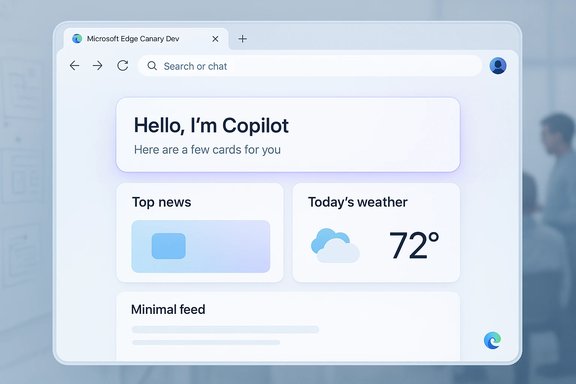
Microsoft Edge Canary Dev UI mockup with Copilot greeting card, weather, and top news widgets.
Microsoft is rolling Copilot’s distinct visual language into Edge, testing a Copilot-inspired redesign in Canary and Dev that reshapes the new tab page, settings, and context menus and brings rounded corners, new colors, and fonts to the browser chrome.

Background​

Microsoft announced a strategic reorganization that brought Mustafa Suleyman and several members of the Inflection AI team into a new Microsoft AI organization in March 2024, a move that has influenced Copilot’s product direction and visual identity. Since Copilot’s debut, Microsoft has been layering generative AI broadly across Windows and Office experiences. The company also launched an experimental “Copilot Mode” for Edge that lets the assistant act across tabs, summarize content, accept voice input, and provide a chat/search omnibox — an opt‑in feature positioned as an AI-first browsing experience rather than a separate browser product. This article explains what Microsoft’s Copilot-inspired Edge redesign changes, why it matters for users and IT administrators, and which technical, privacy, and competitive questions the shift raises. It cross-checks claims reported by multiple outlets, flags speculation, and offers practical guidance for power users who want to try the new UI in preview channels.

What’s changing in Microsoft Edge (the short list)​

  • New tab page: Replaced with a Copilot-style compose/search field and AI-curated cards.
  • Settings and context menus: Settings pages and right‑click menus are being re-skinned to match Copilot’s app design.
  • Visual language: Rounded corners, refreshed color palette, and new type choices aligned with the Copilot app.
  • Separation from Copilot Mode: The UI refresh is not strictly the same as Copilot Mode — Microsoft appears to be applying Copilot’s design to Edge even when the agentic features are disabled.
These changes are currently visible in early builds (Canary and Dev). They are experimental and subject to change during the iterative testing process.

Overview: Why Microsoft is unifying design with Copilot​

Microsoft’s product strategy has shifted toward an AI-first user experience, folding Copilot into Windows, Office, and now Edge. The rationale is twofold:
  • Consistency of experience: A shared design language can make AI features feel native and predictable across Microsoft products — from the Copilot app to Edge’s browsing surface.
  • Product emphasis shift: Making the browser visually and functionally feel like an AI tool signals Microsoft’s intent to move browsing from link navigation to conversational and agentic workflows — where Copilot helps gather, summarize, and act on information.
This strategic direction was foreshadowed by leadership changes and the hiring of Inflection AI personnel, which accelerated the Copilot aesthetic and interaction model into Microsoft’s consumer AI product roadmap. The Copilot UI diverges from Microsoft’s established Fluent Design and adopts cues that observers compare with Inflection’s prior Pi assistant.

Deep dive: The UI changes in detail​

New Tab Page — Copilot-first surface​

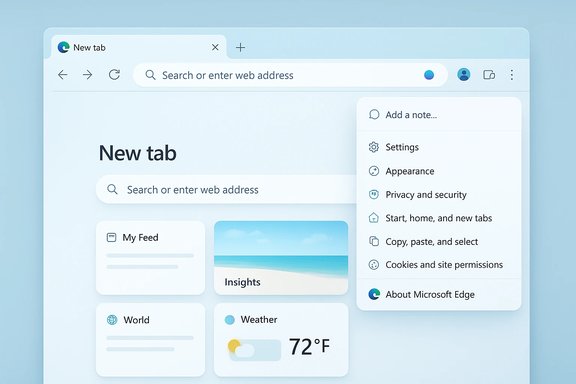
The New Tab Page now resembles a Copilot compose surface, with a large omnibox that functions as chat, search, and command input. Below it sit curated cards and shortcuts, and some early previews show a simplified feed with AI-curated content and sponsored tiles. Early testers report a cleaner, more open layout with increased whitespace, but also find ads and sponsored content remain present in the feed.
  • Benefits:
    • Makes AI interactions accessible immediately on startup.
    • Encourages users to query Copilot for summaries and cross-tab analysis.
  • Trade-offs:
    • Adds friction for users expecting a classic speed-dial/new-tab experience.
    • Introduces potential privacy and ad-targeting questions tied to the feed.

Settings and Context Menus — Copilot styling everywhere​

Early builds apply Copilot’s styling to the Settings page and right-click context menus, aligning fonts, color accents, and corner radius with the Copilot app. These changes are primarily visual in the current previews but may foreshadow deeper integration of Copilot settings into the browser’s configuration surface.

Rounded corners, fonts, and colors​

The Copilot aesthetic abandons some Fluent conventions (notably sharper geometry and older accent palettes) for rounder corners, different typographic choices, and a new color scheme. The difference is noticeable and intentional: Copilot’s look is designed to signal assistant-first behavior, not merely a cosmetic refresh.

Not tied to Copilot Mode (yet)​

Crucially, Microsoft’s rollout separates the visual redesign from the feature toggle of Copilot Mode. That means the browser can wear Copilot’s clothes while not running the agentic features by default. This decoupling indicates Microsoft might be aiming for a consistent brand identity even where AI features are optional.

How this affects users and IT administrators​

For consumers and power users​

  • Expect a more AI-forward default experience in Edge over time, including a prominent omnibox that blurs search and chat.
  • If you prefer classic browsing, the new design may feel intrusive; Edge’s settings and feature flags will determine how easily you can revert to the old layout.
  • Trying the changes requires using preview channels (Canary/Dev) — these builds are explicitly experimental and may be unstable.

For enterprise and IT administrators​

  • Policy controls and administrative settings will be the critical concern. Microsoft historically adds Group Policy/Intune controls to manage UI and feature rollouts, but those admin controls often lag consumer features.
  • Enterprises should watch for:
    1. Controls to disable Copilot Mode and related telemetry.
    2. Options to preserve legacy New Tab behavior and block Copilot-driven content.
    3. Updates to Microsoft’s Privacy and Compliance documentation covering Copilot’s browsing access.
Enterprises considering broad Edge deployments should maintain test fleets on Insider/preview channels to evaluate the behavior changes before wider rollout.

Strengths of the Copilot-inspired redesign​

  • Unified UX for AI features: Users will experience consistent visual cues across Copilot in Windows, Office, and Edge, reducing cognitive friction when switching contexts.
  • Faster access to agentic workflows: The omnibox/compose model lowers the barrier to asking Copilot to summarize webpages, aggregate content across tabs, or take voice-driven actions.
  • Modern aesthetic: The rounded, softer UI may feel more contemporary and approachable for mainstream users, potentially improving adoption of AI features.
  • Iteration in preview channels: Microsoft’s practice of staging major UI changes in Canary/Dev allows for rapid iteration and user testing prior to a Beta/Stable rollout.

Risks and open questions​

Privacy and telemetry concerns​

Copilot Mode and deeper Copilot integration raise questions about data flows and consent. Microsoft has emphasized that Copilot accesses browsing content only with permission in official messaging, but implementation details — what is sent to servers, how long context is retained, and how advertising is served in the Copilot-curated feed — will determine whether privacy-conscious users and regulators raise objections. Until Microsoft publishes granular technical documentation for telemetry and data retention, some concerns remain unresolved. Flag: Claims about exact data retention, model endpoints, and telemetry flows in the new Copilot UI are only partially documented in public communications; those details should be considered unverified until Microsoft publishes formal privacy and technical guidance.

User control and dark-pattern risks​

Embedding AI at the top of the browsing surface can shift default behavior. If Copilot’s compose UI becomes the default and escape paths are hidden or complex, that could be perceived as a nudging or dark-pattern design — exactly the sort of behavior competitors and regulators have criticized in other contexts. Opera and others have previously complained about Microsoft’s default-setting nudges; a Copilot-first new tab might reignite those debates if users feel coerced into the AI experience.

Performance and resource use​

Agentic features that scan multiple tabs, process long pages, or run voice transcription can increase CPU, memory, and network usage. While local acceleration and model optimization will help, users on older hardware or constrained networks might see measurable overhead. That has implications for both battery life on laptops and server costs for Microsoft — trade-offs that will influence final design decisions.

Compatibility with extensions and web standards​

Shifting the default UX to a chat/search omnibox and embedding AI-cards in the new tab may complicate existing extension behavior, bookmarks workflows, and dev tooling that assumed a conventional address bar. Microsoft will need to ensure extension APIs remain stable or provide migration paths for extension authors.

Regulatory scrutiny​

Microsoft’s hiring and licensing arrangements with Inflection drew regulator attention in Europe and the UK in 2024, and although formal probes were dropped or resolved, the EU and other bodies have shown interest in how major platform changes affect competition and consumer choice. A major UI shift that channels users toward Microsoft‑controlled AI services could attract renewed scrutiny if rivals feel disadvantaged.

Practical steps: How to try the Copilot-styled Edge preview today​

  1. Install a preview channel:
    • Download and install Edge Canary or Edge Dev to access the earliest UI tests. These builds are explicitly experimental and may be unstable.
  2. Enable experimental flags or opt-in toggles:
    • Some Copilot surfaces appear under server-side feature flags; early access may require toggles or region‑gated enrollment.
  3. Try Copilot Mode (optional):
    • Copilot Mode itself is an opt-in experience that replaces the new tab with a Copilot-focused compose box; enabling it lets you test the agentic capabilities like cross-tab summarization and voice input. Microsoft provided an opt‑in page for Copilot Mode during earlier rollouts; availability may vary by region and account.
  4. Test privacy controls:
    • Review the browser’s privacy and AI settings to determine what contextual data Copilot can access and whether you can opt out of data‑sharing telemetry.
Note: Because Copilot Mode and the Copilot visual refresh are staged features, the exact steps and availability may change quickly. Administrators should test in isolated environments before wider deployment. Treat any screenshots or early builds as previews, not finished UI.

Design analysis: Why the Copilot look is a meaningful break from Fluent​

Microsoft’s historical Fluent Design system emphasized depth, motion, and material layering with a consistent toolkit across apps. The Copilot aesthetic introduces a distinct identity:
  • New typographic choices change hierarchy and scannability.
  • Rounder geometry reduces visual tension and signals an assistant-like personality.
  • Color accents and white space reframe content emphasis toward summaries and suggestions rather than dense navigation chrome.
This visual divergence is more than cosmetics: it reframes the browser’s mental model from a tool for navigation to a partner for tasks. For users accustomed to direct control and predictable chrome, the new approach may require a re-learn. For mainstream consumers, the softer, chat-centric UI could be more approachable. The long-term UX success will depend on how well Microsoft balances clarity, discoverability, and user control.

Competitive context: Edge vs. the new wave of AI browsers​

The market has seen multiple efforts to bake generative AI into web navigation: Google’s approach in Chrome, Comet/Perplexity’s Comet browser, and startup efforts from The Browser Company. Microsoft’s strategy differs in that it is not introducing a separate product; instead it is turning Edge itself into a platform for agentic browsing, while retaining backward compatibility with traditional web workflows. Mustafa Suleyman has publicly stated that Microsoft intends to evolve Edge rather than build an entirely new browser, effectively folding AI into the existing Edge ecosystem. This evolutionary approach has advantages: it leverages existing web market share, extension ecosystems, and enterprise controls. However, it may also produce tension between legacy behaviors and AI-driven defaults that startups can design around from the ground up.

What to watch next (a checklist for the coming months)​

  • Release cadence: Watch for the UI to appear in Beta/Stable channels and note any controls Microsoft exposes for toggling Copilot visuals separate from agentic functionality.
  • Privacy documentation: Expect accompanying documentation describing what Copilot sends to Microsoft services and how long context is retained; evaluate those details before enabling agentic features widely.
  • Enterprise policy controls: Monitor Group Policy/Intune updates for options to disable Copilot Mode, preserve legacy New Tab behavior, or restrict telemetry.
  • Developer guidance: Look for extension API updates and guidance for adapting to the new omnibox and card surfaces.
  • Regulatory signals: Keep an eye on any renewed scrutiny from competition authorities if the shift materially changes user defaults or competitive dynamics.

Final assessment​

Microsoft’s move to apply the Copilot design language to Edge is a logical next step in a companywide push to make AI a core, visible feature of its consumer products. The change offers a more coherent brand experience across Copilot, Windows, and Office and lowers friction for users who want quick, conversational access to AI assistance.
At the same time, the approach raises legitimate concerns: data privacy promises need concrete technical detail, enterprise controls must be robust and timely, and the company must avoid default behaviors that feel coercive. The UI redesign will only be judged successful if Microsoft preserves user choice, provides clear transparency about data use, and ensures performance and extension compatibility are preserved.
For now, the Copilot-styled Edge in Canary and Dev is a preview of where Microsoft hopes browsing will go — a hybrid space where search, chat, and actions blend into a single, conversational surface. Whether this will become the default browsing model for millions of users depends on how Microsoft addresses the technical, privacy, and policy challenges described above.
Microsoft’s Edge redesign is an important bellwether: it signals that major platform vendors view the browser not just as a portal to content, but as a platform for intelligent assistance. The coming months will determine whether that vision improves productivity and user experience — or whether it introduces new friction and regulatory complications that force a course correction.

Source: The Verge Microsoft Edge is getting a Copilot-inspired redesign
 

Microsoft’s Edge browser is quietly receiving a Copilot-inspired visual overhaul in Canary and Dev builds — a comprehensive UI refresh that signals a wider design and strategic shift as Microsoft weaves its Copilot identity deeper into the browser experience.

Light-blue Microsoft Edge new-tab page with a search bar and a floating settings menu.Background​

Microsoft has been explicit about using Copilot as a central element in its consumer-AI strategy, and recent hires and licensing moves over the last two years — including the migration of much of Inflection AI’s leadership and engineering talent into Microsoft’s consumer AI group — created the talent and design lineage for this new visual language. The transition away from the long-standing Fluent design toward a softer, Copilot-aligned aesthetic has been gradually appearing in Edge test channels, suggesting Microsoft intends a cross-product visual unification across its AI tooling. Edge’s new look is already surfacing in early builds: testers on the Canary and Dev channels report redesigned settings pages, refreshed context and right‑click menus, a simplified new tab experience, and more consistent use of rounded corners, colour palette, and typography that mirror the Copilot app. Microsoft is not gating the new visuals only behind Copilot Mode; the changes appear to apply broadly across the browser UI rather than being isolated to AI features.

What’s changing in Edge: a guided tour of the Copilot-inspired UI​

Core visual changes​

  • Rounded corners and softened surfaces: Toolbars, menus, and dialog boxes use gentler radii compared with prior Fluent-derived elements, producing a uniformly softer feel across the interface.
  • Copilot colour palette and typography: Edge is adopting the Copilot app’s hues and typographic choices to create a consistent brand identity between the assistant and the browser shell.
  • Settings and menus rework: Settings pages have been restructured for clarity and visual parity with Copilot’s layout; context menus and right‑click panels have been visually refreshed for consistency.
  • New tab page re-emphasis: The new tab experience places simplicity and content hierarchy first, with Copilot-like content modules and a cleaner, less cluttered layout.

Interaction and behaviour changes​

While the visible redesign focuses on aesthetics, the rework is also intended to deliver a more unified interaction model where Copilot features feel native to the browser rather than add-ons. That means Copilot-triggered behaviours — summaries, tab aggregation, and task orchestration — will be visually signalled and integrated into the same UI language used by the rest of Edge. However, Microsoft’s strategy keeps these AI capabilities opt‑in so users retain choice over whether the assistant acts on their behalf.

Why Microsoft is shifting Edge’s look now​

Strategic alignment with Copilot​

Microsoft’s consumer-AI push is led from the top: Mustafa Suleyman, now CEO of Microsoft AI after joining from Inflection, has publicly outlined a roadmap where Edge evolves into an “agentic” browser that leverages Copilot to browse, synthesize, and act on content for users — essentially turning the browser into a stage for AI agents rather than the destination itself. Making the browser visually consistent with Copilot reduces cognitive friction and positions Edge as the gateway to Microsoft’s generative AI ecosystem.

Branding and product cohesion​

The Copilot aesthetic creates a single visual identity across Microsoft’s emergent consumer AI products. In practical terms, this simplifies design decisions, shortens onboarding for users who already use Copilot, and strengthens Microsoft’s brand narrative around AI-first productivity. Internally, the hire‑through licensing relationship with Inflection accelerated this design convergence by bringing a cohort of designers who had already developed the Pi/Copilot style.

Technical and UX implications​

For end users​

  • Expect a cleaner, more consistent interface across Edge and Copilot features, with a focus on discoverability for AI functions.
  • Visual parity with Copilot may reduce confusion when the AI is active, since dialogues, prompts, and agent outputs will use familiar styling.
  • Users who prefer more traditional browser chrome may initially perceive the change as less utilitarian and more app-like.

For web developers and extension authors​

  • The visual changes are primarily in the browser chrome; web content and rendering behavior are unchanged. Extensions that insert UI into Edge’s chrome or rely on specific menu placements may need testing against Edge Canary/Dev builds to ensure compatibility.
  • Any alterations to context menus or settings flows could require minor UX adjustments for extensions that integrate into those surfaces.

Performance and stability​

The current rollout is in Canary and Dev channels — environments used to vet functional and performance regressions before stable release. Early tester feedback suggests some rough edges in dark mode and corner rendering; these are typical for UI overhauls and will likely be refined during the beta cycle. Microsoft has not announced a firm stable rollout date for the refreshed interface.

The strategic trade-offs: benefits and risks​

Key benefits​

  • Unified user experience: A single visual language across Copilot and Edge lowers the learning curve for AI features and helps Copilot feel like a native part of Windows’ browsing stack.
  • Stronger product positioning: With competitors pursuing AI-driven browsing experiments, a Copilot‑aligned Edge is a tangible differentiator and a vehicle for driving adoption of Microsoft’s AI services.
  • Design efficiency: Reusing the Copilot visual system can speed up product development and create consistent cross-product interaction patterns.

Notable risks and downsides​

  • Brand fragmentation vs Fluent heritage: Abandoning or sidelining Fluent design risks alienating users and customers who expect the Windows and Office experiences to share a consistent visual DNA. This is a deliberate shift, but it carries perceptual costs that Microsoft will need to manage across product lines.
  • Privacy and trust concerns: Deep visual coupling with Copilot makes the assistant feel omnipresent. While Microsoft emphasizes opt‑in controls, perceptual closeness could make users less likely to scrutinize AI behaviour. Any misstep in transparency or data usage could amplify negative user reaction.
  • Fragmentation during rollout: Early testing shows inconsistent behaviour across modes (e.g., dark vs light themes), and feature parity between Copilot Mode and standard browsing is not guaranteed. Fragmented experiences across channels could create confusion for non‑technical users.

Privacy, telemetry, and control: what to watch for​

Microsoft has repeatedly framed Copilot as visible and controllable — the assistant performs actions in the browser that users can see and intervene on. This visibility is intended to foster trust by avoiding hidden agentic behaviour, and Microsoft says Copilot only accesses pages and content with user permission. That said, when Copilot gains deeper capabilities (for example, accessing stored credentials or history for booking tasks), the privacy surface expands and requires clear consent flows and robust telemetry transparency.
  • Consent mechanics: Look for explicit, contextual permission prompts when Copilot attempts to access credentials, history, or account data.
  • Activity indicators: Visual cues that Copilot is acting on a user’s behalf will be crucial to avoid unexpected automated actions.
  • Data residency and telemetry options: Enterprises and privacy-conscious users will want controls to limit cloud logging, telemetry, or model telemetry to comply with internal policies.
If Microsoft pushes further Copilot automation into task-completion workflows, regulatory scrutiny and enterprise policy controls will likely shape which features get enabled in managed environments.

Enterprise and IT admin considerations​

Enterprises considering broader Copilot adoption should prepare for both policy and operational impacts:
  • Policy reviews: Update acceptable use, data handling, and automation policies to account for agentic browsing and Copilot’s potential access to corporate resources.
  • Configuration controls: Administrators will want group policies to control Copilot features, disable agentic actions where inappropriate, and govern permissions for saved credentials or calendar access.
  • Security testing: Evaluate how Copilot behaves on intranet pages and internal tools, especially when it can read or interact with authenticated content.
  • Training and rollout: Provide user training that explains the visual cues and opt‑in nature of Copilot actions to minimize social engineering and accidental data exposure.
Microsoft’s enterprise tooling has expanded to include Copilot controls in Microsoft 365 administration; expect similar Group Policy or Intune controls for Edge as the Copilot features mature.

How to preview the new Edge UI today​

The safest way to preview Microsoft’s Copilot-inspired interface is to install Edge’s official Canary or Dev channel builds and enable the relevant UI flags documented in those builds. Test environments should include:
  • A separate Canary/Dev profile so tests don’t affect daily browsing data.
  • Dark and light theme validation to surface any rendering inconsistencies.
  • Extension compatibility checks focused on context menu items and settings integrations.
Early adopters and IT teams should expect frequent updates and occasional regressions while Microsoft iterates the design.

Market and competitive context​

Microsoft is not alone in exploring AI‑first browsing. Competitors and startups have been experimenting with AI agents embedded into browsing experiences, and some have even proposed dedicated AI browsers. Microsoft’s approach — evolving Edge rather than shipping a separate product — follows a pragmatic path: leverage existing distribution on Windows and cross‑platform installs while layering Copilot-right features on top. This strategy helps Microsoft retain web traffic behavior and publisher visits while offering the convenience of agentic tasks. Reuters’ coverage of Copilot Mode highlights Microsoft’s product timing and positioning in this broader AI browser arms race.

Design provenance: the Inflection connection​

Media coverage and industry reporting document that Microsoft’s consumer AI organization absorbed a substantial portion of Inflection AI’s leadership and engineering talent in 2024, including Mustafa Suleyman and other senior figures. That move supplied Microsoft with design and product ideas forged during Inflection’s work on the Pi assistant — ideas that evidently influenced Copilot’s visual and interaction language. The Copilot aesthetic’s lineage is therefore traceable to that transfer of people and product thinking. While the exact mechanics of the licensing and hiring arrangements were scrutinized, the design outcome is visible in today’s Edge test builds.

Community reaction and early tester feedback​

Developer and enthusiast communities have been vocal about both the promise and the rough edges of the new UI. Testers applaud the cleaner, more modern look and the visual continuity between Copilot and Edge, but some report glitches in corner rendering and inconsistent behaviour in dark mode. Others raise concerns about the aesthetic feeling out of step with legacy Windows and Office surfaces — a trade‑off between a bold rebrand and the expectations of long-time Windows users. These community signals are valuable: they highlight where Microsoft must balance aesthetic ambition against practical usability and cross‑product consistency.

What Microsoft must get right​

  • Transparency and controls: Explicit consent for agentic actions and clear indicators when Copilot is active or has acted.
  • Polish and performance parity: Ensure the UI works reliably across themes, extensions, and accessibility modes before a broad stable rollout.
  • Enterprise-grade governance: Provide admins straightforward toggles and compliance-friendly defaults to limit automatic agent permissions in managed environments.
  • Respect for platform coherence: Balance the new Copilot visual language with Fluent continuity where cross-product familiarity matters, especially in Office and Windows UIs.

Looking ahead: will Copilot’s aesthetic become Microsoft’s new standard?​

Microsoft appears to be experimenting with applying Copilot’s visual style across Edge and potentially other web properties, but whether this becomes the dominant Microsoft design language remains an open question. The move is emblematic of a broader shift: Microsoft is evolving from discrete product surfaces toward a family of AI-driven experiences where the assistant provides continuity across contexts. That said, adopting Copilot’s aesthetic everywhere carries risk: users and enterprises that value a predictable, unified Fluent look may resist a pervasive Copilot brand. The eventual outcome will likely be a hybrid approach — Copilot-influenced UI for AI-first surfaces, with Fluent retained where consistency and enterprise familiarity are paramount.

Conclusion​

Microsoft’s Edge redesign is more than a cosmetic refresh; it’s the visible tip of a strategic pivot that integrates Copilot deeply into the browsing experience. The Copilot-inspired UI aligns Edge more closely with Microsoft’s AI vision and the leadership team driving it, creating a consistent visual and interaction layer for AI features. The benefits include clearer identity, improved discoverability for AI tools, and faster design iteration across products.
At the same time, there are real trade-offs: potential fragmentation from Fluent design, privacy and consent surface expansion, and the need for enterprise controls and polished cross-theme support. As the changes roll from Canary and Dev into Beta and Stable, the critical measures of success will be how Microsoft preserves user control, maintains performance and accessibility, and offers admins the governance tools needed in corporate environments. Early testers have a preview of the direction — the broader Windows and Edge user base will soon judge whether this Copilot-inspired future enhances productivity or simply colors the browser in a new coat of paint.
Source: channelnews.com.au Microsoft Reshapes Edge With Copilot-Inspired Look In Upcoming Browser Update – channelnews
 

Back
Top