

Microsoft Edge’s quietly advancing Copilot-like redesign is the clearest signal yet that Microsoft intends to make its browser another front for the company’s AI-first interface experiments — a change that reshapes visual identity, user flows, and where the company pushes discoverability of Copilot features.
Microsoft has been folding its Copilot assistant into more places across Windows and Edge for more than a year, moving from a sidebar helper toward a persistent, opt‑in “Copilot Mode” that can reason across tabs and execute permissioned automations. That strategic push placed Copilot at the center of Edge’s New Tab Page and toolbar affordances in preview channels before the company began testing much wider UI changes that borrow the Copilot app’s visual language. At the same time, community testing and evidence from Edge Canary and Dev channels show Microsoft running modular experiments — changing the New Tab Page (NTP), context menus, dropdowns and settings panels to use the same rounder corners, palettes, and typography introduced with the Copilot app. These experiments are visible in Canary/Dev builds for some testers and are being staged server‑side in waves.
The smart path for Microsoft is clear: ship strong controls and transparent defaults, keep Copilot Mode reversible and highly discoverable for users who want it, and give enterprises firm policy levers to manage risk. In practice, Microsoft appears to be following this route — the UI restyles are in Canary/Dev and Microsoft’s public Copilot documentation emphasizes opt‑in consent, visual indicators, and admin controls — but these are experimental and should be evaluated as they evolve.
For now, the changes remain in preview channels and are being tested incrementally — a sensible approach for features that combine UI, privacy, and agentic automation. Observers should watch how Microsoft balances discoverability with choice, and whether the Copilot design language ultimately becomes a cross‑product standard or a distinct brand reserved for assistant‑first surfaces.
Source: Windows Central https://www.windowscentral.com/micr...igned-ui-that-takes-inspiration-from-copilot/
 Background
Microsoft has been folding its Copilot assistant into more places across Windows and Edge for more than a year, moving from a sidebar helper toward a persistent, opt‑in “Copilot Mode” that can reason across tabs and execute permissioned automations. That strategic push placed Copilot at the center of Edge’s New Tab Page and toolbar affordances in preview channels before the company began testing much wider UI changes that borrow the Copilot app’s visual language. At the same time, community testing and evidence from Edge Canary and Dev channels show Microsoft running modular experiments — changing the New Tab Page (NTP), context menus, dropdowns and settings panels to use the same rounder corners, palettes, and typography introduced with the Copilot app. These experiments are visible in Canary/Dev builds for some testers and are being staged server‑side in waves. What’s changing in Edge: the visible updates
A Copilot‑inspired visual language across surfaces
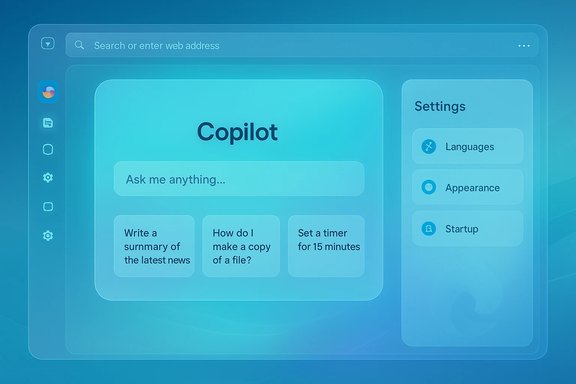
The most immediate change testers report is a consistent visual shift toward the Copilot app’s styling across several Edge surfaces:- New Tab Page: Copilot chat composer, suggestion cards, and a cleaner layout replace or sit alongside the traditional MSN feed in test builds. When Copilot Mode is off, some Canary variants revert the NTP content to MSN news and Bing search; when on, the Copilot modules appear by default.
- Context menus and dropdowns: Rounded corners, revised spacing and the Copilot palette show up in right‑click menus, dropdowns and system‑like panels.
- Settings and preferences: Settings pages are being restyled to echo Copilot layouts and font choices, making cross‑product visual parity more obvious in the browser.
Structural experiments: Studio NTP, left sidebar and flags
Beyond pure visuals, Edge Canary testers have uncovered feature flags and internal experiments that change the NTP behavior and layout mechanics. Evidence points to a “Studio‑based” NTP flag that exposes multiple hosting routes for Copilot on the NTP and allows Microsoft to switch templates remotely for A/B testing. Some variants introduce a persistent left‑hand Copilot shortcut bar on the NTP, while others remove the familiar cog/settings icon in favor of sidebar or alternate settings access. These mechanics indicate Microsoft is testing both the look and the product logic of Copilot as the browser’s starting workspace.Why this matters: product strategy and intent
From complementary assistant to default workspace anchor
Microsoft’s product logic is straightforward: move Copilot from an optional add‑on to a discoverable primary surface. By putting the assistant in the NTP and restyling UI elements to match the Copilot app, Edge becomes, more clearly, an AI browser — a place where the default path leads to the assistant rather than a blank new tab or a news feed. This makes Copilot the path of least resistance, promoting adoption and feature discovery at scale.Engineering and experimentation benefits
The Studio‑based approach (modular templates that can be toggled server‑side) gives Microsoft faster iteration velocity: UI experiments can be run without shipping full browser updates, and telemetry‑driven A/B tests can refine placement, copy and controls in near real time. That agility matters when you’re trying to land complex new behaviors like agentic Actions and Journeys in the wild.Strengths and benefits for users
- Faster discovery and onboarding: A Copilot‑first New Tab Page surfaces prompts, suggestions and starter workflows the moment users open the browser, lowering the barrier to trying AI features.
- Unified visual identity: For users who already use Copilot on Windows or the Copilot app, the consistent look reduces cognitive friction — the assistant behaves and appears similarly across surfaces.
- Integrated workflows: Copilot Mode’s cross‑tab reasoning, Journeys (session memory) and Actions (permissioned automations) work best when the assistant is a primary surface — rendering the browser more useful for long‑running projects and research.
- Server‑side flexibility: Modularity enables Microsoft to quick‑iterate on layout, wording and placement based on real user signals without forcing full client upgrades.
Risks, trade‑offs and governance concerns
Design fragmentation across Microsoft products
As of current tests, the Copilot design language is not the same as Windows’ Fluent design, Office, or Xbox UI. That creates a jarring visual inconsistency across Microsoft’s ecosystem: Copilot, MSN, and Edge may start to feel like a separate brand within Microsoft’s portfolio unless the company commits to a broader unification strategy. This is a product and branding decision with long‑term implications.Discoverability vs. nudging
Making Copilot the default NTP and surfacing persistent prompts increases discoverability, but it also increases the amount of product nudging the company can apply to direct users toward first‑party AI services. That raises questions about user choice and competitive neutrality when those prompts appear near third‑party AI sites or rival services. Edge has already shown “Try Copilot” chips and other nudges in experimental flows, which sparked debate over the balance between helpfulness and coercion.Privacy and data governance
Features like Journeys and Page Context require opt‑in consent to let Copilot use browsing history and open tabs. While Microsoft highlights visible consent flows and retention policies, any aggregated browsing metadata introduces additional privacy surface area. Enterprises must evaluate retention windows, whether conversation histories or screenshots are stored, and how Copilot actions could capture corporate data in logs. Admin controls exist but require policy planning.New attack surface with agentic automations
Copilot Actions (agentic automations that can click, fill, and sequence tasks) are powerful but brittle and risky in adversarial scenarios. Granting an assistant permission to interact with arbitrary web pages opens vector opportunities for prompt injection, deceptive UIs, or automation being misdirected on malicious sites. Microsoft has added visible consent steps and gating, but these features still shift control boundaries and require user attention.What Microsoft has said (and what remains experimental)
Microsoft’s public messaging describes Copilot Mode as opt‑in and permissioned, with visual indicators when the assistant accesses page context and explicit controls for Page Context and Actions. Reuters’ coverage of Copilot Mode’s broader launch describes these intent and control mechanisms as part of the company’s stated safety model. That said, many of the UI restyling moves now visible in Edge are experimental in Canary and Dev and remain subject to change. Key verification points cross‑checked from independent sources:- Edge Canary builds are testing a Copilot‑first New Tab Page and new Copilot prompts on the NTP. This is documented in coverage from multiple outlets and visible in community captures.
- Microsoft is experimenting with modular NTP templates (Studio‑based experiments) and left‑hand Copilot shortcut bar variations in Canary builds. These are community‑reported and surfaced through internal flag captures.
- The Copilot app and Copilot Discover experiments use a new visual language that differs from Fluent Design; Microsoft appears to be piloting that language across Copilot‑centric surfaces. This observation is consistent across hands‑on coverage.
- Codename “Ruby” for Copilot Discover is a reporting inference rather than an official Microsoft label in public documentation; treat the codename as speculative until Microsoft confirms.
Practical guidance: what to expect and how to try it
If you want to preview these changes, the path is:- Install Edge Canary (or Dev) channel — Canary receives daily experimental builds and is the likeliest place to see UI experiments first.
- Check edge://flags for Copilot/NTP flags (some community captures reference flags with names like CMFeature: Enable Studio‑Based Edge NTP). Enabling the relevant flag(s) (if visible) will expose NTP variants and the Copilot‑first templates.
- Use the New Tab Page settings to toggle Copilot suggestion blocks where the Canary build exposes such options — experimental builds sometimes expose a “Copilot suggestions” toggle that removes the prompt cards.
- If you are an administrator, consult Microsoft’s Edge and Microsoft 365 policy documentation for tenant‑level controls (for example, policies that control Copilot icon visibility and Copilot behavior). There are documented policies for hiding the Copilot icon and for managing Copilot features in managed profiles.
Enterprise implications and IT checklist
For IT leaders and endpoint managers, the Edge/Copilot experiments raise several operational questions:- Review allowed Edge channels: Preventing Canary/Dev installation on managed devices reduces exposure to UX experiments and accidental policy drift.
- Policy mapping: Use the Microsoft 365 and Edge administrative controls to define whether Copilot features (the toolbar icon, Page Context, Actions) are allowed for managed profiles. Document default settings for new devices and image builds.
- Data governance: Inventory whether Journeys or conversation logs might capture corporate URLs, project identifiers or other sensitive metadata. Decide if retention and deletion policies in Copilot are sufficient for compliance needs.
- Pilot and train: Run a staged pilot with power users, monitor automation reliability (especially for Actions), and develop guidance on when to use or avoid agentic automations for corporate tasks.
- User education: Because Copilot may appear prominently on the NTP and as chromed prompts, update help desk scripts and documentation to show how to toggle Copilot Mode or disable suggestion cards.
Design debate: Fluent vs. Copilot language
The Copilot design language — rounder corners, specific color and font choices, and a distinct composition model — intentionally diverges from Fluent Design. That makes Copilot stand out as a distinct surface, but also raises questions:- Consistency vs. identity: A single design language across Windows, Office and Edge would simplify cognitive load and reduce perceived fragmentation. Conversely, Copilot’s separate language signals a distinct product identity for AI‑first interactions.
- Accessibility and discoverability: The Copilot aesthetic prioritizes prominent prompts and large composition fields, which can aid discoverability but risks disrupting skilled, keyboard-oriented workflows that expect a blank new tab. Early hands‑on testers report that the rotating suggestion cards can be disruptive for fast navigation users.
Verdict: thoughtful rollout required
Microsoft’s Edge experiments show a coherent product strategy: make Copilot hard to miss and easy to use by aligning UI and layout across Copilot surfaces. The benefits — reduced friction, faster discovery, and integrated, project‑oriented browsing — are tangible for many users. But the risks are non‑trivial: privacy implications for Journeys and Page Context, automation brittleness for Actions, enterprise governance complexities, and a potential split in visual identity across Microsoft products.The smart path for Microsoft is clear: ship strong controls and transparent defaults, keep Copilot Mode reversible and highly discoverable for users who want it, and give enterprises firm policy levers to manage risk. In practice, Microsoft appears to be following this route — the UI restyles are in Canary/Dev and Microsoft’s public Copilot documentation emphasizes opt‑in consent, visual indicators, and admin controls — but these are experimental and should be evaluated as they evolve.
Final thoughts
Edge’s shift toward a Copilot visual and interaction model is the next stage in the company’s effort to make AI a default affordance in everyday workflows. For users who embrace AI assistance, the result could be a more powerful, productive browser; for those who prefer minimal, predictable tool surfaces, the changes risk adding friction unless Microsoft preserves fast opt‑outs and minimal defaults.For now, the changes remain in preview channels and are being tested incrementally — a sensible approach for features that combine UI, privacy, and agentic automation. Observers should watch how Microsoft balances discoverability with choice, and whether the Copilot design language ultimately becomes a cross‑product standard or a distinct brand reserved for assistant‑first surfaces.
Source: Windows Central https://www.windowscentral.com/micr...igned-ui-that-takes-inspiration-from-copilot/
