

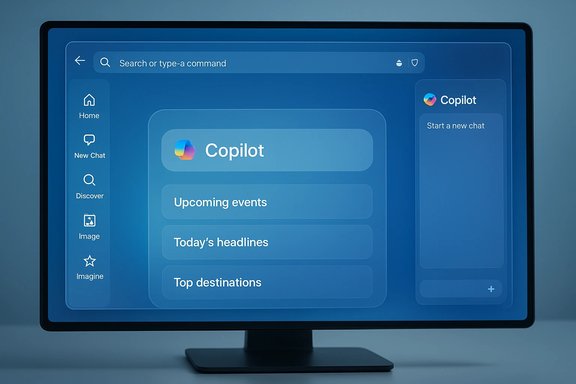
Microsoft Edge is quietly experimenting with a dramatic rethink of its New Tab Page (NTP), pushing Copilot from a sidebar helper into the center of the browsing experience — and in recent Canary builds testers are seeing a variant that mounts Copilot affordances on both sides of the browser window, effectively creating a Copilot‑first workspace with persistent shortcut controls on the left and the assistant pane on the right.
Browsers no longer start as blank canvases for typed URLs; the New Tab Page is prime real estate for discovery, shortcuts, feeds, and now, assistants. Microsoft’s strategy for Edge has shifted from treating Copilot as an optional sidebar toy to making it the default path into search, summarization and agentic workflows — a move reflected in the experimental New Tab Page variants being staged through Edge’s preview channels.
The changes we’re seeing are concentrated in Edge’s Canary and Dev channels. These builds are engineered for rapid experimentation: new flags, server‑side templates, and UI toggles let Microsoft A/B test layouts without shipping full releases. Observers refer to one such internal test as a “Studio‑based” NTP that can host multiple Copilot layouts remotely, enabling Microsoft to flip templates and surface different combinations of elements like left shortcut bars, suggestion cards, and the Copilot chat composer.
From an engineering standpoint, the modular NTP gives Microsoft rapid iteration velocity. From a commercial standpoint, a Copilot‑first Edge is a differentiator: it positions Edge as an assistant platform rather than a neutral browsing shell. That’s a strategic lever in a browser market dominated by habitual behavior and where meaningful differentiation is hard to achieve.
What remains uncertain or partially verified:
But those gains come with trade‑offs. The risks include privacy ambiguity, the erosion of predictable UI defaults by server‑side experiments, potential performance impacts, and a community perception problem that Microsoft must manage carefully. The most important levers Microsoft can pull to preserve trust are clarity of defaults (opt‑in vs opt‑out), transparent consent flows, timely enterprise controls, and conservative rollout of agentic automations.
Microsoft’s experimental Copilot‑first New Tab Page with dual sidebar affordances is an important signal: Edge is evolving from a browsing surface to an assistant platform. The experiments visible today in Edge Canary are a preview of that direction — promising productivity gains, but also testing assumptions about privacy, control and user consent. Users and administrators should treat preview channel behavior as provisional, pilot features deliberately, and insist on clear controls before giving broad permissions to assistant automations.
Source: Windows Report https://windowsreport.com/microsoft-edge-copilot-new-tab-two-sidebars/
 Background: why the New Tab Page matters
Browsers no longer start as blank canvases for typed URLs; the New Tab Page is prime real estate for discovery, shortcuts, feeds, and now, assistants. Microsoft’s strategy for Edge has shifted from treating Copilot as an optional sidebar toy to making it the default path into search, summarization and agentic workflows — a move reflected in the experimental New Tab Page variants being staged through Edge’s preview channels.The changes we’re seeing are concentrated in Edge’s Canary and Dev channels. These builds are engineered for rapid experimentation: new flags, server‑side templates, and UI toggles let Microsoft A/B test layouts without shipping full releases. Observers refer to one such internal test as a “Studio‑based” NTP that can host multiple Copilot layouts remotely, enabling Microsoft to flip templates and surface different combinations of elements like left shortcut bars, suggestion cards, and the Copilot chat composer.
What Microsoft is testing now: the Copilot‑first New Tab with two sidebars
The core elements being trialed
Across multiple reports and hands‑on previews, the key experimental components are consistent:- A Copilot‑style compose/search omnibox that replaces or sits above the traditional MSN/Bing feed on the NTP.
- A left‑hand Copilot shortcut bar on the New Tab Page that surfaces quick entry points — Home, New Chat, Discover, Image/Imagine, Library and other Copilot utilities. This operates like a persistent dock for Copilot features.
- The existing Copilot sidebar (the right‑hand assistant pane) remains available for chat, context analysis and agent actions; when combined with the left shortcut bar the NTP can show Copilot controls on both edges of the browser.
- Rotating suggestion cards beneath the Copilot chat box (a “Try something new” module) that prefill prompts for quick tasks.
- Cosmetic restyling across settings, menus and context panels to match the Copilot app’s rounded corners, fonts and palette.
The “two sidebars” configuration explained
When people describe two sidebars, they usually mean the combination of:- A newly exposed, left Copilot shortcut bar embedded into the New Tab Page shell — intended to surface common Copilot entry points at eye level.
- The traditional right Copilot sidebar (the assistant pane) that can be docked to analyze pages, chat, and run actions.
How this fits into Microsoft’s product strategy
Microsoft’s product logic is blunt and consistent: make Copilot the default path to productivity across Windows and Edge. By aligning Edge’s visual language with the Copilot app and placing the assistant at the center of the New Tab Page, Microsoft reduces the friction for discovery and increases the likelihood of adoption for features like Copilot Actions (permissioned automations) and Journeys (session memory). The Studio‑style approach allows the company to iterate on presentation — swapping templates server‑side — while collecting telemetry on user interactions.From an engineering standpoint, the modular NTP gives Microsoft rapid iteration velocity. From a commercial standpoint, a Copilot‑first Edge is a differentiator: it positions Edge as an assistant platform rather than a neutral browsing shell. That’s a strategic lever in a browser market dominated by habitual behavior and where meaningful differentiation is hard to achieve.
What’s new for users: benefits and practical upsides
Faster discovery and lower friction for AI workflows
- New Tab = immediate prompt: The Copilot composition box and suggestion cards cut the path from opening a tab to running a task, which can speed everyday information synthesis and creative workflows.
- Persistent shortcuts: A left shortcut bar makes Copilot tools one click away without having to hunt the toolbar or menu. This helps casual users discover features they might otherwise ignore.
Unified visual language and consistency
- Consistent UX across Windows, Office and Edge reduces cognitive load: Copilot looks and behaves similarly across Microsoft’s products, which helps users who already use Copilot elsewhere.
Practical productivity wins
- Multi‑tab reasoning becomes easier to access: With Copilot visible and discoverable, features that synthesize content across tabs, summarize long pages, or assemble comparison tables are easier to try and adopt.
- Rapid task templates: The rotating suggestion cards act like starter prompts that lower the bar for using Copilot for common tasks — summarization, research, or transforming browsing into creative outputs.
The trade‑offs and risks: why many users are uneasy
Privacy and data‑access boundaries
Copilot’s utility depends on context: the assistant can read page content, examine open tabs, and — with user permission — execute actions. That capability is powerful but raises questions about defaults, telemetry, and where data is processed and stored. Microsoft emphasizes visible consent and opt‑in mechanisms, but changing UI signals and defaults can nudge users toward granting access they might not fully appreciate. Enterprises should watch default states and consent flows closely.Defaults, nudges, and server‑side changes
Server‑side templates and remote flags mean Microsoft can flip NTP layouts without a local update. While that’s great for iteration, it reduces predictability: users may suddenly see different behavior or discoverability nudges appear without an obvious toggle. This raises governance questions for admins who need stable and auditable user experiences.Performance and visual clutter
Testers report rotating suggestion cards and added modules increase visual density, sometimes causing layout flicker when opening many tabs quickly. For keyboard‑centric power users who rely on a blank new tab to type a URL instantly, the Copilotized NTP can interrupt workflows and feel like clutter.User backlash and brand risk (“Microslop”)
A vocal segment of the Windows community has branded aggressive Copilot placements as “Microslop” — shorthand for perceived overreach, visual bloat, or poorly integrated AI features. That cultural backlash matters: perception influences adoption and can force product teams to reassess UX trade‑offs. Microsoft risks damaging trust if the changes feel forced or opaque.Technical verification and what we can (and cannot) confirm
Multiple independent hands‑on reports and community testing snapshots corroborate the core claims: Copilot components are appearing in the New Tab Page in Canary builds; there is evidence of a left‑hand shortcut bar in some variants; suggestion cards and a Studio‑style NTP flag are present in test permutations. These observations are consistent across several preview‑channel writeups, which increases confidence that the behavior is real in Edge’s experimental channels.What remains uncertain or partially verified:
- Exact server‑side flag names, rollout schedule, and the final Stable behaviour: these vary by build and server gating and are not formally documented outside preview notes. Treat specific flag strings and availability as provisional.
- Final enterprise controls and policy timings: Microsoft typically adds Group Policy and Intune controls for new features, but those admin surfaces often lag consumer experiments. Administrators should not assume immediate policy parity.
Practical guidance: what users and IT teams should do now
For casual users who prefer a classic NTP
- Disable Copilot suggestions on the New Tab Page: In Canary builds where the module appears there is a toggle in the New Tab Page settings (Page Settings → Copilot suggestions) that hides the suggestion block. Expect label and placement to change across builds.
- If the left shortcut bar or new layout is intrusive, switch back to a simpler NTP theme or pin a blank page as your startup page until stable behavior is documented.
For power users and enthusiasts
- Use preview channels intentionally: Canary is experimental; join the channel to test but be prepared for instability.
- Learn flag recovery: If a flag creates problems, reset flags at
edge://flags→ Reset all to default. - Convert frequent sidebar pages to PWAs if you rely on the old sidebar app list; the app list is reportedly being retired in some Canary variants.
For IT administrators and security teams
- Inventory sidebar usage: If teams rely on sidebar app pins, begin converting critical services to PWAs or document alternate access paths — Microsoft has signaled the Sidebar app list may be phased out in favor of Copilot.
- Pilot Copilot features in controlled groups: Validate consent flows, data retention expectations, and DLP/visibility for agentic Actions before broad enablement.
- Watch for admin controls: Expect Group Policy and Intune options to manage Copilot Mode, NTP behavior, and telemetry; these typically arrive after consumer rollout, so plan staged adoption.
Developer and extension author considerations
If the Sidebar app list is retired it affects how users access embedded or lightweight web services. Developers should:- Publish solid PWA manifests and test PWA install flows so users retain one‑click access after UI changes.
- Monitor Copilot Actions and extension APIs: If Copilot automations start acting on web content, developers may need to adapt to automatic navigation flows and ensure sites degrade gracefully if an assistant interacts with forms or elements.
Broader implications: browsers as assistant platforms
Edge’s NTP experiments are a concrete example of a larger industry pivot: browsers are no longer passive runtimes — they can be assistant platforms that synthesize sessions, execute permissioned automations, and keep resumable memory. This reframes the browser’s trust model: an assistant that can read tabs and act on pages is closer to a credentialed operator than a neutral viewer, which escalates governance, privacy and reliability requirements. Microsoft’s emphasis on visible consent and permissioned Actions is necessary but not sufficient by itself; enterprise policy, transparent defaults, and strong audit trails are essential if agentic browsing is to scale responsibly.Final analysis: measured optimism with a caution flag
There is real potential in making an assistant discoverable and integrated: quicker workflows, better synthesis of multi‑tab research, and a more consistent Copilot experience across Microsoft products are tangible benefits. The Studio‑based New Tab Page and the left shortcut bar are sensible experiments for improving discoverability and reducing friction to first use.But those gains come with trade‑offs. The risks include privacy ambiguity, the erosion of predictable UI defaults by server‑side experiments, potential performance impacts, and a community perception problem that Microsoft must manage carefully. The most important levers Microsoft can pull to preserve trust are clarity of defaults (opt‑in vs opt‑out), transparent consent flows, timely enterprise controls, and conservative rollout of agentic automations.
Recommended next steps (concise checklist)
- For everyday users: review New Tab Page settings and toggle off Copilot suggestions if unwanted.
- For power users: test features in Canary only if you want to influence design; otherwise stick to Dev or Stable.
- For IT teams: begin pilot projects, inventory Sidebar dependencies, and prepare Group Policy/Intune playbooks.
- For developers: publish PWA manifests, audit site behavior under automated flows, and test compatibility with possible Copilot interactions.
Microsoft’s experimental Copilot‑first New Tab Page with dual sidebar affordances is an important signal: Edge is evolving from a browsing surface to an assistant platform. The experiments visible today in Edge Canary are a preview of that direction — promising productivity gains, but also testing assumptions about privacy, control and user consent. Users and administrators should treat preview channel behavior as provisional, pilot features deliberately, and insist on clear controls before giving broad permissions to assistant automations.
Source: Windows Report https://windowsreport.com/microsoft-edge-copilot-new-tab-two-sidebars/
