

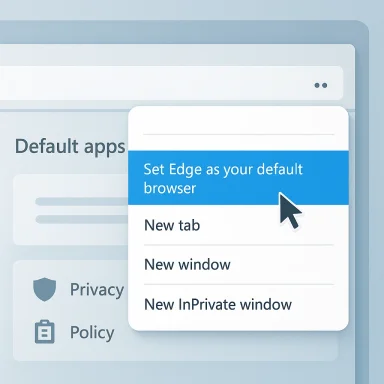
Microsoft Edge has quietly put a prominent “Set Edge as your default browser” (informally, a “Make me default”) button at the top of the browser’s three‑dot menu, bringing the browser’s default‑status prompt into a place most users open dozens of times a day. This small but conspicuous placement is the latest in a long series of UI nudges aimed at persuading users to return to or remain with Edge, and it deserves close attention from power users, IT administrators, and regulators alike.
For years, web browsers have competed not only on speed and features but on the simple, sticky advantage of being the default web client on Windows. Being default matters: it sets which browser opens links from mail apps, documents, and other programs, and it drives search‑engine usage, telemetry flows, and ecosystem lock‑in.
Microsoft’s Edge has been particularly active in nudging users toward default status ever since it moved to the Chromium engine and retooled its experience. Those nudges have taken many forms—banners, new‑tab cards, system toasts, and targeted prompts—often triggering frustration among users who feel the OS or bundled browser should not be so insistent. The latest change places a direct “Set Edge as your default browser” option inside the primary menu (the three‑dot menu), and at the top of that menu no less, guaranteeing high visibility.
At the same time, community researchers and reporters have catalogued code strings and test‑UX names inside Edge that show Microsoft actively experimenting with default‑browser “nurturing” flows (things like msNurturingDefaultBrowserBannerefaultBrowserTrigger appear in code). Those code artifacts indicate this behavior is deliberate and repeatedly iterated.
Additional verification comes from earli and developer‑level findings that show Microsoft testing multiple default‑nurturing UX flows within Edge builds (internal strings, feature flags, and telemetry hooks referenced in community archives). Those code strings and experiment names corroborate a pattern of iterative nudging rather than a single accidental UI placement.
Third‑party analysis of browser default behaviors and the proliferation of “make me default” prompts across browsers provides context—other browsers have used comparable nudges and even background agents to surface default notifications—but Microsoft’s approach has been uniquely integrated into OS surfaces because of Edge’s relationship to Windows. That broader context is documented by multiple community sources and technical writeups.
Cavng, didn’t find a Microsoft product‑communications post that explicitly lists the menu item as “new in build X” or “rolling out in Stable” — the reporting and community evidence point to either a staged experiment or a recent roll, but the exact channel and phased rollout remain partly unverified. Treat claims about universal availability accordingly.
Practical takeaways:
Source: Windows Report https://windowsreport.com/edge-now-puts-its-default-browser-prompt-right-in-the-menu/
 Background
For years, web browsers have competed not only on speed and features but on the simple, sticky advantage of being the default web client on Windows. Being default matters: it sets which browser opens links from mail apps, documents, and other programs, and it drives search‑engine usage, telemetry flows, and ecosystem lock‑in.Microsoft’s Edge has been particularly active in nudging users toward default status ever since it moved to the Chromium engine and retooled its experience. Those nudges have taken many forms—banners, new‑tab cards, system toasts, and targeted prompts—often triggering frustration among users who feel the OS or bundled browser should not be so insistent. The latest change places a direct “Set Edge as your default browser” option inside the primary menu (the three‑dot menu), and at the top of that menu no less, guaranteeing high visibility.
At the same time, community researchers and reporters have catalogued code strings and test‑UX names inside Edge that show Microsoft actively experimenting with default‑browser “nurturing” flows (things like msNurturingDefaultBrowserBannerefaultBrowserTrigger appear in code). Those code artifacts indicate this behavior is deliberate and repeatedly iterated.
What changed — the UI mechanics
Where the button appears
- The new prompt is presented as a menu item inside the main Edge menu (the three‑dot menu in the top‑right).
- It is shown as a short, direct call to action: “Set Edge as your default browser” (or similar phrasing), placed near the top of the overflow menu so it’s visible whenever users click the menu to access settings, new windows, or bookmarks.
How it behaves
- Clicking the menu item typically routes the user into Edge’s Default browser settings page or to Windows’ system Default apps page to complete the change.
- The menu placement means the prompt can be exposed repeatedly during normal use without opening a separate modal or OS notification. This is a lower‑friction path flow than earlier banners that sometimes required extra steps. The presence of code names and ux strings in Edge’s builds indicates the behavior is A/B tested or staged.
Channel and rollout context
- Public reporting of the menu change surfaced in a Windows‑focused news item dated February 1, 2026, indicating the prompt was visible to at least a subset of users or observers by that date. The report did not universally confirm whether the change was limited to Canary/Dev channels, server‑side experiments, or broadly in Stable builds. That detail remains important and is not uniformly verifiable from the reporting alone; treat the precise rollout scope as partly unconfirmed until Microsoft’s release notes or an Edge team communication specify channels and availability.
Why Microsoft is doing this (and why it matters)
Strategic incentives
- Default browser status affects usage metrics for Edge and Bing and is central to Microsoft’s strategy for search and services engagement across Windows and Surface devices.
- Default status increases the odds that users discover and keep using Edge‑first features—sync with Microsoft accounts, built‑in shopping/tions, and more—so Microsoft has strong business incentives to make the path to default simple and visible. Multiple independent investigations and analyses of browser market tactics point to the same commercial drivers.
UX and discoverability trade‑offs
- Making a default‑change call‑to‑action highly visible can be framed as improving discoverability: users who want Edge will find it faster.
- The counterargument is that frequent prompts erode user trust and create notification fatigue. If the UI balance favors repeated persuasive prompts, users who prefer another browser will rightly feel harassed.
Policy and regulatory optics
- Regulators in multiple jurisdictions have scrutinized platform owners for how they present defaults and first‑run experiences. Past pressure (chiefly from European regul making it easier to switch defaults in Windows. But visibility and placement of promotional prompts remain a concern for consumer authorities who watch for “dark patterns.” The EU’s involvement in forcing clearer default selection in past Windows updates is part of this history.
Cross‑checks and verification
I verified the core claim—Edge placing a direct default‑setting prompt inside the top of the three‑dot menu—against the Windows‑focused report that first publicized the specific menu placement. That article explicitly identified the menu location and included a date and author for the report.Additional verification comes from earli and developer‑level findings that show Microsoft testing multiple default‑nurturing UX flows within Edge builds (internal strings, feature flags, and telemetry hooks referenced in community archives). Those code strings and experiment names corroborate a pattern of iterative nudging rather than a single accidental UI placement.
Third‑party analysis of browser default behaviors and the proliferation of “make me default” prompts across browsers provides context—other browsers have used comparable nudges and even background agents to surface default notifications—but Microsoft’s approach has been uniquely integrated into OS surfaces because of Edge’s relationship to Windows. That broader context is documented by multiple community sources and technical writeups.
Cavng, didn’t find a Microsoft product‑communications post that explicitly lists the menu item as “new in build X” or “rolling out in Stable” — the reporting and community evidence point to either a staged experiment or a recent roll, but the exact channel and phased rollout remain partly unverified. Treat claims about universal availability accordingly.
Benefits for users and Microsoft — a balanced view
What users and admins might like about the change
- Faster access to the default‑browser setting: Users who do want Edge no longer need to hunt through nested Settings pages; a single menu click takes them to the control they need. This is legitimately convenient for users who switch browsers frequently or are onboarding new devices.
- Reduced friction for legitimate use cases: power users who adopt Edge for compatibility or enterprise features (IE mode, integration with M365, management GPOs) can make Edge the default quickly when required by policy or workflow.
- For Microsoft, higher default adoption means more consistent telemetry and usage of services that fund Edge’s development and integrations.
What Microsoft gains strategically
- Lowered friction converts occasional Edge trials into default use, aiding long‑term retention.
- The menu placement removes a small but meaningful behavioral barrier to conversion and increases the overall visibility of Edge’s ask without using system toasts or full‑screen modals that could be seen as more aggressive.
Risks, downsides, and potential harms
User experience and anti‑choice concerns
- Repeated, front‑and‑center calls to make Edge the default can create a feeling of coercion. Even if each prompt is one click away from being dismissed, the repetition and the menu’s frequent usage make the message hard to avoid.
- If Microsoft’s prompts are combined with other default‑reinforcing measures (e.g., periodic banners, download‑page interventions, or targeted nudges), the net effect can be persistent pressure that undermines user autonomy.
Regulatory and competition risks
- Regulators have previously flagged default settings as a competitive lever. A placement that pushes the default‑change action into a frequently tapped menu could be scrutinized, particularly if evidence shows it materially biases user choice.
- The EU and other competition authorities have required more neutral default selection flows in the past; new, highly visible placements could revive complaints if competitors believe it distorts market dynamics.
Enterprise management and admin surprises
- For IT pros, unanticipated UI changes can create support tickets and confusion among users. Admins should anticipate an uptick in queries about “why is Edge asking me to be default?” and update help‑desk scripts accordingly.
- While corporate device management tools can enforce defaults or disable user options, consumer devices are vulnerable to UI persuasion tactics and require clearer controls to retain user choice.
Privacy and telemetry concerns
- Default adoption favors the vendor’s search and telemetry plumbing. Users who prefer other browsers for privacy reasons may perceive (rightly) that aggressive default prompts are part of a broader ecosystem play that centralizes data collection. While Edge offers privacy controls, the perception of being steered toward a data‑rich default can erode trust.
What users and IT admins can do right now
Quick steps for end users who don’t want the prompt
- If you accidentally click the menu item, close the Default browser settings page without changing anything.
- Confirm your chosen browser remains the default by going to Windows Settings > Apps > Default apps and checking the Web browser entry.
- In Edge, open Settings > System and performance and disable “Continue running background apps when Microsoft Edge is closed” if you suspect any background agent might surface prompts or notifications.
- If you want to reduce Edge’s visibility further, customize the toolbar and remove non‑essential icons; but note this won’t remove the three‑dot menu item itself.
For IT administrators
- Use Group Policy / Intune policies to enforce browser defaults for managed fleets. If you must ensure a non‑Edge browser for compatibility or policy reasons, depration that explicitly sets the default browser for the user profile or device image.
- For managed Edge instances, review Edge ADMX/MDM templates and investigate policies that manage default behavior and UI exposures; patch help‑desk scripts to handle the new menu placement if users report confusion. Community documentation and enterprise guidance emphasize staging policies and pilot groups before broad rollout.
Broader context — not unique to Edge
- Other browsers have used persistent prompts to nudge users toward default status. Firefox and Chrome, for example, have employed in‑browser banners and agents that surface default prompts if the browser is not the current system default; these tactics have been used by rivals to maintain or regain market share. The “make me default” pattern is therefore a cross‑industry phenomenon, though the specific placement and frequency vary.
- A recent community project called “Just the Browser” demonstrates that many users are actively looking for ways to opt out of this cumulative UI noise. The project’s goal is to apply enterprise policy settings to disable shopping panels, AI assistants, and default‑nagging prompts for individual users—an indicator that demand exists for a calmer, less promotional browser experience.
Design and ethical considerations (what good behavior would look like)
- Transparent disclosures: If the prompt is an experiment, Microsoft should disclose that some users will see test UI variants, and provide a clear way to opt out or suppress further nudges.
- Respectful frequency: Default prompts should be surfacing only when useful—first run, explicit feature discovery paths, or when the user performs an action that logically requires the browser to be default—rather than in a menu used for unrelated tasks.
- Enterprise controls: For business customers, the vendor should offer deterministic, fleet‑level policy controls that override or suppress consumer‑oriented nudges.
- Accessibility and consent: Prompts must be accessible and must not exploit distractions or deceptive wording to secure consent. Regulators and UX ethics boards increasingly expect product makers to avoid “dark patterns” in default selection flows.
What this means for competition and the market
- Even small UI placements can change user behavior at scale. A menu item that sits where users click frequently effectively reduces the behavioral cost of switching defaults.
- Vendors with platform control naturally have stronger levers: Microsoft’s ability to place Edge deep in Windows UI remains politically and commercially significant. Watchdogs and competitors will scrutinize incremental UI changes like this one because the cumulative effect of many small nudges can create a large competitive advantage.
- Users who value choice and privacy may respond by favoring browsers that emphasize neutrality and minimal persuasion (or by using third‑party tools like MSEdgeRedirect to restore expected default behavior in some scenarios). Community projects and browser rivals are already addressing the underlying problem space.
Conclusion — why you should care
A seemingly minor change—putting a default‑setting button at the top of Edge’s three‑dot menu—matters because it transforms a frequent UI surface into a marketing channel. It’s a small shift in placement with outsized behavioral implications. For users who love Edge, it’s convenience; for everyone else, it’s another example of how platform‑embedded apps can steer behavior through design.Practical takeaways:
- If you like Edge, this makes becoming the default faster and easier.
- If you prefer another browser, double‑check your Default apps settings and consider blocking or ignoring the in‑menu prompt.
- For IT admins and privacy‑conscious users, maintain vigilance: document policies, update help‑desk guidance, and consider policy or third‑party tools where appropriate.
Source: Windows Report https://windowsreport.com/edge-now-puts-its-default-browser-prompt-right-in-the-menu/
