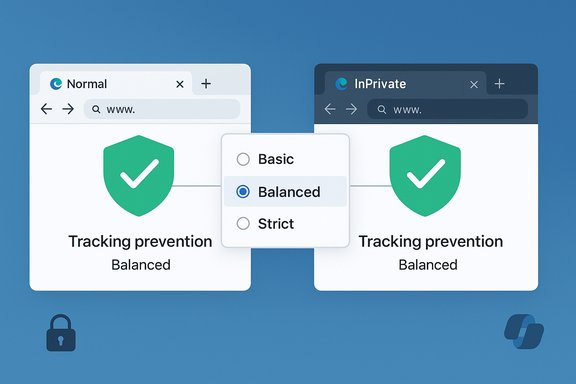
Microsoft’s decision to unify tracking prevention between normal and InPrivate windows in Microsoft Edge removes a long‑standing point of confusion and reshapes what “private” means in the browser — but the change also raises practical questions about expectations, enterprise controls, and how users should configure privacy settings going forward.
Microsoft Edge has offered a three‑tier Tracking prevention model for several years — Basic, Balanced, and Strict — where Balanced is the default and strikes a middle path between privacy and website compatibility. InPrivate browsing windows have historically included an additional toggle: “Always use ‘Strict’ tracking prevention when browsing InPrivate.” That toggle meant an InPrivate session could behave differently from a normal window only if the user explicitly enabled it; otherwise, the InPrivate window inherited the main window’s setting. This dual‑behavior design confused many users who expected InPrivate to always apply stronger protections by default. Microsoft now plans to “unify the tracking prevention experience,” making the setting chosen in the main Privacy page the one used everywhere — normal and InPrivate windows alike. The Microsoft 365 Roadmap item for this change (listed as Tracking prevention when browsing InPrivate) marks the feature as in development and identifies a target check date around March 2026. This is explicitly framed as a decision to make InPrivate behavior consistent with the normal browsing setting.
Finally, the simultaneous experimentation around Copilot (NTP prompts, screenshot composition) and the rename of performance controls to Energy Saver signal that Microsoft is continuing to fold AI and clearer labels into Edge’s core experience. Those changes add convenience and discoverability — and with new convenience comes new governance and privacy considerations that both consumers and administrators must treat seriously.
Source: Windows Report Microsoft Edge cleans up confusing InPrivate tracking prevention controls
 Background
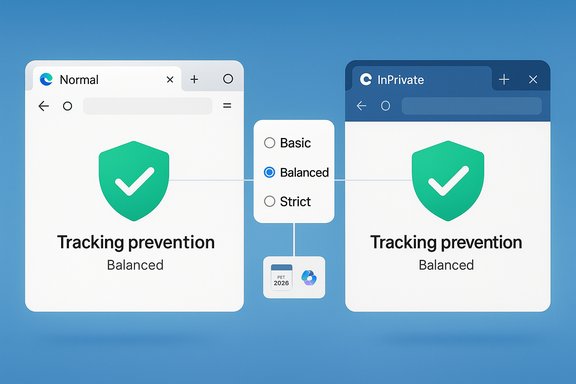
Microsoft Edge has offered a three‑tier Tracking prevention model for several years — Basic, Balanced, and Strict — where Balanced is the default and strikes a middle path between privacy and website compatibility. InPrivate browsing windows have historically included an additional toggle: “Always use ‘Strict’ tracking prevention when browsing InPrivate.” That toggle meant an InPrivate session could behave differently from a normal window only if the user explicitly enabled it; otherwise, the InPrivate window inherited the main window’s setting. This dual‑behavior design confused many users who expected InPrivate to always apply stronger protections by default. Microsoft now plans to “unify the tracking prevention experience,” making the setting chosen in the main Privacy page the one used everywhere — normal and InPrivate windows alike. The Microsoft 365 Roadmap item for this change (listed as Tracking prevention when browsing InPrivate) marks the feature as in development and identifies a target check date around March 2026. This is explicitly framed as a decision to make InPrivate behavior consistent with the normal browsing setting. What Microsoft is changing — the technical details
Single, consistent tracking prevention surface
- Edge will use one tracking prevention level across all windows. Whatever level you set under Settings → Privacy, search, and services → Tracking prevention becomes the effective level for both normal and InPrivate windows.
- The previous per‑window exception (the InPrivate Strict toggle) is being removed or effectively deprecated by making the global setting authoritative. This simplifies the mental model: there is one tracking prevention state for the browser, not two.
Timeline and source signals
- The feature appears in Microsoft’s product roadmap listings and third‑party Microsoft 365 change trackers with a check‑before target around March 2026. Roadmap summaries and change‑intelligence tools show the entry as “in development” with rollout planning keyed for early 2026. Treat the March window as the vendor’s target rather than a hard commitment.
Related UI and feature tweaks arriving at the same time
Microsoft is also fine‑tuning other Edge UX names and AI surfaces around the same period:- Efficiency mode is being renamed Energy Saver, and the gaming‑focused option is being renamed PC gaming boost. These are cosmetic/clarifying name changes to help users understand what each control does.
- Edge Canary testing continues to surface Copilot‑centric prompts on the New Tab Page and an integrated Take screenshot option inside the Copilot composer in the sidebar — both steps in bringing multimodal Copilot features into everyday browsing flows. These experimental features are present in Canary builds and not yet guaranteed for Stable.
Why the change matters: clarity over magic privacy
The problem Microsoft aimed to solve
The old model created a discoverability and expectation gap. Many users assumed InPrivate would automatically give them a stronger privacy posture, only to find that InPrivate behaved identically to a regular session unless they had toggled the hidden Strict switch. That ambiguity produced two negative outcomes:- Users either over‑trusted InPrivate as an all‑purpose privacy shield, or
- They remained unsure whether a private window actually increased protection, prompting needless support questions and inconsistent advice among guides and forums.
What users actually gain
- Reduced confusion: One setting eliminates the “which window applies?” question.
- Simpler support and documentation: Help desks and guides can tell users exactly where to set tracking prevention.
- Consistency across sessions: Anyone using multiple windows or switching between profiles will have the same tracker‑blocking behavior everywhere.
Critical analysis — strengths and trade‑offs
Strengths
- UX clarity: The biggest immediate win is clarity. Users now have a single place to control tracker blocking and a single mental model to remember.
- Lower cognitive overhead: Less choice means fewer accidental mismatches between expected and actual behavior.
- Easier enterprise guidance: Administrators can reference one policy surface when teaching employees about privacy settings and mitigations.
Trade‑offs and risks
- Perception of weakened privacy: For users who expected InPrivate to be stricter by default, unifying the settings may feel like a rollback — even though it’s primarily a simplification. For example, if a user leaves Tracking prevention at Balanced, InPrivate will no longer silently increase protections unless the user explicitly switches to Strict. That can be framed as a user‑education problem or as a material weakening depending on perspective.
- Enterprise and compliance concerns: Enterprises that rely on per‑session or per‑window behavior need clear policy controls and documentation. Group Policy/ADMX and Intune policies must expose equivalent controls for admins to enforce the desired protections at scale. Microsoft’s current policy set does let administrators control tracking prevention and other privacy surfaces, but policy coverage and visibility should be confirmed as changes roll out.
- Expectation mismatch for privacy‑conscious users: Power users who habitually used InPrivate as a quick way to raise protections will need to remember to change their global tracking prevention setting instead.
Unverifiable or fluid claims
- Any early reporting that ties the Copilot screenshot feature to a particular model (for example, naming a backend “GPT‑5”) or describing the exact telemetry/retention of screenshots should be treated cautiously; Microsoft’s model routing and on‑device vs cloud processing details change rapidly and are not always fully disclosed in preview notes. Those are claims to flag and verify when official documentation is published.
What this means for everyday users
Quick take: How your InPrivate sessions will behave
- If you keep Tracking prevention at Balanced (the default), both normal and InPrivate windows will block the same trackers and behave the same.
- If you switch Tracking prevention to Strict, that stricter behavior will now apply to all windows, not just InPrivate.
- To get the strictest experience in InPrivate as before, you must set the global Tracking prevention to Strict. The old per‑InPrivate “force Strict” toggle becomes unnecessary under the new model.
Small, practical steps users should take now
- Open Edge and go to Settings → Privacy, search, and services → Tracking prevention.
- Review which level suits your balance of privacy vs compatibility:
- Basic: minimal blocking, maximum compatibility.
- Balanced: recommended default, blocks known cross‑site trackers without too much site breakage.
- Strict: blocks most cross‑site trackers but may break some websites.
- If you use InPrivate specifically to increase tracker blocking, choose Strict at the global level. If you only use InPrivate for session isolation of cookies, leave the global setting and continue using InPrivate as before.
- For concentration on visual changes and Copilot experiments, use Edge Canary in an isolated profile or VM; experimental Copilot features (New Tab prompts, screenshot composer) appear there first.
Enterprise and admin considerations
Policy and governance
Enterprises should treat this unification as an impetus to review Edge group policies and Intune profiles:- Confirm whether your tenant enforces a tracking prevention level through ADMX/Intune or lets users choose. If you require Strict blocking for compliance, set that policy centrally.
- Check whether the old InPrivate toggle states (if previously managed) are evident in your environment; the change may alter how device‑level scripts or onboarding docs set privacy states.
Recommended admin steps
- Inventory existing Edge policies that affect tracking prevention and InPrivate behavior.
- Pilot the unified setting in a test group and observe user support tickets and site breakage reports.
- Update onboarding documentation and user training to reflect the single setting model.
- If Copilot visuals or screenshot integrations are a concern, evaluate policies that control Copilot features and visual data capture; postpone enabling experimental Canary features in managed fleets until policy controls are available.
Privacy implications — deeper analysis
What InPrivate actually protected (and what it did not)
Microsoft’s InPrivate primarily limits local persistence: browser history, cookies, and site data are wiped on close of InPrivate windows. It does not:- Hide your IP address (use a VPN for that).
- Prevent server‑side personalization while you remain signed into services.
- Stop network observers (ISPs, corporate proxies) from seeing traffic.
Screenshots in Copilot: a new data vector
The experimental Take screenshot option in Copilot’s composer shortens the path between seeing something and asking the assistant about it. That is powerful and convenient, but it opens privacy questions:- Where do screenshot images get processed — locally or in the cloud?
- Are visual inputs logged or used to improve models?
- Do enterprise DLP controls detect or block such context capture?
Recommendations for different user types
For mainstream consumers
- Keep the Tracking prevention level at Balanced if you want a low‑friction browsing experience with decent protection.
- Switch to Strict if you prioritize tracker blocking over compatibility and want the same protection everywhere (including InPrivate).
- Use InPrivate when you want local session isolation (cookies/history cleared on exit), but don’t assume it provides network anonymity.
For privacy‑conscious users
- Set Tracking prevention to Strict globally, block third‑party cookies, and consider privacy extensions like uBlock Origin or Privacy Badger.
- Combine with a reputable VPN if you need to hide IP addresses.
- Test critical sites after switching to Strict; document any breakage and whitelist necessary domains selectively.
For IT administrators
- Review and, if necessary, enforce a global tracking prevention policy via Group Policy or Intune to guarantee required protections.
- Pilot Copilot and Canary features only in isolated test environments; update corporate policies to explicitly address visual input, screenshot capture, and Copilot data use.
- Update end‑user documentation to remove references to an InPrivate‑only enforcement model and to emphasize the unified setting.
Broader implications and final judgment
Unifying tracking prevention between normal and InPrivate windows is a sensible UX move: it reduces hidden toggles, aligns user expectations, and makes the browser’s privacy posture more discoverable. Microsoft’s roadmap entry and preview signals make the vendor’s intent clear and give administrators time to prepare. However, the change also forces a conversation about what “private” means in a modern browser. Too many users historically equated InPrivate with network‑level anonymity or an automatic fortress of protection — and removing an implicit InPrivate‑only strictness will feel like a downgrade to them. The real winner from a security perspective is clarity. When users know precisely what protection they’ve chosen and where to set it, they make better decisions.Finally, the simultaneous experimentation around Copilot (NTP prompts, screenshot composition) and the rename of performance controls to Energy Saver signal that Microsoft is continuing to fold AI and clearer labels into Edge’s core experience. Those changes add convenience and discoverability — and with new convenience comes new governance and privacy considerations that both consumers and administrators must treat seriously.
Conclusion
The unification of tracking prevention in Microsoft Edge simplifies the browser’s privacy model by making the global tracking prevention setting the authoritative control for both normal and InPrivate windows. That simplicity fixes a longstanding user‑experience problem but also removes a hidden “escape hatch” that some users relied on to get stricter protections in private sessions. Users and IT teams should review and, if necessary, adjust their global tracking prevention setting today to ensure the browser behaves as they expect once Microsoft rolls out the change (targeted for March 2026 in public roadmap listings). At the same time, experimental Copilot features such as New Tab prompts and inline screenshot capture deserve cautious testing because multimodal capabilities change the data surface for privacy and compliance — test in Canary, verify processing claims, and update governance prior to wide deployment. Note: Microsoft’s feature rollouts and the technical specifics around model routing, telemetry, and on‑device vs cloud processing for Copilot features are evolving; claims about backend model names or exact processing locations should be verified against Microsoft’s official docs and policy pages when those are published or updated.Source: Windows Report Microsoft Edge cleans up confusing InPrivate tracking prevention controls