

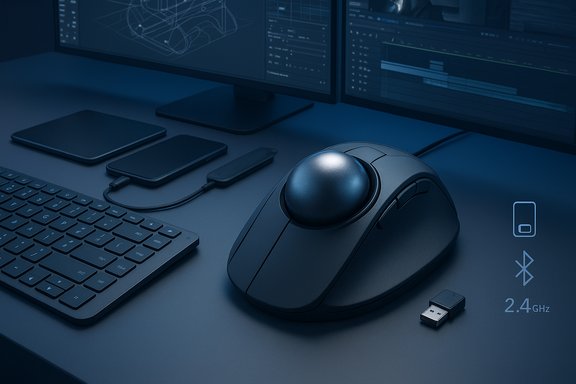
Elecom’s new Huge Plus trackball arrives as an unapologetically large, feature-rich take on the niche input device, marrying a supremely oversized 52 mm ball with swappable MinebeaMitsumi bearings, tri-mode connectivity, ten programmable buttons, and what the company claims is months of battery life between charges — all aimed at power users who prefer keeping the pointer under their fingers rather than moving an entire mouse across the desk.
The Huge Plus is the refreshed, modernized successor to Elecom’s original Huge trackball, an eight-year evolution that takes the original’s unusual form factor and updates it for today’s multi-device workflows. The product is positioned squarely at creatives, CAD users, video editors, and other professionals who value precision and ergonomics over the mainstream, travel-oriented mouse design. Elecom’s package blends hardware upgrades (a larger, serviceable ball and higher-grade bearings), connectivity (Bluetooth 5.3, 2.4 GHz wireless, and USB-C wired), and long battery claims designed to make this a primary desktop input rather than a curiosity.
At a glance, the Huge Plus’ headline specifications are:
Elegance in peripherals isn’t only about RGB and DPI numbers — it’s about how a device integrates with a person’s work habits. The Huge Plus doubles down on the trackball’s enduring promise: precise control without desktop gymnastics. It won’t be universal, but for the right hands and the right workflows, it looks poised to be a meaningful, modern refresh of a very particular input philosophy.
Source: TechSpot The Huge Plus packs a massive 52mm trackball, 10 buttons, and months of battery life
 Background
The Huge Plus is the refreshed, modernized successor to Elecom’s original Huge trackball, an eight-year evolution that takes the original’s unusual form factor and updates it for today’s multi-device workflows. The product is positioned squarely at creatives, CAD users, video editors, and other professionals who value precision and ergonomics over the mainstream, travel-oriented mouse design. Elecom’s package blends hardware upgrades (a larger, serviceable ball and higher-grade bearings), connectivity (Bluetooth 5.3, 2.4 GHz wireless, and USB-C wired), and long battery claims designed to make this a primary desktop input rather than a curiosity.At a glance, the Huge Plus’ headline specifications are:
- 52 mm removable trackball
- Swappable high-performance bearings (MinebeaMitsumi steel bearings supported)
- IR LED optical sensor, switchable DPI: 500 / 1000 / 1500
- 1,000 Hz polling rate in wired mode
- 10 programmable buttons including a tilt wheel
- Tri-mode connectivity: USB-C wired, 2.4 GHz wireless (receiver, receiver stows in base), Bluetooth 5.3
- Supports pairing up to three devices with a quick switch
- Built-in rechargeable lithium-ion battery (quoted up to 5 months in low-power mode)
- Ships with a cushioned palm rest and weighs roughly 279 g
Why a 52 mm ball matters: ergonomics and pointer control
Big ball, small wrist travel
A 52 mm ball is genuinely large by trackball standards. The core ergonomic proposition of a trackball is simple: move the pointer without moving the forearm or wrist. A larger ball increases the circumference a fingertip travels during motion, translating to greater pointer travel per finger movement. For long, precise sweeps — think 4K timeline scrubbing, large CAD pans, or sweeping across multiple monitors — a big ball reduces micro-adjustment fatigue and minimizes wrist deviation over long sessions.Palm support and posture
Elecom bundles the Huge Plus with a cushioned palm rest designed to support the entire palm and wrist. For users who already prefer a stationary input device, this can further reduce stress in the wrist extensors and forearm. The combination of a low-resilience palm rest and a large ball shifts work from continuous wrist translation to finger and hand posture, which many users find more sustainable over multi-hour sessions.Target users
The Huge Plus is purpose-built for:- Professionals who edit video, manipulate timelines, or work on large canvases
- CAD and 3D modelers who require precise, repeatable pointer control
- Users with wrist, forearm, or shoulder strain who need to minimize large mouse translations
- Trackball enthusiasts who want a desktop, stationary device with modern connectivity
Hardware deep dive
The ball and bearings
The Huge Plus uses a removable 52 mm ball and a bearing-supported mount. Elecom highlights MinebeaMitsumi bearings — a notable detail because MinebeaMitsumi is a recognized precision bearing manufacturer. The bearings are removable and swappable, which is important for two reasons:- Maintenance: bearings collect dust and can be cleaned or replaced without replacing the whole unit.
- Customization: users who want different friction or roll characteristics (including synthetic ruby-style supports popular in some enthusiast circles) can experiment.
Sensor and polling
Elecom upgraded the sensor to what it describes as a gaming-grade IR LED optical sensor with three DPI presets: 500, 1000, 1500. The device presents a wired polling rate of 1,000 Hz, which helps reduce latency and improve responsiveness in wired mode. Wireless modes (Bluetooth and 2.4 GHz) typically operate with lower effective polling and may prioritize battery life over the raw input rate, so users seeking the absolute lowest latency would want to use USB-C wired mode.Buttons, wheel and software
Ten programmable buttons, including a tilt-capable wheel, give the Huge Plus substantial macro and navigation flexibility. Elecom’s configuration tool (ELECOM Mouse Assistant) enables button reassignment, flying-scroll/high-speed scroll features, gestures and multiple button profiles. As with other manufacturer-specific utilities, behavior and driver compatibility can vary across operating systems and CPU architectures; the latest ELECOM Mouse Assistant releases target modern Windows and macOS releases, but users on ARM64 or niche OS builds may find functionality limited or might need to use generic HID behavior.Power and wireless
The Huge Plus contains a rechargeable lithium-ion battery Elecom rates at up to five months of typical use in their low-power mode (L mode), or up to three months in high-use (H mode). The tri-mode connectivity — USB-C wired, 2.4 GHz RF (with receiver storage in the base), and Bluetooth 5.3 — allows the unit to pair up to three devices and flip between them via a hardware slide switch. This is useful in multi-system workflows (desktop + laptop + tablet).Strengths: what the Huge Plus gets right
- Exceptional mechanical design for desktop use. The 52 mm ball and bearing support make it one of the most refined stationary trackballs on the market, tuned for long sessions and high precision.
- Serviceability. Swappable and removable bearings plus an easily removable ball reduce the long-term cost of ownership and help ensure consistent performance.
- Connectivity flexibility. Users can choose between low-latency wired operation, stable 2.4 GHz, or power-sipping Bluetooth 5.3, and pair up to three devices.
- Long battery life claims. If achieved in real-world use, five months between charges is a meaningful convenience improvement over many rechargeable peripherals.
- Customizability. Ten programmable buttons and robust software tooling allow deep workflow integration for power users.
- Compact receiver storage. The ability to stow the 2.4 GHz dongle in the base reduces lost-dongle risk and aids mobility for power users who move between desks.
Risks, limitations and things to watch
Battery life is highly usage-dependent
The “up to 5 months” figure is a lab-style estimate that will vary drastically based on active time, polling mode, LED indicators, and whether you use Bluetooth or 2.4 GHz. Wireless radios, frequent profile switching, or heavy macro usage can bring that figure down substantially. Treat Elecom’s figure as optimistic, not guaranteed.Wireless vs. wired trade-offs
Elecom advertises 1,000 Hz polling in wired USB mode only. Bluetooth and 2.4 GHz modes will typically exhibit higher latency and lower sample rates. For users who prioritize rapid, twitchy response (e.g., certain competitive gaming or fast-paced interaction), wired operation remains the best option. The Huge Plus is primarily targeted at precision work, not competitive gaming, but the 1,000 Hz wired mode is a welcome inclusion.Driver and OS caveats
ELECOM Mouse Assistant exists for Windows and macOS, but third-party software ecosystems (Linux, some ARM64 Windows builds, and older macOS versions) may not receive full feature parity. Past Elecom software iterations had quirks: macOS permissioning, multi-button edge cases, and ARM/Apple Silicon limitation mentions have appeared in user reports. Users on alternative platforms should verify driver support before expecting full programmability.Build and quality consistency
Elecom’s trackball line has enthusiastic fans, but community history shows a range of unit experiences. There are reports across user forums of occasional button failures, double-click symptoms, or out-of-the-box inconsistencies with older Huge models. Manufacturing consistency for any niche input device can vary. The Huge Plus improves the design and uses better components, but prospective buyers should be mindful of warranty terms and retailer return policies.Price positioning and alternatives
At Elecom’s direct price, the Huge Plus is a premium desktop trackball. While $129.99 (US direct retail) places it below some high-end gaming mice, it is higher than entry-level trackballs and significantly above smaller, basic models. Alternatives from other makers — Logitech’s various ergonomic and trackball offerings and Kensington’s long-running Expert and Orbit lines — remain attractive for different budgets and thumb vs. finger operation preferences. Buyers should weigh the Huge Plus’ unique large-ball, finger-operated ergonomics against thumb-operated trackballs if desk footprint and hand posture differ.Real-world usage: setup, tips and maintenance
Out-of-box setup
- Choose a connection: slide the switch to Wired/2.4G/Bluetooth as required.
- For 2.4 GHz: plug the receiver into your host, flip the receiver storage compartment to release the dongle, and pair it.
- For Bluetooth: use the DPI/Pairing button sequence to put the device into pairing mode, then complete pairing on the OS Bluetooth menu.
- Install ELECOM Mouse Assistant for button programming and custom scroll behavior on Windows or macOS when full control is needed.
Practical usage tips
- Use wired USB for demanding low-latency tasks; use Bluetooth for convenience with tablets and mobile OS devices.
- When switching between devices, keep one device permanently paired via 2.4 GHz and another via Bluetooth — the slide switch makes toggling quick.
- Test DPI presets to find a balance between fine control and whole-screen sweeps. For ultra-high-resolution monitors, 1,500 DPI may be the most practical.
Cleaning and bearing swaps — step-by-step
- Power off the unit.
- Use the bottom-access hole to remove the ball — clean the ball with a microfiber cloth.
- Inspect the bearing cartridge and cavity for lint; compressed air and a soft brush remove debris.
- If changing bearings, use the supplied removal tool or follow the manual’s instructions. Replace with new bearings and re-seat them carefully to avoid misalignment.
- Reinstall the ball, power on, and verify tracking in your OS pointer control panel.
Software experience and ecosystem considerations
ELECOM’s Mouse Assistant empowers multi-profile button mapping, flying scroll, gestures and per-profile automatic switching. However, the software experience is not uniform across all operating systems. Historically, Elecom’s software:- Delivered full control on Windows desktops.
- Needed manual privacy permission configuration on macOS for accessibility and input monitoring.
- Showed uneven behavior on ARM-based devices unless run under compatibility layers.
- Confirm driver compatibility with your OS before purchase — particularly if you run Linux, Windows on ARM64, or a niche macOS version.
- If using multiple host OSes, expect some limits on button mapping parity; consider relying on on-device defaults for cross-platform consistency.
- Community utilities and third-party remappers (for macOS and Linux) may be viable fallbacks when ELECOM’s own tooling is limited, but these add configuration complexity.
How the Huge Plus compares to other trackball options
- Logitech’s ergonomic trackball alternatives are more mainstream and often thumb-operated. They are easier to find in North American retail and generally supported by Logitech’s unified software.
- Kensington’s Expert Mouse and Orbit series offer a variety of form factors, including both thumb and finger-operated designs, and their software is mature and broadly compatible.
- The Huge Plus differentiates itself with its 52 mm finger-operated ball, swappable precision bearings and a desktop-focused palm rest — features not commonly matched by thumb-oriented competitors.
Purchase and warranty considerations
Elecom sells the Huge Plus through its direct channels and third-party retailers. Pricing may vary by region; Elecom’s US direct listing indicates a retail price that positions it as a premium niche peripheral. Always verify:- The exact model number (the Huge Plus comes in different SKUs for different markets).
- Warranty details, which in Elecom’s case typically include limited manufacturer coverage that varies by region.
- Return policies at your point of purchase — enthusiastic trackball buyers often return devices if the feel or button quality does not meet expectations.
Final analysis: who should (and shouldn’t) buy the Huge Plus
The Huge Plus is a well-considered evolution of Elecom’s stationary trackball philosophy. It brings modern wireless connectivity, an upgraded sensor and a serviceable bearing design to a form factor that rewards long-term desktop usage. The device shines for:- Professionals using high-precision tools across large monitors or multi-monitor desktops.
- Users with repetitive arm/wrist strain who can benefit from stationary input.
- Trackball enthusiasts who appreciate swappable hardware and tangible maintenance.
- Battery life is situational; real-world use can differ from manufacturer estimates.
- Wireless modes compromise polling rate compared to wired operation — wired remains the best option for lowest latency.
- Software support and driver parity may be platform-dependent; if deep customization is essential on an uncommon OS, verify compatibility first.
- Past community reports for other Elecom trackballs suggest occasional quality-control variance; know your return and warranty rights.
Elegance in peripherals isn’t only about RGB and DPI numbers — it’s about how a device integrates with a person’s work habits. The Huge Plus doubles down on the trackball’s enduring promise: precise control without desktop gymnastics. It won’t be universal, but for the right hands and the right workflows, it looks poised to be a meaningful, modern refresh of a very particular input philosophy.
Source: TechSpot The Huge Plus packs a massive 52mm trackball, 10 buttons, and months of battery life