

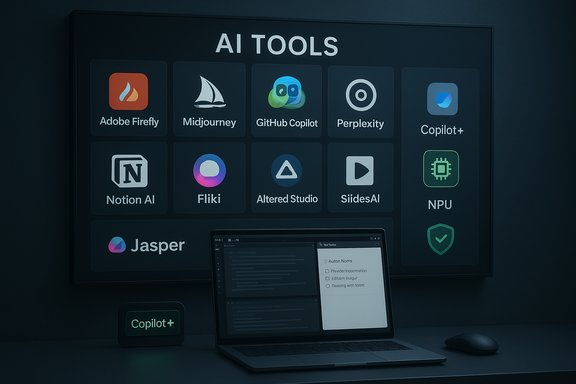
Generative AI has passed a tipping point: what began as experimental chatbots and novelty image generators is now a practical, enterprise-ready layer that businesses are embedding into everyday workflows. From image generation and voice cloning to code pair‑programming and on‑device assistants, the dozen platforms IT Pro highlighted represent real-world options that IT teams and business leaders can deploy today — but each brings distinct trade‑offs in capability, cost, governance and legal risk. This feature distills those choices, verifies the major technical claims, and gives a pragmatic roadmap for IT pros who must turn AI hype into reliable productivity.
The flood of AI tools in 2024–2025 moved quickly from research previews to commercial products and hardware platforms with local NPUs. Vendors now pitch three consistent claims: stronger reasoning at scale, safe/commercial-ready creative outputs, and seamless integration with existing enterprise stacks. Those claims are partly true, but they require careful verification and governance before broad deployment.
OpenAI’s GPT‑5.1, released in November 2025, introduced split modes — Instant for speed and conversational tone, and Thinking for deeper reasoning — plus expanded personality and tone controls intended for corporate branding and consistent outputs. This is a substantive product change, not merely marketing. Microsoft’s strategy has been to weave AI into Windows and Office as a platform capability, creating what it calls Copilot+ PCs with dedicated NPUs and “screen‑aware” assistants that can summarize local content and interact with cloud services when authorized. That hardware+software angle is shifting where sensitive workloads run (on‑device vs cloud) and is an important consideration for IT planning. Midjourney, Adobe, and specialist providers (voice, communications coaching, video builders) now claim production‑grade outputs for branding and marketing. These claims are mostly justified, but their legal, ethical, and provenance implications vary strongly by tool and contract. Tech reviews and vendor documentation bear this out and are cited throughout the analysis below.
Key takeaways:
Key takeaways:
Key takeaways:
Key takeaways:
Key takeaways:
Key takeaways:
Key takeaways:
But the strongest gains come when teams match tool to job and enforce governance. Do pilot projects first, require human sign‑off for external‑facing outputs, negotiate non‑training or IP indemnity clauses when necessary, and centralize monitoring of spend and permissions.
Where claims are purely vendor marketing (e.g., blanket promises that “on‑device = air‑gapped”), treat them cautiously and verify feature‑by‑feature. Some Copilot features are local on Copilot+ PCs, but many richer generative tasks still rely on cloud LLMs — confirm per feature and hardware SKU.
Source: IT Pro The best AI tools for business to try today
 Background
The flood of AI tools in 2024–2025 moved quickly from research previews to commercial products and hardware platforms with local NPUs. Vendors now pitch three consistent claims: stronger reasoning at scale, safe/commercial-ready creative outputs, and seamless integration with existing enterprise stacks. Those claims are partly true, but they require careful verification and governance before broad deployment.OpenAI’s GPT‑5.1, released in November 2025, introduced split modes — Instant for speed and conversational tone, and Thinking for deeper reasoning — plus expanded personality and tone controls intended for corporate branding and consistent outputs. This is a substantive product change, not merely marketing. Microsoft’s strategy has been to weave AI into Windows and Office as a platform capability, creating what it calls Copilot+ PCs with dedicated NPUs and “screen‑aware” assistants that can summarize local content and interact with cloud services when authorized. That hardware+software angle is shifting where sensitive workloads run (on‑device vs cloud) and is an important consideration for IT planning. Midjourney, Adobe, and specialist providers (voice, communications coaching, video builders) now claim production‑grade outputs for branding and marketing. These claims are mostly justified, but their legal, ethical, and provenance implications vary strongly by tool and contract. Tech reviews and vendor documentation bear this out and are cited throughout the analysis below.
Overview: The 12 tools and what they promise
This section groups and summarizes the tools by primary business use case, followed by a quick verification of major technical claims.Creative and branding
- Adobe Firefly — text‑to‑image and generative editing integrated into Photoshop via Generative Fill; trained on licensed Adobe Stock + public‑domain data and positioned as commercially safe. Adobe explicitly states Firefly’s training set and commercial licensing stance.
- Midjourney (v7) — artistic image generation with improved prompt understanding, Draft Mode for rapid ideation, personalization and better handling of text in images; v7 launched in alpha in April 2025 and rolled out progressively. Independent press coverage and vendor notes confirm the v7 improvements while cautioning that some legacy features were temporarily absent at launch.
Writing, research and knowledge work
- ChatGPT Plus (GPT‑5.1) — enterprise‑oriented conversational assistant with Instant/Thinking variants, personality presets, and tiered usage limits for Plus/Pro/Business plans. OpenAI’s product page documents the model split, personality presets and availability tiers.
- Perplexity — citation‑forward, conversational search that returns short answers and source links, designed for research use where traceability matters. Perplexity’s positioning as a research tool that cites sources has been broadly documented and benchmarked by reviewers.
Developer productivity
- GitHub Copilot — AI pair programmer with inline ghost text, integrated Copilot Chat, and project‑aware suggestions inside editors (VS Code, Visual Studio). Copilot’s pricing tiers and student/OSS allowances are consistent across vendor docs and independent guides. You still need code literacy to validate outputs.
Media, voice and video
- Altered Studio — speech transformation and voice‑character bank for ads, podcasts and narration; high‑quality voice clones but with TTS artifacts when used purely as text-to-speech. Users report the best results when starting from a real voice sample. (Vendor demos and user tests match that finding.
- Fliki — quick script‑to‑video with virtual hosts and stock assets; pragmatic but not broadcast‑grade unless you upgrade to higher tiers to remove watermarks and get Full HD. (Market reviews and vendor plans validate the feature set.
Communication and coaching
- Yoodli — AI communication coach for interviews, presentations and meeting extracts; provides metrics on pacing, filler words and suggested rewrites, and it supports video uploads for non‑verbal feedback. Freemium model with team/enterprise plans for centralized reporting is documented in vendor materials and reviews.
Productivity and content assembly
- Notion AI — embedded AI for notes, meeting‑action extraction, autocompletion and ideation inside Notion pages; billed as an add‑on per member. Notion’s integration is lightweight and useful for small teams; enterprise usage should consider data residency and content training rules.
- SlidesAI — rapid deck generation from text inputs inside Google Slides, with improved image matching features; a strong pick for Google Workspace customers who need extremely fast first drafts.
- Jasper AI — marketing‑focused content platform with Brand Voice and campaign generation that coordinates blog posts, social posts and ad copy; integrates with SEO and CRM tools to create campaign bundles. Jasper’s positioning as a higher‑priced, brand‑centric platform holds up in vendor docs and market reviews.
System/OS level assistant
- Microsoft Copilot (Windows) — baked into Windows 11 with screen awareness, voice and vision capabilities, plus deeper Microsoft 365 indexing when signed in with Entra ID. Copilot+ hardware (NPUs) enable local inference for privacy‑sensitive tasks on capable devices. Microsoft’s rollout has been staged and gated by hardware and Insider program phases.
Deep dive: What each tool really does and the verified facts IT should care about
1) Adobe Firefly — practical, commercially safe creative editing
Adobe’s claim that Firefly is trained on licensed Adobe Stock, public‑domain, and openly licensed content and that Firefly outputs are commercially safe is verified in Adobe’s own product and FAQ pages. Adobe also offers enterprise options (IP indemnification and content credentials) for businesses that require contractual guarantees. That makes Firefly a defensible choice for brands that must avoid unlicensed training data risks. Still, IT teams should confirm the exact contractual protections for enterprise plans before replacing agency‑sourced assets. Key takeaways:- Strength: Excellent for compositing/editing inside Photoshop (Generative Fill).
- Risk: Some edge‑case prompts may still produce derivative elements resembling training images — enterprise indemnities and content credentials reduce legal exposure but don’t eliminate the need for review.
2) ChatGPT Plus (GPT‑5.1) — faster drafts, deeper reasoning when needed
OpenAI’s GPT‑5.1 release is real and introduces the Instant vs Thinking split, with personality presets for consistent tone. These features are already available to paid tiers and are being added to APIs and enterprise channels. OpenAI’s documentation shows usage limits and the ability to route requests between Instant and Thinking based on complexity. Key takeaways:- Strength: Fast, customizable outputs with explicit "thinking" depth control for complex tasks.
- Risk: Organizations must manage data use and training policies (enterprise plans offer stronger contractual controls), and outputs still require human verification on high‑stakes items.
3) Perplexity — citation‑first research assistant
Perplexity’s core value is delivering answer summaries with cited sources, which shortens research loops. For analysts and product teams needing quick briefs with verifiable references, Perplexity is a sensible addition to the toolkit. Independent evaluations show it blends generative answers with source links to facilitate validation.Key takeaways:
- Strength: Time‑saved research with sources surfaced.
- Risk: Do not treat the AI summary as the authoritative answer; follow the citations and validate before publishing.
4) Altered Studio — convincing voice transformation, but watch consent
Altered Studio’s voice cloning can be indistinguishable from human actors and offers large character banks. Best practice: always obtain written consent for voice likenesses and confirm licensing for commercial use. Pure TTS mode is improving but can still sound synthetic for sensitive campaigns.Key takeaways:
- Strength: Fast, cost‑effective voice variants for ads or podcasts.
- Risk: Legal/ethical exposure if using cloned voices without clear rights and consent.
5) Midjourney v7 — creative ideation with improved text handling
Midjourney’s v7 is widely reported to improve prompt interpretation, image coherence and personalization; it also introduced Draft Mode for rapid, low‑cost experimentation. Independent tech coverage verifies the April 2025 alpha rollout and the gradual feature expansion that followed. v7’s text rendering improved, but designers should still validate brand text and trademarks within generated images before publication. Key takeaways:- Strength: Rapid ideation and distinctive art styles.
- Risk: IP provenance is murkier than Adobe Firefly’s licensed‑dataset approach; use for ideation and concepting, with legal review before use in final branded materials.
6) GitHub Copilot — real productivity for developers, not a replacement for expertise
Copilot’s integrated ghost text and Copilot Chat are mature features that meaningfully reduce boilerplate work and help debug code. GitHub and Microsoft docs make clear that Copilot provides suggestions that must be validated by a developer; they also outline free/paid tiers and special allowances for students and OSS maintainers. Copilot’s value is highest when paired with developer oversight and security scanning. Key takeaways:- Strength: Fast scaffolding, integrated IDE chat, and multi‑file context.
- Risk: Potential for insecure or license‑sensitive code snippets — require code review and SCA (software composition analysis).
7) Yoodli — measurable improvements for spoken communication
Yoodli’s feedback loop (metrics for pacing, filler words and concision) converts vague coaching goals into measurable progress. For sales teams, interview coaching and executives prepping for public talks, Yoodli offers rapid rehearsal and objective tracking. The freemium/enterprise pricing model matches typical SaaS patterns for rolling out pilot programs.Key takeaways:
- Strength: Repeatable practice, objective metrics, and scenario tailoring.
- Risk: Sensitive rehearsals (confidential interview answers) should be handled in privacy‑controlled environments.
8) Fliki — quick social video without camera crews
Fliki turns scripts into narrated video with stock imagery and AI voices. It’s ideal for social teams producing high volumes of short video. Full production quality requires paid tiers and human editing for nuance and brand fidelity.Key takeaways:
- Strength: Speed and low production cost.
- Risk: Synthetic voice quality and stock content limitations for premium campaigns.
9) Notion AI — embedded assistance inside knowledge workflows
Notion AI handles autocompletion, action‑item extraction, and first‑draft generation inside pages. It is especially useful for startups and small teams that rely on a single knowledge base. Confirm the data‑processing terms before storing customer PII or regulated content.Key takeaways:
- Strength: Contextual writing assistance inside team knowledge flows.
- Risk: For regulated data, require enterprise contracts that govern training and retention.
10) SlidesAI — fastest route from report to deck (for Google Workspace)
SlidesAI converts long text into structured slide decks quickly and now matches images more intelligently. It is a pragmatic fit for Google‑first teams who need first drafts to accelerate design work.Key takeaways:
- Strength: Rapid prototyping of presentations.
- Risk: Branding and fonts will almost always need human polish.
11) Microsoft Copilot (Windows integration) — AI becomes a system input
Microsoft’s OS‑level Copilot moves beyond a sidebar to a system assistant with voice, vision and cross‑account connectors — and it leverages Copilot+ PC NPUs to allow certain workloads to stay on device. The Copilot+ program and 40+ TOPS NPU threshold are vendor‑documented, but feature parity across devices will vary by hardware and staged server toggles. Key takeaways:- Strength: Deep productivity integration and tenant grounding for Microsoft 365 content.
- Risk: Hardware fragmentation, administrative control complexity, and the need to audit which operations are truly local vs cloud‑backed.
12) Jasper AI — marketing teams’ brand guardrails at scale
Jasper centralizes Brand Voice and can generate coordinated campaign bundles (blog post, social variants, email sequences) from a single brief. Its value proposition is consistency and scale for marketing, but it’s a higher‑price solution compared with generalist chatbots. Integrations with SEO and CRM tools make it an operational fit for established digital marketing teams.Key takeaways:
- Strength: Brand consistency and campaign assembly.
- Risk: Cost, and the need for ongoing editorial oversight to avoid hallucinations or off‑brand slips.
Cross‑cutting strengths and verified claims
- On‑device AI hardware matters. Microsoft’s Copilot+ PC program with NPUs (40+ TOPS baseline) and OEM Copilot keys make local inference realistic for privacy‑sensitive tasks on qualifying machines. That hardware gating is real and affects which Copilot features use local NPUs vs cloud models.
- Vendors are differentiating by dataset guarantees. Adobe documents that Firefly’s initial commercial models were trained on Adobe Stock and public‑domain content and positions Firefly as safe for commercial use when used under the stated license terms. That is a defensible position for brands that worry about training‑data provenance.
- Reasoning models are evolving in practical ways. OpenAI’s GPT‑5.1 introduces adaptive routing between Instant and Thinking with documented usage controls; this materially changes how businesses can trade latency for depth when automating complex tasks.
Key risks, governance recommendations and mitigation steps
Adopting these tools without policy is where most organizations stumble. The risks fall into five buckets: hallucination/accuracy, data exposure/training, IP/provenance, legal/consent (voice/likeness), and operational fragmentation.- Hallucination / factual errors
- Mitigation: Treat LLM outputs as draft content. Add human verification steps for legal, financial, and regulatory items. Use citation‑forward tools (Perplexity) when the output requires verifiable sources.
- Data exposure & model training
- Mitigation: Use enterprise plans with non‑training clauses or on‑device modes for regulated data; restrict who can paste PHI/PCI into consumer chat tools. For Microsoft/Entra integrations, use tenant grounding and admin controls to limit cross‑account access.
- IP / provenance for creative outputs
- Mitigation: Prefer models trained on licensed datasets (Adobe Firefly) when publishing large‑scale branded assets; use Midjourney and others for ideation and prototype assets that will later be reworked by designers.
- Consent and likeness (voice cloning)
- Mitigation: Require written release for voice likeness or use paid voice licensing and audit logs when Altered Studio or similar tools are used in campaigns.
- Operational fragmentation and cost
- Mitigation: Create a decision matrix aligning tool to job (creative, research, coding, meeting capture) and pilot two tools per category. Monitor usage and quotas centrally — metered API or generation costs scale fast.
A practical rollout checklist for IT (step‑by‑step)
- Inventory: Identify top 5 recurring tasks where AI could materially save time (e.g., first‑draft content, code scaffolding, creative concepting).
- Pilot: For each task, pick two tools with different risk profiles (one “safer” enterprise tool; one productivity‑oriented tool). Run a 2–4 week pilot with logged outputs and human‑in‑the‑loop validation.
- Legal & Procurement: Obtain written non‑training and data residency guarantees for regulated data; secure IP indemnity for creative assets when required (Adobe enterprise agreements, Microsoft enterprise plans).
- Security: Use MDM to enforce app permissions (camera, mic, clipboard), audit API keys and service principals, and require SSO where available.
- Training & SOPs: Publish SOPs that state what can and cannot be pasted into consumer AI tools, who validates outputs, and escalation paths for suspected hallucinations or IP questions.
- Monitoring: Centralize spend reporting and usage quotas, and review monthly. Tag outputs stored in controlled Windows folders (SharePoint/OneDrive) for audit trails.
- Scale: After pilots, standardize preferred vendors by job class and bake them into templates, training, and procurement.
Vendor selection matrix — a quick guide for IT decision makers
- Need enterprise governance + Office integration: Microsoft Copilot (Windows + Microsoft 365).
- Need multimodal creative outputs with licensed training data: Adobe Firefly (best for commercial creative work).
- Need fast artistic ideation and unique visuals: Midjourney v7 (great for concepting; validate IP before production).
- Need developer productivity in the IDE: GitHub Copilot (inline ghost text + Copilot Chat).
- Need citation‑forward research: Perplexity.
- Need marketing campaign coherence & brand voice: Jasper.
- Need rapid, low‑cost video/social content: Fliki.
- Need voice transformation: Altered Studio (use with clear consent).
Final analysis — when to adopt, when to wait
The current crop of AI tools delivers concrete productivity gains when used with thoughtful guardrails. Creativity tools let marketing teams iterate faster; Copilot and GitHub Copilot cut repetitive work for developers; citation‑first research assistants expedite due diligence; and system‑level copilots are now a legitimate part of OS strategy for organizations that standardize hardware.But the strongest gains come when teams match tool to job and enforce governance. Do pilot projects first, require human sign‑off for external‑facing outputs, negotiate non‑training or IP indemnity clauses when necessary, and centralize monitoring of spend and permissions.
Where claims are purely vendor marketing (e.g., blanket promises that “on‑device = air‑gapped”), treat them cautiously and verify feature‑by‑feature. Some Copilot features are local on Copilot+ PCs, but many richer generative tasks still rely on cloud LLMs — confirm per feature and hardware SKU.
Conclusion
The dozen AI tools IT Pro highlighted are not theoretical curiosities — they are deployable platforms that can shorten time to first draft, speed product ideation, and reduce repetitive developer toil. Verified releases such as OpenAI’s GPT‑5.1 (Instant/Thinking and personality presets) and Midjourney’s v7 have meaningfully improved capability and changed how teams prototype and execute creative work. Likewise, enterprise‑grade assurances (Adobe Firefly’s licensed training set; Microsoft’s Copilot+ hardware and Entra integration) create practical paths for risk‑aware deployment. For IT leaders, the immediate task is not fear of AI but governance of it: pick the right tool for the job, negotiate needed contractual protections, pilot responsibly with human review points, and measure both productivity gains and new exposure. When matched to business needs and wrapped with clear rules and audit trails, today’s AI tools deliver measurable value — but they must be treated as assistants, not authorities.Source: IT Pro The best AI tools for business to try today
