

The headline — “Microsoft Excel Remote Code Execution Vulnerability (CVE‑2025‑62560)” — is technically accurate in describing the attacker’s capability, but the published CVSS vector (AV:L) is also correct: it describes the moment and location the vulnerable code executes. These are two different but complementary signals used by vendors and scoring frameworks; understanding both is essential for accurate triage, risk communication, and mitigation planning.
Microsoft’s advisory naming convention emphasizes operational impact. When a bulletin or CVE title uses the phrase Remote Code Execution (RCE), it signals that an attacker operating off‑host can, through some delivery channel, ultimately cause arbitrary code to run on a target system. That headline is intentionally blunt: RCE is a primary triage driver for defenders and administrators because it represents a worst‑case capability.
CVSS (Common Vulnerability Scoring System) takes a different approach. Its Attack Vector (AV) metric is narrowly defined to indicate where the vulnerable component runs at the moment the exploit is triggered — Network (AV:N), Adjacent (AV:A), Local (AV:L), or Physical (AV ). For many Office document‑parsing vulnerabilities, the vulnerable code executes inside the local application process (e.g., Excel parsing a workbook), so CVSS is correctly marked AV:L even when the malicious file arrived remotely. This distinction avoids “double‑counting” the network delivery step and preserves consistent scoring across diverse exploit models.
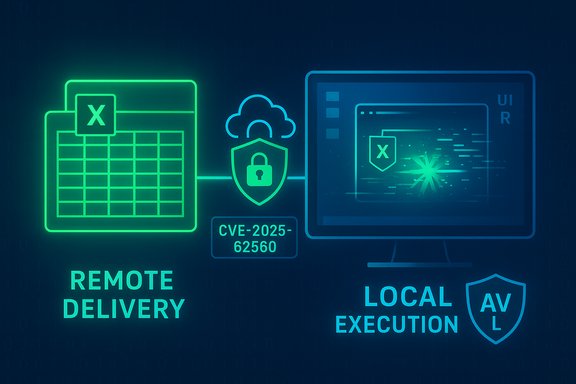
CVE‑2025‑62560 is a concrete example of this pattern: vendor messaging labels it RCE to tell operators what an attacker can achieve from off‑host, and CVSS records AV:L to describe the exploit’s triggering context inside the victim process. The CVSS vector published for this CVE is CVSS:3.1/AV:L/AC:L/PR:N/UI:R/S:U/C:H/I:H/A:H with a base score of 7.8, indicating high impact with local attack vector and user interaction required.
Unverifiable or time‑sensitive details (for example, whether active exploitation is occurring right now) should be checked against live vendor advisories and telemetry; base triage decisions on confirmed KB mappings and your environment’s exposure profile, with server‑side document processors treated as especially urgent remediation targets.
Source: MSRC Security Update Guide - Microsoft Security Response Center
 Background / Overview
Microsoft’s advisory naming convention emphasizes operational impact. When a bulletin or CVE title uses the phrase Remote Code Execution (RCE), it signals that an attacker operating off‑host can, through some delivery channel, ultimately cause arbitrary code to run on a target system. That headline is intentionally blunt: RCE is a primary triage driver for defenders and administrators because it represents a worst‑case capability.CVSS (Common Vulnerability Scoring System) takes a different approach. Its Attack Vector (AV) metric is narrowly defined to indicate where the vulnerable component runs at the moment the exploit is triggered — Network (AV:N), Adjacent (AV:A), Local (AV:L), or Physical (AV
). For many Office document‑parsing vulnerabilities, the vulnerable code executes inside the local application process (e.g., Excel parsing a workbook), so CVSS is correctly marked AV:L even when the malicious file arrived remotely. This distinction avoids “double‑counting” the network delivery step and preserves consistent scoring across diverse exploit models.CVE‑2025‑62560 is a concrete example of this pattern: vendor messaging labels it RCE to tell operators what an attacker can achieve from off‑host, and CVSS records AV:L to describe the exploit’s triggering context inside the victim process. The CVSS vector published for this CVE is CVSS:3.1/AV:L/AC:L/PR:N/UI:R/S:U/C:H/I:H/A:H with a base score of 7.8, indicating high impact with local attack vector and user interaction required.
Why “Remote” and “Local” are not contradictory
Two questions, two answers
- The CVE/advisory title answers: What can an attacker achieve and from where can they attempt it? If an attacker operating remotely can cause code to run on a victim, the advisory will often say Remote Code Execution.
- The CVSS Attack Vector answers: Where must code be executing at the moment the exploit triggers? If exploitation occurs when a local application parses a file on the endpoint, AV:L is the correct CVSS value.
The canonical Excel attack chain (how remote delivery leads to local execution)
- Attacker crafts a malicious Excel workbook (XLSX, XLSB, or an embedded OLE object) that targets a memory‑safety defect in Excel’s native parsing stack.
- The attacker delivers the workbook remotely via email attachment, shared cloud link, or file download.
- A victim opens (or a preview component renders) the workbook in a local Excel process.
- Excel’s parser hits the crafted input, triggers memory corruption, and attacker‑controlled code executes inside the local Excel process under the logged‑on user’s privileges.
The CVSS perspective: what AV:L actually means
CVSS AV metric in plain terms
CVSS’s Attack Vector metric is deliberately granular:- AV:N (Network) — vulnerable component can be exploited across network boundaries without local user interaction (e.g., network service).
- AV:A (Adjacent) — attacker must be on the same local network or adjacent.
- AV:L (Local) — vulnerable code is invoked by a local action (opening a file, running an application).
- AV (Physical) — physical access to the device is required.
User Interaction (UI) and Privileges Required (PR)
Most Office document RCEs are paired with UI:R (User Interaction required) in CVSS because a user must open or preview the file for the vulnerable parser to run. PR:N (no privileges required) is common for file‑parsing bugs because the attacker needs only to trick an ordinary user — the exploit runs under that user’s context. Those fields matter operationally: UI:R means the remediation focus should include user‑facing controls (email gateway, Protected View), while PR:N underscores the importance of least‑privilege and non‑admin user profiles.Why document‑parsing RCEs are especially dangerous
Data‑only exploitation
Excel’s parsing stack is complex: legacy BIFF binary records, Open XML subdocuments, embedded OLE objects, formula engines, rendering subsystems, and ActiveX/OLE handling all run as native code within the Excel process. Memory‑safety defects in these native parsers (use‑after‑free, heap overflow, out‑of‑bounds reads/writes) can be abused as data‑only attacks — that is, no macros or script execution is required to achieve arbitrary code execution. Macro‑blocking controls are therefore not a panacea.Low delivery friction and social engineering
Delivery vectors are trivial: email attachments, cloud shares, and public downloads. Attackers routinely use spear‑phishing, business‑email compromise, and plausible shared document pretexts to convince recipients to open files. Because the required user action is so easy to engineer, an AV:L document RCE often represents very high operational risk in practice. Historical patterns show these vulnerabilities can be weaponized quickly once details are public.Preview handlers and server‑side parsing — the exception that converts Local into Network
There is a critical operational exception: if a network‑accessible server or service (email gateway that generates attachment previews, Office Online Server, a cloud collaboration platform) invokes the vulnerable parser to render or convert uploaded documents, then the vulnerable code runs in a network‑bound process. In that scenario, the attack vector legitimately becomes AV:N because a remote attacker can trigger the parser without a user opening the file on the endpoint. Administrators must inventory whether any server‑side components perform parsing or previewing with the same vulnerable code paths — those hosts become the highest‑priority patch targets.CVE‑2025‑62560: the facts and what we can verify
- Published advisory headline: Microsoft Excel Remote Code Execution Vulnerability (CVE‑2025‑62560) — headline emphasizes that an external attacker can cause code to execute on a target by delivering a crafted file.
- Published CVSS vector: CVSS:3.1/AV:L/AC:L/PR:N/UI:R/S:U/C:H/I:H/A:H (Base score 7.8) — this indicates local attack vector, low complexity, no privileges required, user interaction required, and high confidentiality/integrity/availability impacts. This vector string is reflected in public vulnerability feeds tracking the MSRC advisory.
- Technical root cause class (as summarized in vendor/aggregator records): untrusted pointer dereference / memory corruption (CWE‑126, CWE‑822 variants noted in aggregator metadata). That mapping fits the common Excel memory‑safety defect pattern used to achieve code execution.
- Exploitation model described by Microsoft’s advisory and corroborated in analyst writeups: remote delivery of a malicious file, local opening/preview, parsing triggers memory corruption, payload executes in the Excel process. The advisory and subsequent analyses explicitly convey the “remote delivery, local execution” model.
Operational implications for defenders and administrators
Why AV:L does not mean “low priority”
A Local Attack Vector can be misread as meaning “hard to exploit” or “low urgency.” That is dangerous. Consider:- Excel is ubiquitous across enterprises and consumers, expanding attack surface.
- Delivery channels are low friction, and social engineering remains highly effective.
- Preview features and server‑side processing can eliminate or reduce the required user interaction.
Prioritization checklist (short‑term actions)
- Map affected builds of Excel and Microsoft 365 Apps across the estate and match to Microsoft’s published updates. Deploy patches with priority:
- Servers and services that process or preview Office files (mail gateways, collaboration servers) — highest priority.
- Privileged or admin workstations — second priority.
- General user endpoints — next.
- Enforce Protected View and Application Guard for Office where available to limit parsing privileges for files from the internet.
- Harden email gateways: quarantine or detonate suspicious attachments, block high‑risk attachment types, and enforce sender verification.
- Disable or limit automatic preview panes for high‑risk groups and ensure mail clients do not automatically render attachments.
- Restrict macro execution to signed and trusted publishers and enforce application control rules preventing Office from launching arbitrary child processes.
Longer‑term controls
- Deploy and tune Endpoint Detection and Response (EDR) to detect anomalous Excel process activity, suspicious child processes, and unusual network connections following document opens.
- Apply least‑privilege and segmentation so that a compromised user account or workstation has minimal lateral reach.
- Use phishing‑resistant MFA and robust identity controls to limit the value of credential theft post‑exploit.
- Maintain an accurate inventory of server‑side document processing components and ensure their exposure is minimized or patched promptly.
Detection and incident response guidance
What to look for
- Generic indicators of exploitation in document‑parsing RCEs:
- Excel spawning command interpreters or suspicious child processes (e.g., cmd.exe, powershell.exe) unexpectedly.
- Unusual network connections from Excel processes.
- Creation of artifacts consistent with payload staging (dropped binaries, scheduled tasks).
- Triage priority for telemetry tied to high‑value users (finance, IT, administrators) and hosts performing privileged actions.
Response steps if exploitation is suspected
- Isolate affected host from network segments to limit lateral movement.
- Preserve forensic artifacts: the suspicious file, memory images, and process telemetry.
- Run EDR hunts for related activity and pivot using mail logs to determine exposure (who received similar attachments).
- Patch all potentially vulnerable hosts immediately and remove queued malicious attachments from mail queues.
- Reset credentials for compromised accounts and perform privilege reviews.
Communication: what to tell non‑technical stakeholders
Explain in plain language: an attacker located outside the organization can send a weaponized spreadsheet that causes a targeted workstation to run malicious code, but the exploit typically triggers only when a user opens or previews the file. Emphasize practical mitigation actions: patching top priority systems, enforcing Protected View and mail‑gateway controls, and applying multi‑factor authentication to reduce follow‑on account takeover risk. This clarity helps prioritize resources without oversimplifying the technical mechanics.Technical verification and cross‑referencing
To validate these claims:- The CVSS vector string and base score for CVE‑2025‑62560 are publicly recorded in vulnerability feeds mirroring MSRC’s advisory (CVSS:3.1/AV:L/AC:L/PR:N/UI:R/S:U/C:H/I:H/A:H; base 7.8). This confirms the AV:L designation while the advisory title retains “Remote Code Execution.”
- The CVSS specification and canonical examples for document parsing explicitly show that local parsing is scored as AV:L to avoid double‑counting network delivery, which explains the apparent mismatch in labels. Community and vendor writeups reiterate this approach and use the same explanatory framing.
- Aggregated analyst writeups and vulnerability databases demonstrate the consistent pattern across 2025 Office CVEs: RCE headlines paired with AV:L vectors and UI:R user interaction fields. This pattern supports the operational guidance offered here.
Risks, strengths, and critical analysis
Strengths of Microsoft’s dual messaging
- The RCE label in a CVE title is an effective operational alarm: security teams understand immediately that the vulnerability can lead to arbitrary code execution if the chain completes.
- CVSS’s AV:L provides technical precision needed by automated triage systems and risk scoring pipelines so that organizations can reason about exploit mechanics and required mitigations (user controls vs. network perimeter controls). Both messages together give a balanced, actionable picture.
Potential risks and sources of confusion
- Naive readers may interpret AV:L as “low urgency.” That misinterpretation can delay patching and increase exposure.
- Communications that omit the server‑side parsing exception may lead organizations to under‑prioritize mail gateways, document preview servers, or Office Online Server instances that perform parsing on behalf of remote users.
- Over‑reliance on macro‑blocking controls creates a false sense of security; many modern RCEs are data‑only and bypass macro controls entirely.
Tactical consequence
- Organizations must treat RCE‑class advisories as high priority regardless of AV:L, perform a rapid inventory for server‑side document processing, and apply layered defenses that include both patching and detection/response capabilities.
Practical checklist for IT teams (concise)
- Map Excel/Office builds against Microsoft KBs and deploy security updates immediately.
- Prioritize servers and services that parse or preview documents (mail gateways, Office Online Server, collaboration platforms).
- Enforce Protected View and Application Guard for Office; disable risky preview panes.
- Harden mail filters: quarantine untrusted attachments, detonate in sandbox.
- Limit macro execution and use application control rules to prevent Office from spawning shells.
- Tune EDR to detect Excel spawning unusual child processes; hunt for lateral movement indicators post‑document open.
- Communicate to users: do not open unexpected attachments and report suspicious files promptly.
Conclusion
The apparent contradiction between Microsoft’s CVE title (“Remote Code Execution”) and the CVSS Attack Vector (AV:L) for CVE‑2025‑62560 reflects a deliberate separation of communication goals: vendor headlines emphasize what an attacker can achieve and from where they can try, while CVSS documents how and where the vulnerable code must execute at the moment of exploitation. Both signals are correct and necessary for effective security operations. Treat this class of Office document RCEs as high priority: patch broadly and quickly, harden document‑handling pipelines, and rely on layered detection and response to reduce the likelihood of successful exploitation.Unverifiable or time‑sensitive details (for example, whether active exploitation is occurring right now) should be checked against live vendor advisories and telemetry; base triage decisions on confirmed KB mappings and your environment’s exposure profile, with server‑side document processors treated as especially urgent remediation targets.
Source: MSRC Security Update Guide - Microsoft Security Response Center
