

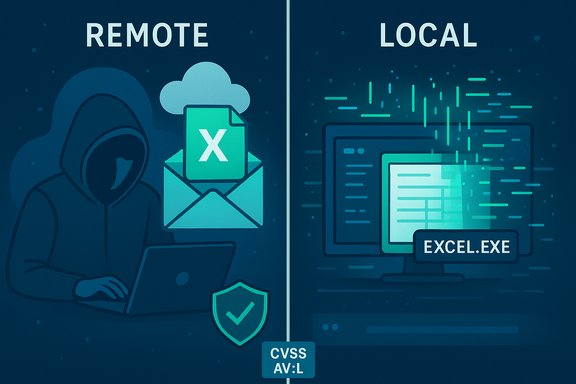
Microsoft’s CVE entry and Microsoft Security Response Center (MSRC) wording for CVE-2025-62201 label the bug as a “Remote Code Execution” (RCE) class vulnerability in Excel while the CVSS vector records the Attack Vector as Local (AV:L), and that apparent contradiction is not an error — it is the result of two different communication goals: vendor-impact shorthand versus CVSS’s narrow, mechanistic scoring of exploit mechanics.
Microsoft’s advisory language, and CVE titles more broadly, often use the phrase Remote Code Execution to flag the worst-case impact: an external adversary can cause arbitrary code to run on a target machine if they can get a victim to open or otherwise parse a specially crafted file. This phrasing is intentionally concise and operational: it tells defenders the attacker’s origin can be external and that the impact is serious.
By contrast, the Common Vulnerability Scoring System (CVSS) Attack Vector (AV) metric describes how the vulnerable code is invoked at the moment of exploitation. If the final, triggering action happens inside a local process on the victim machine — for example, when Excel parses a workbook the user opens — CVSS assigns AV:L even if the malicious file was delivered to the victim over the network (email, cloud share, web download). That deliberate separation avoids “double-counting” network delivery and preserves consistent, comparable scoring across many exploitation models.
Key detection signals worth monitoring:
Source: MSRC Security Update Guide - Microsoft Security Response Center
 Background / Overview
Microsoft’s advisory language, and CVE titles more broadly, often use the phrase Remote Code Execution to flag the worst-case impact: an external adversary can cause arbitrary code to run on a target machine if they can get a victim to open or otherwise parse a specially crafted file. This phrasing is intentionally concise and operational: it tells defenders the attacker’s origin can be external and that the impact is serious.By contrast, the Common Vulnerability Scoring System (CVSS) Attack Vector (AV) metric describes how the vulnerable code is invoked at the moment of exploitation. If the final, triggering action happens inside a local process on the victim machine — for example, when Excel parses a workbook the user opens — CVSS assigns AV:L even if the malicious file was delivered to the victim over the network (email, cloud share, web download). That deliberate separation avoids “double-counting” network delivery and preserves consistent, comparable scoring across many exploitation models.
Why the title says "Remote" while CVSS lists AV:L
Two different questions, two different answers
- CVE/advisory title answers: What can an attacker achieve and from where can they attempt it? If an attacker can be located offsite and still cause code to run on a victim’s machine, the advisory will often use the RCE label to communicate operational urgency.
- CVSS Attack Vector answers: Where must the exploit execute when the vulnerability is triggered? If that moment requires a local action (opening a file, running a local parser), CVSS correctly selects AV:L.
Practical example — the typical Excel attack chain
- An attacker crafts a malicious Excel workbook exploiting a parsing bug (memory-safety defect).
- The attacker delivers the file remotely — via email attachment, cloud link, shared drive, or public download.
- The victim opens (or previews) the file in desktop Excel (or a component that uses the same parser).
- Excel’s parser triggers memory corruption and the attacker’s payload executes in the context of the local Excel process.
Technical anatomy: how a remote delivery becomes “remote code execution” despite AV:L
Why parsing bugs are powerful
Excel’s file formats and parsing stack are complex and include legacy binary formats, Open XML subdocuments, OLE/ActiveX handling, formula engines, and rendering subsystems. Those native-code parsers are fertile ground for memory-safety defects (use-after-free, heap overflows, out-of-bounds reads/writes) that can be weaponized to hijack execution without macros or scripts. That means a data-only malicious file can achieve arbitrary code execution the moment Excel parses it.The CVSS perspective — why AV:L is correct for document parsing bugs
CVSS intends the Attack Vector to reflect the locality of the triggering operation: if the vulnerable component is invoked by a local application reading a file on disk or parsing a stream inside a local process, the vector is Local. Even if the malicious input arrived over the network, the moment the vulnerability is exploited is local to the victim process. This rule avoids inflating exploitability scores by counting both delivery and trigger as separate remote actions.The exception: server-side rendering and preview handlers
There is a key operational exception. If a network-accessible server or service (for example, an email gateway that generates attachment previews, Office Online Server, or a cloud collaboration platform) invokes the same vulnerable parser on behalf of remote clients, then the vulnerable code runs in a network-bound process. In that scenario the attack vector legitimately becomes Network (AV:N) because the attacker can trigger the vulnerable code remotely without requiring a specific user on the eventual victim endpoint to open the document. Advisories explicitly call this out when applicable because it materially increases exposure.Operational implications for defenders and administrators
Why AV:L does not mean “low risk”
- Ubiquity of Excel: Excel is installed on millions of endpoints across enterprises and consumer devices. Any widely-deliverable file format with weaponizable parsers creates a broad attack surface.
- Low delivery friction: Email, shared links, and cloud collaboration make remote distribution trivial, letting attackers reach many targets at low cost.
- User interaction is easy to social-engineer: Attackers routinely entice victims to open attachments with spear-phishing and business-email compromise tactics. Once a user opens the file, the code executes locally.
When to treat the advisory as network-exploitable
If any of these apply in your environment, treat the exposure as close to AV:N until proven otherwise:- You run mail servers, webmail, or gateways that generate previews or otherwise parse Office files.
- You use centralized content-management or document-conversion services that process user uploads.
- You host Office Online Server, collaborative document services, or other systems that perform server-side document rendering.
Recommended mitigations and prioritized action plan
The immediate objective for IT teams is to reduce the attack surface, eliminate exposure where possible, and deploy definitive fixes. The following prioritized checklist is practical and operational.Priority 1 — Patch promptly
- Identify affected Excel/Office builds across your estate.
- Map each host to the appropriate Microsoft security update (KB/package) for its servicing channel.
- Deploy updates via enterprise tools (WSUS, SCCM/ConfigMgr/MECM, Intune) and verify successful installation.
Priority 2 — Harden document handling
- Enforce Protected View for files originating from the Internet and untrusted sources so they open in a sandboxed, read-only mode unless explicitly enabled.
- Disable automatic preview panes in mail clients and file explorers for high-risk groups or globally if feasible.
- Route attachments through mail gateway sandboxing/detonation chambers and block or quarantine suspicious attachments.
Priority 3 — Least privilege and application control
- Ensure users run with standard user privileges, not local administrator accounts, to limit post-exploitation impact.
- Use application allowlisting (AppLocker, Windows Defender Application Control) to constrain what arbitrary code can run.
- Restrict execution of common post-exploitation tooling and credential harvesters through EDR policies and process monitoring.
Priority 4 — Server-side controls and configuration review
- Audit any server or cloud service that performs document rendering for preview or conversion and prioritize patching of those hosts. If they use the same vulnerable parser, they can convert an AV:L client exploit into a true AV:N server exploit.
- Temporarily disable automatic previews or alter settings to use safer, sandboxed renderers until patches are applied.
Priority 5 — Detect and respond
- Tune EDR and SIEM to flag anomalous Office process behavior (unexpected child processes spawned from EXCEL.EXE, unusual network connections initiated from Office processes, or in-memory execution patterns).
- Monitor for known indicators of compromise and unusual requests to mail gateways or file-processing systems that might signal exploitation attempts.
- Prepare incident-response runbooks for rapid containment: isolate affected hosts, collect memory/process artifacts, and apply emergency remediation.
Detection challenges and attacker advantages
Parsing-level exploits often bypass traditional signature-based antivirus because the exploit is encoded within a data structure in a file rather than as a recognizable malicious script or binary. Attackers increasingly weaponize memory-safety bugs for that reason. Behavioral telemetry and EDR remain more effective detection vectors than signatures for these attack classes.Key detection signals worth monitoring:
- Excel/Office processes spawning cmd/powershell or unusual executables.
- Office processes making outbound network connections shortly after file opens.
- Persistence artifacts or lateral movement attempts following an Office process compromise.
Communication and triage: how to read the title and CVSS together
- Treat the CVE title as a high-level impact indicator: RCE means an attacker can ultimately run arbitrary code on a target when the chain completes.
- Use the CVSS vector and the advisory body to understand the exploit mechanics and operational constraints: an AV:L tells you that the attack completes via local parsing, often requiring user interaction (UI:R), while AV:N would indicate network-facing exploitation without user action.
- If RCE + AV:N: escalate immediately and treat network-exposed hosts as critical for hotfixing.
- If RCE + AV:L: focus on patching endpoints, strengthening mail/file-handling controls, and reducing user-interaction risk — but do not deprioritize it. Excel client RCEs are frequently weaponized in the wild.
Risks, limits, and unverifiable claims
- Where official vendor pages or KB identifiers are needed to match an exact build to a fix, rely on Microsoft’s MSRC advisory and the enterprise update catalog to get authoritative mappings. Interactive vendor pages may require scripted rendering to see dynamic content; use centralized patch-management consoles if the MSRC page is not easily parsed. Administrators should not wait for third-party mirrors before applying vendor updates.
- If any statement about the specific exploitability of CVE-2025-62201 (for example, the presence of a working public proof-of-concept or exploit in the wild) is not explicitly documented by vendor or reliable trackers, treat it as unverified until confirmed. The general pattern of “remote delivery + local execution” for Excel parsing bugs is well established, but PoC and exploit availability timelines vary by vulnerability and should be checked against authoritative advisories and threat-intelligence feeds.
Practical checklist for Windows administrators (quick action items)
- Inventory: enumerate Excel/Office versions and servicing channels across the organization.
- Patch: deploy the Microsoft security update addressing CVE-2025-62201 to all affected hosts.
- Harden mail/file flows: disable automatic previews and route attachments to sandboxing appliances.
- Enforce Protected View: require explicit user enabling for internet-sourced files.
- Limit privileges: ensure users run as standard accounts and apply application control where possible.
- Monitor: tune EDR for Office process anomalies and prepare incident-response playbooks.
Conclusion
The apparent mismatch between the CVE title “Remote Code Execution” and the CVSS Attack Vector AV:L for CVE-2025-62201 is a communication nuance, not a contradiction. The CVE title signals the attacker’s ability to deliver a payload remotely and the high-impact outcome if exploitation succeeds; CVSS AV:L records the technical location of the vulnerable code at the moment it is triggered — typically when Excel parses a local file. Understanding both signals is essential for correct triage and response: treat RCE-class Excel advisories as urgent, verify whether any server-side renderers or preview services expose the vulnerable parser (which would change the attack vector to network), and prioritize patching, document-handling hardening, and detection controls accordingly.Source: MSRC Security Update Guide - Microsoft Security Response Center
