

November’s Excel update is small in count but large in implication: Microsoft shipped a concise set of features that push agentic AI workflows deeper into the desktop app, modernize data onboarding, and polish mobile UX — while raising fresh governance and operational questions for IT and power users alike.
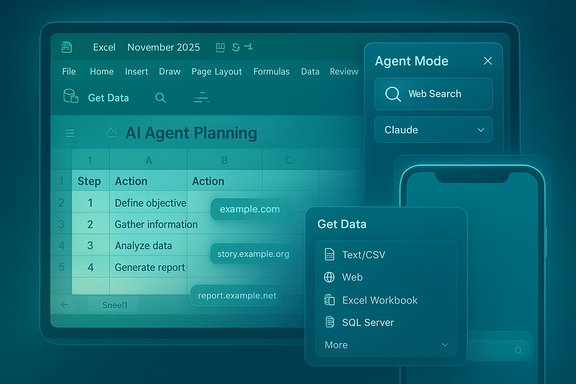
Microsoft’s monthly “What’s New in Excel” cadence continues to be the best single-shot read on where Excel is heading. The November 2025 update centers on four items across Windows, web, and Apple platforms: upgrades to Agent Mode (including web search and a selectable Anthropic model backend), a refreshed Get Data dialog for Windows, previewable comment content for protected files in email notifications across platforms, and a visual/UX refresh (Liquid Glass styling + bottom search) for Excel on iOS devices in the Insider channel. These changes were rolled out as preview/insider-stage features for many customers and are tied to Microsoft’s Frontier preview programs and Copilot-era licensing signals. This article explains what those changes mean in practice, verifies the technical availability and constraints, analyzes the benefits, and highlights governance, security, and accuracy risks organizations should consider before flipping the switches.
Source: Neowin Here are all the new features Microsoft added to Excel in November 2025
 Background / Overview
Microsoft’s monthly “What’s New in Excel” cadence continues to be the best single-shot read on where Excel is heading. The November 2025 update centers on four items across Windows, web, and Apple platforms: upgrades to Agent Mode (including web search and a selectable Anthropic model backend), a refreshed Get Data dialog for Windows, previewable comment content for protected files in email notifications across platforms, and a visual/UX refresh (Liquid Glass styling + bottom search) for Excel on iOS devices in the Insider channel. These changes were rolled out as preview/insider-stage features for many customers and are tied to Microsoft’s Frontier preview programs and Copilot-era licensing signals. This article explains what those changes mean in practice, verifies the technical availability and constraints, analyzes the benefits, and highlights governance, security, and accuracy risks organizations should consider before flipping the switches.What Microsoft shipped in November 2025
Agent Mode: web search + Anthropic (Windows, Frontier/Beta-only initially)
- What changed: Agent Mode in Excel — the multi‑step Copilot workflow that plans and executes sequences of edits inside a workbook — gained two big capabilities: the ability to fetch and ground answers with web search, and an option to route reasoning to Anthropic’s Claude models as a selectable backend. Microsoft positioned the change as part of Frontier/preview programs, with the feature available in Excel for Windows to Insiders on the Beta channel at announcement time; Mac availability and broader GA are planned later.
- Why this matters: Agent Mode moving from web-only previews into the Windows desktop is an important parity step for power users. Adding web search lets agents pull contemporary, external facts (market numbers, published statistics, recent news) directly into their multi-step workflows, with citation links included for transparency. Giving customers a choice of model backends — specifically Anthropic’s Claude family — increases model diversity and lets organizations evaluate trade-offs between different LLM behaviors inside the same agentic surface. Anthropic’s own announcements and independent coverage corroborate the arrival of a Claude-for-Excel experience and demonstrate industry demand for a model choice in enterprise productivity apps.
Get Data: modernized dialog (Windows)
- What changed: A revamped Get Data dialog for Excel on Windows aims to provide a cleaner starting point for connecting to external sources, with built-in search and quick access to popular connectors. This is a UI/UX refinement that streamlines the first interaction for data ingestion and refreshable Power Query connections. Microsoft described the update as rolling out to Current Channel Windows users.
- Why this matters: The Get Data experience is the entry point for many analysts who live in Excel. A more discoverable, searchable dialog reduces friction for new connectors, encourages repeatable refreshable queries, and lowers the cognitive overhead for non‑PowerQuery experts.
Comment previews on protected files in email (Windows, web, iOS)
- What changed: Excel now surfaces comment previews from protected workbooks directly in email notifications. When someone adds a comment to a protected or view‑only file, the notification includes the comment text and its context so recipients can triage feedback without unlocking the file. Microsoft tagged the feature as #FIA (Feedback in Action), signaling it came directly from customer requests.
- Why this matters: This is a pragmatic collaboration quality-of-life improvement; it saves a step for reviewers and accelerates triage cycles for protected documents. It also introduces a new surface where protected-file content is summarized into email bodies — a design trade-off with security implications.
Liquid Glass styling + bottom search for iOS (Insider only; iPhone, iPad, Vision Pro)
- What changed: On Apple platforms (iPhone, iPad and Apple Vision Pro) the Excel Insider app received Liquid Glass visual styling and moved search to the bottom of the screen — aligning Excel with iOS 26’s interface conventions and improving one‑hand usability. This UI update is restricted to Insiders at the time of the announcement.
- Why this matters: The changes are primarily cosmetic and ergonomic, but they show Microsoft’s ongoing work to keep mobile Office apps in step with platform design trends (and Apple’s Vision Pro ambitions).
Technical verification and availability notes
- Agent Mode web search and Anthropic routing were announced as Office/Ignite innovations and are available initially for Frontier program participants and Insiders on Excel for Windows, not broadly GA. Mac parity and general availability timelines were not published as exact dates in the announcement — plan pilots accordingly.
- Anthropic’s own communications describe a Claude for Excel experience (a Claude sidebar add‑in, with traceable edits, connectors to market data, and prebuilt financial Agent Skills) distributed in a research‑preview/beta model to Max, Team and Enterprise customers. That preview cohort and the vendor messaging confirm that Claude is being integrated into spreadsheet workflows at the same time Microsoft surfaces model choice in Copilot/Agent Mode. These are independent but complementary moves.
- Get Data dialog and comment‑preview changes are listed in Microsoft’s monthly “What’s New in Excel” content and mirrored in community/mirror posts; the UX changes are rolling out to Windows Current Channel or Insiders depending on the item. Expect staged rollouts and tenant‑level gating based on license, channel and admin settings.
- Insiders-only label: the iOS Liquid Glass + template filter tweaks are explicitly described as Insider channel features and do not reflect Current Channel or GA availability.
Why these features matter — practical benefits
1. Faster, more grounded agent workflows (Agent Mode + web search)
- Agents can now retrieve and cite web facts directly into spreadsheets, which reduces manual copy/paste and speeds data‑gathering tasks (market snapshots, basic research, reference statistics).
- Model choice (Claude option) lets teams test different LLM behaviors side‑by‑side inside Excel — useful when an enterprise cares about response style, hallucination profile, or specific model safety properties.
2. Lowered onboarding friction for data ingestion (Get Data dialog)
- Analysts and occasional Excel users get a searchable, simpler gateway to the dozens of connectors Power Query supports. That reduces time-to-first-insight and encourages the use of refreshable, auditable query flows.
3. Smoother review cycles for protected content (comment previews)
- Teams using protected sheets for sensitive reports can triage comments faster without unlocking files. This is particularly useful for cross‑organizational reviews where recipients shouldn’t or can’t open protected content as part of email-based reviews.
4. Mobile ergonomics and brand coherence (Liquid Glass + bottom search)
- For users who intermittently use Excel on iPhone/iPad, these incremental changes make mobile discovery more natural and align Excel with modern iOS patterns, reducing friction for quick lookups and minor edits.
Risks, caveats and governance issues
The November updates deliver clear productivity promise, but they also widen Excel’s attack surface and governance complexity. IT leaders and spreadsheet custodians should weigh these risks carefully.Accuracy and hallucination risk (Agent Mode + web search + third‑party models)
- Agents that plan and act can compound a hallucination into multiple edits. When an agent uses web search as a ground, the provenance and trustworthiness of the retrieved pages matter. See‑and‑trust are different: a citation link does not equal verified correctness.
- Using third‑party models like Anthropic’s Claude inside Copilot/Agent Mode increases the number of model supply chains in your tenant. Each model has distinct failure modes and token/personal‑data handling rules. Require testing against representative spreadsheets before production usage.
Data exfiltration and email surface area (comment previews)
- Summarizing comment text and context into email bodies improves triage, but it also places protected-file snippets into mail systems that may have different DLP and retention policies. Confirm that your DLP, retention, and sensitivity label settings are configured to permit or block such previews as appropriate.
- Admins should validate whether the comment preview includes only metadata and comment text, or if broader context (e.g., small table snippets) can be included — that distinction changes risk posture.
Availability fragmentation and platform parity
- Features are rolling out across channels (Insider/Beta/Current) and platforms (web, Windows, iOS), which causes uneven availability for mixed-platform teams. Expect some staff to see agentic features on Windows but not on Mac or mobile devices. Plan rollouts and training with that fragmentation in mind.
Compliance and auditability
- For audit‑critical workflows (financial models, legal calculations), AI‑driven edits must be accompanied by discoverable audit trails and explicit human sign‑offs. Agents that make workbook changes should be treated like macro or scripted edits: version control, change logs, and reviewer approvals remain essential.
Licensing and procurement complexity
- Some new agent capabilities and model backends are tied to Copilot-specific licensing tiers, Frontier preview programs, or third‑party vendor subscriptions. Ensure procurement and budget teams understand the model‑choice consequences (billing, MACC/consumption impact, or separate vendor licensing).
Practical rollout and governance checklist (recommended)
- Inventory
- Identify critical Excel workbooks (finance, legal, compliance) that must be protected from automated edits.
- Map which teams need agentic assistance vs. those that must retain manual control.
- Pilot (Insider/Beta only)
- Start a small pilot for Agent Mode with non‑audit, non‑customer facing models. Limit the pilot to users who understand Excel dependencies and can spot-check results.
- Evaluate Anthropic/Claude behavior against the same prompts you’ll use in production and compare outputs with Microsoft’s default model. Track error modes, hallucinations, and response styles.
- Security & Data Loss Prevention
- Review DLP policy coverage for email previews and Copilot activity logs.
- Ensure sensitivity labels and sensitivity-based access controls block unwanted leaks when comment previews are included in email notifications.
- Audit & Logging
- Enable and centralize audit logs for Copilot/Agent Mode actions when available. Require agents to record the steps they executed in a human‑readable plan that’s saved in workbook metadata.
- Operational Controls
- Use tenant-level gating to control Anthropic model access; restrict model choice to test tenants until procurement and legal sign-offs are complete.
- Define “AI allowed” and “AI disallowed” workbook classifications.
- Training & Runbooks
- Prepare runbooks for user review after agent edits (a set of checks to run), and provide training that explains agent behavior, risk patterns, and how to revert changes.
- Review & Iterate
- Re-run model comparisons quarterly or when a major model update is announced. Rerun your accuracy and hallucination tests after any model upgrades.
How to test Agent Mode outputs — a simple three‑step procedure
- Recreate a representative workbook snapshot (copy onto a test tenant or anonymize sensitive data).
- Define a set of canonical prompts your users would use (e.g., “Create monthly close report with YoY comparisons”).
- Execute the prompts under Agent Mode and:
- Inspect the agent’s plan and per-step edits.
- Validate numerical outputs with independent calculations.
- Record any mismatches and categorize them (formula error, data mapping error, hallucinated external fact).
Strengths and strategic takeaways
- Agent Mode + web search + model choice is the clearest sign yet that Microsoft is turning Excel from a passive calculation canvas into an active automation surface where multi‑step AI agents can operate. That’s transformational for analyst workflows that rely on repeated, multi-step cleanup and aggregation tasks.
- Model diversity within Microsoft’s Copilot ecosystem reduces vendor lock-in and gives IT teams options to pick models that better suit their risk and quality tolerance.
- UX improvements (Get Data dialog and mobile Liquid Glass) matter: small reductions in friction multiply across hundreds of daily tasks for analysts and managers.
- Practical feature prioritization: If you run themed pilots, prioritize Agent Mode tests for tasks with clear, auditable outcomes (table generation, data normalization) and postpone agentic usage for audit‑critical outputs until governance is in place.
Known unknowns and unverifiable items (flagged)
- Microsoft’s public announcements confirm Windows Insiders/Beta availability for Agent Mode with web search and Anthropic routing, but precise GA dates for Mac and the full tenant opt‑in timeline were not provided at announcement time; treat any expectations of immediate cross‑platform parity as unverified until Microsoft publishes exact schedules.
- Anthropic’s Claude for Excel is in beta and described as a research preview for Max/Enterprise/Teams users; the initial preview cohort size and subsequent rollout cadence are vendor‑defined and may change. Verify entitlements and billing impacts with procurement and your Anthropic representative if you intend to adopt Claude at scale.
Bottom line — what Excel teams should do next
- Run a short, well‑scoped pilot of Agent Mode (desktop Windows Insiders) limited to non‑audit spreadsheets, measure accuracy, and compare results between the Copilot default and the Anthropic backend.
- Update DLP and sensitivity label policies to cover comment previews in email and confirm your organization is comfortable with the reduced lock/unlock friction that previewing introduces.
- Adopt the modern Get Data dialog as a standard training moment for analysts: teach refreshable queries and Power Query best practices to reduce manual data hygiene work.
- Treat agentic edits like code: require versioning, human review checklists, and an ability to roll back.
Conclusion
The November 2025 Excel refresh is lean but strategic: Microsoft pushed Agent Mode further into the desktop, added web grounding and a model‑choice option (Anthropic’s Claude), and tightened everyday ergonomics (Get Data UX and comment previews) while keeping some work gated behind Insider and Frontier programs. These incremental shifts accelerate Excel’s transformation from a passive calculation surface into an actionable agentic workspace — a powerful productivity upgrade that also requires clear governance, auditing, and testing before it becomes a part of mission‑critical workflows. Organizations that prepare governance, pilot carefully, and enforce review controls will capture the productivity upside while minimizing accuracy and compliance risks.Source: Neowin Here are all the new features Microsoft added to Excel in November 2025
