

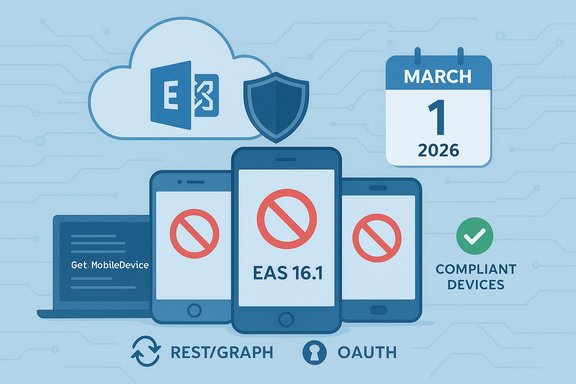
Starting March 1, 2026, Exchange Online will refuse connections from mobile devices that speak an Exchange ActiveSync (EAS) protocol older than EAS 16.1, a change announced by the Exchange Team that impacts native mail clients on phones and tablets and gives organizations a clear deadline to update or mitigate legacy device access.
Microsoft’s Exchange Team published a short but important notice on December 15, 2025 confirming the cutoff date and the affected protocol versions: devices that report an ActiveSync version lower than 16.1 will no longer be permitted to connect to Exchange Online beginning March 1, 2026. The post reiterated that EAS 16.1 first rolled out in mid‑2016 and that vendors and OS teams were engaged in the transition planning. This is part of a broader push by Microsoft to harden legacy access paths and consolidate mailbox programmatic and client access onto modern stacks (REST/Microsoft Graph and OAuth) where stronger telemetry, conditional access, and modern authentication are available. Administrators should treat this as an operational deadline: inventory and remediation activity should be complete well before the March 1, 2026 enforcement date to avoid service disruption for end users. Related hardening moves across Exchange (for example, staged EWS restrictions and retirements) illustrate Microsoft’s multi‑vector approach to reduce legacy protocol surface area.
Get-MobileDevice | Where-Object {($.ClientType -eq 'EAS' -or $.ClientType -match 'ActiveSync') -and $.ClientVersion -and ([version]$.ClientVersion -lt [version]'16.1')} | Sort-Object UserDisplayName | Select-Object UserDisplayName, UserPrincipalName, DeviceId, DeviceModel
This is the Exchange Team’s published query and it’s a practical starting point for discovery; in larger tenants you’ll typically add
Key quick actions (one‑page checklist)
Source: Microsoft Exchange Team Blog Exchange Online ActiveSync Device Support Update | Microsoft Community Hub
 Background / Overview
Microsoft’s Exchange Team published a short but important notice on December 15, 2025 confirming the cutoff date and the affected protocol versions: devices that report an ActiveSync version lower than 16.1 will no longer be permitted to connect to Exchange Online beginning March 1, 2026. The post reiterated that EAS 16.1 first rolled out in mid‑2016 and that vendors and OS teams were engaged in the transition planning. This is part of a broader push by Microsoft to harden legacy access paths and consolidate mailbox programmatic and client access onto modern stacks (REST/Microsoft Graph and OAuth) where stronger telemetry, conditional access, and modern authentication are available. Administrators should treat this as an operational deadline: inventory and remediation activity should be complete well before the March 1, 2026 enforcement date to avoid service disruption for end users. Related hardening moves across Exchange (for example, staged EWS restrictions and retirements) illustrate Microsoft’s multi‑vector approach to reduce legacy protocol surface area.What exactly is changing
- Effective date: March 1, 2026. Devices presenting an ActiveSync protocol version lower than 16.1 will be blocked from connecting to Exchange Online.
- Scope: Exchange Online only. This change does not apply to on‑premises Exchange Server installations.
- Affected clients: Mobile devices using native mail apps that rely on EAS. That includes many default mail clients on Android and iOS when they connect with EAS. Microsoft explicitly called out native iOS Mail (which adopted EAS 16.1 with iOS 10) and referenced other vendors (Gmail and Samsung mail) that are in the process of updating their apps to use EAS 16.1.
- Not affected: Outlook Mobile (Outlook for iOS and Android) — it does not use EAS to talk to Exchange Online in its modern architecture and therefore is not impacted by this ActiveSync enforcement. Administrators who standardize on Outlook Mobile already avoid this specific EAS‑version dependency.
Why Microsoft is enforcing this
Microsoft designed EAS 16.1 to introduce important security and manageability features (for example, account‑only remote wipe and OAuth support for EAS flows) and the service team wants devices and apps to use the updated protocol so modern administrative and security controls work as intended. The enforcement accomplishes several objectives:- Reduces the attack surface presented by legacy protocol implementations that lack modern authentication, telemetry, and policy capabilities.
- Ensures device wipe and policy actions behave predictably (EAS 16.1 brought account‑only remote wipe semantics to native clients).
- Encourages vendors and OS makers to maintain up‑to‑date client software and to adopt modern security features.
Technical details IT teams need to know
What is EAS 16.1 and when did it appear?
EAS 16.1 is an iteration of the Exchange ActiveSync protocol that began rolling out in mid‑2016. The update included several functional and security improvements—most notably the support for account‑only remote wipe and better OAuth integration for mobile clients. Industry documentation and Exchange community guides reference the June 2016 rollout and the association with iOS 10’s native mail support for EAS 16.1.How servers and clients report versions
When a device connects, Exchange records a reported client version string (commonly visible via the ClientVersion property in Exchange mobile device cmdlets). Microsoft’s example PowerShell query demonstrates how administrators can find devices that report a ClientVersion lower than16.1:Get-MobileDevice | Where-Object {($.ClientType -eq 'EAS' -or $.ClientType -match 'ActiveSync') -and $.ClientVersion -and ([version]$.ClientVersion -lt [version]'16.1')} | Sort-Object UserDisplayName | Select-Object UserDisplayName, UserPrincipalName, DeviceId, DeviceModel
This is the Exchange Team’s published query and it’s a practical starting point for discovery; in larger tenants you’ll typically add
-ResultSize Unlimited, iterate across mailboxes, or combine the output with Get‑MobileDeviceStatistics to enrich the data. Outlook Mobile and REST vs EAS
Outlook for iOS and Android has been migrated away from EAS to Microsoft’s REST‑based architecture (and now uses modern authentication patterns). That migration was completed in previous years, so Outlook Mobile uses a different sync pathway and is not impacted by this EAS‑version enforcement on Exchange Online. Microsoft’s own docs and KB entries describe the REST migration and its operational implications.Immediate actions for administrators (practical runbook)
- Inventory devices and apps that use EAS
- Run the Exchange Team’s PowerShell query (above) as a first pass to list devices reporting ClientVersion < 16.1. Add
-ResultSize Unlimitedwhere appropriate and pipe to CSV for triage. - Enrich device data
- Cross‑reference Get‑MobileDevice output with Get‑MobileDeviceStatistics to capture last sync times, client types and user assignment. Use device model and OS fields to prioritize older device classes (e.g., legacy Android versions or old enterprise phones).
- Prioritize critical business flows
- Tag service accounts, scanners, MFPs (multifunction printers), kiosk devices, and vendor‑supplied mobile apps. If these devices are essential, treat them as remediation priorities.
- Vendor coordination
- Contact device and app vendors (Gmail, Samsung, device OEMs) and confirm timelines for EAS 16.1 support if you find vendor apps on the low version list. If a vendor cannot commit to an update, plan mitigations (see next step).
- Short‑term mitigations
- Where immediate updates are not possible, implement conditional access or ActiveSync device access rules that allowlist only trusted clients or block individual device models temporarily while you remediate. Consider standardizing on Outlook Mobile for corporate use where feasible since it is not EAS‑dependent.
- Long‑term remediation
- Update OS and mail client versions to vendor‑supported releases, migrate users to supported apps (Outlook Mobile or vendor apps that support EAS 16.1/OAuth), or replace devices that cannot be updated.
- Communication plan
- Notify impacted users and business units well in advance, include timelines and expected user actions (update app, re‑enroll device, switch to Outlook Mobile). Provide a support window and help desk scripts for triage.
Example PowerShell patterns — practical notes
- Use this to gather a broader dataset and avoid 500‑row truncation on large tenants:
- Connect to Exchange Online (modern Exchange Online PowerShell modules).
- Use Get‑MobileDevice with explicit result sizing:
Get-MobileDevice -ResultSize Unlimited | Where-Object {($.ClientType -eq 'EAS' -or $.ClientType -match 'ActiveSync') -and $.ClientVersion -and ([version]$.ClientVersion -lt [version]'16.1')} | Select-Object UserDisplayName, UserPrincipalName, DeviceId, DeviceModel, ClientVersion | Export-Csv devices-eas‑pre16‑1.csv -NoTypeInformation - Correlate with Get‑MobileDeviceStatistics for last sync timestamps and client fingerprints to help target end users who will be impacted. Many community examples and vendor guides show how to combine these cmdlets for accurate reporting.
Risks, gotchas and edge cases
- False reporting: Some mail clients or middleboxes may misreport the client version string. A device that appears to report
ClientVersion16.0 could actually be a modern client behind a proxy that rewrites user‑agent strings. Always validate a sample of impacted devices directly. - Printer and appliance fleets: Many organizations use a frontline mailbox for scan‑to‑email. Legacy MFP firmware sometimes uses EAS or basic SMTP paths that will be affected. You may need to reconfigure appliances to use authenticated SMTP submission or relay via a properly licensed and managed service mailbox.
- Vendor readiness: Microsoft noted that Gmail and Samsung mail apps are working on updates — that statement reflects vendor engagement but is not the same as a published timetable from each vendor. Consider these claims vendor‑dependent and verify with the vendor’s official support channels. If a vendor cannot confirm, plan alternative paths.
- On‑premises Exchange: This enforcement is specific to Exchange Online. On‑premise servers are not covered by this particular change, but separate Exchange product lifecycle, security and protocol hardening announcements may apply to on‑prem customers.
Wider context: this is not an isolated enforcement
Microsoft has been steadily restricting older or less secure protocol flows across Exchange Online in recent years (for example, staged EWS controls, OAuth migrations, and retirement timelines). The ActiveSync 16.1 enforcement is the mobile‑client facet of a larger program to reduce legacy, broad‑permission endpoints and steer traffic toward modern authentication and Graph/REST models. That program includes license‑based enforcement changes for other Exchange APIs and phase‑out dates for legacy service principals—so administrators should maintain a tenant‑wide posture for discovery and remediation, not just device‑by‑device updates.Recommended policy and governance steps
- Update your IT policy to require mobile mail clients to be on supported versions and operating systems.
- Set minimum allowed EAS version thresholds in device management and conditional access rules where your identity platform supports it.
- Use Mobile Device Management (MDM) to enforce app updates and to block devices that cannot be brought to compliance.
- Create a vendor inventory and require vendor roadmaps that include EAS 16.1 or modern alternatives (Outlook Mobile/REST or Graph‑based integrations).
- Maintain an audit trail of communications, approvals, and compensating controls for business‑critical exceptions.
When to consider switching users to Outlook Mobile
For organizations that want to reduce operational churn from device diversity, a deliberate strategy is to standardize on Outlook for iOS and Android:- Benefits:
- It uses Microsoft’s REST architecture for Exchange Online and is not affected by EAS 16.1 enforcement.
- Integrates cleanly with Intune and app protection policies and supports modern authentication flows.
- Simplifies support because the same client is managed across platforms.
- Considerations:
- Not every user will accept a mandatory client change due to personal preferences or UX differences; communications and user training are required.
- Licensing and conditional access must be reviewed—Outlook Mobile integrates with Intune/conditional access for many security controls, but proper license and configuration are required.
Monitoring and verification after remediation
- Run discovery scripts weekly during the remediation window and daily in the final two weeks before March 1, 2026.
- Use sign‑in logs and ActiveSync usage reports to verify whether previously flagged devices have updated and reconnected successfully.
- Document fallback plans and an emergency contact list with vendors for the week of enforcement in case of unexpected compatibility issues.
Vendor and user communications — sample bulleted checklist
- Send a tenant‑wide notice at least 60 days before enforcement with:
- The enforcement date (March 1, 2026).
- A short description of which clients are affected and how to check device versions.
- A help desk link and update instructions for common device models.
- For business owners and vendors:
- Provide a list of impacted mailboxes and devices you discovered.
- Ask vendors to confirm EAS 16.1 support or provide an alternative integration plan.
- For end users:
- Provide step‑by‑step instructions to update their mail app or to install Outlook Mobile.
- Offer a simple self‑help check (e.g., “update your OS, update your mail app, re‑add your account if prompted”).
Caveats and unverifiable claims
- Microsoft’s blog named Gmail and Samsung mail apps as vendors “working on updating their apps now,” but outside of Microsoft’s announcement there is not necessarily a public, verifiable, dated commitment from each vendor for every market. Treat vendor readiness claims as vendor‑dependent and verify directly with vendor release notes or support contacts for absolute certainty. If a vendor cannot confirm, plan for mitigation or user migration.
Conclusion
The Exchange Online EAS‑version enforcement is a straight‑forward but impactful operational deadline: devices reporting ActiveSync versions lower than 16.1 will be blocked on March 1, 2026. The Exchange Team has provided a PowerShell discovery example and clarified the scope (Exchange Online, native mail apps), and Microsoft’s broader move to REST/Graph and modern authentication makes this enforcement consistent with past service hardening efforts. Administrators should prioritize discovery, vendor coordination, short‑term mitigations, and user communications now—then execute updates and re‑validation well in advance of the cutoff to avoid service interruption.Key quick actions (one‑page checklist)
- Run the Exchange Team’s discovery query and export results.
- Cross‑reference with Get‑MobileDeviceStatistics and sign‑in logs.
- Prioritize vendor‑owned apps and MFP/scanner fleets.
- Apply temporary conditional access or ActiveSync allow/block rules where required.
- Communicate timelines and support steps to end users and business owners.
Source: Microsoft Exchange Team Blog Exchange Online ActiveSync Device Support Update | Microsoft Community Hub
