

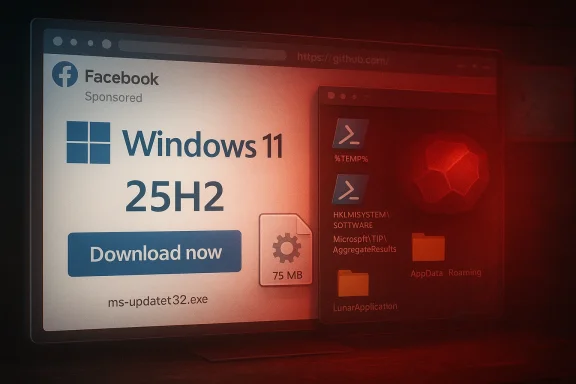
Attackers are buying Facebook ad space to push what looks like an official Windows 11 download page, and victims who click “Download now” receive a 75 MB installer (ms-update32.exe) that plants an Electron-based thief, drops obfuscated PowerShell scripts, and persists via a large registry blob — a campaign that targets real users while cloaking itself from researchers and automated scanners. (malwarebytes.com)
The campaign, uncovered and published by Malwarebytes on February 20, 2026, uses paid Facebook advertisements that mimic Microsoft’s Software Download pages and exploit users’ desire to keep Windows current. The fake pages are visually convincing and intentionally imitate Microsoft naming conventions (the fake domains include “25H2”, echoing Microsoft’s release naming) to increase plausibility. When a target downloads the claimed Windows update, the delivered binary is an installer packaged with Inno Setup that unpacks an Electron-based application and PowerShell scripts that harvest credentials and cryptocurrency artifacts. (malwarebytes.com)
This is not an isolated technique. Security vendors and incident reports have repeatedly documented malvertising and fake-update lures — ranging from fake CAPTCHAs to phony browser-error pages — that trick users into running code or pasting commands. Kaspersky and other threat researchers have warned for years about ad-driven and ad-mediated infection chains that hide behind legitimate-looking interfaces and platform trust.
This campaign is a clear reminder that the modern threat landscape is increasingly about trusted delivery as much as it is about technical complexity. A polished ad, a convincing landing page, and a reputable hosting domain are often sufficient to pierce human defenses — and the costs to attackers are small relative to the potential payoff of stolen credentials and cryptocurrency.
If you rely on Windows devices for work or personal finance, the single most protective habit is simple: download operating-system updates only from built-in update channels and never allow social-media ads to be your update source. For organizations, deploy layered controls — web filtering, EDR with behavior detection, PowerShell command logging, and targeted user education — to reduce the hit surface attackers are clearly exploiting in campaigns like this one. (malwarebytes.com)
Source: Security Boulevard Facebook ads spread fake Windows 11 downloads that steal passwords and crypto wallets
 Background
The campaign, uncovered and published by Malwarebytes on February 20, 2026, uses paid Facebook advertisements that mimic Microsoft’s Software Download pages and exploit users’ desire to keep Windows current. The fake pages are visually convincing and intentionally imitate Microsoft naming conventions (the fake domains include “25H2”, echoing Microsoft’s release naming) to increase plausibility. When a target downloads the claimed Windows update, the delivered binary is an installer packaged with Inno Setup that unpacks an Electron-based application and PowerShell scripts that harvest credentials and cryptocurrency artifacts. (malwarebytes.com)This is not an isolated technique. Security vendors and incident reports have repeatedly documented malvertising and fake-update lures — ranging from fake CAPTCHAs to phony browser-error pages — that trick users into running code or pasting commands. Kaspersky and other threat researchers have warned for years about ad-driven and ad-mediated infection chains that hide behind legitimate-looking interfaces and platform trust.
What the campaign does — technical overview
The delivery vector: paid Facebook ads
- The initial click comes from a paid advertisement placed on Facebook (Meta) that uses Microsoft branding and copy that suggests an available Windows update. This is social-engineering 101: leverage trust in a known brand while creating urgency and convenience. (malwarebytes.com)
- The attackers use multiple campaign accounts and separate tracking pixels for redundancy: if one ad or account is suspended, another campaign can continue to deliver traffic. Malwarebytes lists two Pixel IDs and two campaign IDs observed in the infrastructure. (malwarebytes.com)
Cloaking and geofencing
- Visitors who appear to be security researchers, scanners, or bots (for example, accessing from known data-center IP ranges) are immediately redirected to benign pages (e.g., google.com). Only visitors that look like ordinary home or office users are shown the download and the malicious payload. That combination of geofencing and sandbox/VM detection is a standard evasion technique to keep the operation alive longer and avoid automated takedown. (malwarebytes.com)
Hosting and download chain
- The installer filename seen by victims is ms-update32.exe (reported size ~75 MB). The payload is reportedly hosted on GitHub raw content (raw.githubusercontent.com path) — a hosting choice that makes the download appear to come from a trusted, HTTPS-served domain and reduces browser suspicion. (malwarebytes.com)
- Note: attempts to fetch the specific raw.githubusercontent URL during verification returned an error; that does not disprove the hosting claim reported by Malwarebytes, but it does mean the raw-hosted artifact could already have been removed or access blocked by platform policies. Treat the raw GitHub URL as reported by the vendor and subject to change or removal. ([]())
Installer behavior and payloads
- The installer was built with Inno Setup (a legitimate installer builder commonly abused by threat actors to craft realistic packages). Once executed on a real machine (not a VM or an analysis sandbox), it extracts and deploys several components:
- An Electron-based application installed to C:\Users\<USER>\AppData\Roaming\LunarApplication\ (the “LunarApplication” name appears chosen to evoke crypto tooling).
- Two heavily obfuscated PowerShell scripts with randomized filenames placed in %TEMP% (patterns like .yiz.ps1 and .unx.ps1 were observed). These scripts are launched with ExecutionPolicy disabled (e.g., -ExecutionPolicy Unrestricted). (malwarebytes.com)
- The Electron app bundles Node.js libraries for ZIP/archiving and appears designed to collect browser-stored credentials, session cookies, cryptocurrency wallet files and seed material, and package them for exfiltration. The presence of ZIP-capable Node modules is a strong indicator of data-collection-and-exfiltration behavior rather than a benign app. (malwarebytes.com)
Persistence and stealth
- To survive reboots the malware writes a large binary blob into the registry under HKEY_LOCAL_MACHINE\SYSTEM\Software\Microsoft\TIP\AggregateResults — a legitimate path (Text Input Processor) that makes the persistence artifact afford some camouflage. (malwarebytes.com)
- The installer uses process injection (creating processes suspended, injecting code, and resuming) and other obfuscation/encryption techniques (RC4, HC-128, XOR encoding, FNV hashing for API resolution) to complicate static analysis and detection. It also removes temporary files and can trigger reboots to thwart live-analysis. (malwarebytes.com)
Why this campaign is alarming (and why it worked)
1) The delivery channel is trusted and visible
Paid social ads are seen in a context users trust — alongside friends’ posts, personal updates, and familiar feeds. That trust lowers suspicion and increases the chance of click-throughs. Unlike spam email or malvertising on sketchy sites, an ad that looks legitimate and includes a professional-looking landing page is highly persuasive. (malwarebytes.com)2) Platform abuse is hard to police at scale
Facebook’s (Meta’s) ad network is vast and automated. Attackers can buy small batches of traffic, test creative, and iterate rapidly. Cloaking and geo-targeting allow them to funnel real victims through the funnel while letting automated systems see only benign landing pages. Platform controls, automated moderation, and manual review are effective but not infallible against carefully staged, brief campaigns. Malware and ad abuse by third parties have been documented by multiple vendors for years.3) Use of trusted third-party hosting and packaging
Hosting the installer on GitHub and packaging with Inno Setup both leverage reputational trust: HTTPS + trusted domain → fewer browser warnings; a professional-looking installer → less user suspicion. That trust model is being weaponized. Malware authors frequently favor legitimate platforms (CDNs, Git hosting, cloud storage) to avoid basic protections. (malwarebytes.com)4) Sandbox resistance and targeted delivery
By detecting VMs and routing analysis traffic away, the campaign drastically reduces detection by automated sandboxes, which rely on instrumentation and virtualization. Geofencing to home IPs increases the ratio of infected real users compared to false positives reported by security systems. This makes the campaign both stealthy and persistent. (malwarebytes.com)Cross-checking the reporting and what we verified
- The main investigative report and the IOCs come from Malwarebytes’ blog post published February 20, 2026. The write-up includes a SHA-256 file hash (c634...16aa), the domains used for phishing, the GitHub delivery URL (raw.githubusercontent.com/preconfigured/dl/.../ms-update32.exe), file-system artifacts, registry persistence path, and Facebook Pixel/Campaign IDs. We used Malwarebytes as the primary technical source for the specific IOCs and behavioral analysis. (malwarebytes.com)
- Independent context about the wider threat landscape comes from other reputed vendors and reporting: Kaspersky and other security vendors have observed similar ad-driven and fake-update lures and published advisories that corroborate the technique and its scale. Recent reporting highlights that ad networks and legitimate page frameworks are recurring vectors for stealer families and malvertising.
- Verification note: attempts to fetch the precise raw GitHub payload URL during this reporting run produced an access error, which means the GitHub-hosted binary could have been removed, rate-limited, or otherwise blocked at the time of our check. That does not invalidate Malwarebytes’ finding; it does mean the specific hosted artifact may no longer be retrievable from that raw path. Flag: the live status of the GitHub-hosted binary should be treated as time-sensitive and subject to takedown or removal. ([]())
- Where Malwarebytes reports explicit artifacts and hashes, those are far more actionable than heuristics alone; defenders should treat those IOCs as starting points for triage and hunting. Always combine IOC-based blocking with behavior-based detections (PowerShell command-line patterns, new Electron apps under roaming profiles, and suspicious registry blobs in unusual keys). (malwarebytes.com)
Indicators of Compromise (IOCs) — reported by Malwarebytes (use these carefully)
- File hash (SHA-256): c634838f255e0a691f8be3eab45f2015f7f3572fba2124142cf9fe1d227416aa (ms-update32.exe). (malwarebytes.com)
- Domains noted in the report:
- ms-25h2-download[.]pro
- ms-25h2-update[.]pro
- ms25h2-download[.]pro
- ms25h2-update[.]pro
- raw.githubusercontent.com/preconfigured/dl/refs/heads/main/ms-update32.exe (payload delivery path reported; live status unverified at fetch time). (malwarebytes.com)
- File system artifacts:
- C:\Users\<USER>\AppData\Roaming\LunarApplication\
- C:\Users\<USER>\AppData\Local\Temp[random.yiz.ps1
- C:\Users\<USER>\AppData\Local\Temp[random.unx.ps1. (malwarebytes.com)
- Registry persistence:
- HKEY_LOCAL_MACHINE\SYSTEM\Software\Microsoft\TIP\AggregateResults (large binary data). (malwarebytes.com)
- Facebook advertising infrastructure reported:
- Pixel ID: 1483936789828513
- Pixel ID: 955896793066177
- Campaign ID: 52530946232510
- Campaign ID: 6984509026382. (malwarebytes.com)
Detection and incident response playbook
For consumers and small-business users
- If you clicked the ad but did not download or run anything: monitor for suspicious account activity; scan your machine with a reputable antimalware product and remove any detected items. Do not log into important accounts from the potentially exposed machine. (malwarebytes.com)
- If you downloaded but did not run the installer: delete the file from Downloads and empty the recycle bin; run a full scan with an up-to-date endpoint scanner from a safe device. Consider also checking the downloaded file’s hash against known malicious hashes (if you can obtain them safely via your threat intel feed). (malwarebytes.com)
- If you executed the file: treat the system as compromised.
- Immediately disconnect the machine from networks (airplane mode/wired unplug).
- Use a clean device to change passwords for high-value accounts (email, banking, major social media, crypto custodial accounts).
- If you had software wallets or local keys on the infected system, move funds to a new wallet only after creating a new seed on a clean device. Consider seeking specialized crypto-forensics help if significant funds are involved.
- Re-image the infected device where possible; if re-imaging is not immediately feasible, collect logs and artifacts for forensic investigation and perform a thorough malware sweep. (malwarebytes.com)
- Use multi-factor authentication (prefer hardware or passkey-based MFA where possible) so that stolen credentials alone are not enough to access accounts.
For IT and SOC teams
- Short-term detection rules to deploy:
- Alert on PowerShell child processes launched with ExecutionPolicy Unrestricted from user-context processes.
- Detect creation of executables or Electron apps under user roaming profiles (e.g., AppData\Roaming\LunarApplication).
- Hunt for Registry entries with unusually large binary blobs under the TIP registry path (HKLM\SYSTEM\Software\Microsoft\TIP\AggregateResults).
- Network detection: flag outbound connections to GitHub raw-content paths immediately after ad-click times; block or inspect requests to the reported domains. (malwarebytes.com)
- Containment and cleanup:
- Isolate affected endpoints and capture volatile evidence (memory, disk image, process list).
- Block the phishing domains at DNS and web proxies.
- Rotate credentials that may have been exposed (service accounts, admin passwords).
- Monitor for account takeovers triggered shortly after the suspected infection window.
- Longer-term hardening:
- Enforce application allowlisting and reduce script execution privileges for non-admin users.
- Enforce stricter PowerShell logging and use constrained language mode where practical.
- Implement robust EDR with behavioral detection (process injection, abnormal spawning of suspended processes, exfiltration signatures).
- Educate employees about downloading OS updates only from Settings → Windows Update and not from web links or ads. (malwarebytes.com)
Platform responsibility and what needs to change
The campaign highlights systemic weaknesses across three platforms:- Ad networks (Facebook/Meta): paid ads are a reliable delivery mechanism for attackers. Platform ad-review systems can miss carefully-crafted malicious creatives and cloaked landing pages; the ad-buying and review lifecycle needs stronger verification and faster takedowns for high-risk categories (software downloads, system updates, account recovery). Campaign redundancy (multiple ads and pixels) makes manual takedown of a single asset insufficient. (malwarebytes.com)
- Hosting platforms (GitHub): attackers abusing trusted hosting to serve payloads rely on the platform’s reputation. Git hosting platforms should apply stricter controls on artifacts served from public raw endpoints when the payloads are large binary installers, and they should accelerate abuse reporting and takedown for confirmed malware artifacts. GitHub already has abuse mechanisms, but the attack shows how quickly adversaries can orbit on short-lived payloads. (malwarebytes.com)
- Browser/OS UX: browsers and OS stores could do more to indicate the provenance and trustworthiness of downloaded installers. For example, stronger warnings when executables are downloaded from domains that impersonate platform vendors or when package signatures are absent, and clearer guidance that system updates come from native update channels, not social ads. (malwarebytes.com)
- Faster cross-platform coordination between ad platforms, hosting providers, and security vendors when a campaign is reported.
- Rate-limiting raw binary hosting at scale or requiring additional attestation for public storage of executables.
- Ad review policies that flag and hold any ad creative that promises OS updates, installers, or claims to bypass vendor update mechanisms until manual review completes.
Critical analysis — strengths, weaknesses, and what this campaign reveals about modern malware economics
Strengths of the attackers’ approach
- Operationally mature: paid ads with redundant campaigns, separate pixel IDs, geofencing, and sandbox detection show advanced operational security and testing.
- Leverages reputation: GitHub hosting and Inno Setup packaging lower user suspicion and reduce auto-block triggers from browsers and some endpoint protections.
- High-value target: focusing on credential stores and crypto wallets maximizes ROI per infection — a single compromised wallet can be worth far more than generic PII. (malwarebytes.com)
Weaknesses and forensic opportunities
- Centralized telemetry trails: the use of Facebook Pixel IDs and GitHub raw URLs leaves artifacts that defenders and platform abuse teams can use to disrupt the operation. These telemetry elements are often the best path to takedown.
- Reuse of artifacts: consistent registry paths (TIP\AggregateResults), directory names (LunarApplication), and PowerShell command-line patterns create signatureable telemetry for EDR and SIEM rules. (malwarebytes.com)
What it reveals about the threat ecosystem
- Attackers invest in trust vectors as much as technical sophistication; social trust (brand mimicry, ad context) reduces friction to execution more than exotic zero-days.
- Platform abuse is an attractive scaling mechanism — buying ad clicks is cheap relative to the value of compromised wallets or account logins.
- Evasion via sandbox and VM detection is now routine; defenders must invest in live-user behavioral detection and endpoint heuristics that do not rely solely on sandbox outcomes.
Practical recommendations (short checklist)
- For end users:
- Only update Windows from Settings → Windows Update; do not download "Windows updates" from web ads or third-party pages. (malwarebytes.com)
- If you clicked an ad, do not run downloaded installers; scan the file on a separate, secure device and verify with multiple AV engines.
- Use hardware MFA/passkeys where possible; it significantly reduces account takeover impact from stolen credentials.
- For SOCs and defenders:
- Block the reported domains at DNS and proxy and monitor for any further domains matching the same naming convention.
- Alert on PowerShell command-lines that disable script-signing (-ExecutionPolicy Unrestricted) from user-initiated contexts.
- Hunt for the LunarApplication roaming directory and randomized .yiz.ps1 / .unx.ps1 in %TEMP% as immediate triage indicators. (malwarebytes.com)
- For platform operators:
- Improve cross-product abuse channels so ad takedowns trigger immediate sweeps of hosting artifacts (GitHub raw, cloud object storage) and related ad creatives.
- Expand automated heuristics to detect ad creatives that impersonate vendors and include suspicious download promises.
Final caveats and verification status
- The core technical findings — payload filename, hash, registry path, LunarApplication directory, and the reported Pixel/Campaign IDs — are documented in Malwarebytes’ analysis and reproduce the most critical IOCs defenders need for triage. These details form the basis of the detection and response guidance above. (malwarebytes.com)
- Independent reporting establishes the broader trend: malvertising and fake-update lures are common and effective. Vendors such as Kaspersky and multiple news outlets document similar tactics across campaigns, which supports the conclusion that platform abuse and ad-driven distribution are recurring and high-risk.
- We attempted to fetch the GitHub raw payload URL referenced in the report; that fetch returned an access error during verification. This could mean the payload was taken down, access is blocked, or the raw path is ephemeral — it does not contradict the original report, but it does mean defenders must rely on vendor-provided IOCs and their own telemetry to act. Treat the GitHub URL as time-sensitive. ([]())
This campaign is a clear reminder that the modern threat landscape is increasingly about trusted delivery as much as it is about technical complexity. A polished ad, a convincing landing page, and a reputable hosting domain are often sufficient to pierce human defenses — and the costs to attackers are small relative to the potential payoff of stolen credentials and cryptocurrency.
If you rely on Windows devices for work or personal finance, the single most protective habit is simple: download operating-system updates only from built-in update channels and never allow social-media ads to be your update source. For organizations, deploy layered controls — web filtering, EDR with behavior detection, PowerShell command logging, and targeted user education — to reduce the hit surface attackers are clearly exploiting in campaigns like this one. (malwarebytes.com)
Source: Security Boulevard Facebook ads spread fake Windows 11 downloads that steal passwords and crypto wallets
