

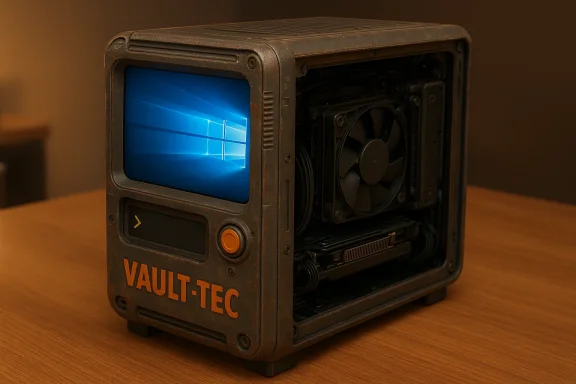
Adafruit’s spotlight on a Fallout-themed Mini‑ITX build that dresses the 3D‑printed Callisto 2 in post‑apocalyptic livery and runs Windows 10 is a vivid example of how the maker community keeps bending design intent to new use cases: taking a retro‑terminal project originally designed for single‑board computers and pushing it into the realm of small‑form‑factor (SFF) PC building, Windows compatibility, and heavy cosmetic modding. The result is a conversation piece that raises practical questions about fit, thermals, power delivery, and software support — and it’s exactly the kind of project that sparks strong interest (and strong opinions) in the Windows and SFF communities. (hackster.io)
Key technical points from the original Callisto 2 project:
If you’re motivated by aesthetics and learning, this is a fantastic weekend project that will teach you a lot and yield an eye‑catching machine. If your goal is a daily‑driver Windows PC that must be reliable under heavy load, weigh the tradeoffs: the metal SFF cases designed for Mini‑ITX still offer superior long‑term reliability and thermal headroom.
For builders who try this conversion, follow these priorities in order: verify physical fit with a cardboard mockup, choose a conservative low‑TDP component set, plan PSU placement and cable routing early, and print structural parts in heat‑resistant filament. And because Windows 10 has reached its end of standard support, plan your OS and security posture before the first boot. (hackster.io)
If you want a community‑tested checklist and tuned STL remixes to get started, the Callisto 2 project page and several remixes on community repositories are the best next stop; they provide the raw files, dimensional references, and a growing list of conversions that can be used as starting points. For Windows 10 guidance, consult Microsoft’s official lifecycle and ESU pages before committing your build to a long‑term Windows 10 install. (hackster.io)
Source: Adafruit MINI ITX Callisto 2 Fallout theme with Windows 10 #3DThursday #3DPrinting
 Background / Overview
Callisto 2: a retro computer born for 3D printing
The Callisto 2 began life as a fully 3D‑printable retro‑style computer designed by “Pigeonaut” (LowBudgetTech / Solar Hardware Computers). It was conceived around the hobbyist ethos: print the parts on a modest machine (Prusa Mini–sized volumes), snap the pieces together with printed pegs (no glue or screws), and use widely available SBC hardware like a Raspberry Pi 4 and an 8‑inch Pimoroni 1024×768 IPS display. The design intentionally evokes 1980s terminals and full‑size retro keyboards while keeping parts and cost accessible; early coverage and interviews note a roughly $250 parts budget and about six main printable pieces. (hackster.io)Key technical points from the original Callisto 2 project:
- Designed for SBCs (Raspberry Pi example) and small displays rather than full desktop motherboards. (hackster.io)
- Printable in multiple small pieces to fit consumer printers (Prusa Mini scale). (hackster.io)
- Assembly is tool‑light: snap‑fit pegs instead of screws or adhesive. (hackster.io)
What Adafruit is (reportedly) showing
Adafruit’s recent spotlight (March 5, 2026) — referenced by the user — highlights a community build that adapts Callisto 2 into a Mini‑ITX form factor, applies a Fallout visual theme (vault markings, Vault‑Tec color accents and props), and installs Windows 10 as the operating system. Aggregators and 3D model indexes also list a “MINI ITX Callisto 2 Fallout theme with Windows 10” print and build by a community author (listed under usernames such as brunno537 on model indexes). I could not retrieve the Adafruit post directly due to access restrictions at the time of verification, so the rest of this piece cross‑references Adafruit’s description with the original Callisto 2 resources and other independent coverage to validate the core technical claims. Where a claim is only present on the Adafruit listing and could not be independently fetched, I flag gi.com]Why this build matters: SFF, 3D printing, and nostalgia meet Windows
The story matters for three overlapping audiences:- SFF PC builders who constantly search for creative case mods and compact solutions. The idea of making a functional Mini‑ITX desktop inside an intentionally retro, 3D‑printed shell is inherently appealing for desk‑space minimalists and modders. Community threads and build logs continuously show broad interest in novel ITX projects.
- 3D printing hobbyists who want to push what a printed object can host. Callisto 2’s snap‑together ethos plus a thriving base of remixers has already led to unexpected adaptations — including altered internal geometry and added mount points for larger boards. (hackster.io)
- Windows users and modders who like form factor experiments but need reliable thermal performance and driver support. Switching from a low‑power SBC to a full Windows desktop changes the engineering constraints dramatically: power budgets, heat, and firmware/OS compatibility become primary concerns. Microsoft’s support timeline for Windows 10 also colors the decision to use that OS for a modern build.
The technical reality check: Can Callisto 2 become a Mini‑ITX Windows 10 PC?
Short answer: yes — but with multiple nontrivial engineering compromises and rework. The original Callisto 2 is not dimensioned or engineered for standard Mini‑ITX motherboards, PSUs, discrete GPUs, or the airflow demands of x86 components. The community has shown this is possible by modifying the shell and internal mounts, but builders need to understand the following hard constraints.Physical fit and volume
- A Mini‑ITX motherboard is 170 × 170 mm (roughly 6.7" square). The Callisto 2’s design, targeting SBCs and the Pimoroni 8" display, will generally be too shallow or too narrow without re‑scaling key sections or redesigning internal trays. Successful conversions require re‑engineered rear IO cutouts, motherboard standoffs, and often an altered internal cavity for CPU cooler clearance. Use the Mini‑ITX specification and the actual Case‑to‑Motherboard tolerances as your blueprint when adapting the print files.
- 3D prints can be scaled up — but scaling changes proportions and printability (overhangs, chamfers, and snap‑fit tolerances). Many builders instead re‑design specific panels (backplate, PSU bay) while keeping the Callisto silhouette intact. The community notes multiple remixes that do exactly this.
Power delivery: what to use and where to put it
- A Raspberry Pi needs 5V @ 3–5A; a Mini‑ITX desktop needs one of the following realistic options:
- An internal SFX or SFX‑L power supply (preferred for compact builds); or
- An external brick + DC‑DC ATX solution (PicoPSU) if the case volume or thermal layout makes internal PSU placement impossible.
- If you use a discrete GPU, TDP and peak current become the gating factors. The Fallout build photographed in aggregated indexes appears to be a lightly equipped desktop (integrated GPU or low‑TDP discrete card). Builders should choose a low‑power CPU (e.g., modern low‑TDP Intel / AMD SFF chips) or an efficient APU to avoid the need for an oversized PSU and aggressive cooling. Community SFF threads repeatedly emphasize the PSU selection as a frequent point of failure for mod builds.
Cooling and thermals
- The original Callisto 2 relies on the low thermal budget of SBCs. Desktop CPUs (and discrete GPUs) generate far more heat and require directed airflow and exhaust. SFF PC guides and modern ITX case reviews show successful approaches:
- Use front or bottom intake and top or rear exhaust when possible; keep airflow short and unobstructed.
- Consider low‑profile CPU coolers or custom AIO solutions designed for compact layouts (examples include Dan A4‑style layouts that integrate radiators into limited volumes).
- 3D-printed enclosures (PLA/ABS/PETG) will trap heat more than sheet metal cases. PLA softens at ~60°C — so thermal management is not just about performance but also about structural integrity. Use PETG or ABS variants for hotter builds, and include ventilation ducts or printed fan shrouds for active airflow.
Windows 10 support and driver considerations
- Running Windows 10 on a custom Mini‑ITX build is routine — but bear in mind Microsoft’s lifecycle. Windows 10 reached end of mainstream support on October 14, 2025; Extended Security Updates (ESU) programs exist for customers who need more time, but they are paid and temporary. This has two practical implications:
- If you long‑term, factor in ESU access or plan an upgrade path to Windows 11.
- Driver support for some niche or older hardware may be missing on newer Windows 11-only drivers; conversely, some SFF motherboard vendors may only guarantee drivers for Windows 10 during a limited window. Check vendor pages for driver availability and TPM/UEFI Secure Boot quirks before committing.
Aesthetics vs. function: the Fallout skin
- Cosmetic mods — paints, prints, weathering, and added 3D‑printed props — are the easiest part of the project. They’re what get photographed and shared. But they can obscure vents, block fan intakes, and make maintenance harder. Always design the skin with removable panels and quick access to the PSU and storage. Community build logs show many successful Fallout skins, but also many examples where users had to revise paint jobs to restore airflow.
Step‑by‑step guide to reproduce (practical checklist)
Below is a condensed roadmap for builders who want to attempt a Mini‑ITX Callisto 2 conversion running Windows 10. This is a pragmatic, conservative approach intended to minimize wasted prints and avoid a heat or fit disaster.- Planning and measurements
- Choose your Mini‑ITX motherboard and measure the CPU socket location, I/O shield, and M.2 slot placements. Confirm CPU cooler envelope clearance.
- Decide on GPU usage: integrated / low‑profile discrete / none.
- Select a PSU strategy: internal SFX, SFX‑L, or external brick + DC‑DC converter (PicoPSU). If using an external brick, plan for the external jack cutout.
- Prototype with cardboard / foam
- Before printing large pieces, mock up the internal volume with cardboard to validate clearances for the motherboard, PSU, cable routing, and fans.
- Modify or remix the Callisto 2 files
- Either scale/alter the back panel and internal mounting parts or find a community remix that has a Mini‑ITX conversion. Use the Callisto 2 Thingiverse / Printables original as the starting point and retain the iconic front bezel and screen surround. Community remixes exist; use them as references rather than drop‑in solutions. (hackster.io)
- Material choices and print settings
- Use PETG or ABS for structural, heat‑exposed parts (PSU bay, motherboard tray). PLA is acceptable for decorative panels but keep them away from hot exhausts.
- Print thicker walls and add internal ribs where the motherboard standoffs and PSU mounts attach.
- Cooling plan
- Reserve space for a slim 120 mm or 92 mm fan as intake, and a 92/120 mm fan for exhaust if volume permits.
- If using a blower‑style GPU, orient the card’s fan toward an exhaust vent. For SFF friendly GPUs, check exact length and slot compatibility.
- Cable management and connectors
- Use short, modular cables and consider right‑angle connectors for SATA and front‑panel connectors to avoid crowding.
- Plan an easily detachable rear IO panel to allow motherboard swaps without destroying the printed shell.
- Windows 10 installation and drivers
- Use a USB installer made with official Microsoft media creation tools. Confirm drivers for your motherboard chipset and network adapter work on Windows 10 — download and store them offline before the first boot.
- If you plan to use Windows 10 past the October 14, 2025 EOS date, review ESU enrollment options and vendor compatibility first.
- Final testing
- Run thermal stress tests with reat least one hour, monitoring CPU/GPU temps and chassis surface temperature.
- If temperatures approach the softening point of your print material, redesign and reprint the parts using higher‑temperature plastics and improve airflow.
Design wins, community strengths, and creativity
- Remixability: The Callisto 2’s open design and community remixes make it a perfect canvas for experimentation. Makers have produced console‑style variations, keyboard‑integrated versions, and larger cavity conversions. That creative pool reduces starting effort for modders. (hackster.io)
- Aesthetic payoff: The Fallout theme taps a huge nostalgia and pop‑culture vein. For many builders, the visual impact is the point — and on a desk, a Fallout‑skinned Callisto‑derived Mini‑ITX will command attention.
- Educational value: Adapting a retro SBC case into a Windows Mini‑ITX system forces learning in CAD, thermal design, and electrical engineering — valuable skills for hobbyists and makers.
Risks, limitations, and legal/operational caveats
- Thermal risk to printed parts: PLA or weak filament exposed to sustained heat from a CPU or GPU can warp. This is not hypothetical — structural deformation is a common failure mode in SFF printed enclosures. Use high‑temperature filament for structural prints near heat sources. (Engineering reality: PLA’s glass transition around ~60°C is too low for hot exhaust zones.)
- Power and safety: Using a mis‑sized PSU, or an improvised DC‑DC solution, can lead to unreliable power, brownouts, and in extreme cases, component damage. Follow SFF power‑supply best practices and test thoroughly on a bench before closing the case.
- Windows 10 support and security: Running Windows 10 after its 2025 end‑of‑support date implies security exposure unless you have ESU coverage. That’s especially meaningful for machines you connect to the web. Confirm ESU program eligibility and plan upgrades or isolation strategies for insecure systems.
- IP and trademark caution: The Fallout art style and Vault‑Tec logos are copyrighted/trademarked. Cosmetic mods for personal, noncommercial use are common, but be mindful about selling prints or advertising your build with trademarked game assets without permission.
- Unverified specifics: Because Adafruit’s page could not be fetched directly during verification, any precise claims that exist solely on that page (build–part lists, explicit part numbers used by the builder, or installation notes that aren’t mirrored elsewhere) remain flagged as unverified here. I cross‑checked the concept and many technical details against the original Callisto 2 design notes and multiple independent write‑ups, but builders should consult the original Adafruit post and uploaded build logs before copying part lists.
Practical tips from the community (what builders actually do)
- Print test fidgets: Instead of printing full shells immediately, print test brackets and standoffs to validate screw holes and standoff spacing. Community makers often iterate with small prints because the time cost of large failed prints is high.
- Use a removable motherboard tray: Even if you must print one, designing the tray to be removable makes motherboard swaps, BIOS clearances, and cable routing much easier.
- Choose an APU if possible: Modern AMD APUs provide surprisingly capable integrated graphics while keeping thermal and power budgets low — an excellent compromise for a themed desk machine that doesn’t need a heavy discrete GPU.
- Vent intentionally: Decorative grilles are visually pleasing, but many community builds initially hide vents beneath decorations and later retrofit them once temps rise under sustained loads. Design with ventilation in mind from the start.
Final verdict: Inspiration with engineering discipline
Adafruit’s showcase of a Fallout‑themed Callisto 2 converted into a Mini‑ITX Windows 10 box is a powerful reminder that community creativity keeps hardware culture lively. The conversion is entirely feasible — the maker ecosystem has already demonstrated that Callisto 2 prints can be adapted for larger components — but doing it well requires planning: accurate physical measurements, a robust PSU plan, careful thermal engineering, and attention to Windows lifecycle implications.If you’re motivated by aesthetics and learning, this is a fantastic weekend project that will teach you a lot and yield an eye‑catching machine. If your goal is a daily‑driver Windows PC that must be reliable under heavy load, weigh the tradeoffs: the metal SFF cases designed for Mini‑ITX still offer superior long‑term reliability and thermal headroom.
For builders who try this conversion, follow these priorities in order: verify physical fit with a cardboard mockup, choose a conservative low‑TDP component set, plan PSU placement and cable routing early, and print structural parts in heat‑resistant filament. And because Windows 10 has reached its end of standard support, plan your OS and security posture before the first boot. (hackster.io)
If you want a community‑tested checklist and tuned STL remixes to get started, the Callisto 2 project page and several remixes on community repositories are the best next stop; they provide the raw files, dimensional references, and a growing list of conversions that can be used as starting points. For Windows 10 guidance, consult Microsoft’s official lifecycle and ESU pages before committing your build to a long‑term Windows 10 install. (hackster.io)
Source: Adafruit MINI ITX Callisto 2 Fallout theme with Windows 10 #3DThursday #3DPrinting