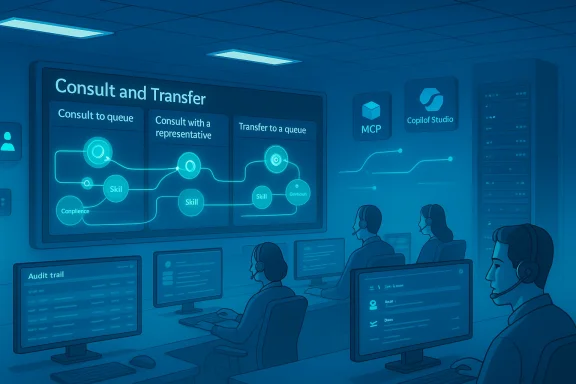
Microsoft has begun rolling out a focused but powerful enhancement to Dynamics 365 Contact Center: administrators can now customize consults and transfers so that the set of queues and customer service representatives available during a consult or transfer is dynamically controlled by FetchXML queries configured in the Copilot Service admin center. The change — announced in Microsoft’s Message Center and scheduled for general availability on January 26, 2026 — formalizes administrator control over who shows up as a consult/transfer target and when, enabling targeted handoffs, compliance-aware routing, and smarter consult workflows without code-heavy changes to the routing stack.
Dynamics 365 Contact Center ships as Microsoft’s modern, Copilot-enhanced contact center offering. It provides voice and digital channels, integrations with Microsoft Teams telephony, AI-assisted agents, and unified routing logic. Consults and transfers are core voice-channel behaviors: when an agent needs help from a colleague (consult) or needs to hand the caller off (transfer), the system has historically offered standard lists of queues and representatives based on queue membership, presence, or static configuration.
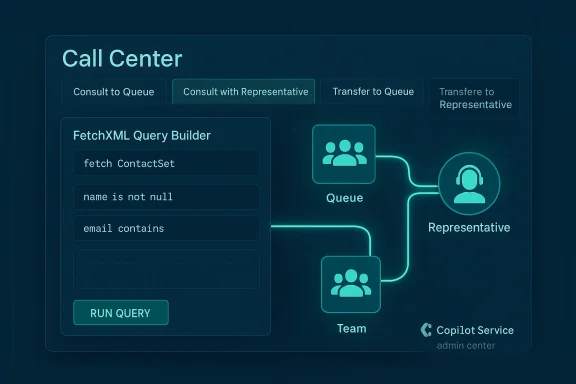
The new capability gives administrators the ability to control those consult/transfer candidate lists using FetchXML — the platform query language already used inside Dataverse — from a dedicated configuration surface in the Copilot Service admin center. Administrators can define FetchXML queries for four scenarios:
Microsoft’s official rollout communications (Message Center note MC1221931) mark this feature as generally available on January 26, 2026, and the Dynamics 365 release planning pages and product documentation reflect complementary changes to consult and transfer behaviors that align with this capability. Additionally, existing voice-channel documentation explains the consult and transfer mechanics (how consult puts a caller on hold, how consults can be public or private, and how consults interact with Teams users and external PSTN participants), which remains relevant for admins implementing these customizations.
Key differences you’ll see in the agent experience:
That power comes with operational responsibility: careful testing, governance, performance tuning, and monitoring are essential. For contact centers that take the time to pilot, document, and iterate on these configurations, the payoff should be fewer misroutes, faster resolutions, and a smoother agent experience. For those that rush the change without adequate controls, the opposite — increased transfers, confusion, and brittle operations — is possible.
If you manage a Dynamics 365 Contact Center deployment, treat this capability as a platform improvement worth planning for: pilot it with clear goals, measure the impact, and bake the configuration process into your change-management and training practices.
Source: Windows Report https://windowsreport.com/microsoft...nd-transfers-for-dynamics-365-contact-center/
 Background / Overview
Dynamics 365 Contact Center ships as Microsoft’s modern, Copilot-enhanced contact center offering. It provides voice and digital channels, integrations with Microsoft Teams telephony, AI-assisted agents, and unified routing logic. Consults and transfers are core voice-channel behaviors: when an agent needs help from a colleague (consult) or needs to hand the caller off (transfer), the system has historically offered standard lists of queues and representatives based on queue membership, presence, or static configuration.The new capability gives administrators the ability to control those consult/transfer candidate lists using FetchXML — the platform query language already used inside Dataverse — from a dedicated configuration surface in the Copilot Service admin center. Administrators can define FetchXML queries for four scenarios:
- Consult to queue
- Consult with a representative
- Transfer to a queue
- Transfer to a representative
Microsoft’s official rollout communications (Message Center note MC1221931) mark this feature as generally available on January 26, 2026, and the Dynamics 365 release planning pages and product documentation reflect complementary changes to consult and transfer behaviors that align with this capability. Additionally, existing voice-channel documentation explains the consult and transfer mechanics (how consult puts a caller on hold, how consults can be public or private, and how consults interact with Teams users and external PSTN participants), which remains relevant for admins implementing these customizations.
What exactly changed: a practical explanation
At a practical level, the change introduces a configuration layer that plugs into the consult/transfer UI flow used by agents. Instead of the system showing a fixed list of candidate queues or reps based purely on membership and presence, Dynamics 365 Contact Center now allows administrators to:- Build and apply FetchXML query filters for each consult/transfer scenario.
- Use those queries to return a tailored subset of queues or representatives that match business constraints (for example, only reps with a given skill, or queues associated with a product line).
- Control consult behavior from the Copilot Service admin center so that changes are centrally managed by service or platform teams.
Key differences you’ll see in the agent experience:
- When an agent selects Consult or Transfer, the candidate list is now filtered by the administrator-defined FetchXML query for that particular scenario.
- Queries can be configured differently for consults vs transfers (for example, consults might show a broader set of subject matter experts while transfers might be limited to a tiered support queue).
- The consult/transfer flow (placing caller on hold, consult role vs transfer completion, whether transfers use bridged or new-call semantics) continues to follow the existing voice-channel settings.
Why this matters: benefits for contact centers
This is not a cosmetic tweak. Several operational and technical gains follow from putting consult/transfer candidate selection under admin control.- More accurate handoffs and fewer escalations. By showing agents only the most appropriate queues or specialists, you reduce failed transfers and shorten resolution time.
- Skills and compliance-aware routing. FetchXML can target reps based on skills, certifications, or compliance flags, helping meet regulatory requirements (for instance, limiting transfers of certain case types to certified staff).
- Simpler, declarative admin control. Administrators can iterate on selection rules via FetchXML rather than waiting for engineering work or complex routing customizations.
- Consistency across teams. Centralized configuration in the Copilot Service admin center reduces ad hoc agent workflows and makes consult behavior auditable.
- Integration-friendly. Because FetchXML targets Dataverse entities, organizations can use custom attributes maintained by workforce management or back-office systems to influence consult/transfer behavior without additional middleware.
How administrators will configure consults and transfers
The rollout exposes configuration options on a dedicated page — the Consult and transfer page in the Copilot Service admin center — where administrators will define FetchXML queries for each scenario. The configuration flow is intentionally declarative; here’s a high-level walkthrough of the typical steps administrators will perform:- Sign into the Copilot Service admin center with an account that has Dynamics 365/tenant admin privileges.
- Navigate to the Consult and transfer configuration page.
- For each scenario (consult to queue, consult with representative, transfer to queue, transfer to representative), create or paste a FetchXML query that returns the desired set of queues or user records.
- Validate queries against a staging environment to confirm correct results and performance characteristics.
- Save and deploy the configuration; changes propagate to agent sessions according to the admin center’s publishing model.
- Train agents on the resulting consult/transfer behavior and monitor metrics.
Technical considerations and limitations
This new capability is powerful, but it introduces several operational and technical considerations you must plan for.- FetchXML complexity and maintainability. FetchXML is flexible, but complex queries can be hard to author and even harder to troubleshoot. Maintain a library of tested queries and add clear comments or naming conventions so future admins understand intent.
- Performance and latency. Consult/transfer candidate lists are typically expected to appear quickly in an agent’s UI. FetchXML queries that are inefficient, or that query large, poorly-indexed datasets, risk adding latency to the consult/transfer flow. Test query performance at expected load.
- Visibility and governance. Changes to consult/transfer queries affect agent workflows and compliance obligations. Lock down who can edit these configurations, use change control, and maintain an audit trail.
- Presence and availability semantics. The consult UI may filter results based on presence (for example, only show online agents). If your FetchXML returns a valid set that includes offline reps, test how presence filtering and FetchXML interplay to avoid unexpected results.
- Interactions with Teams and external transfers. Existing options — like consulting a Teams user or transferring to an external PSTN number — continue to behave as documented. However, if you rely on Teams Phone extensibility or bridged transfers, verify the end-to-end experience when consult candidate lists are restricted.
- Regional and tenant rollout differences. Microsoft’s announcement marks general availability, but some tenants or geographies might see staged activation. Confirm feature availability in your tenant admin center before changing production workflows.
- Logging, reporting, and analytics. Ensure your telemetry captures consult attempts, transfer failures, and consult durations so you can measure the operational impact and tune FetchXML queries accordingly.
Security, compliance, and privacy implications
Any change that affects who agents can contact or transfer calls to raises security and compliance questions.- Controlled exposure of user data. FetchXML queries can and will operate on attributes that might be sensitive. Limit which fields the queries use and who can author them.
- Regulatory routing. For regulated industries, consult/transfer restrictions can be used to keep certain interactions within defined groups (for example, don’t allow EU personal-data calls to be transferred to non-EU reps). Use the configuration to enforce these policies.
- Audit trails and change control. Maintain a versioned change log and require approvals for updates to consult/transfer queries — especially those that affect critical workflows.
- Call recording and transcript retention. Consult conversations may include additional participants; ensure your call-recording and transcription policies cover consult participants and external transfers and that consent requirements are met.
Operational best practices and rollout checklist
Implementing consult/transfer customization is a configuration change with human and technical impacts. Use this practical checklist to reduce risk and improve adoption.- Inventory existing consult and transfer flows.
- Identify business scenarios that benefit most (subject-matter routing, compliance, escalation management).
- Author FetchXML queries in a staging environment and test under load.
- Use descriptive naming conventions and document the intent of every query.
- Create a change-control process that includes service design, compliance, and training teams.
- Train agents on how consult lists will look and when to use consult vs transfer.
- Monitor key metrics: consult attempt rate, consult-to-transfer conversion, transfer success rate, average hold time during consults.
- Iterate rules based on measured outcomes and agent feedback.
How this interacts with related Dynamics 365 Contact Center updates
The consult/transfer customization arrives alongside and after several other contact-center enhancements that Microsoft has been delivering — notably Teams Phone extensibility, capacity control capabilities, and intent-based routing improvements.- Teams Phone extensibility: Dynamics 365 Contact Center’s closer integration with Teams Phone means consults and transfers that involve Teams users need to be validated end-to-end. Depending on the voice channel configuration, transfers to Teams users may use bridged calls or new-call semantics; validate these behaviors when consult candidate lists are narrowed.
- Capacity blocking and automated consult selection: Release notes show that Microsoft has been adding capacity-blocking features and automated consult selection logic. Administrators must ensure that FetchXML-driven consult lists and any automated selection features do not conflict; for example, avoid directing consults to agents who are capacity-blocked.
- Enhanced voice experiences and bridging behaviors: The voice experience (enhanced vs legacy) influences transfer semantics; consult and transfer configuration should be validated against the voice experience used by your tenant.
Real-world scenarios and examples
Below are practical examples of how organizations might use these new configuration options.- Tiered product support: An enterprise with multiple product lines wants consults to preferentially show subject-matter experts who are certified on the customer’s product. Admins author FetchXML to filter representatives by product-certification attribute and current queue membership.
- Regulated transfers: A financial services firm prevents transfers of certain call types to agents who do not hold a license. The FetchXML query filters reps by a “licensed” boolean attribute and by territory.
- Language-aware consults: A global services organization uses FetchXML to show only representatives with the required language skill and local time-zone availability, improving the chance the consult is useful.
- VIP handling: When a high-value customer is identified on the call, the agent’s UI can use a different consult query (or a higher-priority consult template) that surfaces specially trained VIP reps only.
Risks and potential downsides
Even with clear benefits, organizations should be mindful of risks:- Misconfigurations can increase transfers. Overly narrow queries may remove suitable consult targets and force agents into longer routing paths or repeated transfers.
- Operational brittleness. Relying on attributes maintained in other systems (like workforce management) creates coupling; if those feeds lag, consult lists may be inaccurate.
- Skill atrophy. If agents can always consult specialists easily, they may become less empowered to resolve issues themselves. Build training into the rollout plan.
- Complex troubleshooting. When agents report missing consult targets, admins must be prepared to debug FetchXML logic, Dataverse permissions, and presence-filtering interactions.
- Tenant differences and phased availability. If your tenant receives the feature later due to staggered rollout, coordination between teams could be confused.
Recommendations for IT and service leaders
For IT leaders, contact center architects, and operations managers planning to adopt this capability, here are distilled recommendations:- Treat consult/transfer customizations as a product change: apply release management, acceptance testing, and staged rollouts.
- Start small: pilot specific consult scenarios (like one product line or a VIP routing rule) before broad adoption.
- Build operational dashboards: track the consult conversion rate and transfer success metrics to quantify improvement.
- Enforce governance: restrict who can edit FetchXML queries and require peer review for changes that affect business-critical flows.
- Collaborate with workforce management: align attributes used in queries with WFM data to avoid conflicts.
- Document and train: ensure agents understand the new consult candidate lists and when to escalate or transfer.
Troubleshooting quick tips
If consults or transfers don’t behave as expected, try these steps:- Confirm the FetchXML returns expected records in the Dataverse query tester.
- Check Dataverse permissions — the admin account must be able to read the attributes used in the query.
- Validate presence filtering: replicate a consult while varying presence states to ensure visibility rules match expectations.
- Test with a simple query first, then add complexity iteratively.
- Review call-routing logs and telemetry for consult events and filters applied.
- Revert to a known-working query as a stop-gap while debugging.
What to watch next
This feature is foundational rather than flashy — it expands configuration control and enables more nuanced consult/transfer behavior without code. After initial adoption we expect the ecosystem to evolve in these directions:- Pre-built templates and sample queries released by Microsoft partners and the community to accelerate common scenarios (language routing, compliance filtering, VIP routing).
- UI-assisted query builders that let admins create common filters using field pickers instead of hand-editing FetchXML.
- Better analytics surfaced in Dynamics Contact Center dashboards that report consult outcomes and help admins tune queries.
- Integration with AI-based routing where consult/transfer candidate lists are informed by intent detection or predicted resolution probability.
Conclusion
Microsoft’s rollout of configurable consults and transfers for Dynamics 365 Contact Center is a pragmatic, admin-focused enhancement that shifts control of consult/transfer candidate selection into the hands of platform teams. By using FetchXML in the Copilot Service admin center, organizations gain powerful declarative control to target the right queues and representatives for consults and transfers — enabling skills-aware routing, compliance controls, and subject-matter handoffs without heavy code changes.That power comes with operational responsibility: careful testing, governance, performance tuning, and monitoring are essential. For contact centers that take the time to pilot, document, and iterate on these configurations, the payoff should be fewer misroutes, faster resolutions, and a smoother agent experience. For those that rush the change without adequate controls, the opposite — increased transfers, confusion, and brittle operations — is possible.
If you manage a Dynamics 365 Contact Center deployment, treat this capability as a platform improvement worth planning for: pilot it with clear goals, measure the impact, and bake the configuration process into your change-management and training practices.
Source: Windows Report https://windowsreport.com/microsoft...nd-transfers-for-dynamics-365-contact-center/