

Microsoft’s latest push to make contact-center automation more deterministic and scalable is now live: time‑out rules for automatic actions let administrators define time-based triggers that send messages, move conversation state, or close tickets automatically across messaging channels — reducing manual follow-ups and helping teams meet SLAs. Microsoft documents the feature in the Copilot Service / Dynamics 365 admin surfaces and describes both the core scenarios and several recent enhancements, including expanded channel support and a refined representative non-response time (RNRT) calculation.
Time‑out rules are part of Microsoft’s 2025 updates to Dynamics 365 Customer Service and the Contact Center admin tooling. The capability first reached general availability in late April 2025 and has been fleshed out through subsequent release‑wave updates and message‑center communications. Administrators author these rules in the Copilot Service admin center (under Productivity → Timeout rules) and attach them to specific workstreams so they run only for the intended channels and queues. These rules are explicitly designed for messaging and persistent chat experiences — voice channels are currently excluded — and they support automated actions that map to real operational needs: nudging inactive customers, moving idle chats into a waiting state, and closing abandoned conversations so representatives can handle active traffic. The official configuration guidance and trigger/action list are published in Microsoft Learn.
Source: Microsoft Elevate service automation with timeout rules for automatic actions - Microsoft Dynamics 365 Blog
 Background
Time‑out rules are part of Microsoft’s 2025 updates to Dynamics 365 Customer Service and the Contact Center admin tooling. The capability first reached general availability in late April 2025 and has been fleshed out through subsequent release‑wave updates and message‑center communications. Administrators author these rules in the Copilot Service admin center (under Productivity → Timeout rules) and attach them to specific workstreams so they run only for the intended channels and queues. These rules are explicitly designed for messaging and persistent chat experiences — voice channels are currently excluded — and they support automated actions that map to real operational needs: nudging inactive customers, moving idle chats into a waiting state, and closing abandoned conversations so representatives can handle active traffic. The official configuration guidance and trigger/action list are published in Microsoft Learn. How timeout rules work — the heartbeat pattern
The typical “heartbeat timer” scenario
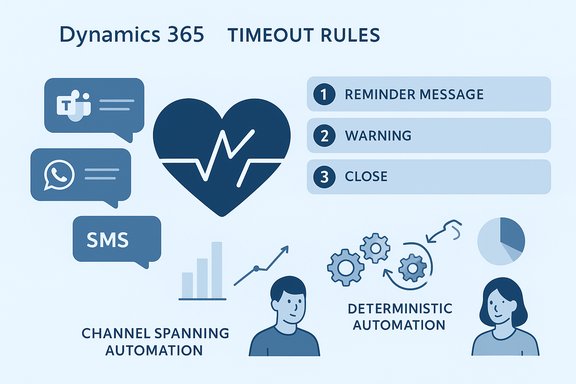
A canonical example used by Microsoft demonstrates the practical sequence these rules automate:- A customer opens a chat (for example, via Microsoft Teams or a website live chat) and a representative responds.
- The customer stops replying. After a configured period (for example, 10 minutes), a timeout rule sends an automated reminder message.
- If the customer remains silent for an additional period (for example, 5 minutes), another rule sends a warning that the chat will be closed.
- A final rule closes the conversation and frees the representative’s capacity.
Key trigger types
Administrators can select between at least two trigger events when authoring a rule:- Customer Non‑Response Time (CNRT): Time elapsed since the representative last sent a message and the customer has not replied.
- Representative Non‑Response Time (RNRT): Time elapsed since the customer last sent a message and the representative has not replied.
Technical details and configuration checklist
Where to configure
- Open your Dynamics 365 Customer Service instance and launch the Copilot Service admin center.
- Navigate to Agent experience → Productivity → Timeout rules.
- Create a new rule, choose a trigger event, set the time threshold and unit (minutes/hours/days), and pick the action(s).
- Configure messages per language and channel, set rule priority, and activate the rule.
Supported actions today
- Send a message: The system sends either a customer‑facing message (appearing as from the representative) or a system message to the agent.
- Close conversation: Automatically moves a conversation to the closed state and frees agent capacity.
- Move active conversation to waiting: For asynchronous and persistent chat channels, an active conversation can be moved into a waiting state so the agent can triage or reallocate time.
- Release conversation back to queue (coming soon): Microsoft has announced a “release to queue” action that enables reassignment for faster resolution; availability timelines are being phased by region and tenant.
Localization and channel customization
Messages can be authored per language and channel, and administrators can define a fallback language. Some channel-specific nuances — for example, the way a message threads or is displayed in WhatsApp vs. Teams — require testing per channel. Voice channels are explicitly unsupported for these timeout actions at present.Representative Non‑Response Time (RNRT): what changed and why it matters
A notable technical refinement addresses how RNRT is calculated. Microsoft updated the logic to improve accuracy in two principal situations:- Initial contact: RNRT measures time from representative assignment to their first response, ensuring the timer starts when a rep is expected to engage after being assigned the conversation.
- Mid‑conversation: Once the interaction has opened into a back‑and‑forth dialog, RNRT is computed as the time since the last customer message, so the platform measures representative responsiveness to the customer’s most recent input.
Channel support and limitations
Expanded messaging channels
Timeout rules now run across major messaging channels including:- Persistent chat and web/live chat
- SMS
- Microsoft Teams
- WhatsApp, Line, Messenger, WeChat
- Apple Messages for Business
Asynchronous conversation handling
For asynchronous or persistent channels, the Active → Waiting action is especially useful: it moves idle conversations into a waiting state while preserving the ability for agents or customers to resume without losing history. This reduces the number of "open but stalled" conversations that count against agent capacity while retaining a clear restart path.Operational impact — measurable benefits
Timeout rules are designed to deliver practical operational value:- Queue management and rep throughput: Automated closures and state transitions reduce queue congestion and free agents to handle active cases.
- SLA compliance: Deterministic, time‑based actions help maintain response‑time SLAs across channels.
- Consistent customer experience: Standardized nudges and closing messages create more predictable experiences than ad‑hoc agent behavior.
Practical rollout guidance (pilot → scale)
Successful deployment requires operations discipline. The following checklist synthesizes guidance from Microsoft documentation and operational best practices used in large automation pilots:- Inventory and scope:
- Pick 1–2 non‑critical workstreams (for example, web chat and Teams) as a pilot.
- Identify the queues and representative profiles that will receive the new automation rules.
- Define success metrics:
- KPIs: reduction in open/idle conversations, agent capacity reclaimed, SLA compliance, and customer re‑engagement rates.
- Author conservative rules:
- Start with gentle reminders (e.g., 10‑minute reminder, 15‑minute warning, 20‑minute close) and avoid aggressive closures during initial pilots.
- Localization and channel testing:
- Validate message formatting across each target channel and verify threading/visibility semantics.
- Human‑in‑the‑loop checks:
- Allow agents to override or pause rules at the conversation level if business needs dictate; audit override events.
- Monitor and iterate:
- Track false positives (conversations closed but the customer later replies) and tune thresholds accordingly.
- Governance and audit trails:
- Log each automated action with the rule ID, timestamp, and outcome; export to SIEM or compliance tooling if retention policies require.
Risks, caveats, and governance concerns
Automation improves scale but introduces new failure modes and governance requirements. The most important risks to manage are:- Customer experience mishaps: Premature closures or poorly worded automated messages can frustrate customers and increase reopens or follow‑ups. Always pilot messages and include a clear re‑open path.
- Regional and channel variance: Not every channel behaves identically; message threading, delivery receipts, and character limits vary and can affect timing semantics.
- Audit and compliance: Automated closures and system messages must be traceable for compliance. Attach rule IDs and timestamps to records and retain logs per retention policy.
- Operational overrides and delegation: Agents may need to pause or override timeout rules during special cases (escalations, long investigations). Microsoft has documented an override capability in roadmap and release notes; administer who can toggle overrides.
- Hidden availability differences: Feature rollout across Azure regions and tenants can be phased; verify availability in your tenant via the admin center and feature geography reports before assuming immediate availability.
Roadmap, inconsistencies, and what to verify in your tenant
Microsoft’s blog post states that timeout rules were released to GA in April 2025 and that additional configuration options (including release to queue and a representative override) should be publicly available in January 2026. The platform’s release plan and message‑center records confirm GA in late April 2025 but also show staged rollouts and separate availability schedules for certain override capabilities (some documentation indicates general availability for override-related controls as early as November 2025). Because different Microsoft pages and communications can reflect phased rollouts and region‑by‑region availability, administrators should verify exact feature availability and dates in their tenant and the Dynamics 365 release geography pages rather than relying on a single blog statement. This discrepancy is flagged for administrators as an action item to validate during planning.Sample rule templates (practical starting points)
- Template A — Low‑risk nudge (web live chat)
- Trigger: Customer Non‑Response Time > 10 minutes.
- Action: Send message — “Hi, just checking in — do you still need assistance?”
- Priority: 100.
- Follow‑up: Add a second rule Customer Non‑Response Time > 15 minutes → Send message warning of closure.
- Final rule: Customer Non‑Response Time > 20 minutes → Close conversation.
- Template B — Asynchronous handoff (persistent chat)
- Trigger: Customer Non‑Response Time > 30 minutes.
- Action: Move Active → Waiting.
- Notification: System message to agent to note the transition.
- Reopen behavior: Customer reply reactivates conversation and notifies original agent.
Monitoring and KPIs to track post‑deployment
- Average number of idle open conversations per agent (pre/post).
- Percentage of automatically closed conversations that reopen within X hours (false‑close rate).
- Agent capacity reclaimed (concurrent conversations per agent).
- SLA adherence: time‑to‑first‑response and percent of cases meeting SLA after automation.
- Customer satisfaction / CSAT impact for conversations that experienced timeout-driven messages.
Conclusion
Timeout rules for automatic actions represent a pragmatic, low‑fragility automation layer for modern messaging‑first contact centers. When configured conservatively and governed with clear pilots, localized testing, and robust logging, these rules reduce representative toil, help meet SLAs, and standardize customer nudges across channels. The feature suite is documented and in GA as of April 2025, with iterative enhancements (RNRT logic, Active→Waiting, release/reassign actions, and override controls) rolling out in waves; administrators should validate exact availability in their tenants before scaling. Practical next steps for IT teams:- Test the default heartbeat templates in a sandbox workstream.
- Define KPIs and a 30–90 day pilot plan.
- Put RBAC, audit logging, and override rules in place.
- Tune thresholds and messages per channel and language.
- Review region availability and the release plan to confirm any feature dependencies.
Source: Microsoft Elevate service automation with timeout rules for automatic actions - Microsoft Dynamics 365 Blog
