
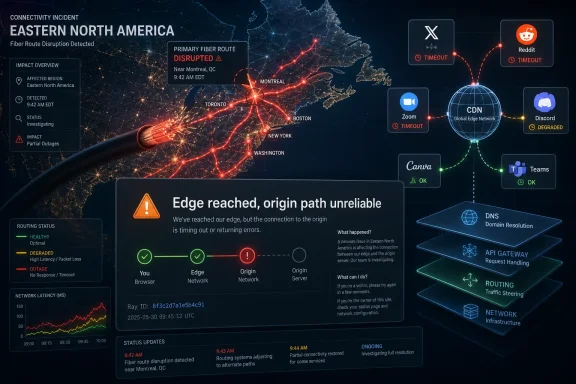
Cloudflare said on Monday, June 22, 2026, that a fiber cut in Eastern North America was causing increased latency and timeouts for customers connecting through North America or reaching services in Europe, while users reported failures across sites including X, Reddit, Zoom, Discord, Canva, and Microsoft Teams. The immediate symptom for many people was not a clean “site down” message but the more confusing Cloudflare-style error page: an edge network could be reached, but the origin path behind it could not reliably complete. That distinction matters because it turns a simple outage story into a lesson about how much of the modern web depends on shared transit, CDNs, DNS, API gateways, and a handful of deeply embedded network providers. The internet did not go down; the illusion that every service fails independently did.
A Cloudflare error page is designed to be practical, but during a major incident it can feel accusatory. It tells visitors to try again later and tells site owners to inspect origin logs, include the Ray ID, and contact support. In ordinary circumstances, that is good advice: a 522-style connection problem often means Cloudflare can reach the edge but cannot establish a working connection to the origin server.
This incident was different in scale. When a physical fiber cut disrupts routes used by major networks, the failure can masquerade as a thousand unrelated application problems. One user sees X fail to load; another sees a Teams call collapse; a sysadmin sees origin timeouts; a developer sees API authentication failures; a help desk sees “the internet is slow.”
That is the defining annoyance of modern outages. The user-facing failure is usually application-specific, but the real cause may sit several layers below the application stack. A cut fiber path, a routing withdrawal, a bad CDN configuration, or a transit-provider failure can all produce the same emotional result: the browser spins, the app retries, and the status page lags behind reality.
Cloudflare’s own status language pointed to a fiber cut in Eastern North America, with the impact spreading to customers connecting through North America or accessing services in Europe. That geography is important. A cable problem in one region can become a global experience when traffic engineering, peering, failover, and cloud dependency chains all route through the same constrained corridors.
But the internet is not simply a mesh of interchangeable paths. It is a negotiated, commercial, and highly optimized system of routes. Networks choose paths based on cost, latency, capacity, contracts, peering relationships, and operational policy. When a major path disappears, traffic does not magically spread evenly across infinite spare capacity.
Instead, routing systems converge on alternatives that may be longer, more congested, or unexpectedly brittle. Latency rises first. Then timeouts appear. Then applications that assume low-latency dependencies begin to fail in ways that look unrelated to networking: login failures, broken dashboards, stalled media, missed webhooks, failed API calls, and misleading server errors.
This is why a single infrastructure event can feel like an application-layer plague. The physical fault is local; the dependency graph is not. A CDN may be healthy in most regions but impaired for a set of routes. A cloud provider may be operating normally but unreachable from affected paths. A SaaS platform may be up by its own metrics while thousands of users cannot reach the pieces of it they need.
That gap between service health and user experience is where outage confusion lives. Status pages tend to describe the provider’s view of its systems. Users experience the path between their device and the service. Those are related, but they are not the same thing.
When something breaks along the way, Cloudflare’s error page may be the only comprehensible artifact users see. The origin server may be healthy. Cloudflare’s edge may be healthy. The path between them may be degraded. To the person holding the phone, none of those distinctions matter; the site is broken.
Reports around the June 22 incident suggested that a network-provider issue, reportedly involving Zayo, was a major part of the underlying problem. That matters because it complicates the easy narrative that “Cloudflare went down.” A provider like Cloudflare can be affected by upstream or transit failures, and so can services that do not use Cloudflare at all.
That is how Microsoft Teams can appear in the same outage chatter as X, Reddit, Zoom, and Discord without proving that every affected platform shares the same CDN. The common element may be geography, transit, peering, enterprise connectivity, or a regional backbone problem rather than a single application vendor.
Still, Cloudflare’s central role means its mitigation choices are consequential. If it reroutes traffic effectively, many users recover quickly. If alternate routes are saturated or fail in unexpected ways, the outage feels broader and longer. The company does not need to be the root cause to become one of the most important actors in recovery.
But during a widespread network incident, that advice has limited value. A site owner can check origin logs and find nothing useful because the requests never arrived. They can restart services that are not broken. They can scale infrastructure that is not overloaded. They can waste the first hour treating a transport problem as an application problem.
That is not a Cloudflare-only criticism. The entire industry still struggles to communicate layered failures. Error pages are optimized for normal incidents, not systemic ones. They are built to help one website operator debug one failing connection, not to explain to millions of users that traffic across a major North American route is being diverted, dropped, or delayed.
For WindowsForum readers, this is a familiar pattern from enterprise outages. The first reports often arrive as application tickets: “VPN down,” “Teams broken,” “SharePoint slow,” “login not working,” “website unavailable.” The root cause may be identity, DNS, routing, TLS inspection, endpoint security, ISP peering, or a cloud provider incident. The symptom rarely names the failing layer.
The practical lesson is not to ignore the error page, but to distrust its implied scope. It tells you where the request failed from one vantage point. It does not prove the origin is at fault, and it does not prove the CDN is the sole cause.
This concentration delivers real benefits. CDNs make websites faster. DDoS protection keeps services online under attack. Global anycast networks reduce latency. Managed identity and cloud APIs let small teams build products that once required large infrastructure staffs. The internet is more capable because infrastructure has been consolidated into specialist platforms.
The tradeoff is correlated failure. When everyone uses the same acceleration layer, the same DNS resolver, the same cloud region, the same identity provider, or the same transit corridor, resilience becomes less intuitive. Each individual company may have redundancy. The ecosystem may still share hidden dependencies.
This is why “multi-cloud” and “multi-CDN” can be comforting slogans but difficult architectures. It is not enough to put workloads in two places if both depend on the same identity provider, certificate automation, DNS host, observability system, deployment pipeline, payment processor, or fiber provider. Real independence is expensive, operationally messy, and often sacrificed until an outage makes the cost visible.
The web did not become fragile because engineers forgot redundancy. It became fragile because the business case for shared infrastructure is overwhelming. Every optimization creates a dependency. Every dependency creates a possible common-mode failure.
That does not mean users are powerless. The right response depends on whether you are a home user, a remote worker, or an administrator responsible for a service. A home user can test another network, such as mobile data, to determine whether the problem is tied to a local ISP route. A remote worker can try a corporate VPN or disconnect from one, because either path might avoid or enter the affected network segment.
Windows users should be careful with the usual folklore fixes. Flushing DNS may help if a stale record is involved, but it will not repair a fiber cut. Changing DNS resolvers may help if the resolver is the failing component, but it will not solve an origin connectivity failure that occurs after resolution. Rebooting a router may change a consumer ISP path in rare cases, but it is usually just ritual.
The more useful move is comparative testing. Check the same service from another device, another browser, another network, and a simple command-line tool. If every network fails, the service or its provider path is likely impaired. If only one ISP fails, routing may be the issue. If only one machine fails, then local DNS cache, proxy settings, endpoint security, or browser configuration deserves attention.
For site owners, the Cloudflare Ray ID is worth preserving. It gives support teams a specific trace point through Cloudflare’s edge. But during a large incident, the Ray ID is not a magic key; it is one clue in a much larger routing map.
That means monitoring from multiple regions, ISPs, and network types. A single cloud-based probe can miss the failure your users are experiencing. Worse, if your monitoring provider shares the same impaired route as your customers, it can confirm the outage without helping you isolate it. If it does not share that route, it can falsely reassure you that everything is fine.
Enterprise teams should also distinguish between origin monitoring and edge monitoring. Origin checks tell you whether your application is responding before the CDN. Edge checks tell you whether users can reach the public service through the CDN. Both matter, and the difference between them is often the incident.
The same thinking applies to Microsoft 365, Azure-hosted apps, remote access gateways, and SaaS dependencies. If your help desk only sees “Teams is down,” you are already behind. You want telemetry that can separate local WAN failure, ISP routing trouble, Microsoft service health, DNS resolution, authentication problems, and endpoint policy issues.
This is where boring documentation earns its keep. During a major outage, teams need to know which services depend on Cloudflare, which depend on Azure Front Door, which use AWS CloudFront, which DNS providers are authoritative, which VPN tunnels force traffic through which regions, and which business functions have alternate access paths. The dependency map is not paperwork; it is the recovery plan.
That caution collides with user experience. By the time a provider says “some customers may experience increased latency,” users may already have declared the internet dead in Slack, Reddit, Discord, and the help desk queue. The gap between field reports and official acknowledgment creates suspicion even when nobody is hiding anything.
Third-party monitors like Downdetector and StatusGator fill part of that gap by surfacing user reports quickly. They are noisy, but useful. A spike in complaints across unrelated services is often the first sign that the problem sits below the application layer.
The best incident response posture combines all three views: official status pages, third-party user-report aggregators, and your own synthetic monitoring. None is sufficient alone. Official pages provide vendor confirmation, user reports reveal lived impact, and your probes tell you whether your specific users and services are affected.
For forum readers running small sites, this may sound excessive. It is not. Even a modest setup can monitor a homepage through the CDN, monitor the origin directly from a locked-down probe, and track DNS from more than one resolver. The goal is not enterprise theater; it is avoiding blind panic when the next orange error page appears.
That surprise is no longer justified. Cloudflare is not a niche performance add-on. It is a major internet control surface. Its network, security products, DNS services, developer platform, Zero Trust tooling, and CDN sit in the request path for a substantial share of everyday web activity.
The uncomfortable part is that Cloudflare is also often a resilience layer. Many sites use it because without it they would be slower, more vulnerable, or less available. Removing Cloudflare from the architecture may reduce one dependency while exposing several worse ones. The answer is not simply “don’t use Cloudflare.”
The better argument is that critical services need explicit failure design. What happens if the CDN cannot reach the origin? What happens if the CDN dashboard is unreachable? What happens if DNS changes cannot be made? What happens if your access-control layer blocks emergency responders during an incident? What happens if your status page depends on the same provider that is failing?
These are not abstract architecture-review questions. They are the difference between a brief degradation and an all-hands scramble.
 The Web’s Front Door Became the Outage Screen
A Cloudflare error page is designed to be practical, but during a major incident it can feel accusatory. It tells visitors to try again later and tells site owners to inspect origin logs, include the Ray ID, and contact support. In ordinary circumstances, that is good advice: a 522-style connection problem often means Cloudflare can reach the edge but cannot establish a working connection to the origin server.This incident was different in scale. When a physical fiber cut disrupts routes used by major networks, the failure can masquerade as a thousand unrelated application problems. One user sees X fail to load; another sees a Teams call collapse; a sysadmin sees origin timeouts; a developer sees API authentication failures; a help desk sees “the internet is slow.”
That is the defining annoyance of modern outages. The user-facing failure is usually application-specific, but the real cause may sit several layers below the application stack. A cut fiber path, a routing withdrawal, a bad CDN configuration, or a transit-provider failure can all produce the same emotional result: the browser spins, the app retries, and the status page lags behind reality.
Cloudflare’s own status language pointed to a fiber cut in Eastern North America, with the impact spreading to customers connecting through North America or accessing services in Europe. That geography is important. A cable problem in one region can become a global experience when traffic engineering, peering, failover, and cloud dependency chains all route through the same constrained corridors.
A Fiber Cut Is Physical, but the Blast Radius Is Logical
The phrase fiber cut sounds reassuringly concrete. It implies a backhoe, a cable, a splice crew, and a repair timeline. Compared with a software bug in a global control plane, it sounds almost old-fashioned.But the internet is not simply a mesh of interchangeable paths. It is a negotiated, commercial, and highly optimized system of routes. Networks choose paths based on cost, latency, capacity, contracts, peering relationships, and operational policy. When a major path disappears, traffic does not magically spread evenly across infinite spare capacity.
Instead, routing systems converge on alternatives that may be longer, more congested, or unexpectedly brittle. Latency rises first. Then timeouts appear. Then applications that assume low-latency dependencies begin to fail in ways that look unrelated to networking: login failures, broken dashboards, stalled media, missed webhooks, failed API calls, and misleading server errors.
This is why a single infrastructure event can feel like an application-layer plague. The physical fault is local; the dependency graph is not. A CDN may be healthy in most regions but impaired for a set of routes. A cloud provider may be operating normally but unreachable from affected paths. A SaaS platform may be up by its own metrics while thousands of users cannot reach the pieces of it they need.
That gap between service health and user experience is where outage confusion lives. Status pages tend to describe the provider’s view of its systems. Users experience the path between their device and the service. Those are related, but they are not the same thing.
Cloudflare Was the Messenger, Not Necessarily the Whole Failure
Cloudflare is often blamed whenever its orange-branded error pages appear, because Cloudflare is the visible intermediary. That visibility is both the company’s value and its liability. It sits in front of websites to absorb attacks, cache assets, terminate TLS, accelerate traffic, enforce security policy, and route requests through its global network.When something breaks along the way, Cloudflare’s error page may be the only comprehensible artifact users see. The origin server may be healthy. Cloudflare’s edge may be healthy. The path between them may be degraded. To the person holding the phone, none of those distinctions matter; the site is broken.
Reports around the June 22 incident suggested that a network-provider issue, reportedly involving Zayo, was a major part of the underlying problem. That matters because it complicates the easy narrative that “Cloudflare went down.” A provider like Cloudflare can be affected by upstream or transit failures, and so can services that do not use Cloudflare at all.
That is how Microsoft Teams can appear in the same outage chatter as X, Reddit, Zoom, and Discord without proving that every affected platform shares the same CDN. The common element may be geography, transit, peering, enterprise connectivity, or a regional backbone problem rather than a single application vendor.
Still, Cloudflare’s central role means its mitigation choices are consequential. If it reroutes traffic effectively, many users recover quickly. If alternate routes are saturated or fail in unexpected ways, the outage feels broader and longer. The company does not need to be the root cause to become one of the most important actors in recovery.
The Origin Error Message Was Technically Honest and Socially Useless
The user-submitted error text is classic Cloudflare: “There is an unknown connection issue between Cloudflare and the origin web server.” Technically, that can be true during a routing disruption. The edge cannot complete a reliable connection to the origin, so the page tells the visitor to wait and tells the owner to inspect logs.But during a widespread network incident, that advice has limited value. A site owner can check origin logs and find nothing useful because the requests never arrived. They can restart services that are not broken. They can scale infrastructure that is not overloaded. They can waste the first hour treating a transport problem as an application problem.
That is not a Cloudflare-only criticism. The entire industry still struggles to communicate layered failures. Error pages are optimized for normal incidents, not systemic ones. They are built to help one website operator debug one failing connection, not to explain to millions of users that traffic across a major North American route is being diverted, dropped, or delayed.
For WindowsForum readers, this is a familiar pattern from enterprise outages. The first reports often arrive as application tickets: “VPN down,” “Teams broken,” “SharePoint slow,” “login not working,” “website unavailable.” The root cause may be identity, DNS, routing, TLS inspection, endpoint security, ISP peering, or a cloud provider incident. The symptom rarely names the failing layer.
The practical lesson is not to ignore the error page, but to distrust its implied scope. It tells you where the request failed from one vantage point. It does not prove the origin is at fault, and it does not prove the CDN is the sole cause.
The Modern Internet Has Fewer Failure Domains Than It Pretends
The June 22 outage belongs to a pattern that has become impossible to dismiss. Cloudflare, AWS, Microsoft, Google, Akamai, Fastly, major DNS resolvers, backbone providers, and identity platforms now form an invisible operating system for the web. Most users do not choose these systems directly. They inherit them through every app, site, and workplace tool they use.This concentration delivers real benefits. CDNs make websites faster. DDoS protection keeps services online under attack. Global anycast networks reduce latency. Managed identity and cloud APIs let small teams build products that once required large infrastructure staffs. The internet is more capable because infrastructure has been consolidated into specialist platforms.
The tradeoff is correlated failure. When everyone uses the same acceleration layer, the same DNS resolver, the same cloud region, the same identity provider, or the same transit corridor, resilience becomes less intuitive. Each individual company may have redundancy. The ecosystem may still share hidden dependencies.
This is why “multi-cloud” and “multi-CDN” can be comforting slogans but difficult architectures. It is not enough to put workloads in two places if both depend on the same identity provider, certificate automation, DNS host, observability system, deployment pipeline, payment processor, or fiber provider. Real independence is expensive, operationally messy, and often sacrificed until an outage makes the cost visible.
The web did not become fragile because engineers forgot redundancy. It became fragile because the business case for shared infrastructure is overwhelming. Every optimization creates a dependency. Every dependency creates a possible common-mode failure.
For Windows Users, the First Fix Is Usually Patience — but Not Always
If you were a visitor seeing the Cloudflare origin error during the incident, the least satisfying advice was also the most accurate: wait a few minutes and try again. A regional routing or transit problem is not something a browser refresh, Windows restart, or DNS flush can repair.That does not mean users are powerless. The right response depends on whether you are a home user, a remote worker, or an administrator responsible for a service. A home user can test another network, such as mobile data, to determine whether the problem is tied to a local ISP route. A remote worker can try a corporate VPN or disconnect from one, because either path might avoid or enter the affected network segment.
Windows users should be careful with the usual folklore fixes. Flushing DNS may help if a stale record is involved, but it will not repair a fiber cut. Changing DNS resolvers may help if the resolver is the failing component, but it will not solve an origin connectivity failure that occurs after resolution. Rebooting a router may change a consumer ISP path in rare cases, but it is usually just ritual.
The more useful move is comparative testing. Check the same service from another device, another browser, another network, and a simple command-line tool. If every network fails, the service or its provider path is likely impaired. If only one ISP fails, routing may be the issue. If only one machine fails, then local DNS cache, proxy settings, endpoint security, or browser configuration deserves attention.
For site owners, the Cloudflare Ray ID is worth preserving. It gives support teams a specific trace point through Cloudflare’s edge. But during a large incident, the Ray ID is not a magic key; it is one clue in a much larger routing map.
Sysadmins Need to Watch Paths, Not Just Hosts
The most important operational takeaway is that uptime monitoring has to move beyond “is the server alive?” A server can be alive, the CDN can be alive, and users can still be unable to reach the application. In a distributed internet, path health is a first-class signal.That means monitoring from multiple regions, ISPs, and network types. A single cloud-based probe can miss the failure your users are experiencing. Worse, if your monitoring provider shares the same impaired route as your customers, it can confirm the outage without helping you isolate it. If it does not share that route, it can falsely reassure you that everything is fine.
Enterprise teams should also distinguish between origin monitoring and edge monitoring. Origin checks tell you whether your application is responding before the CDN. Edge checks tell you whether users can reach the public service through the CDN. Both matter, and the difference between them is often the incident.
The same thinking applies to Microsoft 365, Azure-hosted apps, remote access gateways, and SaaS dependencies. If your help desk only sees “Teams is down,” you are already behind. You want telemetry that can separate local WAN failure, ISP routing trouble, Microsoft service health, DNS resolution, authentication problems, and endpoint policy issues.
This is where boring documentation earns its keep. During a major outage, teams need to know which services depend on Cloudflare, which depend on Azure Front Door, which use AWS CloudFront, which DNS providers are authoritative, which VPN tunnels force traffic through which regions, and which business functions have alternate access paths. The dependency map is not paperwork; it is the recovery plan.
Status Pages Are Necessary, but They Are Not Reality
Cloudflare, Microsoft, AWS, Google, and other major providers all operate status pages, and they are indispensable. But status pages are also political documents, written under uncertainty, by teams trying to avoid both panic and overstatement. Early incident language is often cautious because engineers may not yet know the blast radius.That caution collides with user experience. By the time a provider says “some customers may experience increased latency,” users may already have declared the internet dead in Slack, Reddit, Discord, and the help desk queue. The gap between field reports and official acknowledgment creates suspicion even when nobody is hiding anything.
Third-party monitors like Downdetector and StatusGator fill part of that gap by surfacing user reports quickly. They are noisy, but useful. A spike in complaints across unrelated services is often the first sign that the problem sits below the application layer.
The best incident response posture combines all three views: official status pages, third-party user-report aggregators, and your own synthetic monitoring. None is sufficient alone. Official pages provide vendor confirmation, user reports reveal lived impact, and your probes tell you whether your specific users and services are affected.
For forum readers running small sites, this may sound excessive. It is not. Even a modest setup can monitor a homepage through the CDN, monitor the origin directly from a locked-down probe, and track DNS from more than one resolver. The goal is not enterprise theater; it is avoiding blind panic when the next orange error page appears.
The Cloudflare Pattern Keeps Repeating Because the Stakes Keep Rising
Cloudflare has had several high-profile incidents in recent years, including outages tied to configuration, routing, service dependencies, and product-specific failures. The causes differ, but the public reaction is similar each time: surprise that one company can make so much of the web feel broken.That surprise is no longer justified. Cloudflare is not a niche performance add-on. It is a major internet control surface. Its network, security products, DNS services, developer platform, Zero Trust tooling, and CDN sit in the request path for a substantial share of everyday web activity.
The uncomfortable part is that Cloudflare is also often a resilience layer. Many sites use it because without it they would be slower, more vulnerable, or less available. Removing Cloudflare from the architecture may reduce one dependency while exposing several worse ones. The answer is not simply “don’t use Cloudflare.”
The better argument is that critical services need explicit failure design. What happens if the CDN cannot reach the origin? What happens if the CDN dashboard is unreachable? What happens if DNS changes cannot be made? What happens if your access-control layer blocks emergency responders during an incident? What happens if your status page depends on the same provider that is failing?
These are not abstract architecture-review questions. They are the difference between a brief degradation and an all-hands scramble.
The Outage Playbook Should Start Before the Next Ray ID
The June 22 fiber-cut incident is a reminder that users need simple triage, and administrators need layered evidence. A Cloudflare-branded error page is not a verdict. It is an invitation to determine which side of the edge is failing, which paths are affected, and whether the issue is local, regional, provider-specific, or systemic.- If you are only visiting a site, waiting and retrying from another network is usually more useful than changing random Windows settings.
- If you own the site, preserve the Cloudflare Ray ID, check whether origin requests are arriving, and compare direct-origin health against edge-delivered health.
- If you support users, test from multiple ISPs and regions before declaring an application outage.
- If you run production services, monitor DNS, CDN edge, origin, authentication, and user transactions as separate failure domains.
- If your business depends on a SaaS platform, document whether its outage would block communication, incident response, customer support, or revenue collection.
- If your architecture claims redundancy, verify that the redundant paths do not silently share the same CDN, DNS provider, identity service, cloud region, or transit provider.
References
- Primary source: akses.co.id
Published: 2026-06-22T15:42:10.609309
Loading…
www.akses.co.id - Related coverage: blog.cloudflare.com
Loading…
blog.cloudflare.com - Related coverage: radar.cloudflare.com
Outage Center | Cloudflare Radar
Explore the latest Internet traffic anomalies and verified outages.radar.cloudflare.com - Related coverage: developers.cloudflare.com
Outages · Cloudflare Radar docs
Query the Cloudflare Radar Outage Center API for Internet outage data, including location, cause, scope, and duration. developers.cloudflare.com
- Related coverage: isdown.app
Loading…
isdown.app - Related coverage: thousandeyes.com
Loading…
www.thousandeyes.com
- Related coverage: tomshardware.com
Cloudflare's CTO apologizes after error takes huge chunk of the internet offline — 'we failed our customers and the broader internet' | Tom's Hardware
CTO blames bot mitigation bug triggered by routine config change.www.tomshardware.com - Related coverage: itpro.com
Cloudflare outage explained: What happened, who was impacted, and how was it resolved? | IT Pro
The recent Cloudflare outage lasted over six hours and impacted a host of sites including Uber, Wikipedia, and Bet365.www.itpro.com - Related coverage: livescience.com
Loading…
www.livescience.com - Related coverage: moneyweek.com
Will the internet break – and can we protect it? | MoneyWeek
The internet is a delicate global physical and digital network that can easily be paralysed. Why is that, and what can be done to bolster its defences?moneyweek.com - Related coverage: cf-assets.www.cloudflare.com
- Related coverage: asatunews.co.id
Loading…
www.asatunews.co.id - Related coverage: statusgator.com
Cloudflare Status. Check if Cloudflare is down or having an outage. | StatusGator
Cloudflare down? Check the current Cloudflare status right now, learn about outages, downtime, incidents, and issues.statusgator.com