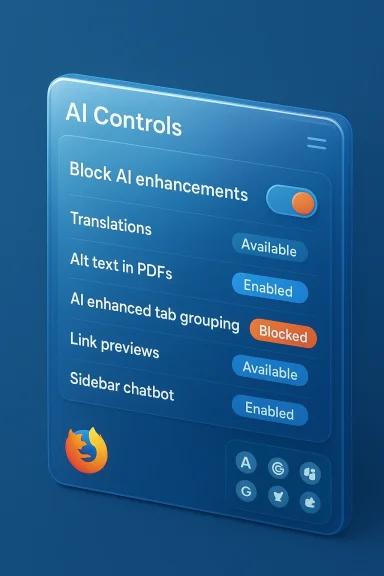
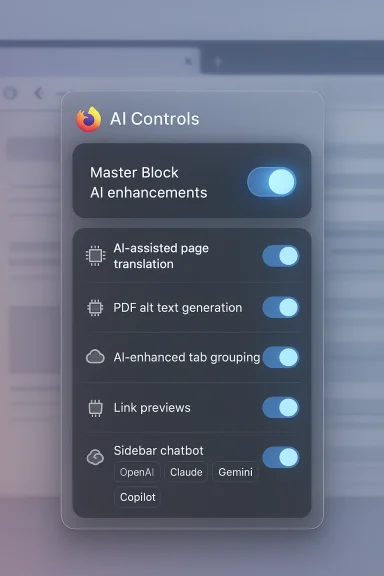
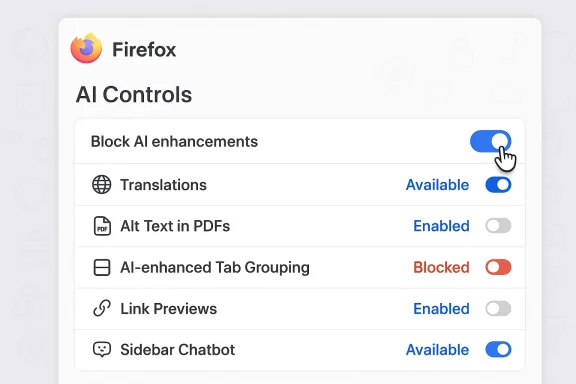
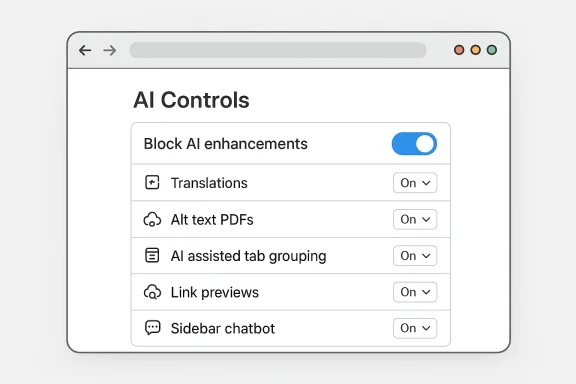
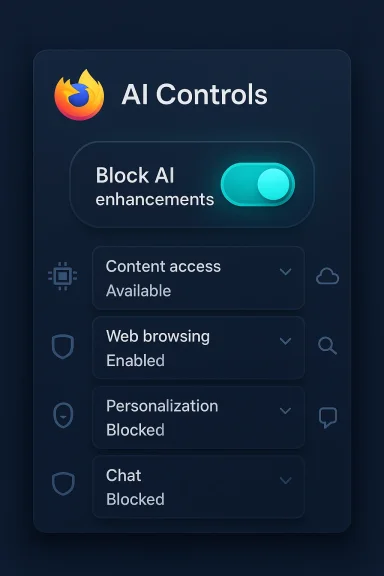
Mozilla has given users a one-click way to tell the AI revolution to stay out of their browser: starting with Firefox 148, rolling out February 24, the desktop browser adds an AI Controls panel with a single “Block AI enhancements” master switch that disables current and future generative AI features and suppresses promotional entry points across the UI.
Mozilla’s shift reflects a strategic bet: as major browser vendors race to weave generative AI into search bars, sidebars, and system-level assistants, Firefox is doubling down on choice — letting users decide whether they want AI at all, or only specific AI tools. The change is tied to broader leadership messaging at Mozilla that places agency, transparency, and simple controls at the center of product design. Under the company’s recent leadership statements, Mozilla committed to making AI optional, understandable, and controllable. That pledge is now embodied in the AI Controls interface arriving in Firefox 148.
This new control panel is a reaction to two simultaneous forces: growing user skepticism about opaque AI features, and persistent competitive pressure to add AI-powered conveniences. Mozilla appears to be positioning Firefox as the browser that gives users the final say — whether they want full AI on their terms, selective features, or no AI at all.
For chatbots and other server-backed AI features, the browser acts primarily as a client: it provides the UI and connectivity to a chosen provider, but actual model inference and storage of conversation data are handled by the provider. This means blocking AI features in Firefox may hide the UI and suppress calls to those providers, but it does not alter the provider’s own privacy model if a user later chooses to connect.
Yet the move comes with trade-offs. It increases engineering complexity, creates potential perception risk if not implemented transparently, and does not eliminate all sources of AI interaction (notably third-party extensions and external websites). Enterprise customers should be cautious and seek policy-based management if they need organization-wide guarantees. Power users should note that mobile parity and extension behavior are still areas to watch.
Ultimately, this change reframes a core question for browsers in 2026: will user control and trust become the competitive differentiator, or will seamless AI conveniences win by default? Mozilla’s answer is clear: make AI optional, obvious, and revocable — and give users the right to say no. For a significant portion of the web audience that has been vocal about AI fatigue, that promise may be exactly what keeps them loyal to Firefox.
Source: The Tech Buzz https://www.techbuzz.ai/articles/firefox-lets-users-block-all-ai-features-in-privacy-push/
 Background
Mozilla’s shift reflects a strategic bet: as major browser vendors race to weave generative AI into search bars, sidebars, and system-level assistants, Firefox is doubling down on choice — letting users decide whether they want AI at all, or only specific AI tools. The change is tied to broader leadership messaging at Mozilla that places agency, transparency, and simple controls at the center of product design. Under the company’s recent leadership statements, Mozilla committed to making AI optional, understandable, and controllable. That pledge is now embodied in the AI Controls interface arriving in Firefox 148.This new control panel is a reaction to two simultaneous forces: growing user skepticism about opaque AI features, and persistent competitive pressure to add AI-powered conveniences. Mozilla appears to be positioning Firefox as the browser that gives users the final say — whether they want full AI on their terms, selective features, or no AI at all.
Overview of the AI Controls in Firefox 148
What the master switch does
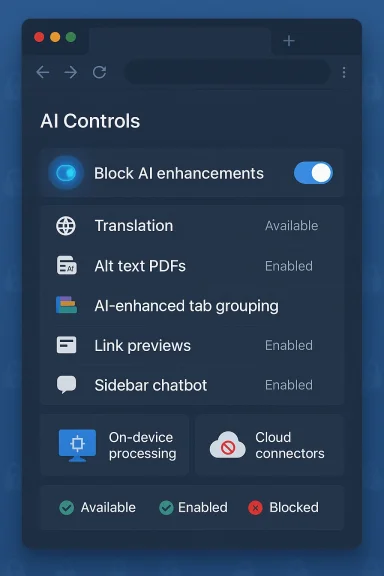
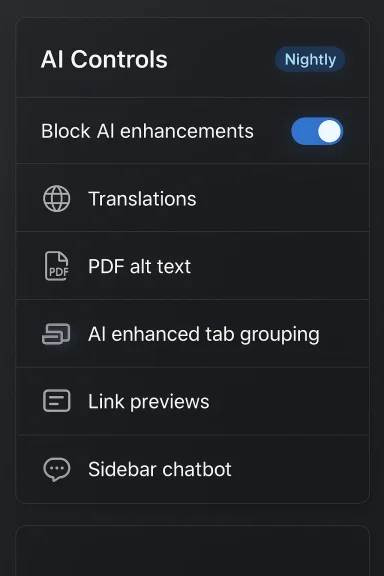
The new AI Controls panel provides two parallel modes of management:- A master “Block AI enhancements” toggle that, when enabled, prevents Firefox from showing pop-ups, reminders, or UI entry points for both existing and future generative-AI features.
- Granular controls that let users enable or disable individual AI capabilities, or set them to “Available,” “Enabled,” or “Blocked.”
Which AI features are covered at launch
At initial rollout, Firefox’s AI Controls let users manage these built-in features:- Translations — generative-AI-assisted page translation to browse in a preferred language.
- Alt text for images in PDFs — automatic descriptions generated for images embedded in PDFs to improve accessibility.
- AI-enhanced tab grouping — automated suggestions for grouping and naming tabs based on content relevance.
- Link previews / key points — short summaries or “key points” generated from a target page to help users decide whether to click a link.
- Sidebar chatbot — a dedicated AI chatbot panel in the Firefox sidebar that can connect to multiple providers (users can choose providers such as Anthropic Claude, ChatGPT, Microsoft Copilot, Google Gemini, and Le Chat Mistral).
How the feature behaves in practice
- When a feature is set to Blocked, its functionality is disabled and the browser removes UI entry points for that tool (for example, the chatbot button in the sidebar will not appear).
- When Block AI enhancements is turned on, Firefox suppresses promotional pop-ups and reminders for both current and upcoming AI features.
- For on-device AI features (small models that can be downloaded to the user’s machine), setting a feature to Blocked will remove any already-downloaded models.
- The Controls are persistent across browser updates: once you configure your AI preferences, they remain in effect until you change them.
Why this matters: privacy, control, and trust
A privacy-forward differentiation
Mozilla’s move is explicitly framed as a privacy- and trust-oriented design choice. By giving users an explicit, easy-to-find toggle that disables generative-AI features — and by distinguishing between on-device AI and cloud-based providers — Firefox signals that it takes user agency seriously. For privacy-conscious users, the ability to remove on-device AI model artifacts and to block browser-surface integrations with third-party chatbots can provide real reassurance.Transparency and discoverability
The Controls page centralizes AI settings that were previously scattered or surfaced in product prompts. That simplifies discoverability: users who care about AI settings no longer have to hunt through multiple menus or decipher small toggles buried in unrelated settings pages. This is a usability win for users who want to tailor the browser to a specific privacy posture.Trust vs. feature-led growth
Mozilla’s approach is a clear contrast with competitors that often fold AI features into default experiences. By making AI an opt-in (or opt-out) experience with a prominent kill switch, Mozilla is staking a brand positioning claim: trust through choice. That may resonate with users who fled mainstream browsers precisely because they disliked default AI invasions.Technical design and limitations
On-device vs. cloud processing
Firefox’s AI architecture is intentionally mixed: some features use on-device models, while others rely on external chatbots hosted by third-party providers. On-device models reduce the amount of user data leaving the device and can offer faster, offline-capable experiences. Firefox’s Controls page labels and groups on-device features separately and explicitly states that models downloaded for on-device features are removed when blocked.For chatbots and other server-backed AI features, the browser acts primarily as a client: it provides the UI and connectivity to a chosen provider, but actual model inference and storage of conversation data are handled by the provider. This means blocking AI features in Firefox may hide the UI and suppress calls to those providers, but it does not alter the provider’s own privacy model if a user later chooses to connect.
Extensions and the kill switch
A notable nuance: the master Block AI enhancements toggle is intended to block AI features provided by Firefox and to remove UI and on-device artifacts for those features. It does not — and cannot technically — prevent third-party extensions from contacting external AI services independently of Firefox’s own AI stack. Mozilla’s documentation clarifies this distinction: extensions that use AI services outside of Firefox’s own AI plumbing can continue to operate unless they specifically integrate with Firefox’s built-in features.Persistence and update behavior
Firefox’s AI preferences are designed to persist across updates, meaning once configured, they remain in place even as Mozilla ships new versions. For enterprises and power users this persistence provides stability: one-time choice that withstands automatic updates.What’s not covered (yet)
- Mobile support: the new AI Controls are introduced in the desktop browser settings. Mobile browsers are not explicitly listed as covered at launch, so mobile Firefox users should expect different behavior until and unless similar controls are added to Android and iOS versions.
- Enterprise policy endpoints: Mozilla’s enterprise/IT policy management integrations for centralized blocking of AI features are not yet widely documented. Administrators should look for policy updates as corporate adoption scenarios emerge; at the time of launch, organizations may need to rely on local configuration or group policy workarounds.
UX implications: helpful AI vs. unwanted noise
Where AI actually helps
Not all AI is hype; some of these features solve real problems:- Automatic translations remove language friction and are useful when browsing international content.
- Alt text generation in PDFs improves accessibility for screen reader users and for document sharing scenarios.
- AI-enhanced tab grouping can reduce cognitive load for people who juggle many windows and tabs.
- Link previews help users triage links without losing browsing context.
Where AI becomes an annoyance
The problems users are reacting to are not purely theoretical. Common annoyance patterns include:- Persistent promotional chrome encouraging users to try new AI features they explicitly do not want.
- Auto-installed artifacts such as on-device model downloads that consume storage even if a user only experimented with a feature once.
- Default exposures that turn optional features into effectively mandatory UX changes, like permanently visible sidebars or pinned chatbot buttons.
Strategic and market implications
Differentiation in a crowded field
As Google embeds Gemini deeper into Chrome and search, and Microsoft continues a Copilot-first strategy across Windows and Edge, Mozilla is carving out a privacy-first differentiation. The gamble: there’s a non-trivial user base that actively dislikes the default proliferation of AI features and will prefer a browser that treats AI as an explicit, revocable choice.Risks for Mozilla
- Missing the AI convenience market: Users who value AI-powered productivity may migrate to browsers where AI is more tightly integrated and enabled by default, potentially reducing Mozilla’s appeal to those segments.
- Developer burden: Supporting both AI-first and AI-off user experiences increases product complexity — more UI surfaces, more conditional logic, and more support scenarios to test.
- Perception vs. reality: If users perceive the kill switch as cosmetic (i.e., it hides UI but doesn’t stop data flows), Mozilla risks damaging trust. The implementation needs to be both technically and communicatively convincing.
- Extension ecosystem friction: Because third-party extensions can independently use AI services, power users or admins may experience inconsistent enforcement of their AI preferences unless extensions explicitly respect the browser-wide setting.
Opportunities for Mozilla
- Reclaiming lapsed users: Former Firefox users who left because of perceived bloat or telemetry may find the explicit AI opt-out an attractive reason to return.
- Regulatory goodwill: Regulators focused on transparency and user consent may view Mozilla’s approach favorably compared with vendors that rely on implied consent.
- A new privacy product narrative: Framing Firefox as the “AI-optional” browser gives Mozilla a clearer story to tell enterprise and consumer audiences concerned about opaque AI behaviors.
Practical guide: how to use the AI Controls
- Open Firefox on desktop.
- Go to Menu > Settings and find the new AI Controls section, or load the AI Controls preferences directly.
- To disable all Firefox-provided generative AI: toggle Block AI enhancements to On.
- To manage features individually:
- Expand each AI feature row (Translations, Alt text in PDFs, Tab group suggestions, Key points in link previews, Sidebar chatbot).
- Choose between Available, Enabled, or Blocked depending on whether you want the feature visible, actively enabled, or fully disabled.
- For the sidebar chatbot, pick your preferred provider if you want to use it; otherwise set it to Blocked to remove it entirely.
- Restart the browser if prompted; on-device models for blocked features will be removed automatically.
Security, bias, and reliability considerations
Hallucinations and misinformation
Generative AI summaries and link previews are convenient but imperfect. Summaries can hallucinate facts or present contested information with unjustified certainty. When such features are disabled you remove both convenience and this class of risk. Users who rely on machine-generated summaries for research, medical, or financial decisions should exercise caution and prefer primary sources.Data leakage through providers
Sidebar chatbots that connect to remote providers inevitably expose user prompts to those services. Even if the browser suppresses prompts, choosing to enable a chatbot later will transmit text to the provider under that provider’s terms. Users and organizations should assume that any query sent to a third-party chatbot is subject to that provider’s data retention and usage policies unless explicitly stated otherwise.Attack surface and safety
Integrations that fetch page content to summarize or to generate alt text enlarge the browser’s attack surface: maliciously crafted pages could try to exploit flaws in summarization parsers or in the way content is extracted. Keeping an auditable kill switch and being able to disable automatic content extraction features reduces exposure to such attacks.What’s unclear and what to watch
- Enterprise management: Formal enterprise policies for centralized control of AI features (e.g., Group Policy or MDM profiles) were not fully documented at launch. IT administrators should monitor Mozilla’s enterprise policy updates.
- Mobile parity: The desktop-first rollout leaves questions about when and how Android and iOS builds will support the same master switch semantics.
- Third-party extension compliance: Whether extension authors will adopt a standard to respect the browser-wide AI block remains an open ecosystem question. Extension store governance and permissions may evolve to address this.
- Future feature taxonomy: As Mozilla develops additional AI features, how they will be categorized (on-device vs. cloud, optional vs. integrated) and how granular controls will scale remains to be seen.
Verdict: a pragmatic, user-first counterpoint — with caveats
Mozilla’s AI Controls in Firefox 148 are a deliberate, pragmatic response to a polarized marketplace. The master toggle and granular controls provide a level of user agency that many other browser vendors have not rushed to offer. For privacy-conscious and control-oriented users, this may be a major selling point: the ability to nuke AI features and promotional prompts with one action is a simple, powerful value proposition.Yet the move comes with trade-offs. It increases engineering complexity, creates potential perception risk if not implemented transparently, and does not eliminate all sources of AI interaction (notably third-party extensions and external websites). Enterprise customers should be cautious and seek policy-based management if they need organization-wide guarantees. Power users should note that mobile parity and extension behavior are still areas to watch.
Ultimately, this change reframes a core question for browsers in 2026: will user control and trust become the competitive differentiator, or will seamless AI conveniences win by default? Mozilla’s answer is clear: make AI optional, obvious, and revocable — and give users the right to say no. For a significant portion of the web audience that has been vocal about AI fatigue, that promise may be exactly what keeps them loyal to Firefox.
Source: The Tech Buzz https://www.techbuzz.ai/articles/firefox-lets-users-block-all-ai-features-in-privacy-push/