

Google’s Free Tier Is Generous Until the Camera Roll Arrives
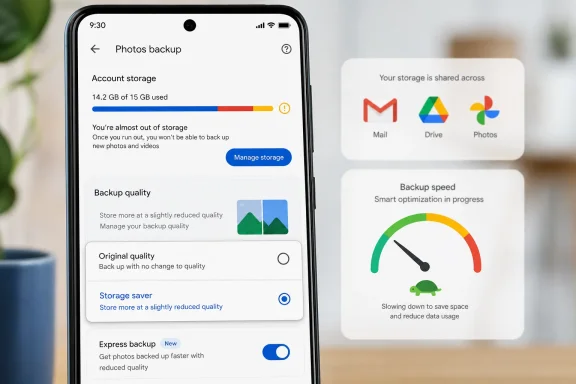
Every standard Google account includes 15GB of storage shared across Gmail, Google Drive, and Google Photos. That sounds workable on paper because most users do not think of email attachments, phone photos, screenshots, WhatsApp images, Drive documents, and videos as one pooled resource. Google does.
The Android Police piece captures a familiar modern annoyance: the user is not necessarily a cloud-storage minimalist, just someone who refuses to pay twice. Microsoft 365 already includes 1TB of OneDrive storage, so using Google’s 15GB for everything would be wasteful. The problem is that Google Photos is so convenient on Android that it quietly becomes the default archive even for people who have larger storage elsewhere.
That convenience is the trap. Google Photos is not merely a gallery app; it is a background ingestion engine for every image and video your phone produces. Once backup is enabled, the app turns casual photography into recurring cloud consumption.
For WindowsForum readers, the dynamic will feel familiar. Microsoft, Google, Apple, and Samsung all sell ecosystems in which the default path is the path of least resistance. The user may believe they are making storage decisions file by file, but the operating system and bundled apps are making a broader architectural decision: where your personal data lands first.
The Real Villain Is the Default
Google Photos offers several backup quality options. Original quality stores photos and videos without reducing them, while Storage saver compresses large photos down to a maximum of 16MP and videos to HD. Express is more aggressive, compressing photos to 3MP and videos to standard definition, where available.
The user in the Android Police article solved the storage problem by switching to Express. That is a blunt instrument, but it is a rational one for a particular kind of archive. If most images are receipts, parking signs, screenshots, throwaway social photos, and “just in case” memories, preserving every pixel is less important than preserving the fact that the image exists and can be searched later.
Google’s default, however, pushes many users toward Original quality. That default flatters the phone camera and protects Google from accusations that it degraded someone’s memories. But it also means users with modest free storage can burn through quota with shocking speed, especially when modern phones produce large image files and very large video files.
The frustrating part is not that Google offers Original quality. It should. The frustrating part is that a storage-sensitive user can enable backup without being forced to make a deliberate trade-off between fidelity and quota.
A setup flow that says “Back up my photos” is not the same as one that says “Back up my photos at full quality and spend my limited account storage faster.” The second version is less elegant, but it is more honest.
The 2021 Shift Still Defines the Product
Google Photos used to be famous for its free unlimited “High quality” backups. That era ended for most users on June 1, 2021, when new compressed uploads began counting against account storage. The terminology also shifted: “High quality” became “Storage saver,” which was more accurate but less magical.
That change still haunts Google Photos. Many longtime users remember the service as a nearly frictionless photo vault. Newer users encounter a more conventional storage product, where uploads compete with email and Drive files and where Google One upgrades are always waiting in the background.
The result is a product that feels like it is still wearing the clothes of its old business model. Google Photos remains wonderfully automatic, searchable, and low-effort. But the economics behind that automation have changed, and the app’s settings have not become obvious enough to match the new reality.
This is why a single backup-quality toggle can feel like a revelation. It is not because compression is new. It is because the app’s most important economic control is treated like a preference rather than a first-run decision.
Compression Is a Compromise, Not a Scam
There is a predictable purist reaction to using Express: why take high-quality photos only to crush them into smaller files? It is a fair question, especially for anyone who edits photos, prints them, crops aggressively, or treats the phone as the family’s main camera.
But not every backed-up image deserves archival treatment. A cloud library is usually a messy mixture of keepsakes and digital lint. The same camera roll may contain a child’s birthday, a blurry restaurant menu, a screenshot of a QR code, a serial number on a router, and ten near-identical pictures of a parking spot.
The smarter workflow is not necessarily “everything in Original quality” or “everything compressed.” It is tiered storage. Keep the irreplaceable images in original form somewhere with enough capacity, and let Google Photos handle the searchable, everyday backup layer at a lower quality.
That is exactly the strategy described in the source article. Original-quality keepers go to OneDrive, backed by the 1TB allocation bundled with Microsoft 365. Google Photos becomes the convenient Android backup tool for the rest.
This approach may offend the all-in-one cloud ideal, but it fits how people actually use devices. One service is good at frictionless phone backup and image search. Another service may be better aligned with a paid storage plan, Windows integration, or family document workflows. The user does not owe either vendor exclusive loyalty.
OneDrive Wins on Capacity, Google Photos Wins on Friction
Microsoft 365’s 1TB of OneDrive storage changes the calculation for anyone already paying for Office apps. From a raw capacity standpoint, it dwarfs Google’s free 15GB tier. For Windows users, it also sits naturally inside File Explorer, Office, and the broader Microsoft account experience.
Yet Google Photos often wins the behavioral battle on Android. It is already there, it understands the camera roll, and its backup process feels native. The Photos app is not asking the user to think like a file manager; it is asking them to keep living their life while the app quietly copies the evidence.
That is where Microsoft still struggles. OneDrive can back up mobile photos, and for Microsoft 365 subscribers it may be the more sensible long-term repository. But Google Photos has trained Android users to expect a gallery-first experience rather than a drive-first experience.
For IT pros, this distinction matters. Users do not choose cloud storage based only on quota tables. They choose it based on which prompt appears at the right moment, which app already has access to the camera roll, and which service makes recovery feel effortless.
In enterprise language, Google Photos has better user adoption mechanics. OneDrive may have better storage economics for some households. The practical answer is often to use both, but intentionally.
The Setting Is Too Important to Be This Buried
The path to changing backup quality is not impossible, but it is more obscure than it should be. In the Google Photos mobile app, users generally need to tap their profile image, open Photos settings, go into Backup, and then find the photo and video quality option. Only there can they switch from Original quality to Storage saver or Express.
That is a lot of navigation for a setting that controls whether a free account survives the year. It is also a setting whose consequences are hard to understand after the fact. Once storage is full, users often respond by deleting files, clearing email, or manually reviewing old photos, when the more effective intervention may have been changing future backup behavior months earlier.
Google deserves credit for offering the options. But surfacing them after backup is enabled is not enough. A user turning on backup should be asked to choose a storage policy in plain language before the upload engine starts doing its work.
The options do not need to be frightening. They need to be legible. “Best quality, uses more storage,” “Good quality, uses less storage,” and “Smallest backup, saves the most space” would communicate the trade-off more clearly than the current maze of settings pages and brand vocabulary.
The industry has learned this lesson in security, where permission prompts and default protections increasingly shape outcomes. Storage deserves the same treatment. A default backup quality is not a cosmetic preference; it is a recurring financial and data-retention decision.
The Free Cloud Is Now a Funnel
The broader pattern is hard to miss. Free cloud tiers are no longer just perks; they are onboarding ramps. Google’s 15GB tier is useful enough to get users invested, but constrained enough that normal behavior eventually creates pressure to upgrade.
There is nothing inherently sinister about that. Cloud storage costs money, and consumers have grown used to treating remote backup as an entitlement. The issue is transparency. If a vendor designs a service so that the default behavior steadily consumes quota, the storage meter becomes part of the product’s monetization machinery.
Google One is the obvious release valve. When Photos, Gmail, and Drive together exceed the free allocation, the upgrade path is simple. For many users, paying is reasonable. For others, especially those already paying Microsoft or Apple for storage, it is duplication.
That is why the backup-quality setting matters beyond Google Photos. It gives users a way to resist subscription creep without abandoning backup entirely. It lets them say: this service is useful, but it does not get to become my primary paid storage plan by accident.
This is the kind of small setting that has large economic consequences. It decides whether the free tier functions as a long-term utility or merely as a countdown clock.
Quality Anxiety Keeps Users From Making the Sensible Choice
Many people leave Original quality enabled because they fear regret. Photos are emotionally loaded. Nobody wants to discover years later that a treasured image was compressed too aggressively or a video was reduced to a muddy artifact.
That fear is legitimate, but it often leads to an irrational all-or-nothing policy. The right response is not to preserve every screenshot as if it were a wedding portrait. The right response is to decide which categories of media deserve original treatment and which only need recoverable, searchable backup.
Storage saver is the middle path for many users. It retains more detail than Express and is likely to be good enough for everyday viewing, sharing, and many casual prints. Express is more extreme, but it can be perfectly adequate for people who use Google Photos as a safety net rather than a master archive.
The more interesting point is that Google Photos does not make this distinction central. It treats backup quality as a single account-level behavior, while real photo libraries are heterogeneous. A more user-friendly system would make it easier to mark certain albums, faces, dates, or device folders for original-quality backup while compressing the rest.
That would align with the way people think. Vacation photos, family events, scanned documents, and random screenshots do not carry equal value. A smart cloud service should understand that without requiring users to become archivists.
Windows Users Should Treat Photo Backup Like Any Other Backup Plan
The lesson for WindowsForum readers is not simply “turn on Express.” That may be too aggressive for many people. The lesson is to stop treating phone photo backup as a magical consumer feature and start treating it like a backup policy.
A good backup policy distinguishes between primary copies, secondary copies, and convenience copies. Google Photos may be the convenience copy: searchable, automatic, and always nearby. OneDrive may be the larger secondary copy, especially for Microsoft 365 subscribers. A local NAS, external SSD, or periodic PC archive may be the durable offline layer.
This is not overkill. Photos and videos are now among the most important personal data most users own. They are also created on devices that are easily lost, stolen, broken, or traded in. Depending on a single consumer cloud service, especially one constrained by a small free tier, is a fragile strategy.
The Android Police author mentions the possibility of building a local backup if Google Photos stops being workable. That instinct is sound. Local backup is not as glamorous as AI search or automatic memories, but it provides something cloud services often do not: independence from subscription changes, account lockouts, quota rules, and product redesigns.
The best setup is boring. Boring is good. Boring means your photos exist in more than one place, under more than one company’s policy regime.
The Smart Move Is to Audit Before the Meter Turns Red
The worst time to design a storage strategy is when the account is already full. At that point, every action feels punitive. Delete old email. Remove large videos. Buy more storage. Empty trash. Repeat.
A better approach is to audit the backup settings while there is still breathing room. Check whether Google Photos is using Original quality, Storage saver, or Express. Look at which device folders are being backed up. Decide whether screenshots, downloads, messaging-app media, and screen recordings belong in the same cloud library as camera photos.
Videos deserve special attention. A few long clips can consume more storage than hundreds of photos. Users who rarely watch old videos but automatically back them up in original form may be spending most of their quota on files they barely value.
The same goes for burst photos, duplicates, and accidental captures. Google Photos has management tools, but prevention beats cleanup. A lower backup quality setting will not solve every storage problem, yet it changes the slope of the line.
That is the quiet victory described in the source article. The user did not gain more storage. They changed the rate at which ordinary behavior consumed the storage they already had.
Google Should Make the Trade-Off Unmissable
There is a product-design fix here, and it is not complicated. When a user turns on Google Photos backup, the app should require a backup quality choice before proceeding. It should explain the consequences in storage terms, not just image-quality terms.
The app should also periodically remind users when their behavior and settings are mismatched. If an account has less than a few gigabytes remaining and Photos is backing up in Original quality, a prompt should suggest Storage saver before the account hits the wall. If a user frequently marks photos as favorites or creates albums, Google could offer to preserve those at higher quality while compressing the rest.
This would not eliminate Google One upgrades. Some users need more storage and should pay for it. But it would make the upgrade feel like an informed decision rather than the consequence of a default most people never consciously selected.
Google has the engineering talent to do this. The harder question is whether it has the incentive. A more visible storage-saving path may reduce conversion pressure. But it would also build trust, and trust is becoming scarcer as every platform vendor pushes deeper into subscription territory.
The best consumer software respects the user’s future self. It does not wait until the meter is full to reveal the lever that could have slowed everything down.
The Small Toggle That Changes the Cloud Bill
The practical lesson is refreshingly concrete: one Google Photos setting can change the economics of a free Google account. It will not make 15GB feel infinite, and it will not replace a serious backup plan. But it can turn Google Photos from the main culprit in storage exhaustion into a manageable convenience layer.
- Changing Google Photos from Original quality to Storage saver or Express can significantly slow how quickly backups consume Google’s free 15GB account storage.
- Storage saver is the safer compromise for many users because it preserves more usable quality than Express while still reducing file size.
- Express is best treated as a convenience-backup mode for low-priority photos, screenshots, and everyday images where detail matters less than availability.
- Microsoft 365 subscribers should consider whether OneDrive’s 1TB allocation is a better home for original-quality keepers.
- Users should check video backup behavior, device folders, and screenshots because those categories often consume storage faster than expected.
- A local backup remains the best hedge against cloud quota changes, account problems, and subscription fatigue.
The cloud-storage fight is not really about whether Google gives away enough gigabytes. It is about whether users understand the defaults that convert daily life into recurring storage demand. Google Photos remains one of the best photo backup tools on Android, but its most important setting should not feel like a secret discovered after the quota warning arrives. The future of personal backup will belong to users who treat cloud services as tools rather than homes — and to vendors willing to make the cost of convenience visible before the bill comes due.
References
- I stopped hitting cloud storage limits for good by changing this Google Photos option Android Police · 2026-06-21T10:12:10.569066
- support.google.com support.google.com