

FlyOOBE’s 2.0.770 release is the clearest statement yet of how a small, community-driven utility has matured from a single-purpose installer bypass into a full Out‑of‑Box Experience (OOBE) orchestration suite — but that polish arrives with important caveats about security, update reliability, and the limits of what software can realistically “fix” for unsupported hardware.
FlyOOBE (formerly Flyby11) began life as a compact bypass utility that automated widely-known installer workarounds so Windows 11 could be installed on machines Microsoft deems “unsupported.” Over multiple releases the project absorbed OOBE customization, debloat tooling, and scriptable extensions, recasting the effort as a one‑stop toolkit for technicians, refurbishers, and privacy-minded home users who want a controlled first‑boot experience. This evolution is documented across the project repository and the community writeups that track the tool’s steady expansion from bypass-only to OOBE orchestration. The newly announced FlyOOBE 2.0.770 keeps that trajectory going: the release is primarily a UI and architecture refresh that promises faster, more discoverable OOBE pages, a reworked extensions engine, improved asynchronous processing to avoid UI hangs, and an activity monitor that logs actions in real time. These changes are aimed at making the app both more approachable for casual users and more robust for technicians who run repeat installs.
For refurbishers, tinkerers, and power users who accept the tradeoffs, FlyOOBE 2.0.770 offers a polished, consolidated toolkit that reduces the friction of first boot and can meaningfully speed repeat deployments. For corporate and security‑sensitive environments, the tool highlights why hardware requirements exist and why vendor-backed solutions remain the recommended path.
Ultimately, FlyOOBE’s 2.0 release is both a useful evolution and a sober reminder: clever software can widen the life of older hardware and improve initial UX, but it cannot fully replace the assurances that hardware-backed security features and vendor support provide. Use it wisely, verify the build, and keep a tested plan to restore and recover if anything goes wrong.
Source: Neowin FlyOOBE 2.0.770
 Background / Overview
FlyOOBE (formerly Flyby11) began life as a compact bypass utility that automated widely-known installer workarounds so Windows 11 could be installed on machines Microsoft deems “unsupported.” Over multiple releases the project absorbed OOBE customization, debloat tooling, and scriptable extensions, recasting the effort as a one‑stop toolkit for technicians, refurbishers, and privacy-minded home users who want a controlled first‑boot experience. This evolution is documented across the project repository and the community writeups that track the tool’s steady expansion from bypass-only to OOBE orchestration. The newly announced FlyOOBE 2.0.770 keeps that trajectory going: the release is primarily a UI and architecture refresh that promises faster, more discoverable OOBE pages, a reworked extensions engine, improved asynchronous processing to avoid UI hangs, and an activity monitor that logs actions in real time. These changes are aimed at making the app both more approachable for casual users and more robust for technicians who run repeat installs. What FlyOOBE actually does
The core capabilities (concise)
- Bypasses common Windows 11 installer gates — TPM checks, Secure Boot enforcement, some CPU‑generation appraisals, and minimum RAM gating — by steering Setup through alternate, community-documented paths or by setting setup-time flags. These are not kernel exploits; they are alternate installer routes and registry/workaround automation.
- OOBE customization and automation — removes forced Microsoft account flows, bypasses network/region gating during first boot, sets privacy/personalization defaults, and presents debloat choices during OOBE so the first sign‑in is already tuned.
- Debloat and provisioning — curated profiles for removing built‑in apps, and PowerShell extension hooks that can run during or immediately after setup to install drivers, apps, or apply policies.
- Media and provider helpers — integrations and helpers for downloading/mounting official ISOs (Fido scripts), Media Creation Tool, and USB helpers such as Rufus/Ventoy; options to run Setup from an ISO or patch a USB installer.
How the bypass works (technical primer)
Two pragmatic, auditable approaches power the bypass capability:- Server‑variant setup routing — invoking a Windows Server installer code path that historically performs fewer client-side compatibility checks, which allows the client Windows 11 image to proceed past gates that the retail client enforces. This is an installer-routing trick rather than an exploitation of Windows internals.
- LabConfig / registry edits and light media edits — when upgrading in place, Setup checks small configuration flags (the so‑called LabConfig or AllowUpgradesWithUnsupported* flags). Tools can set those keys or neutralize the appraiser via small media/registry edits so Setup ignores some checks. FlyOOBE automates these edits to reduce manual error.
What’s new in FlyOOBE 2.0.770 (verified summary)
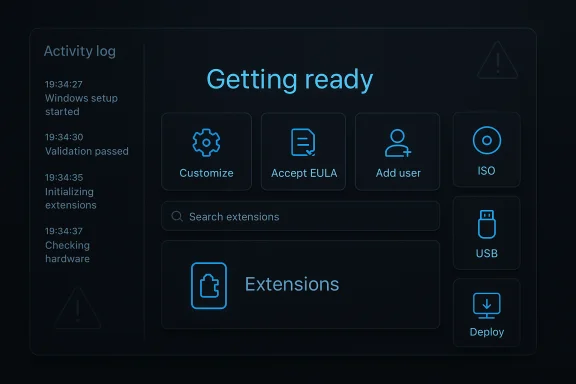
The 2.0.770 release is marketed as the 2.0 milestone and centers on interface modernization and platform refactoring rather than brand‑new bypass techniques. The headline items in the official release notes and the project announcement include:- Modernized, simplified interface — a cleaner, less overwhelming UI designed to lower the cognitive load for first-time or casual users.
- Performance improvements — faster, more responsive app behaviors with reduced loading times and better resource management.
- Completely reworked extensions engine — new internal filtering, category dropdowns, improved search and discoverability for extensions and OOBE pages.
- Centralized Home dashboard — contextual recommendations and keyword-tagged discoverability for pages and extensions.
- Asynchronous processing and a full back navigation stack — major refactor so search, filtering, and loading don’t hang the UI and navigation can be rewound like a browser history.
- Uninstallable built-in extensions and a native activity monitor — shipped extensions can be removed and actions are now logged in real time for easier debugging and contextual help.
- UI scaling and high‑DPI clarity improvements and numerous minor fixes and quality-of-life changes.
Cross-checks and verification
Key product claims used in reporting and user guidance were cross‑checked across multiple independent sources:- The official GitHub release confirms the 2.0.770 tag, the release notes text, and the developer’s signed commit for the release. The release page explicitly calls out the 2.0 milestone and the UI/engine refactors.
- Independent community coverage and historical release notes corroborate the tool’s core mechanics (server‑variant routing and LabConfig edits), OOBE focus, and the split between classic Flyby11 (minimal upgrade tool) and FlyOOBE (full OOBE toolkit).
- Security advisories and reporting from mainstream outlets have also flagged real-world risks: recent coverage warns that unofficial mirrors and fake sites are distributing trojanized or tampered versions of FlyOOBE, and the project’s official pages carry explicit warnings to only download from the GitHub repository. These warnings are real and active; treat them as high-priority operational guidance.
Practical security and operational risks — what to watch for
FlyOOBE performs actions at setup time that have downstream implications for security, updates, and device posture. Administrators and power users must weigh tradeoffs carefully.- Supply‑chain and tampering risk — A real and pressing danger is fake/malicious copies. Attackers have created trojanized mirrors and fake websites purporting to be official. The GitHub repository and mainstream reporting both warn that you must download only from the project’s official release assets and verify signatures/hashes. Failure to do so can result in malware infections or backdoors on freshly-installed machines.
- No Microsoft support for unsupported installs — Machines that are upgraded outside Microsoft’s supported path may be ineligible for certain updates or guarantees. Microsoft’s policy means you assume a support burden and potential stability/compatibility risk after upgrade. FlyOOBE cannot grant vendor support or hardware-backed security assurances.
- Security posture changes — Bypassing TPM and Secure Boot checks is a workaround, not a substitute for the hardware‑rooted cryptographic protections those features provide. Systems that install without a hardware TPM or with Secure Boot disabled will not have the same cryptographic guarantees for firmware attestation, BitLocker key protection, or some secure runtime features. This has real implications for security-sensitive deployments.
- Update fragility over time — Microsoft may change installer behavior, appraiser checks, or update mechanisms in ways that could break a previously working unsupported install. Even if Windows Update continues to deliver monthly patches, there’s no guarantee that major feature updates or future compatibility enforcement won’t fail on patched systems. FlyOOBE users should expect to revalidate workflows periodically.
- Potential for misconfiguration and automation risk — The tool’s scriptable extensions are powerful but can introduce risk if poorly written. Running unknown or community extensions without review increases the chance of destructive actions (unintended package removal, registry edits, or telemetry toggles that break apps). Review and sandbox any extension before rolling into production.
Safe practices and operational checklist
For anyone considering FlyOOBE in a lab, refurbishing shop, or for a single‑machine upgrade, follow these steps to minimize risk:- Download only from the official project page on GitHub. Verify that the release tag and commit are GPG‑signed where available. The project’s release page includes a verified commit signature for 2.0.770 — use it.
- Check checksums: validate the asset SHA‑256 (or other provided hashes) against the values published on the release page. If no hash is published, treat the binary with increased skepticism and consider using the source to build locally.
- Test in an isolated lab first: perform a full backup or image of the target system, and run the upgrade in a VM or on a disposable device before applying to production hardware.
- Review extensions and scripts before executing them; treat community extensions as untrusted code until reviewed. Prefer building your own PowerShell hooks if you need deterministic provisioning.
- Maintain a recovery plan: know how to restore to the prior OS image, and keep a recovery USB or install media that you control. FlyOOBE can operate from USB, so keep a clean rescue stick handy.
- Consider device role: for machines that must maintain enterprise-grade security (BitLocker with TPM, Windows Hello for Business, corporate compliance), do not treat unsupported installs as a drop-in replacement. For lab, hobbyist, or refurbisher use-cases, the tradeoffs may be acceptable.
Alternatives and complementary tools
- Rufus — can create modified installer media and has options to bypass some checks when building USB installers. It is widely used and well-documented.
- Manual LabConfig edits — the registry keys and media tricks FlyOOBE automates can also be applied manually by knowledgeable administrators; FlyOOBE simply packages the steps into a GUI.
- Official approaches — where possible, consider using supported hardware upgrade options or Microsoft’s extended servicing options. In enterprise contexts, evaluate the risk vs cost of replacing hardware vs managing unsupported systems.
The security incident to note (urgent)
In November 2025, multiple outlets and the project’s own GitHub page warned that malicious actors have created counterfeit distribution sites offering trojanized FlyOOBE binaries. The official repository explicitly warns users to not download from certain mirror domains and to use the GitHub Releases page only. This is not hypothetical: mainstream reporting and the project developer’s warnings are consistent on this point. Downloading from unofficial mirrors is a high‑probability path to compromise. Verify signatures and hashes, and avoid third‑party rehosts.For system administrators and refurbishers: a risk-based recommendation
FlyOOBE is a well-engineered toolkit that packages useful, time-saving functionality for organizations that refurbish hardware or manage homelab fleets. Its strengths are clear:- Speed and repeatability — automated OOBE choices and extensions reduce per-device manual steps and improve throughput for repeated imaging tasks.
- User-facing convenience — local-account creation, default browser selection, and debloat profiles make the first boot predictable and reduce remediation work after imaging.
- Open-source transparency — the project is published on GitHub with release notes and signed commits, enabling code review and reproducibility.
- No vendor support for unsupported installations — this matters for warranty, long-term patching, and enterprise compliance.
- Security limitations — a machine that lacks TPM or Secure Boot cannot obtain the same hardware-rooted protections as one that has them; the software bypass cannot substitute for missing hardware.
- Supply‑chain risk — fake builds circulating online make it essential to adopt strict verification processes in shop floors and imaging pipelines.
Final analysis and conclusion
FlyOOBE 2.0.770 is a significant maturation of a community project that started as a pragmatic installer bypass. The release’s emphasis on UI clarity, extension discoverability, asynchronous processing, and real‑time activity logging makes the tool far more useful for repetitive deployments and less intimidating for non‑technical users. These are real usability wins that reflect thoughtful engineering. However, the project’s raison d’être — installing Windows 11 on hardware Microsoft deems unsupported — means it will always sit in a grey area of risk, supportability, and potential fragility. That reality was reinforced by active warnings about counterfeit downloads and the explicit limits of what software workarounds can accomplish (instruction‑set requirements, hardware-backed TPM protections). The work is useful and often well-executed for the right audience, but it demands conservative operational practices: download from the official source, verify signatures and hashes, test in an isolated lab, and maintain clear rollback and recovery plans.For refurbishers, tinkerers, and power users who accept the tradeoffs, FlyOOBE 2.0.770 offers a polished, consolidated toolkit that reduces the friction of first boot and can meaningfully speed repeat deployments. For corporate and security‑sensitive environments, the tool highlights why hardware requirements exist and why vendor-backed solutions remain the recommended path.
Ultimately, FlyOOBE’s 2.0 release is both a useful evolution and a sober reminder: clever software can widen the life of older hardware and improve initial UX, but it cannot fully replace the assurances that hardware-backed security features and vendor support provide. Use it wisely, verify the build, and keep a tested plan to restore and recover if anything goes wrong.
Source: Neowin FlyOOBE 2.0.770
