

FlyOOBE, a free open-source Windows utility from developer builtbybel, now offers a guided way to identify and disable many Windows 11 AI components, including Copilot-related experiences, through an “AI Experiences” workflow available from its GitHub release downloads. Microsoft’s problem is not that Windows has AI; it is that Windows increasingly assumes AI should be everywhere by default. The popularity of tools like FlyOOBE is a symptom of a deeper trust deficit between Redmond and the people who administer, repair, secure, and simply live with Windows PCs.
For decades, Windows bloat was a familiar nuisance: trialware, duplicated media apps, notification nags, sponsored tiles, and services that seemed designed less for users than for quarterly strategy decks. The AI era has changed the texture of that complaint. Copilot and related features are not just extra icons; they are tied to search, browsers, inbox apps, image tools, cloud services, and the broader direction of Microsoft’s platform.
That is why a small utility such as FlyOOBE can become news. It is not merely offering another checkbox for enthusiasts who like clean installs. It is giving form to a user demand Microsoft has been reluctant to satisfy cleanly: a way to say, “No, not on this machine.”
Microsoft would argue that Copilot, Paint image generation, Photos enhancements, Edge writing tools, and Copilot+ PC features are the next generation of personal computing. In some contexts, that case is plausible. A local summarizer, an accessibility tool, or a creative assist feature can be genuinely useful when it is transparent, controllable, and appropriate to the hardware.
The backlash begins when those features arrive as ambient platform furniture. Windows users are not rejecting every application of machine learning. They are rejecting the idea that an operating system should become an AI distribution channel before it becomes an accountable, consent-driven computing environment.
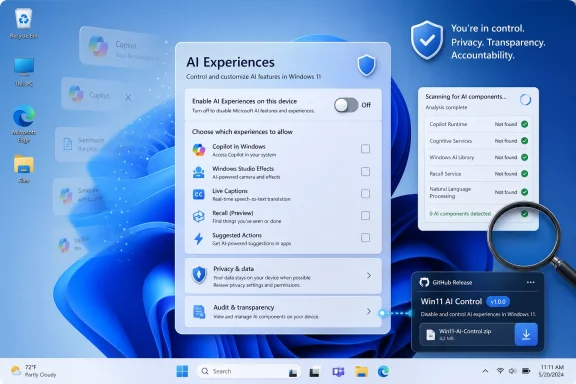
The AI-removal workflow described by The Star is straightforward enough for power users and cautious enough to avoid pretending Windows is a toy. Download the ZIP from the project’s GitHub releases, extract it, run the executable as administrator, open the “AI Experiences” card, scan the system, and choose which active or unset components to disable. The tool then runs its removal workflow, with the usual Windows caveat that administrative rights do not guarantee every subsystem will cooperate on the first pass.
That last point matters. FlyOOBE is not a magic wand, and anyone treating it as one is inviting trouble. If PowerShell stalls or Windows denies access, the article’s advice is to close the background PowerShell window, scan again, and repeat the deactivation pass for anything still present.
The practical appeal is obvious. Windows exposes some toggles, hides others, splits still more between Settings, Group Policy, registry keys, Store apps, Edge settings, and cloud-side behavior. FlyOOBE’s value is not that it invents the desire to remove AI features. Its value is that it centralizes the task in a way Microsoft itself has not.
A consumer may see a Copilot button and ignore it. A sysadmin sees a policy question. A privacy officer sees data-flow ambiguity. A help desk sees another feature that can generate screenshots, explanations, summaries, or user confusion. A security team sees a new class of software behavior to inventory, monitor, and explain to auditors.
This is the gap in Microsoft’s AI messaging. Redmond talks about productivity, creativity, and “experiences.” Administrators talk about default states, telemetry, identity boundaries, data retention, compliance posture, and whether a new feature can be removed without breaking servicing. Those are not anti-AI concerns. They are operating-system concerns.
Windows became dominant in business because it could be managed. It will lose patience in business when it feels managed at users rather than by administrators. The rise of tools such as FlyOOBE is less a rebellion against Copilot than a request for Windows to remember who owns the PC after the license is activated.
On current Windows 11 systems, users may encounter Copilot as a standalone app, a taskbar entry, a browser feature, an assistant inside Microsoft Edge, or a button inside applications such as Paint. Copilot+ PCs add another layer, because some features depend on neural processing hardware and local models rather than only cloud calls. “AI in Windows” is therefore not a single package with a single uninstall string.
That is why third-party removal tools are both useful and risky. They can pull together settings that Microsoft scatters across the system, but they may also rely on scripts, registry changes, package removals, or policy tweaks whose long-term behavior depends on Microsoft’s next update. A clean system today may become a rehydrated one after Patch Tuesday, a Store app refresh, or a feature update.
This dynamic is familiar to anyone who has fought Teams auto-installs, Edge defaults, or consumer experiences in Enterprise editions. Microsoft often moves faster than its own administrative story. The feature ships first, the backlash arrives second, and the durable management model comes later — if it comes at all.
Still, users are not wrong to be wary. Modern AI features often blur boundaries that older software respected more clearly. A writing assistant needs text. A summarizer needs documents or pages. A visual search feature needs images. A recall-style memory feature, even when locally processed and security-gated, asks users to accept that the operating system may observe far more of their activity than traditional utilities ever did.
The issue is accountability. Users want to know what is installed, what is running, what data is processed, where that processing occurs, and how to turn it off in a way that survives updates. Microsoft can answer some of those questions in documentation, but documentation is not the same as control.
FlyOOBE’s popularity indicates that people trust a visible checklist more than a product narrative. That is not necessarily rational in every individual case; a third-party tool can introduce its own risks. But it is politically rational in the broader Windows ecosystem. When the vendor’s incentives are to promote adoption, users go looking for a counterweight.
But there is a danger in treating that ecosystem as a substitute for first-party design. A GitHub utility is not a procurement policy. It is not a vendor-supported security baseline. It is not a promise that future Windows servicing will preserve the state it creates. For home users, that may be an acceptable trade. For enterprise fleets, it is a reminder that unofficial convenience and official support rarely occupy the same chair.
Running FlyOOBE as administrator means granting it serious power over the machine. The fact that it is open source helps, because code can be inspected and community trust can accumulate in public. But most users will not audit the code, and even skilled admins should test tools like this in a virtual machine or sacrificial test device before touching a daily driver or production image.
That caution does not invalidate the tool. It simply puts it in the right category. FlyOOBE is a scalpel for people who understand that Windows customization is surgery, not cosmetics.
This distinction is crucial. Microsoft can integrate AI deeply into Windows and still offer a sane off-ramp. It can build Copilot+ PC experiences and still allow administrators to deploy Windows without consumer-facing AI surfaces. It can make Paint more powerful without making every Paint user feel drafted into a platform experiment.
The company’s best version of this future would look less like a scavenger hunt and more like a supported configuration profile. During setup, Windows could ask whether the device should be configured for AI-enhanced consumer use, local-only AI features, enterprise-managed AI, or no AI experiences beyond required system components. In managed environments, those choices should map cleanly to Group Policy, Intune, provisioning packages, and documented PowerShell controls.
That would not satisfy everyone. Some users oppose AI features on ethical or environmental grounds and will prefer systems that never include them. Others simply want a quiet PC. But it would move the argument from coercion to configuration, which is where Windows has historically been strongest.
The out-of-box experience has become one of Microsoft’s most contested surfaces. Account requirements, OneDrive prompts, Edge nudges, recommended settings, diagnostic choices, ads, subscriptions, and now AI all meet the user before the desktop does. The first boot is no longer just setup; it is onboarding into Microsoft’s preferred services stack.
FlyOOBE’s name is apt because it targets that moment. It recognizes that the fight over Windows customization increasingly starts before the user has opened an app. If unwanted features arrive during setup, the countermeasure must also operate during or immediately after setup.
That is why the tool resonates with enthusiasts far beyond the narrow question of Copilot. It embodies a familiar WindowsForum instinct: the default Windows experience is Microsoft’s opinion, not destiny. For a certain kind of user, reclaiming that default is part maintenance, part craft, and part protest.
When that group concludes that Windows defaults are hostile, the reputational damage spreads. It does not mean people abandon Windows overnight. It means every new feature is greeted with suspicion, every update is presumed to smuggle something in, and every setup screen becomes a negotiation.
That is corrosive for AI adoption. The most successful AI features will be the ones users deliberately invite into workflows because they solve a problem. The least successful will be the ones that appear everywhere because a platform owner has the distribution power to put them there.
If Microsoft wants Copilot to feel like a tool rather than a tax, it needs to make removal, disablement, and policy control boringly reliable. Power users should not need a third-party utility to understand what AI components are present. Administrators should not need community scripts to maintain a non-AI baseline. Consumers should not need to wonder whether “off” means off, hidden, dormant, or waiting for the next update.
 Microsoft Turned AI Into a Default Windows Condition
For decades, Windows bloat was a familiar nuisance: trialware, duplicated media apps, notification nags, sponsored tiles, and services that seemed designed less for users than for quarterly strategy decks. The AI era has changed the texture of that complaint. Copilot and related features are not just extra icons; they are tied to search, browsers, inbox apps, image tools, cloud services, and the broader direction of Microsoft’s platform.That is why a small utility such as FlyOOBE can become news. It is not merely offering another checkbox for enthusiasts who like clean installs. It is giving form to a user demand Microsoft has been reluctant to satisfy cleanly: a way to say, “No, not on this machine.”
Microsoft would argue that Copilot, Paint image generation, Photos enhancements, Edge writing tools, and Copilot+ PC features are the next generation of personal computing. In some contexts, that case is plausible. A local summarizer, an accessibility tool, or a creative assist feature can be genuinely useful when it is transparent, controllable, and appropriate to the hardware.
The backlash begins when those features arrive as ambient platform furniture. Windows users are not rejecting every application of machine learning. They are rejecting the idea that an operating system should become an AI distribution channel before it becomes an accountable, consent-driven computing environment.
FlyOOBE Succeeds Because Microsoft Left a Vacuum
FlyOOBE began life in a different fight: helping users navigate Windows 11 setup and, famously, the friction around hardware requirements. Its evolution into a broader Windows setup assistant is revealing. Once a tool exists to help people sidestep Microsoft’s preferred path through installation, it naturally expands into the other parts of that path users want to edit.The AI-removal workflow described by The Star is straightforward enough for power users and cautious enough to avoid pretending Windows is a toy. Download the ZIP from the project’s GitHub releases, extract it, run the executable as administrator, open the “AI Experiences” card, scan the system, and choose which active or unset components to disable. The tool then runs its removal workflow, with the usual Windows caveat that administrative rights do not guarantee every subsystem will cooperate on the first pass.
That last point matters. FlyOOBE is not a magic wand, and anyone treating it as one is inviting trouble. If PowerShell stalls or Windows denies access, the article’s advice is to close the background PowerShell window, scan again, and repeat the deactivation pass for anything still present.
The practical appeal is obvious. Windows exposes some toggles, hides others, splits still more between Settings, Group Policy, registry keys, Store apps, Edge settings, and cloud-side behavior. FlyOOBE’s value is not that it invents the desire to remove AI features. Its value is that it centralizes the task in a way Microsoft itself has not.
The Word “Bloat” Is Doing More Work Than Microsoft Admits
Calling Copilot “AI bloat” will sound unfair to users who like it. It is also exactly how many Windows administrators experience it. In IT, bloat is not defined only by disk size or RAM use; it is anything that expands the support surface without a corresponding operational need.A consumer may see a Copilot button and ignore it. A sysadmin sees a policy question. A privacy officer sees data-flow ambiguity. A help desk sees another feature that can generate screenshots, explanations, summaries, or user confusion. A security team sees a new class of software behavior to inventory, monitor, and explain to auditors.
This is the gap in Microsoft’s AI messaging. Redmond talks about productivity, creativity, and “experiences.” Administrators talk about default states, telemetry, identity boundaries, data retention, compliance posture, and whether a new feature can be removed without breaking servicing. Those are not anti-AI concerns. They are operating-system concerns.
Windows became dominant in business because it could be managed. It will lose patience in business when it feels managed at users rather than by administrators. The rise of tools such as FlyOOBE is less a rebellion against Copilot than a request for Windows to remember who owns the PC after the license is activated.
Copilot Is No Longer One Thing You Can Uninstall
The hard part about “removing Copilot” is that Copilot is no longer a single application. It is a brand, a web service, a Windows app, an Edge surface, a search companion, a Microsoft 365 assistant, and a design pattern spreading through inbox software. That makes removal messy even when Microsoft provides legitimate controls.On current Windows 11 systems, users may encounter Copilot as a standalone app, a taskbar entry, a browser feature, an assistant inside Microsoft Edge, or a button inside applications such as Paint. Copilot+ PCs add another layer, because some features depend on neural processing hardware and local models rather than only cloud calls. “AI in Windows” is therefore not a single package with a single uninstall string.
That is why third-party removal tools are both useful and risky. They can pull together settings that Microsoft scatters across the system, but they may also rely on scripts, registry changes, package removals, or policy tweaks whose long-term behavior depends on Microsoft’s next update. A clean system today may become a rehydrated one after Patch Tuesday, a Store app refresh, or a feature update.
This dynamic is familiar to anyone who has fought Teams auto-installs, Edge defaults, or consumer experiences in Enterprise editions. Microsoft often moves faster than its own administrative story. The feature ships first, the backlash arrives second, and the durable management model comes later — if it comes at all.
The Privacy Argument Is Really an Accountability Argument
Privacy is the most obvious objection to AI features in Windows, but it is not always the most precise one. Some AI features are cloud-backed; others run locally; some send prompts to Microsoft services; others process images or text on-device. Lumping all of them together as spyware is sloppy.Still, users are not wrong to be wary. Modern AI features often blur boundaries that older software respected more clearly. A writing assistant needs text. A summarizer needs documents or pages. A visual search feature needs images. A recall-style memory feature, even when locally processed and security-gated, asks users to accept that the operating system may observe far more of their activity than traditional utilities ever did.
The issue is accountability. Users want to know what is installed, what is running, what data is processed, where that processing occurs, and how to turn it off in a way that survives updates. Microsoft can answer some of those questions in documentation, but documentation is not the same as control.
FlyOOBE’s popularity indicates that people trust a visible checklist more than a product narrative. That is not necessarily rational in every individual case; a third-party tool can introduce its own risks. But it is politically rational in the broader Windows ecosystem. When the vendor’s incentives are to promote adoption, users go looking for a counterweight.
Enthusiast Tools Are Useful, but They Are Not a Governance Model
There is a long and productive tradition of Windows enthusiasts building the control panels Microsoft would not. Debloat scripts, privacy dashboards, shell restorers, update blockers, start menu replacements, and setup bypass tools all grew from the same soil. Windows is popular enough to attract friction, and open enough to let skilled users sand some of it down.But there is a danger in treating that ecosystem as a substitute for first-party design. A GitHub utility is not a procurement policy. It is not a vendor-supported security baseline. It is not a promise that future Windows servicing will preserve the state it creates. For home users, that may be an acceptable trade. For enterprise fleets, it is a reminder that unofficial convenience and official support rarely occupy the same chair.
Running FlyOOBE as administrator means granting it serious power over the machine. The fact that it is open source helps, because code can be inspected and community trust can accumulate in public. But most users will not audit the code, and even skilled admins should test tools like this in a virtual machine or sacrificial test device before touching a daily driver or production image.
That caution does not invalidate the tool. It simply puts it in the right category. FlyOOBE is a scalpel for people who understand that Windows customization is surgery, not cosmetics.
Microsoft’s Own Retreat Shows the Backlash Is Working
The most interesting development is that Microsoft appears to understand, at least partially, that Copilot saturation has a cost. Recent reporting and public discussion around Windows 11 suggest the company has been rethinking some unnecessary Copilot entry points in basic apps, after months of complaints that AI buttons were appearing where they added little value. That is not a reversal of Microsoft’s AI strategy. It is a concession that distribution is not the same as usefulness.This distinction is crucial. Microsoft can integrate AI deeply into Windows and still offer a sane off-ramp. It can build Copilot+ PC experiences and still allow administrators to deploy Windows without consumer-facing AI surfaces. It can make Paint more powerful without making every Paint user feel drafted into a platform experiment.
The company’s best version of this future would look less like a scavenger hunt and more like a supported configuration profile. During setup, Windows could ask whether the device should be configured for AI-enhanced consumer use, local-only AI features, enterprise-managed AI, or no AI experiences beyond required system components. In managed environments, those choices should map cleanly to Group Policy, Intune, provisioning packages, and documented PowerShell controls.
That would not satisfy everyone. Some users oppose AI features on ethical or environmental grounds and will prefer systems that never include them. Others simply want a quiet PC. But it would move the argument from coercion to configuration, which is where Windows has historically been strongest.
The Clean Install Has Become a Political Act
There was a time when a clean Windows install was mostly about performance. You removed OEM junk, installed drivers, disabled startup cruft, and enjoyed the brief illusion that the machine belonged entirely to you. Today, a clean install is also a statement about platform governance.The out-of-box experience has become one of Microsoft’s most contested surfaces. Account requirements, OneDrive prompts, Edge nudges, recommended settings, diagnostic choices, ads, subscriptions, and now AI all meet the user before the desktop does. The first boot is no longer just setup; it is onboarding into Microsoft’s preferred services stack.
FlyOOBE’s name is apt because it targets that moment. It recognizes that the fight over Windows customization increasingly starts before the user has opened an app. If unwanted features arrive during setup, the countermeasure must also operate during or immediately after setup.
That is why the tool resonates with enthusiasts far beyond the narrow question of Copilot. It embodies a familiar WindowsForum instinct: the default Windows experience is Microsoft’s opinion, not destiny. For a certain kind of user, reclaiming that default is part maintenance, part craft, and part protest.
The Risk Is Not That Users Hate AI, but That They Stop Trusting Defaults
Microsoft should worry less about the people who run FlyOOBE and more about what those people represent. Enthusiasts are often the unpaid support layer for everyone else. They set up relatives’ laptops, write internal wiki pages, test deployment images, advise small businesses, and decide which defaults are acceptable enough to leave alone.When that group concludes that Windows defaults are hostile, the reputational damage spreads. It does not mean people abandon Windows overnight. It means every new feature is greeted with suspicion, every update is presumed to smuggle something in, and every setup screen becomes a negotiation.
That is corrosive for AI adoption. The most successful AI features will be the ones users deliberately invite into workflows because they solve a problem. The least successful will be the ones that appear everywhere because a platform owner has the distribution power to put them there.
If Microsoft wants Copilot to feel like a tool rather than a tax, it needs to make removal, disablement, and policy control boringly reliable. Power users should not need a third-party utility to understand what AI components are present. Administrators should not need community scripts to maintain a non-AI baseline. Consumers should not need to wonder whether “off” means off, hidden, dormant, or waiting for the next update.
The FlyOOBE Checklist Says the Quiet Part Out Loud
The immediate lesson is simple: FlyOOBE gives Windows 11 users a practical route to disable unwanted AI experiences, but it should be handled with the caution due any administrator-level system modification. The larger lesson is sharper. Microsoft has created enough ambiguity around AI defaults that a removal checklist now feels like a public service.- Users should download FlyOOBE only from the developer’s official GitHub presence, because popular Windows utilities often attract lookalike download sites and repackaged installers.
- Users should create a restore point or full backup before disabling Windows components, because feature updates and app dependencies can behave unpredictably after deep customization.
- The AI Experiences scan is most useful as an inventory tool, not merely a removal button, because it shows how many separate places AI now touches Windows.
- Home users may find FlyOOBE sufficient, but managed environments should prefer documented Microsoft controls wherever available and validate third-party tools in testing first.
- Microsoft could reduce the demand for tools like FlyOOBE by offering a first-party “no AI experiences” setup path that survives updates and maps to enterprise policy.
References
- Primary source: The Star | Malaysia
Published: Thu, 21 May 2026 06:00:00 GMT
- Related coverage: techradar.com
Microsoft's Copilot can now peek into your open tabs in Edge — if you let it — as part of new AI features for the browser | TechRadar
It's a big change for Edge, but AI isn't going awaywww.techradar.com - Official source: microsoft.com
AI Tools, Features, & Assistance in Windows 11 | Microsoft Windows
Revolutionize your Windows 11 experience with AI-powered tools and features. Discover how AI in Windows 11 enhances creativity, productivity, and more. Work smarter with Windows.www.microsoft.com - Related coverage: windowslatest.com
Microsoft confirms Windows 11's Edge browser is getting an AI-driven redesign to look more like Copilot and Bing
Microsoft confirms Edge redesign with Copilot-style UI, bringing rounded design, and unified UI across Bing and other Microsoft AI surfaces. www.windowslatest.com
- Related coverage: notebookcheck.net
Windows 11 debloat: Flyoobe 1.40 removes bloatware and Microsoft Copilot directly during installation - Notebookcheck News
Windows utility program Flyoobe (formerly Flyby11) has received a new range of features via version 1.40, positioning itself as a central tool for debloating and bypassing the requirements of Windows 11. For the first time, the tool now offers the option of disabling and removing... www.notebookcheck.net
- Official source: support.microsoft.com
Windows Copilot+ AI components - Microsoft Support
 support.microsoft.com
- Related coverage: tomshardware.com
Developer warns users that fake download site is hosting Windows 11 upgrade bypass tool — Win 10 upgraders warned of potential malicious downloads | Tom's Hardware
Users are urged to download only from the official GitHub page.www.tomshardware.com - Related coverage: windowscentral.com
How to disable Copilot on Windows 11 | Windows Central
On Windows 11 22H2 or 23H3, you can have multiple ways to enable or disable Copilot, and in this guide, you will learn how.www.windowscentral.com - Related coverage: notebookcheck.com
Windows 11 Debloat: Flyoobe 1.40 ermöglicht Bloatware- und Copilot-Entfernung direkt während der Installation - Notebookcheck News
Das erweiterte Windows-Dienstprogramm Flyoobe (ehemals Flyby11) erreicht mit Version 1.40 einen neuen Funktionsumfang und positioniert sich als zentrales Tool für Windows 11 Debloat und Hardware-Bypass. Die Anwendung bietet nun erstmals die Möglichkeit, Microsofts KI-Funktionen, insbesondere den... www.notebookcheck.com
- Related coverage: pcworld.com
This free 'Windows 11 on any PC' app can now remove AI features | PCWorld
The latest version of Flyoobe was just released and it brings some major improvements.www.pcworld.com - Official source: learn.microsoft.com
Application card - Microsoft Paint | Microsoft Learn
Learn about Microsoft Paint's AI features, capabilities, intended uses, and responsible AI considerations.learn.microsoft.com - Related coverage: pcgameshardware.de
Windows 11 ohne KI: Flyoobe entfernt Copilot und Bloatware
Windows 11 ohne nervige KI-Funktionen und unerwünschte Bordmittel? Kein Problem! Das kleine Tool Flyoobe 1.40 macht das mit wenigen Klicks möglich.www.pcgameshardware.de
- Related coverage: cultura-informatica.com
FlyOOBE 2.4: Cómo eliminar la IA de Windows 11 fácilmente | Cultura Informática
FlyOOBE 2.4 permite borrar funciones de IA en Windows 11. Descubre cómo Slopilot mejora el rendimiento y la privacidad de tu PC hoy | Cultura Informáticacultura-informatica.com - Official source: news.microsoft.com
