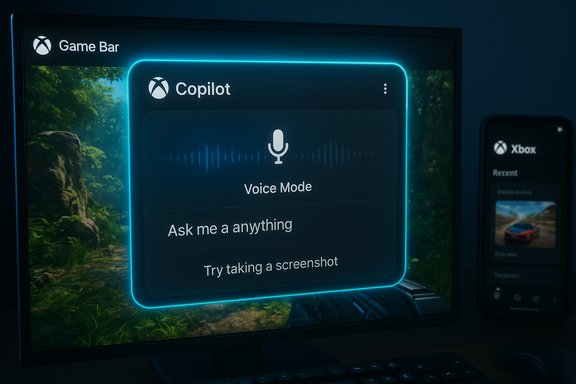
Microsoft has begun rolling out Gaming Copilot — a Copilot‑branded, voice‑first AI assistant embedded into the Windows Xbox Game Bar — that promises to learn from what you play and give contextual, in‑game help using screenshots, voice, and your Xbox account history.
Microsoft’s Copilot strategy has steadily expanded from productivity tools into Windows and Xbox, and Gaming Copilot is the company’s most direct attempt to place a multi‑modal AI alongside active gameplay. The feature arrives as a Game Bar widget that can operate in Voice Mode, accept screenshots for visual context, reference Xbox account activity for personalization, and appear as a pinned mini‑widget so players don’t need to alt‑tab away from a full‑screen game.
The rollout is staged and explicitly labeled a beta: Microsoft began making Gaming Copilot available via the Windows Game Bar on PC and plans a mobile companion inside the Xbox app. The initial preview is age‑gated for adults (18+) and excludes certain regions at launch. Microsoft describes the feature as a hybrid local/cloud system: local UI and capture controls run in the Game Bar while heavier language and image understanding run in Microsoft’s cloud.
At the same time, the arrival of in‑game AI underscores the need for clear rules and technical guardrails. Accuracy, privacy, competitive fairness, and transparency will determine whether Copilot becomes a trusted companion or a controversial addition to the modern gaming ecosystem. Microsoft’s staged release and Insider testing are sensible early steps, but the company and the broader industry must follow with detailed documentation, community engagement, and policy work — fast.
However, the value of that convenience depends on how Microsoft addresses accuracy, privacy, performance, and fairness. Players should explore Copilot as a hands‑on convenience today, but remain cautious: validate critical guidance, manage capture settings, and watch for formal policy guidance from developers and tournament organizers. Microsoft’s next steps — stronger documentation, transparency about data usage, and active engagement with the competitive gaming community — will determine whether Gaming Copilot becomes a transformative gaming companion or a contested experiment in how AI reshapes play.
Source: Dunia Games Portal Berita, Download Game dan Beli Voucher Game Terpercaya Di Indonesia
 Background / Overview
Microsoft’s Copilot strategy has steadily expanded from productivity tools into Windows and Xbox, and Gaming Copilot is the company’s most direct attempt to place a multi‑modal AI alongside active gameplay. The feature arrives as a Game Bar widget that can operate in Voice Mode, accept screenshots for visual context, reference Xbox account activity for personalization, and appear as a pinned mini‑widget so players don’t need to alt‑tab away from a full‑screen game.The rollout is staged and explicitly labeled a beta: Microsoft began making Gaming Copilot available via the Windows Game Bar on PC and plans a mobile companion inside the Xbox app. The initial preview is age‑gated for adults (18+) and excludes certain regions at launch. Microsoft describes the feature as a hybrid local/cloud system: local UI and capture controls run in the Game Bar while heavier language and image understanding run in Microsoft’s cloud.
What Gaming Copilot actually does
Gaming Copilot bundles several interlocking capabilities that are tuned to the real rhythm of modern play. Those capabilities aim to reduce context switching and put help directly into the moment you need it.Core features
- Voice Mode — a natural, spoken conversation interface with Push‑to‑Talk and a pinned Mini Mode for sustained conversations while playing.
- On‑screen understanding — user‑initiated screenshots or short captures can be sent to Copilot for visual analysis (identify enemies, UI elements, objective markers, loot, etc.. This is opt‑in and controlled through Game Bar permissions.
- Account‑aware personalization — when signed into an Xbox/Microsoft account, Copilot can reference play history, achievements, and library data to tailor suggestions and track completion goals.
- In‑overlay responses — answers appear inside the Game Bar overlay and can be pinned so they remain visible without leaving the game.
- Second‑screen mobile companion — the Xbox mobile app will act as a distraction‑free second screen so you can converse with Copilot from your phone without obscuring gameplay on PC. The mobile rollout is scheduled to follow the PC beta.
How it works (technical summary)
The implementation is hybrid: client components inside the Game Bar manage the UI, hotkeys, microphone toggles, and explicit capture permissions; cloud services run the heavy LLM and image‑understanding workloads. The hybrid approach is intended to minimize latency for UI interactions while giving Copilot access to the compute needed for multimodal understanding. Microsoft emphasizes explicit permission and user controls around screenshot capture and telemetry.Why this matters to PC gamers and Windows users
Gaming Copilot changes the common troubleshooting and discovery workflows that have dominated gaming for years. Instead of pausing or alt‑tabbing to search a wiki or watch a video, players can ask for help in situ and receive targeted, contextual advice.- Reduced context switching: Gamers stay immersed — no alt‑tabbing to a browser, no juggling a second device for a walkthrough. This is the primary UX justification Microsoft presents for the feature.
- Faster problem solving: Screenshot grounding means you can show the assistant a specific boss phase or confusing UI, and the model can respond in an informed way rather than relying on generic search results.
- Accessibility gains: Voice‑first modes and natural‑language explanations can help players with vision or mobility difficulties navigate complex UIs or follow mechanics that would otherwise require visual attention.
- Personalized discovery: Copilot can recommend games and goals based on your play history and achievements, turning discovery into a conversational experience rather than a passive storefront scroll.
How to enable and use Gaming Copilot (practical steps)
- Install or update the Xbox PC app from the Microsoft Store.
- Press Windows key + G to open the Xbox Game Bar and locate the Gaming Copilot widget in the Home Bar.
- Sign in with your Microsoft/Xbox account to enable account‑linked features (achievements, play history).
- Configure microphone controls or assign a Push‑to‑Talk hotkey under Game Bar settings; review screenshot and capture permissions to control what Copilot can access.
- Use voice, text, or a captured screenshot to ask contextual questions while you play; pin responses or use Mini Mode to maintain an ongoing conversation.
Strengths: what Microsoft got right (and why it’s compelling)
Microsoft’s approach contains several deliberate design choices that address clear gamer pain points.1) In‑context assistance that respects play
Making the assistant part of Game Bar — an overlay gamers already use for captures and widgets — lowers adoption friction. The in‑overlay responses and pinned mini‑mode design keep help available but unobtrusive, preserving immersion during tense sessions.2) Multi‑modal grounding reduces ambiguity
By combining screenshots with game detection and account context, Copilot can offer more precise suggestions than a generic search. That reduces the cognitive overhead of having to describe a complicated UI or boss behavior.3) Accessibility and onboarding benefits
Voice interactions and direct, in‑game explanations can significantly lower entry barriers for newcomers to complex titles and provide practical benefits for players with disabilities. Those improvements align well with accessibility efforts across modern platforms.4) Iterative, gated rollout
Microsoft’s staged beta (Insider flights, age gating, region restrictions) signals a cautious approach designed to surface real usage data and safety issues before a broad release. This iterative path allows Microsoft to adjust for privacy, performance, and fairness concerns raised by the community.Risks, trade‑offs, and the questions Microsoft still needs to answer
The convenience of an in‑game assistant comes with measurable trade‑offs. Several areas demand close attention from players, developers, and regulators.Accuracy and hallucinations
Generative models still make mistakes. Early coverage notes the danger of hallucinations — confident but incorrect answers — which are particularly harmful when players depend on Copilot for precise strategy or achievement instructions. Users must treat Copilot’s responses as guidance, not gospel, while Microsoft improves model grounding.Privacy and data handling
The assistant’s usefulness depends on analyzing screenshots and account data. Even with explicit permissions, sending in‑game images and play history to cloud services raises questions about:- Retention and deletion policies for captured screenshots and telemetry.
- Whether any personally identifiable information (PII) could be inferred or stored.
- How Microsoft will handle data from multiplayer sessions where other players’ content may appear in captures.
Competitive fairness and anti‑cheat conflicts
An always‑available in‑overlay assistant raises policy questions for competitive play, esports, and ranked matchmaking. Tournament organizers and anti‑cheat vendors will need to decide whether in‑match assistance is permissible and, if so, under what conditions. Microsoft’s current beta gating reduces immediate risk, but the long‑term integration of AI helpers into online play invites complicated fairness debates.Performance and system impact
Running voice capture, local overlay UI, and cloud inference can introduce latency and CPU/GPU overhead — especially on handheld or lower‑end hardware. Microsoft has acknowledged the need for handheld optimizations (the ROG Xbox Ally family is named as an early target for tuning), but hardware variability means users must test the feature on their devices before relying on it during competitive or latency‑sensitive sessions.Platform lock‑in and ecosystem influence
Because Copilot can recommend games and uses Xbox account signals, the feature strengthens Microsoft’s ecosystem lock‑in. While that benefits users already embedded in Xbox services, it also raises concerns about whether Copilot’s recommendation logic will prefer Microsoft‑aligned content in ways that reduce openness. Independent audits or transparency about recommendation ranking would mitigate those concerns; nothing in the current beta disclosures guarantees that level of neutrality.Developer and tournament operator considerations
Game developers should prepare for questions and requests from players and professional organizers around AI assistants. Key practical steps include:- Review your game’s terms and anti‑cheat policies to clarify whether in‑overlay assistants that use visual context are permitted in competitive modes.
- Consider adding explicit UI flags or consent gating for sharing replays, streams, or in‑match screenshots if Copilot integrations become widespread.
- Engage with Microsoft and anti‑cheat providers to define acceptable uses and technical enforcement options for tournaments.
Where Microsoft needs more transparency
Microsoft has released initial documentation and blog posts about Gaming Copilot, but several load‑bearing technical and policy questions remain that should be answered publicly:- Data retention and deletion: How long are screenshots and voice snippets stored? Who has access?
- Model sourcing and training data: Does Copilot use game developer assets, community guides, or third‑party wikis, and are there licensing implications?
- Recommendation logic: How are games ranked for discovery prompts and do Microsoft’s commercial relationships influence results?
- Anti‑cheat compatibility: What technical controls exist to prevent Copilot from evaluating or leaking live, sensitive match data in competitive contexts?
Practical advice for players today
- Review Game Bar’s capture permissions before enabling screenshot features; keep capture off for games or sessions that involve other people’s private content.
- Treat Copilot’s tactical suggestions as starting points. Cross‑check critical strategy or achievement instructions with trusted community guides.
- Test performance impact on your specific hardware, especially if you plan to use Copilot while playing latency‑sensitive multiplayer games.
- If you’re a competitive player, clarify tournament and server rules before using in‑match assistance. Organizers have not yet settled on consistent policies.
The bigger picture: AI assistants are coming to play — but rules will define whether they belong
Gaming Copilot is part of a broader shift: AI assistants that once lived in search bars and productivity suites are being embedded into real‑time interactive experiences. That transition is meaningful — it aligns assistance with the context where problems happen and reduces friction for millions of players. The potential is real: faster troubleshooting, improved accessibility, and more intelligent discovery.At the same time, the arrival of in‑game AI underscores the need for clear rules and technical guardrails. Accuracy, privacy, competitive fairness, and transparency will determine whether Copilot becomes a trusted companion or a controversial addition to the modern gaming ecosystem. Microsoft’s staged release and Insider testing are sensible early steps, but the company and the broader industry must follow with detailed documentation, community engagement, and policy work — fast.
Conclusion
Gaming Copilot brings a clear, ambitious idea to Windows gaming: put an AI sidekick in the Game Bar that learns from how you play and provides contextual, voice‑first help without breaking immersion. The feature’s multi‑modal design — voice, screenshots, and account personalization — offers tangible benefits, especially for onboarding and accessibility.However, the value of that convenience depends on how Microsoft addresses accuracy, privacy, performance, and fairness. Players should explore Copilot as a hands‑on convenience today, but remain cautious: validate critical guidance, manage capture settings, and watch for formal policy guidance from developers and tournament organizers. Microsoft’s next steps — stronger documentation, transparency about data usage, and active engagement with the competitive gaming community — will determine whether Gaming Copilot becomes a transformative gaming companion or a contested experiment in how AI reshapes play.
Source: Dunia Games Portal Berita, Download Game dan Beli Voucher Game Terpercaya Di Indonesia