

Microsoft’s terse reassurance — that Gaming Copilot “only runs when you use it” — has cooled the most alarmist headlines, but the beta’s early days have still exposed a cluster of technical, privacy and performance questions that every Windows gamer and IT pro should understand before enabling the feature on production machines.
Gaming Copilot is Microsoft’s latest Copilot variant: an in‑overlay AI assistant built into the Xbox Game Bar on Windows 11 that aims to give players contextual help without forcing an alt‑tab. It debuted to Xbox Insiders earlier in the year and moved into public beta for broader Windows PC testing as Microsoft staged the rollout across regions and channels. The official rollout messaging described features such as voice mode, screenshot‑based context, achievement tips, and account‑aware guidance. Key product facts confirmed by Microsoft and Xbox communications:
What the community tests typically showed:
How the pipeline appears to work (as reported and documented):
Gaming Copilot has a clear and defensible use case: reduce interruptions, help newcomers, and provide accessibility aids without forcing players out of the game. The viability of that vision depends now on two things: detailed technical transparency about data flows and rigorous performance optimization for the diverse range of Windows gaming hardware. If Microsoft delivers both, the assistant could move from controversy to a genuinely useful co‑pilot for tough quests and competitive ladders; if not, it risks being an opt‑in curiosity that many power users avoid. The beta will be the crucible where product polish and policy clarity are tested. Until Microsoft publishes the missing telemetry details and demonstrates measurable performance gains, the prudent approach for testers and organizations is to assume explicit opt‑in is required and to configure Copilot conservatively.
Source: Mint Microsoft addresses Gaming Copilot concerns, says it runs only when you use it | Mint
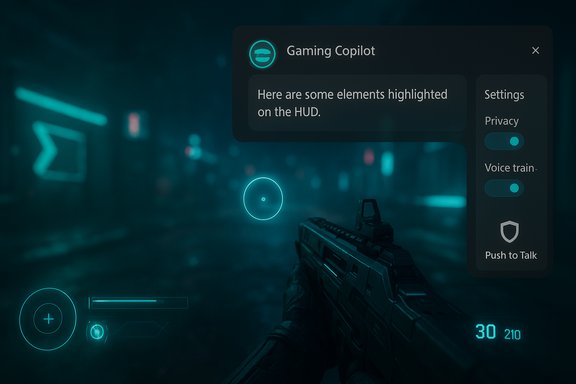 Background / Overview
Gaming Copilot is Microsoft’s latest Copilot variant: an in‑overlay AI assistant built into the Xbox Game Bar on Windows 11 that aims to give players contextual help without forcing an alt‑tab. It debuted to Xbox Insiders earlier in the year and moved into public beta for broader Windows PC testing as Microsoft staged the rollout across regions and channels. The official rollout messaging described features such as voice mode, screenshot‑based context, achievement tips, and account‑aware guidance. Key product facts confirmed by Microsoft and Xbox communications:- Gaming Copilot is surfaced as a Game Bar widget (Win+G).
- It supports Voice Mode (push‑to‑talk and pinned interactions) and text chat inside the overlay.
- The assistant can analyze screenshots of the active game screen to provide context‑aware answers (OCR on HUD text, menu items, objectives).
- The beta has been staged for Xbox Insiders and limited regions, with general PC availability expanding progressively.
What Microsoft officially clarified
After community reports and packet captures prompted concern, Microsoft issued a short, consistent clarification that has been repeated across multiple outlets: Gaming Copilot captures screenshots only during active use of the feature and those screenshots are not used to train Microsoft’s AI models. Microsoft also pointed testers to the Game Bar privacy settings where model‑training and capture toggles are exposed. Two complementary points Microsoft emphasized:- Gaming Copilot is session‑based: it “wakes” only when the user opens or pins the Copilot widget and invokes it. Idle, background gameplay without Copilot engaged does not trigger screenshot captures under Microsoft’s description.
- Conversational inputs (text and voice) have separate training controls: Microsoft allows users to opt out of including conversational data in model training, while saying that screenshot captures used for immediate contextual help are not part of training data.
How the controversy started: community captures and a ResetEra post
The scrutiny began when forum users and independent testers observed outbound network traffic that appeared correlated with Game Bar activity, and one high‑profile ResetEra poster provided packet traces suggesting on‑screen text (OCR output) had left a test machine while Copilot features were active. That post spread quickly and provoked broader forensic testing by journalists and community members.What the community tests typically showed:
- Game Bar created screenshots or captured frames while Copilot was invoked.
- A small, compact payload consistent with OCRed text (far smaller than raw images) was visible in some packet captures.
- The behavior and presence of telemetry varied somewhat across Windows builds, Game Bar versions and preview channels — explaining why some users in some builds saw network egress while others did not.
The technical anatomy: screenshots, OCR, local vs cloud inference
Multiple public statements and early technical reporting describe Gaming Copilot as a hybrid system: lightweight capture and heuristic processing is intended to run locally for responsiveness, while heavier multimodal inference and generative tasks rely on cloud endpoints. This hybrid design is common: it minimizes client requirements but introduces questions about what travels off‑device for richer reasoning.How the pipeline appears to work (as reported and documented):
- User invokes Gaming Copilot inside Game Bar (widget pinned or opened).
- Copilot may capture a screenshot of the active game window or region.
- Captured frames can be processed with OCR to extract readable on‑screen text (HUD labels, quest text, menus). OCR output is orders of magnitude smaller than raw bitmaps, which matches the compact traffic some testers observed.
- Simple, low‑latency processing can be handled locally; more complex inference and natural language generation (the actual Copilot reply) may be handled by cloud models.
Privacy analysis — strengths, gaps and practical risks
Strengths and responsible design choices:- Session‑based activation helps minimize unintended capture: Copilot is designed to act only when summoned. This is a clear design choice that reduces the surface for continuous surveillance.
- Per‑channel training toggles for text and voice give users direct control over whether conversational inputs improve Microsoft’s models, which aligns with evolving expectations around opt‑in for consumer AI training.
- In‑experience privacy controls inside the Game Bar let users disable model training and screenshot sharing without leaving the overlay. This lowers the friction for privacy management.
- Processing location ambiguity — Microsoft has not definitively stated, in machine‑readable telemetry terms, whether screenshot OCR is always performed locally (on the device) or whether extracted text or images are routinely sent to cloud endpoints for inference or diagnostics. Several respected outlets and independent testers note that cloud inference is used for heavier reasoning, but they also point out that the concrete retention and transit policies for screenshot captures are not fully documented. That missing detail matters for legal compliance and high‑risk contexts (NDAs, enterprise workloads).
- UI labeling and default states — multiple community reports suggested the “Model training on text” toggle was visible and in some builds enabled by default. Ambiguous labels can produce mistaken consent when users do not understand whether OCR text falls under that toggle. Privacy‑preserving defaults are the safer choice for consumer trust.
- Auditability and retention — Microsoft’s public denials (no screenshot training) are meaningful but would be far more convincing if backed by: a machine‑readable retention manifest, a third‑party audit or a transparency report describing whether any screenshot artifacts are logged, for how long, and what access controls protect them. Independent packet captures cannot substitute for a vendor transparency document.
- Game testers working on NDA builds, game developers showing pre‑release streams, and users with persistent overlay chat or account information on screen risk accidental leakage if screenshot capture is enabled and cloud processing occurs.
- Streamers and competitive players should be cautious: aside from privacy, an AI that reads the screen could create fairness questions in multiplayer matches; tournament rules and publisher policies may treat in‑match AI assistance as an unauthorized aid.
Performance and user experience: the overhead debate
Performance is distinct from privacy but equally important for adoption. Early hands‑on reports and tests show that Game Bar additions and the Copilot overlay can add measurable overhead on some systems — particularly on handhelds and mid‑range laptops. Testers reported small but noticeable dips in frame rates when certain Copilot features (screenshot capture, model training toggles) were enabled. What independent coverage and testers found:- Enabling screenshot captures and model training options correlated with modest FPS drops in some titles, especially on constrained hardware.
- The added overhead is not uniform: high‑end desktops often see negligible impact, while handheld devices and older laptops can be noticeably affected.
- Microsoft acknowledges the performance tradeoffs and directs testers to submit measurable feedback via Feedback Hub while the beta evolves. The company also states it is optimizing for handheld platforms and intends to reduce overhead in future updates.
How to inspect and control Gaming Copilot on your PC
Microsoft exposed Copilot controls inside the Xbox Game Bar. The practical steps testers and cautious users should follow are consistent across public guidance and independent write‑ups:- Press Windows key + G to open the Xbox Game Bar.
- Open the Gaming Copilot widget.
- Click Settings (gear icon) → Privacy (or Privacy Settings).
- Toggle off “Model training on text” and “Model training on voice” if you do not want conversational inputs used for model improvements.
- Disable screenshot sharing or set captures to manual only if the option exists in your build.
- Disable the Xbox Game Bar entirely via Settings → Gaming → Xbox Game Bar (if a strict no‑capture posture is required). Note that removing Game Bar can be non‑trivial on managed devices and may require administrative action or Group Policy.
- Use push‑to‑talk for Voice Mode rather than continuous listening to reduce accidental audio capture.
Policy and industry implications
This beta highlights a broader industry lesson: integrating AI features that rely on user data into consumer products requires privacy by default rather than privacy as an opt‑out. The core policy implications include:- Default opt‑in for model training or ambiguous toggle labels can quickly erode trust. Product teams must prefer conservative defaults for data collection.
- Enterprises operating in regulated jurisdictions (for example, under GDPR) should treat any unclear default capture behavior as a compliance risk and either block the feature or require explicit documented consent before use on corporate machines.
- Vendors should publish auditable retention manifests and consider third‑party audits for AI features that ingest user visuals from private contexts. Transparency reporting reduces ambiguity and community friction.
Two specific things to watch as the beta progresses
- Transparency on processing location and retention — whether screenshot analysis and OCR are performed fully on device, transiently in the cloud, or stored for diagnostics impacts privacy, compliance and developer trust. Microsoft’s public statements deny use of screenshots for model training, but a machine‑readable telemetry flow and a third‑party audit would close the loop on trust.
- Performance tuning for mid‑range and handheld hardware — Gaming Copilot’s usefulness is tightly coupled to its efficiency. If frame‑rate and battery penalties remain visible on popular mid‑range devices, adoption will be limited to casual, non‑competitive play. Microsoft needs to demonstrate measurable improvements and provide granular toggles for low‑spec modes.
Practical verdict for readers
- For privacy‑conscious users, streamers and NDA‑bound testers: disable screenshot sharing and model training toggles, or disable Game Bar entirely on machines used for sensitive work. This is the safest posture until Microsoft publishes more auditable telemetry details.
- For casual single‑player users who value convenience: try Gaming Copilot in controlled sessions after verifying settings. Keep an eye on performance and prefer Push‑to‑Talk for voice interactions.
- For IT administrators: treat the beta as an untrusted overlay until MDM/Group Policy controls and a vendor transparency report arrive. Audit network egress for Copilot endpoints during pilot deployments.
Gaming Copilot has a clear and defensible use case: reduce interruptions, help newcomers, and provide accessibility aids without forcing players out of the game. The viability of that vision depends now on two things: detailed technical transparency about data flows and rigorous performance optimization for the diverse range of Windows gaming hardware. If Microsoft delivers both, the assistant could move from controversy to a genuinely useful co‑pilot for tough quests and competitive ladders; if not, it risks being an opt‑in curiosity that many power users avoid. The beta will be the crucible where product polish and policy clarity are tested. Until Microsoft publishes the missing telemetry details and demonstrates measurable performance gains, the prudent approach for testers and organizations is to assume explicit opt‑in is required and to configure Copilot conservatively.
Source: Mint Microsoft addresses Gaming Copilot concerns, says it runs only when you use it | Mint
