

Microsoft’s Gaming Copilot for Windows 11 has been thrust into the privacy spotlight after community testers discovered that the assistant can take screenshots during gameplay and — in some preview configurations — a “Model training on text” toggle that relates to on‑screen text appeared enabled by default, creating fears that gameplay frames or OCR’d text could be transmitted to Microsoft unless users manually changed settings. The company responded by saying screenshots are only captured while Copilot is actively being used and that those gameplay screenshots are not used to train Microsoft’s models, but the episode exposes significant UX, transparency, and governance gaps that matter to gamers, streamers, developers, and IT teams.
Gaming Copilot is Microsoft’s in‑overlay AI assistant built into the Xbox Game Bar on Windows 11. It’s designed to deliver context‑aware help — voice and text chat, achievement lookups, and visual context by analyzing screenshots of the active game window so it can answer questions without forcing players to alt+tab. The feature has been rolled out as a staged beta to Xbox Insiders and then broader preview channels.
The controversy began when a ResetEra user (and subsequent independent testers) published packet captures and screenshots suggesting that Copilot was creating screenshots, performing OCR on on‑screen text, and that certain telemetry or training toggles were enabled by default on some systems. That thread quickly propagated through gaming forums and tech outlets and prompted Microsoft to publicly clarify how the feature works. Microsoft’s public position — repeated to several outlets — is straightforward on two points: (1) Screenshots are taken only when users actively invoke Gaming Copilot in the Game Bar, and (2) screenshots captured during active sessions are not used to train Microsoft’s AI models. The company separately stated that conversational inputs (text and voice) may be used to improve models unless users opt out via the privacy toggles in the Game Bar.
If Microsoft responds by tightening defaults, clarifying the UI, and publishing auditable data‑flow and retention details, Gaming Copilot could become a genuinely helpful, low‑friction assistant for millions of players. Until then, cautious configuration and conservative device policies are the prudent path for streamers, developers, and enterprise environments.
Source: hi-Tech.ua Gaming Copilot in Windows 11 takes screenshots during gaming
 Background / Overview
Gaming Copilot is Microsoft’s in‑overlay AI assistant built into the Xbox Game Bar on Windows 11. It’s designed to deliver context‑aware help — voice and text chat, achievement lookups, and visual context by analyzing screenshots of the active game window so it can answer questions without forcing players to alt+tab. The feature has been rolled out as a staged beta to Xbox Insiders and then broader preview channels.The controversy began when a ResetEra user (and subsequent independent testers) published packet captures and screenshots suggesting that Copilot was creating screenshots, performing OCR on on‑screen text, and that certain telemetry or training toggles were enabled by default on some systems. That thread quickly propagated through gaming forums and tech outlets and prompted Microsoft to publicly clarify how the feature works. Microsoft’s public position — repeated to several outlets — is straightforward on two points: (1) Screenshots are taken only when users actively invoke Gaming Copilot in the Game Bar, and (2) screenshots captured during active sessions are not used to train Microsoft’s AI models. The company separately stated that conversational inputs (text and voice) may be used to improve models unless users opt out via the privacy toggles in the Game Bar.
What was reported — the observable facts
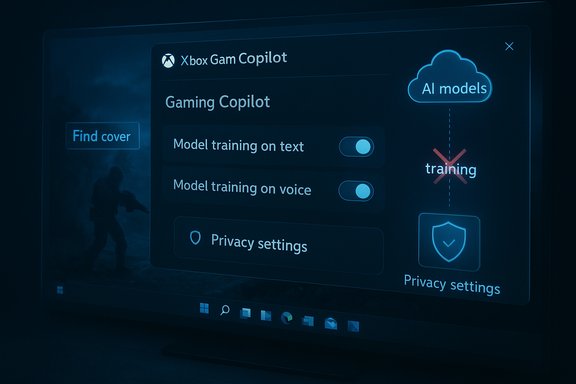
- Multiple community testers and journalists observed that the Game Bar exposes a privacy panel with toggles labeled “Model training on text” and “Model training on voice”, alongside capture controls. On some inspected systems and preview builds, the text‑training toggle appeared enabled by default.
- Packet captures posted by community members showed compact outbound traffic temporally correlated with Copilot activity; those traces looked consistent with OCR‑extracted text (small payloads rather than raw images) in at least some cases. External captures demonstrate egress but do not by themselves prove long‑term retention or training use.
- Testers also reported measurable performance side effects (small drops in FPS and occasional frame‑pacing dips) when Copilot capture and training features were enabled, particularly on mid‑range hardware and handheld Windows devices.
Microsoft’s clarification — what the company said and what remains ambiguous
Microsoft told reporters that Gaming Copilot may use screenshots to better understand what’s happening in a game when you’re actively using Copilot, and that those screenshots are not used to train AI models. The company reiterated that Copilot is optional and that players can adjust privacy settings in Game Bar. Why that statement doesn’t fully settle the debate:- It leaves open whether screenshot data or OCR output is ever transmitted transiently to cloud inference endpoints for live processing. Some outlets and community tests observed network activity consistent with such transmissions, while Microsoft emphasizes local/active use only. Independent packet captures show egress but cannot reveal downstream retention or whether those payloads are stored or used in training. That critical downstream detail is not publicly auditable from client‑side captures alone.
- The label “Model training on text” is ambiguous to many users — what exactly is “text”? Does the toggle cover only typed prompts and conversational text, or does it also include OCR‑extracted on‑screen text derived from screenshots? The UI language and preview defaults created confusion that intensified the backlash.
How Gaming Copilot likely works (technical anatomy)
Understanding the practical risks requires a short technical breakdown of the capture and processing pipeline as described by Microsoft and observed by testers:- The Copilot widget lives inside the Xbox Game Bar (Win+G). When invoked, it can capture a screenshot of the active game window or a selected region.
- Captured images can be processed with OCR (optical character recognition) to extract readable on‑screen text (HUD labels, chat overlays, quest text). OCR output is usually tiny compared to raw images, which matches the small network payloads some testers observed.
- A hybrid local/cloud design is common: lightweight capture and initial heuristics run locally for responsiveness, and heavier multimodal inference (image + language reasoning) may be performed in the cloud when needed. Whether every build sends OCR or images to cloud endpoints depends on configuration, device capabilities (NPU vs non‑NPU), and preview channel.
Privacy, legal and competitive risks
- Sensitive content leakage: Screenshots can capture more than gameplay — overlays, private chats, email previews, or pre‑release/NDA content can be inadvertently captured. A tester’s claim that an NDA game frame appeared in outbound traffic illustrates this real risk. Even transient uploads can create legal and reputational exposure.
- GDPR and regulatory scrutiny: In regions with stricter privacy law, ambiguous defaults and unclear consent mechanisms around screen capture and telemetry can draw regulatory attention. Transparent lawful bases and clear consent flows are essential where personal data might be processed.
- Competitive fairness and esports: In competitive contexts, an always‑on context assistant could be an unfair advantage or create rule conflicts. Tournament organizers and developers should clarify whether Copilot is permitted in competitive play and how to enforce it.
- Performance impact: The computational and networking overhead of capture + OCR + cloud processing can reduce FPS and worsen frame pacing on thermally constrained devices — an issue many gamers will care about more than privacy in practice.
How to check and disable Copilot’s data collection (practical steps)
Multiple hands‑on guides and community writeups reproduce the same Game Bar path to verify and change the relevant toggles. Follow these steps to audit and harden a Windows 11 gaming PC:- Press Windows + G to open the Xbox Game Bar.
- Open the Gaming Copilot widget (the Copilot icon in the Game Bar).
- Click the Settings (gear) icon inside the Copilot widget, then select Privacy (or Privacy settings).
- Toggle Model training on text to Off. This setting has been reported to control whether conversational text and potentially OCR‑derived text are eligible for training in some builds.
- Toggle Model training on voice to Off if you don’t want voice snippets used for training.
- Return to Game Bar Capture settings and disable Enable screenshots (experimental) or any automated screenshot toggles if present. This prevents automatic contextual screenshot capture.
- Disable Xbox Game Bar globally via Settings → Gaming → Xbox Game Bar (toggle off). For complete removal you may need to use PowerShell with administrative privileges or deploy an MDM/Group Policy block in enterprise environments. Be aware that removing the Game Bar can impact other Xbox‑related features.
What Microsoft should (and could) do to restore trust
The incident surfaces a handful of practical product and policy fixes that would materially reduce friction and rebuild confidence:- Make relevant toggles conservative by default (opt‑in) for any capture or training‑eligible paths, especially anything tied to screenshots and OCR. Preview builds that enable training by default create distrust.
- Clarify UI language: rename ambiguous labels like “Model training on text” to explicitly state whether that covers typed input, OCR‑extracted text, or both (for example: “Allow Copilot to use typed text and on‑screen text extracted from screenshots for model training”).
- Publish a clear, machine‑readable data‑flow diagram and retention policy for screenshot/OCR flows: what is sent, when it is deleted, whether it is retained for diagnostics, and whether any of it can be used for training. Independent audits or transparency reports would strengthen credibility.
- Provide explicit, visible cues when screenshot/OCR capture happens (a small persistent icon or a toast) so users always know when the assistant is “seeing” the screen.
Broader context: why this is happening now
Microsoft is deepening its investment in AI across Windows and Xbox, rolling Copilot variants into productivity, developer, and gaming experiences. That broader push has coincided with a series of high‑impact business decisions that have already put the company under scrutiny: multiple rounds of layoffs (more than 9,000 roles cut in recent waves), major price increases for Xbox hardware earlier in 2025, and a substantial Game Pass price rise that hit consumers this autumn. Those moves create a charged environment in which any perceived privacy misstep attracts outsized attention. The product plays into a broader industry tension: AI features promise convenience and new experiences, but they often require telemetry and data‑driven feedback loops that conflict with conservative privacy expectations. Prior Microsoft features with similar capture behaviors (for example, the Recall screenshot feature) already faced pushback and even active blocking by privacy‑focused apps — a reminder that strong defaults and developer cooperation matter.Practical advice for stakeholders
Gamers and streamers- Check Copilot privacy settings and disable training/capture toggles if you value privacy or stream NDA content.
- Test for performance impact with Copilot features enabled; disable it on machines where frame‑rate stability matters.
- Treat Copilot as a capture surface: require test rigs to disable the Game Bar/Copilot when handling pre‑release builds or confidential tools.
- Coordinate with tournament organizers and publishers to define clear policies on whether Copilot is permitted in competitive or certified play.
- Use Group Policy or MDM to block the Game Bar or enforce conservative privacy settings on managed devices that might run games or developer tools.
- Design explicit UX affordances and conservative defaults for any screen capture feature. Provide auditable telemetry policies and third‑party verification where possible.
Critical analysis — strengths, risks, and the middle ground
Strengths- Gaming Copilot addresses a real user need: fast, in‑context help without breaking immersion. For single‑player gamers, accessibility users, and casual players, on‑demand visual context is genuinely useful. The hybrid local/cloud model is a legitimate engineering tradeoff to deliver capable multimodal assistance on a wide range of hardware.
- Ambiguous UI and default settings undermine informed consent. When a preview build leaves a training toggle in an opt‑in state, users reasonably feel opted in by default.
- The lack of a public, auditable retention narrative for screenshot/OCR flows leaves independent verification impossible from client‑side captures alone; that gap fuels suspicion.
- Performance cost on mid‑range and handheld devices is non‑trivial for players who prioritize frame stability and responsiveness.
- The feature can be preserved and responsibly shipped if Microsoft adopts conservative defaults, clearer language, visible capture indicators, and transparent retention/audit practices. Those steps deliver the product value while materially lowering the risk profile for users and organizations.
Conclusion
Gaming Copilot shows how powerful and useful in‑game AI assistants can be: they reduce friction and keep players in the moment. But this episode is a cautionary example of how defaults, language, and transparency are as important as architecture. Community testing successfully surfaced real user concerns; Microsoft’s clarification addresses the headline claim but leaves important technical questions open about transient uploads, retention, and dataset audibility. The practical takeaways for players and IT teams are immediate: verify Game Bar privacy settings, disable training and experimental screenshot options if you do not want Copilot to capture or send visual context, and treat Copilot as a potential data surface for sensitive workflows.If Microsoft responds by tightening defaults, clarifying the UI, and publishing auditable data‑flow and retention details, Gaming Copilot could become a genuinely helpful, low‑friction assistant for millions of players. Until then, cautious configuration and conservative device policies are the prudent path for streamers, developers, and enterprise environments.
Source: hi-Tech.ua Gaming Copilot in Windows 11 takes screenshots during gaming
