

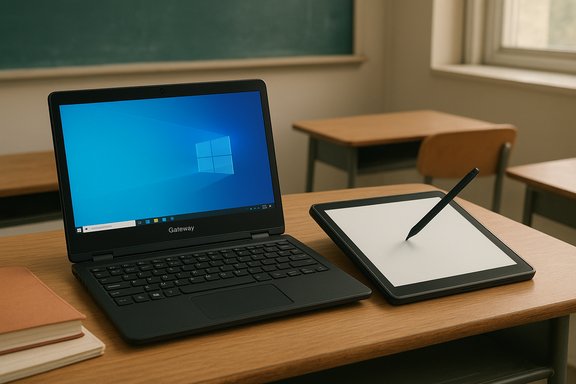
Gateway’s 11.6‑inch 2‑in‑1 convertible (GWTC116) is reappearing across retail and refurbished channels as a budget-first, classroom‑ready convertible—packing an Intel Celeron N4020, 4 GB of RAM and 64 GB of eMMC storage into a slim, 360° hinge chassis intended for students, remote workers and anyone wanting a cheap touchscreen Windows device. The package is straightforward: an 11.6” IPS touchscreen at 1366×768, basic cameras and microphones, a microSD slot for expansion, a pair of USB ports and a mini‑HDMI output—plus a one‑year Microsoft 365 Personal bundle in many listings. That combination makes the GWTC116 easy to understand, but it also creates the usual tradeoffs of low‑cost Windows hardware: constrained multitasking, limited internal storage, variable build quality and important SKU differences buyers must watch for.
For buyers who accept those tradeoffs, the GWTC116 is a practical, budget convertible that does what it sets out to do. For those who need more headroom, prioritize 8 GB RAM and an SSD—even if that raises the price into a different segment—because that investment pays off in responsiveness and longevity. The decision ultimately comes down to use case versus budget, and for classrooms or very light home use, this Gateway is a defensible, inexpensive option—provided buyers check the listing details and return/warranty protections before completing the purchase.
Source: theglobalfilipinomagazine.com https://theglobalfilipinomagazine.c...en-Laptop-Computer-Black-Intel-Celeron-N4020/
 Background
Gateway’s return and positioning
Gateway is a brand with legacy recognition that now exists as a licensed OEM label on value machines. Recent Gateway product pages emphasize budget convertibles and low‑cost laptops intended for students and basic home use, with Windows in S mode offered to simplify security and maintenance for first‑time buyers. The GWTC116 family is positioned as a portable convertible with touchscreen and pen‑friendly ergonomics for note taking and remote learning, rather than a performance machine. This positioning is reflected in official product pages and multiple retailer listings.Why these devices matter now
Two market forces make tiny convertibles relevant: schools and remote learners need low‑cost, manageable machines, and the rise of cheaper flash‑storage Windows SKUs makes an 11.6‑inch convertible comparatively affordable. Bundling Microsoft 365 for a year also softens the sting of limited local storage, since OneDrive integration shifts pressure off the internal eMMC. Still, the hardware choices here strongly influence what those buyers will actually be able to do day‑to‑day.Hardware and technical overview
Core specifications (what sellers list)
Most current listings for the GWTC116 and close variants advertise the following baseline hardware:- Processor: Intel Celeron N4020 (dual‑core, 1.10 GHz base, up to 2.80 GHz burst, 4 MB cache).
- Display: 11.6” IPS touchscreen, 1366×768 resolution.
- Memory: 4 GB LPDDR4 (single‑channel typical in these SKUs).
- Storage: 64 GB eMMC onboard; microSD expansion slot (commonly advertised up to 512 GB).
- Graphics: Integrated Intel UHD Graphics 600 (part of the N4020 package).
- Battery life: Retail copy commonly claims up to ~8.5 hours; real results will vary with workloads.
- Ports: USB 3.0 ×1, USB 2.0 ×1, mini‑HDMI ×1, microSD slot, audio jack.
- Cameras / audio: Listings vary—common claims include a 1.0 MP front camera and stereo speakers, but some retail pages list smaller sensors. Expect basic webcam quality suitable for video calls, not content creation.
The processor in context: Intel Celeron N4020
The N4020 is a low‑power mobile part designed for fanless, entry‑level systems. It has two physical cores and two threads, modest cache, and a low TDP in the single‑digit watt range—traits that favor battery life and low heat but limit sustained single‑thread and multi‑thread throughput. For everyday web browsing, document editing, streaming and light classroom applications the N4020 is adequate; it will struggle when you try to juggle many browser tabs, complex web apps, developer tools, or any sustained heavy workload. Technical details and the CPU’s design intent are confirmed in Intel’s product documentation and third‑party reviews.Real‑world performance expectations
What the GWTC116 will handle well
- Email, document editing, spreadsheets and slide decks: Lightweight office tasks are exactly what this hardware is for. The bundled Microsoft 365 year helps here.
- Video playback and conferencing at 720p: The integrated GPU and low‑TDP CPU handle standard video calls and streams fine, assuming a stable network. Webcam and microphone quality remain basic.
- Portability and battery‑focused workflows: Low power draw and a small chassis make it an easy carry for note taking and remote lessons. Claimed battery life is long for the class, though real numbers depend on brightness and workload.
Where the tradeoffs show up
- Multitasking limits: 4 GB of RAM is the single biggest practical bottleneck for Windows. Multiple browser tabs + a Teams or Zoom call + an editor will push the system to swap and substantially slow responsiveness. Buyers expecting seamless multitasking should plan on a different machine.
- Storage and responsiveness: eMMC storage is slower than SSDs (NVMe / SATA) and will slow app installs, updates and file operations. For a device with 64 GB onboard, cloud storage and external microSD/USB storage are effectively required for larger media or projects.
- Upgradeability and repair: These ultra‑compact 2‑in‑1s often have soldered RAM and internal components designed for low cost, not repairability. Internal upgrades are typically limited to storage via the microSD slot or external drives; battery or board repairs frequently require professional service or a replacement chassis. This reduces long‑term flexibility compared with mainstream laptops.
Software, OS and the Microsoft 365 bundle
Windows S mode vs full Windows
Retail copy for different listings varies between Windows 10 S, Windows 11 Home (S mode) and Windows 10 Home (S Mode) depending on when the listing was created and which channel (new vs refurbished) is selling it. Windows in S mode restricts app installs to the Microsoft Store for security and stability; switching out of S mode to the full Windows desktop is usually free but one‑way. That restriction matters more on a device with limited storage and RAM because sideloading large apps is both discouraged and practically constrained by hardware. Confirm the OS on the product page and whether a free upgrade to Windows 11 is offered.Microsoft 365 inclusion: real value or marketing gloss?
Many new listings include one year of Microsoft 365 Personal, which is a tangible value add—especially on a 64 GB machine that benefits from cloud storage. However, the subscription is time‑limited and may auto‑renew at retail price when the year ends. Buyers should treat the 12‑month subscription as a one‑year convenience, not a permanent offset to low local storage. Confirm activation requirements and auto‑renewal terms on the seller’s page.Ports, expandability and peripherals
- Ports: Expect one USB‑A 3.0, one USB‑A 2.0, a mini‑HDMI video out, headphone jack and a microSD slot. These basic ports support common classroom peripherals and external displays but lack modern conveniences like USB‑C PD charging on many SKUs.
- Expandable storage: microSD expansion is convenient for media and offline files, but microSD performance and durability differ from internal SSDs—use it as archival or media storage rather than for OS/app installs. External USB SSDs remain the best option for faster additional storage.
- Stylus and touch: The chassis supports 360° modes and touch input; some bundles include a basic stylus. Pen performance on low‑cost touch panels varies, so don’t expect Wacom‑level inking fidelity.
Pricing, availability and refurbished market
New vs refurbished SKUs
The GWTC116 appears across channels as new, restored and third‑party refurbished units—often with wide price variance. Brand pages show MSRP positioning for new units, while marketplace and refurb sellers list far lower prices that reflect model age and warranty differences. Refurb outlets may change the OS image (e.g., Windows 10 S vs Windows 11 Home S) and the included accessories, so check return policies and seller reputation.Typical price ranges
Retail listings in the U.S. and marketplace sellers place these units in the low‑hundreds of dollars; refurbished units can dip under $150 depending on promotions and seller margins. Price alone shouldn't be the deciding factor—warranty coverage, seller reliability and whether the OS is current are equally important.Reliability, user reports and cautionary notes
Real‑world complaints and support signals
Community reports and buyer comments for Gateway value laptops show a mix of experiences: many owners get serviceable devices for basic tasks, while others report issues with trackpads, battery longevity or units failing to boot after months of use. These patterns are common in the value segment, where extreme price pressure and multiple refurbs lead to inconsistent QA. Prospective buyers should weigh return windows and warranty policies carefully.What to verify before purchase
- Confirm the exact SKU (e.g., GWTC116‑2 vs GWTC116‑2BL) and OS variant on the product page.
- Check whether the seller is listing new vs refurbished condition and read the warranty terms.
- Verify camera resolution and battery capacity—retail copy sometimes disagrees between listings. If webcam quality matters, test it immediately within the return window.
- Plan for storage expansion (microSD or external SSD) and expect to keep some content in the cloud.
Comparative alternatives and who should buy one
Best fits for this device
- K‑12 students and parents on tight budgets who need a portable, touchscreen device for classroom apps and video lessons.
- Casual home useers who primarily use web apps, streaming and light productivity.
- Buyers who value low cost and portability more than raw performance or long‑term upgrade options.
When to choose something else
- If you need sustained multitasking (heavy browser use, many tabs, large spreadsheets) opt for at least 8 GB RAM and an SSD.
- If you want long‑term repairability or storage/upgrade headroom, consider mainstream 13.3–14” laptops with user‑accessible SSD slots and DDR4/LPDDR upgrade paths.
Practical tips and hands‑on checklist
- Charge and update the device immediately: run Windows Update, firmware/driver updates and confirm the Microsoft 365 activation to reclaim cloud storage quickly. This reduces performance surprises in the first week.
- Install a lightweight browser profile: limit background extensions and use one or two pinned tabs for daily work to avoid RAM pressure. Consider using Edge with Sleeping Tabs or similar features.
- Use microSD for media and backups, and pair with a small USB‑A SSD for active projects (video, large photo libraries). Expect much better responsiveness from a true SSD than from onboard eMMC.
- Keep the device in S mode unless you need an app outside the Microsoft Store; switching out of S mode is usually one‑way. Confirm your required apps before you flip the switch.
Critical assessment: strengths, weaknesses and risk assessment
Strengths — why the GWTC116 works as a budget convertible
- Clear value proposition for single‑task workflows: the device is designed and priced for straightforward productivity and learning scenarios. The 360° hinge and touchscreen add flexibility missing from similarly priced clamshells.
- Bundled services offset hardware limits: one year of Microsoft 365 and OneDrive storage raises the practical usability of a 64 GB device.
- Low heat and fanless operation: the N4020’s low thermal envelope keeps the chassis thin and quiet, which is a genuine benefit for classrooms and long note‑taking sessions.
Weaknesses and measurable risks
- 4 GB RAM is limiting for modern Windows: Windows itself and contemporary web apps increasingly rely on RAM—this SKU sits at the edge of acceptable performance for anything beyond light work. Upgrading is typically not an option.
- eMMC storage is slow and small: real‑world responsiveness suffers compared to SSD‑equipped alternatives; expect to offload or rely on cloud storage.
- Inconsistent retail specifications: camera resolution, OS version and even port lists differ between pages. These inconsistencies can lead to post‑purchase disappointment if buyers assume feature parity across sellers. Always confirm the live listing before buying.
- Aftermarket reliability variance: community reports show mixed reliability and variable customer service experiences in the budget Gateway line—factor a robust return policy into the purchase decision.
Conclusion
The Gateway GWTC116‑series convertible offers a compact, inexpensive path into the Windows 2‑in‑1 world with sensible hardware for email, documents, video calls and digital note taking. It shines where portability, a touchscreen and a low price matter most, and the included Microsoft 365 year softens the storage problem for casual users. However, the core compromises—4 GB RAM and 64 GB eMMC—are real constraints for anyone expecting sustained multitasking, heavier productivity or futureproofing. SKU and seller variability add another layer of caution: confirm the OS, camera and condition before buying, and treat microSD or an external SSD as essential accessories for real usability.For buyers who accept those tradeoffs, the GWTC116 is a practical, budget convertible that does what it sets out to do. For those who need more headroom, prioritize 8 GB RAM and an SSD—even if that raises the price into a different segment—because that investment pays off in responsiveness and longevity. The decision ultimately comes down to use case versus budget, and for classrooms or very light home use, this Gateway is a defensible, inexpensive option—provided buyers check the listing details and return/warranty protections before completing the purchase.
Source: theglobalfilipinomagazine.com https://theglobalfilipinomagazine.c...en-Laptop-Computer-Black-Intel-Celeron-N4020/
