

Korben’s new GDID walkthrough argues that Windows users cannot delete the account-linked identifier Microsoft can correlate across VPN sessions, after the April 2026 arrest of an alleged Scattered Spider member put the obscure 64-bit PUID at the center of a public privacy and forensics fight. The story is not that VPNs are useless, or that Windows telemetry is suddenly new. It is that Windows now has a newly visible correlation point that sits below the layer where most users think their privacy tools operate. The uncomfortable lesson is simple: if the operating system itself keeps reattaching a durable account-linked device label, changing your network exit point is only changing the scenery.
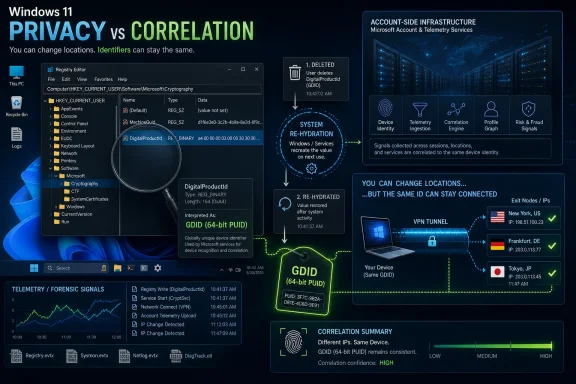
The article at korben.info, which attributes the broader case reporting to The Register and the reverse engineering to Smtimes IWndr, turns that lesson into a practical experiment. Korben spun up a Windows 11 Pro virtual machine, looked for the identifier in the current user registry hive, deleted the visible value, watched it return, and concluded that the local registry entry is not the source of truth. The local machine can display the label, cache the label, and resend the label; the account-side infrastructure appears to be what makes it durable.
That is what separates this from the usual Windows privacy-toggle argument. The GDID, as described in Korben’s test, is not just another noisy telemetry setting buried in Settings. It is a 64-bit PUID attached to the account when a Windows session opens, written in plain text in the registry, and carried back through services that ordinary telemetry hardening advice may not touch.
The arrest that gave this issue oxygen involved an alleged Scattered Spider member who, according to Korben’s account, was caught by the FBI in April 2026 while hiding traffic behind a VPN with IPs across three different countries. The practical significance is not that investigators had one magic number and nothing else. Serious investigations usually rely on a mesh of records, provider returns, timestamps, accounts, infrastructure, mistakes, and seized devices. But the GDID story matters because it shows how a Windows-origin identifier can help connect activity that the network layer alone was supposed to separate.
That is a hard privacy lesson because VPN marketing has trained users to think in IP addresses. If the IP changes, the user feels changed. If the exit country changes, the session feels laundered. If traffic emerges from somewhere else, the local connection feels obscured. The GDID collapses that intuition: an operating-system identifier that survives the network costume change can make multiple exits look like the same underlying Windows environment.
Korben describes the GDID as an identifier that Windows carries continuously and that Microsoft can hand over to authorities when asked. That wording is deliberately provocative, but the underlying risk model is familiar to anyone who has handled endpoint telemetry, anti-fraud systems, licensing systems, or cloud identity logs. Modern operating systems are not passive launchers of local applications. They are identity brokers, update clients, app-store clients, sync clients, push-notification clients, device-registration clients, and security-reporting clients, all of which can generate durable correlations.
The alleged Scattered Spider member was reportedly trying to disappear behind infrastructure, but the machine itself still had a name tag. That is why this story has spread beyond the narrow crime-reporting angle. The same property that helps investigators tie a suspect’s Windows activity to a device can also worry journalists, activists, employees using personal devices, administrators handling sensitive networks, and ordinary users who assumed “use a VPN” was the end of the privacy conversation.
That distinction matters because many users instinctively reach for hardware explanations when they hear “device identifier.” They think of MAC addresses, TPMs, disk serials, motherboard UUIDs, activation hashes, or Windows hardware IDs. Those are real classes of identifiers, but they lead people toward the wrong mitigation model. If the identifier were purely hardware-derived, swapping hardware, reinstalling Windows, or spoofing a device component might be the central question. If it is account-attached and server-backed, the problem shifts to identity, session creation, device registration, and service communication.
Korben’s PowerShell check reads the
The plain-text registry detail is especially inflammatory because it makes the invisible visible. Privacy controversies often get lost in abstractions: telemetry, diagnostics, cloud services, account experiences. A registry value is concrete. It is a thing a power user can query, delete, screenshot, compare, and obsess over. But that concreteness can mislead, because the visible registry value is apparently only a local manifestation of a more durable server-side association.
That is the pivot of the whole story. If the GDID were merely a registry artifact, deletion would be the fix. Instead, according to Korben’s experiment, deletion is theater.
That observation is more important than the registry path. It suggests the local system is not minting the value as an ephemeral local secret. It is retrieving or rehydrating a server-side association tied to the Microsoft account session. The local registry is the window, not the vault.
For users, this is where the usual “just delete the key” advice breaks down. Windows is full of settings that are restored by policy, cloud sync, service registration, scheduled tasks, app repair, or account sign-in. Removing a local artifact without cutting off the process that reasserts it is like erasing a whiteboard while the projector is still on. The image returns because the image source was elsewhere.
For administrators, that makes the risk more subtle. A hardening script that removes a key may pass a superficial compliance check. A registry diff may look clean immediately after remediation. A user may even believe the issue is solved. But if opening a Microsoft Store session causes the same GDID to return, then the control has failed at the persistence layer.
This is also why the story should not be reduced to “Microsoft stores a device ID.” Every large platform stores device and account identifiers. The sharper question is whether Windows gives users and administrators meaningful controls over the identifier’s creation, visibility, transmission, retention, and law-enforcement disclosure. Korben’s test implies that at least one visible local representation of the identifier is not user-controlled in any durable way.
In the Windows 11 Pro VM, Korben says the classic telemetry service was already stopped. The GDID was still present, readable, and associated services were still active. In Korben’s telling, the tracker does not go through the telemetry path most users think they are cutting. It goes elsewhere, through the Connected Devices Platform and Delivery Optimization services.
That distinction tracks with the way Windows actually works. Microsoft’s own public documentation describes Delivery Optimization as a cloud-based downloader used for Windows Updates, Microsoft Store apps, and other Microsoft products. It is not merely a privacy setting; it is part of the operating system’s content-delivery machinery. Disable or interfere with it bluntly, and the consequences may reach updates, Store app behavior, bandwidth management, peer delivery, and enterprise update design.
That is why the GDID story is so awkward for IT departments. The services implicated by Korben are not random adware-like appendages that can be removed without thought. Delivery Optimization, in particular, is a legitimate Windows component. Enterprises use policy to shape it. Microsoft documents it. Networks may depend on it to reduce bandwidth usage or manage update delivery. Treating it only as a privacy leak ignores its operational role; treating it only as an update component ignores its potential to participate in device correlation.
The Connected Devices Platform raises a similar class of concern. Its name sounds like convenience infrastructure, and that is precisely what modern operating systems are built from: cross-device experiences, app handoff, identity continuity, nearby sharing, cloud presence, and device registration. Those features require durable concepts of “this user” and “this device.” The privacy issue is not that such systems exist; it is that users often discover their forensic value only after a criminal complaint, a reverse-engineering thread, or a power-user blog post drags the mechanism into daylight.
The privacy toggle is not the boundary of the privacy system. That is the sentence Windows users should take from this episode. The real boundary is the sum of identity, services, endpoints, registry state, account sessions, cloud-side retention, and legal process.
The project’s workflow has three parts: audit, preview, and apply. The audit script is
The
Korben also notes a specific obstacle: the service named
That is an old Windows pattern with a new privacy wrapper. Windows protects some services from casual tampering because the platform assumes they are part of the managed base OS. Administrators then discover that “administrator” does not always mean “can change this through the friendly interface.” The registry becomes the back door, but using that back door is not the same as using a supported enterprise control.
The right way to read
Korben’s approach intentionally avoids blocking
That is not a stable consumer-grade boundary. Microsoft can change endpoints. Services can share infrastructure. Store, Update, account, security, and device services can have dependencies that are not obvious from a domain name. Hosts-file blocking can also be bypassed by components that use hardcoded IPs, DoH-like behavior, proxy settings, or alternate service paths, depending on implementation. Korben’s article does not claim universal defeat of every possible Microsoft path, and neither should anyone else.
The hosts-file method is still useful as a forcing function. It lets a power user test what happens when certain communications fail. It can produce logs, breakage patterns, and evidence. In a lab, it can help identify which Windows components are responsible for rehydrating or transmitting a value. But as a fleet control, it is brittle unless wrapped in change management, monitoring, rollback, and a clear support posture.
ProcNetBlocker, which Korben mentions as an alternative for blocking a specific process, points toward a more targeted philosophy. Instead of pretending the entire machine can be made quiet by a handful of endpoint entries, process-aware controls ask which executable is talking, where it is talking, and under what conditions. That model maps better to real endpoint defense. It also makes logging and exception handling more manageable.
Even then, the operating system remains the landlord. A third-party blocker running on Windows is still operating inside the trust boundary of Windows. If the threat model is “prevent Microsoft’s own OS from ever emitting an identifier under all conditions,” the defender is already in a structurally weak position.
A local account changes the identity graph, but it does not transform Windows into an offline operating system. Windows Update still exists. The Store may still exist. Activation, Defender, certificates, time sync, crash reporting, app frameworks, and device services may still communicate. Some identifiers may be account-bound. Others may be install-bound. Others may be hardware-derived. Others may be generated per service. The absence of one known Microsoft-account-linked path does not prove the absence of all durable correlation.
That matters because privacy advice often overcorrects. One camp says, “Use a VPN and you’re safe.” Another says, “Use a local account and you’re safe.” Another says, “Disable telemetry and you’re safe.” The GDID story shows why those one-line answers fail. Privacy is not a switch; it is a dependency graph.
For everyday users, a local account may still reduce exposure. For enterprises, it may simplify some identity questions while complicating management. For people with serious adversaries, it is only one small piece of compartmentalization. The dangerous thing is not using a local account; the dangerous thing is believing the local account has solved a server-side and service-side correlation problem that has not actually been measured.
Korben’s harsher conclusion is that the only solid option for sensitive activity is not doing it on Windows. A live Linux system, for example, gives the user fuller control over what leaves the machine. Even that should not be romanticized into magic anonymity. Firmware, network behavior, browser fingerprints, human mistakes, accounts, documents, and timing can still betray a user. But a live Linux environment at least changes the trust boundary: the user is not asking Windows to police Windows.
For WindowsForum readers, that is the practical divide. If the goal is ordinary privacy improvement on a daily driver, measured Windows hardening may be reasonable. If the goal is sensitive compartmentalized activity where operating-system vendor telemetry is inside the threat model, Windows is the wrong substrate.
Delivery Optimization is the clearest example. Microsoft’s own documentation presents it as a Windows feature for downloading updates, Store apps, and other Microsoft content efficiently, including peer and cache-aware behavior. In many organizations, that is not optional fluff. It is part of how devices avoid individually pulling the same content across constrained links. Disabling it because of a privacy story may reduce one correlation path while creating patching delays, user complaints, or unsupported configurations.
That does not mean administrators should ignore the issue. It means they should separate four questions that online debate tends to merge. First, is the GDID present? Second, which services can read or transmit it? Third, which endpoints receive it? Fourth, what operational functions break when those services or endpoints are constrained?
Korben’s
Administrators should also think about logging. If a company decides to block or restrict the path, it should know whether Windows components begin failing noisily, silently retrying, or shifting to alternate endpoints. Silent retry storms can become network noise. Broken Store dependencies can become tickets. Unsupported registry service changes can be undone by updates or collide with policy. A privacy control that no one monitors is just future archaeology.
There is also a policy dimension. If a Windows device can carry an account-linked identifier that is useful enough for law-enforcement correlation, organizations should decide whether that is acceptable on privileged admin workstations, journalist endpoints, legal machines, executive travel laptops, incident-response jump boxes, research systems, and personal devices used under BYOD policies. Not every endpoint has the same privacy requirement. A call-center kiosk and a sensitive investigation laptop should not share the same risk appetite.
Lawful access and platform design are different questions. Investigators may have legitimate authority to request records. Microsoft may have legal obligations to comply. A persistent identifier may be valuable in an investigation of ransomware, fraud, extortion, or intrusion. None of that answers whether users and administrators understand the identifier, can inspect it, can limit it, can rotate it, can prevent its use for nonessential purposes, or can see how often it is disclosed.
The issue is transparency. Windows users are accustomed to product IDs, device IDs, advertising IDs, diagnostic settings, and Microsoft account device lists. GDID is not part of the everyday vocabulary. If a 64-bit PUID attached at Windows session creation can correlate activity across VPN exits, it deserves a clearer control and documentation story than “a reverse engineer and a blog post found the path.”
This is where Microsoft has a stronger long-term interest in explaining itself than in staying quiet. The company can argue that device identifiers are necessary for security, licensing, Store reliability, fraud prevention, update integrity, and abuse investigations. Those arguments may be true. But if the identifier is durable, readable in plain text, rehydrated after deletion, and useful in law-enforcement correlation, then burying it inside the general fog of “connected experiences” will not satisfy technically literate users.
The enterprise version of the same problem is contractual. Businesses increasingly need to know what data leaves endpoints, where it goes, how long it persists, and under what legal process it can be disclosed. A hidden or poorly documented identifier is not just a privacy worry; it is a governance gap. The fact that the identifier helped in a serious criminal investigation may make it defensible. It does not make it self-explanatory.
That distinction is basic security architecture, but consumer privacy discourse keeps losing it. A VPN changes the network path. It does not erase cookies. It does not prevent account login correlation. It does not randomize device fingerprints. It does not stop malware. It does not make a Windows account local. It does not prevent Microsoft services from seeing identifiers emitted by Windows components. It does not make a sloppy operational pattern disciplined.
The alleged Scattered Spider case is therefore less a story about VPN failure than compartmentalization failure. If the same Windows environment, account state, or device identifier appears across activities that were supposed to be separate, the VPN becomes only one costume in a closet full of labels. The exit IP changes; the rest of the stack keeps talking.
For normal users, the lesson is not to cancel the VPN. It is to stop treating the VPN as a privacy force field. For administrators, the lesson is to model identity and device telemetry alongside network controls. For high-risk users, the lesson is harsher: if the operating system vendor is inside the adversary model, the operating system cannot also be the privacy boundary.
This is why Korben’s live Linux recommendation is not performative open-source tribalism. It is a trust-boundary argument. A live system that does not sign into the same Microsoft account, does not reuse the same Windows services, and does not persist the same local state gives the user a cleaner compartment. It still has to be used carefully, but at least it is not trying to make a cloud-connected Windows profile forget itself.
Korben’s piece lands because it turns an abstract platform concern into a reproducible user experience: read the label, delete the label, watch the same label come back. Whether Microsoft responds with documentation, controls, or silence will determine whether GDID becomes a passing privacy flare-up or the next durable symbol of Windows’ cloud-account bargain. For now, the safest assumption is that Windows can remember more than your VPN can hide, and serious privacy planning has to begin at the operating system boundary rather than the network exit.
The article at korben.info, which attributes the broader case reporting to The Register and the reverse engineering to Smtimes IWndr, turns that lesson into a practical experiment. Korben spun up a Windows 11 Pro virtual machine, looked for the identifier in the current user registry hive, deleted the visible value, watched it return, and concluded that the local registry entry is not the source of truth. The local machine can display the label, cache the label, and resend the label; the account-side infrastructure appears to be what makes it durable.
That is what separates this from the usual Windows privacy-toggle argument. The GDID, as described in Korben’s test, is not just another noisy telemetry setting buried in Settings. It is a 64-bit PUID attached to the account when a Windows session opens, written in plain text in the registry, and carried back through services that ordinary telemetry hardening advice may not touch.
 The Scattered Spider Case Made a Hidden Correlator Legible
The arrest that gave this issue oxygen involved an alleged Scattered Spider member who, according to Korben’s account, was caught by the FBI in April 2026 while hiding traffic behind a VPN with IPs across three different countries. The practical significance is not that investigators had one magic number and nothing else. Serious investigations usually rely on a mesh of records, provider returns, timestamps, accounts, infrastructure, mistakes, and seized devices. But the GDID story matters because it shows how a Windows-origin identifier can help connect activity that the network layer alone was supposed to separate.That is a hard privacy lesson because VPN marketing has trained users to think in IP addresses. If the IP changes, the user feels changed. If the exit country changes, the session feels laundered. If traffic emerges from somewhere else, the local connection feels obscured. The GDID collapses that intuition: an operating-system identifier that survives the network costume change can make multiple exits look like the same underlying Windows environment.
Korben describes the GDID as an identifier that Windows carries continuously and that Microsoft can hand over to authorities when asked. That wording is deliberately provocative, but the underlying risk model is familiar to anyone who has handled endpoint telemetry, anti-fraud systems, licensing systems, or cloud identity logs. Modern operating systems are not passive launchers of local applications. They are identity brokers, update clients, app-store clients, sync clients, push-notification clients, device-registration clients, and security-reporting clients, all of which can generate durable correlations.
The alleged Scattered Spider member was reportedly trying to disappear behind infrastructure, but the machine itself still had a name tag. That is why this story has spread beyond the narrow crime-reporting angle. The same property that helps investigators tie a suspect’s Windows activity to a device can also worry journalists, activists, employees using personal devices, administrators handling sensitive networks, and ordinary users who assumed “use a VPN” was the end of the privacy conversation.
GDID Is Not the Hardware Serial Number People Want It to Be
Korben’s most useful contribution is the distinction between what the GDID is and what it is not. It is not described as the motherboard serial number. It is not presented as a hardware hash. It is not simply a BIOS-derived fingerprint. In the Korben test, the GDID is described as a 64-bit PUID that Microsoft’s servers attach to the account the moment a Windows session is opened.That distinction matters because many users instinctively reach for hardware explanations when they hear “device identifier.” They think of MAC addresses, TPMs, disk serials, motherboard UUIDs, activation hashes, or Windows hardware IDs. Those are real classes of identifiers, but they lead people toward the wrong mitigation model. If the identifier were purely hardware-derived, swapping hardware, reinstalling Windows, or spoofing a device component might be the central question. If it is account-attached and server-backed, the problem shifts to identity, session creation, device registration, and service communication.
Korben’s PowerShell check reads the
LID value under HKCU:SOFTWAREMicrosoftIdentityCRLExtendedProperties and converts it into a g:-prefixed decimal-looking representation. On the author’s Windows 11 Pro VM, the observed value was g:6755487812206045. The point of publishing that VM value was not that the number itself is interesting. The point was that a normal user context could expose a readable label that looks boring until someone explains what it can correlate.The plain-text registry detail is especially inflammatory because it makes the invisible visible. Privacy controversies often get lost in abstractions: telemetry, diagnostics, cloud services, account experiences. A registry value is concrete. It is a thing a power user can query, delete, screenshot, compare, and obsess over. But that concreteness can mislead, because the visible registry value is apparently only a local manifestation of a more durable server-side association.
That is the pivot of the whole story. If the GDID were merely a registry artifact, deletion would be the fix. Instead, according to Korben’s experiment, deletion is theater.
Deleting the Registry Value Only Proves Where the Power Isn’t
Korben tried the obvious thing first: delete the visible registry value atHKCU:SOFTWAREMicrosoftIdentityCRLExtendedProperties, restart the relevant service, and see whether the identifier disappears. It did not. After opening the Microsoft Store for two seconds, the GDID came back. More importantly, Korben says it came back as the same one.That observation is more important than the registry path. It suggests the local system is not minting the value as an ephemeral local secret. It is retrieving or rehydrating a server-side association tied to the Microsoft account session. The local registry is the window, not the vault.
For users, this is where the usual “just delete the key” advice breaks down. Windows is full of settings that are restored by policy, cloud sync, service registration, scheduled tasks, app repair, or account sign-in. Removing a local artifact without cutting off the process that reasserts it is like erasing a whiteboard while the projector is still on. The image returns because the image source was elsewhere.
For administrators, that makes the risk more subtle. A hardening script that removes a key may pass a superficial compliance check. A registry diff may look clean immediately after remediation. A user may even believe the issue is solved. But if opening a Microsoft Store session causes the same GDID to return, then the control has failed at the persistence layer.
This is also why the story should not be reduced to “Microsoft stores a device ID.” Every large platform stores device and account identifiers. The sharper question is whether Windows gives users and administrators meaningful controls over the identifier’s creation, visibility, transmission, retention, and law-enforcement disclosure. Korben’s test implies that at least one visible local representation of the identifier is not user-controlled in any durable way.
Telemetry Toggles Are Not the Same as Correlation Controls
One of the most damaging misconceptions in Windows privacy debates is that “telemetry” is a single pipe. Users disable diagnostic data, turn off a few privacy switches, run a debloater, block an obvious endpoint, and assume the operating system has been domesticated. Korben’s test attacks that assumption directly.In the Windows 11 Pro VM, Korben says the classic telemetry service was already stopped. The GDID was still present, readable, and associated services were still active. In Korben’s telling, the tracker does not go through the telemetry path most users think they are cutting. It goes elsewhere, through the Connected Devices Platform and Delivery Optimization services.
That distinction tracks with the way Windows actually works. Microsoft’s own public documentation describes Delivery Optimization as a cloud-based downloader used for Windows Updates, Microsoft Store apps, and other Microsoft products. It is not merely a privacy setting; it is part of the operating system’s content-delivery machinery. Disable or interfere with it bluntly, and the consequences may reach updates, Store app behavior, bandwidth management, peer delivery, and enterprise update design.
That is why the GDID story is so awkward for IT departments. The services implicated by Korben are not random adware-like appendages that can be removed without thought. Delivery Optimization, in particular, is a legitimate Windows component. Enterprises use policy to shape it. Microsoft documents it. Networks may depend on it to reduce bandwidth usage or manage update delivery. Treating it only as a privacy leak ignores its operational role; treating it only as an update component ignores its potential to participate in device correlation.
The Connected Devices Platform raises a similar class of concern. Its name sounds like convenience infrastructure, and that is precisely what modern operating systems are built from: cross-device experiences, app handoff, identity continuity, nearby sharing, cloud presence, and device registration. Those features require durable concepts of “this user” and “this device.” The privacy issue is not that such systems exist; it is that users often discover their forensic value only after a criminal complaint, a reverse-engineering thread, or a power-user blog post drags the mechanism into daylight.
The privacy toggle is not the boundary of the privacy system. That is the sentence Windows users should take from this episode. The real boundary is the sum of identity, services, endpoints, registry state, account sessions, cloud-side retention, and legal process.
The no-gdid Scripts Choose Containment Over Deletion
Korben’s mitigation does not promise to erase the GDID. That restraint is important. The proposed project, namedno-gdid, is framed as a way to stop the identifier from getting out rather than a way to delete it from Microsoft’s side. The local GDID remains readable. The past remains outside the user’s reach. The goal is forward-looking damage limitation.The project’s workflow has three parts: audit, preview, and apply. The audit script is
Get-GDID-Audit.ps1, which is described as read-only. It shows the user’s GDID and the status of services in the chain. The mitigation scripts are Disable-GDID-Services.ps1 and Block-GDID-Endpoints.ps1. Without -Apply, they preview what they would change. With -Apply, they make the changes. The revert script is Revert-GDID.ps1.| Component | Script | Purpose | Default behavior | Risk boundary |
|---|---|---|---|---|
| Audit | Get-GDID-Audit.ps1 | Shows the GDID and related service state | Read-only | Safe first look, but still exposes a sensitive identifier |
| Service mitigation | Disable-GDID-Services.ps1 | Disables services Korben associates with registration and reporting | Preview unless -Apply is used | May affect Windows service behavior and update-adjacent workflows |
| Endpoint mitigation | Block-GDID-Endpoints.ps1 | Sends corresponding Microsoft servers into the void through hosts-file blocking | Preview unless -Apply is used | Can break Microsoft-dependent communication if endpoints are overbroad |
| Reversal | Revert-GDID.ps1 | Restores the system to its prior state | Applies the rollback action | Depends on the original changes being tracked cleanly |
-Apply option is the dividing line between observing and altering the machine. That is a good design choice, because this is exactly the sort of mitigation that should not be copy-pasted blindly from a social post. Service changes and hosts-file blocks can create delayed failures that do not appear during a five-minute test. The Store may behave differently later. Windows Update may behave differently later. Account-connected experiences may fail in ways that look unrelated until someone remembers the hardening script.Korben also notes a specific obstacle: the service named
DoSvc refuses to be disabled the normal way. Even as administrator, Windows returns an “Access denied” error. The workaround described is to disable it directly in the registry, where the service manager blocks the normal administrative path but registry writes remain possible.That is an old Windows pattern with a new privacy wrapper. Windows protects some services from casual tampering because the platform assumes they are part of the managed base OS. Administrators then discover that “administrator” does not always mean “can change this through the friendly interface.” The registry becomes the back door, but using that back door is not the same as using a supported enterprise control.
The right way to read
no-gdid is therefore not “install this and become anonymous.” It is “here is a research-driven containment experiment for people who understand the blast radius.” Korben says to test in a VM with a snapshot before using it on a real machine. That caveat should be treated as part of the mitigation, not a polite afterthought.The Hosts File Is a Blunt Instrument in a Cloud Operating System
Blocking endpoints through the hosts file has a satisfying old-school appeal. It is visible. It is local. It predates the app-store era. It feels like taking back control from a cloud service with the simplest tool in the box. But in a modern Windows system, hosts-file blocking is also crude.Korben’s approach intentionally avoids blocking
login.live.com, because doing so would break Microsoft account login. That single exception illustrates the problem. The same identity fabric that makes Windows convenient also makes clean separation difficult. If the user wants to remain signed into a Microsoft account while reducing GDID reporting, the mitigation has to distinguish between identity endpoints that keep the PC usable and endpoints that participate in the unwanted device reporting path.That is not a stable consumer-grade boundary. Microsoft can change endpoints. Services can share infrastructure. Store, Update, account, security, and device services can have dependencies that are not obvious from a domain name. Hosts-file blocking can also be bypassed by components that use hardcoded IPs, DoH-like behavior, proxy settings, or alternate service paths, depending on implementation. Korben’s article does not claim universal defeat of every possible Microsoft path, and neither should anyone else.
The hosts-file method is still useful as a forcing function. It lets a power user test what happens when certain communications fail. It can produce logs, breakage patterns, and evidence. In a lab, it can help identify which Windows components are responsible for rehydrating or transmitting a value. But as a fleet control, it is brittle unless wrapped in change management, monitoring, rollback, and a clear support posture.
ProcNetBlocker, which Korben mentions as an alternative for blocking a specific process, points toward a more targeted philosophy. Instead of pretending the entire machine can be made quiet by a handful of endpoint entries, process-aware controls ask which executable is talking, where it is talking, and under what conditions. That model maps better to real endpoint defense. It also makes logging and exception handling more manageable.
Even then, the operating system remains the landlord. A third-party blocker running on Windows is still operating inside the trust boundary of Windows. If the threat model is “prevent Microsoft’s own OS from ever emitting an identifier under all conditions,” the defender is already in a structurally weak position.
Local Accounts Help Less Than People Want to Believe
The obvious counterproposal is to stop using a Microsoft account. Korben acknowledges that switching to a local account appears to remove the path being blocked, but also warns that there is no proof yet that an anonymous identifier does not take over behind the scenes. That is the correct level of caution.A local account changes the identity graph, but it does not transform Windows into an offline operating system. Windows Update still exists. The Store may still exist. Activation, Defender, certificates, time sync, crash reporting, app frameworks, and device services may still communicate. Some identifiers may be account-bound. Others may be install-bound. Others may be hardware-derived. Others may be generated per service. The absence of one known Microsoft-account-linked path does not prove the absence of all durable correlation.
That matters because privacy advice often overcorrects. One camp says, “Use a VPN and you’re safe.” Another says, “Use a local account and you’re safe.” Another says, “Disable telemetry and you’re safe.” The GDID story shows why those one-line answers fail. Privacy is not a switch; it is a dependency graph.
For everyday users, a local account may still reduce exposure. For enterprises, it may simplify some identity questions while complicating management. For people with serious adversaries, it is only one small piece of compartmentalization. The dangerous thing is not using a local account; the dangerous thing is believing the local account has solved a server-side and service-side correlation problem that has not actually been measured.
Korben’s harsher conclusion is that the only solid option for sensitive activity is not doing it on Windows. A live Linux system, for example, gives the user fuller control over what leaves the machine. Even that should not be romanticized into magic anonymity. Firmware, network behavior, browser fingerprints, human mistakes, accounts, documents, and timing can still betray a user. But a live Linux environment at least changes the trust boundary: the user is not asking Windows to police Windows.
For WindowsForum readers, that is the practical divide. If the goal is ordinary privacy improvement on a daily driver, measured Windows hardening may be reasonable. If the goal is sensitive compartmentalized activity where operating-system vendor telemetry is inside the threat model, Windows is the wrong substrate.
Enterprise IT Has to Treat This as Both Privacy Risk and Operations Risk
The consumer framing is emotionally simpler: Microsoft bad, tracker found, block it. Enterprise IT does not get that luxury. In a managed environment, the same services implicated in the GDID path may be entangled with update reliability, Store app delivery, bandwidth planning, Microsoft account or Entra-adjacent workflows, help desk assumptions, and compliance evidence.Delivery Optimization is the clearest example. Microsoft’s own documentation presents it as a Windows feature for downloading updates, Store apps, and other Microsoft content efficiently, including peer and cache-aware behavior. In many organizations, that is not optional fluff. It is part of how devices avoid individually pulling the same content across constrained links. Disabling it because of a privacy story may reduce one correlation path while creating patching delays, user complaints, or unsupported configurations.
That does not mean administrators should ignore the issue. It means they should separate four questions that online debate tends to merge. First, is the GDID present? Second, which services can read or transmit it? Third, which endpoints receive it? Fourth, what operational functions break when those services or endpoints are constrained?
Korben’s
Get-GDID-Audit.ps1 belongs in a lab before it belongs in production. An enterprise privacy or endpoint engineering team could use it as a starting point to inventory behavior across Windows editions, account states, update rings, Store configurations, VPN clients, EDR stacks, and management baselines. The useful result is not a screenshot of a scary number. The useful result is a matrix of what changes under controlled conditions.Administrators should also think about logging. If a company decides to block or restrict the path, it should know whether Windows components begin failing noisily, silently retrying, or shifting to alternate endpoints. Silent retry storms can become network noise. Broken Store dependencies can become tickets. Unsupported registry service changes can be undone by updates or collide with policy. A privacy control that no one monitors is just future archaeology.
There is also a policy dimension. If a Windows device can carry an account-linked identifier that is useful enough for law-enforcement correlation, organizations should decide whether that is acceptable on privileged admin workstations, journalist endpoints, legal machines, executive travel laptops, incident-response jump boxes, research systems, and personal devices used under BYOD policies. Not every endpoint has the same privacy requirement. A call-center kiosk and a sensitive investigation laptop should not share the same risk appetite.
Action checklist for admins
- Reproduce Korben’s audit flow first on a disposable Windows 11 Pro VM, preferably with a snapshot, before touching production systems.
- Use
Get-GDID-Audit.ps1only as an inventory and validation aid; treat the displayed GDID as sensitive. - Test
Disable-GDID-Services.ps1andBlock-GDID-Endpoints.ps1in preview mode before using-Apply. - Validate Windows Update, Microsoft Store, account sign-in, device management, EDR, VPN, and help desk workflows after any service or endpoint change.
- Keep
Revert-GDID.ps1available and test rollback as seriously as deployment. - For genuinely sensitive work, consider a separate non-Windows live environment rather than trying to make a daily Windows account behave like an amnesic workstation.
Lawful Access Does Not Make the Design Question Go Away
There is an easy rhetorical trap here: because the case involves an alleged Scattered Spider member, concern about GDID can be framed as concern for criminals. That is lazy. A tracking mechanism does not become irrelevant to civil liberties just because one public example involves a deeply unsympathetic target.Lawful access and platform design are different questions. Investigators may have legitimate authority to request records. Microsoft may have legal obligations to comply. A persistent identifier may be valuable in an investigation of ransomware, fraud, extortion, or intrusion. None of that answers whether users and administrators understand the identifier, can inspect it, can limit it, can rotate it, can prevent its use for nonessential purposes, or can see how often it is disclosed.
The issue is transparency. Windows users are accustomed to product IDs, device IDs, advertising IDs, diagnostic settings, and Microsoft account device lists. GDID is not part of the everyday vocabulary. If a 64-bit PUID attached at Windows session creation can correlate activity across VPN exits, it deserves a clearer control and documentation story than “a reverse engineer and a blog post found the path.”
This is where Microsoft has a stronger long-term interest in explaining itself than in staying quiet. The company can argue that device identifiers are necessary for security, licensing, Store reliability, fraud prevention, update integrity, and abuse investigations. Those arguments may be true. But if the identifier is durable, readable in plain text, rehydrated after deletion, and useful in law-enforcement correlation, then burying it inside the general fog of “connected experiences” will not satisfy technically literate users.
The enterprise version of the same problem is contractual. Businesses increasingly need to know what data leaves endpoints, where it goes, how long it persists, and under what legal process it can be disclosed. A hidden or poorly documented identifier is not just a privacy worry; it is a governance gap. The fact that the identifier helped in a serious criminal investigation may make it defensible. It does not make it self-explanatory.
The VPN Was Doing Its Job; It Was Just the Wrong Job
The most misleading summary of the GDID case is “VPNs don’t work.” They do work, within their layer. A VPN can hide traffic from a local network, obscure the user’s home IP from destination services, route traffic through another jurisdiction, and protect against some forms of network observation. What it cannot do is stop the operating system, browser, app, or logged-in cloud account from identifying the user through a separate channel.That distinction is basic security architecture, but consumer privacy discourse keeps losing it. A VPN changes the network path. It does not erase cookies. It does not prevent account login correlation. It does not randomize device fingerprints. It does not stop malware. It does not make a Windows account local. It does not prevent Microsoft services from seeing identifiers emitted by Windows components. It does not make a sloppy operational pattern disciplined.
The alleged Scattered Spider case is therefore less a story about VPN failure than compartmentalization failure. If the same Windows environment, account state, or device identifier appears across activities that were supposed to be separate, the VPN becomes only one costume in a closet full of labels. The exit IP changes; the rest of the stack keeps talking.
For normal users, the lesson is not to cancel the VPN. It is to stop treating the VPN as a privacy force field. For administrators, the lesson is to model identity and device telemetry alongside network controls. For high-risk users, the lesson is harsher: if the operating system vendor is inside the adversary model, the operating system cannot also be the privacy boundary.
This is why Korben’s live Linux recommendation is not performative open-source tribalism. It is a trust-boundary argument. A live system that does not sign into the same Microsoft account, does not reuse the same Windows services, and does not persist the same local state gives the user a cleaner compartment. It still has to be used carefully, but at least it is not trying to make a cloud-connected Windows profile forget itself.
What Windows Users Should Remember After the Outrage Fades
The GDID debate will probably follow the usual cycle: alarm, counter-alarm, debunking, over-debunking, scripts, forks, angry threads, and then a slow return to normal. The durable value is not the drama. It is the clearer mental model of where Windows identity lives.- The GDID described by Korben is a 64-bit PUID, not merely a motherboard serial number or a simple hardware hash.
- The visible registry value at
HKCU:SOFTWAREMicrosoftIdentityCRLExtendedPropertiesis not enough to control the identifier. - On Korben’s Windows 11 Pro VM, deleting the value did not remove it; the same GDID returned after launching the Microsoft Store.
- Disabling classic telemetry does not necessarily affect the Connected Devices Platform and Delivery Optimization path Korben identifies.
no-gdidis a containment experiment, not an eraser for Microsoft’s existing server-side history.- A live Linux system is the cleaner option when the task is sensitive enough that Windows vendor telemetry belongs in the threat model.
Korben’s piece lands because it turns an abstract platform concern into a reproducible user experience: read the label, delete the label, watch the same label come back. Whether Microsoft responds with documentation, controls, or silence will determine whether GDID becomes a passing privacy flare-up or the next durable symbol of Windows’ cloud-account bargain. For now, the safest assumption is that Windows can remember more than your VPN can hide, and serious privacy planning has to begin at the operating system boundary rather than the network exit.
References
- Primary source: Korben
Published: Wed, 08 Jul 2026 15:59:33 GMT
GDID Windows - Cut the tracker that follows you even under VPN - Korben
As I mentioned earlier, in April 2026, the FBI caught an alleged Scattered Spider member. The guy was hiding his traffic behind a VPN, with IPs across ...korben.info
- Related coverage: tomshardware.com
Windows 11 identifier code used to track Scattered Spider perp after Microsoft shared info with FBI — 19-year-old US-Estonian hacker arrested over alleged ties to infamous extortion group | Tom's Hardware
DOJ claims the group stole over $100 million across various attacks.www.tomshardware.com - Related coverage: pasqualepillitteri.it
- Related coverage: hivesecurity.gitlab.io
The VPN Was Never the Problem: How a Windows Telemetry ID Unmasked a Scattered Spider Suspect — Hive Security
A 19-year-old allegedly hid behind a VPN and ngrok during an $8M jewelry-retailer extortion case. Windows' Global Device Identifier (GDID) gave investigators a device-level pivot.hivesecurity.gitlab.io - Related coverage: golem.de
- Related coverage: thehackernews.com
Court Filing Reveals Windows Device ID Helped FBI Trace Alleged Scattered Spider Hacker
Federal complaint says a Windows GDID tied Peter Stokes to a May 2025 jewelry retailer hack that stole 77GB and drew an $8M ransom demand.thehackernews.com
- Related coverage: ibgids.nl
Windows Device ID hielp FBI Scattered Spider hacker traceren — IBgidsNL Nieuws
FBI traceerde een vermeende Scattered Spider hacker via een persistent Windows device ID, gekoppeld aan een inbraak bij een luxe juwelier.ibgids.nl - Related coverage: fbi.gov
- Related coverage: hwupgrade.it
Credeva di essere invisibile con VPN e tunneling: un codice nascosto in Windows 11 lo ha tradito | Hardware Upgrade
Un identificatore interno di Windows, il Global Device Identifier (GDID), è stato utilizzato nell'ambito di un'indagine dell'FBI per collegare un computer a una serie di attacchi ransomware attribuiti a Scattered Spider.www.hwupgrade.it - Official source: support.microsoft.com
Delivery Optimization in Windows | Microsoft Support
Delivery Optimization in Windowssupport.microsoft.com - Official source: learn.microsoft.com
Configure Delivery Optimization for Windows | Microsoft Learn
In this article, learn about the different configuration considerations to optimize Delivery Optimization (DO) in your environment.learn.microsoft.com - Official source: answers.microsoft.com
Unable to disable Delivery Optimization service - Microsoft Q&A
After recent Windows update v1809 (Build 17763.79), I am unable to disable Delivery Optimization service. This constantly consumes by internet bandwidth in the background which makes the web surfing very slow. Whenever I try to disable this service it…answers.microsoft.com - Related coverage: pentestpad.com
Port 7680 – Windows Delivery Optimization (WDO) | PentestPad
Port 7680 (TCP) is used for peer-to-peer distribution of windows updates and microsoft store apps between devices. Learn how WDO / DoSvc works, common vulner... www.pentestpad.com
- Official source: techcommunity.microsoft.com
- Related coverage: sabaudia.org
DoSvc : maîtriser le service Delivery Optimization de Windows
Découvrez comment maîtriser le service Delivery Optimization (DoSvc) de Windows pour optimiser vos mises à jour sans saturer votre connexion Internet. www.sabaudia.org
- Related coverage: smartpcutilities.com
Delivery Optimization (DoSvc) Windows Service Startup Type and Configuration
Delivery Optimization (DoSvc) Windows service startup type, description, settings, default configuration, and how to optimize in Windows 11. www.smartpcutilities.com
- Related coverage: digitaliziran.si
Windows GDID: What You Need to Know Before Your Next Security Review | Digitaliziran si
The Scattered Spider complaint (July 2026) introduced something to public record: Microsoft’s Global Device Identifier, cited as g:6755467234350028 - a persistent, device-level identifier the FBI used to tie a suspect to a Windows installation across IPs and browsing history. A Microsoft...digitaliziran.si - Official source: download.microsoft.com
