

The GEEKOM A5 Pro 2026 Edition is a compact, quietly cooled mini PC that prioritizes efficiency and connectivity over raw multi‑core muscle — our hands‑on testing shows a well‑rounded Windows 11 Pro experience with excellent I/O, strong networking, and low power draw, but also reveals clear performance trade‑offs tied to its six‑core AMD Ryzen 5 7530U platform and integrated Vega graphics. (cnx-software.com)
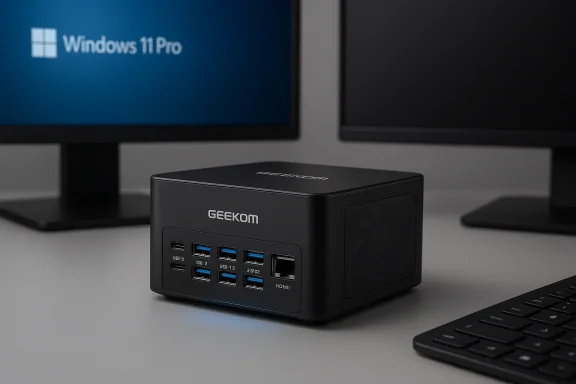
The A5 Pro 2026 Edition ships from GEEKOM as a small, VESA‑mountable Windows 11 Pro mini PC. It pairs an AMD Ryzen 5 7530U (6C/12T, Zen‑3 family often listed as Barcelo/Cezanne refresh) with dual SO‑DIMM DDR4 slots, an M.2 NVMe main drive and a secondary M.2 slot, a 2.5GbE port, and an M.2 Wi‑Fi 6 module — a configuration that aims to serve office, creator‑light, and general‑purpose use cases in a palm‑sized package. (cnx-software.com)
CNX’s headline findings:
Important context: mobile APUs get tuned by OEMs. The 15 W “nominal” TDP is a guideline; actual PL1 and PL2 power limits and the machine’s cooling determine sustained multi‑core performance. CNX’s HWiNFO capture on the A5 Pro reports a Power‑Based Power (PBP / PL1) of 20 W and an MTP (PL2) of 25 W — higher than the 15 W baseline — which explains why the system does not thermally throttle aggressively but also why its sustained power draw is modest. Those readings are device‑specific and are best interpreted as the OEM’s configured power envelope rather than a CPU factory change. (cnx-software.com)
CNX measured the system’s USB 3.2 Gen‑2 ports with an external NVMe enclosure and got read speeds in the ~930–970 MB/s range. That is in line with the real‑world ceiling for a single 10 Gbps USB 3.2 Gen‑2 link (theoretical 10 Gbps = 1,250 MB/s but real overhead and device controller constraints commonly yield 800–1,000 MB/s in practice). Multiple USB spec references and drive reviews confirm the typical Gen‑2 practical window around 800–1,050 MB/s. (cnx-software.com)
Wireless in CNX’s unit is provided by an M.2 2230 AzureWave AW‑XB547NF module populated with a Realtek RTL8852BE Wi‑Fi 6 (802.11ax) combo chip. The vendor module listing and multiple aftermarket part pages identify AW‑XB547NF as an AW module that pairs with RTL8852BE, supporting dual‑band Wi‑Fi 6 and Bluetooth. HWiNFO showed a 1201 Mbps link rate on the review sample, consistent with a 2×2 Wi‑Fi 6 link on 80 MHz channels. (cnx-software.com)
A note about the Realtek RTL8852BE: community reports show mixed real‑world experiences with the chipset, including occasional stability or performance quirks on some laptop/host combinations; while many units work fine, some users have reported disconnects or driver sensitivity depending on firmware and driver revisions. CNX’s results are positive for throughput, but readers should recognize real‑world variability with Realtek Wi‑Fi parts in some systems.
Cross‑checking independent CPU databases and other review results for the Ryzen 5 7530U shows a broad performance band because actual scores depend heavily on PL1/PL2 settings and sustained power allowance: many published 7530U systems score higher in multi‑core (often in the 8–10k Cinebench R23 range) when OEMs allow higher sustained PL1 values and larger cooling budgets. CNX’s lower multi‑core R23 score (6,157) suggests that the A5 Pro in this configuration either ran with conservative sustained clocks, hit thermal/power limits during the run, or used an OEM power curve that yields lower threaded throughput in exchange for lower average power and quieter acoustics. That’s not a problem — it’s a design choice. (cnx-software.com)
Bottom line: expect good single‑thread performance for everyday responsiveness, but do not buy this model expecting 8‑core H‑series multi‑thread throughput. The A5 Pro’s six cores are competitive for office work, multimedia editing light loads, and multitasking, but they lose ground to 8–12 core mini PCs under heavy multi‑threaded workloads.
Caveats:
Noise levels were subdued: idle/light tasks produced ~37–38 dBA at 5 cm from the top, while heavy 3D stress pushed peaks to ~50.7 dBA at the same distance. In normal desktop use, the fan is barely audible; under sustained heavy load it becomes noticeable but not intrusive for many home/office settings. CNX also reported no thermal throttling during their stress runs, consistent with the OEM’s slightly boosted PL1/PL2 settings and competent chassis cooling. (cnx-software.com)
Practical takeaways:
Source: CNX Software GEEKOM A5 Pro 2026 Edition Review - Part 2: An AMD Ryzen 5 7530U mini PC tested with Windows 11 Pro - CNX Software
 Background / Overview
The A5 Pro 2026 Edition ships from GEEKOM as a small, VESA‑mountable Windows 11 Pro mini PC. It pairs an AMD Ryzen 5 7530U (6C/12T, Zen‑3 family often listed as Barcelo/Cezanne refresh) with dual SO‑DIMM DDR4 slots, an M.2 NVMe main drive and a secondary M.2 slot, a 2.5GbE port, and an M.2 Wi‑Fi 6 module — a configuration that aims to serve office, creator‑light, and general‑purpose use cases in a palm‑sized package. (cnx-software.com)- Key platform points: the Ryzen 5 7530U is a 6‑core / 12‑thread mobile APU with a nominal 2.0 GHz base and up to ~4.5 GHz boost; OEM implementations commonly build around a 15 W TDP but vendor power limits and chassis cooling can shift sustained performance.
- GEEKOM’s retail materials and spec pages list the system with two HDMI 2.0 outputs plus two USB‑C ports with DisplayPort Alt Mode, 6 USB ports (four 10 Gbps Gen‑2 ports and a single USB‑2 port), and 2.5GbE networking. The company advertises Bluetooth 5.2 and Wi‑Fi 6 on product pages.
What CNX tested (quick summary)
CNX ran a comprehensive Windows 11 Pro test regimen on the sample A5 Pro 2026 unit: full software inventory (HWiNFO, Task Manager, Device Manager), USB throughput with an NVMe enclosure measured in CrystalDiskMark, storage benchmarks on the internal 1 TB NVMe, PCMark 10, 3DMark Fire Strike, PassMark PerformanceTest 11, Cinebench R23 (single and multi), Unigine Heaven 4.0, YouTube 4K/8K playback in Firefox and Chrome, iperf networking tests over 2.5GbE and Wi‑Fi 6, thermal monitoring under load, fan noise measurements, and power consumption readings with a wall meter. The review unit used Windows 11 Pro 25H2. (cnx-software.com)CNX’s headline findings:
- USB 3.2 Gen‑2 ports hit ~930–970 MB/s with an NVMe enclosure (real‑world Gen‑2 results). (cnx-software.com)
- Internal PCIe NVMe: ~3,720 MB/s read, ~3,434 MB/s write (a solid Gen‑4 x4 drive result on this platform). (cnx-software.com)
- Cinebench R23: 1,344 (single‑core) and 6,157 (multi‑core) — noticeably lower in multi‑core than many 7530U scores reported elsewhere, likely because of platform power/cooling settings. (cnx-software.com)
- 2.5GbE transfers saturated at ~2.37 Gbps with iperf3; Wi‑Fi 6 reached ~845 Mbps down and ~478 Mbps up under the test conditions. (cnx-software.com)
- 4K60 video playback was smooth in Firefox and Chrome; 8K YouTube streams were effectively unwatchable. (cnx-software.com)
Platform and component verification
CPU: AMD Ryzen 5 7530U — what it is and what to expect
The Ryzen 5 7530U is part of AMD’s Zen‑3 mobile family (Barcelo / Cezanne lineage). It is specified as a 6‑core / 12‑thread APU with a nominal 2.0 GHz base and 4.5 GHz boost in many product databases, with an official default thermal design power (TDP) of 15 W for U‑class SKUs. Multiple independent CPU spec databases corroborate these core counts, cache, memory support, and the Vega integrated graphics lineage.Important context: mobile APUs get tuned by OEMs. The 15 W “nominal” TDP is a guideline; actual PL1 and PL2 power limits and the machine’s cooling determine sustained multi‑core performance. CNX’s HWiNFO capture on the A5 Pro reports a Power‑Based Power (PBP / PL1) of 20 W and an MTP (PL2) of 25 W — higher than the 15 W baseline — which explains why the system does not thermally throttle aggressively but also why its sustained power draw is modest. Those readings are device‑specific and are best interpreted as the OEM’s configured power envelope rather than a CPU factory change. (cnx-software.com)
Storage and USB I/O
CNX’s unit used a 1 TB NVMe drive showing CrystalDiskMark sequential read/write of ~3,720 / 3,434 MB/s, consistent with many contemporary PCIe Gen‑4 x4 NVMe drives when the platform exposes the full link. That number is plausible for a mainstream Gen‑4 NVMe—excellent for a compact mini PC but not in the top tier of bleeding‑edge SSDs. (cnx-software.com)CNX measured the system’s USB 3.2 Gen‑2 ports with an external NVMe enclosure and got read speeds in the ~930–970 MB/s range. That is in line with the real‑world ceiling for a single 10 Gbps USB 3.2 Gen‑2 link (theoretical 10 Gbps = 1,250 MB/s but real overhead and device controller constraints commonly yield 800–1,000 MB/s in practice). Multiple USB spec references and drive reviews confirm the typical Gen‑2 practical window around 800–1,050 MB/s. (cnx-software.com)
Networking: 2.5GbE and Wi‑Fi 6 hardware
The GEEKOM A5 Pro’s wired NIC is a Realtek RTL8125 family controller marketed for 2.5GbE. The RTL8125/RTL8125B family is widely used in consumer and small‑business boards and supports NBASE‑T 2.5 Gbps auto‑negotiation. CNX’s iperf3 results saturating at ~2.37 Gbps line up perfectly with the hardware’s expected capability. (cnx-software.com)Wireless in CNX’s unit is provided by an M.2 2230 AzureWave AW‑XB547NF module populated with a Realtek RTL8852BE Wi‑Fi 6 (802.11ax) combo chip. The vendor module listing and multiple aftermarket part pages identify AW‑XB547NF as an AW module that pairs with RTL8852BE, supporting dual‑band Wi‑Fi 6 and Bluetooth. HWiNFO showed a 1201 Mbps link rate on the review sample, consistent with a 2×2 Wi‑Fi 6 link on 80 MHz channels. (cnx-software.com)
A note about the Realtek RTL8852BE: community reports show mixed real‑world experiences with the chipset, including occasional stability or performance quirks on some laptop/host combinations; while many units work fine, some users have reported disconnects or driver sensitivity depending on firmware and driver revisions. CNX’s results are positive for throughput, but readers should recognize real‑world variability with Realtek Wi‑Fi parts in some systems.
Bluetooth LMP firmware vs. vendor spec
CNX observed an LMP firmware version of LMP12.xxx for the Bluetooth adapter; Microsoft’s LMP mapping shows LMP12 corresponds to Bluetooth Core Specification 5.3. GEEKOM’s official spec pages list Bluetooth 5.2; CNX’s device‑level observation therefore indicates this sample reports LMP/firmware that can present as Bluetooth 5.3 on the host, which is an acceptable variance because device firmware revisions and driver stacks can expose newer LMP levels. When a vendor spec lists Bluetooth 5.2 but firmware reports LMP12, that should be considered a firmware/implementation variance rather than an error — and users who need an explicit BT version should confirm on their retail unit. (cnx-software.com)Benchmarks and real‑world performance — what the numbers mean
Synthetic CPU/GPU benchmarks
CNX’s Windows 11 results for the A5 Pro are a useful single‑platform datapoint: PCMark 10 = 5,586; 3DMark Fire Strike = 3,328; PassMark PerfTest 11 = 3,922; Cinebench R23 single = 1,344, multi = 6,157. Unigine Heaven averaged ~32.4 FPS at 1080p. These results place the A5 Pro squarely in the mid‑range, focused on productivity and media handling rather than gaming or heavy multi‑threaded rendering. (cnx-software.com)Cross‑checking independent CPU databases and other review results for the Ryzen 5 7530U shows a broad performance band because actual scores depend heavily on PL1/PL2 settings and sustained power allowance: many published 7530U systems score higher in multi‑core (often in the 8–10k Cinebench R23 range) when OEMs allow higher sustained PL1 values and larger cooling budgets. CNX’s lower multi‑core R23 score (6,157) suggests that the A5 Pro in this configuration either ran with conservative sustained clocks, hit thermal/power limits during the run, or used an OEM power curve that yields lower threaded throughput in exchange for lower average power and quieter acoustics. That’s not a problem — it’s a design choice. (cnx-software.com)
Bottom line: expect good single‑thread performance for everyday responsiveness, but do not buy this model expecting 8‑core H‑series multi‑thread throughput. The A5 Pro’s six cores are competitive for office work, multimedia editing light loads, and multitasking, but they lose ground to 8–12 core mini PCs under heavy multi‑threaded workloads.
Storage and USB throughput (real world)
The internal NVMe’s ~3.7 GB/s sequential read is appropriate for a Gen‑4 x4 device on a constrained mini‑PC platform. External NVMe via USB 3.2 Gen‑2 achieving ~930–970 MB/s is as expected on a single 10 Gbps pipe; the small gaps to 1,250 MB/s are due to protocol overhead and enclosure controller limitations. For most users, these speeds are more than enough for fast application load times and quick large file transfers. (cnx-software.com)Video playback — 4K is comfortable, 8K is not
CNX’s browser playback test shows smooth 4K60 YouTube in Firefox and Chrome with negligible dropped frames in Firefox and very small numbers in Chrome. However, 8K60 playback is not practical on the integrated Vega iGPU in this setup; even 8K30 was unwatchable in CNX’s tests. Heavy browser‑based 8K decoding requires either specialized hardware decode paths, better GPU horsepower, or both. For the target buyer profile — multi‑monitor office, local 4K media, light content creation — the A5 Pro’s video performance is more than adequate. (cnx-software.com)Networking: numbers and practical implications
CNX’s iperf3 runs deliver near‑line rate performance over 2.5GbE (~2.37 Gbps sustained), demonstrating the RTL8125 controller is correctly implemented and fully functional in the sample. Over Wi‑Fi 6 (2×2, AX), CNX measured ~845 Mbps download and ~478 Mbps upload with a Xiaomi AX6000 router test pair; those results are consistent with a 2×2 client on 80 MHz channels under normal home/office attenuation and show the module provides substantial wireless bandwidth for cloud tasks, backups, and streaming. (cnx-software.com)Caveats:
- Wi‑Fi performance depends on AP, channel width, router firmware, and TCP stack tuning; other reviewers and user reports show the real‑world performance envelope for Realtek 8852 family cards can be good but occasionally inconsistent across driver/firmware versions. If wireless reliability is critical for you, consider testing the unit on your own network or planning for an external USB‑C Ethernet dongle as a fallback.
Thermals, noise, and power consumption
CNX measured modest idle power (4.3–6.3 W) and peak test draws of 37–38 W during the initial seconds of Cinebench R23 multi‑core before settling to ~25–31 W sustained depending on duration — a characteristic of an STP burst (PL2 boost) followed by a PL1 thermal/power equilibrium. Idle power and video playback draw were impressively low, which is one of the A5 Pro’s advantages for always‑on or low‑energy scenarios. (cnx-software.com)Noise levels were subdued: idle/light tasks produced ~37–38 dBA at 5 cm from the top, while heavy 3D stress pushed peaks to ~50.7 dBA at the same distance. In normal desktop use, the fan is barely audible; under sustained heavy load it becomes noticeable but not intrusive for many home/office settings. CNX also reported no thermal throttling during their stress runs, consistent with the OEM’s slightly boosted PL1/PL2 settings and competent chassis cooling. (cnx-software.com)
Direct comparisons and value positioning
CNX compared the A5 Pro to a selection of mid‑range mini PCs in a similar price band including models from Beelink and earlier GEEKOM A‑series SKUs. The headline: the A5 Pro favors efficiency and quieter operation over outright benchmark domination. In multi‑core and GPU scores it trails devices with H‑series or higher‑TDP APUs (e.g., Ryzen 7 5800H / Intel i5‑13500H systems) but competes well for everyday productivity and media tasks. For buyers who want the best multi‑threaded output at the same budget, H‑series‑equipped machines will give superior raw numbers at the cost of higher power, heat, and louder fans. (cnx-software.com)Practical takeaways:
- Choose the A5 Pro if you want a compact, quiet mini PC with great I/O (2.5GbE, multiple 10 Gbps USB ports) and efficient 4K media playback.
- Choose a different A‑series mini PC (or an H‑series competitor) if you need sustained multi‑core compute or significantly better integrated GPU performance for game streaming or heavy creative workloads.
Strengths, weaknesses, and risk notes
Strengths
- Excellent connectivity: 2.5GbE + Wi‑Fi 6 + multiple USB 3.2 Gen‑2 ports and DisplayPort Alt Mode over USB‑C make this a very flexible small desktop. (cnx-software.com)
- Low power and quiet operation: attractive for always‑on uses, digital signage, small office servers, or a desktop that won’t disturb a home office. (cnx-software.com)
- Real‑world USB/SSD performance: Gen‑2 ports deliver near‑1,000 MB/s transfers in practice; internal NVMe is fast for day‑to‑day workloads. (cnx-software.com)
Weaknesses / trade‑offs
- Limited multi‑core performance: the 6C/12T 7530U lags H‑series and higher‑core parts in sustained multi‑threaded workloads; CNX’s R23 multi score is lower than some published averages for the same APU, reflecting OEM config choices. If multi‑threaded rendering or CPU‑bound compression is a priority, choose a higher‑TDP device. (cnx-software.com)
- Integrated GPU constraints: Vega iGPU handles 4K60 fine for video decode and light games, but 3D workloads and 8K browser playback are out of reach. (cnx-software.com)
- Potential Wi‑Fi driver quirks with Realtek: while CNX’s throughput was excellent, community reports of intermittent issues with RTL8852BE mean users sensitive to brief drops or roaming behavior may want to test thoroughly or have fallback wired options.
Claims that need caution
- GEEKOM lists Bluetooth 5.2 in the official product spec, while CNX’s sample reported LMP12 (Bluetooth 5.3). Firmware/driver differences can expose newer feature sets; buyers who explicitly need a vendor‑guaranteed Bluetooth version should confirm on their retail order. This is a minor example of spec divergence that occasionally arises between vendor marketing and shipped firmware. (cnx-software.com)
Who should buy this mini PC?
- Users who want a compact, quiet Windows 11 Pro mini PC with fast wired LAN (2.5GbE), multiple 10 Gbps USB ports, support for up to four displays, and low idle power.
- Small business desktops, remote workstations, and media centers that prioritize low‑noise operation and connectivity over maximum rendering throughput.
- Home‑lab and virtualization light loads where energy efficiency, I/O diversity, and a small footprint matter more than absolute core count.
- Need maximum multi‑core render or compile performance (choose an H‑series or 8‑core system).
- Rely on integrated GPU‑heavy workflows or want to play modern AAA titles at high settings.
Final verdict
The GEEKOM A5 Pro 2026 Edition is a pragmatic, well‑balanced mini PC that walks the line between mainstream desktop convenience and ultra‑compact efficiency. CNX Software’s Part 2 testing confirms the unit delivers excellent connectivity, real‑world USB and SSD performance, solid 4K video playback, and near line‑rate 2.5GbE networking — all while remaining quietly efficient. At the same time, its six‑core Ryzen 5 7530U platform is a deliberate compromise: designed to keep thermals and power low, it is not intended to beat H‑series rivals in synthetic multi‑core or GPU benchmarks. If you value quiet operation, lower energy consumption, and broad I/O in a palm‑sized chassis, the A5 Pro is an excellent fit; if you need maximum all‑core performance, look to higher‑TDP mini PCs instead. (cnx-software.com)Practical buying and setup tips (quick checklist)
- Confirm the exact retail SKU and shipping configuration (RAM and SSD capacity), because GEEKOM offers several variants and promotional pricing fluctuates.
- If you depend on wireless stability, test your retail unit’s Wi‑Fi performance on your network; be prepared to update drivers and firmware. Consider using wired 2.5GbE when reliability matters most. (cnx-software.com)
- For heavier workloads, set Windows power plan to “Best performance” as CNX did during benchmarking, or create custom power/thermal profiles if you prefer a quieter/colder machine. (cnx-software.com)
- If you plan heavy external NVMe work, use the 10 Gbps USB 3.2 Gen‑2 ports shown to reach ~900–1,000 MB/s transfers; for even faster external storage, seek devices and hosts supporting Gen‑2x2 or USB4/Thunderbolt. (cnx-software.com)
Source: CNX Software GEEKOM A5 Pro 2026 Edition Review - Part 2: An AMD Ryzen 5 7530U mini PC tested with Windows 11 Pro - CNX Software
