

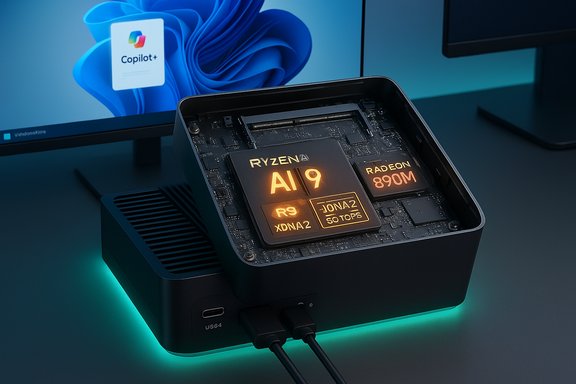
The GEEKOM A9 Max squeezes what looks like a full-size AI workstation into a palm‑sized chassis, pairing AMD’s new Ryzen AI 9 HX 370 with the Radeon 890M iGPU and marketing-grade NPU figures that promise a genuine on‑device Copilot+ and local‑LLM experience for Windows 11 Pro users.
GEEKOM’s A9 Max is billed as an “AI mini PC” aimed squarely at creators, developers, and power users who want local AI capabilities without hauling a desktop tower. The vendor’s product pages and early reviews list an AMD Ryzen AI 9 HX 370 APU, an XDNA 2‑based NPU delivering roughly 50 TOPS and an advertised total AI throughput in the high‑70s to 80 TOPS range, an integrated AMD Radeon 890M GPU (RDNA 3.5), dual USB4 (40 Gbps) ports, Wi‑Fi 7, dual 2.5GbE, support for DDR5‑5600 SO‑DIMMs (up to 128 GB), and dual PCIe 4.0 NVMe slots. These specifications are consistent across the manufacturer’s own product pages and independent hands‑on coverage. This review‑style feature will verify those headline claims, cross‑reference them with independent coverage, explain what they mean in practice for Windows 11 Pro users, and call out both the clear strengths and the practical limits buyers should expect from a tiny, thermally constrained device trying to be “AI workstation, desktop replacement, and mini gaming PC” all at once.
In summary: the GEEKOM A9 Max makes a persuasive case that the next generation of mini PCs can be both genuinely useful for on‑device AI and flexible enough for real workstation workflows. For those ready to experiment with local Copilot+ features, run quantized LLMs on the desktop, or want a compact PC that doubles as a capable gaming/media box, the A9 Max is a noteworthy, well‑spec’d option—provided buyers understand the practical limitations of thermal management, driver maturity, and the nuances of TOPS as a metric.
Source: eTeknix [GEEKOM Unleash AI Power A9 Max Mini PC Windows 11 Pro
 Background / Overview
GEEKOM’s A9 Max is billed as an “AI mini PC” aimed squarely at creators, developers, and power users who want local AI capabilities without hauling a desktop tower. The vendor’s product pages and early reviews list an AMD Ryzen AI 9 HX 370 APU, an XDNA 2‑based NPU delivering roughly 50 TOPS and an advertised total AI throughput in the high‑70s to 80 TOPS range, an integrated AMD Radeon 890M GPU (RDNA 3.5), dual USB4 (40 Gbps) ports, Wi‑Fi 7, dual 2.5GbE, support for DDR5‑5600 SO‑DIMMs (up to 128 GB), and dual PCIe 4.0 NVMe slots. These specifications are consistent across the manufacturer’s own product pages and independent hands‑on coverage. This review‑style feature will verify those headline claims, cross‑reference them with independent coverage, explain what they mean in practice for Windows 11 Pro users, and call out both the clear strengths and the practical limits buyers should expect from a tiny, thermally constrained device trying to be “AI workstation, desktop replacement, and mini gaming PC” all at once.What the hardware actually is (verified specs)
CPU / APU: AMD Ryzen AI 9 HX 370
- AMD’s Ryzen AI 9 HX 370 is a mobile‑class APU built on Zen 5 family designs and is being positioned as a high‑end, laptop‑class chip with integrated NPU capabilities. GEEKOM’s marketing and the product page specify the A9 Max ships with this APU in the top SKU. Independent press coverage also lists the HX 370 as the A9 Max’s heart.
NPU (XDNA 2) and TOPS claims
- GEEKOM states the on‑package XDNA 2 NPU delivers up to 50 TOPS of dedicated NPU throughput and that combined on‑package AI acceleration brings the platform to roughly 77–80 TOPS of aggregate AI performance. These are the numbers shown on the official product pages and repeated in GEEKOM press material. Independent reviews and press previews echo the 50 TOPS NPU and the ~80 TOPS total figure as the vendor’s nominal performance claim.
- How this matters: Microsoft’s Copilot+ PC guidance lists NPUs capable of 40+ TOPS as a practical baseline for many on‑device Copilot features, so a 50 TOPS NPU is in the class that enables richer local AI experiences on Windows 11. That baseline is documented in Microsoft’s Copilot+ guidance and reiterated by multiple outlets.
GPU: AMD Radeon 890M (RDNA 3.5)
- The integrated Radeon 890M is an RDNA 3.5‑era iGPU used on Strix Point / Ryzen AI combos and is reported to have robust integrated graphics power—enough to deliver smooth 1080p gaming in many titles with FSR support and serviceable 4K playback for media. Technical listings and GPU databases show the 890M’s core counts and RDNA 3.5 lineage; independent reviews measure meaningful gaming and GPU‑accelerated AI performance for this class of iGPU.
Memory, storage, and expandability
- The A9 Max supports DDR5 SO‑DIMMs, commonly configured in retail SKUs at 32 GB but expandable to 128 GB on the platform, and includes dual PCIe 4.0 NVMe slots (a standard 2280 M.2 slot plus an additional 2230/2280 option depending on SKU), per GEEKOM’s spec sheet and independent reviews. This makes it unusually upgradeable for a mini PC.
I/O and connectivity
- Dual USB4 (40 Gbps) ports are advertised for the chassis, enabling dual 4K/8K display output, 40 Gbps data transfer, PD charging, and compatibility with many eGPU/oxExternal docks—but note: eGPU behavior depends on the enclosure and driver support; USB4 is not identical to Thunderbolt in every implementation. GEEKOM and early hands‑on reviews both highlight the USB4 ports as a major differentiator.
- Dual HDMI 2.1, DisplayPort (DP‑Alt over USB‑C) capability, Wi‑Fi 7, and dual 2.5GbE ports round out the I/O list in vendor literature and independent coverage.
Software / OS
- Many retail A9 Max units ship with Windows 11 Pro (24H2 builds in current SKUs) preinstalled—this is the platform GEEKOM uses to promote local Copilot+ experiences and direct local LLM work with tools like Ollama and LM Studio. Reviews confirm Windows 11 Pro is the standard shipping OS for major retail channels.
Strengths — why this machine matters
1) Genuine on‑device AI capability in a mini PC
- The A9 Max brands itself as a Copilot+‑capable device (the 50 TOPS NPU places it above Microsoft’s 40 TOPS guidance), which changes the product’s practical value: instead of relying on cloud compute for advanced Windows AI features, the A9 Max can run many inference tasks locally with lower latency and improved privacy. This transition from “AI as cloud service” to “AI where you work” is the A9 Max’s strongest selling point.
2) Balanced integration of CPU, GPU, and NPU
- The strategy behind modern on‑package AI chips is to combine general‑purpose CPU cores, a capable GPU for parallelized workloads, and a dedicated NPU for efficient quantized model inference. For many real‑world small‑to‑medium LLMs (7B–13B, quantized), 32–64 GB of RAM + a 50 TOPS NPU + a fast PCIe 4.0 SSD is a practical, cost‑effective local setup—and that’s the class the A9 Max targets. Hands‑on reports show these systems perform impressively for local models and Copilot features.
3) Uncommonly modern I/O for a mini PC
- Dual USB4 ports, Wi‑Fi 7, dual 2.5GbE and multiple modern display outputs make the A9 Max unusually flexible: multi‑display setups, fast centralized storage access, and external accelerator connectivity are realistic use cases here. That expandability widens the machine’s practical lifetime as workflows evolve.
4) Upgradability that matters
- For many mini PCs, memory and storage are soldered. The A9 Max’s use of SO‑DIMMs and two NVMe slots means users can scale RAM and add fast, large‑capacity storage over time—valuable for AI experimentation where RAM and swap performance make or break usable inference speeds.
Where the marketing glosses things — and what to watch for
TOPS numbers are directional, not absolute
- Vendors commonly cite TOPS as headline metrics. While TOPS gives a sense of NPU capability, it’s an imprecise predictor of real‑world model latency or throughput because software runtimes, quantization format, memory bandwidth, and driver maturity are equally important. The A9 Max’s 50 TOPS NPU meets Microsoft’s Copilot+ baseline on paper, but performance for any particular model or pipeline will vary significantly depending on toolchain support (Windows vs Linux runtimes) and model format. Treat TOPS as a capability indicator, not a guarantee.
eGPU claims and USB4 caveats
- USB4 is a flexible standard that can carry PCIe tunneling, but real‑world eGPU support depends on the host’s implementation, firmware, and the external chassis. While the A9 Max has two USB4 ports, using them as universal “external GPU ports” will work in many scenarios, but users should verify compatibility with their chosen eGPU enclosure and understand performance will be limited by the host’s lanes, driver stack, and protocol translation overhead. Independent reviews highlight this as a “possible but variable” capability rather than a blanket promise.
Thermal & acoustic tradeoffs
- Tiny high‑performance boxes always trade thermal headroom for compactness. Independent hands‑on coverage and community tests across similar Ryzen AI‑based mini PCs show that sustained heavy CPU+NPU+GPU loads push fans into audible territory and may require thermal throttling to keep thermals in check. GEEKOM’s marketing emphasizes an “IceBlast 2.0” cooling system and sub‑25 dB idle claims, but noise and thermal behavior under full NPU/CPU load are where mini PCs reveal limits. Treat vendor idle noise numbers as idealized—real sustained workloads will produce measurable fan noise.
The NPU ecosystem is still maturing on Windows
- Many inference toolchains were developed and optimized on Linux first. Community reports and reviews show Linux tends to offer faster and more flexible NPU/driver stacks for experiments with Ollama, llama.cpp, Qwen, and similar toolchains. Windows support is improving (and Copilot+ integration is Windows‑first by design), but if your workflow requires the absolute lowest latency and widest runtime options for on‑device models, plan for driver/runtime friction and occasional workaround steps.
Warranty & service realities
- GEEKOM advertises a three‑year warranty on many sales channels. That’s stronger than the single‑year default many mini PC vendors offer, but warranty quality (turnaround times, RMA logistics) often varies by region and retailer. Buyers should confirm the exact warranty terms with their reseller before purchase. Vendor warranty promises are valid, but support experiences are an important real‑world consideration.
Practical performance expectations (real‑world scenarios)
Local Copilot+ and Windows AI features
- With an NPU rated at ~50 TOPS, the A9 Max is in the practical class for Copilot+ experiences such as live captions, on‑device image super‑resolution, and lower‑latency local model inference. Microsoft’s Copilot+ guidance puts 40+ TOPS as a baseline, so the A9 Max clears that bar—meaning users should expect many Copilot+ experiences to function locally where Microsoft has enabled them. Real experience will vary by Windows build and regional feature rollouts.
Local LLMs for development and hobbyist inference
- For hobbyist/local ML workflows (Ollama, LM Studio, small agentic browsing tasks), the A9 Max’s mix of RAM, NVMe throughput, and NPU acceleration lets you run quantized 7B–13B models with responsive latencies in many cases. Larger models (30B, 70B+) will run into memory limits or require offloading and slower swap behavior; expect to use model distillation, quantization, or external accelerators for truly large workloads. Community testing on comparable Strix‑Point Ryzen AI systems shows solid responsiveness for small‑to‑medium models.
1080p gaming and integrated GPU workloads
- The Radeon 890M steps up the iGPU game for mini PCs. Expect smooth 1080p in esports and many mainstream titles at high settings; demanding AAA games will require compromises or tuned FSR upscaling. The A9 Max is a solid lightweight gaming box for those who prioritize compactness and local AI over top‑tier GPU frames. Technical listings for 890M and early reviews corroborate respectable iGPU numbers for this class.
Buying checklist — confirm these before ordering
- Confirm the exact SKU you’re buying (RAM and SSD size vary by listing).
- Verify Windows 11 Pro activation and licence type (OEM vs retail) if portability matters.
- If you plan to use an eGPU, confirm the external chassis compatibility and GEEKOM’s USB4 implementation details.
- Plan for cooling/noise management if you’ll run sustained AI workloads; consider a quiet location or acoustic isolation.
- Check the seller’s warranty and support experience for your region—3‑year coverage is attractive but service quality varies.
Step‑by‑step: best use cases and setup tips
- Choose the right OS settings: enable “Best performance” power profile for demanding local inference, but monitor thermals.
- Install the latest vendor firmware, GPU drivers, and AMD’s Ryzen AI toolchain on Windows; for Linux experiments, use a current distro (Ubuntu 24.04+ recommended) and vendor NPU runtime stacks.
- If running local LLMs, favor quantized weights (4‑bit/8‑bit) to stay within RAM limits, and use fast PCIe 4.0 NVMe as swap when necessary.
- For multi‑display or heavy bandwidth tasks, choose direct wired displays on HDMI/DP when possible instead of daisy‑chaining through USB4 to reduce complexity.
- Back up a Windows image before experimenting with Linux or advanced NPU toolchains—this preserves the out‑of‑box Copilot+ behavior and warranty state.
Final analysis and verdict
The GEEKOM A9 Max is a strategically important product: it helps normalize the idea that meaningful on‑device AI no longer requires a rack of hardware or a cloud subscription. For Windows users who want a compact, upgradeable desktop that can run Copilot+ features and local LLM experiments, the A9 Max is compelling—it pairs a 50 TOPS NPU with a capable CPU and a surprisingly strong iGPU, modern I/O, and real expandability. These are not incremental steps; they are a material change in what to expect from small form‑factor systems. That said, the machine is not magic. TOPS marketing should be read as a capability indicator, not a performance guarantee; eGPU over USB4 is promising but not universally plug‑and‑play; and sustained heavy workloads will surface thermal and acoustic limits that are unavoidable in mini PCs. If your goal is to run very large LLMs locally, or to avoid any possibility of throttling under sustained maximum loads, a full‑size desktop with discrete GPU(s) or dedicated accelerators remains the better choice. For the WindowsForum audience—power users who want to blend productivity, on‑device AI, and compact design—the A9 Max represents one of the most interesting value propositions on the market today: a bona fide AI‑capable mini PC that checks the practical boxes Microsoft laid out for Copilot+ compatibility while offering upgrade paths and modern I/O that keep the platform useful for years.Caveats and unverifiable claims (what we couldn’t fully confirm)
- Noise floor claims such as “whisper‑quiet <25 dB” and specific proprietary cooling branding (e.g., “IceBlast 2.0”) are vendor statements; while GEEKOM promotes them, independent long‑term acoustic testing was not available to fully corroborate sub‑25 dB performance under real, sustained AI loads—expect higher fan activity under heavy NPU+CPU stress. Treat these claims as marketing targets rather than certified lab values.
- Some vendor gaming frame‑estimates for specific AAA titles at high settings are useful guideposts but will vary by driver release, Windows updates, and game patches; performance tables should be taken as representative rather than guaranteed.
- eGPU performance over USB4 depends on enclosure, cable, firmware, and driver support. The presence of USB4 ports indicates strong potential, but buyers should test their specific enclosure and be prepared for configuration work.
In summary: the GEEKOM A9 Max makes a persuasive case that the next generation of mini PCs can be both genuinely useful for on‑device AI and flexible enough for real workstation workflows. For those ready to experiment with local Copilot+ features, run quantized LLMs on the desktop, or want a compact PC that doubles as a capable gaming/media box, the A9 Max is a noteworthy, well‑spec’d option—provided buyers understand the practical limitations of thermal management, driver maturity, and the nuances of TOPS as a metric.
Source: eTeknix [GEEKOM Unleash AI Power A9 Max Mini PC Windows 11 Pro
