

The NVIDIA GeForce FX 5500 is a throwback card still offered on secondary markets and in bargain listings — but if you’re seeing product copy that promises “Windows 10 64‑bit drivers included” or touts “free shipping” alongside an FX 5500 256MB PCI board, treat the claim with caution. The FX 5500 is legacy silicon from 2004 with multiple memory and bus variants, and driver support for modern Windows is fragmented: vendor archives and community archives show only legacy ForceWare/GeForce drivers (targeted at Windows XP/Vista era), while third‑party driver sites and generic “driver packs” may advertise Windows 10 compatibility without providing vendor provenance. Before you buy or install, understand what the hardware actually is, where legitimate drivers come from, how to install safely, and what tradeoffs you accept if you keep a decades‑old GPU on a contemporary Windows installation.
The GeForce FX family (often called “GeForce 5” or “FX”) arrived in the early 2000s and includes many submodels. The FX 5500 is a low‑end member of that generation; board partners produced variants that shipped with 64 MB, 128 MB or 256 MB of DDR memory and either AGP, PCI or PCI‑based board designs. The PCI 256 MB variants you see advertised are real hardware configurations, but remember: the GPU architecture and drivers date back more than two decades. Hardware specs and variant notes from independent hardware databases make the card’s generation and memory options clear.
Why that matters to you: GPU drivers are kernel‑mode components that must match the card’s INF entries and be built for the target OS. NVIDIA’s ForceWare family and later driver branches were written around older Windows driver models (WDDM versions used in XP/Vista era), then evolved. NVIDIA published legacy ForceWare packages for the GeForce FX series (for example, final WHQL Vista‑era ForceWare builds), but you will not find a modern, actively maintained Game Ready driver branch targeted at the FX 5500 for Windows 10 the way current GeForce RTX cards are supported. Windows 10 may accept legacy drivers in compatibility mode or use the built‑in Microsoft fallback driver, but it’s not the same as getting a modern WHQL Game Ready package tailored for Windows 10.
For the specific listing you pasted (an FX 5500 256MB PCI board advertised with “drivers for Windows 10 64 bit”), treat the listing as a hardware sale first and a driver promise second: verify images/part numbers with the seller, demand provenance for any bundled driver EXE, and follow the safe install workflow above if you decide to install. Community guidance and vendor archives back up this cautious approach — download drivers only from NVIDIA or OEM pages and avoid repackagers unless you can validate signatures and INF contents.
If you’d like, I can:
Source: Born2Invest https://born2invest.com/?b=style-230035012/
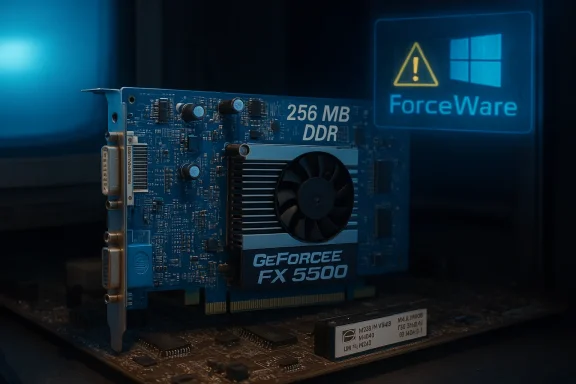 Background / Overview
The GeForce FX family (often called “GeForce 5” or “FX”) arrived in the early 2000s and includes many submodels. The FX 5500 is a low‑end member of that generation; board partners produced variants that shipped with 64 MB, 128 MB or 256 MB of DDR memory and either AGP, PCI or PCI‑based board designs. The PCI 256 MB variants you see advertised are real hardware configurations, but remember: the GPU architecture and drivers date back more than two decades. Hardware specs and variant notes from independent hardware databases make the card’s generation and memory options clear. Why that matters to you: GPU drivers are kernel‑mode components that must match the card’s INF entries and be built for the target OS. NVIDIA’s ForceWare family and later driver branches were written around older Windows driver models (WDDM versions used in XP/Vista era), then evolved. NVIDIA published legacy ForceWare packages for the GeForce FX series (for example, final WHQL Vista‑era ForceWare builds), but you will not find a modern, actively maintained Game Ready driver branch targeted at the FX 5500 for Windows 10 the way current GeForce RTX cards are supported. Windows 10 may accept legacy drivers in compatibility mode or use the built‑in Microsoft fallback driver, but it’s not the same as getting a modern WHQL Game Ready package tailored for Windows 10.
What the FX 5500 actually is (specs and variants)
Core facts (quick reference)
- GPU family: GeForce FX (NV34/NV34B architecture)
- Typical clocks: GPU ~240–270 MHz (board dependent), memory 166–200 MHz effective (DDR).
- Memory bus: 128‑bit.
- Common memory sizes: 64 MB, 128 MB, 256 MB (PCI/board variants).
- Outputs: commonly VGA + DVI (some boards include S‑Video).
- Interfaces: AGP 8x (most retail boards) or PCI (special low‑profile/PCI variants).
- DirectX/OpenGL support: DirectX 9.0a / OpenGL 1.5–2.0 (limited).
Driver reality: What NVIDIA and the community actually publish
Official vendor drivers
NVIDIA’s official download pages and their ForceWare archive show legacy driver releases targeted at older Windows versions (Windows XP, Vista). For the GeForce FX series, the final WHQL Vista drivers were in the older ForceWare branches (for example, ForceWare Release 96.x family). Those packages are vendor‑signed archives from the mid‑2000s and are the canonical sources for the FX series driver binaries — not modern GeForce Game Ready drivers. If you need vendor‑published binaries, check NVIDIA’s legacy archive/ForceWare pages for the release that names the FX or NV34 family.Community and hardware databases
Independent hardware databases (TechPowerUp, GPU DBs) document the FX 5500 specs and list the era‑appropriate driver families you should expect (ForceWare 70–100 era, later legacy updates). These databases also record variant memory sizes and bus types (PCI, AGP), useful when matching a physical card to the correct INF entries and driver expectations.Third‑party driver sites and “driver pack” portals
Many driver aggregator sites and “driver packs” claim to offer FX 5500 drivers for Windows 10/11. Some repackaged installers will run on modern Windows, others wrap old INF files into executable installers or bundle updater/installer utilities. These sites often surface driver filenames or version numbers (for example, old ForceWare version strings like 6.14.x.x), but they are not authoritative. Relying on them without cryptographic verification of the binary, a checksum, or the vendor release notes increases risk. Treat third‑party “driver download” portals as suspect unless you can verify the file against NVIDIA’s original archive or the OEM’s release.Is the FX 5500 supported on Windows 10 x64?
Short answer: Not officially in modern driver branches. The FX 5500 was designed long before Windows 10. NVIDIA’s legacy ForceWare archives include drivers that were built for Windows XP and Vista and those packages may sometimes be installed on Windows 10, but there’s no modern, actively maintained Game Ready branch for this GPU on Windows 10 like there is for current GeForce families. In practice you have three realistic outcomes:- Windows Update provides a Microsoft‑signed fallback driver (Microsoft Basic Display Adapter or a signed legacy INF) that gives display output and basic acceleration. This is low risk and usually adequate for desktop, multi‑monitor and light video playback.
- You can try an archived vendor driver (ForceWare / legacy package) — extract it, confirm your card’s hardware ID is in the INF, and install only if it lists your device. This approach sometimes works for desktop add‑in FX 5500 cards, but it’s fragile and may not enable modern video decode features or high‑performance 3D.
- You can use third‑party repackaged drivers—not recommended unless you can validate their checksums & signatures and understand the risk. Many community posts and audits warn against “discount” driver mirrors and repackagers.
Buying safety: what the “Free Shipping / Brand NEW” listings mean (and don’t)
When you see a listing advertising “Brand NEW nVidia Geforce FX5500 256MB 128bit DDR VGA DVI PCI Video” with Free Shipping, remember:- The card can be physically new old stock — that’s pare** is straightforward and inexpensive.
- The seller’s statement about drivers may be generic marketing copy. They may mean “drivers available online” (which could be Microsoft’s fallback driver, an OEM driver, or a third‑party download).
- Listings that bundle a driver EXE or “driver support” service are higher‑risk if the driver comes from an unvetted mirror. Never run a kernel‑level installer from an unknown site without checking vendor provenance and file signatures.
- Ask the seller to confirm the board part number and include a high‑resolution photo of the PCB sticker.
- Confirm whether the board is PCI or AGP (PCI FX 5500 variants are rarer and slower than AGP/PCIe modern cards).
- If you depend on Windows 10 functionality (hardware decode, multi‑monitor scaling, specific resolutions), test return policy and ensure you can return the item if drivers don’t meet needs.
Safe workflow: obtaining and installing a driver for FX 5500 on Windows 10 x64
Follow this conservative, proven process. It protects you from unwanted changes and gives you rollback options.- Inventory your system first.
- Open Device Manager → Display adapters → if device is listed, right‑click → Properties → Details → Hardware Ids. Copy the PCI\VEN_XXXX&DEV_YYYY string. This is the canonical identifier the INF must match.
- Prefer vendor/OEM sources.
- If the card came preinstalled in a branded system or was sold by a specific card vendor (ZOTAC, SPARKLE), check the vendor’s support pages for that model. If none exists, check NVIDIA’s legacy archive for the ForceWare driver that lists NV34/NV34B as a supported GPU family. Vendor and NVIDIA official archives are the authoritative starting point.
- Try Windows Update first.
- Settings → Update & Sece → View optional updates → Driver updates. Often Microsoft’s signed fallback driver is the safest and easiest route.
- If you need a vendor driver, verify the INF.
- Download the vendor or NVIDIA legacy package and extract it (the NVIDIA installer se folder). Open the .INF files and search for your hardware ID string. If the ID is present in the INF, it is more likely to install cleanly. If not, don’t force it. Community archives repeatedly stress INF verification as a critical step.
- Create a full recovery plan before you change drivers.
- Create a System Restore point, and if the mmake a full image backup. Driver installs can render a system temporarily unbootable; a full image is the fastest recovery path.
- Use Display Driver Uninstaller (DDU) for stubborn clean installs.
- If previous driver artifacts exist or the installer fails, boot to Saferemove remnants, then install the desired package in normal mode. Community guides and forum threads document this as the safest workflow for legacy-to-modern driver transitions.
- Validate after install and know how to recover.
resolution, multi‑monitor behaviour, video playback and that there are no immediate BSODs. If anything goes wrong, boot to Safe Mode, run DDU, then revert to the Microsoft driver or restore the image.oting common issues - “Installer cannot find compatible hardware” — often INF/device‑ID mismatch; extract the package and check the INF for your hardware ID string. If it’s missing, the pacnstall.
- Windows Update keeps replacing your test driver — use Microsoft’s “Show or hide updates” troubleshooter (wushowhide.diagcab) to hide the driver while you test, or pause Windows Update temporarily.
- Black screen after install — boot to Safe Mode, run DDU, reinstall a known good package (or revert to Microsoft Basic Display Adapter). If recovery fails, restore from your image backup.
Security & lifecycle risks up for)
- Legacy drivers are not maintained. Older ForceWare drivers were not designed for modern WDDM versions and lack the security hardening and bug fixes of modern Game Ready drivers. Running an ancient driver increases the attack surface and long‑term instability risk. If the system must remain secure, consider hardware refresh rather than relying on a legacy GPU.
- Windows 10 end of support changed the calculus. Microsoft ended mainstream Windows 10 support on October 14, 2025. That increases the risk profile for running legacy drivers on Windows 10 because the OS itself will no longer receive security updates and ecosystem guidance. If you intend to run Windows 10 on the machine long term, factor that lifecycle context into your decision.
- Third‑party driver binaries can be malicious. Repackaged installers have been observed to alter INFs, bundle PUPs, or include malicious payloads. Avoid driver download mirrors unless you can verify the file’s Authenticode signature and checksum against the vendor record. Community audits repeatedly flag repackagers as a high‑risk vector for kernel‑mode drivers.
If you already bought the card: practical next steps
- Inspect the physical board and card sticker for manufacturer/part numbers. That helps you find OEM driver pages or confirm vendor archives.
- Boot the PC with the card installed, let Windows discover hardware, and see whether Windows Update supplies a working driver. If the display works and you don’t need 3D acceleration, the Microsoft fallback driver may be enough.
- If you need more: follow the safe workflow above (backup → INF check → DDU if necessary → clean install).
- If you experience persistent instability, return the card (if possible) or replace it with a cheap modern card with native Windows 10 support (many entry‑level cards today are inexpensive and offer vastly better security, decoding features and driver support).
Alternatives worth considering
- Integrated GPU (modern CPU): Newer CPUs with integrated graphics give far better playback, security and driver support for a small spend. If your motherboard/CPU supports a CPU upgrade, that’s often cheaper and more reliable than shoehorning legacy discrete video.
- Budget modern GPU: A low‑end modern GPU from the last few generations outperforms a GeForce FX 5500 by a large margin and has full Windows 10/11 support and modern video decode features.
- Use Linux or a lightweight OS: If your primary use is basic web/email/retro gaming, some Linux distributions may work fine with older GPUs or fallback drivers — but driver support and features vary. This is a migration decision, not a driver fix.
Verdict: Buy the FX 5500 only if you understand the tradeoffs
- If you want the FX 5500 for nostalgia, retro hardware builds, or testing old software, it’s a finut don’t expect modern driver support or security parity with current GPUs. Verify the exact card variant before buying and be prepared to use Microsoft fallback drivers or an archived vendor package after careful INF verification.
- If you need a stable Windows 10 desktop with video acceleration, multi‑monitor reliability, DRM/codec support, or long‑term security, plan to buy a modern entry‑level GPU or use a newer integrated GPU solution instead. Relying on an FX 5500 for production or security‑sensitive tasks is a risk.
Quick reference: safe dr (best → worst)
- Your PC vendor / card vendor support page — first choice for notebooks and OEM boards.
- NVIDIA official legacy archive / ForceWare pages — canonical vendor‑signed packages for legacy GPUs.
- Microsoft Update Catalog / Windows Update — safe, signed fallbacks for basic functionality.
- Reputable third‑party mirrors with verifiable checksums — only when you can match a checksum and signature to a vendor record.
- Driver packs / generic “one‑click” updaters / unvetted mirrors — avoid unless you can cryptographically verify the binary.
Closing recommendation
If your goal is to resurrect an old PC or to buy a cheap FX 5500 for light, nostalgic use, go ahead — but follow the conservative workflow: validate hardware IDs, prefer vendor or Microsoft sources, make a full backup, and use DDU for clean installs if needed. If you need a long‑term Windows 10 (or later) workstation, budget for a modest modern GPU or upgrade to hardware with supported integrated graphics.For the specific listing you pasted (an FX 5500 256MB PCI board advertised with “drivers for Windows 10 64 bit”), treat the listing as a hardware sale first and a driver promise second: verify images/part numbers with the seller, demand provenance for any bundled driver EXE, and follow the safe install workflow above if you decide to install. Community guidance and vendor archives back up this cautious approach — download drivers only from NVIDIA or OEM pages and avoid repackagers unless you can validate signatures and INF contents.
If you’d like, I can:
- Check a specific seller photo/part number to help confirm the card variant, or
- Extract the exact hardware ID from your machine (if you paste it) and point to the most promising vendor or archived driver package that lists that ID.
Source: Born2Invest https://born2invest.com/?b=style-230035012/
