

Getac announced the ZX80W and hazardous-area ZX80W-EX on June 3, 2026, as 8-inch fully rugged Windows 11 tablets built on Qualcomm’s ARM-based QCS6490 platform, with availability expected in July 2026 through Getac’s enterprise channel. The headline is not simply that another rugged tablet exists. It is that Windows on Arm has moved from executive travel laptops into places where fans clog, ports corrode, and downtime has a physical cost. For field IT, the ZX80W is a test of whether Microsoft’s ARM story can survive outside the conference room.
The rugged tablet market is not where platform shifts usually begin. It is conservative by design, because the buyers are conservative by necessity: utilities, defense contractors, oil and gas operators, transport fleets, warehouses, field-service organizations, and public safety agencies do not replace hardware because a benchmark chart looks good. They replace it when the old machine is too heavy, too hot, too fragile, too power-hungry, or too expensive to support.
That is why Getac’s ZX80W matters more than its modest 8-inch footprint suggests. This is not a consumer tablet with a rubber case and a procurement SKU. It is a Windows device meant for the ugly edge of computing, where a tablet may be mounted in a vehicle one day, carried across a wet worksite the next, and used near combustible dust or flammable gas in its EX variant.
Windows on Arm has spent years being judged by the wrong audience. Enthusiasts asked whether it could replace a gaming laptop. Reviewers asked whether every niche desktop app ran perfectly. Enterprise buyers asked a harsher and more useful question: can it do the assigned job reliably, quietly, and for a full shift?
The ZX80W is built around that third question. Its Qualcomm QCS6490 is not a Snapdragon X Elite chasing laptop glory; it is an IoT-oriented ARM platform paired with 12GB of LPDDR5 memory and 256GB of UFS storage. The pitch is efficiency, thermals, local AI acceleration, and a sealed design that does not need a fan to survive the day.
For a warehouse supervisor, that may mean fewer failures after months of exposure to cardboard dust and temperature swings. For a flight-line technician, it means one less mechanical part vulnerable to grit, vibration, and impact. For a refinery or chemical plant, it pairs with hazardous-environment certification to support a more controlled approach to electronics in sensitive zones.
The ZX80W’s rugged credentials are the sort buyers expect from Getac: MIL-STD-810H testing, IP67 dust and water resistance, a quoted 1.8-meter drop tolerance, and an operating range from -29°C to +63°C. Those numbers are easy to skim past, but they define the difference between a tablet that can be carried into a storm and one that lives in a supervisor’s office because nobody trusts it outside.
The display also matters. Getac lists an 8-inch WUXGA panel with 1,000 nits of brightness and its sunlight-readable LumiBond treatment. That is not a luxury feature in the field; it is the difference between a worker reading a maintenance workflow outdoors and angling the device under a truck shadow to see a form.
That is the correct Windows for this job. Rugged deployments do not want surprise feature churn, consumer integrations, or a UI experiment arriving mid-contract. They want a stable baseline, predictable patching, and a support window long enough to justify hardware qualification, accessory investment, imaging work, and field training.
This also softens one of the classic Windows on Arm objections. On a consumer laptop, broad compatibility is the product. On an industrial tablet, compatibility is scoped. A fleet may need one electronic logging application, one barcode workflow, one VPN client, one device-management agent, one remote-support tool, and one browser-based dashboard. If those work, the rest of the Windows ecosystem is largely theoretical.
That does not make ARM compatibility irrelevant. Drivers, peripherals, VPNs, security agents, smart-card middleware, diagnostic utilities, and legacy Win32 applications still need validation. But the ZX80W’s most likely buyers already validate hardware images before deployment; they are not handing these tablets to users and hoping the app store fills the gaps.
Microsoft’s modern Windows on Arm stack is also better than the version that damaged the category’s reputation years ago. Windows 11 supports x86 and x64 app emulation on Arm, and Microsoft has continued improving the emulation layer. But emulation is a bridge, not a deployment strategy, especially in field operations where performance predictability and peripheral support can matter more than whether an app merely launches.
That 13 TOPS figure will not impress anyone comparing it with the 40-plus TOPS NPUs in Copilot+ PCs. But rugged tablets live in a different performance economy. A compact field device does not need to generate marketing art in a coffee shop; it needs to process images, sensor inputs, forms, routes, telemetry, and inspection data without burning through its battery or waiting for a cloud connection that may not exist.
This is where ARM’s strengths become less abstract. Lower heat output makes sealed designs easier. Better performance per watt stretches runtime. Integrated connectivity options matter for mobile fleets. And local acceleration can support edge workloads that would be clumsy or insecure if every inference had to leave the device.
Getac’s use-case list includes drone management, infrastructure monitoring, predictive maintenance, and electronic logging. These are sensible examples because they are not sci-fi. A tablet that can classify visual inspection data, assist with asset checks, process barcode or camera input, or support maintenance prompts locally is more useful than one that merely opens a cloud dashboard faster.
In defense and critical infrastructure, that matters. A tablet used around substations, depots, pipelines, ports, or military logistics may collect images, locations, asset identifiers, personnel notes, and operational status. Sending all of that to a cloud service by default is not always acceptable, and in some places it is not even possible.
Local processing also reduces latency. A technician inspecting equipment does not want to wait for a remote model to process an image over a weak cellular connection. A driver logging compliance data does not want an app to stall because coverage dropped between depots. A maintenance worker using guided workflows wants the device to respond like a tool, not like a web page trapped behind a spinning icon.
The ZX80W’s NPU is best understood as a way to make small, repetitive, targeted tasks more reliable at the edge. That is less glamorous than generative AI demos, but it is closer to how enterprise AI will actually show up in rugged computing. The field does not need a chatbot in a hard hat; it needs software that can keep working when the network disappears.
This distinction matters because industrial buyers do not treat certifications as brochure decorations. A device used in a chemical plant, refinery, mine, pharmaceutical facility, or fuel logistics site may need to satisfy internal safety requirements before it can be deployed. A consumer tablet in a rugged case is not a substitute for equipment certified for the relevant zone.
The EX version is heavier at 780g, compared with the ZX80W’s listed 590g. That is a real increase, but still compact by the standards of rugged Windows hardware. Many field workers have grown accustomed to carrying larger Intel-based rugged tablets that behave more like small laptops with handles than mobile tablets.
The ZX80W-EX also illustrates why the ARM shift is not merely about battery life. Removing fans, reducing heat, and minimizing mechanical complexity all align with the requirements of hazardous and punishing environments. In that context, the processor architecture becomes part of the safety and reliability story, not just the performance story.
That is especially true in workflows where the user already carries tools, protective equipment, radios, scanners, test instruments, or safety gear. A lighter Windows tablet can be the difference between digitizing a workflow at the point of work and digitizing it later, after the worker returns to a desk. The first changes operations; the second merely changes the form.
This is one reason the 8-inch size is important. The ZX80W is not trying to replace a 14-inch rugged laptop used for complex diagnostics or report writing. It is aimed at quick interaction: viewing work orders, scanning assets, capturing photos, checking procedures, logging readings, managing routes, or controlling field equipment.
Windows has historically struggled in this size class because small tablets expose the limits of desktop UI assumptions. But in controlled enterprise deployments, that problem can be managed with custom applications, kiosk modes, task-specific shells, and touch-first workflows. Again, the narrower the job, the more sense Windows on Arm makes.
Getac itself sells larger rugged Windows machines built around x86 processors, and those are not going away because an 8-inch ARM tablet exists. A technician running heavy diagnostics, CAD viewers, legacy service tools, or multi-monitor docked workflows may still be better served by an Intel or AMD device. ARM’s opportunity is not to erase x86 from the field; it is to claim the jobs where x86 has been tolerated rather than required.
That distinction is important for IT buyers. A rugged fleet does not have to be architecturally pure. It can include x86 laptops for complex work, ARM tablets for lightweight field capture, Android handhelds for narrow scanning roles, and phones where appropriate. The winning architecture is the one that fits the task and can be supported without multiplying headaches.
The ZX80W therefore lands in a middle zone. It offers Windows manageability and application continuity in a form factor and thermal envelope more often associated with Android rugged tablets. That is its pitch: not the most powerful Windows field device, but perhaps a more deployable one for frontline workflows that never needed a hot little PC in the first place.
Still, nobody should expect bargain-table pricing. The previous Android ZX80 family started around the low four figures in European enterprise channels, and a Windows model with industrial support, rugged certification, and optional hazardous-environment configuration will almost certainly sit above ordinary consumer tablets. The ZX80W is not competing with an iPad or a Surface Go at retail.
That price context matters because rugged hardware often looks overpriced until total cost is considered. A cheap tablet that fails in the field, cannot be read in sunlight, lacks replaceable or shift-friendly power options, breaks after drops, or cannot pass safety review may be cheaper only on the purchase order. The expensive part is dispatching workers with tools they cannot rely on.
The tougher question is whether Windows on Arm introduces hidden costs: application remediation, driver validation, security tooling gaps, or user training. For some organizations, those costs will erase the efficiency advantage. For others, especially those with modern web apps or custom ARM-ready software, the trade may be favorable.
Windows on Arm is most persuasive when efficiency, standby behavior, integrated connectivity, low heat, and sealed designs matter more than peak compatibility with decades of desktop software. That description fits field tablets better than it fits gaming rigs or developer workstations. The ZX80W plays directly to those strengths.
The use of Windows 11 IoT Enterprise LTSC also gives Microsoft a cleaner enterprise narrative. Instead of asking users to accept the full consumer Windows experience on unfamiliar silicon, it offers a stable, managed, specialized Windows environment on hardware designed for a defined job. That is a more disciplined proposition.
There is also a strategic angle. If Windows on Arm can move into rugged tablets, industrial handhelds, point-of-service devices, medical equipment, logistics terminals, and edge-AI appliances, Microsoft gains a broader hardware base without needing every traditional PC user to switch. ARM adoption may grow first where the user does not care what the CPU is, as long as the device works.
Rugged deployments often rely on accessories as much as the tablet itself. Vehicle docks, hand straps, hot-swap batteries, barcode readers, NFC workflows, GPS, cellular modules, external antennas, and charging bays all need to work in the real configuration, not just in a spec table. The more specialized the environment, the less useful generic compatibility claims become.
This is why pilot deployments will matter. A ZX80W evaluation should include the actual image, actual MDM policies, actual line-of-business applications, actual gloves, actual mounts, actual wireless dead zones, and actual workers. A lab test that proves the tablet boots and joins management is not enough.
The same applies to AI features. Buyers should ask what models run locally, what software exposes the NPU, how updates are handled, what happens offline, and whether data stays on the device by default. “AI-ready” is a starting point, not a solution architecture.
Choosing this device is not just choosing Getac. It is choosing Windows on Arm, Windows 11 IoT Enterprise LTSC, Qualcomm’s embedded roadmap, Getac’s accessory and support ecosystem, and whatever software stack can take advantage of the NPU. That makes procurement more complex, but also more consequential.
The upside is a more coherent field architecture. A fanless ARM Windows tablet can sit between Android handhelds and x86 rugged PCs, giving organizations a Windows-managed endpoint for tasks that do not justify a heavier machine. If the software estate supports it, that could simplify workflows that currently bounce between phones, paper, and laptops.
The downside is fragmentation. IT teams may end up supporting Windows x86, Windows Arm, Android, iOS, and browser-based workflows in the same operational environment. Without discipline, the “right tool for every job” becomes five platforms, six management models, and a support desk that hates everyone.
The device’s success will depend on how well Getac and its partners answer practical questions. How long does the battery last in real field use? Which accessories are available at launch? Which cellular options are supported in each region? How does the EX model’s certification map to customer safety requirements? Which Windows management and security tools have been validated on the ARM image?
The answers will vary by customer, and that is normal. Rugged computing is not a mass-market category hiding behind enterprise language. It is a project business, full of site-specific constraints and workflows that outsiders find oddly particular because they are oddly particular.
That is also why the ZX80W deserves attention. Products in this category are not built for vibes. If Getac is putting Windows on Arm into an 8-inch fully rugged tablet, it is because the company believes enough customers see a practical advantage in fanless, efficient, locally intelligent Windows endpoints.
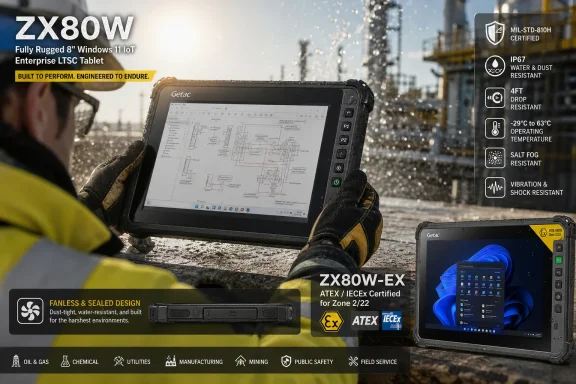 Getac Pushes Windows on Arm Into the Dirt
The rugged tablet market is not where platform shifts usually begin. It is conservative by design, because the buyers are conservative by necessity: utilities, defense contractors, oil and gas operators, transport fleets, warehouses, field-service organizations, and public safety agencies do not replace hardware because a benchmark chart looks good. They replace it when the old machine is too heavy, too hot, too fragile, too power-hungry, or too expensive to support.That is why Getac’s ZX80W matters more than its modest 8-inch footprint suggests. This is not a consumer tablet with a rubber case and a procurement SKU. It is a Windows device meant for the ugly edge of computing, where a tablet may be mounted in a vehicle one day, carried across a wet worksite the next, and used near combustible dust or flammable gas in its EX variant.
Windows on Arm has spent years being judged by the wrong audience. Enthusiasts asked whether it could replace a gaming laptop. Reviewers asked whether every niche desktop app ran perfectly. Enterprise buyers asked a harsher and more useful question: can it do the assigned job reliably, quietly, and for a full shift?
The ZX80W is built around that third question. Its Qualcomm QCS6490 is not a Snapdragon X Elite chasing laptop glory; it is an IoT-oriented ARM platform paired with 12GB of LPDDR5 memory and 256GB of UFS storage. The pitch is efficiency, thermals, local AI acceleration, and a sealed design that does not need a fan to survive the day.
The Fanless Design Is the Real Spec Sheet
The absence of a cooling fan sounds like a minor mechanical detail until the device is used where rugged tablets are actually used. Fans move air, and air carries dust, moisture, fibers, metal particles, chemical residue, and every other environmental irritant that enterprise buyers spend money trying to keep out of electronics. A sealed fanless chassis is not just quieter; it is simpler to maintain and harder to contaminate.For a warehouse supervisor, that may mean fewer failures after months of exposure to cardboard dust and temperature swings. For a flight-line technician, it means one less mechanical part vulnerable to grit, vibration, and impact. For a refinery or chemical plant, it pairs with hazardous-environment certification to support a more controlled approach to electronics in sensitive zones.
The ZX80W’s rugged credentials are the sort buyers expect from Getac: MIL-STD-810H testing, IP67 dust and water resistance, a quoted 1.8-meter drop tolerance, and an operating range from -29°C to +63°C. Those numbers are easy to skim past, but they define the difference between a tablet that can be carried into a storm and one that lives in a supervisor’s office because nobody trusts it outside.
The display also matters. Getac lists an 8-inch WUXGA panel with 1,000 nits of brightness and its sunlight-readable LumiBond treatment. That is not a luxury feature in the field; it is the difference between a worker reading a maintenance workflow outdoors and angling the device under a truck shadow to see a form.
Windows 11 IoT LTSC Changes the ARM Argument
The operating system choice is just as important as the chip. Getac is not pitching the ZX80W as a general-purpose Windows 11 Home or Pro tablet. It uses Windows 11 IoT Enterprise LTSC, the long-term servicing branch aimed at fixed-function and specialized commercial devices.That is the correct Windows for this job. Rugged deployments do not want surprise feature churn, consumer integrations, or a UI experiment arriving mid-contract. They want a stable baseline, predictable patching, and a support window long enough to justify hardware qualification, accessory investment, imaging work, and field training.
This also softens one of the classic Windows on Arm objections. On a consumer laptop, broad compatibility is the product. On an industrial tablet, compatibility is scoped. A fleet may need one electronic logging application, one barcode workflow, one VPN client, one device-management agent, one remote-support tool, and one browser-based dashboard. If those work, the rest of the Windows ecosystem is largely theoretical.
That does not make ARM compatibility irrelevant. Drivers, peripherals, VPNs, security agents, smart-card middleware, diagnostic utilities, and legacy Win32 applications still need validation. But the ZX80W’s most likely buyers already validate hardware images before deployment; they are not handing these tablets to users and hoping the app store fills the gaps.
Microsoft’s modern Windows on Arm stack is also better than the version that damaged the category’s reputation years ago. Windows 11 supports x86 and x64 app emulation on Arm, and Microsoft has continued improving the emulation layer. But emulation is a bridge, not a deployment strategy, especially in field operations where performance predictability and peripheral support can matter more than whether an app merely launches.
Qualcomm’s QCS6490 Is Not Trying to Be a Laptop Chip
The QCS6490 is the most interesting part of the ZX80W precisely because it is not the flashiest Qualcomm part available. It is an octa-core ARM platform designed for embedded and IoT use cases, not a high-end laptop SoC marketed around creator workloads. Getac lists it at up to 2.7GHz with Qualcomm Adreno graphics and a Hexagon processor capable of up to 13 TOPS through Qualcomm’s sixth-generation AI Engine.That 13 TOPS figure will not impress anyone comparing it with the 40-plus TOPS NPUs in Copilot+ PCs. But rugged tablets live in a different performance economy. A compact field device does not need to generate marketing art in a coffee shop; it needs to process images, sensor inputs, forms, routes, telemetry, and inspection data without burning through its battery or waiting for a cloud connection that may not exist.
This is where ARM’s strengths become less abstract. Lower heat output makes sealed designs easier. Better performance per watt stretches runtime. Integrated connectivity options matter for mobile fleets. And local acceleration can support edge workloads that would be clumsy or insecure if every inference had to leave the device.
Getac’s use-case list includes drone management, infrastructure monitoring, predictive maintenance, and electronic logging. These are sensible examples because they are not sci-fi. A tablet that can classify visual inspection data, assist with asset checks, process barcode or camera input, or support maintenance prompts locally is more useful than one that merely opens a cloud dashboard faster.
Edge AI Is Practical Only When It Is Boring
The industry has spent the past two years attaching “AI” to everything with a processor, so skepticism is justified. The ZX80W is not an AI workstation, and Getac should not be judged as if it were. The meaningful question is whether local inference makes existing field work less dependent on connectivity and less likely to expose sensitive data.In defense and critical infrastructure, that matters. A tablet used around substations, depots, pipelines, ports, or military logistics may collect images, locations, asset identifiers, personnel notes, and operational status. Sending all of that to a cloud service by default is not always acceptable, and in some places it is not even possible.
Local processing also reduces latency. A technician inspecting equipment does not want to wait for a remote model to process an image over a weak cellular connection. A driver logging compliance data does not want an app to stall because coverage dropped between depots. A maintenance worker using guided workflows wants the device to respond like a tool, not like a web page trapped behind a spinning icon.
The ZX80W’s NPU is best understood as a way to make small, repetitive, targeted tasks more reliable at the edge. That is less glamorous than generative AI demos, but it is closer to how enterprise AI will actually show up in rugged computing. The field does not need a chatbot in a hard hat; it needs software that can keep working when the network disappears.
The EX Model Is Where Rugged Becomes Regulated
The ZX80W-EX adds ATEX and IECEx Zone 2/22 certification for hazardous environments where flammable gases or combustible dust may be present. That makes it a different kind of product, even if the core platform remains the same. Ruggedness keeps a device alive; hazardous-location certification helps determine whether it is allowed through the gate.This distinction matters because industrial buyers do not treat certifications as brochure decorations. A device used in a chemical plant, refinery, mine, pharmaceutical facility, or fuel logistics site may need to satisfy internal safety requirements before it can be deployed. A consumer tablet in a rugged case is not a substitute for equipment certified for the relevant zone.
The EX version is heavier at 780g, compared with the ZX80W’s listed 590g. That is a real increase, but still compact by the standards of rugged Windows hardware. Many field workers have grown accustomed to carrying larger Intel-based rugged tablets that behave more like small laptops with handles than mobile tablets.
The ZX80W-EX also illustrates why the ARM shift is not merely about battery life. Removing fans, reducing heat, and minimizing mechanical complexity all align with the requirements of hazardous and punishing environments. In that context, the processor architecture becomes part of the safety and reliability story, not just the performance story.
The Weight Reduction Is an IT Issue, Not a Comfort Perk
A 590g fully rugged Windows tablet sounds like a spec-sheet win, but weight is also a deployment variable. The heavier a device is, the more likely workers are to leave it in a vehicle, mount it permanently, swap it for a phone, or avoid using it until paperwork is unavoidable. Mobility hardware fails not only when it breaks, but when it is inconvenient enough to be bypassed.That is especially true in workflows where the user already carries tools, protective equipment, radios, scanners, test instruments, or safety gear. A lighter Windows tablet can be the difference between digitizing a workflow at the point of work and digitizing it later, after the worker returns to a desk. The first changes operations; the second merely changes the form.
This is one reason the 8-inch size is important. The ZX80W is not trying to replace a 14-inch rugged laptop used for complex diagnostics or report writing. It is aimed at quick interaction: viewing work orders, scanning assets, capturing photos, checking procedures, logging readings, managing routes, or controlling field equipment.
Windows has historically struggled in this size class because small tablets expose the limits of desktop UI assumptions. But in controlled enterprise deployments, that problem can be managed with custom applications, kiosk modes, task-specific shells, and touch-first workflows. Again, the narrower the job, the more sense Windows on Arm makes.
Intel Is Not Being Replaced Everywhere
It would be easy to frame the ZX80W as another sign of Intel losing ground in Windows devices. That is partly true, but too simplistic. Intel and AMD remain essential in rugged computing where high sustained performance, specialized x86 software, complex peripheral stacks, and mature driver support are non-negotiable.Getac itself sells larger rugged Windows machines built around x86 processors, and those are not going away because an 8-inch ARM tablet exists. A technician running heavy diagnostics, CAD viewers, legacy service tools, or multi-monitor docked workflows may still be better served by an Intel or AMD device. ARM’s opportunity is not to erase x86 from the field; it is to claim the jobs where x86 has been tolerated rather than required.
That distinction is important for IT buyers. A rugged fleet does not have to be architecturally pure. It can include x86 laptops for complex work, ARM tablets for lightweight field capture, Android handhelds for narrow scanning roles, and phones where appropriate. The winning architecture is the one that fits the task and can be supported without multiplying headaches.
The ZX80W therefore lands in a middle zone. It offers Windows manageability and application continuity in a form factor and thermal envelope more often associated with Android rugged tablets. That is its pitch: not the most powerful Windows field device, but perhaps a more deployable one for frontline workflows that never needed a hot little PC in the first place.
The Price Will Keep This Out of Consumer Fantasyland
Getac has not announced pricing, and that omission is normal for rugged enterprise hardware. These devices typically move through B2B channels, configured with options, accessories, service plans, docks, mounts, scanners, cellular modules, warranties, and support contracts. A single street price would be less useful than it looks.Still, nobody should expect bargain-table pricing. The previous Android ZX80 family started around the low four figures in European enterprise channels, and a Windows model with industrial support, rugged certification, and optional hazardous-environment configuration will almost certainly sit above ordinary consumer tablets. The ZX80W is not competing with an iPad or a Surface Go at retail.
That price context matters because rugged hardware often looks overpriced until total cost is considered. A cheap tablet that fails in the field, cannot be read in sunlight, lacks replaceable or shift-friendly power options, breaks after drops, or cannot pass safety review may be cheaper only on the purchase order. The expensive part is dispatching workers with tools they cannot rely on.
The tougher question is whether Windows on Arm introduces hidden costs: application remediation, driver validation, security tooling gaps, or user training. For some organizations, those costs will erase the efficiency advantage. For others, especially those with modern web apps or custom ARM-ready software, the trade may be favorable.
Microsoft Gets a More Credible Windows on Arm Story
Microsoft has wanted Windows on Arm to be a real platform for a long time. The consumer version of that story has been uneven, even as recent Snapdragon laptops have improved the case substantially. But rugged and embedded devices may be where the platform’s logic becomes harder to dismiss.Windows on Arm is most persuasive when efficiency, standby behavior, integrated connectivity, low heat, and sealed designs matter more than peak compatibility with decades of desktop software. That description fits field tablets better than it fits gaming rigs or developer workstations. The ZX80W plays directly to those strengths.
The use of Windows 11 IoT Enterprise LTSC also gives Microsoft a cleaner enterprise narrative. Instead of asking users to accept the full consumer Windows experience on unfamiliar silicon, it offers a stable, managed, specialized Windows environment on hardware designed for a defined job. That is a more disciplined proposition.
There is also a strategic angle. If Windows on Arm can move into rugged tablets, industrial handhelds, point-of-service devices, medical equipment, logistics terminals, and edge-AI appliances, Microsoft gains a broader hardware base without needing every traditional PC user to switch. ARM adoption may grow first where the user does not care what the CPU is, as long as the device works.
The Compatibility Trap Has Not Disappeared
The danger for buyers is assuming that “Windows 11” means “drop-in replacement.” It may not. Windows on Arm can run many x86 and x64 applications through emulation, but specialized environments are full of awkward exceptions: kernel drivers, old VPN clients, USB accessories, smart-card readers, serial adapters, label printers, proprietary diagnostics, and security agents with deep system hooks.Rugged deployments often rely on accessories as much as the tablet itself. Vehicle docks, hand straps, hot-swap batteries, barcode readers, NFC workflows, GPS, cellular modules, external antennas, and charging bays all need to work in the real configuration, not just in a spec table. The more specialized the environment, the less useful generic compatibility claims become.
This is why pilot deployments will matter. A ZX80W evaluation should include the actual image, actual MDM policies, actual line-of-business applications, actual gloves, actual mounts, actual wireless dead zones, and actual workers. A lab test that proves the tablet boots and joins management is not enough.
The same applies to AI features. Buyers should ask what models run locally, what software exposes the NPU, how updates are handled, what happens offline, and whether data stays on the device by default. “AI-ready” is a starting point, not a solution architecture.
The Rugged Tablet Becomes a Platform Decision
For years, rugged tablets were often purchased as physical tools first and computing platforms second. The key questions were durability, battery life, screen brightness, warranty, and accessory ecosystem. Those still matter, but the ZX80W shows how platform decisions are becoming entangled with edge computing strategy.Choosing this device is not just choosing Getac. It is choosing Windows on Arm, Windows 11 IoT Enterprise LTSC, Qualcomm’s embedded roadmap, Getac’s accessory and support ecosystem, and whatever software stack can take advantage of the NPU. That makes procurement more complex, but also more consequential.
The upside is a more coherent field architecture. A fanless ARM Windows tablet can sit between Android handhelds and x86 rugged PCs, giving organizations a Windows-managed endpoint for tasks that do not justify a heavier machine. If the software estate supports it, that could simplify workflows that currently bounce between phones, paper, and laptops.
The downside is fragmentation. IT teams may end up supporting Windows x86, Windows Arm, Android, iOS, and browser-based workflows in the same operational environment. Without discipline, the “right tool for every job” becomes five platforms, six management models, and a support desk that hates everyone.
The July Launch Will Test the Channel, Not the Hype
Availability in July 2026 gives Getac a short runway between announcement and market entry. That is appropriate for enterprise hardware, where early conversations likely began long before the press release. The important action will happen in reseller demos, proof-of-concept deployments, and procurement reviews rather than in public preorders.The device’s success will depend on how well Getac and its partners answer practical questions. How long does the battery last in real field use? Which accessories are available at launch? Which cellular options are supported in each region? How does the EX model’s certification map to customer safety requirements? Which Windows management and security tools have been validated on the ARM image?
The answers will vary by customer, and that is normal. Rugged computing is not a mass-market category hiding behind enterprise language. It is a project business, full of site-specific constraints and workflows that outsiders find oddly particular because they are oddly particular.
That is also why the ZX80W deserves attention. Products in this category are not built for vibes. If Getac is putting Windows on Arm into an 8-inch fully rugged tablet, it is because the company believes enough customers see a practical advantage in fanless, efficient, locally intelligent Windows endpoints.
The Field Test Will Be Whether Workers Stop Leaving Windows Behind
The most concrete lesson from the ZX80W is that Windows on Arm is no longer confined to thin laptops and platform demonstrations. Getac is betting that the architecture can solve physical problems that x86 Windows tablets have often worked around with bulk, heat, and larger batteries.- The ZX80W is an 8-inch fully rugged Windows 11 IoT Enterprise LTSC tablet built on Qualcomm’s ARM-based QCS6490 platform.
- Getac says the standard model weighs 590g, while the hazardous-area ZX80W-EX weighs 780g.
- The fanless design is central to the product because sealed rugged devices benefit directly from lower heat and fewer moving parts.
- The ZX80W-EX adds ATEX and IECEx Zone 2/22 certification for certain explosive-atmosphere environments.
- The device’s edge-AI value will depend less on headline TOPS and more on validated local workflows that work offline.
- Enterprise buyers should treat Windows on Arm compatibility as a pilot requirement, especially for drivers, accessories, VPNs, security tools, and legacy line-of-business applications.
References
- Primary source: gagadget.com
Published: 2026-06-03T15:10:15.832548
Loading…
gagadget.com - Related coverage: getac.com
Loading…
www.getac.com - Related coverage: prnewswire.com
Loading…
www.prnewswire.com - Related coverage: belsatex.com
Loading…
belsatex.com - Related coverage: qualcomm.com
Loading…
www.qualcomm.com - Related coverage: atexdepot.nl
Loading…
www.atexdepot.nl
- Related coverage: ecom-ex.com
Loading…
www.ecom-ex.com - Related coverage: windowscentral.com
NVIDIA promises its upcoming RTX Spark chips will be compatible with every Windows app ever made
In an attempt to quell people's concerns around app compatibility with Windows on Arm, NVIDIA's CEO says that its new RTX Spark chips won't have any app compatibility problems. www.windowscentral.com
- Official source: learn.microsoft.com
Loading…
learn.microsoft.com - Official source: microsoft.com
Loading…
www.microsoft.com - Official source: developer.microsoft.com
Loading…
developer.microsoft.com - Official source: support.microsoft.com
Loading…
support.microsoft.com - Official source: blogs.windows.com
Loading…
blogs.windows.com - Related coverage: windowslatest.com
Loading…
www.windowslatest.com - Related coverage: computerworld.com
Loading…
www.computerworld.com - Related coverage: tomshardware.com

Windows 10 update incorrectly tells some users they've reached end-of-life, despite having extended support — Microsoft confirms message sent to Enterprise, Pro, and Education users in error
Windows 10 is not completely dead, yet.www.tomshardware.com
- Related coverage: techradar.com
Loading…
www.techradar.com - Related coverage: arrow.com
Loading…
www.arrow.com