

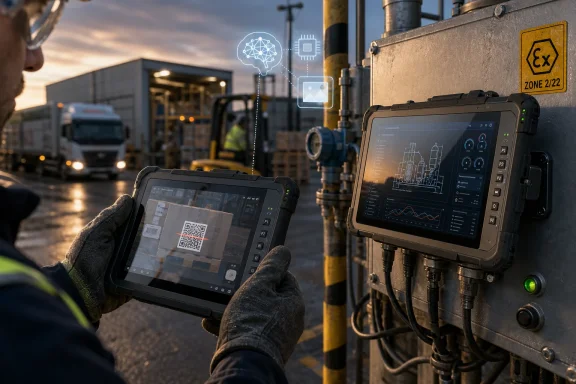
Getac announced on June 4, 2026, in Taipei that its new ZX80W and ZX80W-EX rugged 8-inch tablets will ship in July with Windows 11 IoT Enterprise LTSC, Qualcomm QCS6490 Arm silicon, and on-device AI acceleration for industrial field work. The launch is not simply another spec bump in a hardened chassis. It is a bet that Windows on Arm has matured enough to leave the conference room and survive the utility truck, the warehouse dock, the flight line, and the hazardous worksite. For WindowsForum readers, the interesting part is not that Getac made another rugged tablet; it is that the rugged Windows tablet is starting to look less like a shrunken laptop and more like a purpose-built edge device.
Windows on Arm has spent years being judged by consumer laptop expectations: browser performance, battery life, app compatibility, and whether the machine feels like a normal PC when a user installs old x86 software. That was always a difficult courtroom for the platform. The PC market rewards broad compatibility above almost everything else, and even small gaps in drivers, VPN clients, plug-ins, or peripheral utilities can become evidence against the whole architecture.
Getac’s ZX80W line moves the argument into a different arena. A rugged tablet used for inspection routes, vehicle logging, field service, asset management, or hazardous-zone data capture is not trying to be a general-purpose developer workstation. It is expected to run a defined set of applications, connect to known peripherals, survive weather and abuse, and keep working long after a consumer tablet would be dead, dim, overheated, or out of warranty.
That makes Arm more persuasive. The Qualcomm QCS6490 platform gives Getac a fanless thermal envelope, low power draw, integrated AI acceleration, and enough compute for field workflows that are increasingly camera-heavy and sensor-heavy. The ZX80W is still a Windows device, but it is not Windows chasing the laptop benchmark leaderboard. It is Windows being used as an enterprise compatibility layer on top of hardware designed for mobility first.
This distinction matters because rugged computing is often conservative by necessity. Procurement teams do not buy tablets for soldiers, linemen, port workers, drivers, inspectors, or refinery operators because a platform is fashionable. They buy them because downtime is expensive, because failure can be dangerous, and because the device has to slot into management, security, and application ecosystems that already exist.
The ZX80W is Getac’s attempt to collapse that trade-off. The standard model weighs 590 grams, while the hazardous-environment ZX80W-EX comes in at 780 grams. Both are 8-inch fully rugged tablets, not semi-rugged office devices in a rubber case, and both run Windows 11 IoT Enterprise LTSC rather than a mobile operating system or a consumer Windows build.
That combination is the story. Getac is telling customers they can have a small, fanless, power-efficient field tablet without leaving the Windows estate. For enterprises with existing Windows applications, identity policies, device management tools, security baselines, and support playbooks, that message is stronger than any single benchmark number.
The use of Windows 11 IoT Enterprise LTSC is also deliberate. LTSC is not the right Windows channel for normal knowledge-worker PCs, and Microsoft has repeatedly positioned it for fixed-function and special-purpose devices. In rugged field hardware, though, a stable feature set and long servicing horizon are virtues rather than limitations. Nobody wants a tablet mounted in a vehicle or certified for hazardous operations to be treated like a consumer laptop receiving a steady drip of feature churn.
The temperature numbers are equally telling. The standard ZX80W is listed for operation from -29°C to 63°C, while the ZX80W-EX is listed from -21°C to 55°C. Those are not lifestyle-tablet claims. They are intended for workflows where a device may be used outdoors in heat, cold, rain, dust, vehicle vibration, and gloved conditions.
The EX model adds the second half of Getac’s argument: operator safety in places where ordinary electronics are not welcome. ATEX and IECEx Zone 2/22 certification places the ZX80W-EX in a different procurement category from a normal rugged tablet. Getac says the EX variant also includes thicker display glass, a reinforced rear cover, a secure port cover for the main docking connector, and seals over exposed screw covers.
That matters because hazardous-environment hardware is not merely “tougher.” It is constrained. Materials, ports, covers, seals, battery behavior, and docking mechanisms become part of the safety story. The tablet has to be useful without becoming a new ignition risk, and the Windows device inside has to behave like a controlled industrial endpoint rather than a gadget.
That does not turn an 8-inch rugged tablet into a mobile data center. It does make local inference plausible for tasks that fit the device’s real world: image recognition, inspection assistance, barcode or label workflows, anomaly detection, voice and audio processing, and automation that should not wait on a round trip to the cloud. In many industrial environments, the network is not merely slow; it is intermittent, congested, restricted, or intentionally unavailable.
This is where the rugged AI story becomes more believable than the consumer AI PC story. A field worker inspecting a substation, managing a UAV-related task, checking a vehicle log, or documenting an asset may need a fast local decision more than a generative assistant. The value is not a chatbot in a hard hat. The value is reducing the number of times a worker has to stop, rescan, re-enter, reconnect, or radio someone else because the device could not process information locally.
Getac’s examples point in that direction: UAV flight control in utilities, predictive asset management, electronic logging devices in transport and logistics, and hazardous-environment workflows with the EX model. Some of those use cases will depend heavily on the customer’s software stack, and buyers should treat vendor AI claims as a starting point rather than a delivered outcome. But the hardware direction is rational: rugged devices are becoming sensor terminals, and sensor terminals need local compute.
That is the right fit for a field tablet that may be deployed into a controlled workflow and left there for years. An enterprise can qualify an application image, validate drivers, test docking stations, configure security policy, and avoid the constant anxiety that a new consumer feature will alter behavior on a device that is not being used like a consumer PC. For many Windows administrators, that stability is not boring; it is the whole point.
There is also a security argument. Getac’s president, James Hwang, framed the ZX80W series as a way to extend the enterprise core into the field while preserving enterprise security and performance standards. That is vendor language, but it maps onto a real IT problem. The more work moves to the edge, the more organizations need field endpoints that can be managed, patched, locked down, audited, and integrated with identity systems.
The catch is that LTSC does not magically solve application compatibility. Windows on Arm supports native Arm64 applications and can run many x86 and x64 Windows applications through emulation, but drivers and low-level utilities remain a harder boundary. A rugged tablet deployment is therefore only as strong as the validation work done around its line-of-business apps, peripherals, VPN stack, security tooling, and device management agents.
Industrial buyers should still be colder-eyed than laptop shoppers. A rugged device often relies on specialized accessories, vehicle docks, serial or USB adapters, barcode scanners, smart card readers, GNSS modules, radio equipment, camera software, and proprietary enterprise applications that may have been written years ago. If any one of those components depends on an x86-only driver or a kernel-level component without Arm support, emulation will not save the deployment.
That does not make the ZX80W a risky product by default. It means the purchasing process has to look like industrial IT, not retail IT. The right evaluation is a pilot with the actual image, the actual peripherals, the actual management stack, and the actual workday. If the apps are web-based, UWP, Arm-native, or already validated under Windows on Arm, the platform may be a strong fit. If the deployment depends on obscure legacy drivers, the conversation gets more complicated.
The upside is that rugged tablets are usually deployed in controlled fleets. Unlike a consumer laptop that might run anything a user downloads, a field tablet often runs a narrow set of sanctioned applications. That gives Windows on Arm a practical path to success: it does not need to run every possible Windows workload beautifully; it needs to run the customer’s workload reliably.
This is where the QCS6490 platform’s performance-per-watt matters. The ZX80W is not chasing workstation-class compute. It is trying to keep a Windows field workflow responsive while minimizing heat and preserving battery life in a small enclosure. A fanless design also makes the product more credible for mounted and mobile scenarios, where airflow is inconsistent and environmental exposure is a given.
For administrators, fanless also changes the support profile. Fewer moving parts means fewer mechanical failures, and lower heat can mean less throttling, less battery stress, and fewer mystery lockups in the field. That does not eliminate the need for spare devices, warranty planning, or depot repair logistics, but it strengthens the case for Arm in places where the device’s physical survivability is as important as its software compatibility.
The weight figures reinforce the same point. A 590-gram Windows rugged tablet is easier to carry, mount, scan with, and use one-handed than the older mental image of a thick Windows slab. In industrial settings, ergonomics is not a luxury feature. A device that is too heavy, too hot, or too awkward gets left in the vehicle, and a device left in the vehicle is not transforming any workflow.
ATEX and IECEx Zone 2/22 certification targets environments where explosive gas or dust atmospheres may occur under abnormal conditions. That does not mean every EX customer is walking into a refinery every day, but it does mean the device is intended for procurement scenarios where safety certification can determine whether a product is even eligible. In those markets, Apple-versus-Android-versus-Windows preferences are secondary to compliance.
This is also where Windows can remain unusually sticky. Many hazardous-environment workflows are tied to enterprise systems that have been built, validated, and audited over long periods. Replacing the endpoint OS may sound attractive in a slide deck, but rewriting or recertifying the workflow can be expensive and risky. A small Windows on Arm rugged tablet offers a middle path: modern mobile hardware characteristics without abandoning the Windows application estate.
The EX model’s existence suggests Getac is not just testing Arm with a low-stakes device. It is bringing the architecture into one of the most demanding branches of its product line. That does not guarantee market success, but it signals confidence that Windows on Arm can be more than a premium laptop experiment.
That platform framing matters. Rugged computing buyers care about availability windows, accessory ecosystems, fleet consistency, and support commitments. They do not want a device family that changes silicon unpredictably every year because the consumer market moved on. Industrial hardware often needs a longer runway for qualification, deployment, and maintenance.
The ZX80W therefore sits at the intersection of two Qualcomm stories. One is the visible Windows on Arm story driven by laptop silicon and consumer AI PCs. The other is the quieter IoT story, where Arm chips power fixed-function devices, cameras, kiosks, handhelds, industrial terminals, and edge systems. Getac’s tablet pulls those narratives together under the Windows banner.
For Microsoft, that is useful too. Windows on Arm does not need to win only by converting laptop skeptics. It can win in categories where power efficiency, battery life, thermals, and integrated AI are more important than maximum backward compatibility with decades of arbitrary PC software. Rugged Windows tablets are one of those categories.
Arm helps because it changes the power budget. LPDDR5 memory, UFS storage, fanless operation, and a mobile-first SoC all point toward a device designed for long shifts rather than short bursts. Getac describes the ZX80W as having class-leading battery capacity, though real endurance will depend on brightness, radios, camera use, AI workloads, temperature, and application behavior.
The daylight-readable display is a reminder that battery claims must be read in context. A 1,000-nit outdoor screen is a field necessity, but it is also a power draw. The more often the device is used in direct sunlight, with cameras active and radios searching for signal, the more theoretical battery advantages meet operational reality.
Still, the platform direction is sensible. A rugged Windows tablet that can stay cooler, run longer, and remain sealed without a fan is not just nicer to use. It reduces logistical drag. In fleet deployments, fewer charging interruptions can mean fewer spare units, fewer battery swaps, fewer vehicle adapters, and fewer support calls from workers who are trying to finish a route before the device dies.
That makes the ZX80W a better example of what on-device AI can actually mean. Local recognition can help with asset tags, components, forms, faces where permitted, damage patterns, inventory, gauges, or safety checks. Local analytics can reduce dependence on the cloud in places where connectivity is weak or data should remain near the point of capture. Local automation can remove repetitive steps from workflows that are already constrained by gloves, weather, vehicles, and time pressure.
None of this requires pretending the tablet is a general artificial intelligence machine. It requires software that uses the NPU for targeted tasks and a deployment model that measures whether those tasks reduce errors, speed completion, or improve safety. In enterprise terms, that is a healthier conversation than asking whether an AI feature can produce a clever demo.
The risk is that “AI-ready” remains a promise until customer applications use the hardware well. Getac can provide the platform, but system integrators and software vendors will determine much of the outcome. The edge AI hardware is the enabler, not the deployment.
That creates opportunity. Existing Windows management skills remain relevant. Security baselines, identity integration, application packaging, update control, and device lockdown practices can carry over more naturally than they would with an Android-only fleet. Organizations that have resisted mobile OS fragmentation may find this sort of hardware easier to justify.
It also creates friction. Admins will need better Arm readiness testing. They will need inventories of agents, drivers, and peripheral dependencies. They will need to know which apps run native, which run under emulation, and which cannot run at all. They will need vendor commitments in writing, not just compatibility optimism.
The right mental model is not “Can this replace every rugged x86 tablet?” It is “Which field workflows are constrained by battery, heat, weight, and connectivity more than by raw x86 compatibility?” In those workflows, the ZX80W class of device may be exactly where Windows on Arm makes the most sense.
 Getac Takes Windows on Arm Where Laptops Could Not Prove It Alone
Windows on Arm has spent years being judged by consumer laptop expectations: browser performance, battery life, app compatibility, and whether the machine feels like a normal PC when a user installs old x86 software. That was always a difficult courtroom for the platform. The PC market rewards broad compatibility above almost everything else, and even small gaps in drivers, VPN clients, plug-ins, or peripheral utilities can become evidence against the whole architecture.Getac’s ZX80W line moves the argument into a different arena. A rugged tablet used for inspection routes, vehicle logging, field service, asset management, or hazardous-zone data capture is not trying to be a general-purpose developer workstation. It is expected to run a defined set of applications, connect to known peripherals, survive weather and abuse, and keep working long after a consumer tablet would be dead, dim, overheated, or out of warranty.
That makes Arm more persuasive. The Qualcomm QCS6490 platform gives Getac a fanless thermal envelope, low power draw, integrated AI acceleration, and enough compute for field workflows that are increasingly camera-heavy and sensor-heavy. The ZX80W is still a Windows device, but it is not Windows chasing the laptop benchmark leaderboard. It is Windows being used as an enterprise compatibility layer on top of hardware designed for mobility first.
This distinction matters because rugged computing is often conservative by necessity. Procurement teams do not buy tablets for soldiers, linemen, port workers, drivers, inspectors, or refinery operators because a platform is fashionable. They buy them because downtime is expensive, because failure can be dangerous, and because the device has to slot into management, security, and application ecosystems that already exist.
The Real Product Is the Compromise Getac No Longer Has to Make
The classic rugged Windows tablet compromise has been brutally simple: if you want Windows, you usually accept more heat, more weight, more battery anxiety, and a larger chassis than an Android-first design. If you want a lighter field tablet with long endurance, Android has often looked more natural, but at the cost of Windows application compatibility and familiar enterprise control.The ZX80W is Getac’s attempt to collapse that trade-off. The standard model weighs 590 grams, while the hazardous-environment ZX80W-EX comes in at 780 grams. Both are 8-inch fully rugged tablets, not semi-rugged office devices in a rubber case, and both run Windows 11 IoT Enterprise LTSC rather than a mobile operating system or a consumer Windows build.
That combination is the story. Getac is telling customers they can have a small, fanless, power-efficient field tablet without leaving the Windows estate. For enterprises with existing Windows applications, identity policies, device management tools, security baselines, and support playbooks, that message is stronger than any single benchmark number.
The use of Windows 11 IoT Enterprise LTSC is also deliberate. LTSC is not the right Windows channel for normal knowledge-worker PCs, and Microsoft has repeatedly positioned it for fixed-function and special-purpose devices. In rugged field hardware, though, a stable feature set and long servicing horizon are virtues rather than limitations. Nobody wants a tablet mounted in a vehicle or certified for hazardous operations to be treated like a consumer laptop receiving a steady drip of feature churn.
A Rugged Tablet Is a Different Kind of Windows PC
The ZX80W’s published specifications read like a checklist for a field device rather than a consumer tablet. It has an 8-inch WUXGA display at 1920 by 1200, Getac’s sunlight-readable LumiBond display technology, capacitive multi-touch, programmable buttons, front and rear cameras, USB-C with DisplayPort and Power Delivery, and optional data-capture accessories such as a barcode reader. It is rated to MIL-STD-810H and IP67, resists vibration, and is specified for six-foot drops.The temperature numbers are equally telling. The standard ZX80W is listed for operation from -29°C to 63°C, while the ZX80W-EX is listed from -21°C to 55°C. Those are not lifestyle-tablet claims. They are intended for workflows where a device may be used outdoors in heat, cold, rain, dust, vehicle vibration, and gloved conditions.
The EX model adds the second half of Getac’s argument: operator safety in places where ordinary electronics are not welcome. ATEX and IECEx Zone 2/22 certification places the ZX80W-EX in a different procurement category from a normal rugged tablet. Getac says the EX variant also includes thicker display glass, a reinforced rear cover, a secure port cover for the main docking connector, and seals over exposed screw covers.
That matters because hazardous-environment hardware is not merely “tougher.” It is constrained. Materials, ports, covers, seals, battery behavior, and docking mechanisms become part of the safety story. The tablet has to be useful without becoming a new ignition risk, and the Windows device inside has to behave like a controlled industrial endpoint rather than a gadget.
Edge AI Is Less Glamorous Here, and More Useful
The phrase “edge AI” has become so overused that it can make serious products sound unserious. In the ZX80W and ZX80W-EX, however, the AI claim is relatively grounded. The tablets use Qualcomm’s 6th-generation AI Engine and Hexagon NPU, with Getac listing up to 13 TOPS of NPU performance for the ZX80W.That does not turn an 8-inch rugged tablet into a mobile data center. It does make local inference plausible for tasks that fit the device’s real world: image recognition, inspection assistance, barcode or label workflows, anomaly detection, voice and audio processing, and automation that should not wait on a round trip to the cloud. In many industrial environments, the network is not merely slow; it is intermittent, congested, restricted, or intentionally unavailable.
This is where the rugged AI story becomes more believable than the consumer AI PC story. A field worker inspecting a substation, managing a UAV-related task, checking a vehicle log, or documenting an asset may need a fast local decision more than a generative assistant. The value is not a chatbot in a hard hat. The value is reducing the number of times a worker has to stop, rescan, re-enter, reconnect, or radio someone else because the device could not process information locally.
Getac’s examples point in that direction: UAV flight control in utilities, predictive asset management, electronic logging devices in transport and logistics, and hazardous-environment workflows with the EX model. Some of those use cases will depend heavily on the customer’s software stack, and buyers should treat vendor AI claims as a starting point rather than a delivered outcome. But the hardware direction is rational: rugged devices are becoming sensor terminals, and sensor terminals need local compute.
Windows 11 IoT LTSC Is the Quiet Center of the Pitch
The most important word in the product description may not be Arm, Qualcomm, NPU, or rugged. It may be LTSC. Windows 11 IoT Enterprise LTSC is built for devices whose operators do not want the operating system experience to keep changing underneath them. Microsoft’s current IoT LTSC release carries a 10-year support lifecycle, with quality updates rather than regular feature-update churn.That is the right fit for a field tablet that may be deployed into a controlled workflow and left there for years. An enterprise can qualify an application image, validate drivers, test docking stations, configure security policy, and avoid the constant anxiety that a new consumer feature will alter behavior on a device that is not being used like a consumer PC. For many Windows administrators, that stability is not boring; it is the whole point.
There is also a security argument. Getac’s president, James Hwang, framed the ZX80W series as a way to extend the enterprise core into the field while preserving enterprise security and performance standards. That is vendor language, but it maps onto a real IT problem. The more work moves to the edge, the more organizations need field endpoints that can be managed, patched, locked down, audited, and integrated with identity systems.
The catch is that LTSC does not magically solve application compatibility. Windows on Arm supports native Arm64 applications and can run many x86 and x64 Windows applications through emulation, but drivers and low-level utilities remain a harder boundary. A rugged tablet deployment is therefore only as strong as the validation work done around its line-of-business apps, peripherals, VPN stack, security tooling, and device management agents.
Arm Compatibility Is Better, But Field IT Still Has Homework
The consumer Windows on Arm conversation has improved significantly since the early Surface Pro X era, but “better” is not the same as “invisible.” Microsoft has invested in emulation, developer tooling, Arm64EC, and broader native Arm application support. Qualcomm’s more recent Windows push has also helped change expectations around performance and battery life.Industrial buyers should still be colder-eyed than laptop shoppers. A rugged device often relies on specialized accessories, vehicle docks, serial or USB adapters, barcode scanners, smart card readers, GNSS modules, radio equipment, camera software, and proprietary enterprise applications that may have been written years ago. If any one of those components depends on an x86-only driver or a kernel-level component without Arm support, emulation will not save the deployment.
That does not make the ZX80W a risky product by default. It means the purchasing process has to look like industrial IT, not retail IT. The right evaluation is a pilot with the actual image, the actual peripherals, the actual management stack, and the actual workday. If the apps are web-based, UWP, Arm-native, or already validated under Windows on Arm, the platform may be a strong fit. If the deployment depends on obscure legacy drivers, the conversation gets more complicated.
The upside is that rugged tablets are usually deployed in controlled fleets. Unlike a consumer laptop that might run anything a user downloads, a field tablet often runs a narrow set of sanctioned applications. That gives Windows on Arm a practical path to success: it does not need to run every possible Windows workload beautifully; it needs to run the customer’s workload reliably.
The Fanless Chassis Is a Maintenance Feature, Not Just a Comfort Feature
Fanless computing is easy to undersell because it sounds like a matter of noise. In rugged hardware, it is more than that. A fan is an opening, a moving part, a dust path, a thermal dependency, and a failure point. Removing it helps simplify sealing, improves reliability, and makes the device easier to trust in dirty, wet, or explosive-adjacent environments.This is where the QCS6490 platform’s performance-per-watt matters. The ZX80W is not chasing workstation-class compute. It is trying to keep a Windows field workflow responsive while minimizing heat and preserving battery life in a small enclosure. A fanless design also makes the product more credible for mounted and mobile scenarios, where airflow is inconsistent and environmental exposure is a given.
For administrators, fanless also changes the support profile. Fewer moving parts means fewer mechanical failures, and lower heat can mean less throttling, less battery stress, and fewer mystery lockups in the field. That does not eliminate the need for spare devices, warranty planning, or depot repair logistics, but it strengthens the case for Arm in places where the device’s physical survivability is as important as its software compatibility.
The weight figures reinforce the same point. A 590-gram Windows rugged tablet is easier to carry, mount, scan with, and use one-handed than the older mental image of a thick Windows slab. In industrial settings, ergonomics is not a luxury feature. A device that is too heavy, too hot, or too awkward gets left in the vehicle, and a device left in the vehicle is not transforming any workflow.
The EX Variant Shows Where Rugged Computing Still Defies Consumer Logic
The ZX80W-EX is the more specialized product, and that makes it the more revealing one. Its extra weight, thicker glass, reinforced protection, port-cover changes, and hazardous-zone certifications are not spec-sheet decoration. They are reminders that industrial computing obeys rules consumer electronics rarely encounter.ATEX and IECEx Zone 2/22 certification targets environments where explosive gas or dust atmospheres may occur under abnormal conditions. That does not mean every EX customer is walking into a refinery every day, but it does mean the device is intended for procurement scenarios where safety certification can determine whether a product is even eligible. In those markets, Apple-versus-Android-versus-Windows preferences are secondary to compliance.
This is also where Windows can remain unusually sticky. Many hazardous-environment workflows are tied to enterprise systems that have been built, validated, and audited over long periods. Replacing the endpoint OS may sound attractive in a slide deck, but rewriting or recertifying the workflow can be expensive and risky. A small Windows on Arm rugged tablet offers a middle path: modern mobile hardware characteristics without abandoning the Windows application estate.
The EX model’s existence suggests Getac is not just testing Arm with a low-stakes device. It is bringing the architecture into one of the most demanding branches of its product line. That does not guarantee market success, but it signals confidence that Windows on Arm can be more than a premium laptop experiment.
Qualcomm’s IoT Play Is Hiding in Plain Sight
For Qualcomm, devices like the ZX80W are strategically useful because they move Arm Windows beyond the consumer PC cycle. The QCS6490 is positioned for IoT and embedded use cases, not merely thin laptops. It combines CPU, GPU, AI acceleration, connectivity capabilities, and long-life platform considerations that are attractive to industrial OEMs.That platform framing matters. Rugged computing buyers care about availability windows, accessory ecosystems, fleet consistency, and support commitments. They do not want a device family that changes silicon unpredictably every year because the consumer market moved on. Industrial hardware often needs a longer runway for qualification, deployment, and maintenance.
The ZX80W therefore sits at the intersection of two Qualcomm stories. One is the visible Windows on Arm story driven by laptop silicon and consumer AI PCs. The other is the quieter IoT story, where Arm chips power fixed-function devices, cameras, kiosks, handhelds, industrial terminals, and edge systems. Getac’s tablet pulls those narratives together under the Windows banner.
For Microsoft, that is useful too. Windows on Arm does not need to win only by converting laptop skeptics. It can win in categories where power efficiency, battery life, thermals, and integrated AI are more important than maximum backward compatibility with decades of arbitrary PC software. Rugged Windows tablets are one of those categories.
The Battery Story Is Really an Operations Story
Getac’s announcement emphasizes uninterrupted work in remote locations where charging may be limited. That sounds obvious, but battery life is often the hinge between a successful field deployment and a failed one. If workers have to ration screen time, carry extra chargers, rotate devices midday, or return to a vehicle to recharge, the workflow has already lost much of its efficiency.Arm helps because it changes the power budget. LPDDR5 memory, UFS storage, fanless operation, and a mobile-first SoC all point toward a device designed for long shifts rather than short bursts. Getac describes the ZX80W as having class-leading battery capacity, though real endurance will depend on brightness, radios, camera use, AI workloads, temperature, and application behavior.
The daylight-readable display is a reminder that battery claims must be read in context. A 1,000-nit outdoor screen is a field necessity, but it is also a power draw. The more often the device is used in direct sunlight, with cameras active and radios searching for signal, the more theoretical battery advantages meet operational reality.
Still, the platform direction is sensible. A rugged Windows tablet that can stay cooler, run longer, and remain sealed without a fan is not just nicer to use. It reduces logistical drag. In fleet deployments, fewer charging interruptions can mean fewer spare units, fewer battery swaps, fewer vehicle adapters, and fewer support calls from workers who are trying to finish a route before the device dies.
The Rugged Market Is a Test Bed for Sensible AI PCs
The mainstream AI PC conversation has often been backwards. Vendors lead with TOPS, assistant branding, and speculative productivity features, then ask users to imagine the killer app. Rugged industrial devices start from the other end: the work already exists, the environment is hostile, the network may be unreliable, and the device has to make specific tasks faster or safer.That makes the ZX80W a better example of what on-device AI can actually mean. Local recognition can help with asset tags, components, forms, faces where permitted, damage patterns, inventory, gauges, or safety checks. Local analytics can reduce dependence on the cloud in places where connectivity is weak or data should remain near the point of capture. Local automation can remove repetitive steps from workflows that are already constrained by gloves, weather, vehicles, and time pressure.
None of this requires pretending the tablet is a general artificial intelligence machine. It requires software that uses the NPU for targeted tasks and a deployment model that measures whether those tasks reduce errors, speed completion, or improve safety. In enterprise terms, that is a healthier conversation than asking whether an AI feature can produce a clever demo.
The risk is that “AI-ready” remains a promise until customer applications use the hardware well. Getac can provide the platform, but system integrators and software vendors will determine much of the outcome. The edge AI hardware is the enabler, not the deployment.
Windows Administrators Should See Both Opportunity and Friction
For WindowsForum’s administrator audience, the ZX80W family is interesting because it expands the Windows endpoint map. A Windows device is no longer necessarily an x86 laptop, desktop, or thick tablet. It can be an Arm-based, fanless, rugged, AI-capable field unit running an LTSC branch and operating inside a highly specialized workflow.That creates opportunity. Existing Windows management skills remain relevant. Security baselines, identity integration, application packaging, update control, and device lockdown practices can carry over more naturally than they would with an Android-only fleet. Organizations that have resisted mobile OS fragmentation may find this sort of hardware easier to justify.
It also creates friction. Admins will need better Arm readiness testing. They will need inventories of agents, drivers, and peripheral dependencies. They will need to know which apps run native, which run under emulation, and which cannot run at all. They will need vendor commitments in writing, not just compatibility optimism.
The right mental model is not “Can this replace every rugged x86 tablet?” It is “Which field workflows are constrained by battery, heat, weight, and connectivity more than by raw x86 compatibility?” In those workflows, the ZX80W class of device may be exactly where Windows on Arm makes the most sense.
Getac’s Small Tablet Carries a Bigger Windows Signal
The concrete details are easy to summarize, but their implications are larger than the product page. Getac is bringing Windows on Arm, LTSC servicing, rugged certification, hazardous-environment options, and local AI acceleration into an 8-inch tablet family aimed at serious field operations.- The ZX80W and ZX80W-EX are scheduled for availability in July 2026, with both models built around Qualcomm’s QCS6490 Arm platform.
- The standard ZX80W weighs 590 grams, while the ZX80W-EX weighs 780 grams and adds hazardous-environment certification and additional protective design changes.
- Both devices run Windows 11 IoT Enterprise LTSC, which fits controlled industrial deployments better than consumer Windows feature-update cycles.
- The tablets combine 12GB of LPDDR5 memory, 256GB of UFS storage, an 8-inch 1920-by-1200 sunlight-readable display, and Qualcomm Hexagon NPU acceleration.
- The strongest early use cases are likely to be controlled line-of-business deployments where the app stack and peripherals can be validated on Windows on Arm before fleet rollout.
- The biggest practical risk is not the rugged hardware claim but compatibility with legacy drivers, specialized accessories, and low-level enterprise software that may not yet support Arm.
References
- Primary source: Vietnam Investment Review - VIR
Published: 2026-06-04T04:10:34.504211
Loading…
vir.com.vn - Related coverage: getac.com
ZX80W
The ZX80W 8" fully rugged Windows tablet delivers AI-ready performance in a compact design, powered by Windows 11 IoT Enterprise LTSC, with extreme durability and a class-leading battery capacity for extended, reliable performance.www.getac.com - Related coverage: prnewswire.com
Loading…
www.prnewswire.com - Related coverage: getac.com.cn
强固型工业平板 -ZX80W
ZX80 8吋全强固安卓平板电脑是一款专为人工智能打造的强大产品,可将实时分析、设施管理和无人机驾驶等功能置于您的掌中,在光滑轻巧的包装内具有极高的耐用性和超长的电池续航时间。www.getac.com.cn
- Related coverage: einpresswire.com

Getac’ın yeni 8 inç ZX80W ve ZX80W-EX tabletleri
Kompakt ve hafif yapı, yüksek edge AI performansıyla birleşiyorwww.einpresswire.com