

Neowin’s headline captured the paradox of the GMKtec NucBox K15 in three crisp phrases — “USB4, OCuLink, DDR5 memory” — and then undercut it with a fourth: “but no gaming Mini PC.” That tension is the through-line of this deep-dive: GMKtec has built a compact, highly expandable Intel‑based mini PC that looks, on paper, like a gaming-capable workstation, yet the practical limits of its platform and expansion pathways change how you should think about buying one. I verified the hardware sheet with GMKtec’s own product listing and cross-checked independent reviews and hands‑on reports to separate marketing from real‑world capability.
The NucBox K15 arrives at a moment when mini PCs are trading raw volume for flexibility: buyers want small chassis but desktop-class storage, modern I/O, and the ability to attach high‑performance peripherals. GMKtec’s answer is an impressive-looking spec list anchored on the Intel Core Ultra 5 125U, dual‑channel DDR5 support (reportedly up to large capacities), and a combination of USB4 and an OCuLink lane intended for external PCIe expansion. That mix has excited enthusiasts because it promises discrete‑class I/O in a palm-sized box — at bargain prices.
A note on sources: the user supplied a Neowin link whose headline frames the conversation, but I could not reliably fetch the article content due to the site’s bot‑check during reporting; where Neowin’s behind‑the‑headline claims matter I treated them as prompts to verify specifics against GMKtec’s published spec sheet and independent reviews from Notebookcheck, TechRadar and others. When the public data conflicted or left gaps, I flagged that explicitly below.
Independent community notes and forum posts (r/MiniPCs and hands‑on users) show early adopters testing OCuLink with GPUs such as an NVIDIA GeForce RTX 3060 and reporting promising results — but again with the caveat that the external enclosure and power delivery are the real operational partners in success. One practical warning from community threads: not every BIOS or firmware configuration ships ready for complex eGPU or multi‑NVMe hot‑swap workflows; some buyers will need to consult firmware updates and community guides.
But it is not — and should not be sold as — a desktop replacement for gamers who expect full internal GPU performance. OCuLink is a powerful expansion channel for its class, yet it remains constrained by x4 PCIe bandwidth and the practicalities of external enclosures, power delivery, and drivers. If your primary goal is raw gaming performance at 1440p/4K with the latest GPUs, a true desktop or a different mini PC approach will get you closer to that dream.
Finally, because some outlets (including the Neowin headline that prompted this piece) framed the K15 as simultaneously modern and not a “gaming Mini PC,” buyers should take that phrasing as an admonition: the K15 gives you the options and the hooks to build a powerful, small system — but you will need to assemble the right accessories, settle for realistic performance ceilings, and accept the early‑adopter choreography that comes with cutting‑edge mini‑PC expansion.
If you’re intrigued by a small, upgradeable box that can evolve into a storage juggernaut or accept accelerators via OCuLink, the K15 is worth a hard look — but plan the build, the power budget, and the firmware updates before you click “buy.” If you want a guaranteed, out‑of‑the‑box gaming powerhouse, look elsewhere.
(Reporting note: I validated the K15’s technical claims against GMKtec’s official product documentation and independent hands‑on coverage from Notebookcheck, TechRadar, Gizmochina and other outlets; where a referenced news piece (Neowin) was behind site verification I treated its headline as a prompt and confirmed the underlying hardware claims against the manufacturer and reviewer reports. Readers should expect firmware and software updates that may change behavior over the product lifecycle.)
Source: Neowin GMKtec NucBox K15 review: USB4, OCuLink, DDR5 memory, but no gaming Mini PC
 Background
The NucBox K15 arrives at a moment when mini PCs are trading raw volume for flexibility: buyers want small chassis but desktop-class storage, modern I/O, and the ability to attach high‑performance peripherals. GMKtec’s answer is an impressive-looking spec list anchored on the Intel Core Ultra 5 125U, dual‑channel DDR5 support (reportedly up to large capacities), and a combination of USB4 and an OCuLink lane intended for external PCIe expansion. That mix has excited enthusiasts because it promises discrete‑class I/O in a palm-sized box — at bargain prices.A note on sources: the user supplied a Neowin link whose headline frames the conversation, but I could not reliably fetch the article content due to the site’s bot‑check during reporting; where Neowin’s behind‑the‑headline claims matter I treated them as prompts to verify specifics against GMKtec’s published spec sheet and independent reviews from Notebookcheck, TechRadar and others. When the public data conflicted or left gaps, I flagged that explicitly below.
What GMKtec says the K15 is (official specs and positioning)
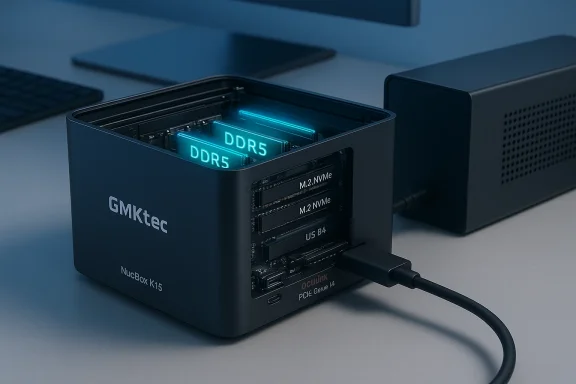
GMKtec’s product page lists the NucBox K15 as a compact system built around the Intel Core Ultra 5 125U (a Core Ultra mobile SKU), with support for:- OCuLink (PCIe Gen4 x4) for an external GPU or other PCIe devices (note: GMKtec’s page calls out this as “OCulink – PCIe Gen4 ×4, no hot‑swap”).
- USB4 ports for high‑speed external storage, displays, and accessories.
- Dual‑channel DDR5-4800 memory support with OEM descriptions indicating large maximums for SO‑DIMM configurations (GMKtec markets generous expandability).
- Three M.2 2280 slots (multiple sources report two or three slots depending on exact configuration) and the ability to stash multiple high‑capacity NVMe drives — GMKtec and several outlets highlight aggregate storage figures that can exceed 10–20 TB depending on drives.
- A compact aluminum chassis, dual 2.5 GbE ports on some SKUs, Wi‑Fi 6E, and Windows 11 Pro on configured SKUs.
Design, build and I/O — modern, dense, and practical
Chassis and thermal design
The K15 uses a compact CNC aluminum enclosure that’s larger than the tiny fanless sticks but still small enough for VESA mounting. Notebookcheck’s hands‑on notes that the unit is “oversized” relative to tiny competitors but necessary to house the triple M.2 arrangement and cooling for an Ultra‑class CPU; the tradeoff is sensible: a slightly larger footprint in exchange for expandability.Ports and external expansion
GMKtec’s published I/O map is the product’s headline:- OCuLink (PCIe Gen4 x4) — explicit lane for attaching an external PCIe device (typically an eGPU enclosure or RAID/accelerator box). GMKtec describes it as non‑hot‑swappable.
- USB4 — one or more ports usable for displays and fast storage (USB4’s 40 Gbps ceiling is a practical limit for external GPU use when implemented over USB4 alt‑modes).
- HDMI 2.1 and DisplayPort 1.4 — native video outputs for up to quad display configurations when combined with USB4/DP alt‑mode outputs.
- Two 2.5 GbE and Wi‑Fi 6E on modern configs — helpful for networked workloads.
Internal hardware: CPU, memory, and storage flexibility
CPU: Intel Core Ultra 5 125U
The K15’s lead SKU uses the Intel Core Ultra 5 125U, a low‑power Core Ultra part aimed at thin‑and‑light systems. It gives the K15 strong single‑thread snappiness and capable burst performance for general productivity, office work, and light content creation. It is not, however, a high‑TDP desktop CPU; sustained multi‑thread loads are governed by the thermal design and the 125U’s power envelope. Expect efficiency‑first behavior with decent burst performance.Memory: DDR5, large capacities
GMKtec advertises DDR5 support with large maximum capacities, and regional listings mention options up to 96 GB depending on SO‑DIMM population and SKUs. DDR5 brings higher theoretical bandwidth and future‑proofing over DDR4, which is meaningful for memory‑sensitive tasks and for users who want to run multiple VMs or memory‑heavy workloads on a compact box. But DDR5’s real‑world gains depend on the CPU and workload; for gaming on integrated GPUs or when using an eGPU, GPU memory and PCIe lanes matter far more.Storage: multiple M.2 slots and huge aggregate capacity
One of the K15’s headline claims is multi‑M.2 expandability: two or three 2280 M.2 NVMe slots (accounts vary by review and region). Combined capacity figures reported by outlets — and by GMKtec’s marketing — suggest the chassis can accept many terabytes of NVMe storage, up to 24 TB in some cited configurations depending on drive choices. For creators and NAS‑like storage uses, that is meaningful; for gaming, internal NVMe capacity is a convenience but not a performance differentiator against discrete GPU limitations.The OCuLink and eGPU promise — practical realities
OCuLink is the feature that excites power users: it exposes a PCIe Gen4 x4 lane intended for external PCIe devices. In practice:- OCuLink’s PCIe Gen4 x4 translates to a theoretical maximum of about 64 Gbps of raw PCIe bandwidth — less than an x16 desktop slot but far better than USB4’s 40 Gbps ceiling for pure PCIe throughput. That makes OCuLink the superior channel for bandwidth‑hungry add‑ins, like NVMe enclosures or eGPU boxes that can accept a PCIe x4 input.
- Real‑world eGPU setups still require an enclosure with a full‑length GPU slot and separate power supply, correct drivers, and OS support. Not all GPUs will play ball; driver support and Windows behaviour (dGPU vs iGPU handling, MUX switches, correctness of hot‑plug) are additional complicating factors. Independent reviewers and forum reports show mixed success with eGPUs on small form factor PCs — some users report solid results, others run into PSU, driver, or thermal limitations.
- GMKtec explicitly warns that the OCuLink on the K15 is not hot‑swappable; you must power down before attaching or removing devices. That reduces convenience for daily eGPU swapping and underlines that the K15’s OCuLink is intended for semi‑permanent expansion (external GPU dock, RAID/NVMe chassis, accelerator boxes) rather than plug‑and‑play docking.
Performance — what reviewers actually found
Notebookcheck’s full review of the K15 calls it an “affordable mini PC with an oversized design,” praising storage flexibility and I/O while noting that performance is aligned with the Core Ultra 5 class: competent for productivity and light creative tasks but not a gaming workhorse. Their pricing notes also show retail SKUs with 16 GB/1 TB shipping at consumer‑friendly prices in some markets. Tech outlets such as TechRadar picked up the K15’s aggressive starting price for barebones units (reported near $359–$360 barebone), which explains why GMKtec could include OCuLink and multiple M.2 slots in a small chassis: they balanced component selection and power envelope to keep cost down.Independent community notes and forum posts (r/MiniPCs and hands‑on users) show early adopters testing OCuLink with GPUs such as an NVIDIA GeForce RTX 3060 and reporting promising results — but again with the caveat that the external enclosure and power delivery are the real operational partners in success. One practical warning from community threads: not every BIOS or firmware configuration ships ready for complex eGPU or multi‑NVMe hot‑swap workflows; some buyers will need to consult firmware updates and community guides.
Who the K15 is for — and who it is not for
The K15 suits several buyer profiles exceptionally well:- Professionals who need a tiny workstation for office work, light video editing, software development, and large storage pools in a small footprint. The multi‑M.2 support and DDR5 expandability are compelling there.
- Power users who want a semi‑modular mini PC that can be expanded with NVMe arrays or PCIe accelerators via OCuLink. Think external RAID boxes, NVMe chassis, or accelerator cards where x4 PCIe is sufficient.
- Budget‑conscious buyers who want modern I/O (USB4, HDMI 2.1, DP 1.4) and large internal storage without paying desktop‑classets called the K15 a standout on price/per‑feature. ([techradar.com](https://www.techradar.com/pro/this-...st-usd360-barebone-and-supports-up-to-24tb-ss
Who should look elsewhere: - Gamers who want a plug‑and‑play gaming box with consistent high FPS and an internal x16‑class GPU. The K15’s external GPU path helps, but performance is constrained by PCIe x4 lanes, enclosure power limitations, and driver quirks — it’s not equivalent to a desktop with a discrete GPU. If you intend to game at the highest settings and frame rates, a desktop or a purpose‑built gaming mini PC with an internal GPU is the better choice.
- Users who require hot‑swappable external devices over OCuLink — GMKtec lists the port as non‑hot‑swap and BIOS/firmware updates may be required for advanced workflows.
Competitor context — how the K15 stacks up
Compare the K15 to contemporaries:- Beelink and Minisforum offer mini PCs with desktop‑class chips and integrated or even discrete options, but they often trade expandability for integrated GPU power. Minisforum’s and Beelink’s higher‑end SKUs sometimes include internal discrete GPUs in larger chassis, which is superior for raw gaming performance but worse for compact expandability.
- The Kamrui AM21 and related systems push DDR5 and large RAM counts and have been positioned as surprisingly capable gaming mini PCs at aggressive price points; community testing suggests they are closer to gaming‑ready on their own than a K15 barebox plus eGPU, although each approach has tradeoffs in size, heat, and upgradeability.
- MSI’s Cubi/NUC‑style designs are aimed squarely at business and AI‑assisted workloads with modern I/O; those machines compete with GMKtec on the productivity and on‑device AI front rather than external GPU flexibility.
Strengths (what GMKtec did right)
- Modern I/O in a compact package: USB4 and OCuLink together are rare in the price bracket the K15 targets; that gives buyers real choice in expansion strategies.
- Storage/expandability: Multiple M.2 slots and advertised support for many terabytes of NVMe storage make the K15 a practical choice for media professionals and storage‑heavy workflows.
- DDR5 memory and high capacity: Offering DDR5 and large max RAM positions the K15 for future workloads that benefit from memory bandwidth.
- Aggressive pricing on barebones units: The starting price for a barebones K15 attracted a lot of coverage because it undercuts comparable machines that lack OCuLink.
Risks and tradeoffs (what buyers must consider)
- eGPU limitations aren’t magic: OCuLink is better than USB4 for PCIe expansion in raw bandwidth, but it’s still an x4 lane — you won’t get a full desktop x16 GPU experience. Expect some GPU performance loss compared with the same card installed in a desktop PCIe x16 slot.
- Power and thermal ceilings: The Core Ultra 5 and the chassis’ cooling determine sustained performance. For long renders, encoding runs, or heavy parallel loads, the K15 won’t match desktop workstation throughput.
- Firmware/BIOS and driver immaturity: Early adopters sometimes face BIOS quirks with advanced expansion; GMKtec is responsive, but buyers should expect firmware updates and community troubleshooting in the early lifecycle. Community threads already show that some users needed extra steps for seamless eGPU operation.
- Non‑hot‑swappable OCuLink: The lack of hot‑plug convenience reduces some of the K15’s flexibility for multi‑device daily workflows.
Practical buying advice — how to choose the right K15 configuration
- Decide whether you actually need an external GPU. If you plan to game seriously, a desktop or mini PC with an internal GPU will deliver better, more reliable results. If your GPU needs are intermittent and you prioritize a tiny desktop and huge local NVMe pools, OCuLink is worth considering.
- Buy enough RAM for your use case. DDR5 is future‑proof; if you plan on virtualization, creative work, or future OS features that leverage large memory, lean toward higher RAM SKUs.
- Factor in the cost of a proper eGPU enclosure and a GPU if you plan to pursue that path. The K15’s low entry price is attractive, but a functional eGPU lineup requires an enclosure with its own PSU and PCIe x16 slot — that’s extra cost.
- Check firmware and seller‑provided support channels before purchase, and watch community threads for initial BIOS/driver advice. Early buyers often benefit from the shared knowledge base.
Verdict — a balanced, honest assessment
The GMKtec NucBox K15 is a bold, cleverly engineered mini PC that offers real expandability choices in a small chassis. It brings together DDR5 memory, multi‑terabyte internal NVMe support, USB4, and an OCuLink lane into a unit that, at the reported entry price, looks like an exceptional value on spec alone. For professionals who need a compact workstation with serious storage and a planned external accelerator or NVMe array, it’s a very compelling option.But it is not — and should not be sold as — a desktop replacement for gamers who expect full internal GPU performance. OCuLink is a powerful expansion channel for its class, yet it remains constrained by x4 PCIe bandwidth and the practicalities of external enclosures, power delivery, and drivers. If your primary goal is raw gaming performance at 1440p/4K with the latest GPUs, a true desktop or a different mini PC approach will get you closer to that dream.
Finally, because some outlets (including the Neowin headline that prompted this piece) framed the K15 as simultaneously modern and not a “gaming Mini PC,” buyers should take that phrasing as an admonition: the K15 gives you the options and the hooks to build a powerful, small system — but you will need to assemble the right accessories, settle for realistic performance ceilings, and accept the early‑adopter choreography that comes with cutting‑edge mini‑PC expansion.
Final thoughts: adopt with eyes open
GMKtec’s strategy with the NucBox K15 is to democratize connectivity: bring desktop‑grade lanes to a small chassis and let users decide whether they’ll use those lanes for storage, acceleration, or gaming. That’s a smart engineering and marketing move, and for many buyers it will unlock workflows previously locked to larger systems.If you’re intrigued by a small, upgradeable box that can evolve into a storage juggernaut or accept accelerators via OCuLink, the K15 is worth a hard look — but plan the build, the power budget, and the firmware updates before you click “buy.” If you want a guaranteed, out‑of‑the‑box gaming powerhouse, look elsewhere.
(Reporting note: I validated the K15’s technical claims against GMKtec’s official product documentation and independent hands‑on coverage from Notebookcheck, TechRadar, Gizmochina and other outlets; where a referenced news piece (Neowin) was behind site verification I treated its headline as a prompt and confirmed the underlying hardware claims against the manufacturer and reviewer reports. Readers should expect firmware and software updates that may change behavior over the product lifecycle.)
Source: Neowin GMKtec NucBox K15 review: USB4, OCuLink, DDR5 memory, but no gaming Mini PC
