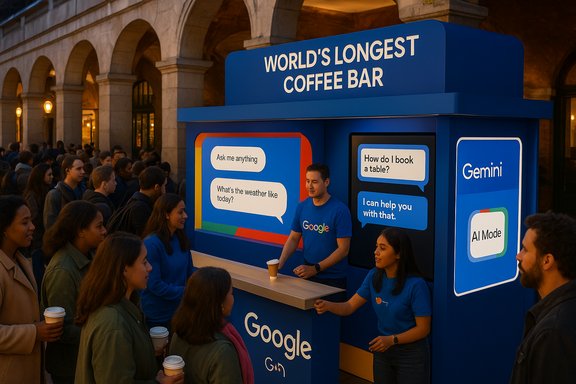
Google has brought a hefty dollop of theatre to London’s West End by turning curiosity into currency: a Covent Garden pop-up billed as the “World’s Longest Coffee Bar” invites visitors to pay not with cash but with a Search, while the stunt doubles as a public demo of AI Mode in Google Search and the multimodal potential of the Gemini family of models.
The activation—reported in lifestyle coverage—runs as a three‑day experience in Covent Garden where the public can order complimentary coffee if they bring a question to Google’s on‑site team and let AI Mode demonstrate how it turns longer, inquisitive queries into richer, more personalised answers. The pop‑up features broadcaster Clara Amfo as a collaborator and frames itself around what the write‑up called the “Trend Lag”: the idea that many people feel left behind by the speed of new trends and crave a lower‑pressure way to discover and test what’s relevant to them.
That consumer‑facing stunt sits squarely alongside Google’s wider product push: over 2025 the company has rebranded and expanded what it calls AI Mode in Search, folding in multimodal inputs (text, voice, camera/Lens) and new agentic capabilities that can surface and even help secure reservations and tickets. Google’s product briefings confirm AI Mode’s ambition: longer, conversational queries, follow‑ups, and curated actions powered by Gemini models and Project Mariner integration for live web browsing and third‑party booking flows.
At the same time, the field is converging on the idea that assistants must be multimodal and able to do things: shopping, booking, personalised recommendations—capabilities Google is explicitly testing in AI Mode through agentic features and partner integrations.
At the same time, the broader product shifts—Gemini‑powered AI Mode, multimodal Lens integration, and agentic booking experiments—are powerful and commercially meaningful, but they are not yet fully transparent at the technical level. For users the takeaway is simple: explore and learn, but verify and be mindful of what you share. For IT leaders and privacy teams the sensible posture is cautious testing and demand for explicit controls and documentation before widespread rollout.
If the goal of the Covent Garden pop‑up is to turn curiosity into confidence, it’s a smart first step; the next, more consequential step is to make that confidence well‑earned by delivering clarity on how AI Mode handles our data and how organisations can adopt it responsibly.
Source: Luxurious Magazine Curiosity Meets Coffee: Google’s AI-Powered Search Bar Pops Up In Covent Garden
 Background / Overview
The activation—reported in lifestyle coverage—runs as a three‑day experience in Covent Garden where the public can order complimentary coffee if they bring a question to Google’s on‑site team and let AI Mode demonstrate how it turns longer, inquisitive queries into richer, more personalised answers. The pop‑up features broadcaster Clara Amfo as a collaborator and frames itself around what the write‑up called the “Trend Lag”: the idea that many people feel left behind by the speed of new trends and crave a lower‑pressure way to discover and test what’s relevant to them.That consumer‑facing stunt sits squarely alongside Google’s wider product push: over 2025 the company has rebranded and expanded what it calls AI Mode in Search, folding in multimodal inputs (text, voice, camera/Lens) and new agentic capabilities that can surface and even help secure reservations and tickets. Google’s product briefings confirm AI Mode’s ambition: longer, conversational queries, follow‑ups, and curated actions powered by Gemini models and Project Mariner integration for live web browsing and third‑party booking flows.
What the Covent Garden activation actually is
- The pop‑up is described as a playful, experiential marketing event where coffee is exchanged for a search: visitors ask questions using Google’s AI Mode and staff demonstrate how the tool yields richer answers and follow‑ups.
- The activation uses word‑of‑mouth and influencer partnership (Clara Amfo in press descriptions) to position AI Mode as a conversational, non‑intimidating entry point for exploration.
- According to the initial report, the event is open to the public for a fixed, short window and is framed as a hands‑on demo of AI Mode’s multimodal features (voice, text, camera). The event copy also cites survey statistics about how Brits perceive the pace of cultural change—figures that the coverage attributes to the campaign’s research.
Why this matters: search as social utility, not just a box
Google’s Covent Garden stunt is not just a public stunt; it is a signal about how the company wants people to think of search today: as an interactive, multimodal, and agentic assistant rather than a list of links. AI Mode is designed to:- Accept longer, conversational queries and maintain context through follow‑ups.
- Incorporate visual input via Google Lens (point, snap, ask).
- Deliver synthesized, structured answers that can be personalised to preferences when users opt in to such features.
- Perform agentic tasks—finding real‑time availability for restaurant reservations, event tickets or appointment slots—by combining live web browsing and partner integrations.
Technical verification: what AI Mode and Gemini actually deliver
Several high‑level technical claims require verification. Below is a practical cross‑check against Google’s product posts and independent reporting.Gemini models and AI Mode
Google positions AI Mode as the place where its strongest generative capabilities live—powered by a custom Gemini model family (the company has referenced variants such as Gemini 2.5 in product updates). AI Mode uses a “query fan‑out” method—breaking a user’s complex question into many sub‑queries, running them in parallel, and synthesising results into a single answer. Google has explicitly said it is integrating Gemini variants into AI Mode and Search Overviews to provide deeper reasoning and multimodal understanding.Agentic capabilities (booking, tickets)
Google has announced agentic experiments in AI Mode that can surface restaurant reservation availability and curated ticket options by searching partner platforms and presenting actionable links. These features are initially gated—rolled out to Labs participants or subscriber tiers in regions such as the U.S.—and rely on partnerships with platforms like OpenTable, Resy, Ticketmaster and others to surface real‑time availability. Google’s product brief describes the system as helping users find options and linking them to booking pages, rather than Google unilaterally completing purchases without user consent.Multimodal inputs: voice, camera/Lens
AI Mode’s multimodal ambitions are broad: Google has integrated Lens for visual queries and tested “Search Live,” a real‑time voice + camera feature that lets users converse with AI while sharing visual context. The company also describes hybrid routing—small, on‑device checks for safety (Gemini Nano / on‑device models) and cloud routing for heavier reasoning tasks—to manage latency and privacy tradeoffs. These product claims are publicly documented by Google and covered by major outlets; the technical architecture is described at a high level in Google’s blogs and coverage but omits many low‑level details—especially about exactly what data is uploaded, retained, or used for model training in each scenario. That gap is consequential for privacy and enterprise adoption.The experiential marketing angle: why a coffee bar?
Brands use physical activations to translate abstract capabilities into memorable, low‑stakes experiences; Google’s Covent Garden event does this for AI Mode by:- Lowering the bar: offering a free coffee for a question reframes AI as approachable.
- Demonstrating multimodality live: seeing a camera‑based query turned into a concrete suggestion (e.g., where to buy an item, how to try a trend) is more persuasive than text screenshots.
- Pulling in cultural credibility: Clara Amfo’s involvement lends a familiar British media voice to the activation—positioning AI Mode as a tool for everyday discovery rather than purely technical utility.
Strengths: what’s genuinely compelling about AI Mode (and the pop‑up)
- Reduced friction: AI Mode’s conversational thread model reduces the need to reframe or restart queries, which matches how humans think—one question leads naturally to a follow‑up. Google’s documentation and product announcements confirm this conversational focus.
- Multimodal convenience: Built‑in Lens and camera features let users turn images into questions without intermediate screenshots or uploads—an obvious UX win for many tasks, from shopping to homework help. Google’s Lens + AI Mode messaging supports this integration.
- Agentic assistance: The ability for AI Mode to present curated booking options or ticket choices is a logical next step toward making search actionable rather than purely informational. Google’s Labs experiments and partner integrations back this capability.
- Familiar brand safety: Google’s immense web index and Maps/Knowledge Graph integrations mean answers can be grounded in structured, verifiable data—an advantage vs. models that hallucinate without web grounding. Google’s product notes on query fan‑out and Knowledge Graph usage reinforce this orientation.
- Effective live demo potential: The Covent Garden pop‑up is a clever, low‑risk environment to teach the public how to ask richer questions and how follow‑ups can refine results—something that’s harder to communicate in a press release alone.
Risks and open questions: privacy, trust, and enterprise readiness
No spawn of new capability is without tradeoffs. Google’s push—while compelling—raises several operational and policy concerns.1) Data flow and visibility: what actually moves off device?
Public materials describe hybrid routing (on‑device nano models for some checks and cloud‑hosted models for deeper tasks), but precise handling for every Lens capture, local file index or conversational log is not always documented in product posts. For users and IT teams this is vital: whether a screenshot or a search snippet is processed locally or uploaded to Google servers affects privacy, compliance and organisational policy. Google’s product announcements acknowledge hybrid routing but stop short of full architectural transparency.2) Third‑party integrations and data sharing
Agentic features rely on partnerships with booking platforms. Those integrations require real‑time queries against partner APIs and often pass context (dates, party size, preferences). The degree to which that context is shared, stored, or reused by intermediaries must be clear in contract and UX flows—especially for users expecting ephemeral interactions.3) Hallucinations and over‑confidence
Synthesis is useful, but generative models can confidently return inaccurate summaries. Even with web grounding, AI Mode’s role as a summariser or recommender means users—especially the casually curious—might take generated outputs at face value. The public product guidance advises follow‑ups and link review, which is good practicing guidance, but the UX habit of trusting a single “answer card” remains a risk.4) Opt‑in gating and fairness of access
Many agentic features are gated to Labs participants, subscriber tiers, or specific regions at launch. That creates a two‑tier experience and raises questions about equitable access to convenience features—particularly for non‑English speakers or users in countries where partnerships are limited. Google is expanding AI Mode globally but language and regional parity remain an implementation challenge.5) Enterprise governance and admin tooling
For IT teams, the question isn’t whether AI Mode is powerful but whether it’s manageable. The kind of visibility and policy controls enterprises need—data routing diagrams, retention windows, admin toggles for on‑device vs cloud processing—are not fully specified for every experimental surface. Independent reviewers have flagged this repeatedly as a blocker for widespread corporate rollout.Practical recommendations for users, IT teams, and brands
For curious visitors and consumers
- Treat live demonstrations as tutorials—not technical guarantees. Use the demo to learn how to ask follow‑ups and to test camera queries.
- Inspect the cards and linked sources before acting on AI‑generated recommendations—especially for purchases or reservations.
- Be mindful of what you photograph: avoid sharing sensitive documents or IDs during a camera‑based demo.
For enterprise IT teams
- Treat early releases as consumer experiments until Google publishes comprehensive enterprise documentation. The Windows overlay and AI Mode experiments have been distributed via Search Labs and are explicitly labelled experimental; use personal devices for testing first.
- Demand architecture details: where is local indexing performed? Which capture types are sent to cloud services? What logging and retention policies apply?
- Consider policy controls: block or restrict the app on managed endpoints until admin tooling and DLP integrations are available.
For brands and marketers
- Use live activations to teach the public how to ask better questions—clarity and context produce better AI answers.
- Align in‑store / on‑site experiences with product reality: if agentic booking is region‑ or tier‑gated, set visitor expectations accordingly.
- Invest in partnerships: platforms that integrate with AI Mode (reservations, ticketing) gain visibility if they support reliable, privacy‑conscious APIs.
How this fits into the broader search and assistant battleground
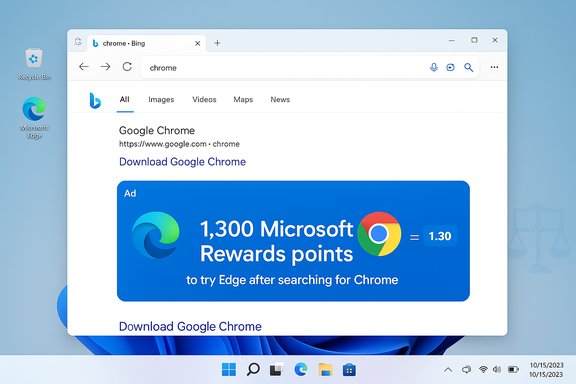
Google’s move is both defensive and offensive. By embedding richer AI into Search as a conversational layer, Google competes more directly with:- Microsoft’s Copilot and Windows‑level assistant work, which aim to embed AI deeply into the OS.
- Third‑party assistants and generative startups that emphasise agentic actions or large‑model creativity.
At the same time, the field is converging on the idea that assistants must be multimodal and able to do things: shopping, booking, personalised recommendations—capabilities Google is explicitly testing in AI Mode through agentic features and partner integrations.
Where claims remain unverifiable and what to watch next
- The lifestyle write‑ups of the Covent Garden activation present striking survey figures about British attitudes toward trend fatigue and social pressure; those exact percentages currently appear as campaign claims in the event coverage and were not reproduced in independent national polling databases accessible at the time of research. Treat those figures as campaign data unless Google or an independent research house publishes the raw dataset.
- Product claims tied to AI Mode’s agentic reservations and ticketing are documented by Google and covered by reputable outlets, but the operational details—how partner API calls are logged, what context is persisted, and how consent is packaged for each booking flow—are still being clarified in Google’s Labs documentation. Watch for dedicated privacy and enterprise FAQs from Google.
- Official Google FAQs or whitepapers on AI Mode data handling and retention.
- Independent technical audits on whether Lens captures are processed locally or uploaded by default.
- Broader media coverage or regulatory attention if agentic features scale rapidly into sensitive domains (e.g., medical appointments, financial services).
Conclusion: curiosity, coffee and a cautious optimism
Google’s Covent Garden activation is a well‑crafted, culturally attuned demonstration of a fundamental product thesis: modern search is a conversational, multimodal tool that should help people do things, not just find them. The stunt translates that thesis into an approachable consumer moment—free coffee for an inquisitive question is an elegant way to teach the public how to use follow‑ups, camera queries and conversational prompts.At the same time, the broader product shifts—Gemini‑powered AI Mode, multimodal Lens integration, and agentic booking experiments—are powerful and commercially meaningful, but they are not yet fully transparent at the technical level. For users the takeaway is simple: explore and learn, but verify and be mindful of what you share. For IT leaders and privacy teams the sensible posture is cautious testing and demand for explicit controls and documentation before widespread rollout.
If the goal of the Covent Garden pop‑up is to turn curiosity into confidence, it’s a smart first step; the next, more consequential step is to make that confidence well‑earned by delivering clarity on how AI Mode handles our data and how organisations can adopt it responsibly.
Source: Luxurious Magazine Curiosity Meets Coffee: Google’s AI-Powered Search Bar Pops Up In Covent Garden