

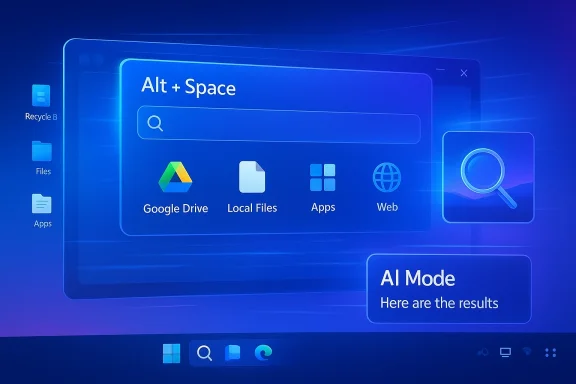
After months of testing, Google has finally pushed a significantly upgraded desktop app onto Windows, and the move is more than a convenience update. The new app blends AI-powered search, Google Drive, local file access, installed apps, and Lens-style visual lookup behind a single Alt + Space shortcut, turning the Windows desktop into a more searchable, more assistant-driven workspace. That makes it one of Google’s clearest attempts yet to win a permanent place in the Windows workflow, not just a tab in the browser. The launch also lands at a moment when desktop AI is becoming a battleground for both Google and Microsoft, with each trying to define how users will summon help, search content, and move through daily tasks.
Google’s desktop push on Windows is best understood as part of a larger shift in the AI market: assistants are moving from chat windows into operating system workflows. The app described in the forum material is not just a search box, and that distinction matters. It combines file discovery, web search, app launching, image recognition, and AI Mode into a single interface that appears designed to reduce context switching and make everyday work feel faster.
The timing is important because Windows has become a more contested platform than it was even a year ago. Microsoft has spent much of the past two years trying to make Copilot a central part of the Windows experience, but the company has also been backing away from overly aggressive AI branding in some places, signaling that users do not want every workflow to feel like a demo. Against that backdrop, Google’s launch looks less like a novelty and more like a direct challenge to Microsoft’s ability to control the default AI entry point on the desktop.
This is not the first time Google has tried to create a desktop foothold on Windows, but the combination of global English availability, Alt + Space activation, and broad content reach makes this version feel more ambitious. The app’s design suggests Google wants to be useful at the exact moment users need something: a file, a note, an image, a quick answer, or a web result. In that sense, the product is a workflow tool dressed as a search utility.
The broader market implication is clear. The next competition in AI is not only about model quality or benchmark bragging rights. It is about who owns the first action a user takes when they need help, and whether that action happens inside a browser, inside an OS, or inside a vendor’s own desktop shell. Google’s Windows app is a serious bid to own that first interaction.
The most important thing here is not that Google added one more search surface. It is that the company collapsed several separate actions into one interface. Users no longer have to decide whether to search the web, open Drive, browse the local file system, or launch an app first. Google is betting that one prompt box can do the work of several tools if it is fast enough and smart enough.
That matters because desktop software is still a game of defaults. The winner is often not the tool with the best demo, but the one that becomes the easiest reflex. Microsoft knows this well, which is why it has spent so much effort weaving Copilot into the Windows shell and Office suite. Google is now trying to make its own reflex equivalent.
The Lens component is also meaningful. Visual search turns the desktop into something more like a multimodal environment where users can query what is on the screen, not just what they can type. In practice, that can help with screenshots, web content, on-screen objects, and other moments where text search alone is too slow or too vague.
For power users, the value is a little different. They tend to care less about the novelty of AI and more about whether the tool actually saves clicks. If Google’s app finds the right document, app, or screenshot faster than the existing Windows workflow, it will earn a permanent role. If it is slower, more limited, or less predictable, it risks becoming another launcher that looked better in the announcement than in day-to-day use.
There is also a psychological advantage to reducing app switching. Users often perceive a tool as “smarter” when it keeps them in flow, even if the underlying model is not dramatically better. That makes the user experience almost as important as the search stack underneath it. Google appears to understand that the interface is the product, not just the model behind it.
That makes the launch significant even if the app itself is simple. A lot of desktop adoption is about who becomes the first responder when you need to find something, not who has the most comprehensive feature checklist. If Google’s app owns that job, it gains a durable place on Windows.
The app’s most interesting strategic trait is that it does not ask users to leave Windows in order to use Google. That sounds obvious, but it is strategically important. The company is trying to meet users where they already are, rather than demanding that they open a browser tab or mobile app first. That is how software becomes infrastructure instead of a destination.
That makes the launch feel less like a search product and more like a control surface. It is a way for Google to place itself earlier in the work sequence, before users choose a browser tab, before they open a Drive folder, and before they use an OS-native search tool. If that pattern catches on, Google’s desktop presence becomes much more valuable than a conventional app install.
That is a mature strategy. The AI market is increasingly about usefulness, not spectacle. Consumers want tools that save time, and enterprises want tools that reduce friction without creating governance headaches. A desktop app that feels dependable has a better chance of long-term adoption than a flashy assistant that only shines in demos.
That is not the same as losing the OS battle, but it is still serious. Platform power often starts with small habits. If users call Google’s app for search, use Google Lens for visual lookup, and rely on Google Drive integration for content retrieval, Microsoft’s own utilities become less central to the daily experience. That weakens the argument that Windows alone should be the hub of the user’s workflow.
The contrast is subtle but important. Microsoft’s challenge is to make AI feel native without making it feel forced. Google’s challenge is to make a desktop app feel indispensable without making it feel like just another launcher. Whoever does the better job of balancing utility and restraint is likely to gain the longer-lasting advantage.
For Microsoft, that is awkward. The company has invested heavily in its own search and AI strategy, but Google remains the brand most users instinctively trust for quick answers. If Google can pair that trust with a desktop shortcut, Microsoft may have to work harder to justify why Windows-native search should remain the default mental model.
That means the launch has two possible enterprise paths. In one scenario, it becomes a useful productivity layer for teams already using Google services. In the other, it becomes a shadow utility that employees use informally while IT struggles to govern it. The difference will likely come down to admin controls, visibility, and how clearly Google documents the data handling model.
That is why governance is not an afterthought. It is the deciding factor. A useful desktop AI app can quickly become a liability if it is not constrained well enough for regulated environments or enterprise device fleets. Google has an opportunity here, but only if the product feels both powerful and controllable.
This is also where Google can differentiate from generic launchers. If the app knows how to surface the right Drive asset, the right screenshot, or the right meeting note without a long search trail, it becomes more than a convenience. It becomes a productivity system.
That puts a lot of pressure on response quality, indexing accuracy, and interface clarity. If the app returns noisy results, misses obvious matches, or struggles with file relevance, users will drift back to the tools they already know. If it works smoothly, it could become the kind of helper people open dozens of times a day without consciously thinking about it.
There is also a fine line between powerful and cluttered. The more surfaces the app spans, the more it risks feeling busy. Search, AI, files, apps, and visuals are all useful on their own, but the interface has to keep them coherent or the app will feel like a bundle of features rather than a single tool.
That bridge is where the product becomes strategically valuable. The more seamlessly the app can move between local files, Drive files, app launching, and web search, the more it becomes a default utility rather than a special-purpose helper. That is the difference between a nice feature and a durable platform play.
The desktop is especially important because it remains where serious work still happens. Browsers matter, but desktop applications, file systems, and local tools still anchor a huge amount of productivity. An AI assistant that can live there, rather than next to it, has a better shot at becoming indispensable.
That is why the launch feels strategically mature. It does not rely on a dramatic reimagining of personal computing. Instead, it takes a familiar action—search—and makes it broader, smarter, and more available. In a crowded market, that may be a stronger move than trying to invent a new behavior from scratch.
Microsoft will almost certainly respond in some way, because this release touches the same behavioral territory that Copilot and Windows Search are meant to occupy. Even if there is no direct counter-launch, the competitive pressure will likely show up in product tuning: cleaner search, better integration, fewer interruptions, and more thoughtful AI placement. In other words, Google’s move may force both companies to make their desktop tools more useful and less noisy.
Source: Dataconomy Google launches upgraded desktop app with AI features for Windows
Source: AIBase Google Releases a New Windows Desktop AI Application - Easy to Search with Just Two Keys!
 Overview
Google’s desktop push on Windows is best understood as part of a larger shift in the AI market: assistants are moving from chat windows into operating system workflows. The app described in the forum material is not just a search box, and that distinction matters. It combines file discovery, web search, app launching, image recognition, and AI Mode into a single interface that appears designed to reduce context switching and make everyday work feel faster.The timing is important because Windows has become a more contested platform than it was even a year ago. Microsoft has spent much of the past two years trying to make Copilot a central part of the Windows experience, but the company has also been backing away from overly aggressive AI branding in some places, signaling that users do not want every workflow to feel like a demo. Against that backdrop, Google’s launch looks less like a novelty and more like a direct challenge to Microsoft’s ability to control the default AI entry point on the desktop.
This is not the first time Google has tried to create a desktop foothold on Windows, but the combination of global English availability, Alt + Space activation, and broad content reach makes this version feel more ambitious. The app’s design suggests Google wants to be useful at the exact moment users need something: a file, a note, an image, a quick answer, or a web result. In that sense, the product is a workflow tool dressed as a search utility.
The broader market implication is clear. The next competition in AI is not only about model quality or benchmark bragging rights. It is about who owns the first action a user takes when they need help, and whether that action happens inside a browser, inside an OS, or inside a vendor’s own desktop shell. Google’s Windows app is a serious bid to own that first interaction.
What Google Actually Launched
At the center of the release is a desktop app for Windows that behaves like a hybrid between launcher, search tool, and lightweight AI assistant. The key idea is simplicity: press Alt + Space, type a query, and get results that may include the web, files stored locally, Google Drive content, installed apps, or visual matches via Lens. That single shortcut is the kind of small UX decision that can shape daily behavior if it becomes habitual.The most important thing here is not that Google added one more search surface. It is that the company collapsed several separate actions into one interface. Users no longer have to decide whether to search the web, open Drive, browse the local file system, or launch an app first. Google is betting that one prompt box can do the work of several tools if it is fast enough and smart enough.
The Shortcut as Strategy
The Alt + Space shortcut is a strategic clue in itself. Shortcuts become muscle memory, and muscle memory is where platform power lives. If users start reflexively calling Google’s app before they call Windows Search or open a browser tab, Google gains a behavioral foothold that is hard to dislodge.That matters because desktop software is still a game of defaults. The winner is often not the tool with the best demo, but the one that becomes the easiest reflex. Microsoft knows this well, which is why it has spent so much effort weaving Copilot into the Windows shell and Office suite. Google is now trying to make its own reflex equivalent.
Search, Files, and Visual Understanding
The app’s search scope is what gives it practical weight. Being able to find a file, surface a Drive document, and then jump to a relevant web answer in one place creates a smoother flow than bouncing between browser tabs and file explorers. That convenience is what will make or break adoption, especially for users who already live inside Google’s ecosystem.The Lens component is also meaningful. Visual search turns the desktop into something more like a multimodal environment where users can query what is on the screen, not just what they can type. In practice, that can help with screenshots, web content, on-screen objects, and other moments where text search alone is too slow or too vague.
- Alt + Space reduces friction.
- Drive integration keeps Google data central.
- Local file access makes the app relevant beyond the browser.
- Lens support expands the app into visual discovery.
- AI Mode gives Google a more conversational, more context-aware entry point.
Why This Matters for Windows Users
For consumers, the big appeal is obvious: speed. Many Windows users spend their day bouncing between folders, browser tabs, communication apps, and cloud storage. A single tool that can search all of those surfaces at once can feel less like another app and more like a productivity layer. That is especially true for people already invested in Google services.For power users, the value is a little different. They tend to care less about the novelty of AI and more about whether the tool actually saves clicks. If Google’s app finds the right document, app, or screenshot faster than the existing Windows workflow, it will earn a permanent role. If it is slower, more limited, or less predictable, it risks becoming another launcher that looked better in the announcement than in day-to-day use.
Consumer Convenience Versus Habit Formation
Consumer software becomes sticky when it solves a recurring annoyance. Google is targeting one of the oldest annoyances in computing: where did I put that thing? If the app consistently answers that question, users will forgive a lot of rough edges. If it fails at that basic promise, the AI features will not matter much.There is also a psychological advantage to reducing app switching. Users often perceive a tool as “smarter” when it keeps them in flow, even if the underlying model is not dramatically better. That makes the user experience almost as important as the search stack underneath it. Google appears to understand that the interface is the product, not just the model behind it.
What Windows Already Offers
Windows already has built-in search, Task View, the Start menu, and a growing list of AI-adjacent features. But those tools are fragmented, and fragmentation creates friction. Google’s app is trying to position itself as the more coherent layer above the operating system, especially for users who already live in Google Drive and Google Search.That makes the launch significant even if the app itself is simple. A lot of desktop adoption is about who becomes the first responder when you need to find something, not who has the most comprehensive feature checklist. If Google’s app owns that job, it gains a durable place on Windows.
Google’s AI Strategy on the Desktop
This release is also part of Google’s broader effort to push Gemini-style intelligence into places where work actually happens. The company has been moving toward project-oriented AI experiences, richer search behavior, and more contextual workflows across its products. The Windows app is a clean extension of that direction because it puts those capabilities directly in front of desktop users.The app’s most interesting strategic trait is that it does not ask users to leave Windows in order to use Google. That sounds obvious, but it is strategically important. The company is trying to meet users where they already are, rather than demanding that they open a browser tab or mobile app first. That is how software becomes infrastructure instead of a destination.
From Chatbot to Workflow Layer
The industry has spent enough time with chatbots to know the limitation: chatting is useful, but not sufficient. People do not want to retype the same context over and over. They want an assistant that remembers enough, surfaces enough, and acts quickly enough to keep the work moving. Google’s desktop app is a move toward that more durable workflow model.That makes the launch feel less like a search product and more like a control surface. It is a way for Google to place itself earlier in the work sequence, before users choose a browser tab, before they open a Drive folder, and before they use an OS-native search tool. If that pattern catches on, Google’s desktop presence becomes much more valuable than a conventional app install.
Why the Model Matters Less Than the Motion
A lot of AI coverage still obsesses over model scores. On the desktop, the user rarely cares. What matters is whether the system can retrieve the right thing, interpret the right image, or direct the user to the right next step. Google seems to be betting that accessibility and convenience will do more to win adoption than abstract claims about intelligence.That is a mature strategy. The AI market is increasingly about usefulness, not spectacle. Consumers want tools that save time, and enterprises want tools that reduce friction without creating governance headaches. A desktop app that feels dependable has a better chance of long-term adoption than a flashy assistant that only shines in demos.
- Workflow integration matters more than novelty.
- Persistent desktop access increases usage frequency.
- Search plus AI is more practical than AI alone.
- Multimodal input makes the product feel more modern.
- Behavioral defaults may be more important than raw model quality.
Competitive Pressure on Microsoft
Google’s launch lands squarely in Microsoft’s territory. Windows has been one of Microsoft’s strongest strategic moats, and Copilot is part of the company’s plan to keep that moat relevant in the AI era. But if Google can become the more natural launcher for search and file discovery, Microsoft faces a problem that goes beyond branding. It risks losing the first interaction in the desktop workflow.That is not the same as losing the OS battle, but it is still serious. Platform power often starts with small habits. If users call Google’s app for search, use Google Lens for visual lookup, and rely on Google Drive integration for content retrieval, Microsoft’s own utilities become less central to the daily experience. That weakens the argument that Windows alone should be the hub of the user’s workflow.
Copilot Versus Google’s Desktop Shortcut
Microsoft has made plenty of moves to embed Copilot more deeply into Windows, but it has also learned that too much AI can become annoying. The company has been trimming back visible Copilot branding in some places and emphasizing a quieter, more useful experience. That makes Google’s launch even more interesting, because Google is arriving with a product that is explicit about AI but framed as utility first.The contrast is subtle but important. Microsoft’s challenge is to make AI feel native without making it feel forced. Google’s challenge is to make a desktop app feel indispensable without making it feel like just another launcher. Whoever does the better job of balancing utility and restraint is likely to gain the longer-lasting advantage.
Search Is Still a Power Center
Search has always been one of Google’s core strengths, and this launch essentially exports that strength onto the Windows desktop. That matters because search is not just a service; it is an attention gateway. Whoever controls search behavior controls a huge amount of user intent, and that can influence everything from ad inventory to ecosystem stickiness.For Microsoft, that is awkward. The company has invested heavily in its own search and AI strategy, but Google remains the brand most users instinctively trust for quick answers. If Google can pair that trust with a desktop shortcut, Microsoft may have to work harder to justify why Windows-native search should remain the default mental model.
Enterprise Implications
For enterprise users, the story is more nuanced. Businesses do not just want speed; they want policy controls, data boundaries, predictable behavior, and supportability. A Google desktop app on Windows can be attractive if it integrates well with company-managed Google Workspace environments, but IT teams will immediately ask what it indexes, what it uploads, and how it interacts with local and cloud data.That means the launch has two possible enterprise paths. In one scenario, it becomes a useful productivity layer for teams already using Google services. In the other, it becomes a shadow utility that employees use informally while IT struggles to govern it. The difference will likely come down to admin controls, visibility, and how clearly Google documents the data handling model.
Governance and Trust
Enterprise adoption depends on trust more than flash. If the app can search local files, Drive files, and app content, administrators will want to know exactly how those surfaces are handled. Businesses are increasingly sensitive to AI tools that blur the line between personal productivity and enterprise data movement.That is why governance is not an afterthought. It is the deciding factor. A useful desktop AI app can quickly become a liability if it is not constrained well enough for regulated environments or enterprise device fleets. Google has an opportunity here, but only if the product feels both powerful and controllable.
Google Workspace Advantage
Where Google has a real opening is in organizations already invested in Workspace. In those environments, the app could become an efficient bridge between local desktop work and cloud-based collaboration. That could be especially valuable for knowledge workers who live in documents, slides, files, and search-heavy processes all day.This is also where Google can differentiate from generic launchers. If the app knows how to surface the right Drive asset, the right screenshot, or the right meeting note without a long search trail, it becomes more than a convenience. It becomes a productivity system.
- IT controls will determine enterprise acceptability.
- Data boundaries will matter more than AI features.
- Workspace alignment could make the app attractive for Google-centric firms.
- Auditability will be a prerequisite in regulated industries.
- Policy consistency will influence long-term deployment.
The User Experience Question
The real test of this app is not whether it can do a lot. It is whether it can do the right things quickly enough to become habit. Desktop utilities succeed when they feel invisible in a good way. Users should think, that was faster, not that was interesting.That puts a lot of pressure on response quality, indexing accuracy, and interface clarity. If the app returns noisy results, misses obvious matches, or struggles with file relevance, users will drift back to the tools they already know. If it works smoothly, it could become the kind of helper people open dozens of times a day without consciously thinking about it.
Discoverability Versus Clutter
A shortcut-driven product lives or dies by discoverability. The shortcut has to be memorable, the launch behavior has to be consistent, and the result set has to feel predictable enough that users trust it. Google has made a smart move by centering the experience on a simple invocation pattern, but simple is not the same as effortless.There is also a fine line between powerful and cluttered. The more surfaces the app spans, the more it risks feeling busy. Search, AI, files, apps, and visuals are all useful on their own, but the interface has to keep them coherent or the app will feel like a bundle of features rather than a single tool.
Local Work Versus Cloud Work
One of the more interesting tensions in this release is the balance between local and cloud-based content. Windows users still keep a lot of data on-device, but they increasingly rely on cloud storage and cross-device access. Google is trying to bridge those worlds without forcing the user to choose one.That bridge is where the product becomes strategically valuable. The more seamlessly the app can move between local files, Drive files, app launching, and web search, the more it becomes a default utility rather than a special-purpose helper. That is the difference between a nice feature and a durable platform play.
What the Launch Says About the AI Market
This release is part of a much larger industry pattern. The AI conversation has moved past the phase where every company simply tried to slap a chatbot on top of an existing product. Now the real competition is about workflow ownership, contextual access, and system-level integration. Google’s Windows app fits that shift precisely.The desktop is especially important because it remains where serious work still happens. Browsers matter, but desktop applications, file systems, and local tools still anchor a huge amount of productivity. An AI assistant that can live there, rather than next to it, has a better shot at becoming indispensable.
The AI Utility Phase
The first wave of AI was about surprise. The current wave is about utility. That distinction is critical, because utility is harder to market but easier to sustain. Google’s Windows app looks designed for the utility phase: practical, fast, and embedded where users already work.That is why the launch feels strategically mature. It does not rely on a dramatic reimagining of personal computing. Instead, it takes a familiar action—search—and makes it broader, smarter, and more available. In a crowded market, that may be a stronger move than trying to invent a new behavior from scratch.
Who Wins the Next Layer
The next layer of AI competition will likely be won by vendors that can make users feel faster without making them feel managed. That is harder than it sounds. Too much automation can feel invasive, but too little can feel irrelevant. Google’s challenge is to stay useful without overreaching. Microsoft’s challenge is to stay integrated without becoming intrusive.- Utility beats novelty in everyday desktop use.
- Integration beats isolation for workflow retention.
- Speed and trust will matter more than model hype.
- The desktop shell remains a valuable strategic surface.
- Default behavior is where platform wars are won.
Strengths and Opportunities
Google’s Windows launch has real strengths because it solves an old problem in a modern way. It brings together search, files, apps, Drive, and visual lookup in a single, fast-access interface, and that combination is exactly what many users want from an AI-era desktop utility. If Google executes well, it could become a daily habit rather than a one-time download.- A single Alt + Space shortcut lowers friction.
- Drive integration strengthens the Google ecosystem.
- Local file search makes the app useful beyond the browser.
- Lens support gives the product multimodal reach.
- AI Mode adds conversational depth to search.
- The app could become a default desktop reflex.
- Enterprise teams already using Google services may see immediate value.
Risks and Concerns
The biggest risk is that the app becomes too broad to feel polished. A launcher that promises web search, local search, app launching, cloud content, and AI responses has a lot of moving parts, and any one weak link can undermine trust. If the results are inconsistent or the indexing is shallow, users will revert to familiar tools quickly.- Search quality must be consistently strong.
- Privacy and data handling must be easy to understand.
- Enterprise admins will expect clear governance controls.
- The app could feel redundant if Windows-native tools improve.
- Too many features can dilute the core value proposition.
- Users may resist another always-available launcher.
- AI branding can backfire if the utility is not obvious.
Looking Ahead
The next few months will tell us whether Google’s Windows app is a meaningful productivity shift or simply the best-searching launcher in a crowded field. The company has already established the strategic premise: if users can get to search, files, Drive, apps, and visual lookup from a single shortcut, many will prefer that over bouncing between multiple interfaces. The unanswered question is how deeply that behavior can stick, especially once the novelty fades.Microsoft will almost certainly respond in some way, because this release touches the same behavioral territory that Copilot and Windows Search are meant to occupy. Even if there is no direct counter-launch, the competitive pressure will likely show up in product tuning: cleaner search, better integration, fewer interruptions, and more thoughtful AI placement. In other words, Google’s move may force both companies to make their desktop tools more useful and less noisy.
Watch These Signals
- Whether Google expands beyond English and broadens regional availability.
- Whether enterprise controls and admin documentation become more robust.
- Whether the app’s search quality stays fast and reliable under real use.
- Whether Microsoft adjusts Windows search or Copilot behavior in response.
- Whether users start treating Alt + Space as a new reflex.
Source: Dataconomy Google launches upgraded desktop app with AI features for Windows
Source: AIBase Google Releases a New Windows Desktop AI Application - Easy to Search with Just Two Keys!
Last edited:
